


How to locate essential files in Multilogin
 ~2 minWritten by Yelena V
What file system is for
Understanding Multilogin’s file system helps with troubleshooting, managing logs, and even pre-loading browser extensions. Whether you're digging into logs or customizing profiles, knowing your way around the folders saves time and stress.
➡️ Multilogin stores its local app files in the mlx folder:
-
Windows:
C:\Users\%username%\mlx -
macOS:
/Users/%username%/mlx -
Linux:
/home/%username%/mlx
Use this folder to find logs, app components, browser-profile files, custom browser extensions, and exported browser profiles.
Who can use this feature?
- 👨💻 Account owner and all team members
- 💰 Available on all plans
File system path
Here’s where to find the main Multilogin folder on your device:
-
Windows:
C:\Users\%username%\mlx -
macOS:
/Users/%username%/mlx -
Linux:
/home/%username%/mlx
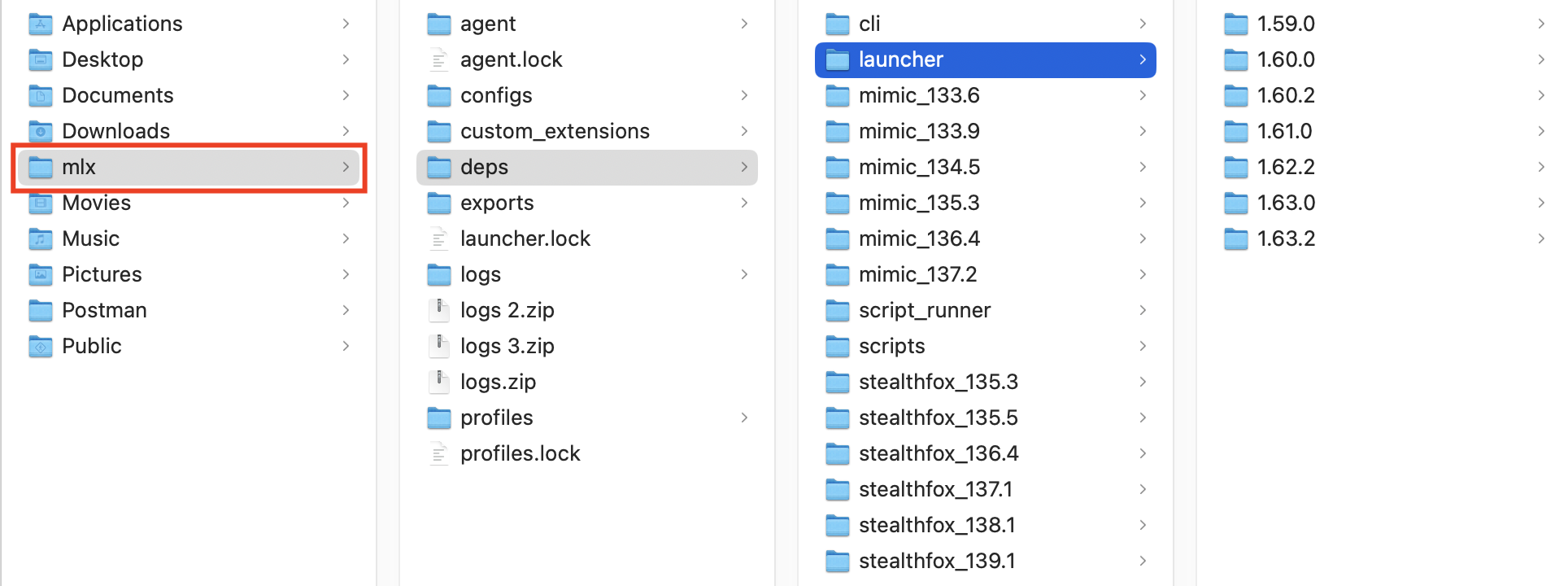
Important: do not manually move, rename, or delete files inside the mlx folder unless a Multilogin Help guide specifically tells you to. Changing app or browser-profile files can cause startup or data issues.
Folder structure breakdown
| FOLDER | PURPOSE |
| agent | Contains the installed agent version, installation file, and latest log upload info |
| configs | Stores extra config files for the launcher |
| custom_extensions | Holds browser extensions you want to pre-upload to profiles |
| deps | Contains downloaded browser cores |
| exports | Stores .zip files of your exported profiles |
| launcher (in deps) | Stores versioned subfolders for the agent’s executable |
| logs | Keeps log files – super helpful for diagnosing issues (and sharing with support) |
| profiles | Houses profile data, organized by user ID, workspace ID, and profile ID |
Pro tips
- Pre-upload extensions into the
custom_extensionsfolder for quick use across profiles - Check the logs first when something breaks – send them to support if needed
- Profiles folder = the heart of your data. Avoid moving or deleting files inside unless you know what you're doing
FAQs
Can I move the Multilogin folder to another drive?
Not recommended. It can break paths and cause issues – keep it in the default location.
How can I view my browser core files?
Head to the deps folder – they’re all there, versioned and ready.
Is it safe to delete log files?
Yes – but they’re helpful for support if you’re troubleshooting an issue.


