








-
Cloud phones
Multilogin
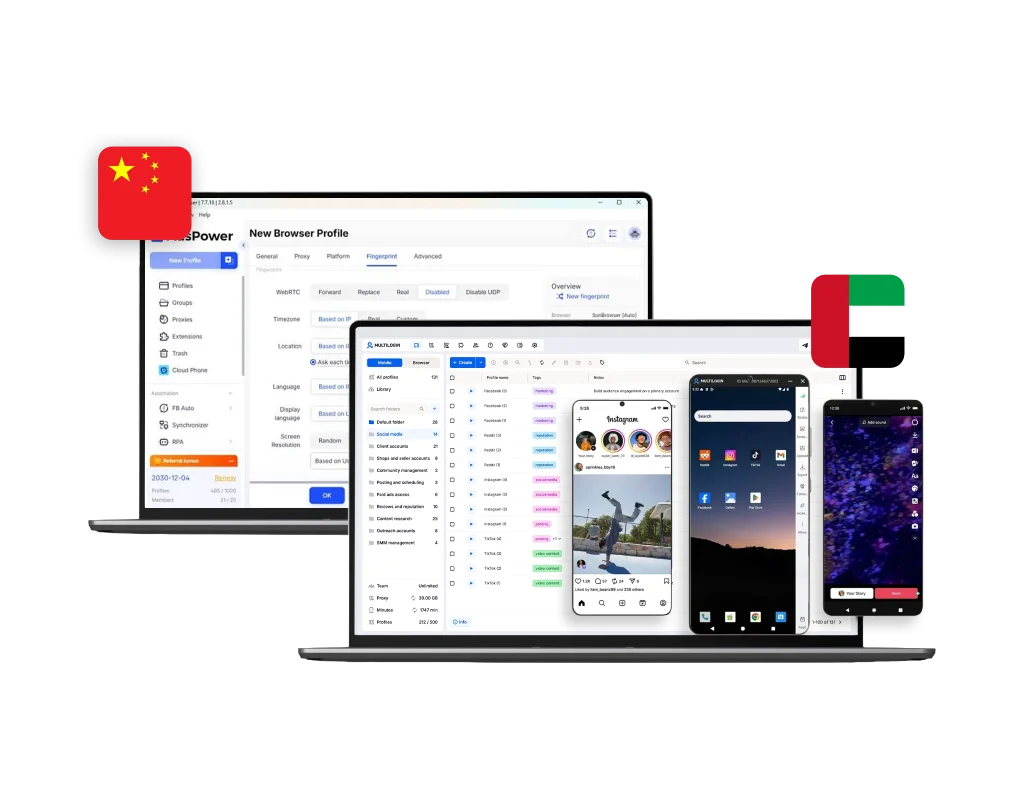
Multilogin offers you Android cloud phones that run native apps just like real devices. Choose from different phone brands (such as Samsung, Oppo, and others), install apps from the built-in store or upload APKs, and keep your app data, cache, and login sessions saved between uses.
AdsPower
AdsPower does not offer cloud phones; mobile app workflows must use physical devices or separate cloud phone services, as the platform focuses only on browser-based multi-account management.
-
Built-in proxies
Multilogin
Multilogin offers built-in residential and mobile proxies with access to over 30 million IPs across 150+ countries. Features include super-sticky IP sessions up to 24 hours, bandwidth rollover, and an IP quality filter, ensuring optimal performance and extensive geographic coverage.
AdsPower
AdsPower doesn’t provide built-in proxies. Users must find proxies from other providers and set them up manually, which brings instability to your setup.
-
Web automation
Multilogin
Multilogin is built for high-demand automation and reduces manual work. You can automate simple tasks such as posting and likes, as well as other repetitive actions. It integrates with Selenium, Playwright, Postman, and Puppeteer and offers a powerful API suite for full workflow automation. Chain multiple tasks in a single workflow to save time and streamline operations.
AdsPower
AdsPower does not provide native Postman integration. Also, the platform shows lower stability under large-scale or mass workflow setups.
-
Browser fingerprinting customization
Multilogin
Multilogin delivers advanced browser fingerprinting with 55+ parameters, covering canvas, WebGL, geolocation, timezone, language, and more. It also includes a Cookie Robot for consistent session management and proven fingerprint masking. The engine is tested daily across 50+ platforms to ensure reliable stealth and long-term account stability.
AdsPower
AdsPower browser provides only basic fingerprinting customization. It also does not support reusable fingerprint templates, which makes fingerprint management less flexible and structured for large-scale setups.
-
Browser flexibility
Multilogin
Multilogin provides cloud phones for mobile platforms and browser profiles with advanced fingerprinting. Mobile and browser profiles can be managed from one dashboard, which makes your multi-account experience seamless and streamlined.
AdsPower
AdsPower provides only browser profiles for web‑based multi‑account management. It does not offer cloud phones for mobile app workflows and has more limited fingerprint customization.
-
Teamwork
Multilogin
Multilogin works well for everyone, from solo users to small teams. Its onboarding is straightforward, role-based permissions are easy to manage, and the interface is intuitive, making it simple for beginners while still supporting advanced team workflows.
AdsPower
AdsPower allows teams to share workspaces and manage profiles together, but its collaboration features are basic. It offers limited role-based permissions, less flexible cloud storage, and fewer tools for secure team management.
-
Customer support
Multilogin
Multilogin offers 24/7 support in multiple languages such as English, Russian, Chinese, Vietnamese, and Portuguese. Teams can get help via live chat or email and explore a comprehensive knowledge base. Additionally, Multilogin Academy provides searchable tutorials, feature guides, and step-by-step use cases to help users resolve issues quickly and maintain smooth multi-account operations.
AdsPower
AdsPower offers basic support through live chat and email, along with a knowledge base for browser profile setup. It does not have a dedicated Academy section or searchable library of use cases and step-by-step guides.
-
Data privacy & security
Multilogin
Multilogin follows applicable data protection and privacy regulations to safeguard user data. Data is deleted three months after your subscription ends. Multilogin also offers top-tier security by hashing passwords so they aren’t stored or transmitted as plain text. It uses AES encryption for account data and encrypts sessions before they are stored in the cloud.
AdsPower
AdsPower browser offers secure account management with password encryption. However, since its data processing is not regulated, users should implement additional safeguards for sensitive information.
-
Pricing
Multilogin
Multilogin’s pricing now starts with a Free Plan, with no time limit and no credit card required. Paid plans start from $7.08/month, billed annually. Every plan combines cloud phones, browser profiles, and residential proxy traffic in one package, with no hidden costs.
AdsPower
AdsPower starts at €9/month, but since it doesn’t include proxies, you’ll need around 4 GB of residential proxy traffic on average from external providers, which increases the overall cost and makes the setup more expensive.
What Multilogin offers that AdsPower browser doesn’t
Multilogin vs. AdsPower recap chart
Find out why Multilogin is the preferred alterative to AdsPower
-
Platform maturity
Multilogin
Launched in 2015, more mature and stable platform
AdsPower
Launched in 2019, less mature platform
-
Cloud phones
Multilogin
Included
AdsPower
Not included
-
Desktop app
Multilogin
Beginner-friendly and stable
AdsPower
Complex and less stable
-
Mobile proxies
Multilogin
Included
AdsPower
Not included
-
Country of origin
Multilogin
UAE
AdsPower
China
-
Cross-device account management
Multilogin
Included
AdsPower
Not included
-
Resource consumption
Multilogin
More intensive, requires 4GB RAM
AdsPower
Less intensive, requires 2GB RAM
-
Security
Multilogin
High security
AdsPower
Standard security
-
Fingerprinting technology
Multilogin
High level
AdsPower
Standard level
-
Quick profile creation
Multilogin
Included
AdsPower
Not included
-
Frequent updates
Multilogin
Frequent and detailed updates
AdsPower
Regular updates
-
Platform compatibility
Multilogin
macOS, Windows, Linux
AdsPower
macOS, Windows, Linux
-
Built-in proxies
Multilogin
Included
AdsPower
Not included
-
Custom browser fingerprint generation
Multilogin
Included
AdsPower
Not included
-
Account password protection
Multilogin
Included
AdsPower
Not included
-
Knowledge centre
Multilogin
Included
AdsPower
Not included
-
Mobile App marketplace
Multilogin
Included
AdsPower
Not included
-
One-click proxy management
Multilogin
Included
AdsPower
Not included
-
Profile warmup with Cookie Robot
Multilogin
Included
AdsPower
Not included
-
Passes all browser fingerprint checkers
Multilogin
Included
AdsPower
Not included
-
Market position
Multilogin
Beginner-friendly and scalable for businesses and teams of any size
AdsPower
Suitable for small to medium-sized businesses
Grow your social media accounts with Multilogin cloud phones
Build account trust, reach any location, and boost your engagement
- Unlimited time
- Mobile and browser profiles included
- Free built-in proxies & mobile minutes
Why people love Multilogin
-

A Good Cloud Phone for Account Management
Running a small team means I need control over who can access what, and Multilogin handles that well. The team access controls let me manage permissions without giving everyone the keys to every account. On top of that, the cloud phones keep everything isolated so one account issue doesn’t put the rest at risk. Solid choice for agencies managing multiple clients or accounts.
-

The best service for great ideas and big minds!
Always here for their clients, always ready to help out. I am using the service for 3-4-5 months now and brought me lots of great things 🙂 Hope to grow it on a larger scale and continue using the service …
-

Cloud phones make it easy to manage multiple TikTok accounts with AI agents
I use Multilogin to manage a bunch of AI agents running TikTok accounts for different countries. Since each agent needs its own account, I wanted an easy way to keep everything organized. Cloud phones make it super easy. Every account has its own phone, so I don’t have to buy or manage a bunch of real devices. I can see everything in one dashboard while the AI agents handle posting and the rest of the daily work.
-

Ideal for Social Media Management
I mainly use Multilogin for client social media management, and the cloud phones have been the biggest advantage for me. I can keep different clients in separate environments, leave their sessions running, and jump between accounts without constantly switching physical devices. It feels much more practical than trying to manage everything from a pile of phones.
-

Perfect browser for work, worth the money!
My overall experience with Multilogin has been excellent. I really like its intuitive dashboard, reliable customer support, and competitive pricing. It has become an essential part of my e-commerce business, and I highly recommend it to anyone looking for a dependable solution.
-

Safer accounts using Cloud Phones for social profiles
Running social profiles on cloud phones feels safer, everything is properly separated instead of relying on browser fingerprint tricks alone. Been running mine for a couple months with zero linking issues.
-

Efficient Account Management and Outstanding Support with Multilogin
Multilogin has been an excellent tool for managing multiple accounts efficiently. The setup was quick, and I was able to start using it right away with no learning curve. The interface feels just like Chrome, making it easy to navigate and work without interruption. Performance has been smooth, and browsing feels natural and responsive.
The award-winning platform for social media growth













See more comparisons
- Compare with Android Emulator
-
Compare with

-
Compare with

- Compare with Browser Emulator
-
Compare with
-
Compare with

-
Compare with
-
Compare with

-
Compare with

-
Compare with

-
Compare with
-
Compare with

-
Compare with

-
Compare with

-
Compare with

-
Compare with
-
Compare with

-
Compare with

-
Compare with

-
Compare with

-
Compare with
-
Compare with

-
Compare with

-
Compare with

-
Compare with

-
Compare with
-
Compare with

-
Compare with

-
Compare with
-
Compare with

-
Compare with

-
Compare with

-
Compare with

-
Compare with

-
Compare with
-
Compare with

-
Compare with

-
Compare with
Watch the Multilogin Demo
Learn how Multilogin can boost your business. Check the video below to see its full capabilities in a short demo video.
Multilogin vs AdsPower: what browser to choose in 2026
Managing multiple online accounts requires more than just isolated browser profiles. You need a solution that keeps accounts separated, maintains consistent identity signals, and supports both mobile app and web workflows.
AdsPower is a browser built for profile isolation and web workflows. Multilogin is a cloud phone platform for social media marketers: it lets people and AI agents create, run, and manage multiple social media profiles on TikTok, Instagram, Facebook, Reddit, and YouTube from one dashboard, with each mobile profile running on its own real Android cloud phone and each web profile in its own isolated browser. So which platform fits your workflow best?
Social media management: where the platforms split
Social media now runs mostly inside apps. TikTok, Instagram, and Reddit push their best features there first, and any desktop-only setup tends to look thin to the platform. AdsPower works on the browser side only, so anyone managing social accounts at scale ends up adding extra tools or physical phones just to cover mobile.
Multilogin handles both sides in one app. Every plan includes real Android cloud phones, and users can pick the brand, model, IMEI, and Android version themselves. Apps install through the built-in Marketplace in a click, including TikTok, Instagram, Reddit, and Snapchat. Each phone behaves as its own device, which keeps the activity clean in the eyes of the platform and gives accounts room to build reach. Teams comparing options for this specifically often look at the best cloud phones for social media managers, since that mix of browser profiles and real mobile devices in one dashboard is the part AdsPower doesn’t cover.
Cloud phones: browser-only vs. Android environments
AdsPower does not provide cloud phones for mobile app workflows. Its platform focuses on browser profiles, which means mobile account management has to rely on physical devices or a separate cloud phone service. That can work for simple web-based tasks, but it doesn’t offer a built-in way to run native Android apps in isolated environments.
Multilogin provides Android cloud phones that let you run native mobile apps directly from your desktop. Each account operates in its own dedicated cloud phone, which keeps workflows organized and separated, including for teams that need to create multiple Instagram accounts with Multilogin cloud phones for different regions or campaigns. Combined with built-in proxies and unified browser profile management in the same dashboard, it covers both mobile and web multi-account operations.
AdsPower fingerprinting: reliable for simple tasks, thinner for advanced use
AdsPower lets users configure fingerprints and run multiple browser profiles in parallel. It supports both Chromium and Firefox engines and provides standard anti-fingerprint controls. That’s enough for managing a small set of accounts, but AdsPower’s fingerprint depth is thinner than Multilogin’s, which can matter more once operations scale into higher-risk work like affiliate marketing or ad account testing, such as testing an Instagram Shop checkout flow across several regions at once.
Multilogin offers 55+ fingerprinting customization options across desktop and mobile profiles. Each browser profile gets a unique, fully adjustable fingerprint, backed by a 30M+ IP pool across 150+ countries for managing accounts securely at scale. Strong isolation only carries an account so far, though; posts still need to hold up on their own, so having decent video editing software in the stack matters just as much as the account setup underneath it.
AdsPower proxy handling: bundled vs. bought separately
Proxy support is critical for any multi-account browser. AdsPower supports third-party proxy integration but does not include any proxy traffic itself. Users have to source and configure proxies separately, which adds setup steps and raises the chance of a mismatch between browser fingerprint and proxy location.
Multilogin includes residential proxies directly in the platform. Every plan comes with proxy traffic built in, starting with 200MB on the Free Plan, and additional traffic is available from $3.50/GB with unused traffic rolling over. Proxies assign to profiles in a couple of clicks, with no separate account or tool to manage.
AdsPower pricing vs. Multilogin pricing
AdsPower‘s Free plan includes 2 browser profiles. Paid plans start around $9/month for 10 profiles on monthly billing, dropping to roughly $5.40–$7.20/month with annual billing, which puts it close to Multilogin on raw price. The difference shows up in what’s included: AdsPower’s price covers browser profiles only, so proxies and any mobile workflow are extra, on top of a separate tool.
Multilogin gives new users a Free Plan to start, with no time limit and no credit card required, including 5 profiles across cloud phones, browser profiles, and proxy traffic, so you can test the full setup before paying anything. Paid plans start from $7.08/month (billed annually) and bundle cloud phones, browser profiles, and residential proxy traffic in one package, with no separate tools to add on top.
Why Multilogin is the stronger AdsPower alternative
If you’re looking for an AdsPower alternative, the case for Multilogin starts with what kind of platform it is: a cloud phone provider first, with browser profiles built in alongside it, rather than a browser that happens to offer a mobile add-on. From there, the rest follows:
- Real Android cloud phones for managing native mobile apps directly from the dashboard, which AdsPower doesn’t offer at all
- Built-in residential proxies in every plan, instead of a separate purchase and setup step
- 55+ fingerprinting parameters across the Mimic browser, deeper than AdsPower’s standard controls
- Customizable browser profiles with full control over configuration per account
- Automation support through Selenium, Playwright, and Puppeteer (AdsPower supports these too, so this part is a wash between the two rather than a Multilogin-only advantage)
- A decade of operating history since 2015, with a strong commitment to data protection, privacy, and security.
For teams whose work depends on mobile-first platforms specifically, that cloud phone and bundled-proxy combination is what tips the comparison, more than any single feature on its own. Beyond account management itself, most teams running multiple profiles are also trying to drive broader social media growth, which is where having mobile and web covered in one place actually pays off.
Beyond account management: the rest of the workflow
Isolating accounts solves the safety half of the job, not the content half. Teams running several profiles still need a plan for what gets posted and when, which is where an AI content calendar can help keep multiple accounts’ schedules from colliding, especially once posting volume across profiles picks up.
Multilogin is a cloud phone provider built for both mobile and web
AdsPower is a reasonable option for browser-only, web-based account management at a competitive price. It covers fingerprinting, proxy configuration (once you’ve sourced your own), and browser automation well. Where it runs out of road is mobile: there’s no cloud phone product, so any native app work needs a second tool.
Multilogin is a cloud phone platform at its core, built for social media marketers, agencies, and AI-driven workflows managing profiles on TikTok, Instagram, Facebook, Reddit, and YouTube. It covers the same browser-side ground as AdsPower and adds real Android cloud phones, bundled proxies, and mobile-first workflows in the same subscription. If your accounts live entirely in a browser, the two are closer in price and capability than headlines suggest. If any part of your work depends on TikTok, Instagram, or another mobile-first app, Multilogin is the more complete setup, and the cloud phone is the reason why.
Multilogin vs. AdsPower browser FAQ
What is AdsPower browser?
AdsPower is a browser built for managing many accounts at once. Profiles run with isolated cookies, IPs, and fingerprints, and settings like user agent, timezone, WebGL, canvas, and fonts can be tuned per profile. It works well for entry-level, browser-only multi-account setups, but has no mobile or cloud phone side. Multilogin, by contrast, is a cloud phone platform first: it runs real Android cloud phones for native mobile apps, with the same browser-side isolation as AdsPower built in alongside them.
What is the difference between AdsPower and Multilogin cloud phones?
The simplest answer: AdsPower doesn’t have cloud phones. The platform is built around browser profiles, so any mobile work needs a physical device or a separate service on top. Multilogin builds cloud phones into every plan, each running as a real Android device with its own IMEI, hardware signals, and Android version, so accounts on TikTok, Instagram, Reddit, and Snapchat can be managed the way real users would, from the same dashboard as the browser profiles.
How does AdsPower compare to Multilogin overall?
Both handle browser-based multi-account work well, and both support automation through Selenium, Puppeteer, and Playwright. The real split is mobile: Multilogin includes real Android cloud phones and bundled residential proxies in every plan, while AdsPower covers browser profiles only, with proxies as a separate purchase and no path to native mobile app management.
Can Multilogin help with social media management better than AdsPower?
For mobile-first platforms, yes. Most social media work in 2026 happens inside apps, and AdsPower runs on the browser side only, which leaves anyone managing TikTok, Instagram, or Reddit juggling extra tools or physical phones for the mobile part of the job. Multilogin keeps both sides in one app, with real Android cloud phones on every plan and full control over device brand, model, IMEI, and Android version.
Can I automate TikTok posting across multiple Multilogin cloud phones?
Yes. Once you’re running more than a few TikTok profiles, automating TikTok posting across cloud phones cuts down on the manual work of publishing to each account one at a time. AdsPower has no cloud phone to run this kind of mobile-app automation against in the first place.
What is the best AdsPower alternative?
Multilogin is one of the strongest picks, combining browser profiles and Android cloud phones with 55+ fingerprint parameters, built-in residential proxies, the Cookie Robot for natural profile warmup, and integrations with Selenium, Playwright, and Puppeteer. That gives teams a solid base for social media management and larger multi-account workflows, while staying beginner-friendly enough to get running quickly.
Is AdsPower safe to use?
AdsPower works reasonably well for browser-only, lighter multi-account needs, though manual proxy sourcing adds a step where mismatches can happen. Multilogin bundles proxies and fingerprint depth together out of the box, plus mandatory 2FA for teams, which removes a few of the manual steps where mistakes tend to happen.
How do I get started with AdsPower, and how does that compare to Multilogin?
Getting AdsPower running well means paying for the platform, sourcing a proxy provider separately, and connecting the two. Multilogin covers the same core setup but includes cloud phones and proxies from the start, so mobile and web work run under one login instead of stitched-together tools.
Can Multilogin manage accounts on platforms besides TikTok, Instagram, and Facebook?
Yes. Multilogin’s cloud phones aren’t limited to the core five platforms; teams that also run outreach or community channels use them for things like managing multiple Telegram accounts the same way they’d handle TikTok or Instagram. AdsPower’s browser-only setup can’t cover this kind of app-based account at all.
What are the features of the AdsPower browser?
AdsPower covers the essentials: multi-account browser profiles, fingerprint customization, proxy configuration (bring your own), and RPA-based automation. It’s solid for browser-only, entry-level work. Multilogin offers a comparable automation and fingerprinting toolkit, plus the parts AdsPower doesn’t have: built-in residential proxies and real Android cloud phones for native mobile apps.
How is Multilogin different from AdsPower?
Multilogin is simpler to set up and ships with more tools out of the box. Residential proxies, deep fingerprint control, automation features, and Android cloud phone profiles are all part of the platform.
With AdsPower, proxies are bought separately and the setup takes more manual work. Multilogin keeps everything in one place, which speeds up daily work, especially for users running many accounts across both web and mobile.
What are some AdsPower alternatives?
A few options fit depending on what you need. Multilogin stands out for teams that need both browser and mobile coverage, since it combines browser profiles and Android cloud phones in one dashboard rather than requiring a second tool for mobile-first platforms like TikTok and Instagram.