• Website
  • Server status
  • API documentation
  • Blog
Telegram Icon Community
EN
English
Português
Русский
中文 (中国)
Tiếng Việt
Log in Try for €1.99
  • Website
  • Server status
  • API documentation
  • Blog
  • Telegram Icon Community
  • English (US)
    English
    Português
    Русский
    中文 (中国)
    Tiếng Việt
Log in View Plans

Cookies & session management

Learn how to manage cookies and sessions in Multilogin. Explore guides on importing, exporting, and troubleshooting cookies to optimize your browsing workflow.

search icon

Contact Us

If you still have questions or prefer to get help directly from an agent, please submit a request.
We’ll get back to you as soon as possible.

Please fill out the contact form below and we will reply as soon as possible.

  • Multilogin 6 account setup
  • Multilogin 6 profile management
  • IP masking & proxy solutions
  • Cookies & session management
  • Home
  • breadcrumb separator bar
  • Multilogin 6 (legacy)
  • breadcrumb separator bar
  • How to use Multilogin 6
  • breadcrumb separator bar
  • Cookies & session management
  • breadcrumb separator bar
  • How to use cookie import in Multilogin 6

How to use cookie import in Multilogin 6

Written by Yelena V ( Updated on March 11th, 2026 )

Updated on March 11th, 2026

⚠️ Still using Legacy Multilogin 6? You are missing the good stuff!

The new Multilogin lets you run browser profiles and Android cloud phones in one workspace – manage desktop and mobile accounts without extra tools or devices.

⚡ Want to join the migration queue? Download the latest Multilogin 6 version (scroll to the bottom of the page), open it and click “Migrate”.

  • 🖥️ Better workspace: Web interface • Desktop app • Dark mode • 2FA
  • 🧑‍💻 Mobile + browser accounts together: Android cloud phones • Mimic and Stealthfox browsers
  • 🌍 Built-in proxy tools: Multilogin proxy • Traffic saver
  • 🍪 Powerful cookie tools: Cookie import & export • Pre-made cookies • CookieRobot
  • 🌐 Faster setup: Profile and proxy templates • Extension manager
  • 💾 Flexible profile storage: Local profiles • Cloud profiles • Storage converter
  • ⚡ Productivity tools: Profile folders & tags • Column manager • Running profiles manager • Trash bin • Copy profile ID
  • 🤖 Automation ready: API access in all plans • Selenium / Puppeteer / Playwright support • CLI tool • Script runner 

👉 Curious what else changed? Read New Multilogin version: how is it different from Multilogin 6. 


Who can use this feature?

  • 👨‍💻 Account owner and team members with "Launch, edit, create" role
  • 💰 Available on all plans
 

What cookie import does

Cookies are tiny data files that websites use to remember you – like keeping you logged in or tracking your browsing habits. In Multilogin, importing cookies helps you look like a returning user instead of someone brand new. This is super useful for multi-accounting, testing, or warming up profiles.

With the built-in cookie import tool, you can easily upload cookie data into any profile – no extensions or external tools needed.

How to view cookies in a browser

Check cookies

Here's how you can view cookies in a browser:

  • For Mimic, paste chrome://settings/content/all into the browser address bar
  • For Stealthfox, paste about:preferences#privacy into the browser address bar, and on the page that opens, select “Cookies” → “Manage data”

Why cookie import is useful

  • Skip login steps: instantly access sites without entering credentials
  • Build trust: make your profile appear more “aged” to websites

How to import cookies

In Multilogin 6, there's a built-in cookie import feature, that supports JSON and Netscape formats. 

JSON

Before importing JSON cookies, you can make sure that the file contents are correct using this JSON validator.

Existing cookies will be overwritten if you import another set of cookies for the same website.

 
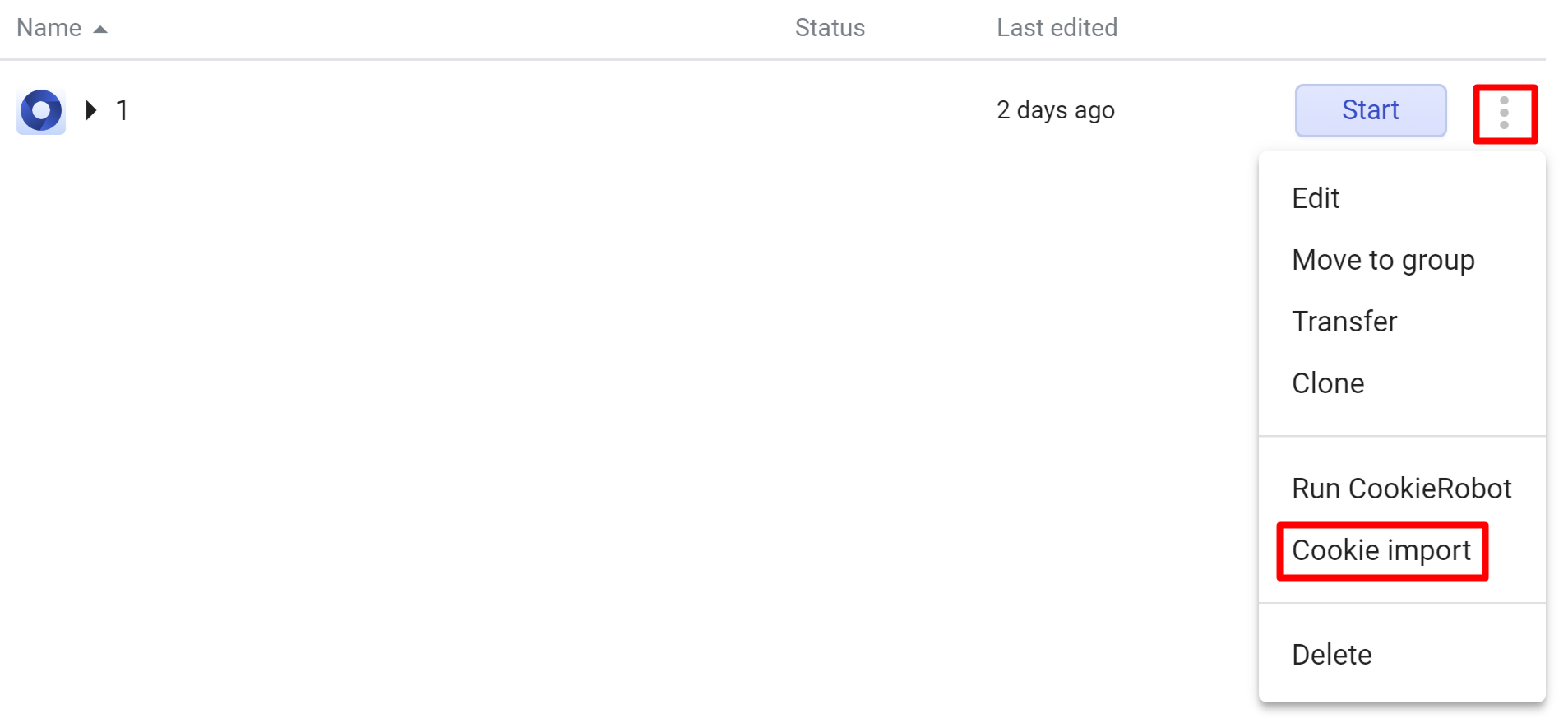
  1. Click the 3 dots on the right of your profile and choose “Cookie import”
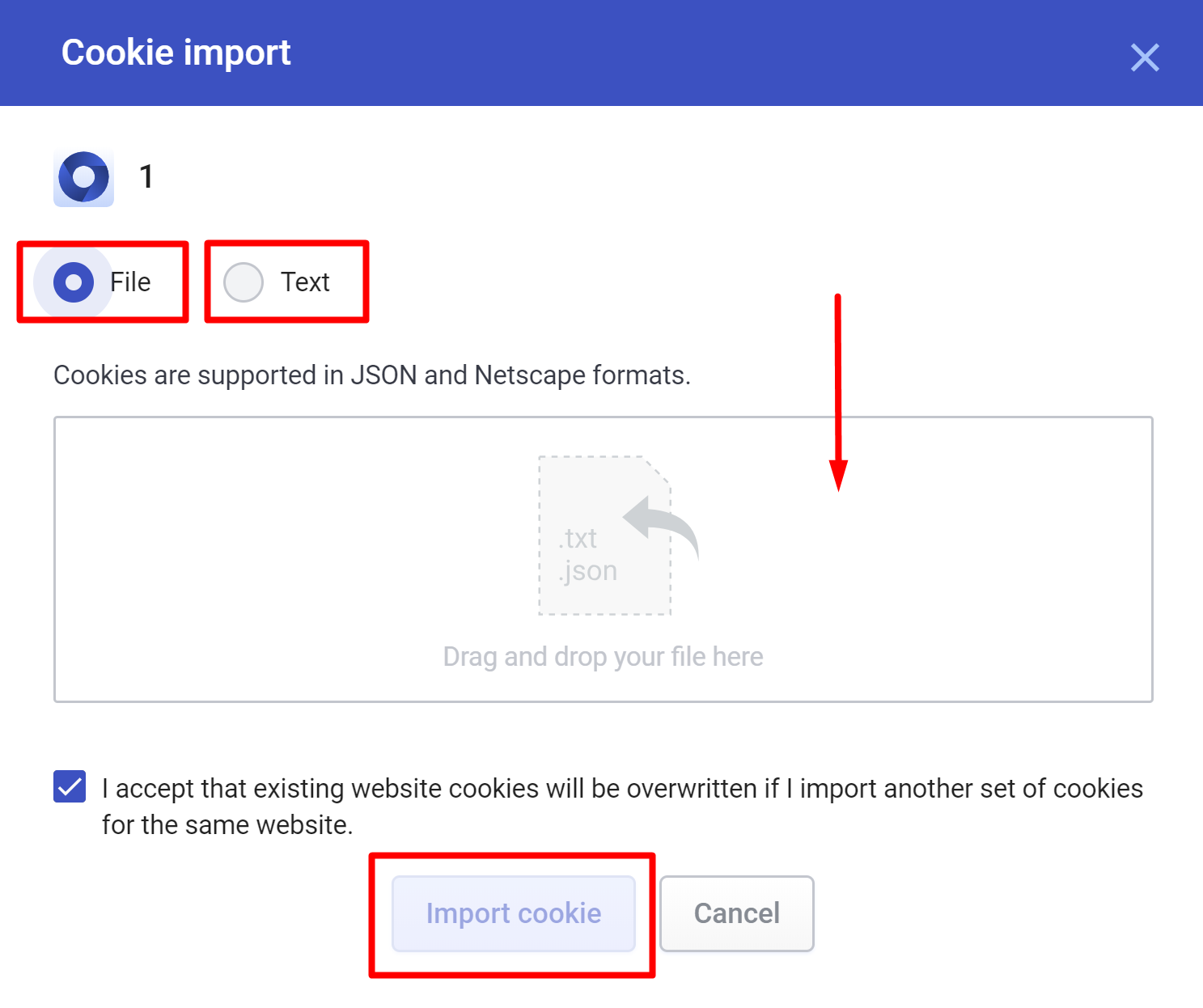
  1. Use one of the 2 options:
    1. Select "File" and drag and drop your cookie file
    2. Select "Text" and paste your cookies in text format
  2. Click "Import cookie"

Netscape

Before importing Netscape cookies, make sure to delete any lines in the original file that starts with # 


Was this article helpful?

Give feedback about this article

In this article

  • What cookie import does
  • How to view cookies in a browser
  • Why cookie import is useful
  • How to import cookies
  • JSON
  • Netscape

Multilogin community

Stay informed, share your thoughts, and engage with others!

Telegram Icon Join us on Telegram

Read more on the topic

Blog Post Img

10 Best Datacenter Proxies for Web Scraping (2025 Edition)

Apr 2, 2025 5 min read
Google SERP Img

What is a Google SERP Proxy and Why Should You Care?

Apr 1, 2025 6 min read
UK Proxy Img

What Are Dedicated UK Proxies? Everything You Need to Know

Apr 1, 2025 6 min read
Related Article Title Icon

Related articles

  • How to use cookie export in Multilogin 6
  • How to use cookie import in Multilogin
  • Why isn't cookie import working?

Mobile

  • Cloud phone
  • Virtual phone
  • Remote phone
  • Phone farming
  • Cloud cell phone
  • Cloud Android emulation
  • AI Quick Action Automation

Multi-accounting

  • Multiple Instagram accounts
  • Multiple Tiktok accounts
  • Multiple Reddit accounts
  • Multiple Telegram accounts
  • Multiple Facebook accounts
  • Multiple Youtube accounts
  • Multiple LinkedIn accounts

COMPARISON

  • Multilogin vs. MoreLogin
  • Multilogin vs. FlashID
  • Multilogin vs. DuoPlus
  • Multilogin vs. VMOS cloud
  • Multilogin vs. Octo Browser
  • Multilogin vs. AdsPower
  • Multilogin vs. GoLogin

Platform proxies

  • Mobile proxy
  • Reddit proxy
  • Instagram proxy
  • TikTok proxy
  • Facebook proxy
  • Youtube proxy
  • LinkedIn proxy

USECASES

  • Cloud phones for Tiktok
  • Cloud phones for Instagram
  • Cloud phones for Reddit
  • Cloud phones for Facebook
  • Cloud phones for Youtube

RESOURCES

  • Knowledge base
  • API documentation
  • Glossary
  • Academy
  • Blog
  • Server status
  • Release notes

FREE TOOLS

  • YouTube views to money calculator
  • Instagram money calculator
  • Online URL to text converter
  • Google local SERP checker
  • Random address generator

GET IN TOUCH

  • Contact 24/7 support
    [email protected]
  • Referral program
  • Affiliate program
  • Pricing page
  • Careers
GDPR Compliant

© 2026 Multilogin. All rights reserved.

  • Privacy policy
  • Terms of service
  • Cookie policy
Multilogin watermark
  • MOBILE

    • Cloud phone
    • Virtual phone
    • Remote phone
    • Phone farming
    • Cloud cell phone
    • Cloud Android emulation
    • AI Quick Action Automation
  • MULTI-ACCOUNTING

    • Multiple Instagram accounts
    • Multiple Tiktok accounts
    • Multiple Reddit accounts
    • Multiple Telegram accounts
    • Multiple Facebook accounts
    • Multiple Youtube accounts
    • Multiple LinkedIn accounts
  • COMPARISON

    • Multilogin vs. MoreLogin
    • Multilogin vs. FlashID
    • Multilogin vs. DuoPlus
    • Multilogin vs. VMOS cloud
    • Multilogin vs. Octo Browser
    • Multilogin vs. AdsPower
    • Multilogin vs. GoLogin
  • PLATFORM PROXIES

    • Mobile proxy
    • Reddit proxy
    • Instagram proxy
    • TikTok proxy
    • Facebook proxy
    • Youtube proxy
    • LinkedIn proxy
  • USECASES

    • Cloud phones for Tiktok
    • Cloud phones for Instagram
    • Cloud phones for Reddit
    • Cloud phones for Facebook
    • Cloud phones for Youtube
  • RESOURCES

    • Knowledge base
    • API documentation
    • Glossary
    • Academy
    • Blog
    • Server status
    • Release notes
  • FREE TOOLS

    • YouTube views to money calculator
    • Instagram money calculator
    • Online URL to text converter
    • Google local SERP checker
    • Random address generator
  • GET IN TOUCH

    • Contact 24/7 support
      [email protected]
    • Referral program
    • Affiliate program
    • Pricing page
    • Careers
GDPR Compliant
  • Privacy policy
  • Terms of service
  • Cookie policy

© 2026 Multilogin. All rights reserved.

Expand