Skip to content
MultiloginHelp Center

How to manage agent logs in Multilogin

Agent logs contain technical information about the agent and launcher that helps Multilogin troubleshoot connection and launch issues.

Multilogin automatically collects logs (like agent and launcher details) every six hours to keep things running smoothly. These logs are stored securely on AWS and help us troubleshoot and improve your experience.

But hey, we get it – privacy matters. If you'd rather not share your data automatically, no worries! You can turn off the auto-upload feature and share logs only when needed. We’ve got your back with these simple steps to stay in control. 

This guide covers the legacy agent used with the Multilogin web interface.

How to disable automatic log upload

If this is your first time configuring the agent, you’ll need to create your own agent.yaml file.

Step 1: find or create a configuration file agent.yaml

  1. Go to your local Multilogin folder in your system:
    1. Windows: C:\Users\%username%\mlx
    2. macOS: /Users/%username%/mlx
    3. Linux: /home/%username%/mlx
  2. Create a new text file using any editor (for example, Notepad)
  3. Rename the file to agent.yaml

Step 2: edit the agent.yaml file

  1. Open the file with any text editor 
  2. Add the following line: AutoUploadLogEnabled: false
  3. Save and close the file

Things to remember:

  • This feature requires agent version 1.32 or higher
  • If the AutoUploadLogEnabled flag is not present in the agent.yaml file, or if there is no such file in the folder, it will automatically be set to true

How to send logs manually

You can still send logs manually directly to our AWS server at your best convenience, even if the AutoUploadLogEnabled is set to false:

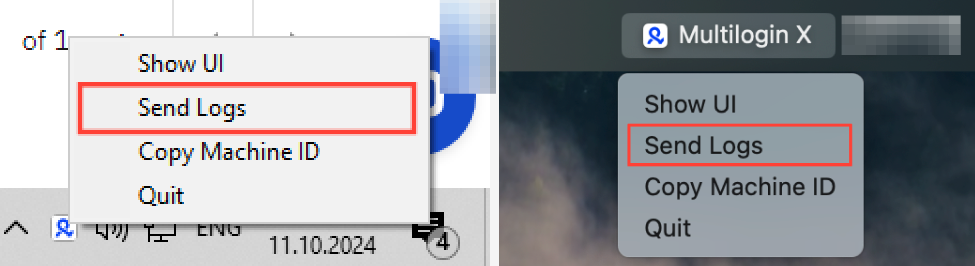
  1. Click the Multilogin icon in your system tray
  2. Choose “Send logs”

There's no need to wait for a confirmation message, the logs are automatically sent to the server.

Windows and macOS agent menus with Send Logs highlighted

Stay in the loop

Catch the latest updates, exchange advice, explore practical use cases.

Get product updatesTelegram channelAsk other usersTelegram chatExplore use casesDiscord community