Create multiple Steam accounts

Create and manage multiple Steam accounts with separate browser identities. Multilogin keeps each account isolated with its own fingerprint and IP behavior, so accounts stay independent and don’t get linked during daily use.

Avoid Steam bans with built-in proxies
Manage multiple Telegram accounts

Manage multiple Steam accounts

Run multiple Steam accounts from one organized workspace without accounts crossing signals. Each Steam account runs in its own isolated browser profile with a separate fingerprint and IP behavior, keeping sessions stable and independent. This reduces security checks, prevents account linkage, and lets you switch or scale accounts with control instead of trial and error.

Manage password-free Steam from any device

Manage password-free Steam from any device

Access Steam accounts without re-entering passwords or repeating logins. Each profile keeps its cookies and session data synced securely in the cloud, so you can open the same account from any device and continue without triggering security checks, with optional Android mobile emulation when a mobile session is needed.

Automate Steam workflows at scale

Automate Steam workflows at scale

Automate large-scale workflows with full support for Selenium, Playwright, Puppeteer, Postman, and the Multilogin CLI. Each automated task runs inside its own isolated browser profile, so sessions stay consistent, accounts remain separated, and automation doesn’t trigger flags caused by shared environments or unstable setups.

Share Telegram accounts with your team

Share Steam accounts with your team

Share Steam accounts safely with teammates without exposing passwords or mixing sessions. Each team member works inside the same isolated browser profile with controlled access, so accounts stay consistent while actions remain traceable. This makes collaboration possible without risking account linkage, accidental logins, or security checks caused by shared devices.

Create multiple Steam accounts

Avoid Steam bans with built-in proxies

Avoid Steam bans caused by unstable or reused connections by using built-in residential proxies. Accounts run on 30+ million pre-filtered residential IPs, with 95% clean IP records, 99.99% uptime, and 24-hour sticky sessions, keeping each Steam account on a stable and trusted connection.

What is antidetect browser?

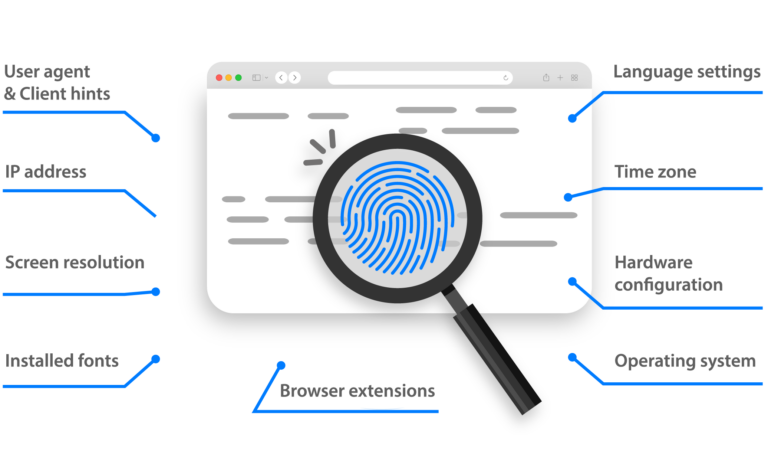
An antidetect browser is a browser designed to keep online accounts separated by giving each one its own isolated environment. Instead of sharing fingerprints, cookies, and device data like a normal browser, each profile looks like a different real user. This prevents websites from linking accounts together and reduces bans caused by shared signals when managing multiple accounts from the same device.

MetaMask Airdrop

Why use Multilogin to manage multiple Steam accounts?

Multilogin is built for situations where running multiple Steam accounts from one setup stops working. Instead of switching logins in the same browser and leaving signals behind, each Steam account runs in its own isolated browser profile with separate fingerprints, sessions, and IP behavior. This keeps accounts independent, reduces security checks, and prevents the quiet linkage that often leads to bans when multiple Steam accounts are managed the wrong way.

Image illustrating why it is important to use an antidetect browser.

Multilogin features for creating multiple Steam accounts

Icon representing Multilogin's feature to bypass bot protection.

Bypass bot detection

Our anti-fingerprinting tech bypasses multi-account and automated browser detection by masking unique browser fingerprints.

An icon representing Team Collaboration with Multilogin.

Team collaboration

You can collaborate on browser profiles and easily share passwords, cookies, and session progress with team members.

Icon representing data sync over the cloud with Multilogin.

Data sync over cloud

Use cloud browser profiles to sync data across multiple devices or VPS instances.

An icon representing fingerprint adjustment to match proxy feature of Multilogin.

Fingerprint adjustment to match proxy

Automatically adjust browser fingerprints to match proxy locations, supporting all types for enhanced security.

Icon representing Multilogin's support for all proxy types, including HTTP, HTTPS, and SOCKS5.

Support for all proxy types

Use our proxies or bring your own. All proxy types are supported.

Icon representing residential rotating IPs in Multilogin.

Residential rotating IPs

Our residential proxies are tested daily ensuring flawless performance with major platforms.

Icon representing the Android Chrome browser in Multilogin.

Chrome or Firefox interface

Our Mimic and Stealthfox browsers fully emulate Chrome or Firefox, providing you with a different digital identity in each browser window.

An icon representing High Load Supported feature of Multilogin.

High load supported

Our platform supports high loads, making it ideal for operations of any size.

Icon representing the Manual Mode feature in Multilogin.

Manual mode

Manually control the settings of your browser profiles in secure virtual environments.

An icon representing browser action automation feature in Multilogin.

Browser action automation

Automate repetitive tasks with Selenium, Playwright, and Puppeteer automation drivers, bypassing anti-bot algorithms.

Most Awarded Antidetect Browser

Kinza awards for Multilogin.
Conversion club badge for Multilogin.
Mask group badge for Multilogin
Startup 2019 awards badge for Multilogin
badge for Multilogin
Best Value Software 2022 badge for Multilogin
High performer 2024 badge for Multilogin
Leader 2024 badge for Multilogin
Best support 2024 badge for Multilogin
Easiest to do business with 2024 badge
SourceForge top performer 2023 badge
GetApp user reviews badge

How to start using Multilogin

Start collecting data effortlessly with the industry leading antidetect browser.

Step 1 of how to use Multilogin

Sign up

Register using a verified email address. 

Step 2 of how to use Multilogin

Choose your plan

Select from various subscription plans tailored to your business needs.

Step 3 of how to use Multilogin

Download Multilogin agent

Available for Windows, Mac, and Linux.

Step 4 of how to use Multilogin

Access the Multilogin dashboard

Start creating and managing antidetect browser profiles.

Step 5 of how to use Multilogin

Run your data scraping script

Integrate your Puppeteer, Selenium, and Playwright data scraping scripts and begin collection.

Manage multiple Steam accounts with no bans​

Start using Multilogin today​

Watch the Multilogin demo for creating multiple accounts on Steam

Get a 10-minute demo video on how Multilogin can help you easily build your database of Steam accounts while remaining undetected. Just fill in your name, last name and email below, and we’ll deliver the demo video directly to your inbox.

Image of locked video for Multilogin demo preview

Multiple Steam accounts: How to sreate, manage, and keep them from getting linked

If you searched can you have multiple accounts on Steam, chances are this isn’t curiosity. Something already went wrong. A warning showed up. A login suddenly failed. Or an account you cared about got restricted without a clear explanation. That’s usually the moment people realize that running multiple Steam accounts is allowed, but running them the wrong way is what causes damage.

Steam doesn’t punish users for having more than one account. The real issue starts when accounts look connected behind the scenes. Same browser. Same device data. Same IP patterns. Enough overlap, and Steam stops treating those accounts as separate identities.

This article explains why people create multiple Steam accounts, where most setups fail, and how to manage them without constantly worrying about bans.

Can you have multiple Steam accounts?

Yes, you can have multiple Steam accounts. Steam does not limit users to a single account, and many people legitimately operate more than one. Problems begin when those accounts start sharing technical signals that make them look like one. 

Steam tracks more than just logins. It observes: 

  • browser data and local storage 
  • IP behavior and session patterns 
  • how often accounts switch or overlap 

If two or more accounts behave like they belong to the same environment, Steam doesn’t need proof. It reacts based on risk. 

Why people create multiple steam accounts

People don’t create multiple Steam accounts for fun. They do it because one account can’t safely handle everything they need. 

Common reasons include: 

  • Separating personal and competitive gameplay 
  • Keeping test or practice accounts away from a main profile 
  • Managing different game libraries or regions 
  • Handling marketplace or trading activity separately 
  • Testing mods, updates, or builds without risking progress 

The intention is usually safe. The execution is where things fall apart. 

What goes wrong when you manage multiple Steam accounts incorrectly

Most bans feel sudden, but they’re not random. They build up quietly as signals overlap. 

When multiple Steam accounts are run from the same setup, users often see: 

  • Repeated security checks 
  • Forced logouts 
  • Limited marketplace access 
  • Temporary or permanent bans 

Switching accounts in the same browser window is one of the fastest ways to trigger this. Even if you log out cleanly, data stays behind. 

If you already lost an account, repeating the same setup with a new one leads to the same result. 

How to manage multiple Steam accounts safely

Managing multiple Steam accounts is not about speed. It’s about separation. 

A safer setup includes: 

  • A separate browser environment per Steam account 
  • Isolated cookies, cache, and local storage 
  • Consistent IP behavior tied to one account 
  • No switching accounts inside the same browser profile 

When each account runs in its own environment, Steam sees them as unrelated users instead of variations of the same one. 

Where most users realize they need a better setup

There’s usually a moment that changes behavior. Maybe it’s losing access to a marketplace account. Maybe a competitive account gets restricted right before a match. That’s when users stop asking how to create multiple Steam accounts and start asking how to manage multiple Steam accounts without losing them. 

At that point, prevention matters more than recovery. 

Using multiple Steam accounts with Multilogin

Multilogin antidetect browser is used by people who already know that Steam links accounts through shared environments. Instead of running everything inside one browser, Multilogin creates fully isolated browser profiles. 

Each profile has: 

  • Its own browser fingerprint 
  • Separate cookies and storage 

You assign one Steam account to one profile. That profile never touches another account. If one account gets flagged, the rest stay clean because there’s no shared data connecting them. 

This approach is especially useful if you already manage more than two or three Steam accounts and switching manually is no longer safe. 

Managing multiple Steam accounts long-term with Multilogin

The real benefit shows up over time. Instead of constantly logging in and out or worrying about what Steam remembers, profiles stay persistent. 

With Multilogin, you can: 

  • Open accounts directly without re-authentication loops 
  • Keep long-lived sessions stable 
  • Reduce accidental cross-account actions 
  • Organize accounts by purpose instead of memory 

If you’ve ever opened the wrong Steam account by mistake and realized too late, you know how costly that can be. 

When multiple Steam accounts still get banned

No tool is magic. Accounts can still get banned if: 

  • Behavior looks automated 
  • Actions violate Steam’s rules 
  • Accounts are created too aggressively 
  • Proxies or locations jump unexpectedly 

What Multilogin does is remove environment linkage from the equation. That alone eliminates one of the biggest causes of unexplained bans. 

If you already lost accounts, the next step isn’t creating another one in the same browser. It’s fixing the setup first. 

Final thoughts

Multiple Steam accounts are common, allowed, and often necessary. What Steam reacts to is not the number of accounts, but how closely they resemble each other behind the scenes. 

If you’ve already been burned, repeating the same setup won’t fix it. Changing the environment will. 

That’s why users who manage multiple Steam accounts seriously move away from single-browser workflows and toward isolated setups that keep accounts independent for the long run. 

FAQs

Yes, you can have multiple Steam accounts. Steam does not limit users to one account per person, device, or household. Many users legitimately operate more than one account for different purposes, such as separating personal gameplay from competitive play, testing games, or managing different libraries or regions. 

Where people get into trouble is not the number of accounts, but how those accounts are used. Steam looks for shared technical signals between accounts. If multiple accounts appear to be operated from the same environment, Steam may flag or restrict them even though having multiple accounts itself is allowed. 

Yes, Steam allows multiple accounts to be used on the same computer. There is no rule that limits a single device to one account. However, this is where many users unknowingly create risk. 

When multiple Steam accounts are used on the same computer without proper separation, they share browser data, system fingerprints, and cached information. Over time, Steam can associate those accounts together. That association is what leads to security checks, forced logouts, marketplace restrictions, or bans. 


Using the same computer is allowed. Using the same environment for every account is what causes problems. 

You can switch between Steam accounts on one PC by logging out and logging back in, but this is one of the most common causes of account linkage. Logging out does not remove all stored data. Cookies, cached files, and device identifiers often remain. 

If you only have one account and occasionally log into another, this may not cause immediate issues. If you manage multiple Steam accounts regularly, switching inside the same setup increases risk with every session. 

Users who manage accounts long-term usually stop switching accounts in one environment and move to isolated setups instead. 

You are not banned for having multiple Steam accounts. You are banned for behavior that violates Steam’s rules or for operating accounts in a way that triggers abuse or fraud detection. 

Most bans related to multiple Steam accounts happen because: 

  • Accounts are clearly linked through shared data 
  • Accounts are used to bypass restrictions 
  • One account’s violation spreads risk to others 
  • Trading or marketplace activity looks coordinated 

If one account is banned and others are technically linked, Steam may investigate or restrict the rest. This is why isolation matters more than the number of accounts. 

Yes, Steam allows multiple accounts to be associated with the same email address. This is common and not a violation. Using the same email alone does not cause bans. 

However, email reuse does not protect you either. Steam does not rely on email addresses to determine whether accounts are connected. It focuses on technical signals like environment data and behavior patterns. 

Using the same email is fine. Using the same browser setup is where problems start. 

Two Steam accounts cannot be logged in at the same time in the Steam client on the same system session. Steam is designed for one active account per client instance. 

Some users try to work around this by opening browsers, virtual machines, or separate environments. The important point is not simultaneous access, but separation. If two accounts are active in environments that share system data, they can still be linked. 

Running accounts independently in isolated environments is safer than trying to force parallel logins in one setup. 

Watch the demo for multi-account management

Thank you! We’ve received your request.
Please check your email for the results.
We’re checking this platform.
Please fill your email to see the result.

Multilogin works with amazon.com