



A regional campaign can look correct in the ad dashboard and still fail on a real phone. The wrong city offer appears, the landing page defaults to another country, the currency does not match, or the app opens with an old account state.
That is the real problem behind geo targeted mobile ads. Location targeting is only one part of the user experience. This guide explains what to test, which preview methods to trust, where platform tools are limited, and how to keep mobile ad testing organized across separate regional environments.
Key takeaways
- Geo targeted mobile ads need QA at four levels: campaign settings, creative display, landing page behavior, and reporting.
- Platform preview tools are the safest first check, but they do not show every auction, app condition, account state, or mobile path.
- A reliable location test should match the target market, device type, language, session state, and destination page.
- Location targeting is not perfectly accurate. Google Ads and TikTok Ads both describe location delivery as signal-based rather than guaranteed.
- Separate Android sessions can help teams keep regional QA work repeatable, but they do not replace platform rules or campaign reporting.
What are geo targeted mobile ads?
Geo targeted mobile ads are mobile ads shown to people based on geography or location-related signals. The geography can be broad, such as a country, or narrow, such as a city, radius, DMA, or postal code when the ad platform supports that level.
Google Ads Help says location targeting can include countries, areas within a country, radius targeting, and location groups. TikTok Ads Manager lists options such as city, country or region, county, DMA, state, and zip code where available.
The word mobile matters because the experience often changes on a phone. A mobile user may see a native app ad, a mobile landing page, a store locator, a call button, a different language, or a local checkout path.
Why do geo-targeted mobile ads need mobile ad testing?
Geo-targeted mobile ads need testing because location settings do not prove that the user sees the right experience. A campaign can target the right market while the creative, link, app session, offer, or analytics setup still creates a mismatch.
Location settings do not prove the full mobile path works
Google Ads Help states that location targeting is based on a variety of signals, including user settings, devices, and behavior on Google platforms, and that 100% accuracy is not guaranteed in every situation. TikTok Ads Manager uses similar caution, saying delivery and accuracy are not guaranteed in every situation because signals vary.
That caveat changes how QA should work. The goal is not to prove that every user in a location will see the same ad. The goal is to catch obvious mismatches before spend starts, then use platform reporting to confirm performance after launch.
Preview tools, real sessions, and reports answer different questions
Ad preview tools answer whether an ad can appear under selected settings. Real mobile sessions answer what a user path feels like on a phone. Campaign reports answer whether the platform is delivering and converting after launch.
Treat these as complementary checks. A preview is not a substitute for reporting, and a live mobile check is not proof of overall delivery quality.
What should you test before launching geo-targeted mobile ads?
Before launch, test the targeting setup, localized creative, destination page, tracking, and reporting views. These checks catch the most common regional campaign errors before they affect spend.
Targeting settings and exclusions
Start by checking the target locations, radius rules, language settings, audience scope, and exclusions. Small targets can reduce delivery, and some ad platforms limit very granular locations.
Google Ads Help says radius targeting requires at least 1 km around a location and that Google Ads only permits location targeting where privacy thresholds are met. TikTok Ads Manager notes that small geographic areas or small sets of zip codes can significantly reduce impressions and clicks and may result in higher CPA.
Creative, offer, and landing page localization
Check that the creative, headline, currency, language, promo code, phone number, store hours, shipping message, and page destination match the market. A location-targeted ad can lose trust quickly when the first tap sends the user to a generic or wrong-region page.
For mobile ad testing, open the ad destination from a mobile environment rather than only from a desktop browser. Mobile menus, app deep links, cookie banners, checkout fields, and store locators often behave differently on phones.
Tracking, consent, and reporting
Check that UTMs, conversion events, consent banners, analytics views, and regional reporting labels are working before the campaign goes live. Location-based advertising can involve sensitive data concerns, so the QA process should not capture personal user data or reuse real customer information.
FTC took action in 2024 against Mobilewalla over allegations involving sensitive location data, including data that could reveal private homes. The case is a reminder that location data and consent should be treated as part of campaign governance, not as an afterthought.
How to test geo-targeted mobile ads by location?
To test geo-targeted mobile ads by location, use a repeatable QA checklist that separates setup validation from real mobile experience checks. The process should record both the expected regional result and the observed result.
- Define the market scenario. Record the target country, city, radius, language, device type, campaign, ad set or ad group, and expected landing page.
- Check the ad platform settings first. Confirm the selected locations, language, audience rules, exclusions, and any industry restrictions that apply to the campaign.
- Use the platform preview tool when available. For Google Search ads, use Ad Preview and Diagnosis before searching manually.
- Open the mobile destination from a market-matched session. Check the page, app link, currency, contact details, consent banner, store locator, and checkout flow.
- Capture a QA log. Save the date, tester, market, device environment, campaign ID, ad ID, URL, screenshot reference, and pass or fail status.
- Compare with reporting after launch. Look at impressions, clicks, conversion events, location reports, and unexpected traffic from nearby markets.
Ad preview by location: method comparison
Ad preview by location is useful, but each method has a different role. The best testing setup depends on whether you need a quick search preview, a social app experience, a native Android session, or real local feedback.
| Option / tool / method | Best for | Strengths | Limitations | Pricing signal | Compliance or operational note |
| Google Ads Ad Preview and Diagnosis | Checking Google Search ad appearance for a keyword, location, language, and device. | Free official tool, avoids adding impressions, gives diagnostics when ads do not show. | Focused on Google Search results. Google says the tool may not reflect all campaign activity. | Free | Use before manual Google searches because manual searches can affect impression data. |
| Platform preview tools in social ad managers | Creative and placement checks inside the ad platform. | Good first-pass review of copy, asset fit, and placement layout. | May not reproduce every app state, account history, location signal, or post-click path. | Free inside ad account | Treat as setup QA, not proof of real delivery. |
| VPN or proxy-based browser check | Quick browser-level regional checks for landing pages or search results. | Can be fast and low-cost for page localization checks. | May not match mobile app signals, device state, GPS, language, or logged-in app conditions. | Freemium or paid | Do not use it to claim that social app delivery works. |
| Physical local tester | Human review from a person in the target market. | Best for real local context, language nuance, and payment or store checks. | Hard to scale, slower to coordinate, and less repeatable across many markets. | Paid or custom pricing | Use for high-value markets or final signoff. |
| Cloud phone Android session | Repeatable Android QA for market-specific app and mobile web paths. | Keeps app sessions, cookies, and regional test environments separated by market. | Does not guarantee platform delivery or policy compliance. Setup quality still matters. | Paid, verify on the official page | Use for operational clarity when teams test multiple locations. |
| Campaign reporting and location reports | Post-launch validation after ads start serving. | Shows real impressions, clicks, conversions, and market patterns. | Comes after launch and can lag behind real-time QA needs. | Included in ad account | Use reporting to confirm or correct assumptions from previews. |
How to test Google Ads, TikTok Ads, and paid social without misleading yourself?
The safest way to test across platforms is to use official preview tools for setup checks, then validate the mobile destination and reporting separately. Each platform uses its own location signals and limits.
Google Ads
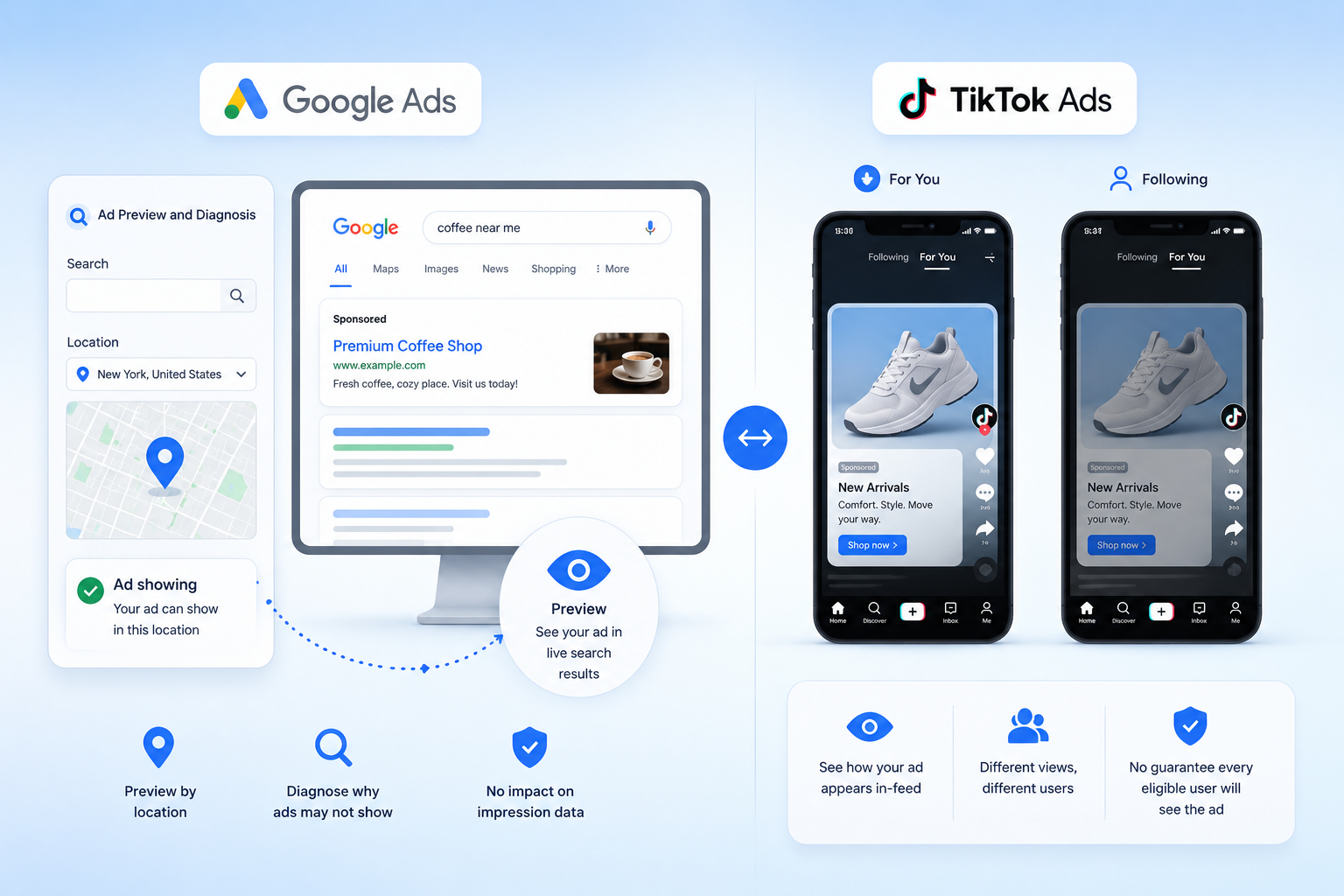
Google Ads Help says Ad Preview and Diagnosis can show how an ad appears in live search results without affecting impression data. It can also help diagnose why an ad or asset is not showing.
Use this for Google Search ad previews by location. Do not treat it as a full mobile app test for paid social or as a promise that every eligible user will see the ad.
TikTok Ads
TikTok Ads Manager says location targeting is signal-based and that accuracy is not guaranteed in every situation. TikTok also notes that it does not support location exclusions or zip code exclusions, so advertisers should select the locations they want to target.
Use TikTok’s location settings and platform preview tools for campaign setup. Then test the mobile landing path, app link, tracking, and market-specific creative in a separate mobile session when the campaign depends on local context.
Meta Ads Manager
Meta Business Help Center describes location targeting in Meta Ads Manager as a way to show ads to people in specific geographic areas. For QA, separate setup checks from real mobile checks because the in-app experience can depend on placement, account state, language, and destination behavior.
For paid social teams, the practical rule is simple: confirm the settings in the platform, then test the mobile path in the same market scenario your audience will experience.
How to keep regional mobile ad QA organized across separate Android sessions?
When a team tests several regions from one shared phone, the results can get messy. One tester may stay logged into a U.S. account, another may test a German landing page, and a third may reuse an old app session with cached location or language data.
Google Ads Help and TikTok Ads Manager both describe location delivery as signal-based, which means clean QA notes matter. If the test setup is mixed, the team may not know whether a failed result came from the campaign, the landing page, the device state, or the tester’s account.
Android cloud phone environments are one practical way to keep regional mobile ad testing separate. Multilogin Cloud Phone can support one Android session per market, so a paid social team can keep a London test, a Berlin test, and a New York test in separate environments with persistent app data and clearer notes.
A realistic example: assign one Android session to each target market, name it by region and campaign, keep a QA log next to the session, and use the same session for pre-launch checks and post-launch spot checks. For teams managing many regions, this can reduce messy account switching and make results easier to compare.
Review Android cloud phone environments for structured mobile QA.
Multilogin is not a way around platform rules; the safest approach combines clean account separation with original content, real engagement, and platform-compliant activity.
Benefits for paid social and regional marketing teams
The main benefit is not more targeting. The benefit is clearer operational control when many regions, accounts, creatives, and landing pages are involved.
- Keep regional QA workspaces organized when multiple accounts and markets are involved.
- Reduce confusing account switching during mobile ad testing.
- Give team members clearer access to assigned regional checks.
- Separate mobile workflows so cached app data and logged-in states do not mix across markets.
- Create cleaner QA logs for creative, landing page, tracking, and reporting follow-up.
5 best practices for geo-targeted mobile ad testing
- Start with the official preview tool. Google Ads Help says Ad Preview and Diagnosis lets advertisers view Search ad appearance without affecting impression data.
- Document the target market before testing. A QA result is only useful when the location, language, device type, campaign, and expected result are recorded.
- Test the post-click mobile path. Location targeting settings do not confirm that the mobile landing page, app link, offer, consent banner, and tracking event work in the target market.
- Treat small-radius targeting with caution. Google Ads Help says very small targets can show intermittently or not at all, and TikTok says small geographic areas may reduce impressions and clicks.
- Protect location data during QA. FTC enforcement actions around sensitive location data show why teams should avoid collecting personal data during ad testing.
Final thoughts
Geo targeted mobile ads work best when location is tested as part of the whole mobile path. Start with official platform settings and preview tools, then verify the creative, landing page, tracking, and reporting view for each market.
For simple campaigns, a platform preview and a landing page check may be enough. For regional paid social programs with many markets, separate Android sessions and clear QA logs make the testing process easier to trust.