





Planning social media content one week at a time feels manageable until you add up the hours. Fifty-two Monday-morning planning sessions a year, each one starting from a half-blank page, each one pulled together under time pressure because last week’s ideas ran out. It’s exhausting, and it produces content that reacts to the calendar instead of building toward anything.
Planning a full quarter, 90 days, in a single focused session sounds intimidating, but it’s actually less work overall. You load context once instead of fifty-two times, you can see patterns and gaps across the whole quarter that are invisible week by week, and you walk away with a plan solid enough that most weeks only need light adjustment, not a full rebuild.
This is the exact process we use to map a full quarter of content in a single day, sometimes less. It won’t produce every final caption, that still happens closer to publish date, but it will give you a complete strategic skeleton with topics, formats, and dates locked in for the next 90 days.
Why Batch a Whole Quarter Instead of a Month
A month is long enough to feel like planning, but short enough that you’re still doing it constantly. A quarter aligns with how most businesses actually think, product launches, seasonal shifts, and reporting cycles tend to run in three-month blocks. Planning at the same cadence means your content calendar reflects business reality instead of an arbitrary 30-day cutoff that ignores what’s happening in month two or three.
There’s also a psychological benefit. A single intense planning day, done right, produces sharper strategic thinking than four separate sessions spread across a month, because you’re seeing the whole arc at once instead of a narrow slice of it.
Before the Planning Day: Gather Your Inputs
A quarter can’t be planned from a blank page in real time, that’s how six-hour sessions happen. Gather these inputs in advance so the actual planning day is execution, not research:
- Business calendar. Product launches, promotions, events, and anything with a fixed date in the next 90 days.
- Seasonal and cultural moments. Holidays, industry events, and awareness days relevant to your audience.
- Last quarter’s performance data. Your top five and bottom five performing posts by engagement, saves, or conversions, whichever metric ties to your actual goals.
- Content pillar list. If you haven’t defined these yet, do it before the planning day, not during it. See our guide on building content pillars for any brand.
- Asset inventory. A rough list of what photo, video, and design assets already exist versus what needs to be created fresh.
The One-Day Planning Framework
Hour 1: Set the Quarter’s Themes
Before touching individual posts, define three to five overarching themes for the quarter, tied to business priorities. If Q3 is about launching a new product line, a theme might be “building anticipation” for weeks one through four, “launch and social proof” for weeks five through eight, and “sustained demand” for the remainder. These themes become the backbone that keeps 90 days of content feeling intentional instead of scattered.
Hour 2: Map the Calendar Skeleton
Lay out all 13 weeks of the quarter in your planning tool. Mark every fixed date first, launches, holidays, campaigns, so you can see immediately which weeks are already anchored and which weeks are open canvas. This single step prevents the common mistake of planning generic content into a week that actually needed to carry a major announcement.
Hour 3–4: Batch Ideate by Pillar, Not by Week
This is the step that makes quarterly planning faster than weekly planning, not slower. Instead of asking “what do we post this week,” work pillar by pillar across the entire quarter. Pick your educational pillar and brainstorm 15 to 20 ideas in one sitting. Move to your community pillar and do the same. This keeps your brain in one mode of thinking at a time instead of constantly switching between topics, which is where most planning fatigue actually comes from.
Once each pillar has a healthy bank of ideas, distribute them across the 13 weeks according to your target ratio (see the pillar ratio approach in our content calendar guide).
Hour 5: Assign Formats and Platforms
Every idea needs a home. Go through the quarter and assign a primary platform and format, reel, carousel, static post, long-form video, to each planned piece. This is also the point to flag ideas that need repurposing across multiple platforms rather than treating each channel as a separate content well. Our guide on repurposing one piece of content across six platforms is worth reviewing before this step if you haven’t built that muscle yet.
Hour 6: Flag Production Needs and Deadlines
Work backward from each publish date to set a realistic production deadline, when the asset needs to be shot, designed, or written by. This is the step most calendars skip, and it’s exactly why “content is late” becomes a recurring problem. If a reel needs to publish on the 15th and requires a studio shoot, that shoot needs to be scheduled weeks earlier, not the night before.
What to Leave for Weekly Touch-Ups
A quarterly plan isn’t meant to lock every detail in place. Leave room for:
- Trending audio or formats that didn’t exist when you planned the quarter.
- Final caption copy, which reads better written closer to the actual publish date.
- Real-time performance adjustments, swapping an underperforming pillar ratio after seeing a few weeks of data.
Think of the quarterly plan as the skeleton and the weekly touch-up as the muscle. You need both, but building the skeleton once saves enormous time over the following 13 weeks.
Common Objections (and Why They Don’t Hold Up)
“Things change too fast to plan three months out.” Plans built at the theme and pillar level, rather than the exact caption level, absorb change easily. You’re not locking in exact wording, you’re locking in direction and workload.
“A full day feels like too much time to give up.” Add up the hours spent on 13 separate weekly planning sessions, plus the context-switching cost of starting fresh each time, and a single eight-hour day is almost always less total time, with a better strategic result.
“My team is too small for this level of process.” Solo operators benefit from this framework the most, because there’s no one else to catch strategic gaps. A single planning day, done quarterly, replaces the mental overhead of constantly wondering what to post next.
A Sample Quarter Breakdown
To make this less abstract, here’s a simplified version of what a mapped quarter might look like for a service-based brand with three content pillars: educational tips, client results, and behind-the-scenes.
- Weeks 1–4 (theme: authority building): Heavier weighting on educational content, 50% of posts, to establish expertise before any promotional push. Client results woven in at 30%, behind-the-scenes at 20%.
- Weeks 5–8 (theme: proof and momentum): Shift toward client results and case studies, 45%, since trust has been built and social proof now converts better. Educational content drops to 35%, behind-the-scenes holds at 20%.
- Weeks 9–13 (theme: conversion and community): Introduce a higher share of direct offers and calls to action, 25%, balanced against continued educational and results content to avoid feeling purely promotional.
Notice that the pillars don’t change, only their weighting shifts across the quarter to match where the audience’s trust and buying intent likely sit. This is the kind of pattern that’s nearly impossible to see when planning one week at a time, but obvious once the full 90 days are laid out together.
Tools That Make the Process Faster
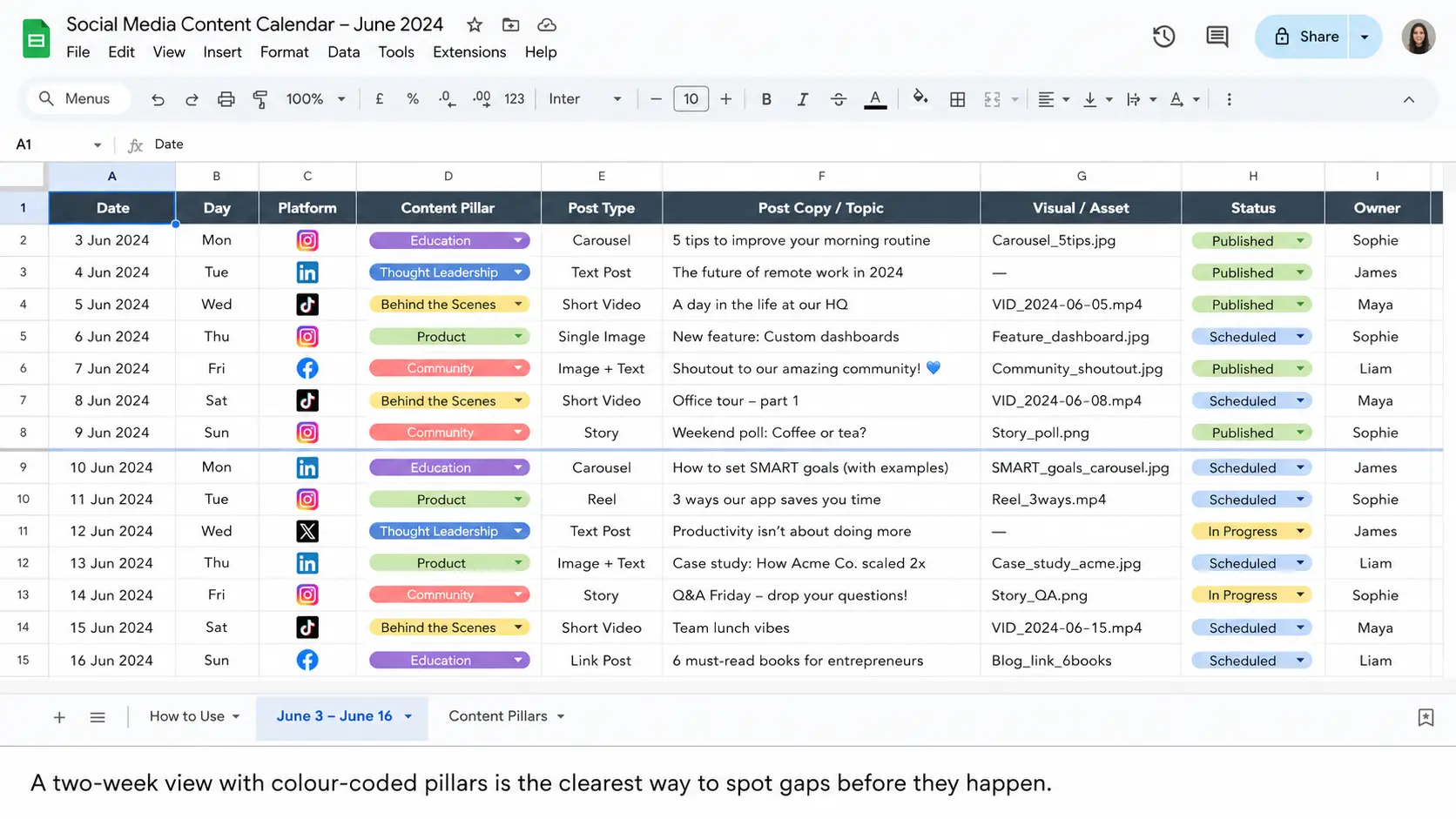
You don’t need expensive software to run a quarterly planning day, but the right setup removes friction. A shared spreadsheet with one tab per month works for most teams. For agencies managing several client accounts at once, a dedicated workspace that keeps content planning, approvals, and client communication together, rather than spread across five different tools, cuts significant time off the process, since you’re not re-explaining context in every handoff.
Whatever you use, make sure it supports filtering by pillar and by platform. Being able to instantly see “show me every educational post across the whole quarter” is what makes it possible to spot gaps and overlaps at a glance, rather than scrolling through 90 days of mixed content trying to count manually.
Where Multilogin Cloud Phones Fit Into Social Media Planning
A quarterly content calendar is easier to manage when the planning tool matches the way social media work actually happens. For many teams, especially agencies, ecommerce brands, affiliate teams, and global social media managers, that work does not happen from one account, one device, or one location.
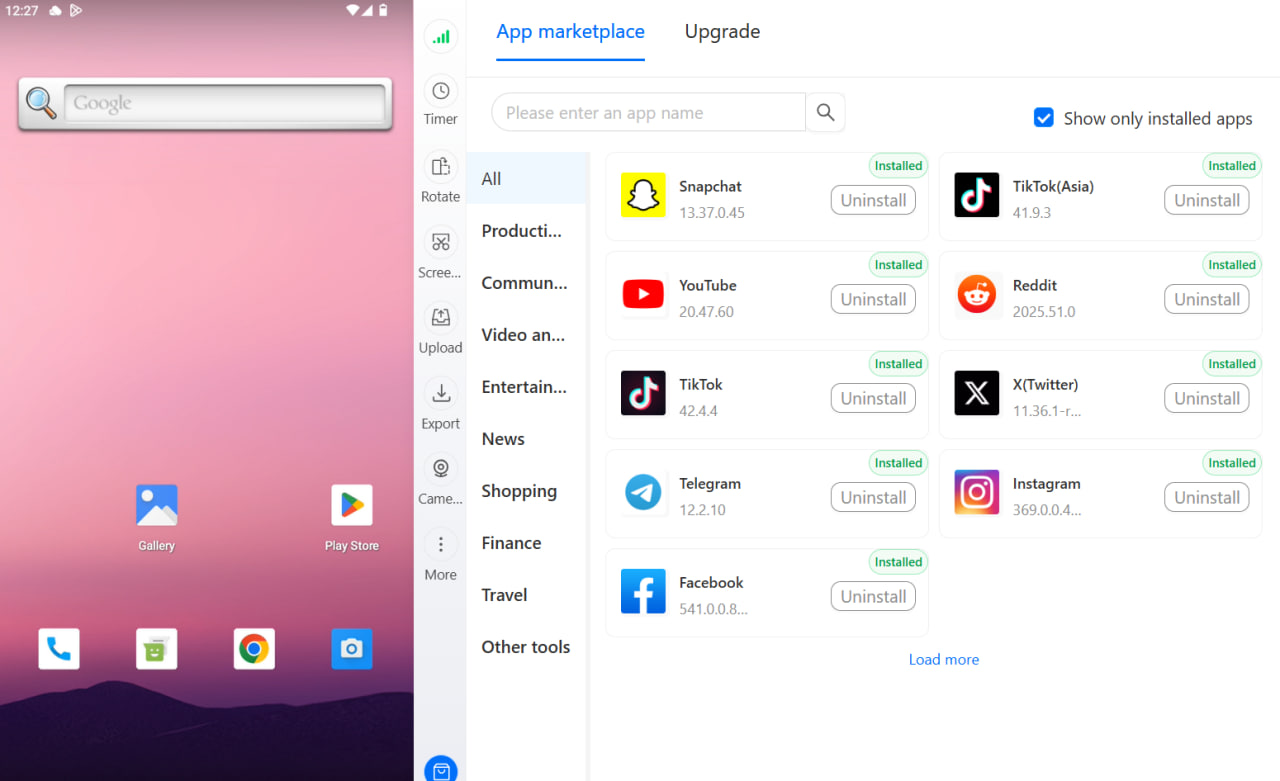
This is where Multilogin Cloud Phones can become useful as part of the planning workflow. Instead of using personal phones, shared devices, or constant account switching, social media managers can run separate Android cloud phone sessions for different accounts, clients, brands, or regions. Each account can stay in its own mobile environment, which keeps app sessions, content checks, and day-to-day account activity more organized.
The location part is especially useful for planning content by market. A social media manager planning a 90-day calendar for several regions does not only need different captions. They need to understand what each audience sees, when they are active, which local moments matter, and whether the planned content actually fits that market.
For example, a team managing accounts for the US, UK, Germany, and the UAE could structure its quarterly calendar by location. Each region can have its own content themes, local holidays, campaign dates, publishing windows, and approval owner. With location-aligned cloud phone sessions, the team can review mobile workflows in a way that better matches the target market instead of checking everything from one generic device setup.
This helps with practical planning tasks such as:
- Checking whether local campaign messaging makes sense inside the actual mobile app experience.
- Reviewing region-specific content calendars before assets go into production.
- Keeping local brand accounts, creator accounts, or client accounts separated.
- Testing whether landing pages, app links, social bios, and campaign links open correctly from a mobile session.
- Assigning each market or client account to the right team member without sharing personal devices.
- Planning posting windows around local time zones instead of one central office schedule.
It also makes the quarterly planning day cleaner. Instead of writing one broad content plan and adapting it later in a rush, teams can build the calendar around real market segments from the beginning. One tab can cover the US account, another can cover the German account, another can cover a city-specific campaign, and each one can be matched to the right mobile environment for review.
For agencies, this is even more important. A client calendar is not just a list of posts. It includes account access, approval flows, local positioning, content formats, platform checks, and reporting expectations. Multilogin Cloud Phones help keep those workflows separated so one client’s TikTok, Instagram, Reddit, or Facebook activity does not get mixed with another client’s environment.
The goal is not to replace your calendar tool. You may still plan the quarter in a spreadsheet, Notion, Airtable, or a social media management platform. The cloud phone becomes the mobile execution and review layer around that calendar. The calendar tells the team what should happen. The cloud phone helps the team check, manage, and execute that work inside the right mobile account environment.
A simple setup could look like this:
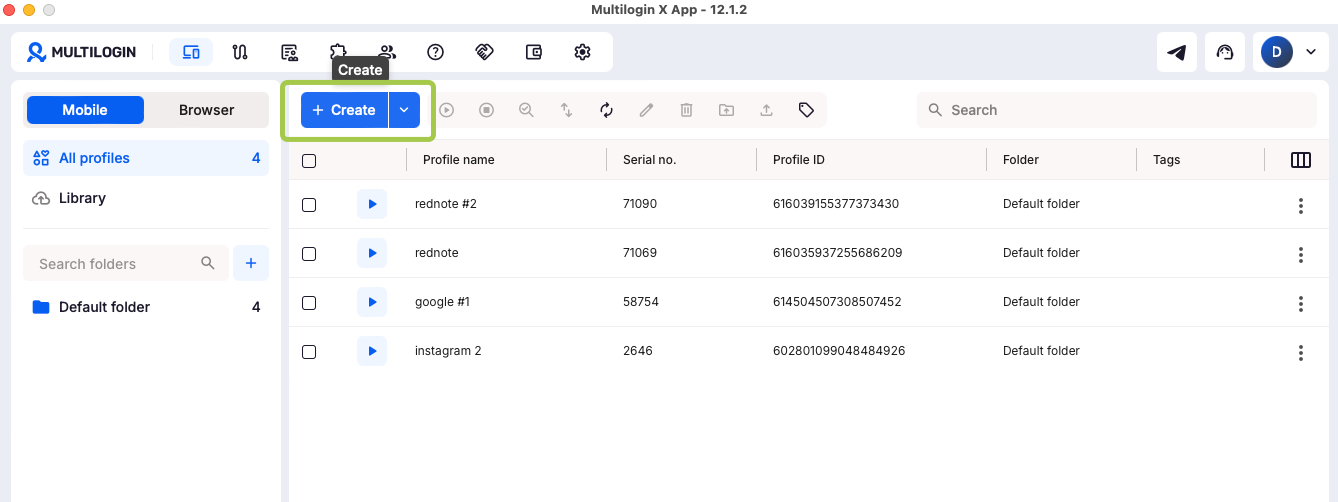
- Create one planning tab per region, client, or brand.
- Assign each tab to a matching cloud phone session.
- Label each session with the account name, market, owner, and approval status.
- Use the correct session when reviewing mobile-only formats such as TikTok posts, Instagram Stories, Reels, app notifications, local profile pages, or region-specific campaign links.
- Keep notes in the calendar whenever a local adjustment is needed.
This turns location-based social media planning into a repeatable workflow. Instead of asking, “What do we post everywhere this week?” the team can ask, “What does each market need this quarter, and how do we check it in the right environment?”
Multilogin is not a shortcut around platform rules. It is most useful when teams need cleaner account separation, more organized mobile workflows, and better location-aware planning. Used properly, it helps social media managers plan content with more context: the right account, the right region, the right device environment, and the right team owner.
Making the Planning Day Sustainable
Treat the quarterly planning session as a recurring calendar block, not something you squeeze in when things get chaotic. Put it on the calendar for the same week every quarter, protect it from meetings, and go in with your inputs already gathered. Teams that treat this as a fixed ritual, rather than an occasional emergency measure, are the ones who stop feeling like they’re always one week behind on content.
Once your quarter is mapped, the day-to-day work becomes execution against a known plan instead of constant improvisation, which is where most of the actual stress in social media management disappears.
For the full system this quarterly planning process fits into, read our complete guide: The Complete Social Media Content Calendar Guide for 2026.


