





The honest Gemini review nobody else is writing
Most Gemini reviews fall into one of two camps: breathless praise from Google Workspace power users who love the integration, or one-star Trustpilot venting from people who tried it once and gave up. Neither version is particularly useful if you are a social media manager trying to decide whether to add it to your stack.
We tested Gemini across real social media workflows in 2026, pulled in feedback from Capterra, Trustpilot, and Reddit, and compared it directly against Claude and ChatGPT on the tasks social media managers actually care about. Here is what we found.
Who this review is for Social media managers, agency operators, and content teams evaluating AI tools for caption writing, content batching, ad copy, and multi-account workflows. Not a general Gemini review — a Gemini review for your specific job.
What is Gemini AI?
Gemini is Google’s AI assistant, built on Google’s Gemini family of large language models. It replaced Google Bard in 2024 and has since become the AI layer across Google’s product suite: Gmail, Docs, Drive, Workspace, Android, and Search all have Gemini built in or available as an add-on.
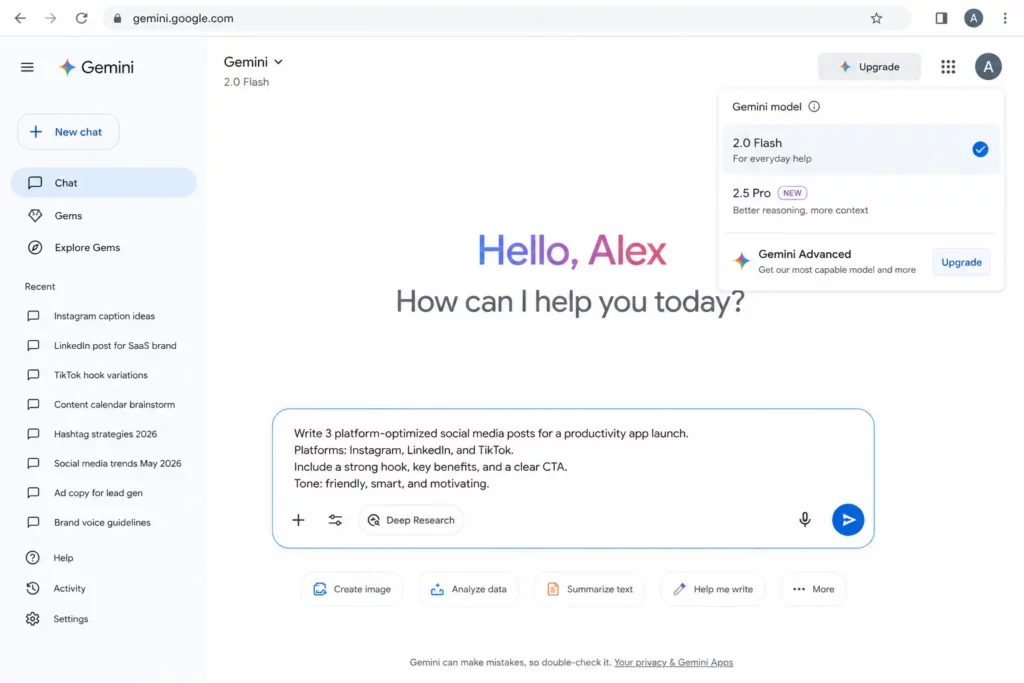
For social media managers, the product that matters is the standalone Gemini app at gemini.google.com, which gives you a ChatGPT-style conversational interface with the option to connect your Google account, upload files, and use Gems — Gemini’s version of persistent prompt templates or AI personas.
Gemini models in 2026
- Gemini 2.0 Flash — fast, free, and capable enough for most social media drafting tasks
- Gemini 2.5 Pro — the flagship model; better reasoning and longer context; available on paid plans
- Gemini Advanced — the premium subscription tier ($20/month) which includes 2.5 Pro, deep research, and 2TB of Google One storage
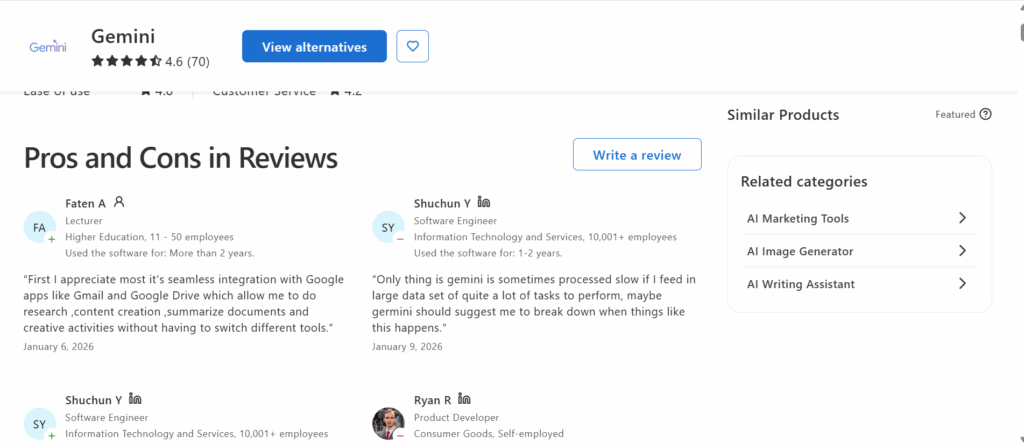
Key stat Gemini’s Capterra score sits at 4.5 stars across 70 reviews, driven largely by Google Workspace users. Trustpilot tells a different story: 1.5 out of 5 from 904 reviews, with 80% giving one star. The gap reflects two very different use cases — integrated productivity work versus standalone AI expectations.
What Gemini does well for social media managers
1. Google Workspace integration
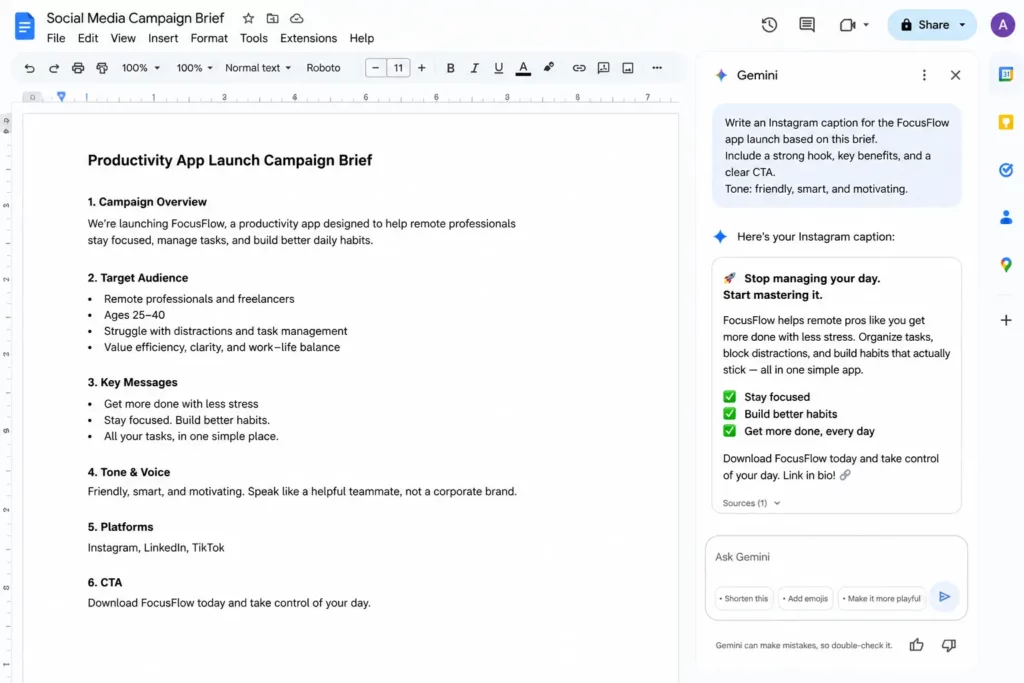
This is Gemini’s clearest, most defensible advantage. If your agency or client workflow lives inside Gmail, Google Docs, Google Drive, and Google Sheets, Gemini sits inside all of it without switching tabs or re-uploading files.
“First I appreciate most it’s seamless integration with Google apps like Gmail and Google Drive which allow me to do research, content creation, summarize documents and creative activities without having to switch different tools.” — Faten A, Lecturer, Capterra, Jan 2026, 5 stars
For social media managers who build content calendars in Google Sheets, store client briefs in Google Drive, and draft copy in Google Docs, Gemini’s workspace integration removes a real friction point. It is also why it pairs naturally with multi-account management workflows where you are coordinating assets across multiple client accounts — the files stay in one place, and Gemini can reference them without you re-uploading every session.
2. Content drafting and brainstorming
Gemini produces workable first drafts for social media captions, blog outlines, email subject lines, and content calendar ideas. It is fast — significantly faster than Claude on shorter outputs — and it handles the standard formats (Instagram captions, LinkedIn posts, TikTok hooks) without needing extensive instruction.
“For content creation it’s great at brainstorming, drafting, and refining emails, blogs, and social posts, and the built-in image generation plus light image/video editing is perfect for quick marketing visuals or thumbnails.” — Gautam P, Teacher, Capterra, Apr 2026, 5 stars
The quality ceiling is lower than Claude’s. Gemini tends toward surface-level answers and safe phrasing. Where Claude pushes back on vague prompts and produces copy that requires less editing, Gemini gives you something faster that requires more editing. The tradeoff depends on your workflow.
3. Deep research for content strategy
Gemini’s deep research feature — available on the Advanced plan — is genuinely useful for content strategy work. It shows its thinking as it researches, cites sources, and produces structured reports. For market trend analysis, competitor content research, or audience insight work, it is a meaningful step up from a basic search.
“Provide deep research capabilities that help me to be creative and get comprehensive information with proper citations for understanding even complex concepts e.g. big market trends and audience insights.” — David G, Marketing Project Manager, Capterra, Jan 2026, 5 stars
4. Pricing and value
Gemini’s free tier is genuinely usable, not just a teaser. The paid Gemini Advanced plan at $20/month bundles 2TB of Google One storage alongside AI access, which makes it one of the better-value AI subscriptions on the market if you are already in the Google ecosystem.
For a small agency or solo social media manager who does not want to pay separately for cloud storage, the Gemini Advanced bundle is a reasonable all-in-one choice.
Where Gemini falls short for social media managers
The Trustpilot data is hard to ignore: 80% of 904 reviews are one star. Not all of those complaints are from social media managers, but the patterns that emerge are directly relevant to content workflows.
Hallucination and accuracy problems
The most common complaint across Trustpilot, Capterra, and Reddit is inaccurate output — and crucially, Gemini often delivers it confidently. For social media managers writing on behalf of brands, a hallucinated statistic or incorrect product claim that gets published creates a real problem.
“Gemini consistently provides inaccurate data and even when corrected, and it acknowledges that it was incorrect… it will continue to provide the bad data again.” — Marianne, Trustpilot, Jun 2026, 1 star
“I much prefer Claude if I’m being honest. I think Gemini has a tendency to be forgetful, go for the easiest, most surface level answer. I often have to correct it or ask how it got to that conclusion at all.” — Tyra O, People Operations Specialist, Capterra, May 2026, 3 stars
Claude’s Constitutional AI framework makes it more likely to flag uncertainty rather than invent a confident-sounding answer. For brand-sensitive content, that matters.
5. Competitor research and content gap analysis
Claude does not have live web access by default, but toggling on the web search tool on paid plans lets you ask it to identify what competitors are covering, surface gaps in your niche, or summarise what is trending in your category.
For strategy sessions, this is more useful than a blank brainstorm — you arrive with real data and Claude turns it into a structured content brief.
6. Social media ad copy
Claude writes clean ad copy. Give it your product, your audience segment, and the platform — Meta, TikTok Ads, LinkedIn — and it produces primary text, headline variants, and CTA options in a single pass. For agencies running multiple ad accounts across clients, the combination of Claude for copy generation and cloud phones for account separation creates a production pipeline that is both fast and clean.
Claude AI + cloud phone: the multi-account workflow
Most reviews of Claude AI stop at the content quality conversation. For social media managers running multiple accounts — whether for clients, affiliate operations, or brand portfolios — the real question is how Claude fits into a multi-account workflow.
Here is how the setup works in practice:
- Each client or brand account lives inside its own Multilogin cloud phone session. The cloud phone is a virtualised mobile device with its own identity, network profile, and browser environment.
- Content for each account is generated inside a corresponding Claude Project. The Project holds the client’s brand voice, audience brief, and content history.
- Claude generates the copy. The cloud phone is the device the account lives on. A scheduling tool bridges the two for publishing.
The result is an agency workflow where content quality is consistent, accounts are properly separated, and the human editor focuses on review and approval rather than first drafts.
Memory and context loss in long sessions
Gemini does not maintain memory between conversations by default. In longer sessions it loses context mid-chat — a consistent complaint from professional users. For agencies doing content production across multiple sessions for multiple clients, this is a genuine workflow cost.
“After I returned to the saved chat a few days later, I could no longer scroll up all the way to the earliest prompts and outputs.” — Ryan R, Product Developer, Capterra, Jan 2026
“If I upload documents to a chat, they seem to remain accessible for only a limited time (like 1 hour). After that, even though the files are still attached to the conversation, the system often acts as if it has forgotten them, forcing me to upload them again.” — Marco, Trustpilot, Jun 2026, 1 star
Gems — Gemini’s persistent prompt templates — partially address this, but they require setup and are not as flexible as Claude’s Projects for storing full brand briefs and content history.
Image generation is inconsistent
Gemini has built-in image generation, which is an advantage over Claude (which has none) in principle. In practice, the execution is unreliable enough that most social media managers should not rely on it for client-facing creative work.
“Sometimes it changes the original features of our face while creating our uploaded images due to which that image is of no use to us and time is also wasted.” — Verified Reviewer, Capterra, May 2026, 4 stars
“After a few prompt refinements it continues to generate the same image repeatedly with no changes.” — Verified Reviewer, Capterra, Apr 2026, 4 stars
The image generation issue — getting stuck in a loop of identical outputs regardless of prompt changes — came up across multiple independent reviews on both Capterra and Trustpilot. Use a dedicated image tool for client work; treat Gemini’s image generation as a bonus, not a feature you can depend on.
Performance issues under heavy use
Several users on Trustpilot reported slow responses, server timeouts, and dropped sessions when feeding in large documents or running intensive tasks. For social media managers doing content batching — generating a month of posts in one session — this reliability gap is a real consideration.
“Gemini is sometimes processed slow if I feed in large dataset of quite a lot of tasks to perform.” — Shuchun Y, Software Engineer, Capterra, Jan 2026, 5 stars
Content sounds surface-level without heavy prompting
The most consistent creative criticism across reviews is that Gemini produces safe, generic output unless you push it hard. It tends toward the obvious angle, the common phrasing, and the sanitised corporate tone that social media audiences have learned to scroll past.
Claude produces cleaner, more distinctive copy from a similar brief. ChatGPT lands somewhere in between. Gemini is the tool you use when speed matters more than voice precision.
Gemini AI and cloud phone workflows: where it fits
Gemini does not connect natively to social media platforms, and it does not have any built-in multi-account management capability. Like Claude and ChatGPT, it generates text — publishing, account management, and platform isolation are separate problems that require separate tools.
That said, Gemini fits into a cloud phone workflow in a specific and useful way: as the content generation layer for teams already operating inside Google Workspace.
The practical setup looks like this:
- Client briefs, content calendars, and brand guidelines live in Google Drive
- Gemini references those files directly in the conversation via the Google Workspace integration, reducing the re-upload friction that slows other AI tools
- Content is drafted and approved inside Google Docs, with Gemini in the sidebar
- Published content goes live through the corresponding cloud phone session for each client account — keeping accounts isolated at the device level while Gemini handles the content layer
For teams managing multiple TikTok accounts, multiple Instagram accounts, or multiple LinkedIn accounts across different clients, the content layer and the account layer are separate concerns. Gemini handles the first. Cloud phones handle the second. The two tools do not conflict — they stack.
Gemini vs Claude vs ChatGPT: head-to-head for social media managers
Here is the honest comparison based on what actually matters for social media work:
Feature | Gemini | Claude | ChatGPT |
Content quality | Good for drafts | Best for long-form | Strong for captions |
Brand voice match | Surface-level | Deep with Projects | Good with prompting |
Google Workspace | Native integration | No integration | No integration |
Image generation | Built-in (inconsistent) | No — text only | No — text only |
Memory / context | Gems (limited) | Projects (persistent) | Conversation memory |
Multi-account workflow | External tools needed | External tools needed | External tools needed |
Free tier | Generous | Rate-limited | Limited |
Paid plan | $20/mo + 2TB storage | $20/mo (Pro) | $20/mo (Plus) |
Best for SMMs | Google-heavy workflows | Content quality focus | General versatility |
Which one wins for social media content?
For pure content quality — captions that sound human, hooks that land, copy that does not need six rounds of editing — Claude is ahead. For Google Workspace integration and research — especially if your workflow already lives in Google products — Gemini has a clear advantage. ChatGPT sits in the middle on both dimensions.
Most professional SMMs end up using more than one. A common split we see in agency workflows: Gemini for research, briefs, and Workspace-integrated drafts; Claude for final copy that needs to sound human; a cloud phone setup for publishing across isolated accounts regardless of which AI generated the content.
“I use Gemini 2.0 Flash Thinking as my ‘Layer 1’ AI… If I need to go deeper, or require more nuance, or just want to get a second opinion, I’ll kick that output over to Claude or ChatGPT.” — r/GoogleGeminiAI user, Reddit
Who should use Gemini for social media management?
Gemini is the right choice if:
- Your workflow is built inside Google Workspace and you want AI that works inside your existing tools without context-switching
- You need a strong research assistant for content strategy, trend analysis, or market research alongside content creation
- You are budget-conscious and want to combine AI access with Google One cloud storage in a single $20/month subscription
- You are using it as a Layer 1 drafting tool and passing output to Claude or another tool for final polish
- Your content volume is moderate and you do not need to batch-produce large sets of posts in a single session
Choose a different tool if:
- Content quality and brand voice precision are your primary criteria — Claude consistently outperforms Gemini here
- You need reliable, persistent memory across long client engagements without manually re-uploading briefs
- You are relying on image generation for client deliverables — Gemini’s image output is too inconsistent for professional use
- You need a tool that can handle long-session content batching without performance degradation
Our recommendation If you are a Google-native team or solo SMM, Gemini Advanced at $20/month is worth the trial — the storage bundle alone makes it competitive. If content quality is your primary concern,
Claude Pro at the same price produces better copy. Most professional agencies end up using both.
Gemini pricing in 2026
Gemini’s pricing structure is simpler than most AI tools:
- Free: Gemini 2.0 Flash with daily limits. Usable for light social media drafting, good for testing
- Gemini Advanced: $20/month. Includes Gemini 2.5 Pro, Deep Research, 2TB Google One storage, Gemini in all Workspace apps
- Gemini for Google Workspace: add-on pricing for Business and Enterprise plans; varies by tier
The storage bundle makes Gemini Advanced unusually good value compared to Claude Pro ($20/month, no storage) and ChatGPT Plus ($20/month, no storage). If you are already paying for Google One storage, Gemini Advanced effectively gives you the AI for free on top of what you were already spending.
Our verdict
Category | Score | Notes |
Social media content writing | 6/10 | Functional but generic; rarely sounds human without heavy prompting |
Google Workspace integration | 9/10 | Best-in-class; Gmail, Docs, Drive sync is genuinely useful for SMMs |
Image generation | 5/10 | Inconsistent; users report repetitive outputs and face distortion |
Platform adaptability | 6/10 | Understands platforms but lacks the tone precision of Claude |
Memory and context | 5/10 | Loses thread in long chats; no persistent memory without Gems |
Pricing value | 8/10 | Free tier is generous; $20/mo includes 2TB storage — good value |
Cloud phone compatibility | 7/10 | Works as a content tool alongside cloud phones; no direct integration |
Multi-account workflow | 5/10 | No native multi-account support; requires external tools |
Overall for SMMs | 6/10 | Solid for Google Workspace users; not the best pure content tool |
Gemini is a capable AI tool that is better at some things than most reviews give it credit for — particularly the Google Workspace integration, the research capability, and the pricing structure. It is also worse at the specific thing social media managers need most: producing copy that consistently sounds like a human wrote it.
The Trustpilot score of 1.5 is a reflection of mismatched expectations more than a reflection of a bad tool. Users expecting Gemini to replace Google Assistant or to produce print-ready creative work without editing are going to be disappointed. Users building content workflows inside Google Workspace, using Gemini for research and first drafts, and passing output through a human editing layer will find it genuinely useful.
For social media managers running accounts across multiple clients or platforms, Gemini works best as the content layer inside a broader stack. The publishing layer belongs to cloud phones and scheduling tools. The account isolation layer belongs to multi-account management infrastructure. Gemini drafts the copy. The rest of the stack handles everything else.
Need to manage multiple social media accounts? Try Multilogin Cloud Phones.
Frequently asked questions
For Google Workspace users, Gemini has a clear integration advantage. For content quality and brand voice precision, ChatGPT is ahead of Gemini — though Claude outperforms both on longer-form content. For social media marketing specifically, the best setup is Gemini for research and Workspace-integrated drafts, Claude for final copy, and a dedicated scheduler for publishing.
At $20/month for Gemini Advanced, yes — if you are already in the Google ecosystem. The 2TB Google One storage bundle makes it competitive with standalone storage subscriptions. If you are primarily buying it for AI content quality, Claude Pro at the same price produces better social media copy.
The main downsides are hallucination risk on factual content, context loss in long sessions, inconsistent image generation, and a tendency toward surface-level copy without extensive prompting. For brand-sensitive client work, the accuracy risk requires a consistent human review step.
Gemini handles the content layer: it generates captions, ad copy, and content calendar ideas. Cloud phones handle the account layer: each social media account runs inside its own isolated virtual device, so accounts stay separated regardless of how many you are managing. Gemini’s output goes into the relevant account’s content queue. The tools serve different functions in the same workflow.
On content quality and brand voice precision, Claude consistently produces better output in head-to-head testing. Gemini’s advantage is Google Workspace integration and research capability. Many agency SMMs use both: Gemini for research and Workspace-connected drafting, Claude for final copy that needs to sound human.
There is no single winner — the best setup depends on your workflow. Claude leads on content quality. Gemini leads on Google Workspace integration and research. ChatGPT leads on ecosystem integrations and image generation. For social media managers, a combined approach typically outperforms any single tool. See our full comparison of best AI tools for social media managers 2026 for the complete breakdown.


