





Getting blocked from a website or app is frustrating no matter why it’s happening. Maybe you’re traveling and something you use every day is suddenly unavailable in the country you’re in. Maybe you’re in a region where a platform is restricted. Maybe your workplace or school network blocks sites you legitimately need. Maybe you’re a developer or marketer who needs to see how content appears in a different country.
Whatever the reason, the standard solution — a VPN — works less reliably than it used to. Most major platforms actively block VPN exit nodes. And VPNs don’t solve the full picture anyway: they change your IP but don’t change your device’s time zone, language settings, or other location signals that sophisticated detection systems read.
Multilogin Cloud Phones work differently. This guide explains how, which specific scenarios they solve, and how to set one up for accessing blocked sites and apps.
Why Different Types of Blocking Require Different Solutions
Before choosing a solution, you need to understand what’s doing the blocking. The mechanism matters because different approaches address different mechanisms.
- Network-level blocking (corporate or school WiFi). Your network administrator has configured a DNS blocklist or firewall. All devices on the network are affected. Traffic to blocked domains gets intercepted before it reaches the site.
- Geo-blocking by IP address. The website or platform checks your IP address against a database of IP-to-location mappings. If your IP falls in a blocked country or region, access is denied. This is how streaming services restrict content by region, how some social platforms restrict features by country, and how some news sites geo-fence their content.
- App Store regional restrictions. Apps that aren’t published in your country’s app store simply don’t appear when you search for them. You can’t install an app that isn’t available in your region’s store.
- Government-level ISP blocking. Some countries require ISPs to block access to specific platforms at the connection level. Applies to everyone in the country, not just on specific networks.
- Platform behavioral detection. Some platforms don’t just check your IP — they evaluate your full device environment (time zone, language settings, hardware signals, behavioral patterns) to determine whether your claimed location matches your actual location.
Why VPNs Fail More Than People Realize
VPNs change your visible IP address by routing traffic through a server in another location. For many use cases, especially personal privacy or bypassing simple geo-blocks, VPNs work fine.
But they have real, documented limitations:
VPN IP ranges are flagged. Netflix, BBC iPlayer, Disney+, Hulu, and most major streaming platforms maintain databases of known VPN exit node IP ranges and block them. This is an ongoing arms race, and in 2026 the detection is sophisticated enough that most consumer VPNs fail on major streaming services.
VPNs only change one signal. Your device’s time zone, language settings, hardware identifiers (IMEI on Android), and other location signals don’t change when you connect to a VPN. Platforms that evaluate the full device environment can detect the mismatch between a Southeast Asian IP (VPN) and a device with US time zone and English language settings.
Corporate network blocks intercept before VPN. If your network filter blocks the VPN provider’s connection ports, the VPN doesn’t connect in the first place. Network-level firewalls can prevent VPNs from working at all.
Speed and stability. VPN connections add latency and can be unreliable, particularly on mobile or when the VPN server is distant from your actual location.
How Multilogin Cloud Phones Bypass Restrictions Differently
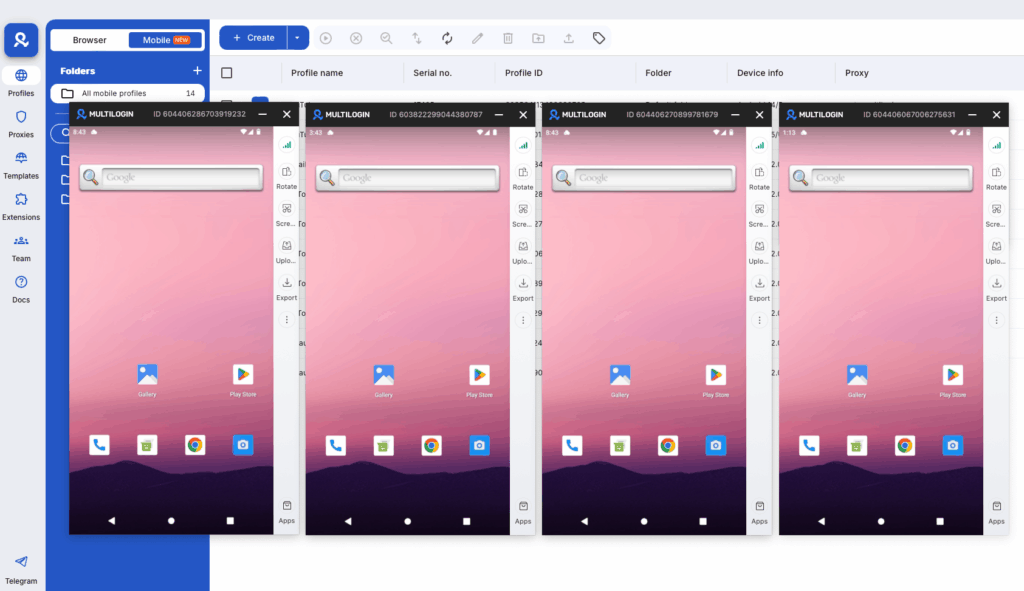
A Multilogin Cloud Phone is a real Android device hosted in a data center in a specific country, accessed remotely through a live video stream. When you use a Cloud Phone, your internet traffic doesn’t originate from your location through a VPN tunnel. It originates directly from that physical device in that physical location.
This is a fundamentally different approach with significantly different detection resistance:
Residential IP addresses, not datacenter IPs. Cloud Phones connect through Multilogin’s residential proxy pool — 30M+ IPs from real home ISPs across 150+ countries and 1,400+ cities. Residential IPs are assigned to actual households by real ISPs. Streaming services, social platforms, and other geo-blocking systems don’t maintain block lists of residential IPs the way they do of datacenter and VPN exit node ranges.
The full device environment matches the location. The Cloud Phone’s Android device is configured with the target country’s locale — time zone, language, regional settings. There’s no mismatch between the IP and the device environment because the device itself is configured for that location.
Real hardware signals. The Cloud Phone’s IMEI, Android ID, and hardware fingerprint are from a real manufactured device. Apps that check hardware signals to detect spoofed locations get genuine responses.
Network-level blocking doesn’t apply. Since the Cloud Phone connects on its own residential network, whatever network restrictions apply to your office or school WiFi are completely irrelevant. The Cloud Phone isn’t on your local network.
What You Can Access With Cloud Phones That VPNs Often Can’t
Geo-Restricted Streaming Content
A Cloud Phone configured for a UK location with a UK residential IP can access BBC iPlayer, ITVX, and other UK-exclusive streaming services that reject most VPN connections. The same logic applies to any region’s streaming content.
Apps Not Available in Your Country’s App Store
Some apps are only published in specific countries’ Google Play stores. A Cloud Phone configured for that country can install and run the app through Multilogin’s App Marketplace — which hosts apps across regional configurations. You’re literally using a device that’s set up as a regional device in the country where the app is available.
Platform Features Restricted by Region
TikTok, Instagram, YouTube, and other platforms sometimes make features available in certain countries before others, or restrict features in specific regions. A Cloud Phone configured for the right region gives you genuine regional device access.
For example, accessing TikTok from specific regions with region-appropriate pricing and features is something Cloud Phones handle naturally — because they are genuinely regional devices.
Corporate and School Network Restrictions
Since the Cloud Phone’s traffic doesn’t route through your local network, DNS blocklists and firewall rules on your local network don’t affect what you can access on the Cloud Phone. The Cloud Phone is effectively a separate device on a different network that you’re viewing remotely.
Accessing Platforms Restricted in Your Country
If a platform is blocked in your country but available in others, a Cloud Phone configured for a country where it’s available provides access from a device that genuinely appears to be in that country.
Content Testing and QA
Developers, marketers, and QA teams who need to verify how websites, apps, and geo-targeted content appear in different regions can use Cloud Phones to test from genuine local device environments. See mobile testing with Android emulation for the QA-specific use case.
How to Set Up a Cloud Phone for Accessing Blocked Content
Step 1: Sign up for Multilogin. Go to multilogin.com/pricing and choose a plan. Cloud Phones are available on all paid plans.
Step 2: Open the Multilogin dashboard and switch to Mobile/Cloud Phones view. Use the toggle at the top of the dashboard.
Step 3: Click “Create Cloud Phone.” Choose a device model from the available real Android devices (Samsung, Google Pixel, Xiaomi, OPPO, and others). Select an Android version (12 or 13 for most use cases).
Step 4: Configure the proxy. Select Multilogin’s built-in residential proxy. Choose the country and city that matches the content or platform you want to access. This assigns a real residential IP from that location.
Step 5: Optionally configure network type and phone number. In the Extra section, you can choose between Wi-Fi and Cellular presentation. For most content access use cases, Wi-Fi is appropriate.
Step 6: Click “Create” and then “Launch.” The Cloud Phone opens as a live video stream of the real Android device.
Step 7: Open a browser or install your target app. Use the built-in browser for website access, or install apps through Multilogin’s App Marketplace. You’re now accessing the internet as a real device in your configured location.
For a full comparison of how Cloud Phones compare to other access methods, see cloud phone vs. VPS and cloud phone vs. Android emulator.
Accessing Specific Blocked Platforms
TikTok access from restricted regions: How to use proxies for TikTok covers the regional access setup specifically.
Unblocking YouTube: For regions with YouTube restrictions, see how to unblock YouTube without a VPN or proxy — Cloud Phones are covered as an option.
Accessing Instagram from restricted regions: Cloud Phone for Instagram covers the setup for regional Instagram access.
Need a secure way to manage multiple accounts? Try Multilogin’s Cloud Phones
Frequently Asked Questions
Can Cloud Phones bypass Netflix's geo-restrictions?
Cloud Phones use residential IPs which are significantly harder for Netflix to detect than standard VPN datacenter IPs. Success depends on the specific IP’s history. Residential proxy IPs have a consistently higher success rate than datacenter VPN exits for streaming access.
Is using a Cloud Phone to access geo-blocked content legal?
In most jurisdictions, using a proxy or residential IP to access geo-blocked content is legal for users, though it may violate the service’s Terms of Use. Local laws vary — verify your country’s regulations. Cloud Phones are a legitimate commercial product; usage responsibility is with the user.
Can I install apps unavailable in my country's app store on a Cloud Phone?
Yes. Multilogin’s App Marketplace includes apps across regional configurations. Configure a Cloud Phone for the country where the app is available.
How is a Cloud Phone different from a VPN for accessing blocked content?
A VPN changes your IP address while leaving your device environment unchanged. A Cloud Phone is a real device in a real location — the full device environment (IP, time zone, language, hardware signals) matches the target location consistently.
Can I use Cloud Phones to bypass corporate network restrictions?
Yes. The Cloud Phone operates on its own residential network, completely independent of your local corporate or school network. Local DNS blocks and firewall rules don’t affect what the Cloud Phone can access.
Can I automate ad creation with an antidetect browser?
Yes. Multilogin supports automation via REST API, Selenium, and Puppeteer, allowing you to scale your Facebook ad creation, testing, and account switching with minimal manual effort.

