





Your personal Facebook is full of family updates, old school friends, and posts you’d never want a client to see. Your professional presence needs to be completely separate. Or maybe you’re managing Facebook accounts for multiple clients and the built-in limitations are already a problem.
Whatever the reason, running two Facebook accounts is something millions of people do. The challenge isn’t setting it up — it’s staying safe once you have. Facebook’s systems are good at detecting linked accounts, and getting flagged on one can pull the other down with it.
This guide covers every method for having two Facebook accounts, what Facebook’s actual policy is, how to delete one if you need to, and what professional operators do when they need reliable account separation at scale.
Does Facebook Actually Allow Two Accounts?
Officially, no. Facebook’s Community Standards state that every individual should have a single personal account representing their real identity.
But Facebook does offer a built-in workaround: since early 2024, Meta has allowed users to create up to four additional profiles under one main account. Each profile can have its own name, photo, and audience. You switch between them inside the app without logging out.
The catch: all profiles are tied to your primary account. If your main account gets restricted or suspended, every additional profile goes down simultaneously. For anyone who needs true account independence — separate credentials, separate sessions, separate risk — this built-in option is not enough.
That’s why social media managers, advertisers, and agencies tend to go a different route, which this guide covers in detail.
Why People Run Two Facebook Accounts
Before getting into the how, it helps to be clear on legitimate reasons — because Facebook’s enforcement focuses on abuse, not on professionals keeping their work and personal lives separate.
- Keeping personal posts away from colleagues, clients, or professional contacts
- Managing a dedicated business presence without mixing it with personal activity
- Running Facebook pages and ad accounts for clients as an agency or freelancer
- Maintaining a public creator or brand identity separate from a private personal profile
- Operating in different markets or languages where content strategies don’t overlap
What Facebook actively prohibits is using multiple accounts to impersonate others, spread misinformation, or manipulate the platform. Having two accounts for distinct and legitimate purposes is different — and professionals do it every day with the right setup in place.
How to Have Two Facebook Accounts on One Phone
There are four practical methods. Which one is right for you depends on how much separation you actually need.
Method 1: Facebook’s official additional profiles
Log into your primary Facebook account. Tap your profile picture and look for the option to create an additional profile. Set it up with its own name, photo, and audience settings. Switching between them takes one tap.
This is the lowest-risk approach because it’s fully within Facebook’s terms. The trade-off is that both profiles are linked to the same underlying account. If Facebook restricts or disables your main account, both go down together. Use this if your goal is personal organisation, not true account independence.
Method 2: Facebook Lite alongside the main app (Android only)
Install both the main Facebook app and Facebook Lite on your Android device. Log into a different account on each. Both run simultaneously without interfering with each other.
This is a simple, free solution for two accounts on one Android phone. It’s not available on iPhone — iOS doesn’t support running two instances of the same app simultaneously, so iPhone users need one of the other methods below.
Method 3: Dual apps or Dual Space on Android
Most Android phones from Samsung, Xiaomi, Huawei, and other manufacturers include a built-in feature called Dual Messenger, Dual Apps, or Parallel Space. This creates a cloned version of Facebook that runs as an independent instance with a separate login.
On Samsung: go to Settings, search for Dual Messenger, and enable it for Facebook. On other Android devices, the feature name varies — search your settings for “clone” or “dual.”
This works well for personal use. The important limitation: the cloned app shares the same device hardware identifier. Both accounts are still linked at the device level, which matters if Facebook’s security systems ever look closely.
Method 4: Mobile browser for the second account
Keep one account logged in on the Facebook app and access the second account through a mobile browser — Chrome, Safari, or Firefox — using either a regular or private tab.
This is convenient for occasional access but not practical for daily management. Mobile browser sessions don’t support push notifications and lack some features available in the native app.
How to Have Two Facebook Accounts on iPhone
iPhone users don’t have access to Dual Apps features, so the options are more limited:
- Use Facebook’s official additional profiles feature for anything that doesn’t require true account independence
- Keep one account in the Facebook app and access the second through Safari in a private tab
- Use a third-party social media management app that supports multiple Facebook logins
- For full isolation, use a professional cloud-based solution that assigns each account its own independent environment
For everyday personal use, the additional profiles feature or browser approach is sufficient. For business users running client accounts or ad accounts, a dedicated solution is the right investment.
How to Delete One Facebook Account When You Have Two
If you’ve accidentally created two accounts, or you’ve consolidated and no longer need one, here’s how to remove it:
- Log into the account you want to delete
- Go to Settings and Privacy, then Settings
- Select Your Facebook Information
- Click Deactivation and Deletion, then Delete Account
- Follow the confirmation steps — Facebook applies a 30-day grace period before permanent deletion
During that 30-day window, you can cancel by logging back in. After 30 days, the account and all its data are gone permanently. The phone number or email attached to the deleted account can be reused after a short waiting period.
If the second account was created by someone else and is impersonating you, don’t try to access it — report it to Facebook directly using the impersonation reporting tool.
The Real Risks of Running Two Separate Facebook Accounts
This is where most people underestimate the problem.
Facebook links accounts by device, IP, and browser data
Facebook’s security system — referred to internally as “Lander” — tracks IP addresses, device identifiers, browser fingerprints, cookies, and behavioral patterns to identify clusters of accounts belonging to the same person. If both accounts are accessed from the same device and IP, they’re linked in Facebook’s eyes.
A violation on one account then creates risk for both. That’s why Facebook account suspensions often come in pairs when people are running linked profiles.
Switching accounts triggers security checks
Rapidly switching between two accounts from the same browser session is one of the most reliable ways to trigger a verification checkpoint. Facebook will ask you to confirm your phone number, upload an ID, or complete a CAPTCHA. This is disruptive and can temporarily lock you out of both accounts.
The stakes are higher than most people realise
If Facebook detects multiple standalone personal accounts without justification, it may permanently disable the secondary account. In cases where both accounts are linked, both can be affected simultaneously. Does Facebook ban IP addresses? Yes — and when it does, every account operating from that IP is at risk.
The Professional Solution: Full Account Isolation With Cloud Phones
Social media managers, ad agencies, and anyone running Facebook accounts for clients at scale can’t afford the risks that come with shared device environments. The professional approach is full isolation — making each account appear to Facebook as if it belongs to a completely different person on a completely different device.
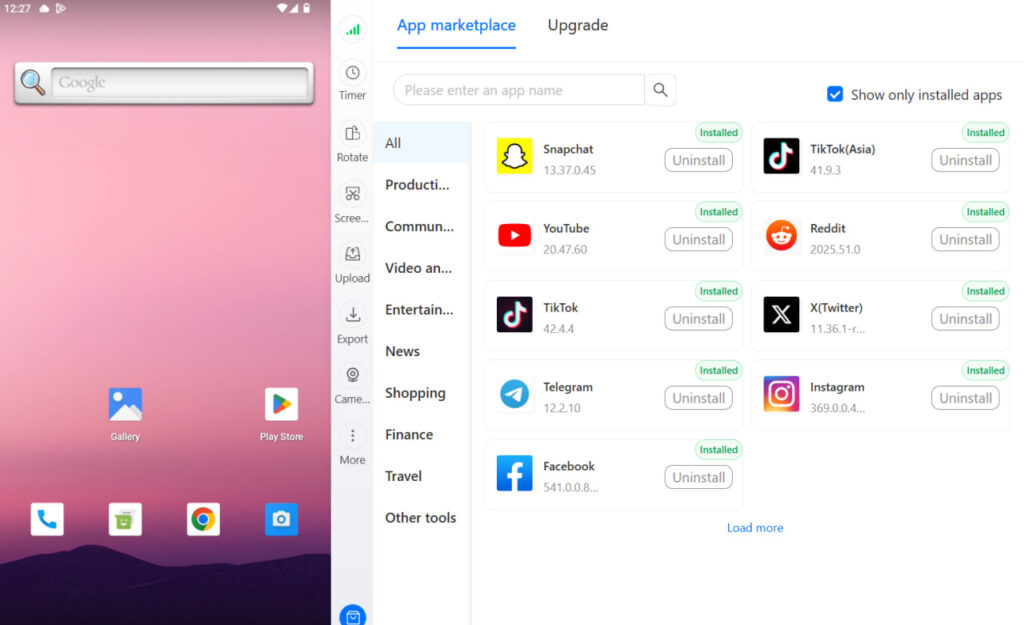
Multilogin Cloud Phones are virtual Android devices that run entirely in the cloud. Each cloud phone has its own unique device fingerprint, its own IP address, and its own completely separate Facebook session. From Facebook’s perspective, each one is a genuine separate handset in a different location.
This is why cloud phones are the right tool for Facebook multi-account management. You can run each client’s account in its own isolated Android environment, assign team members access to specific phones without sharing login credentials, and ensure that if one account ever faces a restriction, nothing else is exposed.
The alternative — Dual Apps, browser tabs, shared devices — creates account clusters that Facebook can detect. The professional approach doesn’t cut corners on isolation. Learn more about how Multilogin cloud phones work for social media and what the setup looks like for agencies.
Running Facebook accounts for multiple clients? Multilogin Cloud Phones give each account its own Android environment with a unique device fingerprint and IP. No linking. No shared risk. Start at multilogin.com.
Best Practices for Managing Two Facebook Accounts Safely
Whether you’re using Facebook’s official additional profiles or a professional isolation setup, these practices reduce your risk:
- Use a completely unique email address and phone number for each account. Never reuse credentials across profiles
- Give each account a clear, distinct purpose. Cross-posting identical content across accounts signals coordinated inauthentic behaviour to Facebook’s systems
- Don’t switch between accounts rapidly from the same session. Even a few seconds between logins from the same browser is a detection trigger
- Never like, comment, or share from one account to boost the other. Cross-account engagement is one of Facebook’s primary ban signals
- If using a standard browser for both accounts, clear cookies and cached data between sessions
- Enable two-factor authentication on both accounts. This protects against unauthorised access regardless of how the accounts are structured
Need to manage multiple Facebook accounts? Try Multilogin Cloud Phones.
Frequently asked questions
No. Each account requires a unique email address or phone number. You cannot register a second account with the same credentials.
Yes. Samsung includes a built-in Dual Messenger feature. Go to Settings, search for Dual Messenger, and enable it for Facebook. This lets you run two accounts simultaneously with separate logins on the same device.
The most practical approach on iPad is one account in the Facebook app and a second through Safari or another browser. Facebook’s official additional profiles feature also works across all devices since it operates within the same account.
Yes. One personal account can create and manage multiple pages. If you’re running pages for multiple clients, separate management accounts (each with their own browser profile and proxy) are the cleaner approach for avoiding account linking.
Search for your name on Facebook while logged out. If a second profile appears with your name, it may be a duplicate. You can also try logging in with other email addresses you’ve used to check whether multiple accounts are registered under your identity.
If an account is banned or suspended, follow the appeal process inside the account settings or via the Facebook account recovery process. A properly isolated second account means you’re not completely shut out while you resolve the issue with the primary.
Click “Add a button” below your cover photo. Choose from options like Book now, Contact us, Send message, Shop now, or Sign up. Link it to your website, booking tool, or contact form.
Final Word
Running two Facebook accounts is practical, common, and manageable when you do it correctly. Facebook’s official additional profiles feature covers personal organisation. For anything involving client work, ad accounts, or professional content separation, you need proper account isolation — not just separate logins on the same device.
The difference between those two approaches is the difference between accounts that are linked in Facebook’s eyes and accounts that are genuinely independent. Professionals who’ve had accounts suspended know which version they want.


