


How to fix error “Wrong proxy data”
 ~2 minWritten by Yelena V
Running into a “Wrong proxy data” error when trying to launch a profile? Don’t worry – this is usually a quick fix. It means there’s an issue with your proxy, either your traffic is used up or the current IP isn’t working. Let’s sort it out together!
➡️ If you see “Wrong proxy data”, first check the proxy traffic → run “Check proxy” → verify the proxy details in the profile. If the proxy check fails, correct the settings, refresh the IP when supported, or replace the proxy.

Check proxy
Check proxy traffic
Multilogin proxy
First, check the proxy traffic in the bottom-left corner of the app.

Then, top up your Multilogin proxy, if the traffic has run out.
Your proxy traffic may show a negative value (for example, -1000 bytes). It also means that the traffic has run out.
Proxy traffic is available as a paid add-on. Pricing depends on the package you choose, so check the current options when you top up.
For instructions, see how to add proxy traffic in Multilogin.
VAT may be applied to proxy packages depending on your location and tax status.
Custom proxy
Contact your proxy provider to check the current amount of traffic and top it up if necessary.
Check proxy connection status
If your proxy has enough traffic, test if it's online. Here’s what the results mean:
- ✅ Proxy check passed: Multilogin connected to your proxy and got everything it needs
- ❌ Proxy check failed: the root cause found, your proxy is offline – replace it to continue working in this profile or get a new IP
Select a profile from the list and click “Check proxy” in the top menu. If you use Multilogin proxy, you can also click “Refresh IP” to get a new IP from the same pool. These options are also available in the right-click menu.
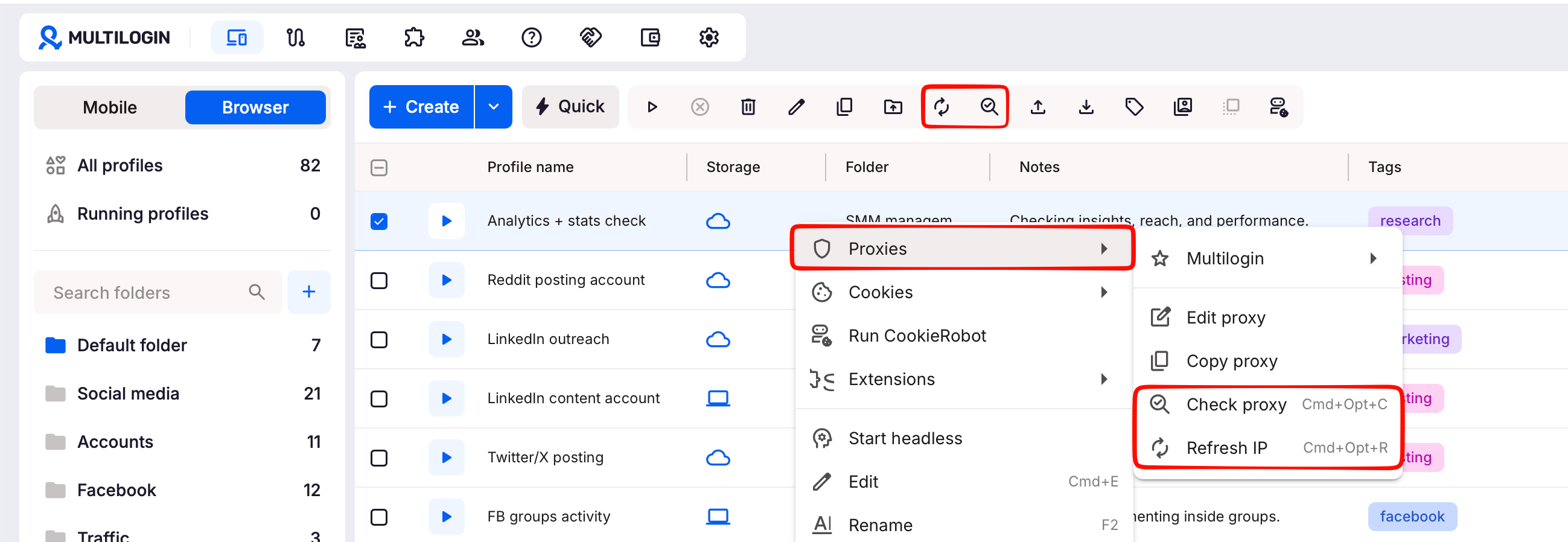
Also make sure, that the proxy data is formatted the following way:
ip:port:username:password
Nothing helps?
We'll be glad to help out! Just send us your logs and proxy details, if you don't use Multilogin proxy. These include your proxy IP, port, login, and password.
- Recreate the issue or wait until the error message appears
- Archive the logs folder found in these locations:
-
Windows:
C:\Users\%username%\mlx -
macOS:
/Users/%username%/mlx -
Linux:
/home/%username%/mlx
-
Windows:
- Email support at [email protected] with:
- A clear description of the issue
- The archived logs folder attached


