








-
Cloud phones
Multilogin
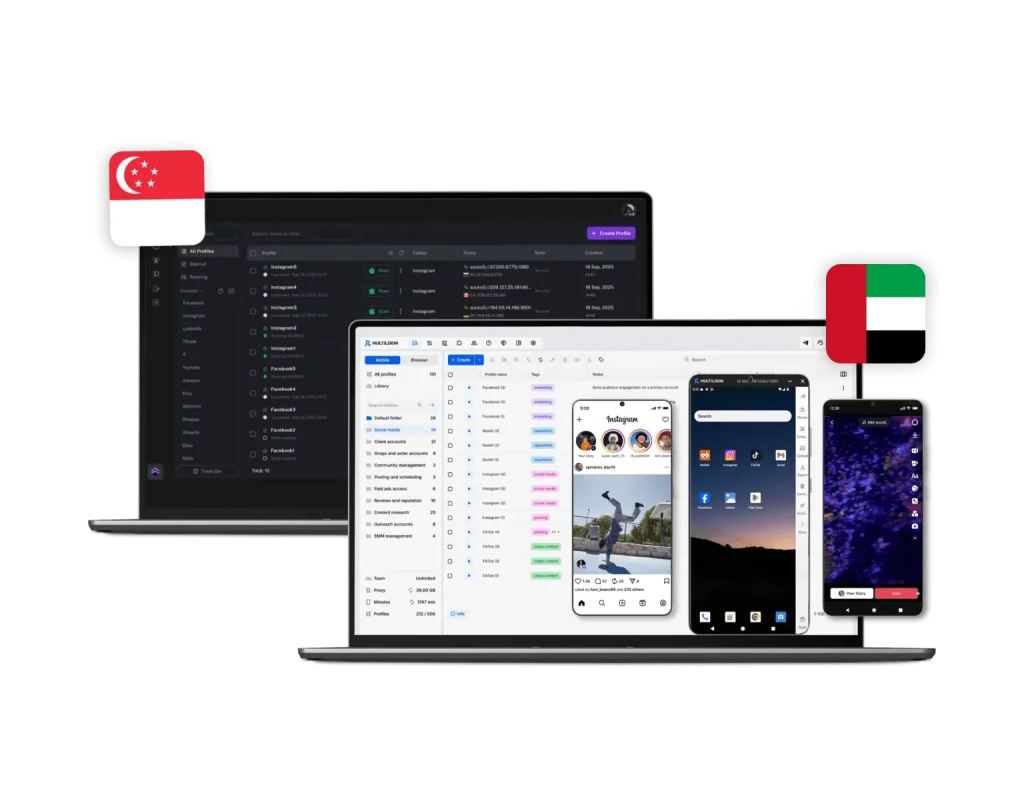
Multilogin gives you Android cloud phones that let you run native apps the same way you would on a physical device. Choose from multiple device brands, launch each account in its own remote phone, install apps from the built-in store or upload APKs, and keep app data, cache, and login sessions saved between sessions. Everything is managed from one unified dashboard, so your mobile accounts stay organized and consistent as you scale.
FlashID
Flash ID does not offer Android cloud phones for running native mobile apps. That means social media managers must rely on browser-only setups or separate tools, making the workflow more complex. Without dedicated remote phones for each account, keeping mobile sessions stable and accounts properly separated becomes harder, especially at scale.
-
Built-in proxies
Multilogin
Multilogin offers built-in residential proxies with access to over 30 million IPs across 150+ countries. You can assign proxies to profiles in a single click, with super-sticky sessions up to 24 hours, bandwidth rollover, and an IP quality filter for maximum stability. No external setup or third-party costs — everything works seamlessly out of the box.
FlashID
FlashID, provides no built-in proxy solution. Users must manually configure third-party proxies (HTTP, HTTPS, or SOCKS5), often from multiple vendors. This not only adds extra costs but also increases the risk of configuration errors, IP leaks, and account bans.
-
Usability and user interface
Multilogin
One dashboard for browser profiles, proxies, and cloud phones — no switching between tools.
Multilogin’s clean interface is designed for beginners and power users alike. Quick profile creation with templates. AI Quick Actions automate repetitive tasks in seconds.FlashID
FlashID offers a basic dashboard for managing browser profiles, with a learning curve that may feel steep for first-time users. Setup requires manual configuration for proxies and fingerprints, and the interface focuses mainly on browser profiles without unified mobile account management.
-
Web automation
Multilogin
Multilogin is built for automation and high-volume workflows. With AI Quick Actions, you can launch, assign, or move browser profiles instantly — no manual steps needed. It supports Playwright, Puppeteer, Selenium, and Postman, plus a full API suite and CLI for custom integrations and scripted control. You can even chain up to 10 tasks in a single command, automating complex multi-account operations effortlessly.
FlashID
FlashID remains in beta and currently offers no proven automation compatibility with major frameworks. Users must rely on manual operations, which don’t scale well for professional environments. Without stable API access or workflow automation, it quickly becomes a bottleneck for teams handling large numbers of profiles.
-
Browser fingerprinting customization
Multilogin
Multilogin provides advanced anti-fingerprinting across canvas, WebGL, audio and hardware signals, timezone, geolocation, language, and 55+ fingerprint parameters — tested daily across 50+ platforms.
FlashID
FlashID provides only basic fingerprinting and offers profile templates for web and mobile, letting users configure OS, browser version, resolution, plugins, WebGL parameters, and device hardware.
-
Browser flexibility
Multilogin
Multilogin supports both web and mobile profiles in one unified platform, including full Android cloud phones and advanced browser profiles. Cloud phones run Android devices in the cloud with selectable brands and OS versions, keeping app data and login sessions persistent, while web profiles use browser cores like Mimic and Stealthfox with advanced fingerprint control across dozens of parameters. Each profile can have its own extensions, user agent, resolution, proxy, and device settings, allowing you to accurately match real-world mobile and desktop environments.
FlashID
FlashID provides web and mobile profiles with configurable OS settings, browser, screen resolution, plugins, and device hardware. However, it does not offer Android cloud phones for running native mobile apps, which limits mobile account management to browser-based environments. It also lacks multiple browser cores, per-profile engine control, and deeper fingerprint customization, reducing flexibility for social media managers and teams handling high-volume or specialized workflows.
-
Teamwork
Multilogin
Multilogin supports workspace roles and granular access controls so admins can assign permissions for profile creation, groups, proxies, and automation tasks. Multilogin supports workspace team collaboration with role-based access and allows multiple team members depending on the plan.
FlashID
FlashID does not clearly offer unlimited team access across plans, indicating more limited collaboration options. It also lacks Android cloud phones, meaning social media managers cannot assign dedicated remote phones per account, making team workflows more fragmented and harder to manage at scale.
-
Data privacy
Multilogin
As a European-based company, Multilogin complies with GDPR regulations, ensuring your data is deleted three months after your subscription ends. Both browser profiles and Android cloud phones are protected with hashed password security, so credentials are never stored in plain text. Multilogin also uses AES encryption for account and cloud phone data, with sessions encrypted before being stored in secure cloud infrastructure.
FlashID
FlashID secures account data and browser profiles, but its data processing is not regulated under GDPR. Two-factor authentication is available, but users are responsible for additional safeguards. Limited support infrastructure means security issues may require manual intervention, potentially exposing accounts to risk.
-
Pricing
Multilogin
Multilogin offers a Free Plan, allowing users to explore Cloud Phones, browser profiles, residential proxies, and mobile workflows before upgrading.
Paid plans start from $7.08 and combine web and mobile account management in one platform. Users can run Android apps, maintain persistent sessions, organize profiles, and manage proxies without relying on separate tools.
Try Multilogin for free and upgrade when you need more profiles, mobile minutes, proxy traffic, or team features.FlashID
FlashID, still in Beta, currently operates under an early access program. Pricing for regular paid plans has not yet been publicly announced, though it will likely align with average market rates. How the platform will scale for larger teams or agencies once Beta ends remains unclear.
What Multilogin offers that FlashID doesn’t
Multilogin vs. FlashID recap chart
Find out why Multilogin is the preferred FlashID alternative
-
Platform maturity
Multilogin
Launched in 2015, more mature and stable platform
FlashID
Launched in 2025, still in Beta
-
Android Cloud Phones
Multilogin
Included
FlashID
Not included
-
Chromium
Multilogin
Yes (Mimic)
FlashID
Included
-
Mobile app marketplace
Multilogin
Built-in store + APK upload
FlashID
Not included
-
Platform compatibility
Multilogin
macOS, Windows, Linux
FlashID
Windows, macOS, Linux
-
Resource consumption
Multilogin
Requires 4GB RAM
FlashID
Requires 4GB RAM
-
Security
Multilogin
High security
FlashID
Standard level; no GDPR or audit transparency
-
Anti-fingerprinting technology
Multilogin
Advanced level
FlashID
Standard level
-
Quick profile creation
Multilogin
Included
FlashID
Not included
-
Account password protection
Multilogin
Included
FlashID
Included
-
Mobile proxies
Multilogin
Included
FlashID
Not included
-
Frequent updates
Multilogin
Frequent and detailed updates
FlashID
Regular updates
-
Built-in proxies at no additional cost
Multilogin
Included
FlashID
Not included
-
Custom browser fingerprint generation
Multilogin
Included
FlashID
Partial
-
Account password protection
Multilogin
Included
FlashID
Not included
-
Knowledge center
Multilogin
Included
FlashID
Limited
-
Suits well for team management
Multilogin
Included
FlashID
Not included
-
Market Position
Multilogin
Beginner-friendly and flexible for individuals and small teams, with room to scale.
FlashID
Built mainly for technical users and larger teams
-
Trial
Multilogin
Included
FlashID
Not included
-
Support
Multilogin
24/7 Live Support, supports 5 languages
FlashID
Online support
Grow your social media accounts with Multilogin cloud phones
Build account trust, reach any location, and boost your engagement
- Unlimited time
- Mobile and browser profiles included
- Free built-in proxies & mobile minutes
Why people love Multilogin
-

A Good Cloud Phone for Account Management
Running a small team means I need control over who can access what, and Multilogin handles that well. The team access controls let me manage permissions without giving everyone the keys to every account. On top of that, the cloud phones keep everything isolated so one account issue doesn’t put the rest at risk. Solid choice for agencies managing multiple clients or accounts.
-

The best service for great ideas and big minds!
Always here for their clients, always ready to help out. I am using the service for 3-4-5 months now and brought me lots of great things 🙂 Hope to grow it on a larger scale and continue using the service …
-

Cloud phones make it easy to manage multiple TikTok accounts with AI agents
I use Multilogin to manage a bunch of AI agents running TikTok accounts for different countries. Since each agent needs its own account, I wanted an easy way to keep everything organized. Cloud phones make it super easy. Every account has its own phone, so I don’t have to buy or manage a bunch of real devices. I can see everything in one dashboard while the AI agents handle posting and the rest of the daily work.
-

Ideal for Social Media Management
I mainly use Multilogin for client social media management, and the cloud phones have been the biggest advantage for me. I can keep different clients in separate environments, leave their sessions running, and jump between accounts without constantly switching physical devices. It feels much more practical than trying to manage everything from a pile of phones.
-

Perfect browser for work, worth the money!
My overall experience with Multilogin has been excellent. I really like its intuitive dashboard, reliable customer support, and competitive pricing. It has become an essential part of my e-commerce business, and I highly recommend it to anyone looking for a dependable solution.
-

Safer accounts using Cloud Phones for social profiles
Running social profiles on cloud phones feels safer, everything is properly separated instead of relying on browser fingerprint tricks alone. Been running mine for a couple months with zero linking issues.
-

Efficient Account Management and Outstanding Support with Multilogin
Multilogin has been an excellent tool for managing multiple accounts efficiently. The setup was quick, and I was able to start using it right away with no learning curve. The interface feels just like Chrome, making it easy to navigate and work without interruption. Performance has been smooth, and browsing feels natural and responsive.
Award winning multiple account management platform













See more comparisons
- Compare with Android Cloud Gaming & AFK Farming with Multilogin Cloud Phones
- Compare with Get your mobile phone farm in the cloud with Multilogin
-
Compare with
-
Compare with

-
Compare with

-
Compare with
-
Compare with

-
Compare with
-
Compare with

-
Compare with
-
Compare with

-
Compare with

-
Compare with

-
Compare with

-
Compare with

-
Compare with

-
Compare with
-
Compare with

-
Compare with

-
Compare with

-
Compare with

-
Compare with

- Compare with Multi‑account browser with cloud phones
-
Compare with

-
Compare with

Watch the Multilogin Demo
Learn how Multilogin can boost your business. Check the video below to see its full capabilities in a short demo video.
Multilogin vs. FlashID : A Comparison for Multi-Account Management
Choosing the right multi-account management platform is an important business decision for affiliate marketers, e-commerce teams, and digital agencies.
The choice between an established all-in-one solution and a newer free option can directly affect workflow stability, scalability, and operating costs.
This comparison examines the main differences between Multilogin and FlashID, focusing on Cloud Phones, browser profiles, proxy management, team features, and their ability to support growing operations.
Cloud phones for mobile account management
Multilogin extends multi-account management beyond the browser with full Android cloud phones built directly into the platform. Each mobile account runs inside its own remote phone with selectable brands and Android versions, persistent app data, and matched built-in proxies. You can install apps from the built-in store or upload APKs, keep login sessions saved between uses, and manage everything from the same unified dashboard as your browser profiles. For agencies and high-volume teams, this means real mobile environments, stable app sessions, and full control over both web and native workflows without stacking extra tools.
FlashID does not offer Android cloud phones for running native mobile apps. Mobile workflows are therefore limited to browser-based environments or external solutions. This creates gaps for social media managers who rely on native apps for posting, engagement, or account warm-up. Without dedicated remote phones per account, maintaining stable mobile sessions and keeping accounts fully separated becomes more complex, especially when scaling across multiple clients or large account portfolios.
Fingerprinting technology comparison
Maintaining consistent account environments across mobile and web workflows is essential for reliable browser profile management.
FlashID’s account environment technology is still developing compared with more established platforms. It supports basic browser and mobile workflows but may provide fewer tools for maintaining consistent environments as account volume and operational complexity grow.
Inconsistent settings across timezone, language, location, hardware data, and network configuration can make account management harder. Limited separation between environments may also create operational risks when multiple accounts are handled from the same workspace.
Multilogin provides a more mature system for managing persistent browser profiles and Android Cloud Phones. This approach helps professionals maintain stable mobile and web sessions as workflows expand.
Here’s what Multilogin’s account management platform includes:
- Android Cloud Phones: Runs native mobile apps in persistent Android environments with selectable devices, operating systems, and dedicated account sessions.
- Consistent browser profiles: Keeps cookies, storage, environment settings, and browsing sessions separate for each account.
- Centralized profile management: Supports profile organization, export, import, and team access, making migration and daily account management more straightforward.
- Cloud storage: Stores cookies, extensions, bookmarks, and session data in the cloud, allowing authorized users to access account environments without manual transfers.
Built-in proxy integration and management
To manage multiple accounts, you need a good proxy solution that works without having to fix it all the time.
FlashID does not come with built-in proxies. You have to find, pay for, and set up external SOCKS5 or HTTP proxies for each profile by hand. This manual process makes things more complicated, raises the risk of configuration mistakes, and adds costs that you need to keep track of separately.
- Multilogin is an all-in-one solution with built-in residential proxies included in every subscription. This integration simplifies the workflow and reduces the risk of connectivity leaks. Here’s what you get:
- Free residential proxy traffic: Included in all plans, so you don’t need external setup or deal with hidden costs.
- All-in-one management: View, top up, and track all proxies from one dashboard. Apply proxy templates across multiple profiles in a few clicks instead of configuring each one manually.
- Proxy traffic saver: Minimizes bandwidth usage during scraping and automation, stretching your included traffic further.
Automation in FlashID and Multilogin
Reliable automation is needed for operations with a lot of volume.
FlashID is still in early access, so its documentation for automation workflows and stability are not very good. It doesn’t always work well with professional automation frameworks like Selenium, Playwright, Puppeteer and Postman.
This means you have to do things by hand, which limits how much you can grow.
Multilogin supports automation workflows:
- Full support for Selenium, Puppeteer, Playwright, and Postman, as well as the Multilogin CLI for more complex automation tasks.
- AI-powered workflow: This includes Quick Actions that use AI to let you create, edit, and launch profiles with assigned proxies all at once. This lets you run a lot of automated operations without having to write scripts for everything.
Team collaboration and support
Managing a team requires secure access control and reliable customer support.
FlashID offers basic team features, but it lacks the granular control and scale necessary for large organizations. As a product still in early access, it also provides minimal support infrastructure, which can lead to significant downtime when technical issues arise.
Multilogin provides the infrastructure for secure, collaborative growth:
- Team access: Offers unlimited team access with Role-Based Access Control (RBAC) for secure, controlled access.
- Expert support: Provides 24/7 expert support in 5 languages, ensuring a smooth experience from day one and minimizing operational interruptions.
- Security: Features 2FA for bulletproof security and flexible storage options (local or secure cloud) with strict access controls.
User feedback on FlashID and Multilogin
FlashID is still in beta, and the idea of “free with lifetime profiles” sounds good, but the reality is more complicated. People in the community keep bringing up the same issues: problems with stability, a proxy setup that is hard to understand, and features that aren’t done yet. When you have to manage a lot of accounts, these aren’t just little problems; they’re dealbreakers.
Multilogin has been around for a long time and has a good reputation on review sites. Users always talk about how stable the performance is, how well the fingerprinting works, and how quickly support responds when they need help. This is most important for agencies, e-commerce sellers, and affiliate teams that have 50 or more accounts and lose money when they go down.
Why users pick Multilogin:
- It works reliably at scale. You’re not constantly troubleshooting or dealing with random failures.
- Proxy and fingerprint controls are advanced but don’t require a PhD to configure.
- Team features, cloud sync, and automation tools are actually built for real workflows, not afterthoughts.
- Support is active and updates roll out regularly to stay ahead of new detection methods.
Conclusion:
FlashID is free, but it’s not very stable and you have to set up a manual proxy, which makes it risky if you’re growing your business or running workflows that are important for making money.
Multilogin is a fully developed platform that lets you manage a lot of accounts safely. It gives you the reliability you need with built-in proxies, stable fingerprints, and support around the clock. When your accounts stay live, the cost pays for itself with fewer bans, fewer mistakes, and less downtime.
FAQ
What is FlashID?
FlashID is a newer antidetect browser designed to create isolated browser profiles for managing multiple accounts. Each “Flash ID” refers to the unique identity of a profile, including browser fingerprints, device parameters, and cookies.
FlashID is still in beta, so its fingerprinting is basic and sometimes inconsistent. Users may experience data leaks between profiles, which can link accounts and increase the risk of bans.
Multilogin, by comparison, is a mature platform with nearly a decade of experience. It generates realistic, fully customizable fingerprints across 55+ parameters, including Canvas, WebGL, audio, timezone, and geolocation. Profiles are fully isolated, mobile-compatible, and backed by daily testing across 50+ platforms, ensuring reliable anti-detection.
How does FlashID work?
FlashID creates separate browser profiles to isolate accounts, assigning each a unique fingerprint. Profiles are intended to prevent account bans, but because the platform is still under development, fingerprints may be inconsistent and external proxies must be configured manually.
Multilogin allows complete profile customization, including time zone, language, screen resolution, and GPU settings. Users can also export and import profiles with fingerprints and cookies intact, migrate profiles securely, and store everything in the cloud for access from any device. This makes it ideal for both beginners starting small and teams scaling to thousands of profiles.
What are the main differences between Multilogin and FlashID?
ey differences include:
|
Feature |
Multilogin |
FlashID |
|
Fingerprinting |
Advanced, stable, tested daily across 50+ platforms |
Basic, inconsistent, beta-stage |
|
Proxies |
Built-in residential proxies included, no setup required |
Manual setup of HTTP/SOCKS5 proxies |
|
Automation |
Full integration with Selenium, Puppeteer, Playwright, Postman; AI-powered Quick Actions; CLI for complex tasks |
Limited, unstable, manual workflows required |
|
Team Collaboration |
Unlimited team seats with role-based access, cloud sync, and 2FA |
Minimal team features |
|
Support & Updates |
24/7 expert support in 5 languages; regular updates |
Limited support, irregular updates |
|
Scalability |
10–10,000+ profiles, suitable for solo users to enterprises |
Small-scale only |
Does FlashID include built-in proxies?
No. FlashID users must find and configure proxies themselves, which can be time-consuming and error-prone.
Multilogin includes residential proxy traffic in all plans (150+ countries). Users can manage proxies in one dashboard, apply templates to multiple profiles, save bandwidth, and roll over unused traffic. This all-in-one proxy system reduces errors and ensures profiles stay undetected.
Can FlashID be used for automation?
Automation is limited in FlashID. Beta-stage instability and lack of documentation make it unreliable with frameworks like Selenium, Puppeteer, Playwright or Postman. Many repetitive tasks require manual work.
Multilogin supports full automation workflows, including AI-powered Quick Actions for batch operations, CLI access, and integration with major frameworks. Users can automate hundreds of profiles reliably, saving significant time for both beginners and advanced teams.
Is FlashID free?
Yes, FlashID is free and offers “lifetime profiles.” However, its limitations include:
- Basic fingerprinting
- Manual proxy setup
- Limited automation
- Minimal team collaboration and support
Multilogin, while paid, offers a low-risk entry point: a €1.99 3-day trial with 5 profiles and proxy traffic included. Its Pro plans start at €5.85/month annually, with built-in proxies, automation-ready APIs, and team functionality, providing scalable, predictable value.
Can FlashID scale for large teams or agencies?
FlashID is not designed for large-scale operations. It lacks granular access control, secure storage, and scalable team features.
Multilogin supports unlimited team members, role-based access, and cloud storage. Bulk operations, profile sharing, and consistent fingerprinting allow teams to manage 10,000+ profiles securely.