





There are two completely different things people mean when they search for “TikTok unblocked,” and they need completely different solutions. The first is a network block: TikTok won’t load because your school, workplace, or country is preventing access to it. The second is a user block: someone inside the app has blocked you, or you’ve blocked someone and want to reverse it.
I’m going to cover both. If you’re stuck on a restricted network trying to get TikTok to load, start at the top. If you’re here to figure out how to unblock someone on TikTok or what happens when you do, skip ahead to the relevant section.
Why Is TikTok Blocked in the First Place?
Understanding what’s actually stopping you from loading TikTok matters because the method you use to get around it depends entirely on the type of block.
School and workplace networks block TikTok at the firewall or DNS level. Your school’s IT department adds TikTok’s domains and IP addresses to a blocklist, and when your device tries to connect, the network refuses the request. The block applies to the school Wi-Fi only. Your personal mobile data runs through a completely different network and is typically not affected.
Government or regional bans are more comprehensive. Countries including India have permanently banned TikTok entirely. In those cases, the block happens at the ISP level, meaning every internet provider in the country is required to prevent access. These are harder to work around than school filters.
App store removal is what happened in the US in January 2025, when TikTok was temporarily pulled from both major app stores. Users who already had the app installed could still use it, but new downloads were unavailable.
Each type of block requires a different approach. Here’s what actually works in 2026.
How to Get TikTok Unblocked at School
School networks typically use DNS filtering or firewall rules to block TikTok. The most reliable methods for getting around them are:
1. Use Your Mobile Data
The simplest solution by a significant margin. School blocks apply to the school’s Wi-Fi network, not to your mobile carrier’s data connection. Turn off Wi-Fi on your phone, switch to 4G or 5G, and TikTok loads normally. No workarounds, no tools, no setup.
The downside is data consumption. TikTok is a video-heavy app and will eat through your monthly allowance quickly if you’re using it on mobile data regularly.
2. Use a Reputable VPN
A VPN (Virtual Private Network) encrypts your internet traffic and routes it through a server in another location, which hides the destination from your school’s firewall. From the network’s perspective, it sees encrypted traffic going to a VPN server, not a connection to TikTok.
Paid VPNs work significantly better than free ones for this. Free VPNs are slower, often have their own domains blocked by school firewalls, and carry real privacy risks. Studies suggest free VPNs bypass basic school filters about 80% of the time, but that rate drops considerably against enterprise-grade filtering systems.
If you’re going to use a VPN regularly, a paid service is the only option worth considering for consistent, reliable access.
3. Use a Web Proxy
Web proxies act as an intermediary between your browser and TikTok’s servers. You visit the proxy website, enter TikTok’s URL, and the proxy fetches the content on your behalf. Services like CroxyProxy let you do this without installing anything.
The limitations are real though. Free proxies are slower than VPNs, have their own security risks, are often blocked quickly by school IT departments once they become popular, and are not suitable for logging into your account or uploading content. They’re useful for viewing TikTok content, not for using the app as a creator.
4. Switch DNS Servers
Some school networks block TikTok through DNS filtering, meaning they block the translation of “tiktok.com” into the server IP address. Switching to a public DNS server like Google’s (8.8.8.8) or Cloudflare’s (1.1.1.1) can bypass this type of block.
This works specifically when the block is DNS-based. It won’t help if your school uses deeper packet inspection or IP-level blocking, which more sophisticated systems do.
5. The Google Translate Trick
Still functional for basic viewing in 2026. Type TikTok’s URL into Google Translate, set the languages, and click the translated link. It opens the page through Google’s servers, which bypasses some basic content filters. It’s limited to viewing and doesn’t work for logging in or posting, but it’s a zero-effort workaround for checking TikTok quickly.
TikTok Unblocked at School Without a VPN
The most reliable no-VPN option is mobile data. Beyond that, the Google Translate trick and public DNS switching are the two methods most likely to work on a school network without needing to install or set up anything.
Browser-based proxies are another no-VPN option, though they tend to get blocked faster and are less stable than a proper VPN. For a Chromebook specifically, most browser extensions get blocked by school-managed accounts, which limits your options significantly.
TikTok Unblocked for Chromebook Users
School Chromebooks are often managed through MDM (Mobile Device Management), which gives IT administrators control over which apps and extensions can be installed. This makes many workarounds ineffective on school-owned devices.
Your best options on a managed Chromebook are mobile data (if you have a phone hotspot), the Google Translate trick, or DNS switching in network settings if the device allows it. If the Chromebook is fully locked down, switching to your personal device on mobile data is the most reliable path.
Getting TikTok Unblocked in Countries Where It’s Banned
For users in countries where TikTok is permanently banned, like India, the challenge is more significant than a school Wi-Fi block. ISP-level bans are more comprehensive and more consistently enforced.
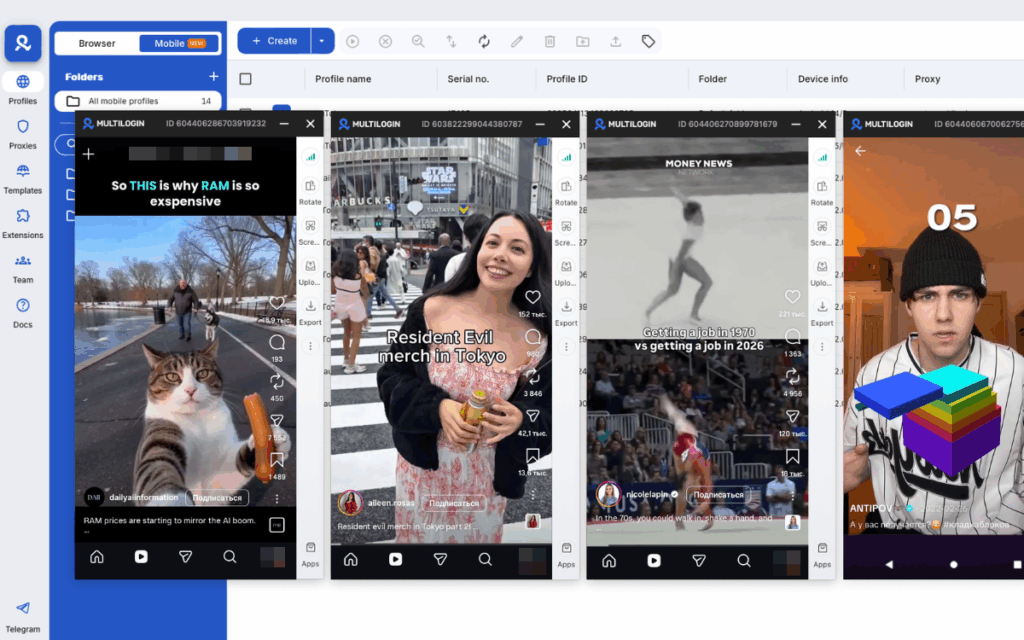
A Cloud Phone is the most complete solution for this. Multilogin Cloud Phones run real Android devices in the cloud, each with its own genuine hardware identity and a location matched to a country where TikTok is available. The phone isn’t pretending to be in another country: it genuinely is one, with a real residential IP, real device identifiers, and a real app environment. TikTok runs natively on the Cloud Phone exactly like it would on a physical device in that location.
This is the approach that works for creators and social media managers who need reliable, consistent, professional access to TikTok from restricted regions — not a workaround that stops working when the school updates its filter. You can see the full setup at how to use Cloud Phones for TikTok.
Unblocked TikTok Websites: Are They Safe?
Sites claiming to offer “TikTok unblocked 66,” “TikTok unblocked 76,” “TikTok unblocked WTF,” or similar are third-party mirror sites. In 2026, most of these are either fake, filled with ads and trackers, or actively malicious. One college student who used an unofficial “TikTok unblocker” site during class later found unauthorized logins from multiple countries on their account.
Never log into your TikTok account through an unofficial third-party site. If you’re going to access TikTok through a workaround, use the official TikTok website or app, accessed through a tool that changes your network routing, not a site pretending to be TikTok.
How to Unblock Someone on TikTok
This is an entirely different issue from network blocks. If you’ve blocked a user on TikTok and want to reverse it, here’s exactly how to do it:
Method 1: Through your blocked users list
- Open TikTok and tap your Profile icon
- Tap the three-line menu in the top right
- Go to Settings and Privacy
- Tap Privacy
- Tap Blocked accounts
- Find the account you want to unblock
- Tap Unblock next to their name
Method 2: From their profile directly
- Search for the user’s account or find it through another route
- Go to their profile
- Tap the three-dot menu in the top right of their profile
- Tap Unblock
Both methods work the same way. Once you unblock someone, they can view your content and interact with you again, and you can view theirs.
If You Unblock Someone on TikTok, Will They Know?
No. TikTok does not send a notification when you unblock someone. They won’t receive an alert saying they’ve been unblocked. The only way they’d know is if they tried to visit your profile while blocked, couldn’t see it, and then later found they could see it again — which most people wouldn’t notice unless they were actively checking.
Similarly, TikTok does not notify someone when you block them in the first place. The block is silent in both directions.
Can Someone See If You Unblock Them on TikTok?
Not directly. TikTok doesn’t surface block or unblock events to users. The person you unblocked will simply find that they can access your profile and content again if they happen to look. There’s no history, no notification, and no alert on their end.
What Happens When You Unblock Someone on TikTok?
When you unblock a user on TikTok, a few things change immediately:
- They can view your profile, videos, and public content again
- You can view their profile and content
- They can comment on your videos, send you DMs (if your settings allow), and engage with your content
- Their previous comments that you may have removed while they were blocked do not automatically reappear
- They are not automatically added back to your followers or following list — that has to happen again separately if either of you wants to follow the other
Can You Block and Unblock Someone on TikTok?
Yes. There’s no limit to how many times you can block and unblock a user. Each action takes effect immediately. That said, repeatedly blocking and unblocking the same person doesn’t serve much practical purpose for most users.
How to Get Unblocked on TikTok If Someone Has Blocked You
If someone else has blocked you, there’s nothing you can do to reverse it from your end. The block is entirely within their control.
You won’t be able to see their profile, find their content, or send them messages while the block is active. If the person is someone you know, the only way to resolve it is to reach out to them through another channel.
How to Block Someone on TikTok Without Viewing Their Profile
If you want to block someone without landing on their profile (for example, because you don’t want your visit to appear in their profile view history), you can block them from the comment section or from a shared video:
- Tap their username on any comment or post tag
- From the mini-profile popup that appears, tap the three-dot menu
- Select Block
This lets you block without fully navigating to their profile page.
How to Unblock Comments on TikTok
If you’ve restricted who can comment on your videos and want to open them back up:
- Go to Settings and Privacy
- Tap Privacy
- Tap Comments
- Adjust who can comment on your videos
This is different from blocking individual users. Comment settings control who can interact with your content broadly, not whether a specific person can see you.
Need to manage multiple Tiktok accounts? Try Multilogin Cloud Phones.
Running Multiple TikTok Accounts: The Smarter Unblocked Setup
For creators and agencies who need consistent, unrestricted access to TikTok across multiple accounts and regions, a patchwork of VPNs and proxy sites is not a sustainable solution. VPNs change your IP but don’t solve device fingerprinting. Mirror sites are unsafe for account credentials. Free proxies get blocked and come back unreliable.
Multilogin Cloud Phones give each TikTok account its own isolated real Android environment: its own device identity, its own location, its own residential proxy, all managed from one dashboard. Each account appears to TikTok as a completely independent user on a completely independent device in a specific country. There’s no shared IP, no shared fingerprint, and no linked account signals.
For Indian creators, Southeast Asian agencies, or any professional operation that needs TikTok access from a restricted region, this is the approach that works at scale without the instability and security risks of ad-hoc workarounds.
You can see how it’s set up at Cloud Phones for TikTok and best Cloud Phones for social media marketing.
Frequently asked questions About TikTok Unblocked
The most reliable method is switching to mobile data, which bypasses the school’s Wi-Fi restrictions entirely. The Google Translate trick and switching to public DNS servers also work for basic content viewing on some school networks.
Using a VPN or proxy to access TikTok is not illegal in most countries, but it may violate your school’s acceptable use policy. Check your school’s rules before using any bypass method.
Go to Settings and Privacy, then Privacy, then Blocked accounts, find the user, and tap Unblock. Alternatively, visit their profile and use the three-dot menu to unblock directly.
No. TikTok sends no notification to the user when you unblock them.
These are third-party sites claiming to offer unblocked TikTok access. In 2026, most of these are unreliable, ad-heavy, or actively unsafe. Never log into your account through them.
No. There’s no notification for unblocking, just as there’s no notification for blocking.
Yes, through a Cloud Phone running from a country where TikTok is available. This gives you a genuine Android device in an unrestricted location with full app access, not just a masked IP.
The fastest method is to visit the person’s profile and use the three-dot menu to unblock. If you don’t remember their username, go to Settings and Privacy, then Blocked accounts, to find them.


