



Runway AI can create static social-ad images and video assets, including product animations and campaign variations. For creators and agencies, the buying decision comes down to how many attempts produce an approved asset. The useful measure is credits per approved clip, alongside the time needed to finish the ad.
This review evaluates Runway for teams managing social profiles. The focus is practical: turning an image or prompt into an ad asset, checking the result, and choosing a plan around revision costs.
What is Runway AI, and what can it generate?
Runway AI is a creative platform for generating and editing video, images, and audio. Its video tools include text-to-video and image-to-video generation, alongside tools for changing existing footage. Different models have different inputs, settings, and credit costs.
For a social media manager, the main jobs are creating ad variations, animating a product image, and changing an existing scene. Runway includes task-specific apps for advertising, alongside Edit Studio, powered by Aleph 2.0, for changes such as replacing a background or adjusting a shot’s appearance.
Keep those jobs separate when estimating a project. Creating a clip, revising footage, and finishing an ad can involve different tools and additional credits.
Is Runway good for social media content?
Runway is a useful candidate for social content that needs original visual assets and allows time for revisions. The strongest starting point is a specific missing shot in an existing content plan. Buying a subscription before defining that shot makes the credit budget harder to control.
Social media marketers can use Runway to develop:
- Product motion: animate an approved pack shot for a Reel or ad opening.
- Supporting footage: create a scene that helps explain an offer or establish a mood.
- Creative variations: explore a different setting or camera movement while holding the campaign message steady.
- Campaign concepts: develop visual directions and storyboards for client review before committing to production.
Creators developing an AI influencer can also evaluate generated scenes for a recurring character. Review identity consistency across the full sequence before treating an attractive individual frame as a successful video.
Generating an approved clip covers the creative side, but agencies publishing Runway assets to several client or niche accounts also need to keep those accounts apart. Multilogin for AI-generated content on multiple social media accounts runs each social profile on its own real Android cloud phone with its own app data and built-in proxy, so each Reel or TikTok upload happens inside that account’s own environment. Multilogin offers a free plan with no time limit and no credit card required, and paid plans start from $7.08/month.
If your daily work mainly involves cutting existing footage and adding captions, start with an editor. Our guide to AI tools for social media marketing separates content creation from the other jobs in a social workflow.
Can Runway create social ads?
Runway can create static ad images and video assets for social campaigns. Choose the workflow around the deliverable: a new ad layout, a product video, or a shot to add to an existing edit. Here is an overview of the Runway features that can help you create social ads.
| Tool | Input | Output | Aspect ratio | Cost |
|---|---|---|---|---|
| Create Ad | Reference ad, product image, tagline | One static image | 16:9 | 25 credits / sec (Gen-4.5) |
| Product Shot Video Builder | Product photo | Product video | 9:16 vertical | 12 credits / sec (Gen-4.5) |
| Gen-4.5 image-to-video | Image plus motion prompt | 2 to 10 second clip, 720p | 9:16 supported | 12 credits/second |
| Gen-4.5 text-to-video | Text prompt | 2 to 10 second clip, 720p | 16:9 listed | 12 credits/second |
Runway permits commercial use of generated content, including product advertising, Instagram Reels, and TikTok, and requires no attribution. Its usage-rights guidance confirms that permission. Use reference ads and input assets your team is authorized to use, then review campaign claims and required disclosures.
How to make a static ad with Create Ad
Create Ad uses an existing layout as a starting point for a new image ad. For the bottle campaign, use your own approved reference creative and product photo.
1. Open Apps and search for Create Ad.
2. Add the layout under Reference Ad and the bottle photo under Reference Image.
3. Enter approved copy, such as “Refill. Reuse. Repeat.”, with a short visual direction. Check the quoted credits and select Generate.
4. Review the image’s product details, lettering, layout, and dimensions before adapting it for the intended placement.
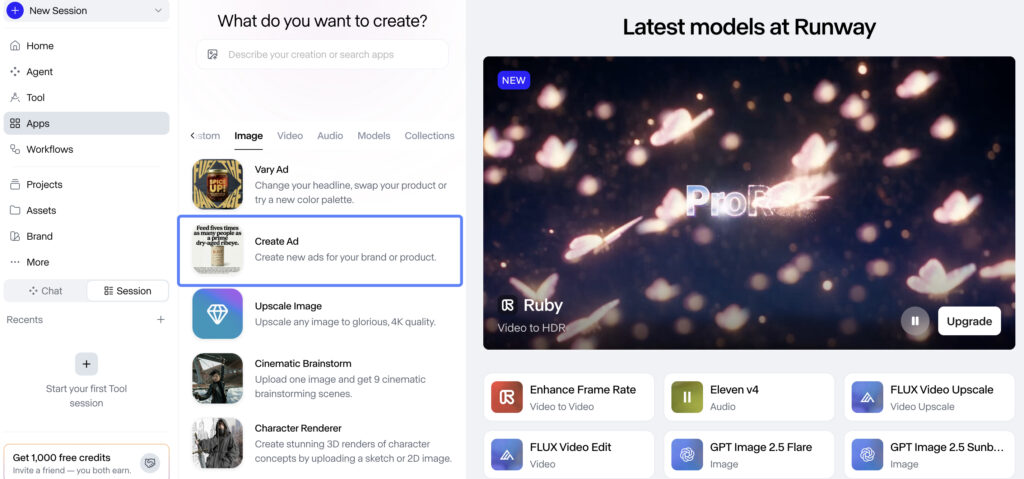
Keep separate approval checks for static images and video. An approved image establishes a useful starting frame; motion introduces another round of product and composition checks.
How does Runway image-to-video work for social ads?
Runway image-to-video uses a starting image to establish the scene. The prompt describes movement. For product ads, that gives you a concrete visual starting point: the image your team has already approved.
Gen-4.5 supports vertical 9:16 output in image-to-video mode. The following workflow is based on Runway’s documentation and is ready for hands-on validation.
1. Prepare the starting image. Use a product photo. Compose the vertical frame with space for a headline and the social app’s interface.
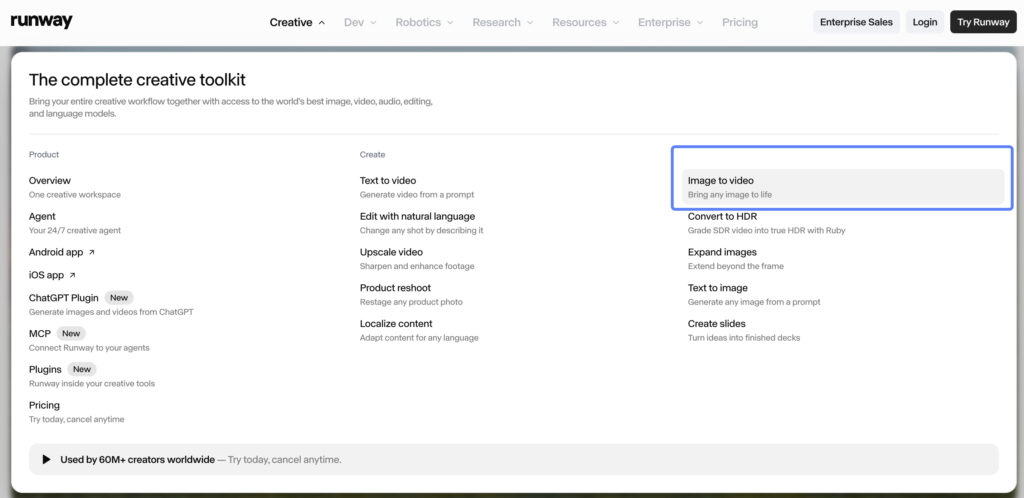
2. Open the video tool. In Runway’s Tool mode, select Image to Video and choose Gen-4.5. Upload the image and check the crop before generating.
3. Describe one movement. Try this original starting prompt: “The camera moves slowly toward the bottle. Soft reflections travel across its surface. The bottle remains upright on the table. One continuous shot.” Treat the prompt as a test input, with results still to be measured.
4. Set a five-second duration and check the cost. Confirm 9:16 and review the credit estimate before clicking Generate. Save the prompt and settings so the next attempt changes only one variable.
5. Review before repeating. Compare the first, middle, and last frames, then watch the full clip. Reject a take if the bottle changes shape, label details become unusable, or the motion distracts from the offer.
6. Download and finish the ad. Add approved copy, captions, audio, and an end card in your editor. Review the exported 9:16 file and record the total production time, including rejected attempts.
This workflow keeps the product review separate from the creative decision. A dramatic camera move is only useful if the product still looks correct.
When should you use Runway text-to-video instead?
Runway text-to-video suits a new scene that you can describe without a source image. Include the subject, setting, visual style, and movement in the prompt. For example: “A red bicycle beside a quiet coastal road at sunrise. The camera slowly moves past the handlebars.”
The format distinction matters for social ads. Runway’s current Gen-4.5 documentation lists 16:9 for text-to-video, while image-to-video includes 9:16. This is a Gen-4.5 specification, so do not apply the same restriction to every model hosted in Runway. Confirm the selected model’s settings before committing to a vertical workflow.
For an ad that needs a recognizable product and a vertical composition, we recommend starting with an approved image. Use text-to-video to explore supporting scenes where exact packaging is less central.
What does Runway AI pricing include in 2026?
Runway pricing starts at $0, with individual paid plans from $15 per month on monthly billing or $12 per month with annual billing. The table compares the individual plans relevant to this workflow. Team and Enterprise options need a separate assessment for shared production.
| Individual plan | Monthly billing | Annual billing, monthly equivalent | Included credits | Five-second Gen-4.5 attempts |
|---|---|---|---|---|
| Free | $0 | $0 | 125 once | Gen-4.5 requires a paid plan |
| Standard | $15/month | $12/month, $144/year | 625/month | 10 |
| Pro | $35/month | $28/month, $336/year | 2,250/month | 37 |
| Max | $95/month | $76/month, $912/year | 9,500/month | 158 |
Last verified: September 30, 2026. Prices are in USD. Annual equivalents require annual billing. Source: Runway’s official pricing page.
Calculated at 60 credits per five-second generation, rounded down. The figures assume the entire monthly allowance goes to that model and duration, before any other credit-consuming work. They count attempts, with no assumption that a clip will be approved.
Standard includes watermark-free generation. Pro and Max provide larger budgets for iteration. Select a plan using your expected number of approved shots and the number of attempts needed for each.
How do Runway credits work, and what does a usable clip cost?
Runway credits pay for generation, with the amount depending on the selected tool and settings. Gen-4.5 costs 12 credits per generated second, so a five-second attempt uses 60 credits. The official credits guide also explains expiry and separate API billing.
Use this formula for your test: credits per approved clip = total credits spent on the tested workflow ÷ approved clips. Include image preparation and generated revisions when those steps consume credits.
Here is an illustrative budget, with no measured success rate implied. Suppose you generate twelve five-second clips and approve three. Generation uses 720 credits, giving a cost of 240 credits per approved clip before other work.
At that assumed rate, ten ads needing one new approved shot each require 2,400 credits. Ten ads needing three new approved shots each require 7,200. This difference can change the plan choice before you add music, editing, or another revision round.
For a cash measure, divide the subscription and top-up spending allocated to the campaign by its approved outputs. Keep editing labor separate so you can see whether lower generation costs simply move more work to the editor.
What Runway plan works for frequent video creation?
Pro is a sensible starting point for a solo creator generating a few times a week. Max suits heavier daily work. Team is the option to assess when several people need a shared production workspace. These choices follow Runway’s current plan guidance, but the credit budget decides whether a plan covers your workload.
| Plan | Credits | Best for | Key details |
|---|---|---|---|
| Standard | 625 credits/month | Light exploration and occasional generation | Check the credit estimate before relying on it for regular posting |
| Pro | 2,250 credits/month | Recurring individual creation | More room for alternate takes and concepts |
| Max | 9,500 credits/month | Heavier generation and revision budgets | Up to one month of unused credits carried forward |
| Team | 6,900 credits per seat/month | Collaboration for 2–9 people | Credits go into a shared workspace pool; two paid seats provide 13,800 credits across the team |
Estimate monthly demand with this formula: ads per month × new shots per ad × attempts per shot × seconds per attempt × model rate, plus other credit-consuming work.
For an illustrative four-week month, two ads per week, one fresh five-second shot per ad, and three attempts per shot use 1,440 Gen-4.5 credits. Pro covers that generation estimate; Standard does not. Copy, existing footage, and the end card are assumed to be prepared separately.
Change the brief to five ads per week with three fresh shots each, keeping the same duration and attempt assumption, and the estimate becomes 10,800 credits. That exceeds Max’s included allowance. A daily schedule or a higher plan name does not remove the need to budget for top-ups or reduce generation demand.
Use shorter clips or a lower-cost model for early concept work when appropriate. Changing models requires a new generation and another quality review. A draft that works on one model may look different on another.
Standard and Pro monthly credits do not roll over and reset within 24 hours of the billing date. Max and Team allow up to one month of unused credits to roll over, while purchased credits do not expire. Keep web-app and API credit budgets separate if you later automate production.
Is Runway AI free?
Runway AI has a free plan with 125 one-time credits and 5GB of storage. Those credits do not expire, but they do not refresh after use. Video generated on the free plan carries a watermark, and free users cannot purchase extra credits without upgrading.
The free model selection can change. An upgrade prompt means the selected model or tool is outside your available access, or the balance is insufficient. Check the current choices and restrictions shown in your account before planning the test.
Use Free to explore the available workflow. Budget for Standard or above if your evaluation specifically requires Gen-4.5.
Runway vs CapCut: which fits your social workflow?
Choose Runway when the missing piece is a generated shot or a scene transformation, and CapCut when the main job is assembling existing footage and adding captions. The table below compares their role in a social ad workflow.
| Runway | CapCut | |
|---|---|---|
| Main job | Generating new shots and transforming scenes | Editing and assembling existing footage |
| Timeline | Final Cut timeline in the Agent panel, video clips only | Full timeline editing |
| Captions and text overlays | Finish in an editor | Built in |
| Audio | Music, voice and sound effects generation | Audio editing |
| Role in the bottle ad | Create the product shot | Assemble the final 15-second ad |
A practical combination is to create one campaign shot in Runway, then assemble the ad with existing footage in CapCut. Read the CapCut review for the editing side of that decision.
What are Runway’s main strengths and limits?
Runway’s documented strengths are model choice, image-led generation, and tools for revising existing scenes. The main purchasing constraint is that creative iteration draws from a finite credit budget. Actual quality and revision effort need to be established with your own assets.
For a social-ad evaluation, check these requirements:
Product accuracy: the approved shape, color, and packaging should remain recognizable throughout the shot.
Editing control: decide whether a problem needs a new generation, an AI edit, or a simple timeline adjustment.
Delivery format: Gen-4.5 generates 2 to 10 second clips at 720p, and paid plans include 4K upscaling after generation. Assess the final file at the size and quality your campaign needs.
Current controls: Motion Brush belonged to the retired Gen-2 model. Newer models do not provide that legacy feature, so use current prompting and supported controls when planning the shot.
Export requirements: Runway currently lists ProRes and PNG sequence generation for Max, Unlimited (Legacy), and Enterprise, and choosing either format adds 5 credits per second to the generation cost. Check the format requirement before choosing Pro for a production brief.
Content review: Runway has an automated system that scans text prompts, uploaded source images, videos, and generated assets to enforce the platform’s Usage Policy.
For synthetic characters, include the risks of AI in influencer marketing in the review process. A visually convincing scene still needs an honest message and a responsible publisher.
How to publish Runway content across multiple social profiles
Multilogin for multiple social media accounts gives each social profile its own real Android cloud phone for mobile publishing, with browser profiles included for web tasks such as ad dashboards. Scheduling tools such as Buffer or Later organize the posting calendar in one dashboard, while Multilogin keeps each account technically separate at the device level. For this campaign, keep the approved ad, destination social profile, and operator clearly matched before uploading.
Step 1: Prepare a destination-specific file. Export the approved ad with a clear name such as “bottle-ig-launch-v3.mp4”. Record the intended account and approved caption alongside the file.
Step 2: Create or open the account’s cloud phone. For a new setup, go to Profiles > Mobile > Create. Name the profile, select the built-in Multilogin proxy or add your own, run the proxy check, and keep the location appropriate to the account’s established workflow.
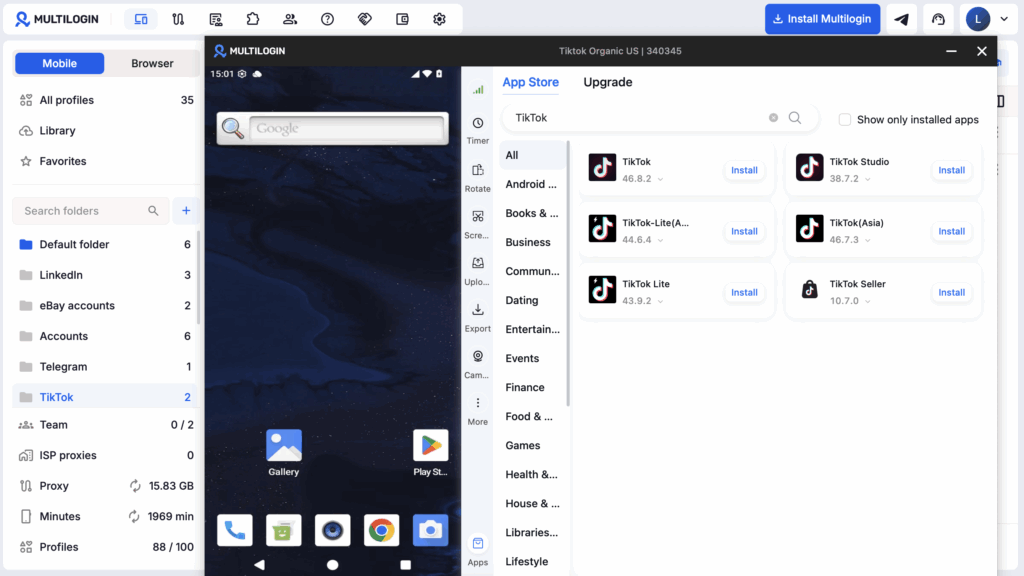
Step 3: Bring in the video. Start the cloud phone and use Upload in the right-side menu to add the file. Open or install the social app, such as TikTok, and sign in to the account.
Step 4: Check the publishing preview. Confirm the account, video, caption, cover, and required labels. Review how the app crops the creative before posting, then return to the same cloud phone for that social profile’s later work.
Step 5: Use browser profiles for web tasks. Keep web-based account work, such as an ad dashboard or reporting session, in the appropriate browser profile. Keep the approved master file and campaign record available to the team.
Similar content can still be flagged regardless of account isolation. Give each social profile an appropriate content plan and follow the platform’s rules. Cloud phones cannot send or receive SMS. Account verification needs an accessible phone number or provider outside the cloud phone, such as a virtual phone number.


Manage multiple accounts with Android cloud phones
Build account trust, reach new locations, and grow faster from one dashboard
Conclusion: Is Runway worth it for creators?
Runway is worth a focused trial if you need original ad images and product videos and can budget for revisions. Start with Pro as a candidate for recurring solo work, Max for heavier generation, and Team for shared production. Confirm that choice against approved output from your own campaign test.
Start with one 15-second vertical ad. Record every attempt, approve clips against the same criteria, and compare the total effort with your existing production method. Choose the plan after that test shows what an approved shot costs your team.
Frequently asked questions about Runway
Is Runway good for social media?
Runway is worth evaluating for product motion, supporting footage, and visual concepts for social campaigns. Start with a defined shot and check whether the result meets your brand requirements. For routine editing of existing footage, a dedicated editor may cover more of your daily work with fewer generation decisions.
Is Runway free?
Runway has a free plan with 125 one-time credits, limited model access, and 5GB of storage. The credits do not expire or renew, and generated videos have a watermark. Gen-4.5 requires Standard or above, so the free allowance cannot be treated as a free Gen-4.5 trial.
What can Runway generate?
Runway offers video, image, and audio generation, plus tools for transforming footage. Create Ad generates static ad images, Product Shot Video Builder creates product videos, and Gen-4.5 supports text-to-video and image-to-video. Available formats and credit costs vary, so choose the workflow around the asset your campaign needs.
Runway image-to-video vs text-to-video: what is the difference?
Runway image-to-video begins with an uploaded image that establishes the composition, while text-to-video begins with a written scene description. For Gen-4.5, the documented image workflow supports 9:16; text-to-video lists 16:9. Start with an approved image when a vertical product composition is central to the brief.
How do Runway credits work?
Runway deducts credits for generation according to the model and settings. Gen-4.5 uses 12 credits per second, or 60 for five seconds. Divide total workflow credits by approved clips to measure practical cost. Standard and Pro monthly credits expire; Max permits up to one month of rollover.
Can Runway create social ads?
Runway can generate static ad images and video assets. Create Ad produces an image from a reference ad, product or scene image, and creative direction. Product Shot Video Builder creates product videos. Review the output, format, copy, and branding before publishing or using the creative in a paid campaign.
What Runway plan works for frequent video creation?
Pro is a starting point for solo creators generating a few times a week; Max is aimed at heavier daily work. Team adds shared production for two to nine people. Estimate fresh shots, attempts, duration, and other tool costs before deciding whether the included credits cover your schedule.
How do I publish Runway videos to multiple social media accounts?
Export a separate, clearly named file for each destination account, then upload it from that account’s own environment. Multilogin runs each social profile on a dedicated real Android cloud phone, so the Instagram or TikTok app, login, and upload history for one account stay separate from the others. Give each account its own caption and content plan, because near-identical posts across accounts can be flagged regardless of how the accounts are set up.
Does Runway still have Motion Brush?
Runway’s Motion Brush belonged to Gen-2, which is no longer available. Newer models do not offer that legacy feature. Evaluate the current model’s prompting and supported controls, then test whether they produce the movement your ad needs. Older tutorials can describe interfaces you will no longer find.