





This question circulates constantly in social media communities — and the answer is genuinely more interesting than most guides admit. You’ll find people who swear scheduling tanks their reach. You’ll find a Hootsuite experiment showing scheduled posts outperforming native ones. You’ll find Reddit threads with hundreds of comments pointing both directions.
All of them are partially right. Here’s the full picture.
What the platforms officially say
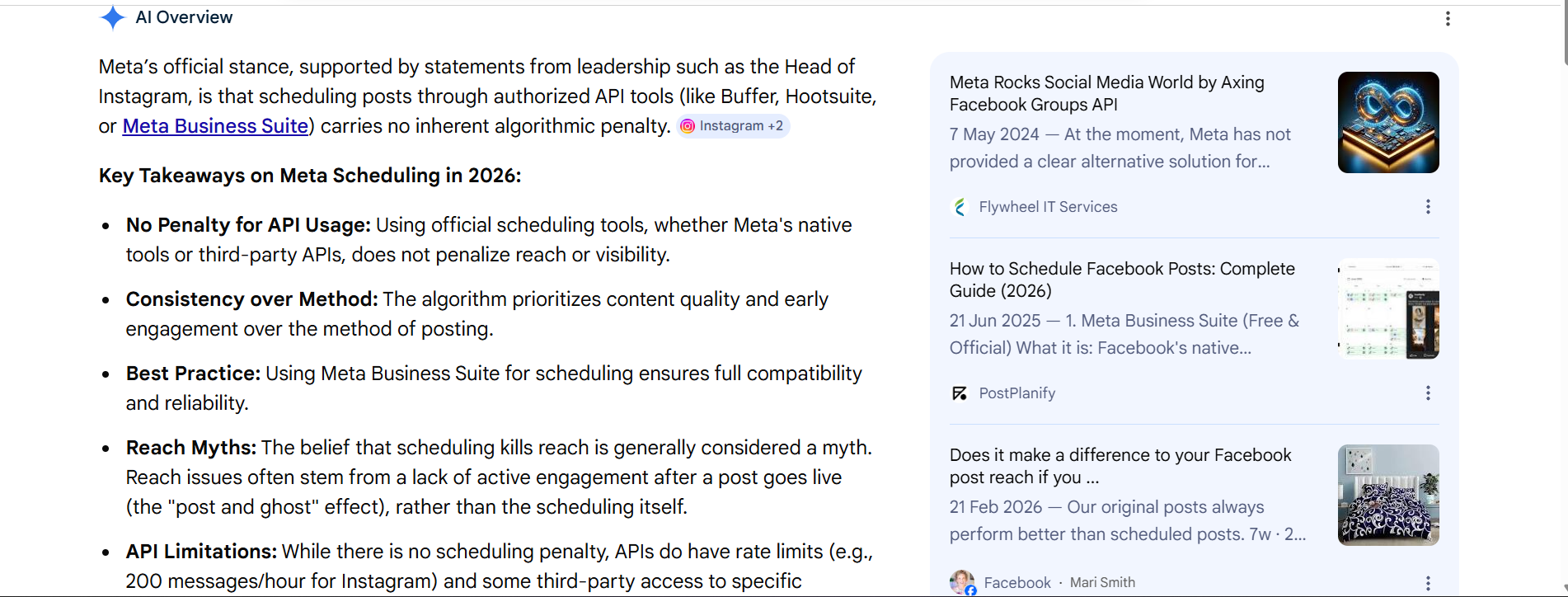
Instagram, LinkedIn, and TikTok all have official positions: scheduling through approved third-party tools uses their official APIs and is not algorithmically penalised. Hootsuite, Buffer, Later, and other official partners submit posts via the same API infrastructure that native apps use.
Hootsuite ran an actual experiment on this in 2025 — a wrestling business account posting five feed posts natively and five through Hootsuite, same content type, same times. The scheduled posts outperformed the native posts: 8.19% engagement rate versus 6.44%, and higher total reach. Their conclusion: the tool itself doesn’t hurt performance.
Instagram’s CEO has been asked versions of this question in Q&As repeatedly. The question rarely gets selected to answer — which some social media managers read as itself meaningful — but Meta’s official line is consistent: API scheduling carries no penalty.
So: at the infrastructure level, scheduling a post does not reduce your views or reach. That’s accurate, and it matters.
Why the myth won’t die
Here’s what makes this debate messy: the people reporting reach drops from schedulers aren’t all wrong either.
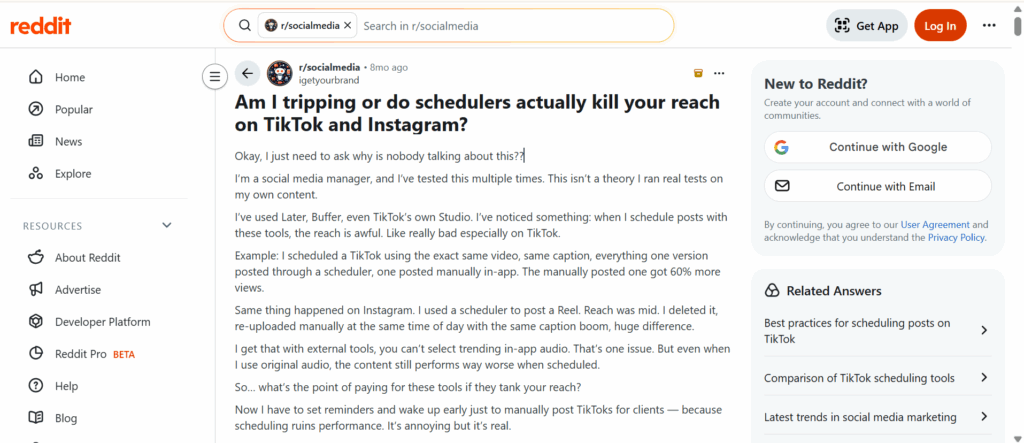
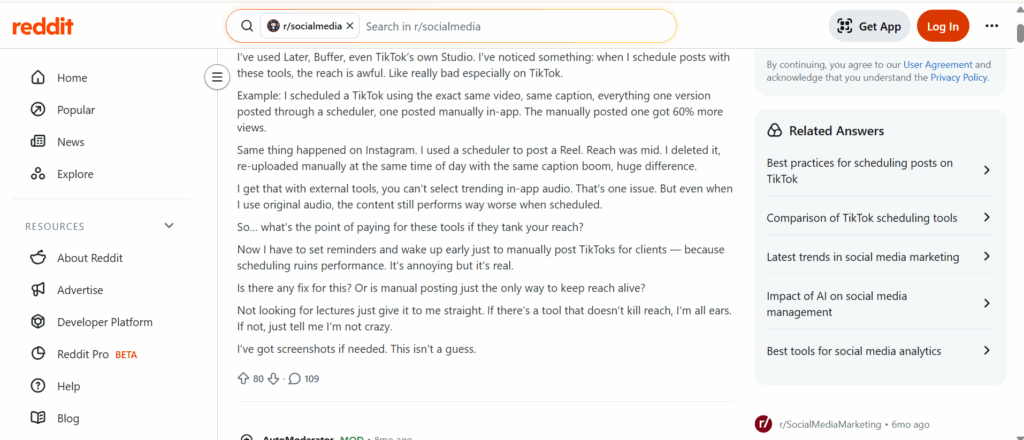
One Reddit thread from August 2025 had over a hundred comments from social media managers describing firsthand experience. Several had run their own comparisons — same video, same caption, one scheduled, one posted manually in-app — and reported significant view differences. One commenter: “I scheduled a TikTok using the exact same video, same caption… the manually posted one got 60% more views.” Another: “I deleted it, re-uploaded manually at the same time of day with the same caption — boom, huge difference.”
These aren’t conspiracy theorists. They’re practitioners running accounts every day.
If the API doesn’t penalise, what’s causing what they’re seeing?
The three things that actually cause reach differences
1. Missing the engagement window
The first 30–60 minutes after a post publishes are when the TikTok algorithm and Instagram’s ranking system assess whether to distribute your content to a wider audience. Early likes, comments, and shares are treated as quality signals.
When you post manually from the app, you’re usually watching. Engagement comes in, you reply to comments, you’re active in the app. That activity reinforces the post.
When a scheduler publishes while you’re asleep or in a meeting, nobody’s home. The post exists in the algorithm’s queue, but the behavioural signals from your account that would normally surround a post — time in the app, engagement responses, session activity — are absent.
This is what Hootsuite’s own experiment noted as “behaviour associated with using these tools” causing reach differences, even while acknowledging the API itself isn’t penalised. The tool isn’t the problem. The empty session around the scheduled post is.
2. Timing set in advance, not in the moment
Scheduling requires committing to a time ahead of posting. But optimal timing isn’t static — it shifts based on when your specific followers are active, what’s trending, and even the day’s content competition in the feed.
Generic advice about the best time to post on TikTok or the best time to post Reels is a starting point. Your TikTok analytics will tell you when your specific audience is actually online — and that data is more reliable than any blanket recommendation. A scheduled post going out at a time that felt right a week ago may be landing in a quieter window than you’d have chosen if you’d checked that morning.
3. TikTok is particularly sensitive to native session signals
Instagram and TikTok behave differently here. Instagram appears more forgiving — Hootsuite’s experiment showed no meaningful difference, and most agency practitioners report similar findings.
TikTok is different. The platform’s algorithm appears to give additional weight to signals from native sessions: time spent in the app, engagement with other creators’ content, the fact that an active user is in the ecosystem when a video goes up.
This is consistent across what experienced practitioners report. TikTok’s own scheduler (via TikTok Studio) gets similar complaints — even with an official first-party tool, creators report lower views than when posting directly in the app. One comment from the Reddit thread: “Even TikTok’s own scheduler can be hit or miss.”
The practical implication from the TikTok algorithm: native activity around the time of posting matters. The scheduler posts the content — but posting is just one moment. What surrounds it matters too.
How to schedule and still get full reach
Understanding the real problem points directly to the solution.
- Post natively, use schedulers for planning. The most effective workflow for many social media managers: draft content in your scheduling tool, plan the calendar, get approvals — but publish natively. Set a reminder for the scheduled time, open the app, post directly. You get the workflow benefits of planning ahead without handing the actual publish moment to a third-party tool.
- Be in the app when it goes out. Whether you post natively or via scheduler, your presence in the app during the first 30 minutes matters. Respond to early comments. Engage with other content. Give the algorithm the behavioural signals it uses to assess distribution.
- Pick times you can actually be present for. This sounds obvious but gets ignored constantly. Scheduling something for 3am because that’s technically your audience’s peak time makes no sense if you’re not there when it goes live. A slightly suboptimal time when you can actively engage often outperforms the perfect time when you can’t.
- Use trending audio natively. One real limitation of third-party schedulers is access to trending sounds — you can only select these from inside the app. For TikToks where audio is part of the reach strategy, posting natively is the only way to use whatever sound is trending at that exact moment.
The multi-account problem
All of the above is manageable when you’re running one account. The math changes completely when you’re a social media manager handling five, ten, or fifteen client accounts simultaneously.
Posting natively from each account at optimal times means being logged into ten different phones, across ten different sessions, simultaneously available when each one goes live. That’s not a workflow. That’s a nightmare.
This is where the debate about scheduling tools intersects with a different kind of infrastructure question. The issue isn’t just “scheduler vs native posting” — it’s “how do you get the benefits of native posting at scale without physically owning ten phones?”
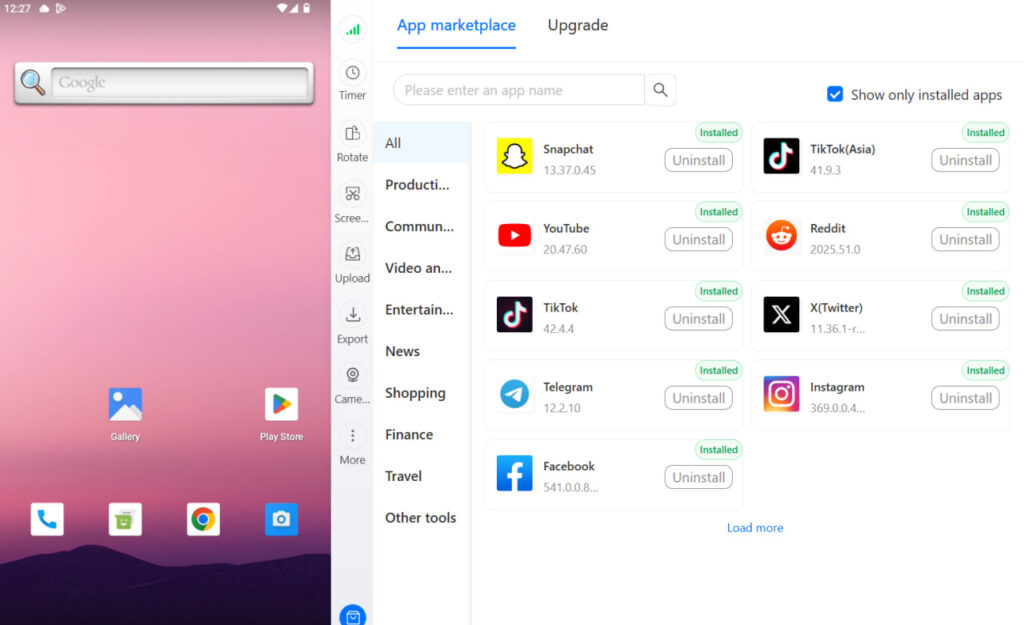
A cloud phone for TikTok or a cloud phone for Instagram gives each account a real Android device in the cloud — its own session, its own hardware identity, its own active usage signals. You manage all of them from one desktop — social media management from a real Android device, not a desktop browser pretending to be one. Post natively to each account at the right time, be present in each session during the engagement window, respond to early comments across clients in real time.
It’s the same native posting experience — from real Android devices with real device signals — without requiring a drawer full of physical phones. The best cloud phones for social media management solve the logistics problem that makes native posting impractical at scale.
For agencies running multiple TikTok accounts or helping clients create multiple TikTok accounts(https://multilogin.com/blog/how-to-run-multiple-tiktok-accounts-without-bans), this also addresses a completely separate problem: account linking. Running multiple client accounts from the same physical device means they share hardware fingerprints — which TikTok uses to associate accounts, creating risk that has nothing to do with scheduling. Cloud phones keep each account’s device identity fully separate.
Try Multilogin now and post natively across every client account from a single desktop — without shared devices, shared sessions, or compromised reach.
How to schedule TikTok posts
TikTok has two native scheduling options:
- TikTok app (mobile): When creating a post, tap “More options” before publishing. Select “Schedule” and choose a date and time up to 10 days in advance. The video must already be ready — you can’t edit it after scheduling. This is available on both iPhone and Android.
- TikTok Studio (desktop): Go to studio.tiktok.com, upload your video, and use the schedule option in the post settings. TikTok Studio is free and works in any browser. For accounts managing multiple TikToks or larger volumes of content, the desktop interface is significantly faster than the mobile app.
- Third-party tools: Buffer, Later, Hootsuite, Metricool, and others all support TikTok scheduling. API-approved tools don’t technically penalise your reach — but apply the native-posting tips above regardless of which method you use.
How to schedule Instagram posts
- Instagram app (mobile): When creating a post, tap “Advanced settings” before publishing and select “Schedule this post.” Choose your date and time up to 75 days in advance. Works for feed posts and Reels; Story scheduling is available through Meta Business Suite.
- Meta Business Suite (desktop): Go to business.facebook.com, navigate to your Instagram account, and schedule posts through the Planner. This is Meta’s own tool, so it uses native API access. You can schedule Stories and carousel posts here that you can’t schedule directly in the app.
- Third-party tools: Same API infrastructure as Meta’s own tools for approved partners. The actual scheduling works. The engagement-window factors still apply.
Does deleting and reposting help?
Several people in the Reddit thread described deleting a underperforming scheduled post and reposting it manually, seeing a significant views increase. This gets cited as proof that the scheduler damaged the original post.
The more likely explanation: the repost got a fresh distribution window with the creator actively present and engaging. The original post may have also underperformed for unrelated reasons — timing, content, the day’s competition in the feed. TikTok’s distribution decisions are made early in a video’s life, and a fresh upload resets that window entirely.
Reposting works, but it’s not evidence that the scheduler was the cause of the original underperformance.
The real factors that determine views
Rather than optimising around the scheduler question, these are what actually move the needle:
- Watch time and completion rate. The primary signal the algorithm uses to decide how far to push content. A video people finish — and especially one they watch twice — gets more distribution than one with high drop-off. Understanding your completion data in TikTok analytics is more valuable than any scheduling decision.
- Initial engagement velocity. The first 30–60 minutes. Be there for it.
- Account health and history. New accounts and accounts coming out of restrictions get lower initial distribution. Warming up a new TikTok account properly before posting high-priority content is often more valuable than any timing optimisation. A TikTok shadowban or account restriction will tank views regardless of when or how you post.
- Content quality matched to your audience. What the Hootsuite study ultimately concluded: the factors that actually affect performance are content relevance, relationship between poster and viewer, and timeliness. The scheduling method isn’t in the top tier of variables.
- Posting consistency. The algorithm rewards accounts that post regularly. Understanding how to go viral on TikTok is partly about content — but also about the consistent volume of output that gives the algorithm enough data to distribute your best work. A scheduler helping you maintain consistent volume often produces better long-term results than sporadic posting done entirely manually.
Need to manage multiple social media accounts? Try Multilogin Cloud Phones.
Frequently asked questions About Do scheduling apps lower your reach
The API connection used by third-party schedulers doesn’t algorithmically penalise your views. What does affect views is missing the engagement window — the first 30–60 minutes after posting — because you scheduled for a time when you weren’t actively in the app. Post at times you can be present for, and engage with early comments regardless of how the video was published.
The evidence for Instagram is weaker than for TikTok. Hootsuite’s experiment found scheduled posts actually outperforming native posts on Instagram. The API carries no penalty. Timing and engagement behaviour matter significantly more than the scheduling method.
In the TikTok app, create your video, then tap “More options” and select “Schedule” before posting. Pick your date and time (up to 10 days ahead). For desktop scheduling, use TikTok Studio at studio.tiktok.com — free, no app required.
TikTok Studio is TikTok’s official desktop management tool at studio.tiktok.com. It’s free and lets you upload, schedule, and analyse your content. You can schedule posts up to 10 days in advance. It’s the desktop alternative to scheduling within the mobile app.
Often yes — not because deleting fixed something, but because the repost gets a fresh distribution window, and you’re typically more present and engaged when you manually repost. TikTok makes its distribution decisions early in a video’s life, and a fresh upload resets that process.
Conclusion: the real reach problem isn't your scheduler
After going through the research, the experiments, and several hundred Reddit comments, the conclusion is pretty clear.
The scheduler isn’t killing your reach. The empty session around it is.
For a single account, that’s fixable with habits: post at times you can be present for, engage during the first hour, treat the scheduler as a planning tool and publish natively when it matters most.
For anyone managing multiple accounts — five clients, ten TikTok channels, a mix of TikTok and Instagram across different markets — those habits don’t scale. You can’t be genuinely present across ten sessions at once with ten physical phones. Which means the choice most social media managers quietly make is: accept worse reach on some accounts, or accept burnout trying to manually post everything.
That’s the problem Multilogin cloud phones actually solve. Each account gets its own real Android device — its own session, its own hardware identity, its own active usage signals. You post natively to every account from one desktop, present in each session during the engagement window, without a drawer full of phones or a team of people staggered across time zones to hit each account’s optimal posting time.
The scheduling debate is really about what native posting gives you that schedulers can’t: a real device, an active session, a live user engaging in the moment. Multilogin cloud phones give you all of that, at scale, without the physical infrastructure.
Try Multilogin now — and give every account the native posting experience that actually moves the algorithm.


