


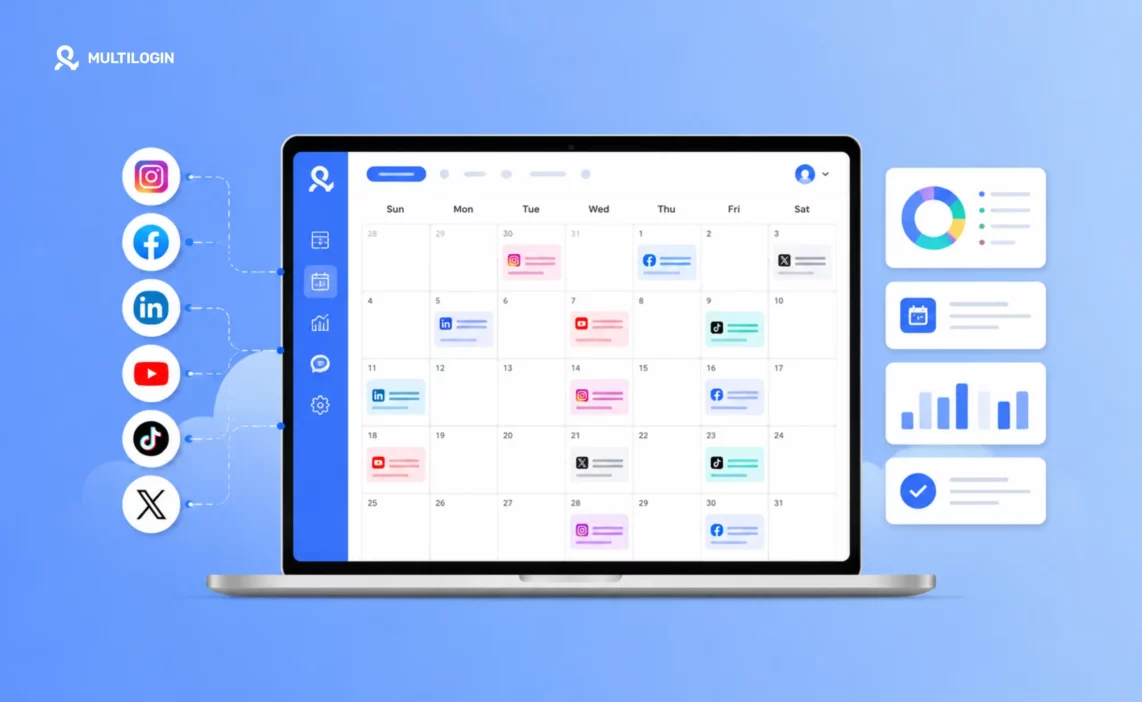



A social media content calendar is the difference between a team that posts strategically and a team that scrambles every morning wondering what to put up.
If you manage social media for a brand, an agency, or multiple clients, this guide covers everything: what a content calendar is, how to build one, how to use AI to speed up the process, and how to keep it running across multiple accounts without things getting mixed up.
We have also included a free downloadable social media content calendar template you can use today.
What Is a Social Media Content Calendar?
A social media content calendar is a planning document that maps out every post you are going to publish, on every platform, across a set time period. At its most basic, it tells you what is going live, where, and when.
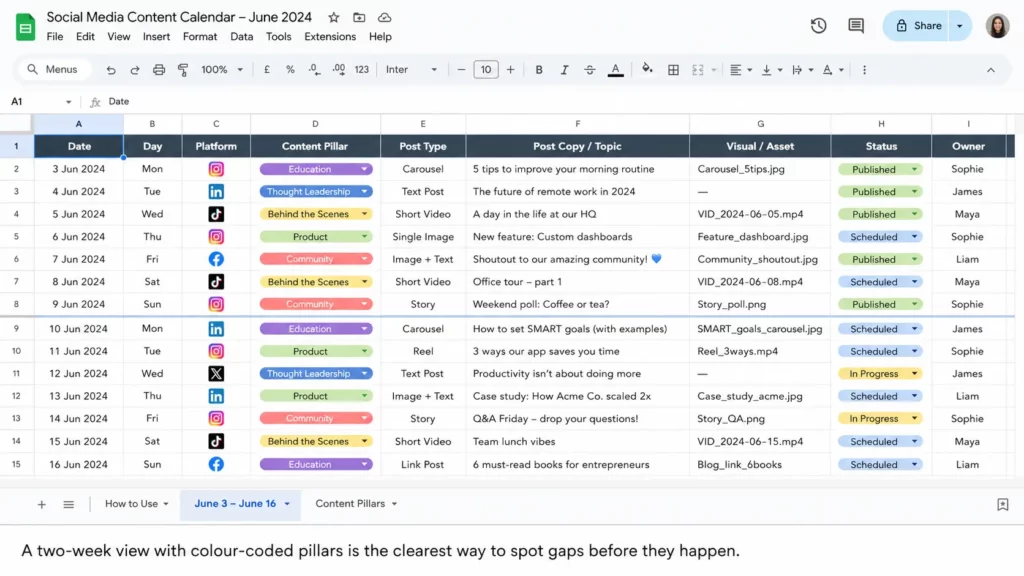
At its most useful, it also tracks the content type, the caption, the visual asset, the CTA, the approval status, and who owns each piece.
The best definition comes from what it replaces: the last-minute scramble. Without a calendar, most social media teams make posting decisions the day of or the night before. With a calendar, those decisions are made a week or a month ahead. The quality is better, the content is more strategic, and the team is less stressed.
What Does a Social Media Content Calendar Include?
A solid content calendar tracks these fields for every post:
- Publish date and time: when the post goes live
- Platform: Instagram, TikTok, LinkedIn, X, Pinterest, YouTube, Facebook
- Content type: image, video, carousel, Reel, Story, text post
- Content pillar: which theme or topic the post belongs to
- Caption and copy: the final approved text
- Visual asset: link to the image or video file
- Call to action: what you want the reader to do next
- Status: draft, in review, approved, scheduled, published
- Owner: who is responsible for creating and publishing this post
Some teams add a notes column for campaign context, a link column for UTM-tracked URLs, and a performance column to track results after publishing. Start with the essentials and add columns as your workflow matures.
Social Media Calendar vs Content Calendar: Is There a Difference?
Yes, but a small one. A content calendar typically covers all marketing content — blog posts, email newsletters, ads, podcasts, and social media. A social media content calendar focuses specifically on social posts.
In practice, most teams use the terms interchangeably. If you manage social alongside other channels, keep them in separate tabs of the same spreadsheet rather than separate files.
Why Does Every Social Media Manager Need a Content Calendar?
The short answer: consistency is the single most important factor in social media growth, and consistency is almost impossible without a calendar.
Platforms reward accounts that post regularly. Audiences follow accounts they can rely on. Teams produce better work when they are not making decisions under time pressure.
What Are the Real Benefits of a Social Media Content Calendar?
- You post consistently without the daily scramble: decisions are made in advance, not at 9pm the night before
- Your content has a strategic purpose: every post connects to a business goal, a campaign, or a content pillar
- Your team knows what is happening: no one is guessing about deadlines, approvals, or who owns what
- You catch mistakes before they go live: a structured review process reduces the risk of errors and off-brand content
- You can plan around key dates: product launches, holidays, and trending events do not sneak up on you
- You can analyse performance more easily: when posts are documented, you can see patterns in what works
According to data from Emplifi’s 2025 Social Media Benchmarks Report, which tracked 399 million posts across 754,000 brand profiles, brands with structured publishing schedules consistently outperform those publishing ad hoc. The structure is the advantage.
How to Create a Social Media Content Calendar in 2026
Building a social media content calendar from scratch is a 7-step process. Follow these steps once and you will have a system that runs itself week to week.
Step 1: Audit What You Are Currently Posting
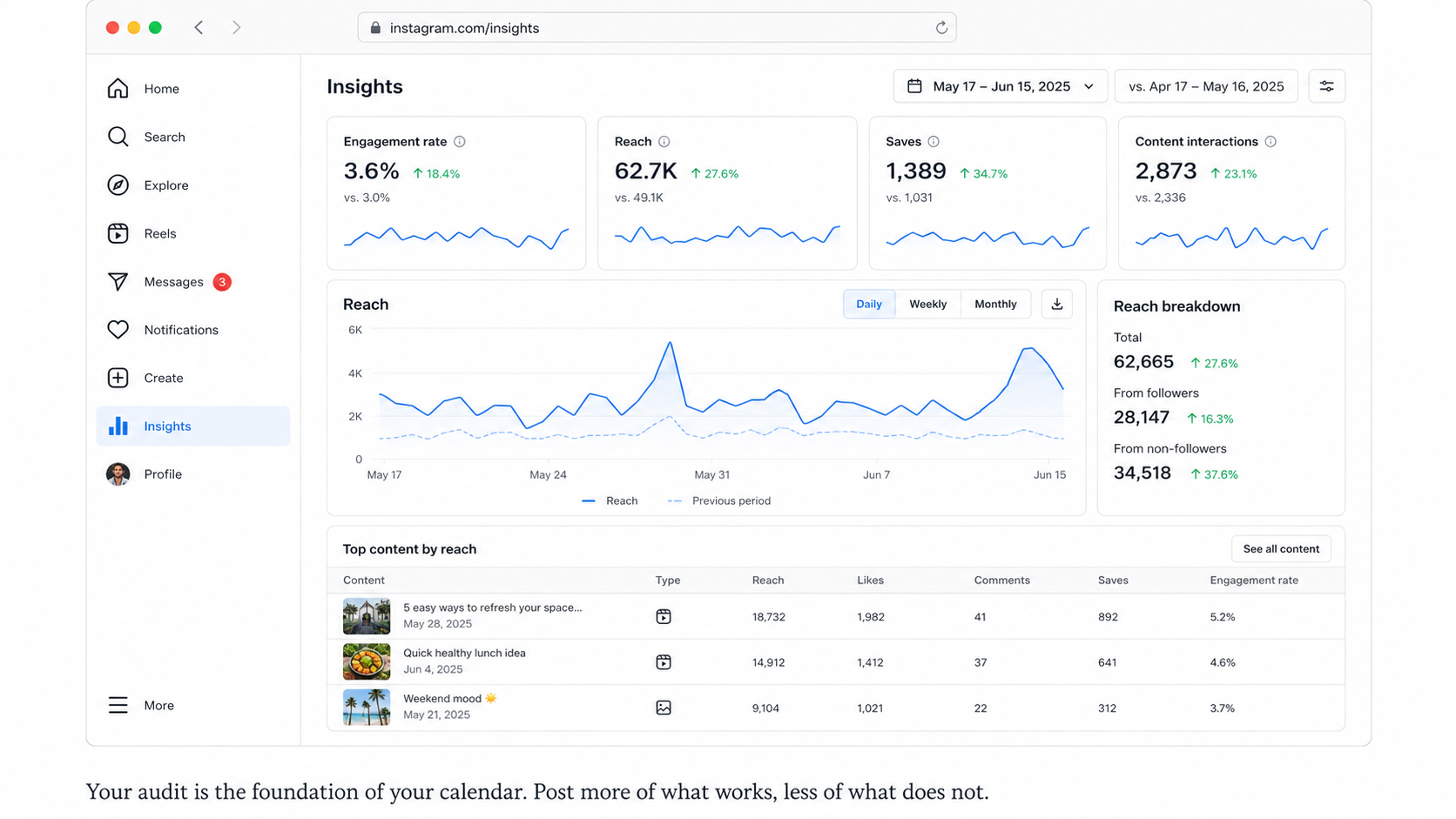
Before planning what to post next, review what you have already posted. Look at the last 30 to 90 days on each platform. Which post types got the most engagement? Which fell flat? Which platforms are actually driving traffic or conversions?
Use your platform analytics (Instagram Insights, TikTok Analytics, LinkedIn Analytics) to pull this data.
Focus on these metrics: engagement rate, reach, saves, shares, and link clicks. These tell you what your audience actually cares about, not just what gets likes.
Step 2: Define Your Content Pillars
Content pillars are the 3 to 5 broad topics your brand covers on social media. Every post you publish belongs to one of these pillars. They keep your content varied enough to stay interesting, but focused enough to build authority.
Examples by brand type:
- Social media agency: Education, Client case studies, Tools and tips, Behind the scenes, Industry trends
- SaaS product: Product use cases, Customer stories, Industry insights, How-to guides, Company culture
- E-commerce brand: Product features, User-generated content, Lifestyle, Promotions, Educational content
Once your pillars are set, assign each post in your calendar to a pillar. A quick colour-coding system in your spreadsheet makes it easy to see if you have too many promotional posts and not enough educational ones.
Step 3: Choose Your Platforms and Posting Frequency
You do not need to be on every platform. Pick the ones where your audience is actually active and where your content format fits. Platform selection should come from your audit data, not from assumptions.
Platform | Best Content Format | Best Posting Frequency | Best For |
Reels, carousels, Stories | 3-5x per week | Visual brands, lifestyle, retail | |
TikTok | Short-form video (15-60 sec) | 1-3x per day | Entertainment, tutorials, product demos |
Articles, text posts, documents | 3-5x per week | B2B, agencies, professional services | |
X (Twitter) | Text posts, threads | 1-3x per day | Real-time commentary, news, community |
Vertical images, infographics | 5-10 pins per day | E-commerce, lifestyle, evergreen content | |
YouTube | Long-form video, Shorts | 1-3x per week | Education, tutorials, brand storytelling |
Videos, carousels, events | 3-5x per week | Community, local business, older demographics |
These frequencies are starting points, not rules. Test, analyse, and adjust. What matters most is consistency within whatever cadence you choose.
Step 4: Map Out Your Key Dates
Before filling in day-to-day posts, mark the important dates for the quarter. These include:
- Product launches and major announcements
- Campaigns with defined start and end dates
- National and international holidays relevant to your audience
- Industry events, conferences, and awareness days
- Your own brand milestones (anniversaries, team growth, award wins)
Planning these first prevents the situation where you have a perfectly scheduled calendar and a product launch that has no content support because you forgot to build it in.
Step 5: Fill In Your Content Calendar
Now fill in the actual posts. Work at least two weeks ahead at all times. For larger campaigns, plan a full quarter in advance. A practical approach:
- Monday morning: write the content for the following week (or batch for the month)
- Tuesday: design review and approval
- Wednesday: load approved posts into your scheduling tool
- Thursday and Friday: handle anything that needs rework
- Weekend: content publishes automatically via your scheduler
Batching works better than writing one post at a time. Set aside a focused block for creation and a separate block for review. Switching between creation and review throughout the day costs more time than it saves.
Step 6: Choose Your Scheduling Tool
Your content calendar is where you plan. Your scheduling tool is where the content actually goes live. The two work together but serve different purposes.
- Buffer: cleanest interface, best for Instagram-heavy workflows, per-channel pricing suits smaller teams
- Later: strongest visual calendar and grid preview for Instagram and Pinterest
- Hootsuite: best for larger agencies needing approval workflows and client-facing reporting
- Metricool: best all-in-one for teams wanting scheduling and analytics without Hootsuite pricing
- Tailwind: best for Pinterest-first operations with high pin volume
Connect your scheduling tool to each account once and let it handle the publish timing. Your calendar plans; the scheduler executes.
Step 7: Review and Improve Every Month
At the end of every month, spend 30 minutes reviewing performance. Which content pillars drove the most engagement? Which post formats underperformed? Which days and times got the best reach?
Feed these answers back into the following month’s calendar. Over time, the calendar improves because you are building a record of what actually works for your specific audience.
Free Social Media Content Calendar Template (Download)
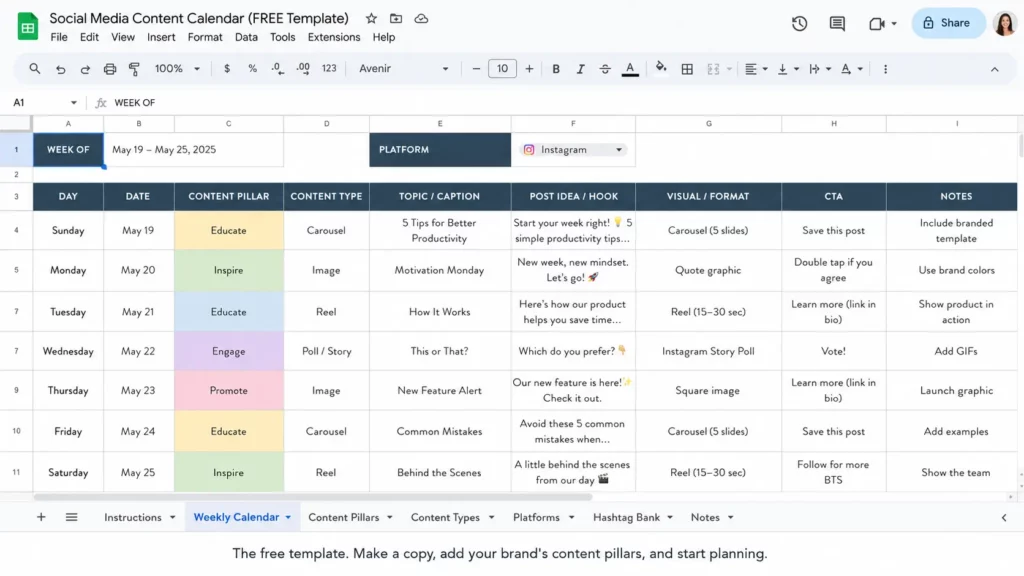
We built a free social media content calendar template in Google Sheets and Excel format. It includes everything you need to start planning immediately: date and time columns, platform selector, content type, pillar tag, caption field, asset link, CTA, status tracker, and owner assignment. The template covers a full quarter with weekly tabs and a monthly overview.
What Is Included in the Template
- Weekly tab (one per week): date, day, platform, content type, pillar, caption, asset link, CTA, status, owner
- Monthly overview tab: bird’s-eye view of all content across all platforms for the month
- Platform dropdown: Instagram, TikTok, LinkedIn, X, Pinterest, YouTube, Facebook
- Status dropdown: Not started, In progress, In review, Approved, Scheduled, Published
- Pillar colour-coding: five colour options for your content pillars, auto-applied
- Key dates tab: map out launches, campaigns, holidays, and events for the quarter
How to Use AI to Build Your Social Media Content Calendar
AI tools like Claude and ChatGPT can cut your calendar planning time from hours to minutes. The key is giving the AI enough context to produce brand-specific output rather than generic suggestions. Here is exactly how to do it.
Set Up Your AI Brand Brief First
Before running any of the prompts below, open Claude or ChatGPT and paste in your brand brief. This is the context the AI uses to produce relevant, on-brand output. Include:
- Brand name and what you do in one sentence
- Target audience: who they are, what they care about, what problems they have
- Brand voice: two or three adjectives (practical, direct, no-nonsense; or warm, inspiring, community-first)
- Content pillars: your 3-5 pillar topics
- Platforms you are active on
- Things you never write: banned phrases, topics to avoid, tone to avoid
In Claude, save this brief in a Project so every conversation inherits it automatically. You will never need to re-brief the AI.
How to Manage a Social Media Content Calendar Across Multiple Accounts
Managing a content calendar for one brand is straightforward. Managing calendars for 10 or 20 clients simultaneously — or running multiple accounts for your own brand across different markets — is a completely different challenge. The calendar is still the right tool for planning. But the account management layer underneath it needs to be right, or everything breaks down.
What Breaks When You Manage Multiple Accounts Without the Right Infrastructure
Here is what happens in practice when social media managers try to run multiple client accounts from the same device without proper isolation:
- Accounts get linked: platforms like TikTok, Instagram, and Facebook track device fingerprints and IP history. When two accounts share a device, the platform connects them. If one gets flagged, the other follows.
- Content gets mixed up: posting Client A’s caption to Client B’s account is a crisis-level mistake that becomes far more likely when you are switching between accounts on the same device.
- Logins get complicated: sharing passwords with team members or logging in and out of multiple accounts across different tools leads to security risks and access confusion.
- Scaling becomes impossible: above 10 accounts, managing everything from a single device or shared login becomes operationally untenable.
How Cloud Phones Solve the Multi-Account Problem
A cloud phone is a real Android device running on a remote server. Each cloud phone has its own unique device fingerprint, its own IP address via residential proxy, and its own completely isolated app environment.
When you log in to a client’s Instagram account from a dedicated cloud phone, the platform sees a separate device in a separate location. It cannot link that account to any other account you manage.
For social media managers and agencies running multiple accounts, the workflow looks like this:
- Create one Multilogin cloud phone per client account (or per brand account per market)
- Assign a residential proxy matching the account’s target geography
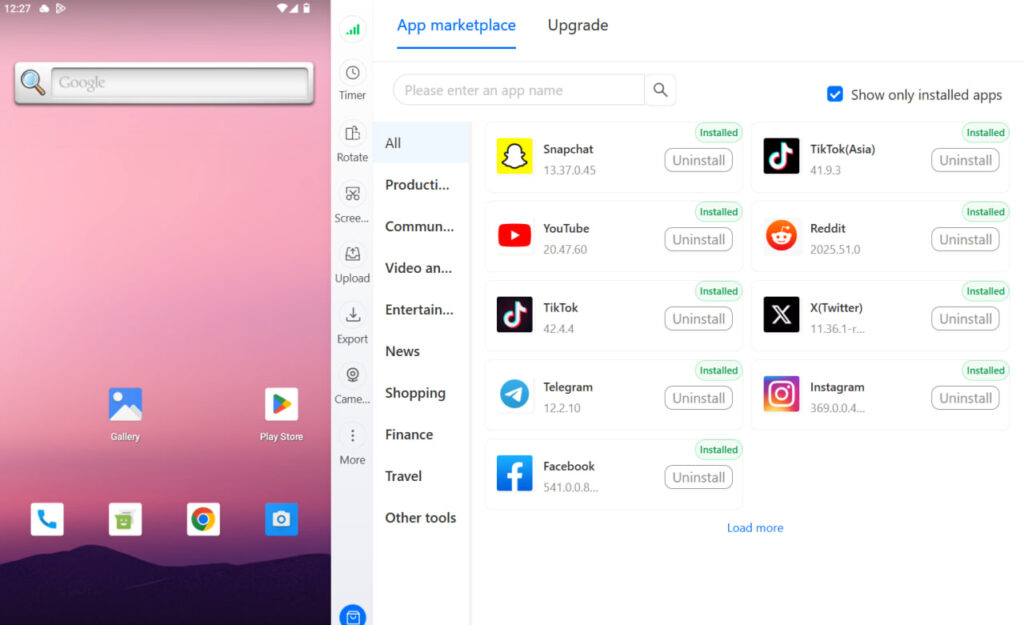
- Install the social apps inside the cloud phone via the built-in app library
- Log in to the account and warm it for 3-7 days before scheduling content
- Connect your scheduler (Buffer, Later, Metricool) via OAuth from inside the cloud phone
- From that point, your scheduler publishes from the account using the cloud phone’s device identity
The Three-Layer System: Calendar, Scheduler, Cloud Phone
The cleanest way to think about managing a large social media operation is as three separate layers:
- Layer 1 — Content calendar: where you plan what posts, where they go, and when
- Layer 2 — Scheduler: where approved posts are queued and published automatically
- Layer 3 — Cloud phones: where the accounts live, isolated and protected from each other
Each layer does one job. The content calendar does not manage accounts. Cloud phones do not generate content. The scheduler does not provide device isolation. The separation is what makes the system work at scale.
For agencies managing 20 or more client accounts simultaneously, this three-layer setup is the difference between a manageable operation and a chaotic one. See the full guide to managing multiple social media accounts for the complete infrastructure walkthrough.
Scaling to Multiple Markets with Location-Specific Cloud Phones
If your brand or clients operate in multiple countries, the location layer matters. A cloud phone assigned a UK residential proxy will appear, from the platform’s perspective, to be a UK device. A US residential proxy makes the account appear to operate from the US. This is useful for:
- Brands running separate regional accounts (US, UK, Australia, Germany) that need to appear locally operated
- E-commerce sellers managing separate storefronts per market on TikTok Shop, Amazon, or other platforms
- Agencies managing campaigns where ad targeting and account performance depends on appearing in the right geo
📱 Try Multilogin Cloud Phones Free
Multilogin’s cloud phones are available on all plans, starting from a $2 trial. Create up to 100 phones in a single batch, assign residential proxies per phone, and manage everything from one dashboard. If you manage social media for multiple clients or brands, this is the account isolation layer that makes the rest of the workflow reliable. Start your free trial now.
Social Media Content Calendar Best Practices for 2026
These are the habits that separate teams with content calendars that actually work from teams with calendars that are updated for two weeks and then abandoned.
Plan at Least Two Weeks Ahead at All Times
Two weeks is the minimum. One week is reactive. Less than one week means you are still scrambling. For campaigns, plan a full quarter in advance. For evergreen content, plan rolling two-week blocks. The further ahead you plan, the better the content quality because decisions made under pressure are almost always worse than decisions made with time.
Leave Room for Real-Time Content
A content calendar should not be so rigid that there is no space for a trending topic, a news hook, or a spontaneous moment that fits your brand. Plan 80% of your content in advance and leave 20% flexible. The calendar manages the planned work; the flexible 20% keeps you relevant.
Assign Every Post an Owner
Every post in your calendar should have a name next to it. Not a team name, a person’s name. When ownership is shared between ‘the team’, ownership belongs to no one and things fall through. Assign clearly and make owners accountable for their deadlines.
Use Colour Coding for Instant Scanning
Colour-code by content pillar, by platform, or by status — pick one and be consistent. A well-colour-coded calendar communicates the week’s content balance in under three seconds. You should be able to glance at a week and immediately see if you have too many promotional posts, or if you have forgotten LinkedIn entirely.
Review Performance Before Planning the Next Month
Before you fill in next month’s calendar, spend 20 minutes reviewing last month’s results. Pull your top three and bottom three performing posts from each platform. Ask: what made the top three work? What made the bottom three fail? Let the answers shape the next month’s content mix. Over time, this feedback loop makes every calendar better than the last.
Do Not Abandon the Calendar When It Gets Hard
The most common social media content calendar failure mode is abandonment. The team uses it consistently for 3-4 weeks, then the workload spikes, the calendar gets skipped for a week, and within a month nobody is using it. The solution is to keep the calendar as simple as possible. Remove any columns you are not actually filling in. The calendar that gets used is worth more than the calendar that is theoretically comprehensive.
Best Social Media Content Calendar Tools for 2026
The right tool depends on your team size, the number of accounts you manage, and whether you need approval workflows. Here is the honest breakdown:
Tool | Best For | What It Does Well | Honest Weakness |
Google Sheets | Solo managers and small teams | Free, flexible, accessible anywhere, easy to share | Manual scheduling — no direct publish capability |
Notion | Teams that already live in Notion | Flexible views, database structure, integrates with team workflow | Learning curve; not designed specifically for social |
Buffer | Small agencies, Instagram-heavy workflows | Cleanest scheduling interface, strong Instagram integration | Analytics not sufficient for client reporting |
Hootsuite | Larger agencies, enterprise teams | Approval workflows, client-ready analytics, broad platform coverage | Expensive; complex interface slows smaller teams |
Later | Visual brands, Instagram and Pinterest | Best grid preview, visual calendar, intuitive for creatives | Weaker on LinkedIn and TikTok |
Metricool | Growing agencies wanting one tool | Scheduling and analytics in one platform, competitive pricing | Denser interface than Buffer or Later |
Trello | Teams that think in kanban | Visual workflow, easy to track status per post | Not calendar-native; no direct scheduling |
Asana | Teams with complex approval chains | Powerful task management, due dates, team assignments | Overkill for simple content calendar needs |
For most independent social media managers and small agencies, Google Sheets for planning paired with Buffer or Later for scheduling is the most practical starting stack. Scale up to Hootsuite or Metricool when you need approval workflows or client-facing reports.
Need to manage multiple social media accounts? Try Multilogin Cloud Phones.
Frequently asked questions
A social media content calendar is a planning document that maps out every post you plan to publish across every platform over a set time period. It includes the post date and time, the platform, the content type, the caption, the visual asset, and the approval status. It is the single source of truth for your social media publishing schedule.
Download our free template at the top of this guide. Open it in Google Sheets (free), make a copy, add your brand’s content pillars in the pillar column, and fill in your posts for the coming two weeks. That is the entire process. You do not need a paid tool to start — a well-maintained spreadsheet beats an unused premium platform every time.
Minimum two weeks at all times. For planned campaigns, launches, and seasonal content, plan a full quarter ahead. For evergreen content that is not tied to a specific date, plan in rolling two-week blocks and refill the queue each week. The further ahead you plan, the better the content quality — decisions made under time pressure are almost always worse.
A social media content calendar template is a pre-built spreadsheet structure with the columns already set up: date, time, platform, content type, content pillar, caption, asset link, CTA, status, and owner. You download or copy it, add your brand’s specifics, and start filling in posts. Our free 2026 template is available for download at the top and bottom of this guide.
For agencies managing multiple clients, add a ‘Client’ or ‘Account’ column to your calendar and use separate tabs per client for cleaner organisation. The calendar handles the planning. The account management layer — keeping each client’s accounts isolated from each other on separate devices — is handled by Multilogin cloud phones. One cloud phone per client account, each with its own device fingerprint and IP. See our full guide to managing multiple social media accounts for the complete setup.
The Bottom Line on Social Media Content Calendars
A social media content calendar is not a nice-to-have. If you manage social media professionally — for your own brand or for clients — it is the foundation that makes everything else work. Without it, content is reactive, inconsistent, and harder to improve because there is no record of what you published and how it performed.
Build it once with the free template in this guide. Use the AI prompts to speed up content generation. Connect it to a scheduler so content publishes automatically. And if you manage multiple accounts, add the cloud phone layer so each account is properly isolated and your calendar can scale from 3 clients to 30 without breaking.


