


A search for a free android app youtube downloader usually starts with a practical need. You want to watch a video later, save one of your own uploads, or keep useful material available without relying on a connection.
Then the options get confusing.
Official YouTube downloads stay inside the YouTube app. Third-party tools may advertise normal video or audio files. Some Google Play listings appear for video-downloader searches even though their descriptions state that they do not support YouTube. Apps distributed as external APKs require additional care because Android warns that software from unknown sources can put devices and personal data at risk.
Before installing anything, separate four questions:
- Does YouTube provide or authorize the download?
- Do you have permission to copy or use the content?
- Will the video remain inside YouTube or become a normal media file?
- What access does the Android app request?
This guide explains those differences without treating one downloader as the right choice for every video.
Key takeaways
- YouTube officially supports offline viewing through YouTube Premium and selected regional download features, but those downloads normally remain inside the YouTube app.
- Creators can download videos they uploaded themselves through YouTube Studio or export their uploaded content through Google Takeout.
- YouTube’s service rules and copyright permission are separate checks.
- Google recommends obtaining Android apps through Google Play and reviewing Play Protect warnings and app permissions.
- A third-party downloader cannot be treated as completely safe or permitted based only on an app title, listing, or marketing claim.
- Multilogin can support separate creator and team environments, but it is not a YouTube downloader.
Quick definitions
Official offline download: A video saved through a feature provided by YouTube for playback inside the YouTube app.
Exported video file: A standard media file that can be stored on the device or opened in another compatible app.
APK: The installation-file format used for Android apps. Installing an APK from outside Google Play requires additional care.
Core difference: Official YouTube downloads are intended for offline viewing inside YouTube. Third-party tools may offer file export, but authorization, rights, permissions, and app safety still need to be checked separately.
What does YouTube officially allow you to download?
YouTube allows downloading when the service expressly provides the feature or when the required permission has been granted by YouTube and the relevant rights holders.
The YouTube Terms of Service restrict downloading or otherwise using content unless the service authorizes it or the necessary permission has been obtained. The Terms also prohibit interfering with features that limit copying or use.
That creates an important distinction:
A download feature provided by YouTube is not the same as a third-party app extracting a file from a public video page.
YouTube currently provides several official options.
YouTube Premium offline viewing
YouTube Premium lets members download eligible videos in the YouTube mobile app for offline viewing.
Downloaded videos are accessed through the Downloads area of YouTube. They are not normally exported as standard video files that appear in the Android gallery.
Eligibility can depend on the video, location, and current Premium status.
See the official YouTube Premium download instructions.
Regional in-app downloads
YouTube offers mobile offline downloads for certain videos in selected countries and regions.
Availability depends on the user’s location, the video, and whether Premium is required. A download option that appears for one user may therefore be unavailable to another.
YouTube explains these conditions in its offline video FAQ.
Downloads of your own uploaded videos
Creators can download videos they uploaded to their own YouTube channels.
YouTube Studio provides an official route for downloading individual uploads. Creators who need copies of all their uploads can also use Google Takeout.
The process is covered in YouTube’s guide to downloading uploaded videos.
Can a free Android app YouTube downloader create normal video files?
A free Android app YouTube downloader may offer file export, but that does not establish permission to download every YouTube video.
An official YouTube offline download normally remains inside YouTube. A third-party app may claim to save a separate audio or video file that can be opened elsewhere.
These are different outcomes.
Some apps shown for video-downloader searches also state in their Google Play descriptions that they do not support YouTube. Check the written app description rather than relying on its title, screenshots, or position in a search result.
Before installing an app, confirm:
- Whether the app states that it supports the intended website.
- Whether it comes from Google Play or an external source.
- Whether YouTube authorizes the download method.
- Whether you own the content or have permission to copy it.
- Whether the result stays inside the app or becomes a normal device file.
- Which Android permissions the app requests.
Technical capability does not answer the permission question.
Where are YouTube downloads stored on Android?
Official YouTube downloads are stored in an encrypted format for playback inside the YouTube app rather than as ordinary gallery files.
That is why a video may appear under YouTube’s Downloads tab but remain absent from Photos, Files, or another media player.
Availability can depend on the video, the user’s location, and applicable Premium conditions.
YouTube describes this storage format in its offline video storage documentation.
Official offline viewing therefore provides access inside YouTube rather than an unrestricted copy of the file.
Is it legal to download YouTube videos?
Downloading a YouTube video requires checking both YouTube’s service rules and the rights attached to the content.
These are related but separate questions.
YouTube’s service rules
YouTube’s Terms determine which downloading methods the service authorizes.
When YouTube provides a download feature, the feature can be used under the conditions shown by the service.
A third-party tool does not become authorized merely because it can process a public YouTube URL.
Copyright and permission
Copyright determines whether a person has the right to copy, reuse, edit, publish, or distribute the content.
Situations with a clearer basis may include:
- Downloading a video you uploaded yourself.
- Receiving permission from the relevant rights holder.
- Using material confirmed to be in the public domain.
- Following a licence that permits the intended use.
- Relying on an applicable copyright exception.
Copyright exceptions vary by jurisdiction. YouTube states that fair use is case-specific and can ultimately be decided only by a court.
Using only a short part of a copyrighted work does not automatically make the use lawful.
For more detail, read YouTube’s guidance on copyright exceptions and fair use, common copyright myths, and public-domain content.
Users remain responsible for checking whether material is in the public domain and whether the intended use is permitted in their jurisdiction.
This article provides general information, not legal advice.
Are YouTube downloader APKs safe?
A YouTube downloader APK should not be treated as safe simply because it works or appears on a download page.
Android recommends obtaining apps through Google Play where possible. It also warns that apps from unknown sources may put the device, stored data, and personal information at risk.
Three checks matter before installation.
Installation source
The installation source shows whether the app comes through Google Play or from an external location.
Installing software from an unknown source adds risk and should prompt closer review before access is granted to files, photos, videos, or other device data.
Google explains these risks in its guidance on downloading Android apps.
Play Protect status
Google Play Protect checks apps during installation and periodically scans Android devices for potentially harmful software.
Play Protect can warn about, disable, or remove potentially harmful apps. It can also scan apps installed outside Google Play.
This protection is useful, but it does not determine whether downloading a particular YouTube video is authorized.
See Google’s Play Protect documentation.
App permissions
Android permissions show which parts of the device and personal data an app can access.
Permissions may cover photos, videos, files, contacts, location, microphone, camera, and other sensitive information.
Compare each request with the app’s stated function. Access that is unrelated to downloading or storing media deserves closer review.
Android users can inspect or revoke permissions through their device settings. Google explains the controls in its Android app permission guide.
How do the available YouTube download options compare?
The correct option depends on whether you need offline viewing, a copy of your own upload, or a separate file that you have permission to create.
Option | Best for | Cost | Normal file export | Main requirement | Main limitation |
YouTube Premium download | Watching eligible videos offline inside YouTube | Paid membership | No | Eligible video and active Premium access | Playback remains inside YouTube |
Regional in-app download | Offline viewing where YouTube offers the feature | Varies | No | Eligible location, user, and video | Not available for every video or location |
YouTube Studio download | Saving a video you uploaded yourself | Free | Yes | Access to the uploading channel | Applies to your own uploads |
Google Takeout | Exporting an archive of your YouTube uploads | Free | Yes | Access to the relevant Google account | Designed for the user’s own data |
Third-party Android app | Authorized cases that require a separate file | Varies | Varies | YouTube authorization, content rights, and app review | Safety, policy, and compatibility vary |
Which YouTube download option should you choose?
Choose the official option that most closely matches why you need the video.
For offline viewing during a flight or commute, use YouTube’s own offline feature when it is available.
For a video uploaded through your channel, use YouTube Studio or Google Takeout.
When a client or rights holder has given permission to create a separate file, check that the method also complies with YouTube’s Terms. Review the Android installation source, Play Protect status, and requested permissions before using a third-party app.
An app promising instant downloads does not remove those checks.
Example 1: A creator needs a copy of an old upload
Example: A creator wants a copy of a video previously uploaded to their own channel.
The creator can download the upload through YouTube Studio. Google Takeout provides an official option when copies of multiple uploads are needed.
This route uses YouTube’s own creator tools rather than adding a separate downloader app.
Example 2: A viewer wants videos for a long journey
Example: A viewer wants to watch several eligible videos without an internet connection during a trip.
YouTube Premium or an available regional download feature can save the videos for playback inside the YouTube app. The videos will not normally appear as standard files in the Android gallery.
This is an offline-viewing use case, not a file-export use case.
Five best practices before installing a downloader
- Checkwhether YouTube alreadyprovides an official download option for the video and your location.
- Verifythat you own the content, have permission, or have another applicable basis for copying it.
- ChooseGoogle Play rather than an unknown installation source where the required app is available there.
- ReviewPlay Protect warnings and compare every requested permission with the app’s stated purpose.
- Revokeunnecessary permissions and remove the app when it is no longer needed.
How creator teams can organize Android and browser review workflows
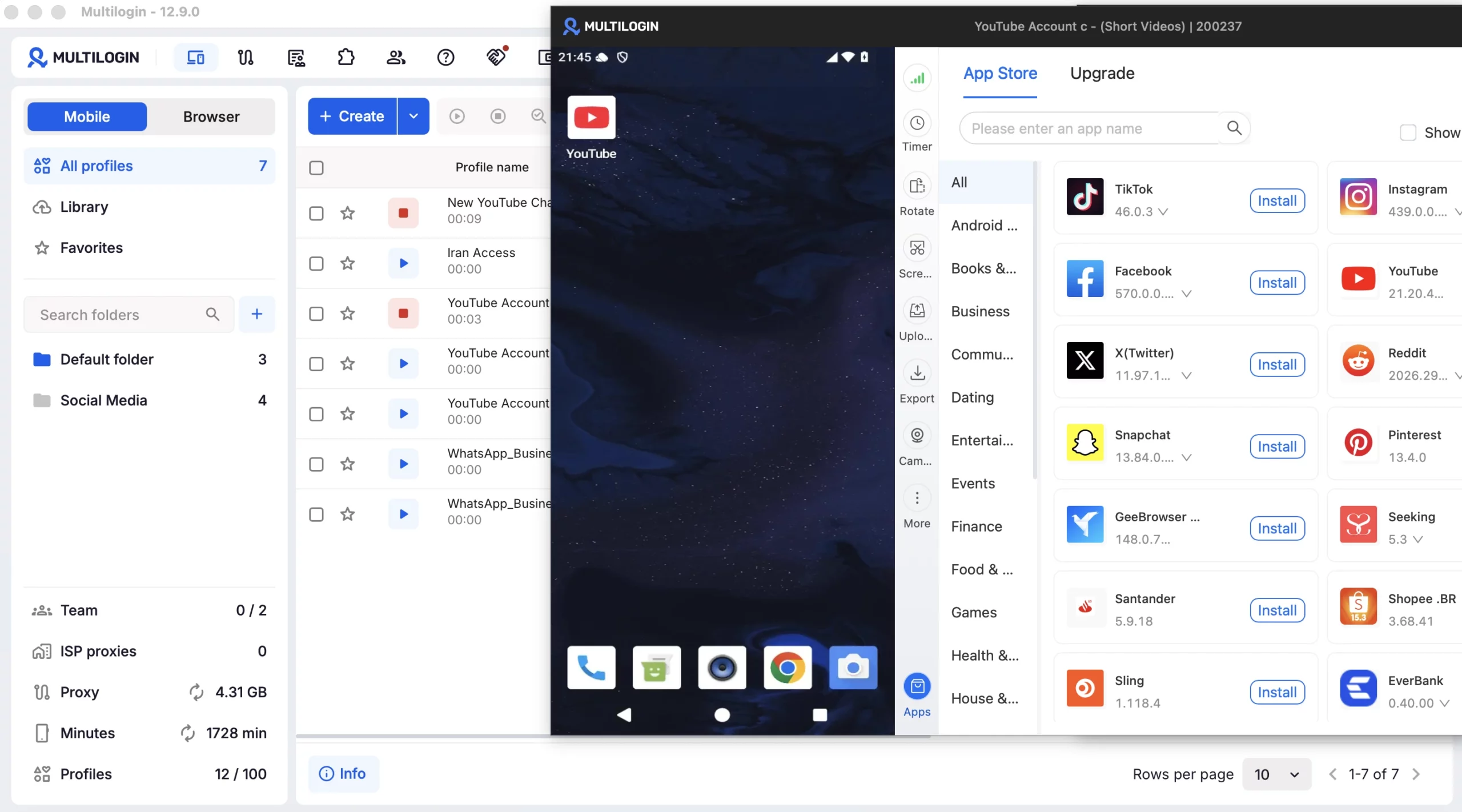
Creator teams can use separate Android and browser environments to organize app reviews, client-channel work, and team handoffs, but Multilogin is not a YouTube downloader.
Multilogin is a cloud phone platform for social media marketers. It combines real Android cloud phones and browser profiles in one dashboard.
Each cloud phone can support a separate social profile while retaining its own app data and login history. Browser profiles can be used for YouTube Studio and other web-based channel work. Folders, tags, team permissions, and profile handoffs help organize work across creators, agencies, and client teams.
For example, an agency could use a separate cloud phone to review an Android app without placing several client social profiles on one physical device. That workflow separates day-to-day app environments, but it does not authorize downloads or change the rights attached to a video.
Built-in residential proxies are included across Multilogin plans. A different network environment does not change YouTube’s Terms, copyright permissions, or the functions provided by a downloader app.
The free plan has no time limit and requires no credit card. It currently includes five profiles, including one mobile profile, 30 cloud-phone minutes, and a one-time 200 MB proxy allowance.
Paid plans currently start at $7.08 per month.
Compare total cost, then start with the free Multilogin plan.
For creator teams managing multiple (YouTube) brand or client profiles, Multilogin can help keep daily account work organized without turning your analytics workflow into a login mess.
Multilogin is not a way around platform rules; the safest approach combines clean account separation with original content, real engagement, and platform-compliant activity.
Conclusion
A free downloader app may look like the fastest option, but permission and purpose should come first.
Use YouTube’s offline features when you need to watch eligible videos without a connection. Use YouTube Studio or Google Takeout for your own uploads. Treat third-party Android tools as conditional options that require separate checks of YouTube’s rules, content rights, installation source, Play Protect status, and requested permissions.
The right download method is the one that matches both what you need and what you are permitted to do.