





If you’ve ever launched a Facebook ad campaign only to face instant restrictions, long reviews, or—worse—account bans, you’re not alone. Recent data shows more than 60% of new Facebook ad accounts hit limits within the first 30 days, usually because they have zero trust history with Facebook’s systems.That’s exactly why experienced marketers, agencies, and growth teams are turning to aged Facebook accounts—established profiles that let you skip the painful “prove yourself” phase and jump straight into effective, scalable advertising.But what exactly are aged Facebook accounts? Where do you find quality ones? And how do you actually use them without getting banned the moment you log in?This guide covers everything—from understanding what makes an account “aged” to the exact steps for onboarding safely using tools like browsers and cloud phones.
What is an aged Facebook account?
Aged Facebook accounts are Facebook profiles (and sometimes ad accounts or Business Managers) created months or years ago that have built up natural activity over time. To Facebook’s algorithms, these accounts look like real, established users—not fresh signups trying to run ads on day one.What makes an account “aged”:
- Created 6–12 months ago (or longer)
- Has organic activity: posts, likes, friend connections, comments
- Consistent login history from similar locations/devices
- Higher trust score for Facebook’s ad approval systems
- Sometimes includes verified email/phone or prior ad spend history
The age itself isn’t magic—it’s the accumulated trust signals that come with months of normal-looking behavior. That’s what Facebook’s bot detection systems are really checking for.
Types of Facebook accounts you can buy
Not all Facebook accounts for sale are the same thing. The market covers several distinct account types, and knowing which one you actually need will save you money and headaches.
Facebook profiles (personal accounts)
These are standard personal Facebook accounts—the kind with a name, profile photo, friends list, and post history. When people search for Facebook profiles for sale or buy Facebook profiles, this is usually what they mean. They’re used as the base for running ads, managing pages, or operating Business Managers. The older and more active the profile, the more trust it carries.
Facebook ad accounts
A Facebook ad account is a separate entity within Facebook’s ecosystem, used specifically for running paid campaigns. You can buy standalone ad accounts—sometimes called Meta ad accounts or Facebook advertising accounts—that already have spend history, higher limits, and established trust. These are especially valuable for media buyers who’ve burned through multiple fresh accounts.
Facebook Business Manager accounts
Business Manager (now Meta Business Suite) is Facebook’s hub for managing pages, ad accounts, pixels, and team access. Buying an aged Facebook Business Manager account gives you a trusted umbrella structure you can attach other assets to—useful for agencies running campaigns across multiple clients.
Facebook Pages
Some buyers specifically want Facebook Pages for sale—established brand or community pages with existing followers and engagement history. An aged Facebook Page with real followers looks more legitimate to both Facebook’s systems and your audience than a brand new one with zero activity.
Facebook Marketplace accounts
There’s a specific demand for Facebook Marketplace accounts for sale—profiles that already have Marketplace access enabled and a clean transaction history. Facebook has tightened Marketplace eligibility in 2026, making accounts with existing access more valuable for resellers, dropshippers, and local commerce operators. More on this in a dedicated section below.
Why buy aged Facebook accounts for ads?
If you’re wondering whether buying aged accounts is worth it, consider what happens when you don’t have them. Fresh accounts get stuck in review queues. They get flagged for “suspicious activity” before spending $20. They get disabled for no apparent reason.Aged accounts sidestep most of that. Here’s the breakdown:
1. Facebook’s algorithms actually trust them
New accounts trigger automated risk checks. Facebook sees no history, no connections, no organic behavior—and treats the account accordingly.Aged accounts have months (sometimes years) of logins, posts, and engagement. Facebook’s systems recognize them as established, real users. That translates directly to smoother ad approvals and fewer restrictions.
2. Higher spend limits from day one
Fresh accounts start with embarrassingly low daily spend caps—sometimes $25-50/day. Building that up takes weeks of careful, gradual increases.Aged accounts often come with higher initial limits. You can actually test creatives and scale campaigns without waiting weeks for Facebook to “trust” you.
3. Run multiple campaigns without cross-contamination
Managing multiple ad accounts from one device or browser is asking for trouble. Facebook links accounts through browser fingerprints, IP addresses, and behavioral patterns. One ban can cascade to everything connected to it.With aged accounts—each managed in isolated browser profiles or cloud phones—you can run ads for different brands, verticals, or clients without any connection between them.This is essential for:
- Agencies managing multiple client portfolios
- Affiliate marketers testing different niches
- E-commerce brands expanding into new markets
- Anyone who needs clean separation between campaigns
4. Skip the warm-up period
New accounts need to be “warmed up” slowly—weeks of gradual activity, cautious spending, manual engagement that mimics a real user. It’s tedious and time-consuming.Aged accounts already have that natural activity baked in. You can start running ads and testing offers almost immediately, which matters when you’re racing competitors to market or handling time-sensitive campaigns.
5. Lower ban risk when managed properly
Aged accounts aren’t immune to bans—nothing is. But they’re statistically less likely to get flagged by Facebook’s risk AI when you follow best practices:
- Dedicated browser environments for each account
- Consistent, human-like behavior patterns
- No sudden changes in IP, device, or location
- Residential IPs that match the account’s apparent location
When you combine aged accounts with tools like Multilogin for multi-account management, each account gets its own isolated browser fingerprint and real residential IP. Facebook sees seamless, natural logins—reducing ban risk even further.
6. Better long-term account health
Quality aged accounts often come with:
- Verified email or phone
- Consistent posting or ad spend history
- Existing friend connections or page likes
All of this adds up to higher “account health,” making it easier to maintain, scale, and keep ads running smoothly for months or years rather than constantly replacing banned accounts.
Aged vs. fresh Facebook accounts: the real difference
If your brand-new Facebook account can’t get an ad approved—or gets disabled before you even spend $10—you’re not imagining things. The gap between aged and fresh accounts is massive.
What aged accounts have going for them:
- Time-tested: They’ve survived multiple Facebook updates and policy changes
- Established patterns: Consistent logins, real usage history, organic engagement
- Higher trust scores: Facebook’s algorithms see them as lower risk
- Faster approvals: Ads move through review quicker, higher initial spend limits
- Lower ban risk: When managed properly, far less likely to get flagged
What fresh accounts are up against:
- Zero history: No connections, no organic signals, instant suspicion
- Strict limits: Slow reviews, capped spending, endless verification requests
- High ban risk: Many get disabled within days of their first ad
- Weeks of warm-up: Acting like a “real user” for weeks before you can actually advertise
- Not built for scale: Managing multiple campaigns from fresh accounts is asking for trouble
Side-by-side comparison
| Factor | Aged Facebook account | Fresh Facebook account |
| Account age | 6–12+ months | 0–30 days |
| Activity history | Real logins, posts, friends | None or minimal |
| Ad spend limits | Higher; scale quickly | Low; must build over weeks |
| Ad approval speed | Fast, usually automated | Slow, often manual review |
| Ban/suspension risk | Low (if managed well) | High |
| Setup time | Ready to use immediately | Weeks of warm-up required |
| Best for | Agencies, marketers, scaling | Personal use, beginners |
Burner Facebook accounts vs. aged Facebook accounts
Some people searching for burner Facebook accounts are really after two different things. It’s worth separating them.A burner Facebook account in the traditional sense is a throwaway—a fresh account created specifically to be disposable. You use it, it gets banned, you move on. They’re cheap to make (or buy) and zero-trust by definition. Some operators use them for short-burst activity where permanence doesn’t matter.Aged accounts are the opposite. They’re built for longevity. The whole point is that they’ve accumulated enough trust to survive normal business operations—running ads, managing pages, accessing Marketplace—without hitting constant friction.Which one you need depends on your use case:
- Burner accounts make sense for one-off tasks where you don’t care about the account surviving, and where you have the infrastructure to cycle through them quickly
- Aged accounts are the right call for anything ongoing—ad campaigns, Marketplace operations, long-term multi-account management
If you’re going the burner route, the management infrastructure still matters. Running multiple burner accounts from the same browser or IP is how people lose entire account batches in one sweep.
Facebook account farming vs. buying aged accounts
There’s another option some operators explore before turning to the market: Facebook account farming. This means creating fresh accounts and then deliberately “aging” them yourself—posting regularly, adding friends, simulating normal user behavior—until they build enough trust to use for ads or other purposes.It sounds cost-effective. In practice, it’s expensive in time and infrastructure.To farm Facebook accounts at any meaningful scale, you need:
- Unique browser profiles or cloud phones for each account (to avoid linking)
- Residential proxies per account with consistent geo-targeting
- Phone numbers for verification
- Weeks to months of activity before the accounts are usable
- Constant monitoring for restrictions and checkpoint triggers
Teams that do this at scale—using tools like Multilogin to manage dozens of browser profiles or cloud phones simultaneously—can produce quality aged accounts over time. But for most operators, buying established accounts from reputable sellers is faster and more predictable than farming your own.Either way, the management infrastructure is the same. Farmed or purchased, each account needs isolation, a dedicated IP, and consistent behavior to survive.
How to check a Facebook account’s age
Before you buy any account, you want to verify the age claim yourself. Sellers can misrepresent how old an account is, and there’s no official Facebook tool that shows you creation date directly—but there are reliable ways to check.
Method 1: Check the earliest activity
Go to the profile’s Activity Log or Timeline and scroll all the way back. The earliest post, like, or friend connection gives you a floor for the account’s real age. If a seller claims a 3-year-old account but the earliest activity is from 8 months ago, something’s off.
Method 2: Check the Facebook ID number
Facebook assigns user IDs sequentially. Earlier accounts have lower ID numbers. You can find the Facebook ID by going to a profile URL and looking at the numeric string—or use a tool like findmyfbid.in to extract it. Lower IDs generally mean older accounts, though this is a rough indicator rather than a precise date.
Method 3: Check joined groups and pages
Groups and pages a user has joined or liked also carry timestamps. An account with group memberships from 2019 or 2020 has a documented history that’s harder to fake than a simple creation date claim.
Method 4: Ask for account metadata
Reputable sellers should be able to provide access to the account’s Settings panel, which shows the registered email, phone, and in some cases the creation date under Security and Login. If a seller refuses to let you verify before purchase, that’s a red flag.
Facebook Marketplace accounts: what you need to know in 2026
There’s a growing niche around Facebook Marketplace accounts for sale, and it’s easy to understand why. Facebook has made Marketplace eligibility increasingly restrictive—accounts need sufficient age, activity, and in some regions identity verification to access selling features.If you’ve been banned from Marketplace, had your account disabled, or simply need a fresh start with Marketplace access already enabled, buying an aged account with an established Marketplace history is the practical solution.
What to look for in a Marketplace account
- Marketplace access already enabled: Confirm the account can actively list and buy, not just browse
- Clean transaction history: No open disputes, complaints, or policy violations on record
- Verified payment method: Some Marketplace features require a verified payment method attached
- Location match: Marketplace is geo-dependent—a UK account managed from a US IP will look wrong immediately
- Age and activity: Facebook’s 2026 Marketplace requirements favor accounts with at least 6 months of general activity, not just Marketplace usage
Managing Marketplace accounts safely
The same rules that apply to ad accounts apply here. Log into each Marketplace account from its own isolated environment—a dedicated browser profile or cloud phone—with a residential IP that matches the account’s expected location. Marketplace is particularly sensitive to location inconsistencies because it’s built around local commerce.
Buying Facebook ad accounts and Meta ad accounts
If your specific need is advertising—not just profile access—then what you’re really looking for is a Facebook ad account for sale or a Meta ad account with established spend history.These are different from personal profile accounts. A dedicated ad account carries its own trust score, spend history, and billing relationship with Meta. Buying one that’s already been through the new-account restrictions means you inherit that trust.
Types of Facebook ad accounts on the market
- Standard ad accounts: Attached to a personal profile, with basic spend history and standard limits
- Verified Facebook ad accounts: Phone or ID-verified, often with higher trust scores and better approval rates
- Facebook agency ad accounts: Operated through a Meta agency relationship, often with significantly higher spending limits and dedicated support
- Threshold accounts: Accounts that have crossed Meta’s payment threshold milestones, unlocking higher daily spend caps
What to check before buying a Facebook ad account
- Current daily spend limit
- Any active policy violations or account restrictions
- Whether the billing method can be transferred or updated
- Total historical spend (more is generally better for trust)
- Whether Business Manager access is included
Once you have the account, managing it in a completely isolated environment is non-negotiable. A previously clean ad account can get flagged within hours if Facebook notices it’s being accessed from the same fingerprint as a banned account.
Buying Facebook accounts in bulk
Some operators—agencies, affiliate networks, large e-commerce teams—don’t just need one or two aged accounts. They need Facebook accounts wholesale or Facebook accounts in bulk, with consistent quality across the batch.Bulk buying comes with different considerations than single-account purchases:
Quality consistency matters more at scale
One bad account in a batch of five is annoying. One bad account in a batch of 50—especially if it’s linked to the others through sloppy onboarding—can cascade into a wider problem. At scale, you need a supplier who can guarantee consistent account quality, not just cherry-pick a few good ones for your sample.
Infrastructure has to scale too
Buying 20 aged accounts only makes sense if you have the infrastructure to manage 20 isolated environments. That means 20 unique browser profiles or cloud phones, each with its own residential IP, each onboarded carefully without overlap.Multilogin’s team plans are built specifically for this—letting you manage large account pools from a single dashboard without the management overhead of spinning up separate tools for each account.
Negotiate replacement terms upfront
Any serious bulk supplier should offer replacement guarantees—at minimum a 24–72 hour window where accounts that fail on delivery get replaced. Get this in writing before committing to a large order.
Is buying Facebook accounts legal in 2026?
This is one of the most common questions from people new to this space, and the answer has a few layers.
What Facebook’s policy says
Facebook’s Terms of Service explicitly prohibit buying, selling, or transferring accounts. This has been the case for years and hasn’t changed in 2026. If Facebook identifies signs that an account has been transferred to a new owner, it can restrict or disable the account.So from a platform policy standpoint: yes, it violates ToS.
What the law says
Buying a Facebook account is not illegal in most jurisdictions. There’s no law in the US, UK, EU, or most other countries that makes it a criminal act to purchase a social media account. The violation is civil—between you and Facebook—not criminal.The exception is if the account was obtained through fraud or hacking. Buying a stolen account knowingly could carry legal exposure depending on your jurisdiction. This is why sourcing from reputable sellers with transparent practices matters beyond just account quality.
What the actual risk is
The practical risk isn’t legal prosecution—it’s account loss. Facebook can and will disable accounts it suspects have been transferred. That’s why proper onboarding (cookies, isolated environments, consistent IPs) isn’t optional. It’s what separates a successful account purchase from an expensive mistake.
Can you buy aged Facebook accounts safely?
Short answer: yes, but the “safely” part depends entirely on how you onboard and manage them.
What Facebook’s rules say
Facebook’s Terms of Service don’t allow account sales or transfers. They actively monitor for suspicious activity—sudden changes in login location, device fingerprint, or behavior can trigger restrictions even on aged accounts.That said, buying aged accounts isn’t illegal in most countries. The real risk isn’t legal—it’s losing the account (and your money) due to sloppy onboarding.
What actually makes it safe
1. Quality accounts with proper session data
Only buy from reputable sellers with verified history. Better yet, get accounts that come with aged cookies or premade cookies—these replicate a real user’s session history, making your first login look natural rather than suspicious.Without proper cookies, logging into an “aged” account from a new device and location looks exactly like what it is: someone new taking over the account. That’s a red flag.
2. Isolated browser profiles
Each account needs its own dedicated browser environment. No shared cookies, no fingerprint overlap, no accidental connections between accounts.Multilogin creates completely isolated profiles—each with unique device fingerprints, session storage, and cookies. The premade cookies integrate directly into these profiles for seamless, authentic logins.
3. Real residential IPs
Facebook checks whether your IP address matches expected behavior. Logging in from a datacenter IP or a VPN known for abuse gets flagged immediately.Use a real residential proxy for each account—ideally one that matches the account’s apparent geographic location. Multilogin includes built-in residential proxies across 195+ countries with city-level targeting.
4. Gradual warm-up behavior
Even with aged accounts, don’t launch aggressive ad campaigns immediately. Browse around, like a few posts, interact naturally for a few days. Then gradually increase activity and ad spend.
5. Cloud phones for mobile-first management
Here’s something most guides skip: Facebook heavily weighs mobile app behavior. Accounts that only ever log in through browsers look different from accounts that use the Facebook app on a real phone.Multilogin cloud phones solve this. Instead of browser profiles, you’re logging into the actual Facebook app on a real Android device hosted in the cloud. Real hardware IDs (IMEI, Android ID, MAC address), real app behavior, real device attestation signals.To Facebook, it looks exactly like someone using the app on their phone—because that’s what it is. The difference is you’re controlling it from your desktop.This is especially valuable for:
- Accounts that have historically shown mobile usage patterns
- Warming up accounts with natural mobile behavior
- Managing accounts where Facebook keeps pushing mobile verification
- Building trust through the Facebook app rather than web-only access
Safety checklist for buying aged Facebook accounts
- Buy from vetted sellers with transparent reviews and replacement policies
- Request aged cookies/premade cookies as part of your purchase
- Import cookies into your browser profile or cloud phone before first login
- Assign a unique residential IP matching the account’s expected location
- Never use your main device or shared browser sessions
- Warm up naturally—no sudden changes to account info, device, or behavior
- Follow Facebook’s ad policies once you start running campaigns
How to buy aged Facebook accounts (step by step)
Step 1: Know what you needBefore shopping, answer these questions:
- How many accounts do you need?
- What age range? (6 months? 2+ years?)
- Do you need accounts with prior ad spend history?
- Do you need Business Manager or just personal profiles?
- Do you need them with aged cookies included?
- Do you need Marketplace access specifically?
- Are you buying one account or in bulk?
Step 2: Find reputable sellersLook for specialized account providers with:
- Transparent reviews and verified history
- Clear replacement or refund policies
- Active customer support
- Secure delivery methods (not plain text over Telegram)
Avoid random sellers on Telegram, WhatsApp, or sketchy websites—these often sell recycled, stolen, or low-quality accounts that won’t survive a week.Step 3: Ask the right questions before buying
- When was the account created?
- What activity does it have? (posts, friends, engagement)
- Is email/phone verified? Can you change them?
- Does it include aged cookies/session data?
- What’s the replacement policy if the account gets banned quickly?
Step 4: Set up your management infrastructure firstBefore you even receive the accounts, have your tools ready:
- Multilogin installed with browser profiles created for each account
- Or cloud phones provisioned if you’re going the mobile route
- Residential proxies assigned (using Multilogin’s built-in options or your own)
Step 5: Onboard carefully
- Import any provided cookies before your first login
- Log in from the isolated profile with the correct proxy
- Don’t change account details immediately
- Browse, like, comment—act human for a few days
- Then gradually ramp up to business activity
Where to buy aged Facebook accounts
1. Specialized account marketplaces
Search for providers that specifically focus on aged social accounts. Look for:
- Real user reviews (not just testimonials on their own site)
- Secure payment and delivery options
- Clear account specifications and quality tiers
2. Marketing forums (with caution)
Some forums like BlackHatWorld have sellers with established reputations. But vet carefully:
- Check the seller’s history and feedback
- Use marketplace escrow protections when available
- Start with a small test purchase before buying in bulk
3. Agency-grade solutions
Some providers offer premium packages with:
- Handover support and managed onboarding
- Guaranteed replacement periods
- Accounts pre-warmed for specific use cases
These cost more but can be worth it for agencies managing high-value client campaigns.
Managing aged accounts: why proper tools matter
Buying aged accounts is step one. The real game is managing them in a way that keeps each account isolated, keeps Facebook’s algorithms happy, and lets you scale without cascading bans.
Browser profiles for web-based management
Multilogin creates completely isolated browser environments for each account:
- Unique fingerprints: Each profile has its own device characteristics—canvas fingerprint, WebGL, fonts, screen resolution, timezone
- Isolated storage: Cookies, local storage, and session data stay completely separate
- Persistent sessions: Close a profile, come back later, and everything’s exactly where you left it
- Built-in proxies: Assign a different residential IP to each profile with a few clicks
Facebook sees each account as a completely different person on a completely different computer. No overlap, no connections, no risk of one ban affecting others.
Cloud phones for mobile-first management
Here’s the advantage most marketers miss: Facebook’s trust signals weight mobile app behavior heavily. An account that only shows web logins looks different from one that regularly uses the app.Multilogin cloud phones are real Android devices hosted in the cloud:
- Real hardware IDs: Genuine IMEI, Android ID, MAC address—not spoofed emulator fingerprints that Facebook can detect
- Native app access: Log into the actual Facebook app, not a browser pretending to be mobile
- Persistent storage: App data, cache, and login sessions persist between uses
- ~30 device models: Samsung, Google Pixel, OPPO, Xiaomi, OnePlus—real device diversity
- Mobile-grade proxies: Built-in mobile proxies with geolocation matching
- Desktop control: Manage everything from Multilogin’s dashboard—no physical phones required
This matters for avoiding Facebook bans because you’re not trying to fool Facebook into thinking you’re on a phone. You actually are on a phone—just one hosted in a data center instead of your pocket.
Cloud phones vs. emulators: why real devices win
Traditional Android emulators (BlueStacks, NoxPlayer, etc.) use spoofed device fingerprints. Facebook has gotten very good at detecting emulator signatures—that’s why emulator-based accounts almost always trigger verification or bans.
| Factor | Emulators | Cloud phones |
| Device identity | Spoofed (traceable) | Real hardware IDs |
| Detection risk | High | Low |
| App behavior | Mimicked | Genuine native app |
| Session persistence | Usually resets | Data persists |
| Device variety | Limited | ~30 real models |
| Management | Separate instances | One dashboard |
Getting started with Multilogin for aged Facebook accounts
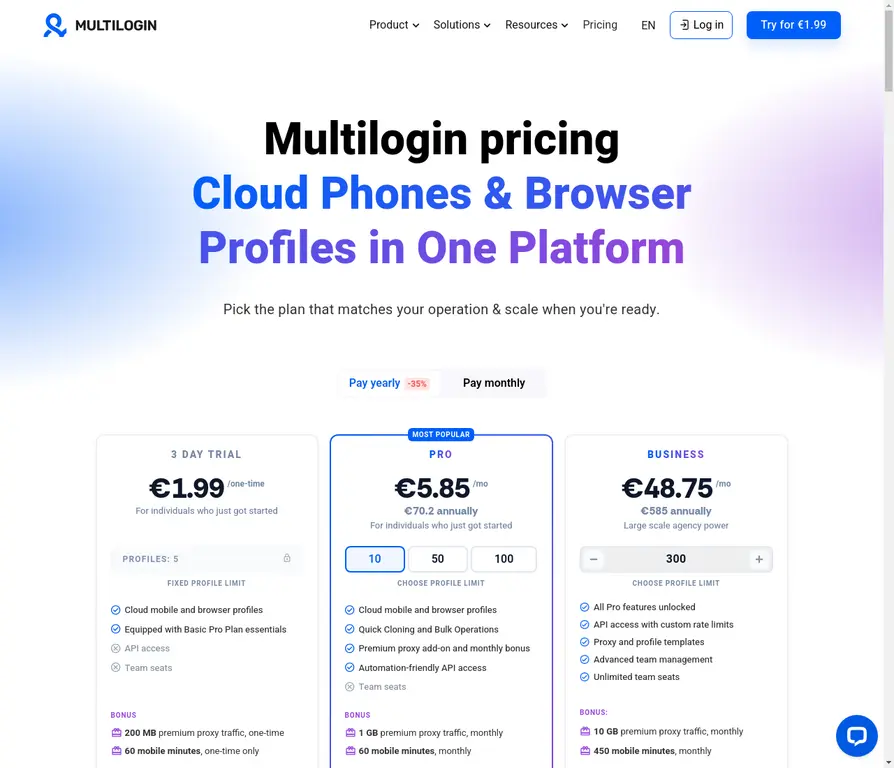
Step 1: Start with the Free Plan
You get a free plan including 5 profiles with no time limit and built-in residential proxy traffic, so you can understand whether this approach works for your use case before committing. Start your free plan here.
Step 2: Choose browser profiles or mobile
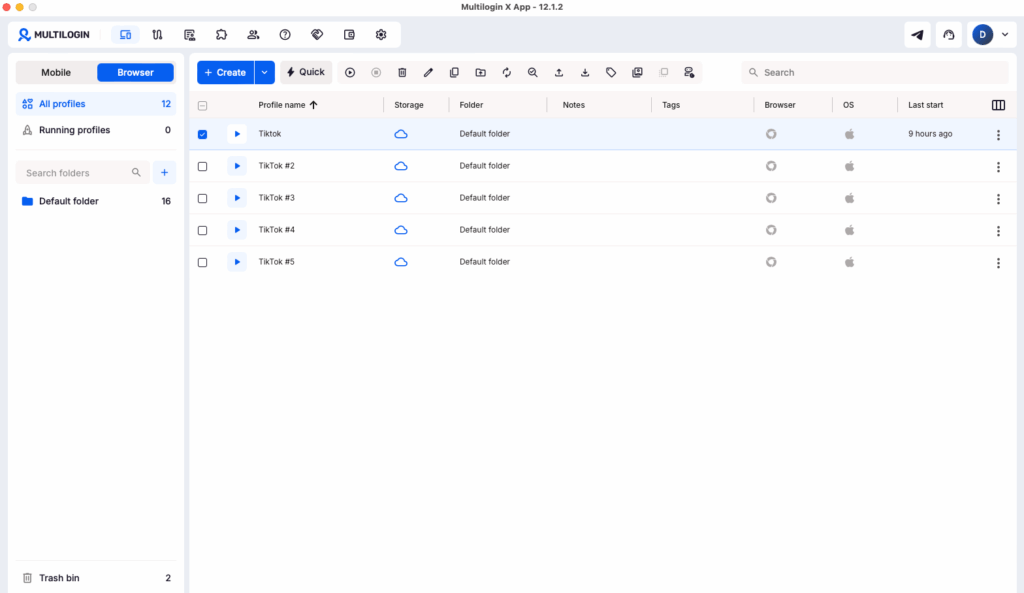
For web-based account management:
- Create a new browser profile for each aged account
- Import any provided cookies
- Assign a residential proxy
For mobile-first management:
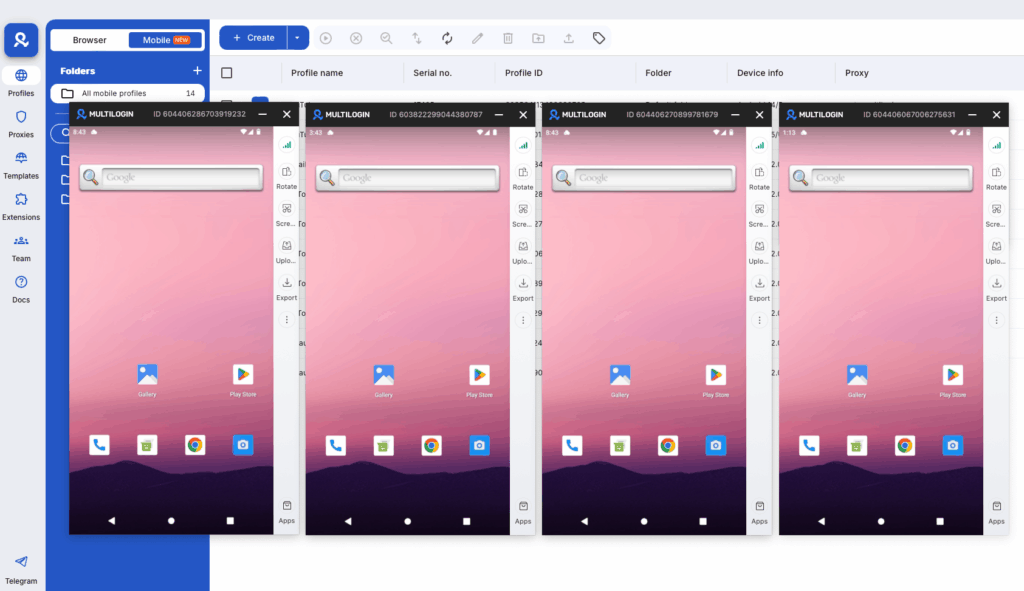
- Provision a cloud phone for each account
- Log into the Facebook app directly
- Benefit from real device trust signals
Many marketers use both—browser profiles for Ads Manager work, cloud phones for account warming and mobile engagement.
Step 3: Import your aged accounts
Each aged account goes into its own isolated environment. Never share profiles between accounts—that’s the fastest way to get everything linked and banned together.
Step 4: Assign residential proxies
Use Multilogin’s built-in proxies or integrate your own. Match the proxy location to where the account “should” be logging in from based on its history.
Step 5: Warm up, then scale
Even with aged accounts, don’t go from zero to aggressive advertising overnight:
- Day 1-3: Browse, like posts, maybe add a friend
- Day 4-7: Light engagement, check Ads Manager, review settings
- Week 2+: Start running ads with modest budgets, scale gradually
Why Multilogin is the standard for aged Facebook account management
Managing multiple aged Facebook accounts without proper tools leads to cross-account contamination, detection, and bans. Here’s why Multilogin has become the go-to solution:
- Complete profile isolation: Each account runs in its own unique browser environment—no accidental links
- Advanced fingerprinting: 55+ parameters customized per profile, mimicking real user devices
- Built-in residential proxies: 30M+ IPs across 195+ countries included in all plans
- Cloud phones: Real Android devices for mobile-first account management
- 2-in-1 solution: Browser profiles and cloud phones in one dashboard—complete web and mobile control
- Team collaboration: Share accounts with team members while maintaining isolation
- Persistent sessions: Cookies and sessions saved automatically—no lost logins
Starting at $7.08/month, Multilogin provides one of the safest and most scalable ways to manage aged Facebook accounts, whether you’re handling two accounts or two hundred.
You can also get started with a free plan that includes 5 profiles with no time limit, so you can try the platform before upgrading.

