





A mobile proxy routes your internet traffic through a real SIM card connected to a cellular carrier network — 4G, 5G, or LTE. To any platform checking your connection, your traffic looks identical to a real person browsing on their phone. For social media managers, the question isn’t whether mobile proxies work — it’s when you need them instead of residential proxies, what the difference actually is, and how to set them up without the complexity that puts most people off.
How Does a Mobile Proxy Work?
A mobile proxy works by routing your requests through a device — typically a modem or router — that holds a real SIM card and connects to a mobile carrier network. Your traffic exits through that device’s IP address, which is a carrier-assigned mobile IP. The platform you’re connecting to sees carrier network traffic, not your real IP.
The critical mechanism is CGNAT — Carrier Grade Network Address Translation. Mobile carriers use CGNAT to share a single public IP address across thousands of real users simultaneously. That shared nature is what makes mobile proxies structurally different from other proxy types. When a platform sees a mobile carrier IP, blocking it would mean blocking thousands of genuine users on the same carrier. Instagram and TikTok are extremely reluctant to do that — which is precisely why mobile carrier IPs carry the highest trust level of any IP type for social media platforms.
How Does a Mobile Proxy Work on Android?
On a physical Android phone, a mobile proxy is configured in Wi-Fi settings: Settings → Wi-Fi → long-press your network → Modify network → Advanced → Proxy. You enter the proxy host and port. The phone then routes all its traffic through that proxy server, which sits between your device and the internet.
For professional social media management, a better approach is to skip manual phone configuration entirely. Multilogin cloud phones are real Android devices hosted in the cloud, with proxies configured at the network level. You don’t touch Android settings — the proxy assignment is a dropdown in the dashboard. Each cloud phone gets its own IP, and it never rotates unexpectedly mid-session.
Mobile Proxy vs Residential Proxy: The Real Difference for Social Media
Both mobile proxies and residential proxies use IP addresses from real users — not data centres. Both look like genuine human traffic to social platforms. The difference is the type of connection they route through, and that difference matters for how platforms treat them.
What Is a Residential Proxy vs a Mobile Proxy?
- Residential proxy: Routes through a real home broadband connection. The IP is assigned by an ISP to a household — a physical address behind a cable, fibre, or DSL subscription. Trusted by platforms, widely used, and cost-effective ($3–15/GB).
- Mobile proxy: Routes through a real SIM card on a cellular carrier network. The IP is assigned by a carrier — AT&T, T-Mobile, Vodafone, EE — to a real phone on 4G, 5G, or LTE. Highest trust level for mobile-first platforms, higher cost ($10–50/GB).
Difference Between Residential, Datacenter, ISP, and Mobile Proxies
There are four main proxy types, and their trust levels on social media platforms follow a clear hierarchy:
- Mobile proxies — highest trust. Carrier-grade IPs shared by thousands of real users via CGNAT. Hardest to block without affecting real users. Best for Instagram and TikTok at scale.
- Residential proxies — high trust. Real home IPs. Slightly lower trust over time as proxy provider pools get catalogued. Best for most social media management tasks.
- ISP proxies (static residential) — moderate trust. IPs hosted in data centres but assigned to ISPs. Fast and stable but flagged more readily than genuine home or mobile IPs.
- Datacenter proxies — lowest trust for social media. Identifiable by ASN. Instagram, TikTok, and Facebook block datacenter IP ranges aggressively. Not suitable for social account management.
Are Mobile Proxies Better Than Residential Proxies for Instagram and TikTok?
For Instagram and TikTok specifically — yes, mobile proxies are better at scale. Both platforms are mobile-first. Their detection systems are built around the expectation that real users access them from phones on carrier networks. Mobile proxies match that expectation exactly. Residential proxies work well for Instagram at lower account volumes, but as account count and activity intensity increase, mobile proxies produce meaningfully fewer restrictions.
For LinkedIn and Facebook web — residential proxies are sufficient. These are browser-based platforms, and residential IPs perform reliably for browser-profile-based account management. The extra cost of mobile proxies doesn’t buy you additional protection here.
When Should Social Media Managers Use Mobile Proxies?
Mobile proxies aren’t the right choice for every situation. Here’s the clear decision framework:
Use a Mobile Proxy for Social Media When:
- You’re managing 10+ Instagram or TikTok accounts with regular daily activity. At this scale, residential proxy IP pools face higher scrutiny and the extra protection of carrier-grade IPs becomes worth the cost.
- A high-value client account has been flagged while on residential proxies. Switching to mobile proxies before reactivating gives that account a cleaner IP history and reduces the chance of a repeated flag.
- You need the highest possible account stability. If losing an account would cost significant business or damage a client relationship, the $10–50/GB mobile proxy cost is a small insurance premium.
- You’re running WhatsApp, Snapchat, or other carrier-dependent apps. These platforms share mobile’s expectation of carrier-grade IPs. Mobile proxies match their traffic signature perfectly.
Use Residential Proxies for Social Media When:
- You’re managing under 10 Instagram or TikTok accounts with moderate activity. Residential proxies handle this reliably at lower cost.
- You’re managing LinkedIn, Facebook web, or Twitter/X. Browser-based platforms don’t benefit meaningfully from mobile proxies. Residential IPs perform just as well.
- You’re doing high-volume web scraping. Residential proxy pools are larger, cost less per GB, and are more than adequate when you don’t need to look specifically mobile.
What Does a Proxy Do on a Phone? The Social Media Manager’s Explanation
When you configure a proxy on a phone, it sits between the phone and every service it connects to. The phone sends requests to the proxy server; the proxy forwards them to the destination (Instagram, TikTok, etc.) using the proxy’s IP address; the response comes back through the proxy to your phone.
From Instagram or TikTok’s perspective, the request is coming from the proxy’s IP address — not your real IP. If that proxy IP is a mobile carrier IP, the platform sees carrier network traffic. If it’s a datacenter IP, the platform sees a data centre — and flags it immediately.
For social media managers running multiple client accounts, the proxy also provides IP consistency per account. Account A always appears to come from one specific IP in one specific location. Account B always appears to come from a different IP. The accounts never share a network-level signal, so the platform can’t link them.
Types of Mobile Proxies: Rotating, Sticky, Dedicated, and Shared
Rotating Mobile Proxies for High-Volume Tasks
The IP changes at set intervals or between requests. Useful for scraping and tasks where session continuity doesn’t matter. Not suitable for social media account management — a mid-session IP change triggers a location verification on Instagram or TikTok.
Sticky Mobile Proxies for Managing Social Media Accounts
The IP stays consistent for the duration of a session. Essential for social media management. Every login from Account A uses the same IP. Every login from Account B uses a different, consistent IP. The platform sees a stable, believable user pattern for each account.
Dedicated Mobile Proxies for High-Value Accounts
A single mobile IP used exclusively by you. Complete control over that IP’s history — no other users have ever sent flaggable traffic through it. Availability is the practical limit on dedicated mobile IPs. Most providers sell them out of large pools in the US and Europe, and single-country carrier coverage across Asia stays thin. If the accounts need to read as Singaporean, dedicated Singapore mobile proxies run on physical Singtel, M1 and StarHub SIMs rather than a resold pool. That is the difference between holding a local carrier ASN and holding an IP that merely geolocates to the right city.
Shared Mobile Proxies and Their Limitations for Social Media
An IP shared with other customers of the same proxy provider. Lower cost, but you inherit the traffic history of other users. If another user on the same shared IP has triggered flags on Instagram, your account starts with a compromised IP. For serious social media account management, shared proxies carry avoidable risk.
Is a Mobile Proxy Stronger Than a VPN?
For social media account management specifically — yes, a dedicated mobile proxy is significantly better than a VPN.
A VPN routes all your device’s traffic through a shared server. All your accounts share that server’s IP. VPN IP ranges are catalogued and flagged by Instagram, TikTok, and Facebook — they’re a well-known signal for non-genuine traffic. Using a VPN also groups all your accounts together under one IP, the opposite of isolation.
A dedicated residential or mobile proxy gives one account one specific, consistent IP that looks like a real user’s connection. The account always appears from the same location. Platforms see a stable, individual user — not a shared VPN tunnel.
VPNs are useful for personal privacy. They are not suitable infrastructure for managing multiple social media accounts professionally.
What Are the Disadvantages of Using a Mobile Proxy?
Mobile proxies have real trade-offs worth understanding before committing:
- Cost. $10–50/GB vs $3–15/GB for residential proxies. For large-scale operations, the cost difference is significant. Budget accordingly.
- Speed. Cellular networks have variable latency. Mobile proxies are generally slower and less consistent than datacenter or ISP proxies for time-sensitive tasks.
- Pool size. Mobile proxy pools are smaller than residential pools. Fewer IP options means less flexibility for geographic diversity at scale.
- Overkill for many use cases. If you’re managing five Instagram accounts with moderate activity, residential proxies do the job at a fraction of the cost. Mobile proxies are the right choice at higher scale and activity intensity — not for every use case.
How to Set Up a Mobile Proxy for Instagram and TikTok
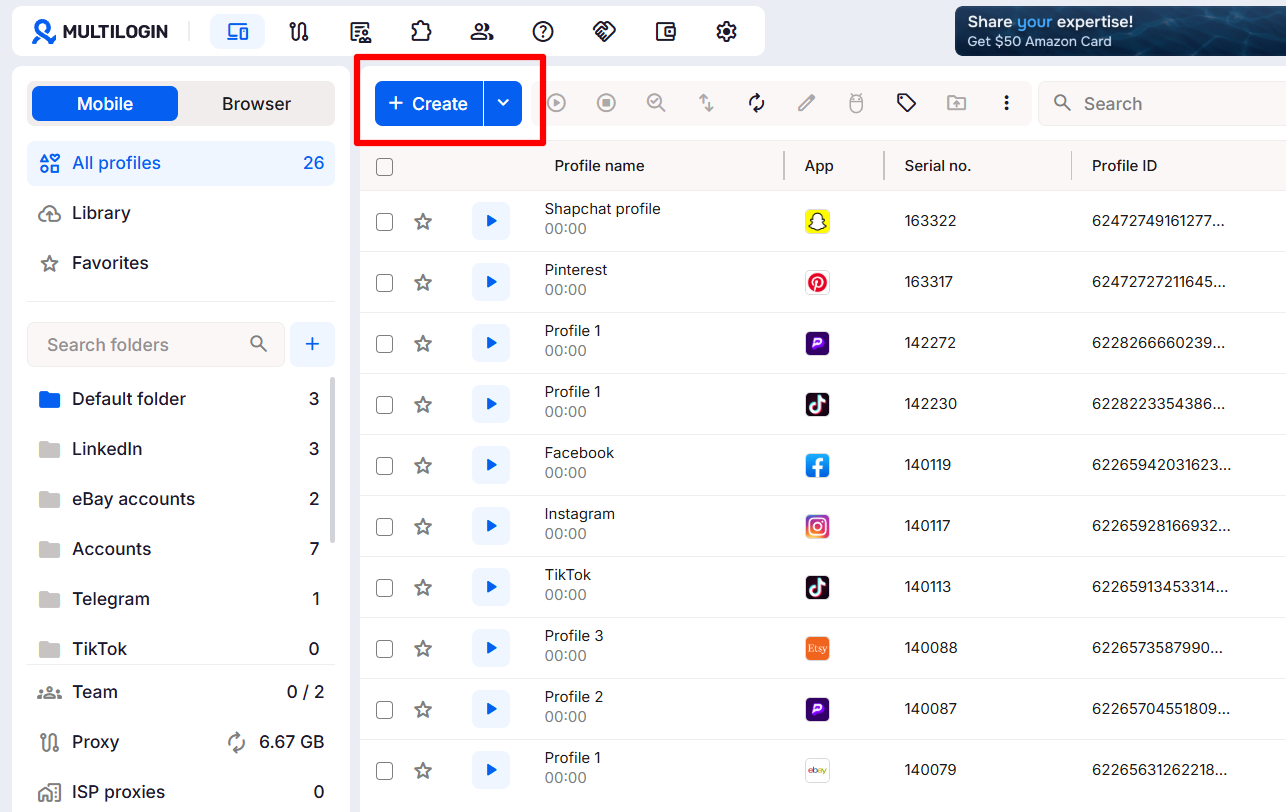
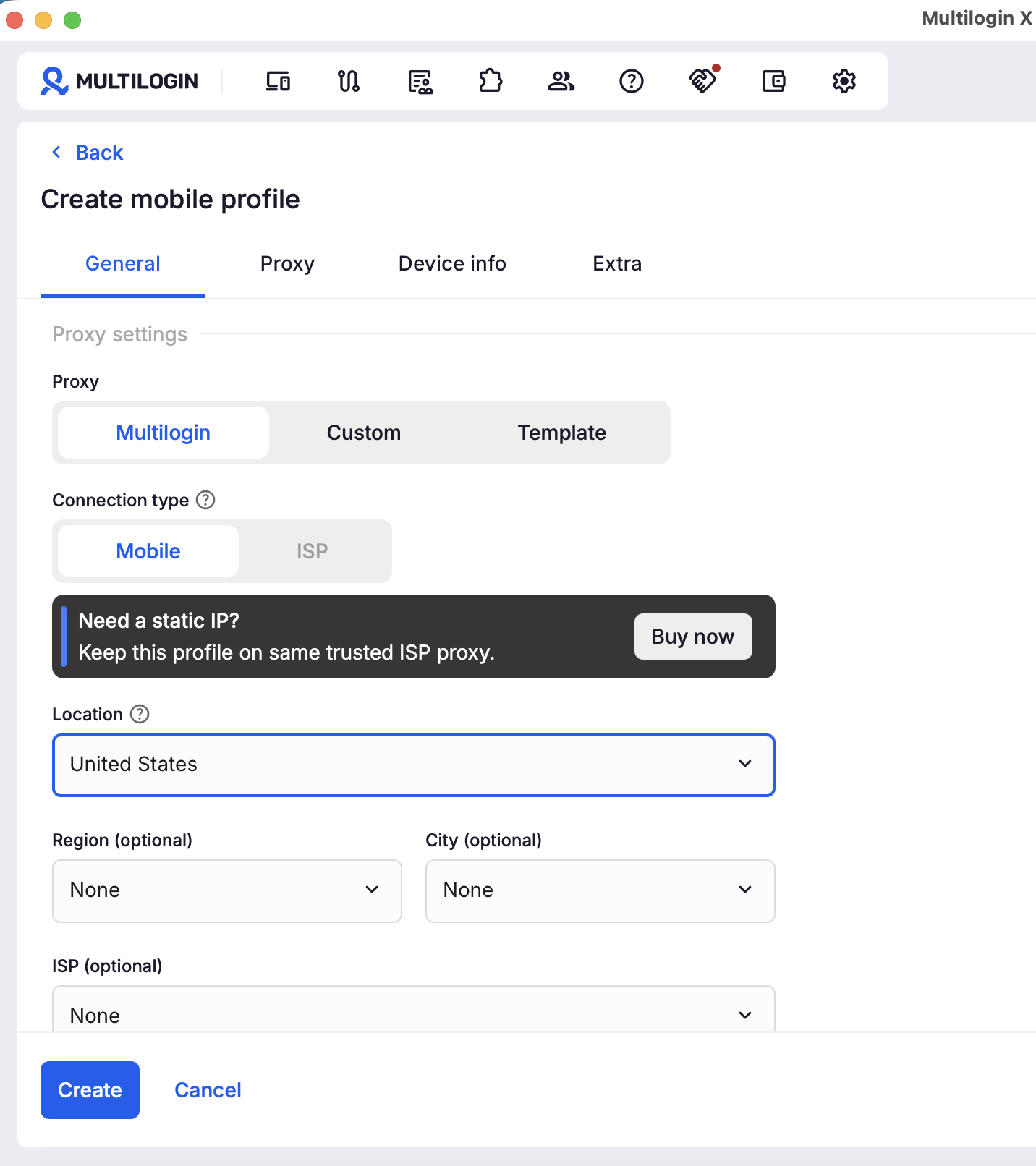
How to Set Up a Mobile Proxy in Multilogin Cloud Phones
The simplest approach for social media managers:
- Create a cloud phone profile in Multilogin for the account
- In the profile settings, select the proxy type and assign a dedicated mobile proxy IP
- Match the proxy geography to the account’s claimed location
- Launch the cloud phone — Instagram or TikTok connects through the assigned proxy automatically
No Android settings configuration. No proxy host/port entries. No manual setup in the app. The proxy is configured at the network level, stays consistent across sessions, and never rotates unexpectedly.
How to Configure a Mobile Proxy on a Physical Android Phone
- Get your proxy host address and port from your proxy provider
- Go to Settings → Wi-Fi → long-press your network → Modify network
- Tap Advanced options → change Proxy from “None” to “Manual”
- Enter the proxy hostname and port
- If required, enter the proxy username and password
- Save and reconnect
Note: Android Wi-Fi proxy settings apply per Wi-Fi network, not globally. If you switch networks, the proxy won’t apply. For consistent coverage, a cloud phone or a dedicated device per account is more reliable.
Can You Use Your Phone as a Mobile Proxy Server?
Yes — technically. Android phones can act as a proxy server through apps like Every Proxy or with root access. The phone shares its cellular IP as a proxy that other devices can route through.
Practically: this is what a DIY phone farm setup looks like. Each phone holds one SIM card, one carrier IP, and shares that IP as a proxy for one account. It works, but it’s expensive (physical devices, SIM cards, space, maintenance), difficult to scale, and fragile. When a device fails, that account loses its IP consistency.
Cloud phones solve this cleanly. Multilogin cloud phones are real Android devices hosted in the cloud — actual ARM hardware with real carrier-like IP assignments, none of the physical overhead. Scale up by adding profiles, not by buying phones. See also: cloud phone vs physical phone farm cost comparison.
Mobile Proxies and Multilogin: Device Isolation + IP Isolation Together
A mobile proxy solves the IP layer. It doesn’t solve the device fingerprint layer.
If five Instagram accounts all use different mobile proxy IPs but share the same device fingerprint — the same device ID, hardware identifiers, canvas rendering output — Instagram links them at the device level regardless of the IP difference. Platforms check both layers independently.
Multilogin cloud phones provide both layers in one:
- Real Android hardware identity per account — ARM hardware running Android 10–16, its own device ID, its own session history
- Dedicated residential proxy included — 30M+ IPs across 150+ countries, one IP per account, geographically consistent
- Mobile proxies available for accounts on Instagram and TikTok at scale where carrier-grade IPs provide meaningful additional protection
The result: Instagram and TikTok see separate phones on separate carrier connections — because that’s genuinely what they are. Start with a $2 three-day trial. Cloud phones from $0.0073/min.


