





YouTube is one of the few platforms where you can realistically build income from zero — but the path there is more specific than most guides admit. The requirements have changed, the revenue rates vary wildly by ni
Most YouTube income guides assume you want to be a creator. But a lot of people are interested in the platform’s income potential without the part where they’re on camera, building a personal brand, or producing original video content week after week.
That’s a reasonable position. YouTube is one of the largest search engines on the planet and one of the most scalable income channels available. You don’t have to make the videos yourself to benefit from it.
Here’s what actually works in 2026, what each approach requires, and what the realistic income looks like.
The honest framing before anything else
“Making money on YouTube without making videos” gets searched a lot because it sounds passive. Most of the methods here are not passive. They involve real work, just not the kind that requires you to sit in front of a camera.
What you’re skipping is the personal brand component. The on-camera presence, the face recognition, the parasocial relationship. Everything else — scripting, production, SEO, publishing, optimization, audience building — is still work. The people making real money from these approaches treat them like a business.
che, and some monetization methods work long before you hit the subscriber thresholds everyone talks about.
This guide covers the actual numbers, every monetization method worth knowing, how long it realistically takes, and what operators running multiple channels do differently to scale.
Try Multilogin now if you’re already at the multi-channel management stage.
The YouTube Partner Program requirements in 2026
AdSense revenue — the ads that play before, during, and after videos — requires joining the YouTube Partner Program (YPP). There are now two tiers.
YPP Basic (early monetization)
- 500 subscribers
- 3 public uploads in the last 90 days
- 3,000 watch hours in the last 12 months, OR 3 million YouTube Shorts views in the last 90 days
This tier unlocks channel memberships, Super Thanks, Super Chats, and the ability to promote products via shopping — but not AdSense ad revenue.
YPP Standard (full monetization)
- 1,000 subscribers
- 4,000 watch hours in the last 12 months, OR 10 million YouTube Shorts views in the last 90 days
This tier adds AdSense ad revenue on long-form videos and Shorts.
YouTube added the Basic tier in 2023 specifically to let smaller creators start earning before hitting 1,000 subscribers. If you’re starting fresh, the Basic threshold is achievable within a few months of consistent posting in most niches.
Scroll through any popular YouTube video’s comment section and you’ll spot them almost immediately. “Amazing video, check my channel!” Copy-pasted across thousands of videos. Crypto scam links disguised as giveaways.
Fake celebrity impersonators pushing sketchy URLs. Bot comments on YouTube have become so common that viewers now assume half of what they read in comment sections isn’t real.
But here’s what most people miss about bot comments on YouTube: understanding how they work matters whether you’re a creator trying to protect your channel, an agency managing multiple YouTube accounts, or someone researching a YouTube comments generator for legitimate engagement purposes.
The technology behind automated commenting reveals exactly why most approaches fail, and what actually works for managing YouTube engagement across multiple channels safely.
How Bot Comments on YouTube Actually Work
The mechanics behind bot comments on YouTube range from embarrassingly simple to genuinely sophisticated. At the basic level, someone downloads a script, feeds it a list of generic messages, and points it at YouTube videos. At the advanced end, AI YouTube comments powered by language models analyze video content and generate responses that sound convincingly human.
Script-Based Auto Comment Tools
The most common approach to auto comment on YouTube video content uses browser automation frameworks like Selenium or Puppeteer. These scripts open a browser, log into a Google account, navigate to target videos, locate the comment box, type a message, and submit it. The whole cycle repeats across hundreds or thousands of videos.
People searching for how to make a comment bot usually find open-source scripts on GitHub that handle this basic flow. They run on Node.js, require Chrome installed locally, and store credentials in configuration files.
Many users looking into bot comments on YouTube how they work and managing engagement safely download these scripts expecting plug-and-play automation. The scripts work, technically. They post comments. But “working” and “working without getting caught” are two completely different things.
AI YouTube Comments and Content Generation
The newer generation of bot comments on YouTube uses AI to generate contextually relevant responses. Instead of posting “Great video!” everywhere, these systems analyze video titles, descriptions, and sometimes transcripts to produce comments that reference specific content.
A YouTube comments generator powered by AI might produce something like “That comparison at the 4:23 mark really changed how I think about this topic” for a video it never actually watched.
These AI YouTube comments fool casual observers more effectively than template-based spam. But YouTube’s detection systems look at patterns beyond just comment text, and even sophisticated language generation can’t fix the behavioral signals that give automated systems away.
The YouTube Comment Responder Problem
Some tools market themselves as a YouTube comment responder, automatically replying to comments on your own videos. The idea sounds reasonable: your audience comments, the tool responds with relevant replies, engagement metrics go up.
In practice, YouTube tracks interaction patterns closely. A channel that responds to every comment within 30 seconds of posting, using varied but still algorithmically generated text, triggers the same detection flags as outbound spam bots.
The response timing alone creates problems. Human creators respond in bursts (checking comments during breaks, replying to several at once, then disappearing for hours). Automated YouTube comment responder tools produce unnaturally consistent response patterns that detection systems recognize instantly.
Method 1: Faceless channels
A faceless YouTube channel uses voiceover narration over visuals with no presenter on screen. Stock footage, screen recordings, animations, or AI-generated imagery carry the content while a voice (yours or a synthetic one) narrates.
This is the most popular approach and for good reason. It works across a lot of niches, the production stack is inexpensive, and you can build a real channel without anyone knowing who you are.
Categories that work well as faceless channels:
Finance and investing explainers, history and documentary-style content, top 10 list videos, motivational content with cinematic visuals, tech news and explainers, true crime, sleep and relaxation content, and satisfying process videos all perform well because the content stands on its own without a personality driving it. For example, finance-focused explainers often cover topics like budgeting tools, market trends, and the role of finance software consultancy in helping businesses make smarter data-driven decisions, which keeps the content informative and evergreen for viewers.
The production stack in 2026:
Scripts: AI drafts (Claude or ChatGPT) with your own editing layer for accuracy and voice. AI-only scripts without editing produce generic, forgettable content that doesn’t retain viewers.
Voiceover: ElevenLabs or Murf for synthetic voices. Quality has improved dramatically. For channels where a consistent voice personality matters, a custom voice model pays off. For purely informational content, standard voices work fine.
Visuals: Storyblocks or Envato Elements for stock footage subscriptions. InVideo, Pictory, or CapCut for editing and assembly.
Thumbnails: Canva or Photoshop. Do not neglect thumbnails. They drive click-through rate, which is one of the primary signals YouTube uses to decide how widely to distribute your video.
SEO: TubeBuddy or vidIQ for keyword research and title optimization. YouTube is a search engine. Well-optimized metadata consistently outperforms better-produced videos that ignore it.
Method 2: YouTube automation with outsourced production
YouTube automation means building channels where you outsource the entire production process. Writers handle scripts. Voice actors or AI handle narration. Editors handle video production. Thumbnail designers handle thumbnails. You manage the operation, approve the content, and collect the revenue.
This is a legitimate business model. It requires upfront capital (expect $1,000 to $5,000 to set up a proper pipeline and test a niche) and operational skill. You’re running a content business where you’re the executive, not the creator.
Revenue comes from YouTube Partner Program ad revenue (the main engine), affiliate placements in video descriptions, and sponsorships once the channel reaches meaningful size.
Strong automation channels in high-CPM niches like finance, software, and business can generate $5,000 to $30,000 per month at scale. Most operators take 6 to 18 months to reach meaningful income. This isn’t a 30-day project.
The common failure mode: underestimating how hard it is to find and retain reliable freelancers who produce consistent quality. The operational challenge is people management, not video production.
Method 3: Managing YouTube channels for other people
Many creators and businesses have YouTube channels they don’t have time to run properly. A channel manager handles video editing, SEO optimization, thumbnail strategy, upload scheduling, community management, and performance reporting. You’re not creating the source content. You’re managing everything around it.
This is a service business. Not passive income. But it’s genuinely high-value and in high demand. Rates for experienced YouTube channel managers range from $500 to $5,000 per month per channel, depending on scope.
Where to find these opportunities: Upwork, LinkedIn, and direct outreach to creators in niches you follow who have engaged audiences but inconsistent or declining upload schedules. The pitch is simple: you handle the operational side so they can focus on creating.
Method 4: Affiliate marketing through YouTube
YouTube is one of the highest-converting platforms for affiliate marketing because content can demonstrate a product’s value before asking someone to click a link.
If you manage or create a faceless channel, embedding affiliate links in video descriptions for products mentioned in the content adds a meaningful income layer on top of ad revenue. Amazon Associates, software affiliate programs, and direct brand programs all work well.
The advantage over ad revenue: affiliate commissions per conversion are usually much higher than YouTube’s CPM payout. A single software affiliate conversion might earn $50 to $200. You don’t need massive view counts to generate meaningful affiliate income from a well-targeted niche channel.
What YouTube monetization actually requires
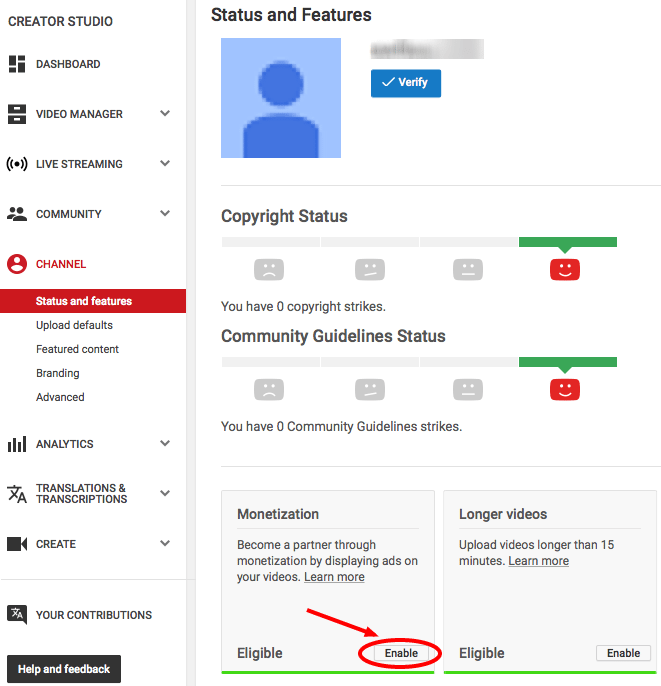
To join the YouTube Partner Program and earn from ads, you need 1,000 subscribers and either 4,000 watch hours in the past 12 months or 10 million Shorts views in 90 days. For most new channels following a disciplined strategy, this takes 3 to 9 months.
Ad revenue CPM varies dramatically by niche. Finance and business content earns $15 to $40 CPM. Entertainment and gaming earns $2 to $5 CPM. The same 100,000 views is worth very different amounts depending on what your channel covers. Choosing a high-CPM niche is one of the most important upfront decisions.
Affiliate income doesn’t require YPP monetization. You can earn from affiliate links from day one.
Managing multiple YouTube channels without account linking
Running multiple channels across different niches, or managing channels for different clients, creates the same account linking problem as any multi-account operation. Google links accounts at the browser, device, and IP level.
Multilogin provides isolated browser profiles for each channel. Every profile has a unique browser fingerprint, separate cookies, and independent session storage. Pair each profile with its own residential proxy and each channel looks like it’s operated by a completely different person from a different device.
For mobile management of YouTube channels, Multilogin cloud phones run the YouTube app in real Android environments with genuine hardware identifiers. Phone verification for account setup is handled through third-party virtual number providers that Multilogin supports.
See also: how to create multiple YouTube accounts and making multiple YouTube accounts with one email for the full setup approach.
Start your Multilogin plan from €5.85/month and keep your channels clean and separate.
Building multiple revenue streams on a single channel
The channels generating the most income stack multiple monetization layers rather than relying on ad revenue alone.
Channel memberships let engaged subscribers pay a monthly fee for exclusive content and perks once you hit 1,000 subscribers and YPP eligibility. Even modest conversion rates add real income. 100 members at $4.99 per month is $499 per month on top of everything else.
Super Thanks and Super Chat let viewers pay to highlight their comments during uploads and lives. For channels with active, loyal communities this adds up, especially during content events.
Merch integration through Printify and Spreadshop lets you display branded merchandise below your videos once the channel has a recognizable identity.
Sponsored content becomes available once you reach consistent views in a relevant niche. Finance, tech, and productivity channels command some of the highest sponsorship rates on the platform.
Digital products linked from descriptions, including courses, templates, and ebooks, often generate more income per viewer than any ad placement, particularly for channels with a tight, engaged niche audience.
Realistic timelines: what to expect
- 3 to 9 months: Most faceless channels following a disciplined strategy hit YPP requirements in this range.
- 6 to 18 months: Most automation operations reach meaningful income ($1,000 to $5,000 per month from a single channel) in this range. Faster is possible with a very well-targeted niche and initial capital for quality production.
- Affiliate income: Can start from the first video if your niche has strong affiliate products and your descriptions are optimized. This is the fastest income layer to activate.
The operators who succeed treat this as a business with a medium-term horizon, not a side hustle they expect to pay out in a few weeks.
Building a profitable channel from scratch: the setup decisions that matter
Most faceless channel operators who fail make the same mistake at the start: they pick a niche they think sounds profitable instead of one they can actually produce consistent content about. Finance sounds great on paper. But if you have no genuine interest in or knowledge of financial topics, scripting three videos per week about index funds will burn you out within a month.
The best niche for a faceless channel sits at the intersection of high CPM (advertisers who pay well), searchable demand (people actually looking for this content), and a topic you can cover consistently without running dry. History, personal development, business, tech, and true crime all meet these criteria. Pick one and stay there.
Keyword research before creating anything: YouTube is a search engine. Before you produce a single video, spend a few hours in TubeBuddy or vidIQ finding what people are actually searching for in your niche and how much competition exists at each search volume level. Target mid-competition keywords in a growing niche rather than competing head-on with established channels for their high-volume terms.
Consistency matters more than quality at first: A channel that publishes two videos per week for six months will outperform a channel that publishes one perfect video per month. The algorithm rewards upload frequency and watch time volume. You need enough videos indexed and accumulating data before the algorithm has enough signal to push your content.
The affiliate income layer: activate it early
Most faceless channel operators wait until they hit YPP monetization before thinking about income. That’s leaving money on the table.
Affiliate marketing from video descriptions can start generating income from your first video. A well-targeted video with 500 views and a relevant affiliate link in the description can earn meaningful commissions if the audience is right and the product fits.
The affiliate products that work best alongside informational content are those directly related to the topic. A finance channel reviewing budgeting concepts links to budgeting apps or courses. A productivity channel discussing note-taking methods links to Notion or Obsidian. The recommendation follows naturally from the content and doesn’t feel like a detour.
YouTube descriptions that convert: Put the most important affiliate links in the first two lines of your description, before the “show more” fold. Most viewers who click into descriptions don’t scroll far. Your primary affiliate call-to-action should be visible immediately.
Need a better YouTube Engagement Plan? Try Multilogin Cloud Phones.
When automation channels make more sense than solo faceless channels
Running a solo faceless channel means all production bottlenecks fall on you. You generate the scripts, manage the voice, edit the video or direct the editor, write the descriptions, create the thumbnails, and publish.
Automation (outsourcing the full production stack) makes sense when: you have the upfront capital to test a pipeline, you’re comfortable with the project management side of coordinating freelancers, and you want to run multiple channels simultaneously rather than building one carefully.
The typical automation channel budget per video ranges from $50 to $200 depending on quality level. A channel publishing twice per week costs roughly $400 to $1,600 per month in production costs before it earns anything. This is the real reason most automation channels take 6 to 18 months to reach profitability. Factor the ramp-up cost into your planning.
Multilogin’s cloud phone platform and isolated browser profiles give multi-channel operators the account separation infrastructure they need once the operation scales across multiple channels and management accounts.
Frequently asked questions About How to make money on YouTube
Yes, through faceless channels, outsourced automation operations, channel management services, or affiliate income from channels you help run. None of these require you to appear on camera or build a personal brand.
With paid production and a well-targeted niche, expect 3 to 9 months to reach YPP monetization thresholds. Affiliate income can start earlier. Most automation operations take 6 to 18 months to reach consistent, meaningful revenue from a single channel.
High-CPM niches with search-driven (not trend-driven) demand work best. Finance, personal development, business, productivity, software tutorials, and history all fit this profile. Avoid niches that require real personal expertise or where viewers expect to see a face.
Yes. Faceless channels using AI narration, stock footage, and screen recording are a legitimate model. Compilation channels with properly licensed content also exist, though YouTube has tightened enforcement on low-effort compilations. The most sustainable “no face” approach is creating genuinely useful content — tutorials, analysis, narrated explainers — without appearing on camera.
Not per view — per 1,000 views (RPM). Typical RPM ranges from $1–$4 for entertainment and gaming to $12–$30 for finance, legal, and business niches. Geography also matters: US, UK, and Australian viewers generate higher CPMs than most other regions.
You don’t earn money from YouTube by watching other people’s content. Some third-party platforms pay small amounts for watching and rating videos, but these are separate services unrelated to YouTube’s own monetization. See the breakdown of ways to make money watching ads if that’s the angle you’re exploring.


