





Multilogin now has a permanent free plan. Not a trial. Not a limited-time offer. A free tier that stays free for as long as you use it, with no countdown and no credit card required.
The free plan gives you five social profiles: real cloud phone and browser profile environments, each with its own device identity, its own location, and its own isolated session. It is the fastest way to test whether Multilogin cloud phones actually solve your multi-account problem by running real social profiles on real accounts, before spending anything.
This article covers exactly what is included in the free plan, how cloud phones work and why they matter for social media marketers, how to get the most out of your five free profiles, and how the free plan compares to paid tiers.
What is included in the Multilogin free plan
The free plan gives you immediate access to the core Multilogin product: real isolated social profile environments, with no credit card and no expiry on the plan itself.
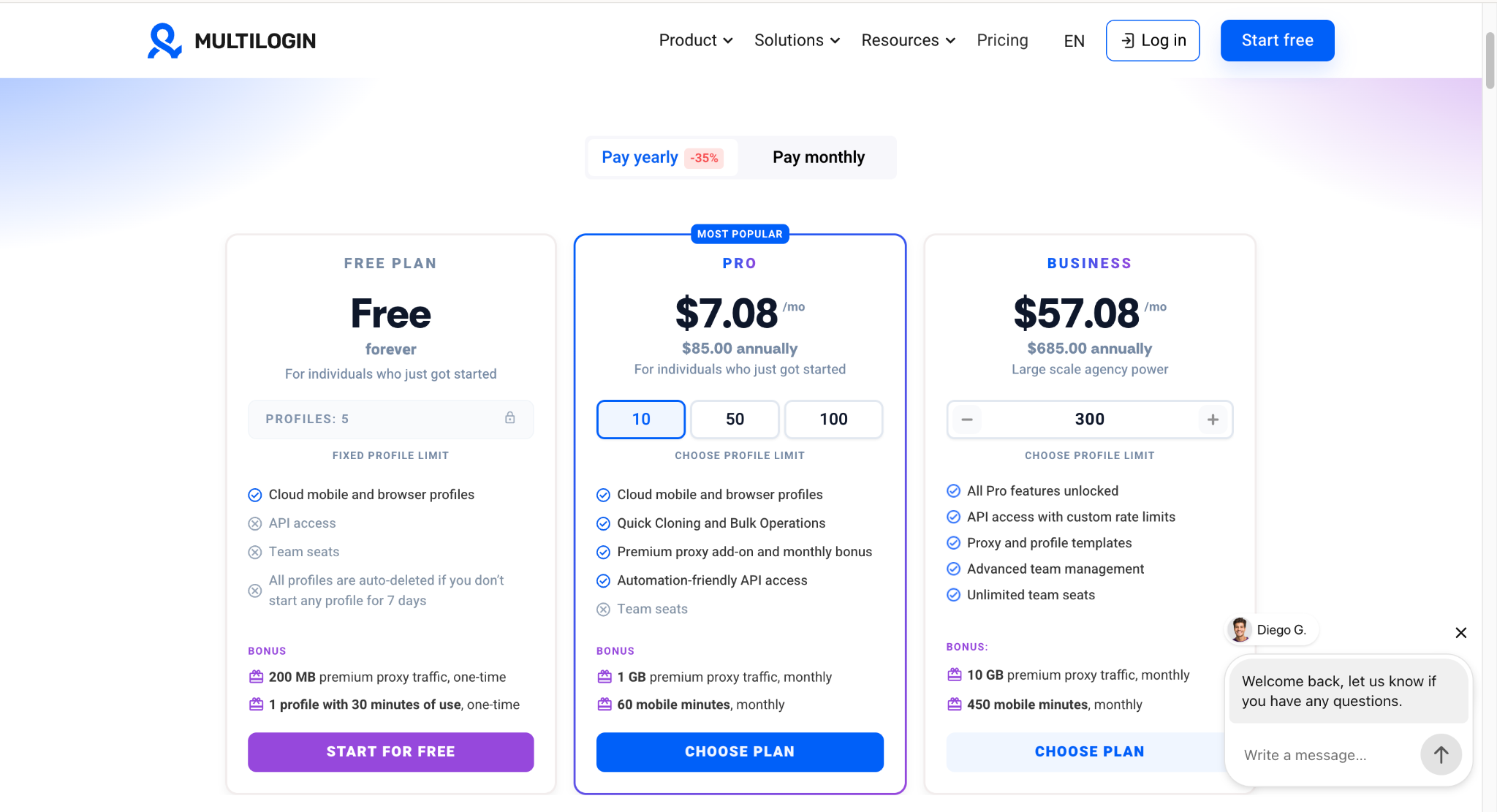
Free plan includes:
- 5 social profiles. Use them as cloud phones (real Android devices), browser profiles, or a mix of both
- 200 MB of premium residential proxy traffic, one-time bonus
- 1 cloud phone profile with 30 minutes of use, one-time bonus
- 24/7 in-app live chat and email support
- Full access to the Multilogin help centre and knowledge base
What is not included on the free plan:
- API access (available from Pro 10 and above)
- Bulk profile creation and quick cloning (available on Pro plans)
- Team seats (available from Pro 100 and above)
- Monthly proxy and mobile minutes bonuses (one-time only on the free plan)
Each of your five profiles gets its own isolated environment: its own device identity, its own cookies, its own session history, and its own IP when you connect a proxy. No profile shares anything with another. That isolation is the core of what Multilogin does. It is what prevents a flag on one social profile from affecting any other.
One condition to know before you start: if you do not open any profile for 7 consecutive days, all profiles are auto-deleted. The free plan itself stays active, so you would just need to recreate the profiles. For anyone using the platform regularly, this will not come up. For anyone who sets up and walks away, it is worth knowing before you invest time in profile configuration.
Start for free. No credit card required.
Why Multilogin launched a free plan
Most social media marketers, agencies, and creators who need proper account isolation have never had a zero-cost way to verify whether cloud phone infrastructure actually works on their specific platforms and accounts before committing to a paid subscription.
The free plan removes that barrier. You can now set up five real isolated social profile environments, install the apps you actually use, run real sessions on real accounts, and see whether the isolation holds up before spending anything. For anyone managing multiple social media accounts, that is a meaningfully different starting point.
What Multilogin cloud phones are and why they matter for social media
The free plan includes access to one cloud phone profile. If you are new to Multilogin or have only used browser-based tools before, this is the part of the product most worth understanding. It is what makes managing mobile-first platforms like TikTok, Instagram, and Facebook properly possible.
What a cloud phone is
A Multilogin cloud phone is a real Android device hosted in the cloud. Actual ARM hardware running Android 10 through 16. You do not hold a physical device. You open the cloud phone inside the Multilogin dashboard and control it from your computer through a live interactive screen stream. The apps on that phone run inside a genuine Android environment, not a browser session attempting to pass as mobile.
This matters because TikTok, Instagram, and Facebook are mobile-first platforms. Their apps detect device sensor signals including movement patterns, tap timing, and hardware identifiers that no browser tool can produce. A real ARM-based Android device running in the cloud produces those signals naturally, because the hardware is real.
Each cloud phone profile builds its own persistent identity over time: app data, login history, and session behaviour. Nothing crosses over from one profile to another. That is how account trust develops at the device level, the same way it does on a real phone.
How cloud phones work alongside browser profiles
Not every platform needs a cloud phone. Multilogin gives you both options from the same dashboard.
- Use a cloud phone profile for TikTok, Instagram, Facebook, and any platform where the real work happens inside a native mobile app. These platforms check for real phone hardware. A cloud phone gives each social profile its own real Android device with its own hardware identity and its own IP.
- Use a browser profile for Reddit, YouTube, and any platform where the primary workflow is web-based. Each browser profile gets its own isolated session with its own device identity, cookies, local storage, and proxy. Complete separation at the browser level.
The free plan’s five profiles can be split however makes sense for your current platforms. One cloud phone for your TikTok test, four browser profiles for Reddit and YouTube, or any other combination.
Cloud phones vs. physical phone farms
Some social media marketers run a physical device per social profile: a phone drawer where each phone is dedicated to one client account. This produces real device signals, but it does not scale. Physical phones need charging, updating, physical space, and physical access. A drawer of phones on the same office WiFi also shares a network fingerprint across every device on it.
Cloud phones deliver the same real-device quality. The hardware still exists, it is just not sitting in your office. There is no physical management overhead. For a full cost and operational comparison, see cloud phone farm vs physical phone farm and phone farm cost vs cloud phone pricing.
Creating and using your first cloud phone
Creating a cloud phone takes under two minutes.
- Open the Profiles tab in the Multilogin dashboard
- Select Mobile from the left-side selector
- Click Create
- Name the profile
- Pick a proxy. Your 200 MB of bonus residential proxy traffic is available immediately
- Click Create and start the profile
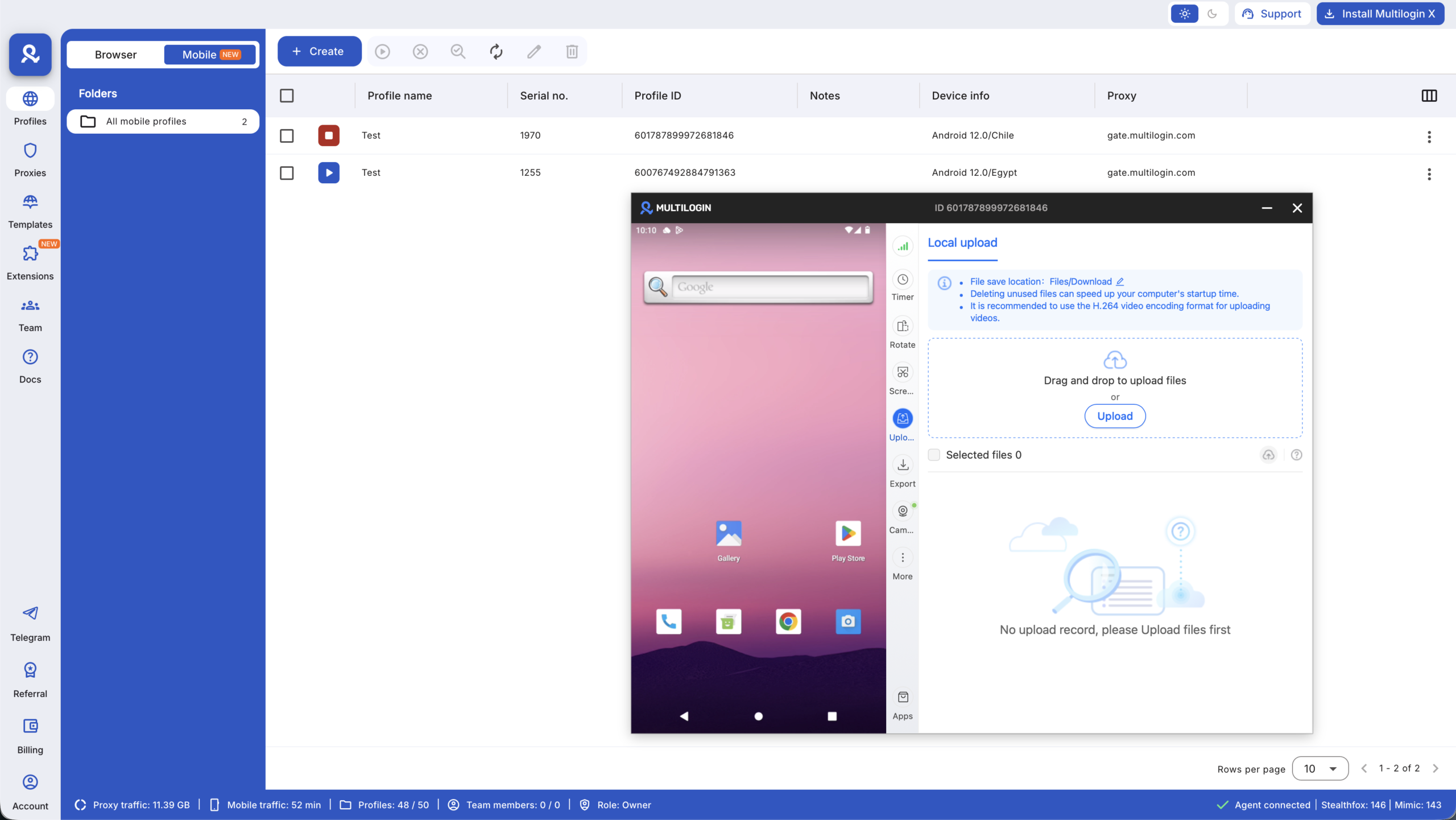
Once the profile is running, a live Android screen opens alongside a tool menu. The tools you will use most day to day: Connection (proxy status in real time), Timer (tracks active minutes so you know where your 30 bonus minutes are), Screenshot, Upload, Camera, and Apps for installing the social apps you need.
For the full setup guide, see how to create Android cloud phones and how to use Android cloud phone features.
How to get the most from your five free profiles
Five social profiles is enough to run a meaningful, real-world test of the platform. Here is how to use them well.
- Use the cloud phone profile for your highest-risk platform first. If TikTok or Instagram is where you have been losing accounts, that is where isolation matters most. Set up the cloud phone profile for your most sensitive account, the one where a flag would do the most damage, and run it through a real session. Account warm-up matters here: start with light activity, build history gradually, and let the profile develop natural behaviour before scaling posting volume.
- Use your browser profiles for Reddit and YouTube. These are web-first platforms where browser profiles are the right tool. Each browser profile gets its own persistent session and its own IP. Account karma and history build naturally over time in a fully isolated environment. See the guide to managing multiple Reddit accounts for how this works in practice.
- Treat each profile as a real social profile from day one. Give each one a clear name and purpose, such as platform, client, niche, or campaign. Use tags and notes inside the dashboard to keep them organised. The organisation habits you build on five profiles are the same ones that keep fifty profiles manageable later.
- Test your proxy setup before logging in to any account. The Connection tool inside each cloud phone shows your proxy status in real time. Confirm the IP and location match what you configured before you touch any account. This is the most common setup mistake and the easiest one to catch before it costs you anything.
- Watch your 30 minutes. The cloud phone timer runs while the profile is active. Use your 30 bonus minutes on a real session: install the app, log in, and run normal activity, rather than spending them on setup and configuration. Once you have seen how the profile behaves on a real account, you will have enough information to decide whether to upgrade.
How the free plan compares to paid plans
The free plan gives you real access to the core product. The limitations are on scale and monthly bonuses, not on whether the isolation technology works.
| Free | Pro 10 | Pro 50 | Pro 100 | Business | |
|---|---|---|---|---|---|
| Price (annual) | $0 | $7.08/mo | $19.17/mo | $26.67/mo | From $57.08/mo |
| Social profiles | 5 | 10 | 50 | 100 | 300+ |
| Cloud phone and browser profiles | Yes | Yes | Yes | Yes | Yes |
| Proxy traffic bonus | 200 MB one-time | 1 GB/month | 3 GB/month | 5 GB/month | 10 GB/month |
| Mobile minutes bonus | 30 minutes one-time | 60 minutes/month | 75 minutes/month | 150 minutes/month | 450+ minutes/month |
| Quick cloning and bulk operations | No | Yes | Yes | Yes | Yes |
| API access | No | Yes | Yes, RPM 50 | Yes, RPM 100 | Yes, custom rate limits |
| Team seats | No | No | No | 2 seats | Unlimited |
| Profile auto-deletion | After 7 days inactive | No | No | No | No |
Additional mobile minutes beyond plan bonuses are available at $0.0073 per minute. Pay only for what you use, and unused minutes roll over. Pre-purchased minute packages start from 2,000 minutes at $18 with a 20% discount. Additional proxy traffic is $3.50 per GB, also with rollover. Full pricing at multilogin.com/pricing.
Multilogin became one of the most cost-effective options in the cloud phone market after the 2026 pricing updates. Cloud phones, built-in proxies, mobile minutes, and browser profile management are all included in one platform. You do not need to pay separately for each of these tools.
Who the free plan is built for
Five social profiles covers three specific situations well.
- Social media marketers and freelancers starting with multi-profile management. If you are managing a small number of client accounts and want to test proper isolation before your roster grows, five profiles covers your current operation. The point at which you outgrow the free plan is exactly the point at which a Pro plan is clearly justified by the accounts it protects. See also: managing multiple Instagram accounts and running multiple TikTok accounts without bans.
- Agencies evaluating a switch from physical phones or browser-only tools. If your current setup is a physical device per client, or browser profiles that are not enough for TikTok and Instagram, the free plan lets you run cloud phones alongside your existing setup. Set up two or three cloud phone profiles, run real client sessions, and compare directly. The decision to migrate is easier when it is based on a live test rather than a product description.
- E-commerce sellers, TikTok Shop operators, and creators testing multi-profile workflows. If you promote products across TikTok, Instagram, or Facebook and want to test separate profiles for different products, regions, or campaigns, five profiles gives you enough room to see whether the infrastructure works for your specific use case before committing to a plan that scales with your operation.
How to get started
Getting started takes under two minutes.
- Go to app.multilogin.com/en/auth/new-account. No credit card required
- Create your account
- Open the Profiles tab. Select Mobile for a cloud phone or Browser for a browser profile
- Click Create, name the profile, and pick a proxy
- Start the profile. Your 200 MB proxy bonus is available immediately. Your 30 cloud phone minutes activate when you first run a mobile profile
For the full cloud phone setup guide, see how to create Android cloud phones. For the day-to-day tool walkthrough, see how to use Android cloud phone features. The Multilogin Academy has practical guides for both mobile and browser profiles.


