





Let’s be honest about why you’re here: you want to automate Instagram activity. Maybe you’re managing multiple client accounts. Maybe you’re trying to grow a brand presence. Maybe you’re testing different content strategies across accounts.
The problem? Instagram’s bot detection systems are ruthless. They don’t just catch obvious spam bots anymore. They track device fingerprints, behavioral patterns, IP addresses, and dozens of signals that flag automated activity — even when you’re using “advanced” automation tools.
This guide breaks down everything: what Instagram bots actually are, how they work, why most get caught within days, and how to handle Instagram automation safely if you’re managing multiple Instagram accounts for legitimate business purposes.
Running Instagram campaigns across multiple accounts? Multilogin Cloud Phones provide real Android environments with genuine device identities — keeping your accounts isolated and safe from Instagram’s detection algorithms.
What are instagram bots? (the real definition)
When people ask “what are instagram bots,” they’re usually talking about one of three things:
- Fake bot accounts (spam accounts)
These are accounts created by automation scripts with no real human behind them. They:
- Follow random accounts hoping for follow-backs
- Like posts automatically to attract attention
- Leave generic comments (“Nice pic!” or “Great content!”)
- Send spam DMs promoting products or services
- Exist purely to inflate follower counts or spread links
Instagram actively hunts and deletes these accounts. Millions get removed every month.
- Automation tools (growth services)
These are third-party software or services that automate actions on your Instagram account:
- Auto-following accounts in your niche
- Auto-liking posts with specific hashtags
- Auto-commenting on posts
- Auto-unfollowing accounts that don’t follow back
- Auto-viewing stories
- Auto-sending DMs
Examples: Jarvee, Instazood, FollowLiker, and dozens of similar tools.
- Legitimate automation (API-based tools)
These use Instagram’s official APIs (or unofficial ones) to perform actions programmatically:
- Scheduling posts
- Responding to comments
- Managing multiple accounts from dashboards
- Analyzing engagement metrics
- Running customer service chatbots
The line between legitimate automation and ban-worthy bots is blurry — and Instagram draws that line wherever they want.
How do instagram bots work? (the technical breakdown)
Understanding how bots operate helps you understand why they get caught.
Account creation bots
Scripts that automatically:
- Generate random usernames and email addresses
- Solve CAPTCHAs (using CAPTCHA-solving services)
- Create Instagram accounts via web or mobile app
- Complete profile setup (bio, profile pic, initial follows)
- Age accounts with random activity to avoid “new account” flags
Engagement automation bots
These log into existing accounts and perform actions:
- Search for target accounts using hashtags, locations, or competitor followers
- Follow accounts (typically 30-50 per hour to stay under rate limits)
- Like posts (50-100 per hour)
- Leave comments from pre-written templates
- Unfollow accounts after X days if they didn’t follow back
- Send DMs to new followers
How bots try to look human:
- Random delays: Instead of liking posts every 30 seconds exactly, bots add randomness (25-45 second intervals) to mimic human behavior.
- Activity limits: Bots impose daily limits: 100 follows, 200 likes, 50 comments. This stays under Instagram’s rate limits for normal accounts.
- Sleep schedules: Bots pause activity during “sleep hours” (midnight to 6am in your timezone) to simulate real user patterns.
- Rotating proxies: Each bot account uses different IP addresses to avoid Instagram linking accounts together by network location.
- Browser fingerprint randomization: Advanced bots try to randomize device fingerprints (screen resolution, user agent, timezone) for each account.
Why most bots still get caught:
Instagram doesn’t just look at individual signals. They analyze combinations of signals using machine learning models trained on millions of examples of human vs. bot behavior.
More on this in the detection section below.
How to make bot account instagram (step-by-step process)
If you’re determined to create Instagram bot accounts, here’s the actual technical process — along with where each step fails.
Step 1: Acquire phone numbers or emails
Instagram requires phone verification for new accounts. You need:
- Virtual phone numbers from SMS services ($0.10–$1 per number)
- Temporary email addresses (free services or custom domains)
- Aged phone numbers (more expensive but less likely to get flagged)
Where this fails: Instagram blacklists known virtual number providers. Accounts created with these numbers get flagged immediately.
Step 2: Set up proxy infrastructure
Each bot account needs a unique IP address to avoid clustering. Options:
- Residential proxies ($50–$200/month for 10-20 accounts)
- Mobile proxies ($100–$300/month, more expensive but less detectable)
- Data center proxies (cheapest but easily flagged)
Where this fails: Instagram tracks IP reputation. If your proxies are used by other bot operators, Instagram flags the entire IP range.
Step 3: Choose automation software
Popular options (most violate Instagram’s ToS):
- Jarvee (desktop software, $69.95/month)
- Instazood (cloud-based, $19/month)
- FollowLiker (desktop, $67 one-time)
- Custom Python scripts (free but requires coding knowledge)
Where this fails: Instagram actively detects these tools by fingerprinting their API calls, timing patterns, and behavioral signatures.
Step 4: Create accounts manually or via automation
Use the automation tool’s account creation feature or do it manually:
- Enter phone/email
- Choose username
- Set password
- Complete profile (bio, profile picture)
- Verify account via SMS/email
Where this fails: Brand new accounts created in bulk from similar IP ranges get flagged during registration. Instagram delays activation or requires additional verification.
Step 5: Age accounts with low activity
Don’t immediately start botting. Spend 1–2 weeks:
- Following 5–10 accounts per day
- Liking 10–20 posts per day
- Posting 1–2 pieces of content per week
- Watching a few stories
This builds account history before aggressive automation.
Where this fails: Accounts that only perform actions (never receive engagement) still look suspicious. Genuine accounts have followers, comments, and DMs.
Step 6: Configure automation settings
Set daily limits in your bot software:
- Follows: 30–50 per day
- Likes: 100–200 per day
- Comments: 10–30 per day
- Unfollows: 30–50 per day
- DMs: 10–20 per day
Where this fails: Even with conservative limits, bots create detectable patterns. Instagram doesn’t just count actions — they analyze timing, targeting consistency, and behavioral fingerprints.
Step 7: Monitor for action blocks and bans
Watch for Instagram warnings:
- “Action blocked” messages (temporary restrictions)
- “Suspicious activity” prompts (verify your identity)
- Shadow bans (your content stops appearing in feeds/hashtags)
- Permanent bans (account disabled)
Where this fails: By the time you notice action blocks, Instagram has already flagged your account. Future activity gets scrutinized more heavily.
Reality check: This process might work for a few days or weeks. But Instagram’s detection systems improve constantly. Accounts created this way typically last 30–90 days before getting permanently banned.
How does instagram detect bots? (the signals Instagram tracks)
Instagram uses sophisticated bot detection systems that analyze dozens of signals simultaneously.
Device fingerprinting
Instagram tracks your device’s unique characteristics:
- Screen resolution and pixel density
- Device model and OS version
- Browser version and rendering engine
- Installed fonts
- Timezone and language settings
- WebGL renderer
- Canvas fingerprint
- Audio context fingerprint
- Touch support and device sensors
If multiple Instagram accounts share identical device fingerprints, Instagram links them together. When one gets flagged as a bot, they all get scrutinized.
This is why device fingerprinting matters more than proxies or VPNs.
Behavioral pattern analysis
Instagram’s machine learning models detect inhuman patterns:
- Action timing: Do you like posts at perfectly regular intervals? Real humans are inconsistent. Bots follow predictable rhythms even with randomization.
- Scroll behavior: Do you scroll before liking? How fast? What path does your cursor take? Bots often like posts instantly without normal browsing behavior.
- Engagement quality: Do the accounts you follow actually match your interests? Do you read captions before commenting? Are your comments relevant or generic?
- Session patterns: Real users open Instagram sporadically throughout the day. Bots often run in continuous sessions or scheduled blocks.
Velocity tracking
Instagram measures how quickly you perform actions:
- Following 50 accounts in 30 minutes is suspicious
- Liking 100 posts in an hour triggers alerts
- Commenting on 20 posts in 5 minutes screams “bot”
Even if you stay under daily limits, velocity within shorter windows matters.
Network analysis
Instagram builds graphs of account relationships:
- Which accounts do you interact with?
- Do those accounts interact back?
- Are they also bots (creating bot clusters)?
- Do you only follow accounts that never engage with your content?
Bots create unnatural network patterns. Real accounts have reciprocal relationships.
IP address tracking
Instagram logs every IP you use:
- Are you always logging in from the same IP?
- Do you suddenly switch between distant geographic locations?
- Is your IP shared with known bot operators?
- Does your IP match your account’s claimed location?
Data center IPs and cheap VPN services get flagged quickly. Even residential proxies can fail if Instagram detects rotation patterns or IP reputation issues.
Content analysis
What you post matters:
- Generic stock photos with no personal context
- Identical captions across multiple accounts
- No original content creation
- Only reposted content from other accounts
Accounts that never post original content but aggressively follow/like look like bots.
Historical account behavior
Instagram tracks changes over time:
- Sudden spikes in activity after dormant periods
- New accounts that immediately start aggressive following
- Accounts that change behavior patterns drastically
- Devices that suddenly start managing 10+ accounts
Consistency matters. Sudden changes trigger scrutiny.
Learn more about avoiding Instagram IP bans and the detection signals Instagram monitors.
Can you get banned for using instagram bots? (ban types explained)
Yes — but bans come in different flavors, and understanding them helps you assess risk.
Action blocks (temporary restrictions)
Instagram temporarily prevents you from performing specific actions:
- “Try again later” when following accounts
- “We restrict certain activity to protect our community”
- Duration: 24 hours to 7 days
What triggered it: Exceeded velocity limits or performed actions Instagram considers spam-like.
Impact: Your account still works, but core automation fails. Repeated action blocks escalate to worse penalties.
Shadow bans (silent suppression)
Your account appears normal to you, but:
- Posts don’t appear in hashtag feeds
- Your content doesn’t reach non-followers
- Engagement drops dramatically
- Story views decrease
What triggered it: Repeated rule violations, aggressive automation, or community guideline issues.
Impact: Your reach is destroyed but the account technically still functions. You might not even notice for weeks. Instagram shadow bans can be permanent or temporary.
Account disabling (suspension)
Instagram disables your account completely:
- “Your account has been disabled”
- Sometimes appealable via Instagram’s review process
- May be temporary (rare) or permanent
What triggered it: Severe ToS violations, repeated automation violations, impersonation, or spam content.
Impact: Account is inaccessible. Appeals rarely succeed. If you regain access, future violations result in permanent bans.
IP bans (network-level blocks)
Instagram blocks all accounts from a specific IP address or IP range:
- All accounts using that IP get action blocks or bans
- Creating new accounts from the same IP immediately triggers flags
- VPN/proxy IP addresses get blacklisted
What triggered it: Multiple bot accounts operating from the same IP, bot service providers using IP ranges, or repeated ban evasion attempts.
Impact: You need new IPs to continue operating accounts. Even then, new accounts get extra scrutiny.
Device bans (fingerprint-level blocks)
Instagram flags your device fingerprint:
- All accounts logged in from that device get linked
- Creating new accounts from the same device triggers immediate flags
- Switching IPs doesn’t help
What triggered it: Multiple banned accounts sharing the same device identity.
Impact: You need completely new device fingerprints to operate accounts safely. Browser profile managers or cloud phones become necessary.
Ban probability timeline:
Week 1–2: Low risk if using conservative automation settings
Week 3–4: Action blocks start appearing
Week 5–8: Shadow bans likely if you continue automation
Week 9+: Permanent account disabling becomes probable
The timeline varies based on account age, activity patterns, and Instagram’s algorithm updates. But very few bot accounts survive 90+ days.
How to get bot followers on instagram (and why you shouldn’t)
People search “how to get bot followers on instagram” because they want quick follower growth. Here’s what actually happens.
Method 1: Buy followers from bot services
Dozens of websites sell Instagram followers:
- $5 for 100 followers
- $20 for 1,000 followers
- $100 for 10,000 followers
What you actually get:
- Fake accounts with no profile pictures
- Accounts with random usernames (jessica23947582)
- Accounts that never engage with your content
- Accounts that Instagram deletes during bot purges
Result: Your follower count looks inflated but engagement rate plummets. Instagram’s algorithm notices the mismatch and suppresses your reach.
Method 2: Use follow/unfollow bots
Automation tools automatically follow thousands of accounts hoping for follow-backs:
- Follow 50–100 accounts per day in your niche
- Wait 3–7 days
- Unfollow anyone who didn’t follow back
- Repeat
What actually happens:
- You attract low-quality followers who also follow thousands of accounts
- Your following/follower ratio looks suspicious
- Instagram detects the automated pattern and action blocks your account
- Accounts that follow back are often other bots
Result: You gain followers but destroy account health and risk permanent bans.
Method 3: Engagement groups and pods
Groups of Instagram users agree to like/comment on each other’s content to boost engagement:
- Join Telegram or Discord groups
- Share your posts
- Group members engage to trigger algorithm visibility
What actually happens:
- Instagram detects engagement pods through network analysis
- Engagement from pod members doesn’t come from real audience
- Your reach outside the pod remains low
- Instagram may shadow ban accounts participating in pods
Result: Fake engagement metrics that don’t translate to real business growth.
Why bot followers hurt more than help:
Destroyed engagement rate
- 1,000 real followers with 5% engagement rate = 50 engaged users
- 10,000 bot followers with 0.5% engagement rate = 50 engaged users
Same engaged audience, but Instagram’s algorithm sees low engagement rate on the 10K account and suppresses reach.
- Lost credibility: Savvy users spot fake followers immediately (generic accounts, no profile pics, suspicious following patterns). Your brand looks desperate and untrustworthy.
- Wasted budget: Money spent on bot followers could fund Instagram ads that reach real, targeted audiences actually interested in your content.
- Account risk: Every bot follower is a potential flag. Instagram purges millions of bot accounts monthly. When they delete your fake followers, your follower count drops dramatically — signaling to Instagram that something’s wrong.
How to remove bot followers on instagram (cleanup strategies)
If you’ve accumulated bot followers (either from buying them or attracting them organically), here’s how to clean up your account.
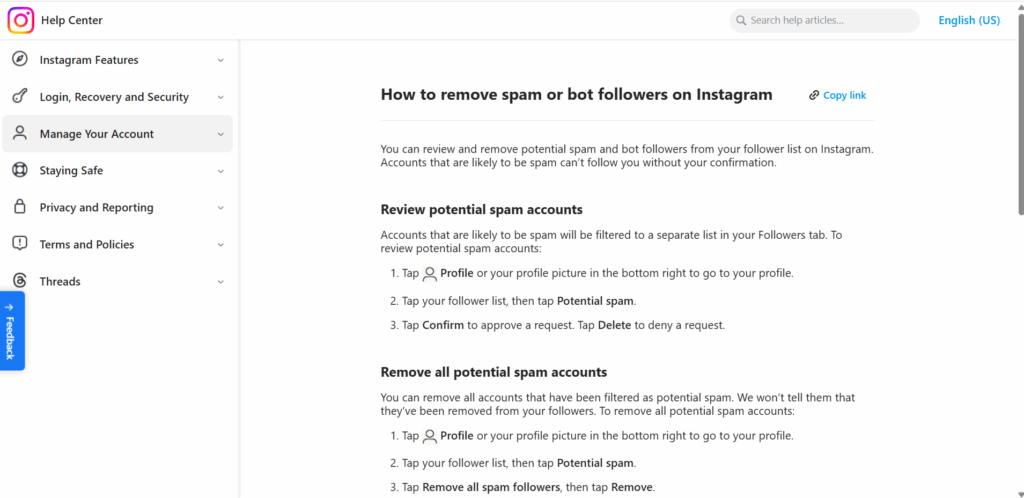
Manual removal (small numbers)
For accounts with <100 bot followers:
- Go to your followers list
- Identify bot accounts (look for: no posts, generic usernames, no profile picture, following thousands)
- Tap the three dots next to their name
- Select “Remove Follower”
Bulk removal tools (larger numbers)
Third-party apps help identify and remove bot followers:
- SpamGuard (free, analyzes followers for bot characteristics)
- Cleaner for Instagram (iOS, batch removal features)
- Follower Analyzer (Android, identifies fake followers)
Warning: Using third-party apps requires giving them access to your Instagram account, which violates Instagram’s ToS and creates its own ban risk.
Audit and restrict settings
Prevent future bot followers:
- Switch to a private account temporarily (bots can’t follow without approval)
- Review follow requests manually
- Reject suspicious accounts
- Return to public after cleanup
Report spam accounts
When you spot obvious bots:
- Tap the three dots on their profile
- Select “Report”
- Choose “Spam”
This helps Instagram identify and remove bot accounts platform-wide.
Accept that some bot followers are inevitable
Every Instagram account with any visibility attracts some bot followers. Don’t obsess over cleaning every single one. Focus on:
- Maintaining high engagement rate from real followers
- Creating quality content
- Building genuine community
Instagram’s algorithm cares more about engagement rate than absolute follower count.
How to stop bots from following you on instagram
You can’t prevent bot follows completely, but you can reduce them significantly.
Don’t use banned hashtags
Some hashtags are heavily targeted by bots:
- #follow4follow
- #like4like
- #followback
- #instalike
- Generic hashtags (#love, #instagood, #photooftheday)
Bots scrape these hashtags looking for accounts to follow. Using them attracts bot attention.
Use niche-specific hashtags
Instead of generic hashtags, use:
- Industry-specific terms
- Location-based hashtags
- Branded hashtags
- Medium-sized hashtags (10K–100K posts, not millions)
Bots target high-volume hashtags. Niche hashtags attract real users interested in your content.
Set account to private temporarily
If you’re getting bombarded by bot follows:
- Switch to private account
- Bots can’t auto-follow (they need approval)
- Review follow requests manually
- Return to public after bot wave passes
Don’t engage with bot accounts
When bots like/comment on your posts:
- Don’t follow them back
- Don’t like their posts
- Don’t respond to generic comments
Engagement signals to bots (and the services running them) that you’re responsive. They’ll target you more.
Report aggressive bot accounts
If the same bot network keeps targeting you:
- Report individual accounts as spam
- Instagram sometimes bans entire bot networks
- This reduces future targeting
Avoid engagement pods and follow groups
Participating in these makes you visible to bot operators who monitor these groups for targets.
Keep your location/contact info private
Bots sometimes scrape accounts by location or contact information. Don’t link your phone number or email publicly unless necessary.
Are instagram bots illegal? (legal vs. ToS violations)
Legal answer: No, Instagram bots are not illegal in most countries. There’s no law against automating social media activity.
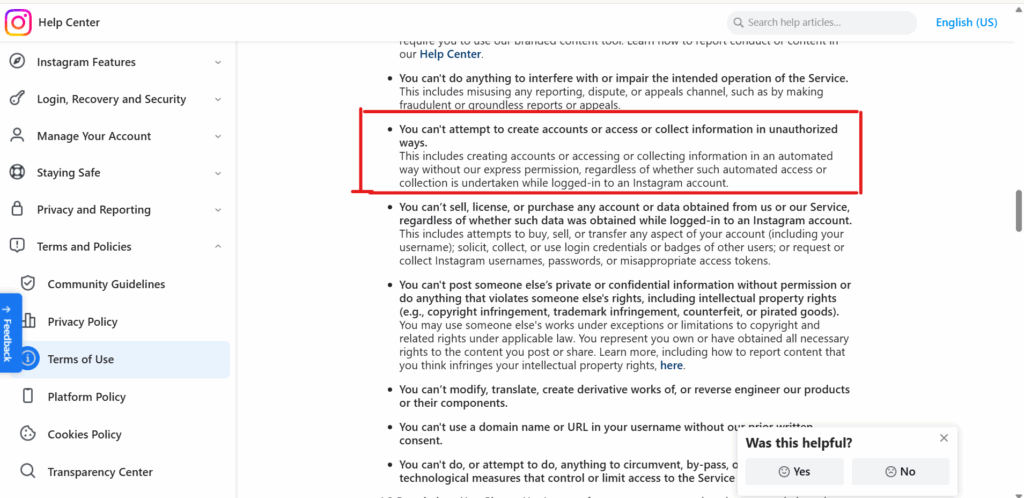
Terms of Service answer: Yes, Instagram bots violate Instagram’s Terms of Service, specifically:
Section 4.2: “You can’t attempt to create accounts or access or collect information in unauthorized ways.”
Community Guidelines: “We want to make sure that everyone has a safe experience. In furtherance of this goal, we prohibit spam and ask people to respect other members of our community.”
What this means:
No legal consequences: You won’t face criminal charges, lawsuits, or fines for using Instagram bots (unless you’re engaging in actual fraud, hacking, or harassment).
Platform consequences: Instagram can ban your account, disable access permanently, or ban your IP address/device fingerprint. You have no legal recourse because you agreed to their ToS.
Business consequences: If you’re using bots for business purposes:
- Losing your business Instagram account hurts brand presence
- You can’t appeal successfully (Instagram almost never reverses bot-related bans)
- You lose all followers, content, and engagement history
- Starting over requires new devices, IPs, and account identities
Legitimate automation exists:
Instagram allows automation through official APIs for:
- Scheduling posts (Buffer, Hootsuite, Later)
- Responding to comments and DMs (many social media management platforms)
- Analytics and reporting (Sprout Social, Iconosquare)
These use Instagram’s official APIs and comply with rate limits. They’re not “bots” in the banned sense.
The line: Are you using Instagram’s official APIs? Are you providing value to users? Or are you simulating human behavior to game the algorithm?
Managing multiple instagram accounts without getting them linked
Here’s the real issue that most Instagram bot guides ignore: the biggest risk isn’t automation. It’s Instagram detecting that you’re managing multiple accounts from the same device.
If you’re running:
- Personal Instagram accounts
- Client brand accounts
- Testing accounts for different content strategies
- Business accounts across different niches
Managing all of these from the same device creates massive detection risk.
Why account linking matters:
When Instagram detects multiple accounts sharing the same device fingerprint, they assume those accounts are connected. If one account uses automation tools and gets flagged, all linked accounts get scrutinized.
Even if your other accounts never used bots, they can get action-blocked or shadow-banned just for being associated with the flagged account.
How to prevent account linking:
Unique device fingerprints per account
Don’t just use incognito mode. Instagram tracks device fingerprints across sessions. You need isolated environments with unique:
- Device models and OS versions
- Screen resolutions and pixel densities
- Browser versions and rendering engines
- Installed fonts
- Timezone and language settings
- WebGL renderers
- Canvas fingerprints
- Audio context fingerprints
Residential proxies matched to account locations
If your account represents a business in Miami, your IP should be from Miami. Use residential proxies (not VPNs or data center IPs) with city-level targeting.
Instagram’s proxy and antidetect bundle provides mobile-grade residential proxies matched to account geolocation.
Real Android environments for native app management
Most Instagram activity happens in the mobile app. If you’re only using desktop browser profiles, you’re missing critical account warmup and engagement opportunities.
Persistent sessions with natural login patterns
Keep Instagram accounts logged in across sessions (like real users do). Don’t constantly log out and log back in — that’s bot behavior.
This is why agencies and marketers use Multilogin:
Creating and managing multiple Instagram accounts safely requires professional isolation tools.
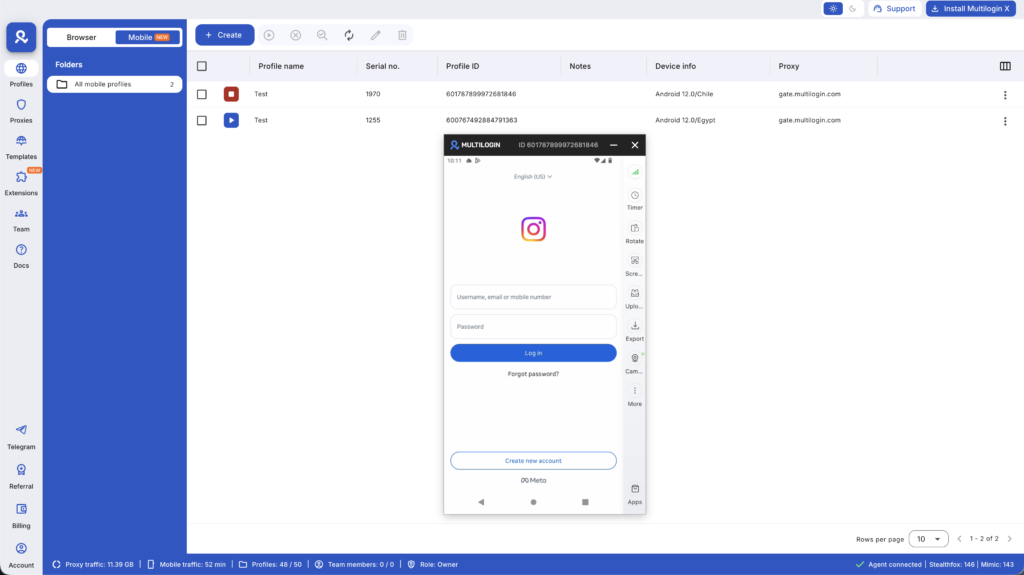
Multilogin Cloud Phones provide:
- Real Android devices with genuine hardware identities (IMEI, Android ID, MAC)
- Persistent app data and login states between sessions
- Built-in mobile-grade residential proxies
- Desktop management interface
- Team collaboration features for agency workflows
When you’re managing 10+ Instagram accounts, proper isolation prevents the mass account bans that destroy bot operations.
Safe instagram automation: what actually works long-term
If you need automation for legitimate business reasons, here’s the sustainable approach:
Use Instagram’s official API partners
These tools comply with Instagram’s ToS:
Scheduling platforms
- Later (scheduling posts, stories, analytics)
- Buffer (multi-account management, post scheduling)
- Hootsuite (team collaboration, content calendars)
Engagement platforms
- ManyChat (automated DM responses)
- MobileMonkey (Instagram chatbots)
- Sprout Social (comment management, analytics)
These use official APIs and won’t get your account banned.
Manually warm up accounts before any automation
Before using even legitimate tools, warm up Instagram accounts properly:
- Spend 2–3 weeks building organic activity
- Post 3–5 times per week
- Engage authentically with your niche community
- Build 500+ organic followers
- Establish normal posting patterns
Accounts with established history are less likely to get flagged when you introduce automation.
Use automation for scheduling, not engagement
The safest automation:
- Scheduling posts in advance
- Auto-responding to common DM questions
- Analyzing engagement metrics
- Managing multiple accounts from dashboards
The riskiest automation:
- Auto-following/unfollowing
- Auto-liking posts
- Auto-commenting
- Auto-viewing stories
Instagram is much more strict about engagement automation than content scheduling.
Keep automation conservative
If you’re using third-party tools:
- Never exceed natural human limits (50 follows/day, 200 likes/day)
- Add random delays between actions (5–15 minutes)
- Don’t run automation 24/7
- Manually engage with your audience regularly
- Mix automated actions with genuine human activity
Monitor account health constantly
Watch for warning signs:
- Decreased engagement rate
- Action blocks or “try again later” messages
- Fewer likes/comments than normal
- Posts not appearing in hashtag feeds
If you see any of these, stop automation immediately and return to manual activity for 2–3 weeks.
Isolate accounts properly
Don’t manage 10 client Instagram accounts from the same device. Use proper isolation:
- Separate browser profiles or cloud phones per account
- Dedicated proxies matched to account locations
- Unique device fingerprints
- Persistent login sessions
This prevents Instagram from linking accounts together when one gets flagged.
Instagram bot alternatives that don’t risk account bans
Instead of risking bans with automation tools, consider strategies that actually work:
Instagram ads (the official way)
Instagram’s advertising platform provides:
- Guaranteed visibility to targeted audiences
- No ban risk
- Detailed analytics and targeting options
- Lead generation tools
- Shop integration
Cost: Varies ($0.50–$3 per click depending on industry), but predictable and compliant.
Content quality focus
Invest automation budget into:
- Professional photography/videography
- Graphic design tools (Canva Pro, Adobe Creative Cloud)
- Content calendars and strategy
- Research into what resonates with your audience
Great content naturally attracts followers and engagement. No bots needed.
Community management
Hire someone (or spend time yourself) to:
- Respond to comments authentically
- Engage with followers’ content
- Build relationships with niche influencers
- Participate in relevant conversations
This builds genuine community that bots can’t replicate.
Influencer collaborations
Partner with micro-influencers (10K–100K followers) in your niche:
- More affordable than celebrity influencers
- Higher engagement rates
- Access to targeted audiences
- Authentic endorsements
Strategic hashtag research
Instead of using automation to spam generic hashtags:
- Research niche-specific hashtags
- Use a mix of high (100K+ posts), medium (10K–100K), and low (<10K) volume hashtags
- Create branded hashtags
- Monitor which hashtags drive real engagement
Consistent posting schedule
Algorithm visibility comes from consistency:
- Post 3–5 times per week minimum
- Post during peak engagement times for your audience
- Use all content formats (feed posts, stories, reels, IGTV)
- Engage with your audience within first hour of posting
Cross-platform promotion
Drive Instagram growth from other channels:
- Link Instagram from your email signature
- Promote Instagram content on Facebook, Twitter, LinkedIn
- Embed Instagram feeds on your website
- Include Instagram handle in offline marketing
These strategies take more time than bots. But they build sustainable growth that won’t disappear in the next Instagram bot purge.
These fake viewer websites often fail because they cannot bypass TikTok’s security. They might ask you to complete surveys or download suspicious software, which are red flags. A safe approach to viewing stories more privately is to avoid these tools altogether. There is no legitimate way to view a private TikTok story anonymously.
No more juggling physical devices or risking account links. Try Multilogin's cloud phones now.
Frequently Asked Questions About How to make bot account instagram
Instagram bots are automated software programs or scripts that perform actions on Instagram without human interaction. They work by logging into Instagram accounts (via web or app APIs) and automating activities like following accounts, liking posts, commenting, viewing stories, and sending DMs. Bots use randomization and delays to mimic human behavior, but Instagram’s machine learning detection systems identify them through behavioral patterns, device fingerprints, velocity analysis, and network clustering.
You can’t. Instagram’s detection systems are sophisticated enough to catch most bot accounts within 30–90 days regardless of how “careful” you are. They track device fingerprints, IP addresses, behavioral patterns, velocity metrics, and network analysis. Even with aged accounts, conservative automation settings, and residential proxies, bots create detectable patterns. The only sustainable approach is using Instagram’s official API partners for scheduling and analytics while managing engagement manually.
Instagram bots are not illegal in most countries — you won’t face criminal charges for using them. However, they violate Instagram’s Terms of Service, which means Instagram can ban your account, disable access permanently, or ban your device/IP address. You have no legal recourse because you agreed to Instagram’s ToS when creating your account. Using bots for fraud, harassment, or unauthorized data collection could have legal implications beyond ToS violations.
Instagram uses machine learning models that analyze dozens of signals: device fingerprints (screen resolution, fonts, WebGL renderer), behavioral patterns (action timing, scroll behavior, engagement quality), velocity tracking (actions per hour/day), IP address reputation, network analysis (clustering of related accounts), and content patterns. Even with randomization and delays, bots create statistical signatures that Instagram’s AI detects. The platform removes millions of bot accounts quarterly.
Protect your Instagram accounts with proper isolation
If you’re managing multiple Instagram accounts for business, clients, or personal brands, proper account isolation is essential protection against platform bans.
Instagram’s detection systems don’t just catch bots. They track device fingerprints, IP addresses, and behavioral patterns to link accounts together. One account using automation tools can trigger scrutiny across all linked accounts.
Multilogin Cloud Phones provide complete Instagram account isolation:
🔹 Real Android devices with genuine hardware identities (IMEI, Android ID, MAC address)
🔹 Approximately 30 device models — Samsung, Google, OPPO, OnePlus, Redmi, Vivo
🔹 Persistent Instagram app data — login states and activity history maintained between sessions
🔹 Built-in mobile-grade residential proxies — 30M+ IPs, 195+ countries, city-level targeting
🔹 Desktop management — control all Instagram accounts from one secure interface
🔹 Team collaboration — share accounts, set permissions, track usage
Whether you’re running Instagram marketing campaigns, managing client accounts, or building brand presence across multiple niches, proper isolation protects against detection and bans.
Get started with Multilogin — plans start at €5.85/month with usage-based pricing that scales with your needs.


