If you’re managing TikTok accounts, you’ve probably heard about TikTok Marketplace at some point. It’s basically where the real money is: brand deals, paid collaborations, all of that. And if you’re running multiple accounts or managing them for clients, getting there is kind of the whole point.
New to this? No problem. We’ll walk through everything, including the parts most guides skip.
What is TikTok Marketplace
TikTok Creator Marketplace was TikTok’s built-in platform for brand and creator collaborations. Brands posted campaigns, creators applied or got invited, and everything was tracked inside the platform. No middlemen, no back-and-forth over DMs.
As of March 2025, TikTok replaced it with TikTok One. All the original Marketplace features are still there, but now they sit inside a bigger platform that also covers ad campaign management, analytics, and AI-powered creative tools. So if you’re looking for brand deals and collaborations, TikTok One is where that happens now.
One thing worth knowing before we get into the how-to:
TikTok watches how accounts behave, not just what they post. That includes device signals, login patterns, and whether multiple accounts seem to be coming from the same place. If you’re managing more than one account and not using proper tools to keep them separate, you’ll run into problems before you ever reach the Marketplace. This isn’t about doing anything shady. It’s just how the platform works, and ignoring it makes everything harder.
Requirements for TikTok Marketplace
Here’s what TikTok actually asks for:
- 10,000 followers minimum (varies by region)
- 100,000 video views in the last 30 days
- Account at least 30 days old
- Personal account, not a business account (in most regions)
- Original content that follows community guidelines
- Located in an eligible country
That’s the official list. What they don’t spell out is that they also look at how the account got there. An account that hit 10k followers through sketchy means, or that’s been logging in from five different devices, doesn’t look the same as one that grew normally. TikTok can tell the difference, and it affects whether you get approved.
How to create an account for TikTok Marketplace using browser profiles in Multilogin
Most people treat account creation like it’s just filling out a form. It’s not. What you do before and right after registration shapes how TikTok reads the account for months.
Set up a browser profile first
In Multilogin, each browser profile is its own separate environment: different fingerprint, different storage, different history. To TikTok, it looks like a different device.
Steps:
1. Open Multilogin and create a new browser profile
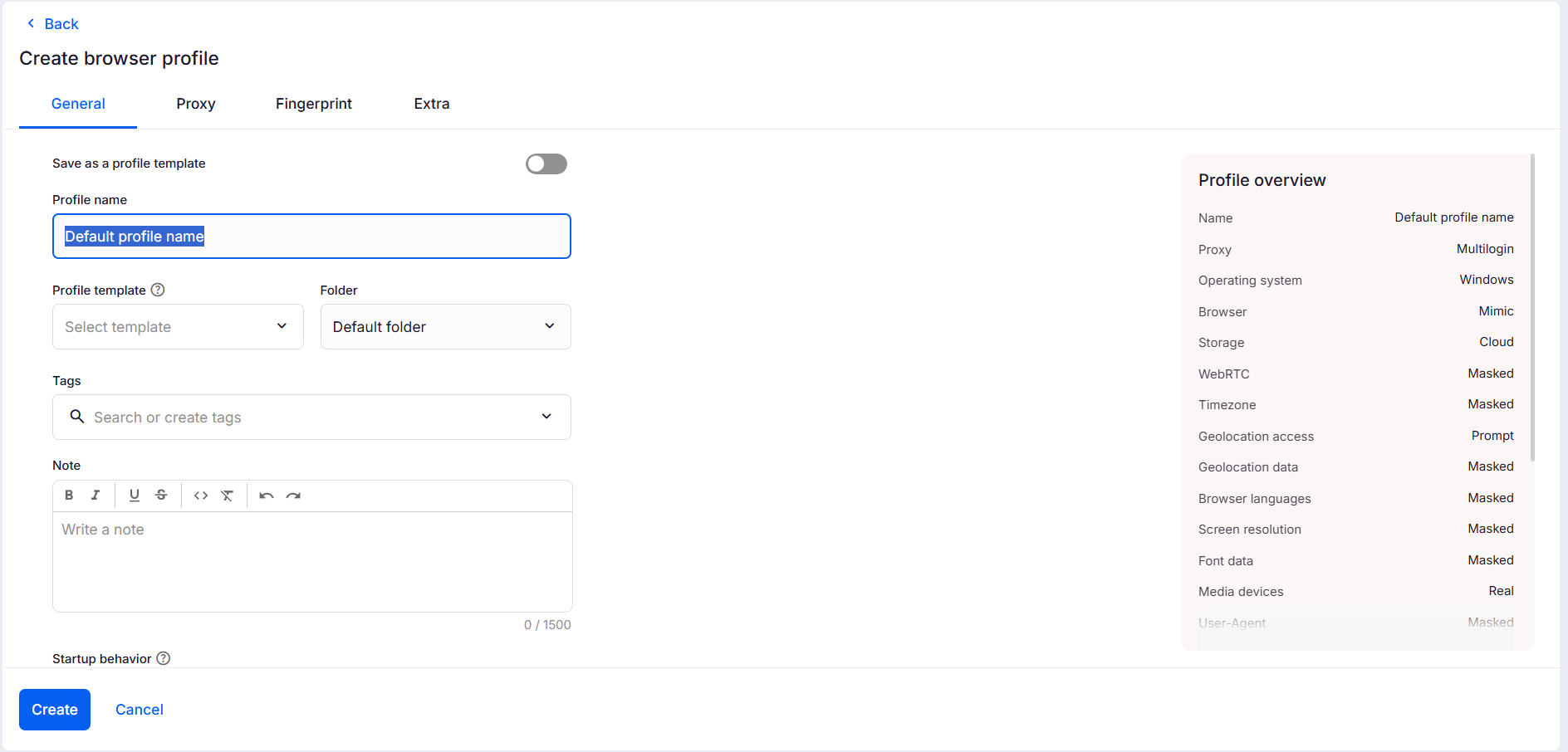
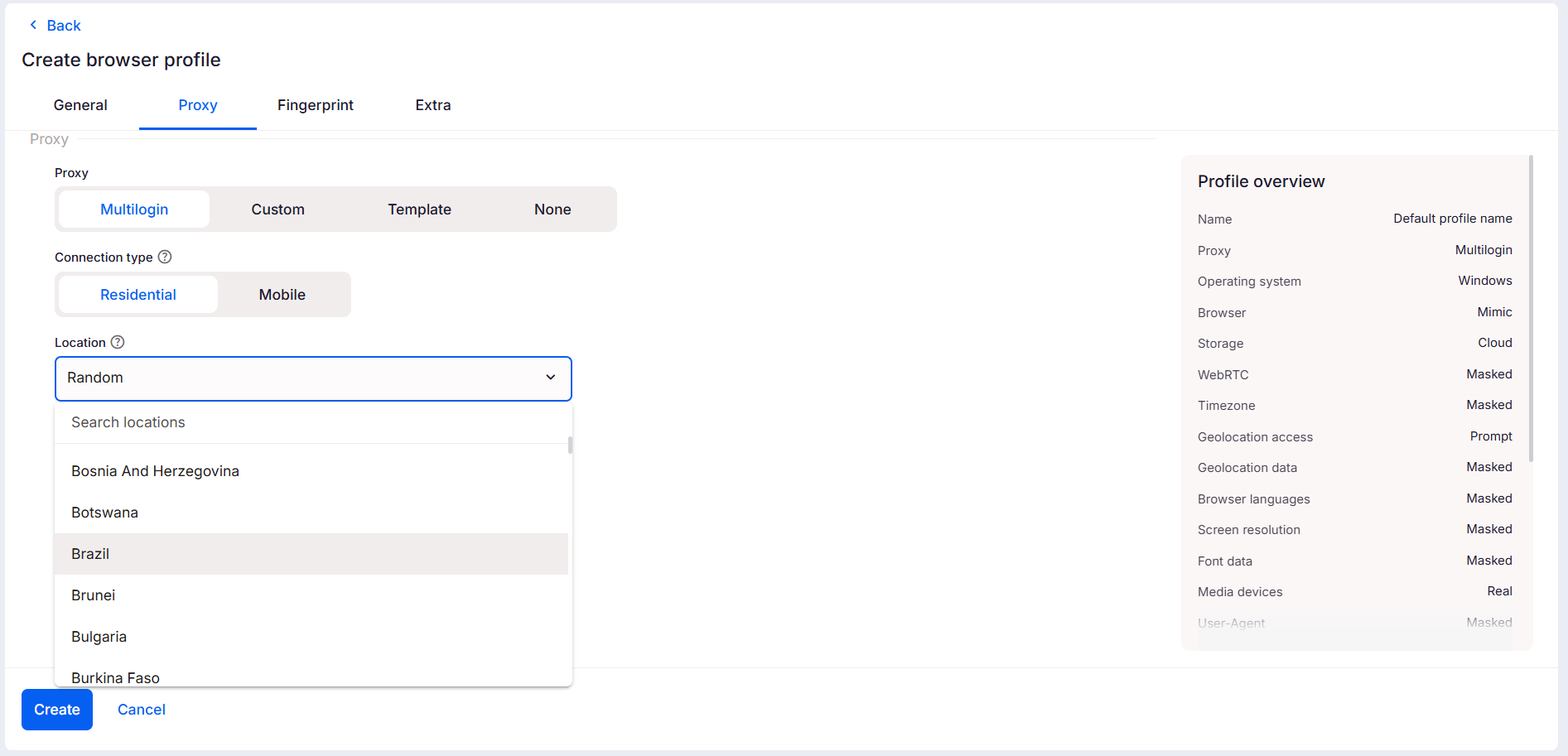
2. Select a residential or mobile proxy, pick one that matches where the account is supposed to be based.
3. Save it, and don’t open TikTok yet
One profile per account. That’s the rule. The moment you start using the same profile for two accounts, TikTok starts connecting them.
Warm it up before you register
Skipping this is one of the most common mistakes. A fresh profile with zero history looks suspicious to TikTok. The good news is Multilogin has a built-in Cookie Robot that handles the warm-up for you.
Here’s how to run it:
1. Right-click on the browser profile you just created.
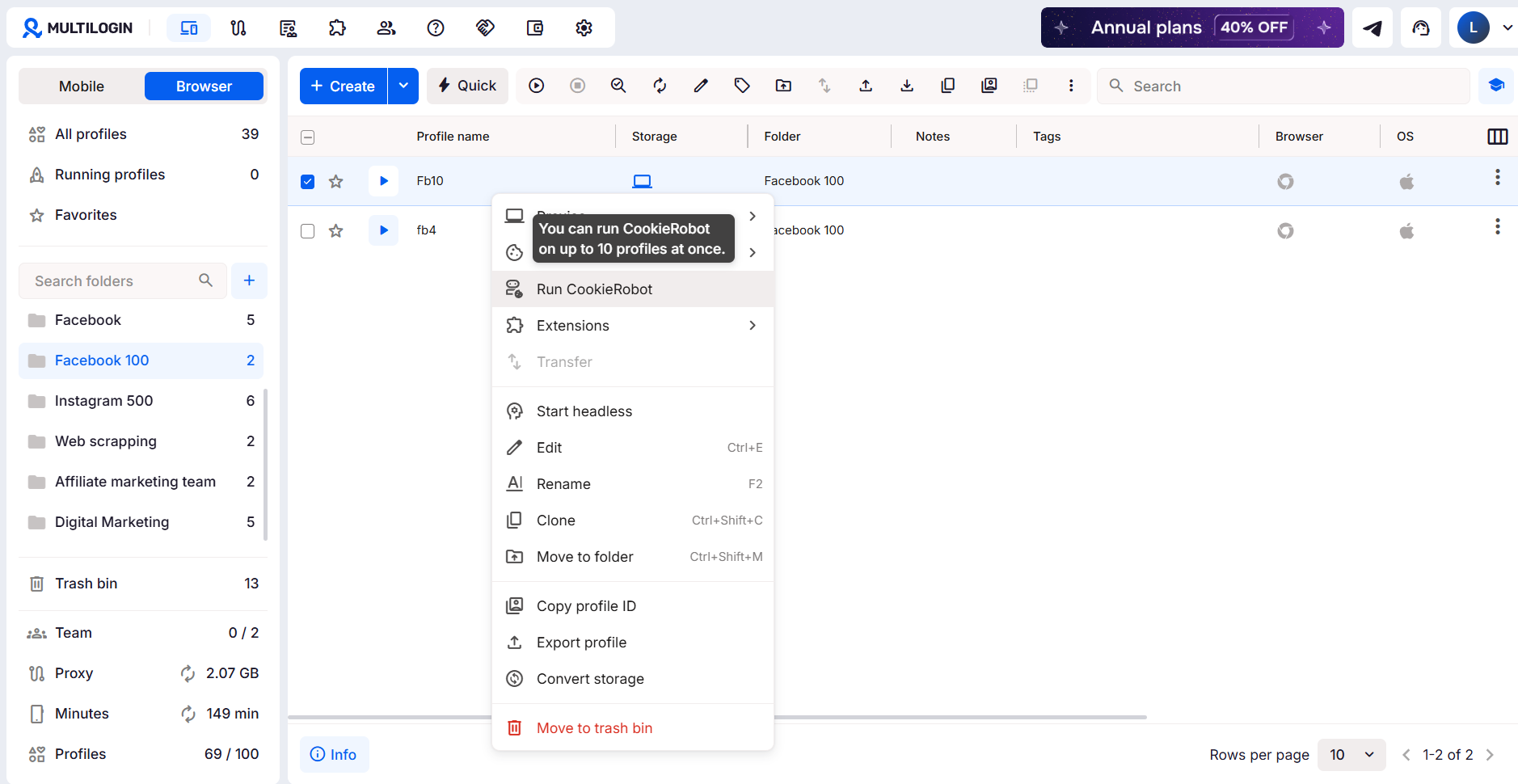
2. Select “Run Cookie Robot”. 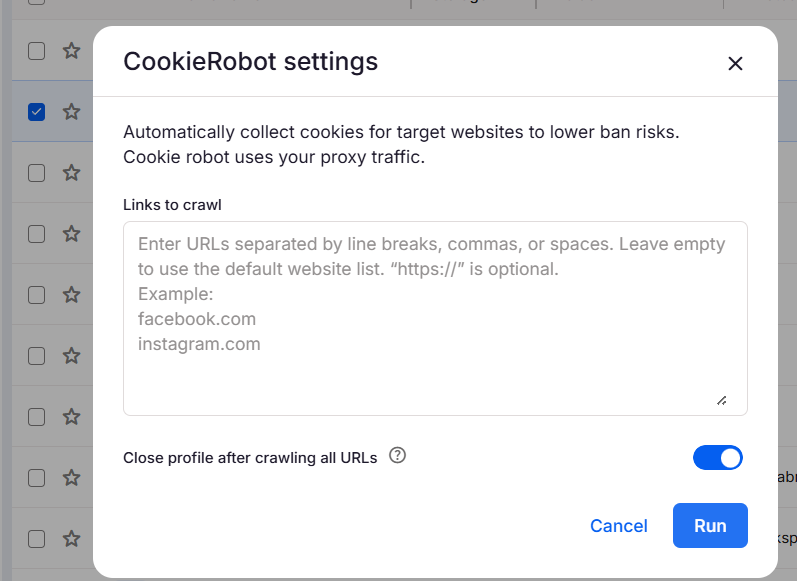
3. Enter a list of websites to visit, or leave it empty to use the default sites. If you want TikTok-specific warm-up, add tiktok.com and related addresses like creators.tiktok.com to the list
4. Wait until it finishes
That’s it. Cookie Robot browses those sites automatically, builds up some session history, and makes the profile look like it’s been used before. Run it over a couple of sessions before you register the account.
Register the account
Now you’re ready:
- Open TikTok inside the Multilogin profile
- Sign up with a fresh email or phone number
- Fill out the basics: name, bio, photo
- Don’t log into any other TikTok account from this profile, ever
Going forward, always open this account from the same profile. Every time you log in from a different environment, TikTok adds that to the account’s history, and inconsistency builds up fast.
Grow it before applying
Hitting the follower and view numbers matters, but so does how you got there. During the growth phase:
- Post on a regular schedule using the same profile
- Actually use the app: scroll, like, comment
- Don’t buy followers or use bots
- Keep the same proxy throughout
The accounts that sail through Marketplace approval are the ones that look like a real person ran them for a few months. Multilogin helps with that by keeping the environment identical every session.
How to join TikTok Marketplace
Since March 2025, the sign-up happens through TikTok One, not the old Creator Marketplace. Here’s how it works:
- Log into TikTok from your Multilogin profile
- Tap your profile, then open TikTok Studio
- Go to the Monetization tab and tap Creator Marketplace
- This will take you directly into TikTok One
- Check eligibility, tap Join, and follow the steps to complete your profile including rates, contact info, and content categories
Once you’re in, brand opportunities show up as open applications or direct invitations from advertisers. You can browse and apply to projects that fit your niche, or wait to get matched automatically.
Got rejected or don’t see the option yet? The most common reasons are not enough views in the last 30 days, accounts too new, or content that doesn’t meet the guidelines. Sometimes it’s also the behavioral signals we mentioned earlier.
Don’t reapply right away. Give the account another few weeks, keep posting, and try again once the numbers are stronger.
Taking it further with Multilogin cloud phones
Browser profiles are solid for managing accounts on desktop. But TikTok is a mobile app, and some of what it tracks only shows up on a phone.
Cloud phones in Multilogin are real Android devices running in the cloud. When TikTok runs on one, it picks up actual mobile signals, the kind that come from a phone someone is actually using. That affects more than just security. TikTok’s algorithm also weighs how organic an account looks when deciding how far to push content. Accounts with clean, consistent mobile signals tend to get better reach. It’s not a trick, it’s just how the platform is built.
Setup is simple:
1. Create a new cloud phone in the Multilogin dashboard. 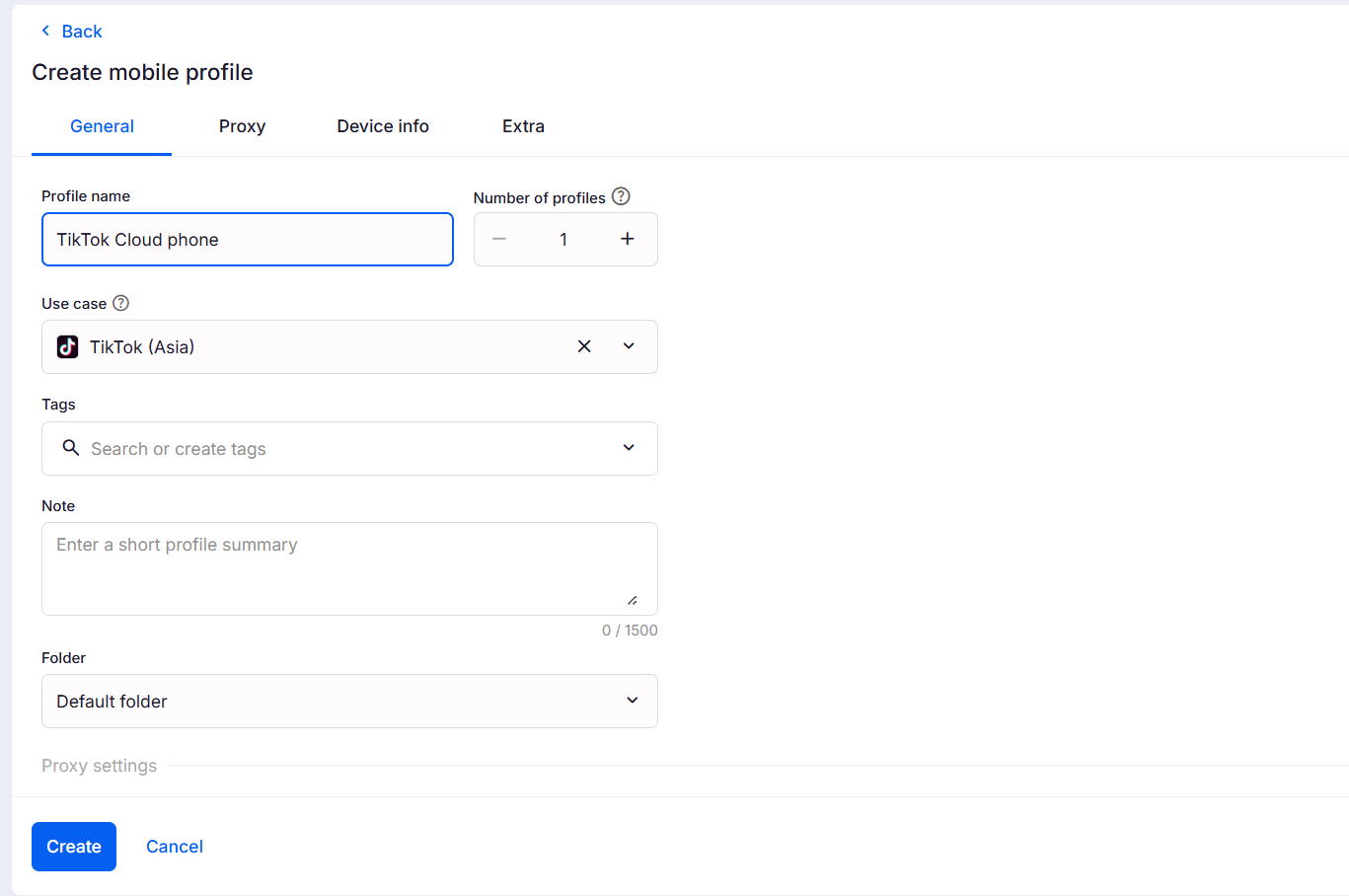
2. Add a proxy for your target region.
3. Install TikTok and log in.
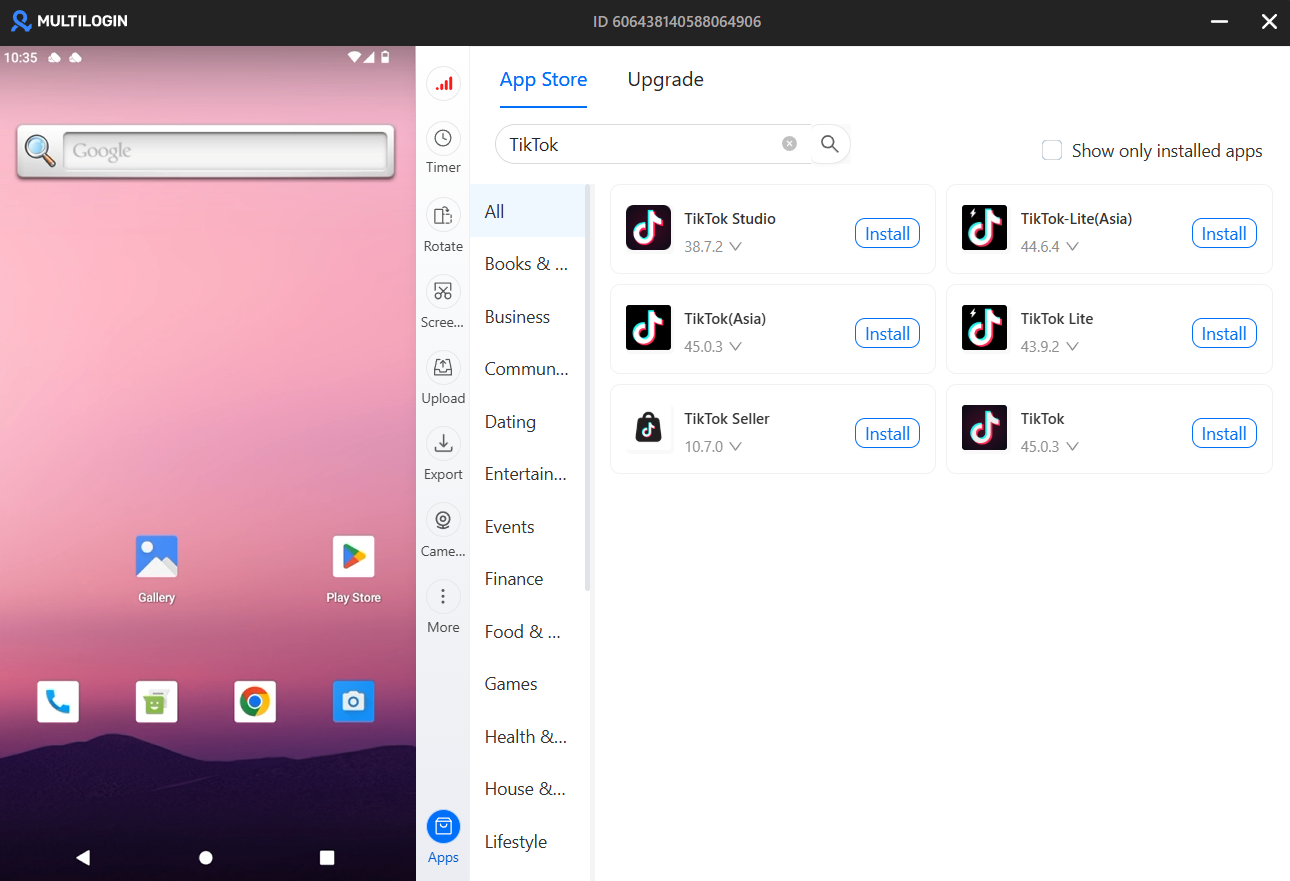
4. Use this phone for everything on that account going forward
Each cloud phone is separate, so if you’re running several accounts, they don’t bleed into each other. One account having a bad day doesn’t touch the rest.
Getting in is the easy part
A lot of people focus on hitting the numbers to qualify for Marketplace, which makes sense. But accounts that get approved and then lose access a few weeks later almost always have the same problem: the environment wasn’t consistent enough.
The accounts that stick around are the ones that looked the same every single login. Same device, same location, same behavior. That’s not complicated to set up, it just requires actually doing it from day one.
Browser profiles handle that on desktop. Cloud phones handle it on mobile. Both together mean TikTok sees what it wants to see: a real account, run by a real person, that’s been around long enough to trust.