


You publish a video around a topic people are searching for. The title looks clear. The thumbnail makes sense. You add a description, a few tags, hit publish, and then not much happens.
The difficult part is figuring out why.
Was the topic wrong? Did the title miss what people wanted? Are viewers choosing other results? Are they clicking but leaving early? Or are you spending time polishing tags while a more important part of the video needs attention?
That is where YouTube SEO becomes useful. Not as a trick for pleasing an algorithm, but as a repeatable process for understanding what people search for, creating the right video for that need, packaging it clearly, and learning from viewer response after publication.
In 2026, YouTube’s own documentation gives us a much better framework than a simple keyword checklist.
Key takeaways
- YouTube SEO connects search demand, relevance, video packaging, content quality, and viewer response.
- YouTube says Search prioritizes three broad elements: relevance, engagement, and quality.
- Titles, thumbnails, and descriptions are more important for discovery than tags in most cases.
- Search and recommendations overlap, but they should not be diagnosed as one identical system.
- YouTube’s published Search documentation does not define a universal creator-facing “SEO score.”
- YouTube SEO continues after publishing because performance and retention data can inform what you review next.
YouTube SEO, in simple terms
YouTube SEO: The process of improving videos and channels so they better match relevant searches and are easier for the intended audience to find.
Video SEO: Optimization focused on an individual video’s topic, title, thumbnail, description, content, and performance.
Channel SEO: Optimization focused on making a channel’s subject and content organization easier for viewers to understand and navigate.
The core difference: Video SEO works at the individual-video level. Channel SEO looks at the wider content library and channel structure.
Four YouTube SEO facts worth keeping in front of you
YouTube’s own documentation gives creators four useful anchors for thinking about Search and discovery.
- YouTube Search prioritizes relevance, engagement, and quality.The importance of each can vary by the type of search.
- Query relevance goes beyond a keyword in the title.YouTube says it can look at how well the title, tags, description, and video content match what someone searched for.
- Viewer response matters.YouTube gives watch time for a particular video and query as an example of an engagement signal that can help determine relevance.
- Tags have a limited rolefor most videos. YouTube says the title, thumbnail, and description are more important for discovery, while tags generally play a minimal role unless terms are commonly misspelled.
Those four facts already tell us why a modern YouTube SEO workflow needs to cover more than metadata.
What is YouTube SEO?
YouTube SEO is the process of making videos and channels more relevant and useful for the searches you want to appear for.
That includes choosing topics people look for, understanding what they expect from the result, creating a video that addresses that need, and presenting it with a clear title, thumbnail, description, and supporting channel structure.
This is broader than adding keywords to metadata.
According to YouTube’s explanation of how Search works, its search system prioritizes three broad elements: relevance, engagement, and quality.
So a useful YouTube SEO process has two sides.
You need to make the subject understandable to YouTube and the viewer. Then the video itself needs to deliver on the expectation created by the search result.
A title can match the keyword perfectly and still point to the wrong video for the viewer’s real question.
How does YouTube SEO work in 2026?
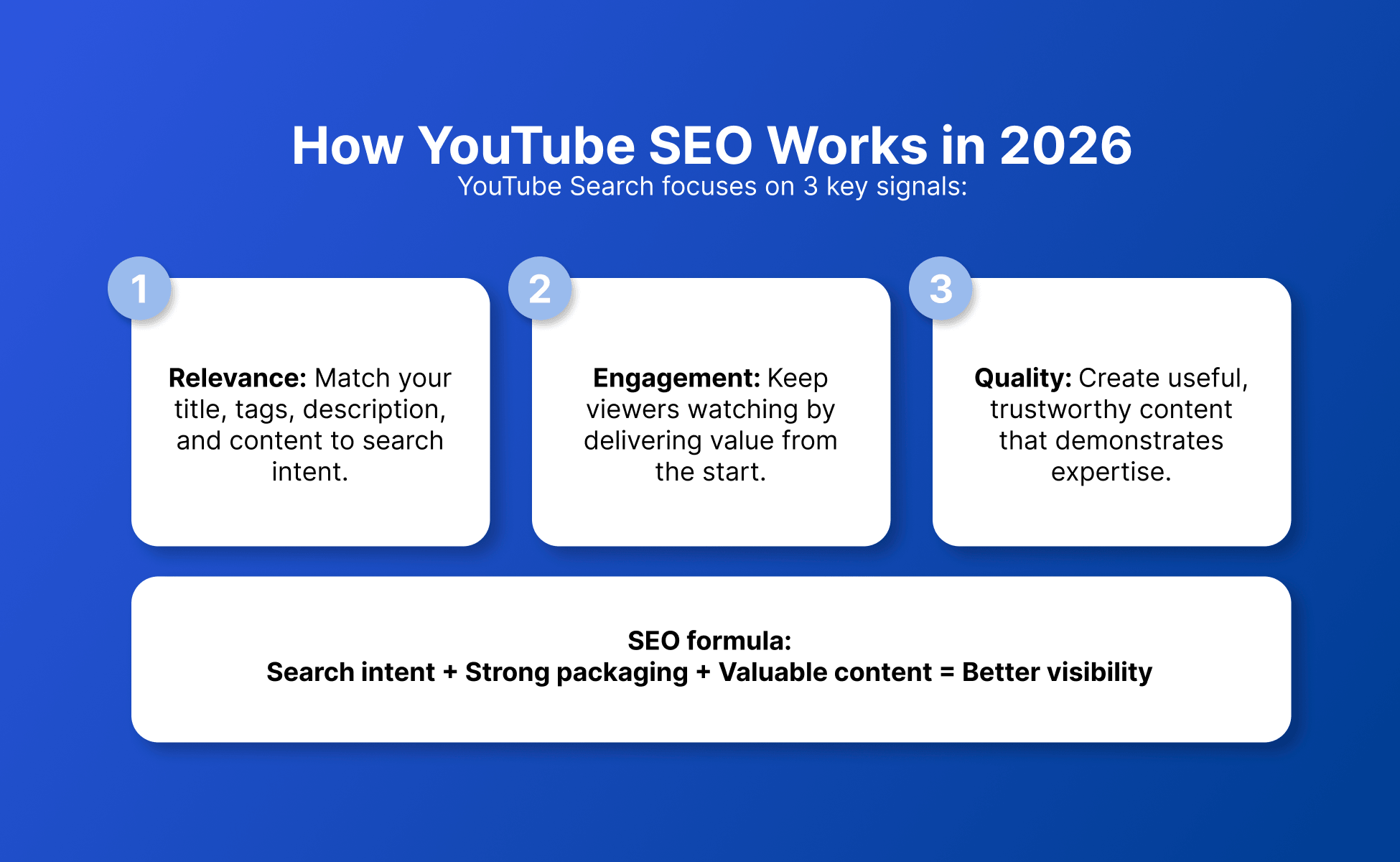
YouTube SEO works by aligning a video with a search query while giving viewers a result that clearly matches what they came to find.
YouTube’s current Search documentation centers on relevance, engagement, and quality.
Relevance
Relevance is about how closely a video matches what someone searched for.
YouTube says its relevance assessment can include how well the title, tags, description, and video content match the query.
That does not mean repeating one phrase everywhere.
A better question is: does every major part of the video point toward the same topic and intent?
If someone searches for “how to create YouTube thumbnails,” a focused tutorial answers a different need from a broad discussion about growing a YouTube channel.
The keyword identifies the subject.
Search intent helps you decide what the result should deliver.
Engagement
Engagement helps YouTube evaluate how viewers respond to a result.
In its Search documentation, YouTube gives watch time for a particular video and query as an example of an engagement signal that can help it judge relevance.
That connects optimization with the viewing experience.
YouTube also advises creators to pay close attention to the opening moments of a video in its recommendation-performance guidance. The initial seconds are where viewers may decide whether to continue or move on.
If your title promises a tutorial but the opening spends too long on unrelated background, the packaging and the content are creating different expectations.
SEO does not stop when the click happens.
Quality
Quality refers to signals YouTube uses to identify channels that demonstrate expertise, authoritativeness, and trustworthiness on a topic.
That language comes directly from YouTube’s current Search explanation.
For creators, the practical lesson is straightforward.
Metadata can help explain the subject, but it cannot replace creating a useful video that addresses the query.
The strongest setup is consistent from beginning to end: search topic, title, thumbnail, description, and content all point toward the same answer.
YouTube Search vs recommendations: what’s the difference?
YouTube Search begins with a query, while recommendations begin with the system trying to match viewers with videos they may want to watch and enjoy.
The distinction is useful, but it should not be exaggerated.
Search itself can also be personalized. YouTube says it may consider a viewer’s search and watch history when delivering personally relevant search results.
For recommendations, YouTube describes viewer history, performance, engagement, and personalization as important inputs.
Area | YouTube Search | Recommendations |
Starting context | A viewer enters a search query | YouTube identifies videos a viewer may want to watch |
Main concepts described by YouTube | Relevance, engagement, quality, plus personal relevance | Performance and viewer personalization |
Content information | Title, tags, description, and video content can help establish query relevance | Titles and thumbnails communicate value and set viewer expectations |
Viewer response | Query-specific watch time is one example YouTube gives | Appeal, engagement, and satisfaction help describe performance |
Personalization | Search and watch history may influence results | Viewing history and related viewing behavior help shape recommendations |
Best diagnostic question | Does the video match the search and satisfy that viewer need? | Do the right viewers choose the video, keep watching, and enjoy it? |
YouTube also says it does not inherently favor one type of video simply because of its format. In its search and discovery guidance, videos are evaluated using performance and viewer personalization rather than a blanket preference for one format.
The practical takeaway is not “optimize for one algorithm.”
Diagnose where discovery is happening and what viewer behavior follows it.
How to do YouTube SEO step by step
A practical YouTube SEO workflow starts before recording and continues after publication.
Across the approved current guides from Sprout Social, Semrush, Backlinko, WordStream, and vidIQ, the recurring pattern is similar: research the topic, understand the query, package the video clearly, publish it, then review how it performs.
Here is a cleaner way to organize that work.
1. Start with a real search problem
Choose a topic based on something your intended viewer is trying to learn, compare, solve, or understand.
A phrase becomes more useful once you understand the reason behind it.
- YouTube thumbnails
- how to make YouTube thumbnails
- YouTube thumbnail size
- YouTube thumbnail ideas
These phrases sit in the same topic area, but they do not necessarily ask for the same video.
Your job is not just to place the keyword.
Decide which problem the video will solve.
2. Study the current results
Review the existing results to collect clues about the likely search intent and the formats viewers currently encounter.
Look at:
- the questions titles appear to answer
- whether results are tutorials, lists, comparisons, or explanations
- common thumbnail approaches
- how narrow or broad each result is
- which subtopics repeatedly appear
Do not treat ranking competitors as a published YouTube ranking formula.
The results are useful mainly because they help you understand how other creators have interpreted the query.
If nearly every result is a beginner tutorial, that is a clue that a highly technical expert discussion may address a different intent.
3. Choose one clear content angle
Pick a specific angle that addresses the query without making the video’s promise unnecessarily broad.
Instead of:
“Everything You Need to Know About YouTube”
you could target:
“How to Optimize a YouTube Video for Search”
The second tells the viewer what problem the video intends to solve.
4. Build the video around that promise
Structure the content so viewers reach the answer they came for without unnecessary detours.
This is where search intent and viewer response meet.
If your title says “How to Do YouTube Keyword Research,” the keyword-research process should begin early enough that the opening confirms the title’s promise.
YouTube’s recommendation-performance guidance specifically tells creators to make the introduction deliver on expectations created by the title and thumbnail.
5. Write the title for clarity
Use the title to state the topic and outcome clearly enough that viewers can judge whether the video matches their search.
A primary keyword can fit naturally when it describes the subject.
For example:
“YouTube SEO in 2026: How to Optimize Videos for Search”
communicates the topic more clearly than a vague promise that hides what the video is about.
The goal is not to squeeze every keyword variation into the title.
One clear subject is enough.
6. Create a thumbnail that supports the title
Use the thumbnail to reinforce the video’s promise and help viewers understand the value of the result.
YouTube’s recommendation-performance guidance describes the title and thumbnail as important for communicating value and setting expectations.
The thumbnail does not need to repeat the entire title.
The two can divide the job.
The title can explain the subject while the thumbnail highlights a result, contrast, question, or key idea.
If this part of the workflow needs more attention, see the guide on how to create YouTube thumbnails.
7. Write a useful description
Use the description to explain what the video covers in natural language and add relevant supporting context.
YouTube lists the description among the information it can use when assessing relevance to a search query.
State the subject clearly.
Add related context where it helps.
Include useful resources when there is a real next step for the viewer.
There is no need to turn the description into a block of keyword variations.
8. Add supporting metadata without overthinking it
Use tags and other supporting metadata as secondary context rather than the center of the SEO workflow.
YouTube’s official tags guidance is unusually clear on this point.
It says titles, thumbnails, and descriptions are more important for discovery. Tags can be useful for terms people commonly misspell, but otherwise they play a minimal role.
That is a good reason not to spend half an hour building dozens of near-identical tags.
9. Publish and measure
Treat publication as the start of the measurement phase, not the end of the optimization process.
YouTube’s performance guidance encourages creators to use analytics and audience-retention information to understand how viewers react to content.
The data will not automatically tell you why something happened.
Use it to form better questions.
For example:
- Is the video being discovered for the topic you intended?
- Do viewers choose it when it appears?
- Does the opening deliver the expected value?
- Where does retention weaken?
- Is another video or topic consistently attracting the audience you want?
10. Improve one problem at a time
Change the part of the workflow that your evidence gives you the strongest reason to question.
If the query match is unclear, review the subject and metadata.
If people encounter the video but do not choose it, inspect the title and thumbnail.
If viewers begin watching but leave during the opening, review whether the content delivers the promise quickly enough.
These are diagnostic hypotheses, not guaranteed explanations.
That distinction keeps you from rewriting an entire video strategy because one metric moved.
How do you do YouTube keyword research?
YouTube keyword research means identifying topics your audience searches for and then understanding what viewers appear to want from those searches.
The approved Sprout Social, Semrush, Backlinko, and WordStream guides all place keyword or topic research near the beginning of the workflow.
A useful research process answers two questions:
- What is the viewer looking for?
- What kind of video would satisfy that search?
The second question is usually more valuable than collecting dozens of related phrases.
Suppose the topic is “YouTube SEO tools.”
That could mean:
- a list of available tools
- a comparison of free and paid options
- a tutorial using several tools in one workflow
- an explanation of which type of tool solves each SEO task
The phrase tells you the subject.
The results and related questions help you choose the angle.
Group keywords by intent
Organize related searches around the problem they express instead of treating every wording variation as a separate content idea.
For example:
- what is YouTube SEO
- YouTube SEO meaning
- what is SEO on YouTube
- how does YouTube SEO work
can support one definition-and-explanation cluster.
Meanwhile:
- YouTube SEO tools
- free SEO tools for YouTube
- YouTube SEO checker
- best SEO tools for YouTube
represent a tools-oriented cluster.
This makes content planning less repetitive.
Decide whether a query needs its own video
Give a search its own video when it represents a meaningfully different viewer problem.
“How to do YouTube SEO” and “how to optimize YouTube videos for SEO” overlap considerably.
“How to optimize YouTube Shorts for SEO” introduces a different format and discovery context, so it may deserve separate treatment.
The goal is useful coverage, not one upload for every keyword variation.
How do you optimize YouTube videos for SEO?
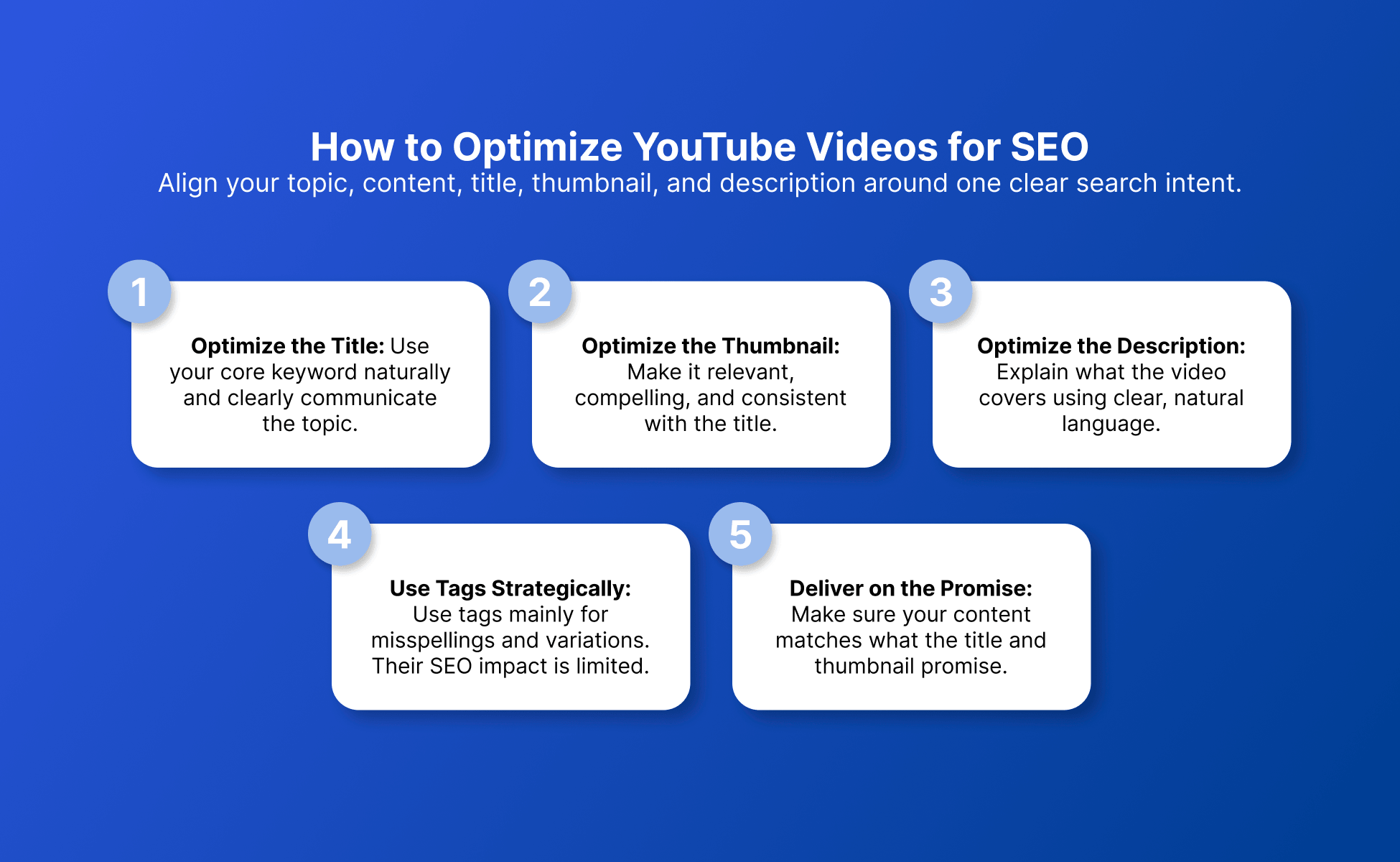
Optimize a YouTube video by aligning its topic, content, title, thumbnail, description, and post-publish review around one clear search intent.
The process works better when those pieces tell the same story.
Optimize the title
Write a title that communicates the subject clearly and accurately.
Use the core keyword where it reads naturally.
Do not force an exact-match version when a cleaner phrase expresses the same topic.
Optimize the thumbnail
Design the thumbnail to reinforce why the video is relevant and worth considering.
YouTube describes the title and thumbnail as vital for communicating value and setting clear expectations in its recommendation-performance guidance.
Think of them as a pair.
One should not contradict the other.
Optimize the description
Use the description to summarize the topic and provide relevant context around what the video covers.
YouTube includes descriptions among the information considered when estimating search relevance.
Write for a viewer first.
Clear language is more useful than a paragraph repeating the same target phrase.
Use tags for their limited role
Use tags mainly for supplemental context, including useful spelling variations, rather than treating them as a primary SEO tactic.
YouTube says tags are particularly useful when terms associated with a video are commonly misspelled.
Otherwise, their role in discovery is minimal.
Keep the content aligned with the packaging
Make sure the video itself delivers the subject and value promised by the title and thumbnail.
YouTube’s current performance guidance emphasizes setting clear expectations and then delivering on that promise in the content.
The upload screen cannot compensate for a video that answers a different question.
Do YouTube tags still matter for SEO?
YouTube tags still have a role, but YouTube says they usually matter less for discovery than the title, thumbnail, and description.
The platform’s own documentation says tags can help when the content contains words people commonly misspell.
Otherwise, they play a minimal role in discovery.
A practical priority order is:
- Choose a relevant topic.
- Understand the search intent.
- Create the right video for that intent.
- Write a clear title.
- Create a thumbnail that supports the promise.
- Write a useful description.
- Add relevant tags where they provide extra context.
Tags are not useless.
They are simply not a good reason to neglect the parts of the video that viewers use to decide what to watch.
How do you optimize a YouTube channel for SEO?
YouTube channel SEO means making the channel’s subject and content organization clear enough that viewers can understand what it covers and find related videos.
Video SEO asks:
“What is this video about?”
Channel SEO asks:
“What can someone expect to find across this channel?”
Current approved guides from Semrush, WordStream, Sprout Social, and vidIQ include channel organization, playlists, related content, or other channel-level optimization as part of the wider workflow.
Make the channel topic understandable
Use clear recurring themes so the content library has an obvious subject structure.
A channel about YouTube growth, for example, could organize content around:
- YouTube SEO
- thumbnails
- Shorts
- monetization
- analytics
- content planning
The point is not that every channel needs one tiny niche.
The goal is to make related content easy to identify.
Organize related videos
Group closely related videos so viewers can move from one relevant topic to another.
Both WordStream and vidIQ include playlists in their current YouTube SEO guidance. vidIQ also discusses cards and end screens as ways to point viewers toward related content.
Use those features because they improve navigation through your content library, not because you need to manufacture a complicated internal-linking system.
Review older videos
Revisit older videos when you have evidence that the topic, packaging, or content could be improved.
WordStream’s current guide explicitly recommends reviewing existing content and using analytics to identify opportunities to optimize older videos.
Sometimes the strongest next move is improving an existing useful video rather than publishing another version of the same topic.
How does YouTube SEO work for Shorts?
YouTube SEO for Shorts still benefits from clear topic relevance, but Shorts should not be treated as a metadata-only version of long-form video SEO.
YouTube’s format-neutral search and discovery guidance says its system does not inherently favor a particular video type simply because of the format.
Performance and viewer personalization still matter.
For a search-oriented Short:
- choose one clear topic
- make the subject understandable quickly
- use an accurate title and description
- keep the content aligned with the promise
- review viewer response after publication
The approved vidIQ 2026 guide also treats Shorts as a distinct workflow rather than simply reusing a long-form metadata checklist.
The safest conclusion is simple.
Do not assume adding more keywords makes a Short more discoverable. The Short still has to be relevant to the topic and work for the viewer.
Which YouTube SEO tools do you actually need?
You need tools that solve a specific research, optimization, or measurement problem rather than every tool labeled “YouTube SEO.”
The current SERP mixes educational guides with keyword tools, checkers, creator platforms, and analytics workflows.
Those products broadly fall into a few categories.
Need | Useful tool category | What to use it for | Limitation to remember |
Topic research | Keyword and topic research | Discover related phrases, questions, and estimated competition | Third-party estimates are tool-specific |
Optimization review | SEO checklist or checker | Catch missing or incomplete optimization elements | A checklist score is not YouTube’s ranking system |
Performance review | YouTube Studio and analytics tools | Review discovery and viewer-response data | Metrics still need interpretation |
Competitive research | Search-result and channel research | Study content angles and packaging patterns | Competitor behavior does not reveal a ranking formula |
Workflow management | Creator workflow tools | Reduce repeated research or publishing work | More features do not automatically produce better content decisions |
Start with the problem.
If manual topic research is taking too long, use a research tool.
If you keep forgetting publishing steps, a checklist can help.
If you need to understand what happened after upload, start with YouTube Studio and the performance information already available there.
Software should remove repetitive work, not make the strategy more complicated.
What is a YouTube SEO score?
A YouTube SEO score is usually a metric created by a third-party tool to summarize its own keyword or optimization criteria.
It should not be confused with an official YouTube ranking score.
YouTube’s published explanation of Search describes relevance, engagement, and quality. It does not present creators with one universal SEO score that determines where a video ranks.
Approved third-party tools illustrate why the distinction matters.
vidIQ, for example, displays its own keyword scores and provides an SEO report or checklist around optimization elements.
Those measurements belong to the tool.
Another product may calculate them differently.
Use a score to ask questions such as:
- Did I forget an important optimization step?
- Is this keyword unusually competitive according to this tool?
- Is my title or description missing the topic?
- Have I completed the workflow I intended to follow?
Do not treat “100/100” as proof that a video will rank.
How do you measure whether YouTube SEO is working?
Measure YouTube SEO by looking at whether the intended audience finds the video and how viewers respond once it is presented to them.
YouTube’s current documentation gives creators several ways to think about that response.
For Search, relevance and engagement matter.
For recommendation performance, YouTube groups signals into appeal, engagement, and satisfaction.
Audience-retention analytics can also show how viewers react at different moments in a video.
The useful part is turning those observations into focused questions.
If search visibility looks weak
Review whether the topic and video clearly match the query you intended to target.
Check:
- Is this really the search problem the video answers?
- Is the topic clear in the title and description?
- Does the content address that question?
- Are you targeting a phrase while creating a video for a different intent?
Do not assume the problem is simply “not enough keywords.”
If viewers encounter the video but often do not choose it
Review the title and thumbnail as the first packaging hypothesis.
YouTube describes these elements as important for communicating value and setting viewer expectations.
Ask whether the result makes the subject obvious.
Could a viewer tell what they will get before clicking?
If viewers begin watching but leave during the opening
Review whether the first moments deliver the value promised by the title and thumbnail.
YouTube explicitly advises creators to use engaging openings and audience-retention analytics to understand viewer reactions.
The fix may be pacing or structure rather than metadata.
If a video performs well for the audience you want
Use that result to research adjacent viewer questions instead of cloning the same video.
A useful YouTube SEO topic may lead naturally into related searches such as:
- YouTube keyword research
- YouTube SEO tools
- YouTube thumbnails
- channel SEO
- Shorts SEO
That turns one successful idea into a coherent content cluster.
If monetization is also part of your strategy, treat it as a separate workflow from search optimization. This guide explains how to make money on YouTube.
Worked example 1: The topic matches, but the opening does not
Example only, not a benchmark: A creator publishes a tutorial targeting “how to create YouTube thumbnails,” and the title and description accurately describe that tutorial.
Viewers begin watching, but the retention data shows that many leave during the opening.
The first question should not be, “Which extra tags should I add?”
YouTube’s own guidance tells creators to look at the opening moments and whether the video quickly delivers on the promise made by the title and thumbnail.
A sensible test would be to shorten unrelated setup and bring the actual thumbnail process forward.
The example does not prove that this change will increase ranking.
It simply shows how analytics can point you toward a more relevant hypothesis.
Worked example 2: The topic is relevant, but the packaging is unclear
Example only, not a benchmark: A team publishes a video about “YouTube SEO tools for beginners,” and the video addresses that exact topic.
The video is being presented to viewers, but they often choose other options.
Before rewriting the entire video, inspect the title and thumbnail together.
Do they explain that this is a beginner-focused tool workflow?
Does one promise something different from the other?
Because YouTube describes title and thumbnail packaging as important for communicating value and expectations, that is a reasonable place to test before assuming the core topic is wrong.
Again, this is a diagnostic example, not a promised outcome.
5 YouTube SEO best practices for 2026
1. Match the video to one clear search intent
Choose one primary problem and create the strongest answer you can for that problem.
Do not make one video carry five unrelated topics simply because several keywords have search demand.
2. Prioritize titles, thumbnails, descriptions, and content over tags
YouTube itself says titles, thumbnails, and descriptions are more important for discovery than tags in most cases.
Put the larger share of your attention into the parts that communicate what the video is and whether it is worth watching.
3. Write for viewers before optimization checkers
Use SEO checkers as reminders.
Do not make a proprietary score the editor-in-chief of the channel.
A complete checklist cannot tell you whether the video satisfies the viewer who searched for it.
4. Review performance after publishing
Use Search and viewer-response data to decide what deserves another look.
Diagnose first.
Then change one meaningful part of the workflow rather than rewriting everything at once.
5. Build related topic clusters
Create useful paths between closely related videos instead of publishing a collection of disconnected subjects.
Someone learning YouTube SEO may reasonably want a deeper video about thumbnails, keyword research, Shorts, channel organization, or monetization next.
How can creator teams organize SEO work across multiple YouTube channels?
Creator teams managing several YouTube channels can keep daily work clearer by separating web sessions, channel projects, native-app tasks, and team access according to the workflow involved.
For YouTube, that workflow is mainly web-first.
Multilogin’s multiple YouTube accounts workflow uses isolated browser profiles for tasks such as YouTube Studio, uploads, analytics, channel settings, comments, and metadata work.
Each browser profile can retain its own login session, cookies, browser settings, and YouTube Studio state.
When the workflow specifically needs the native YouTube or YouTube Studio mobile app, an Android cloud phone can be used instead. It is a real Android device hosted in the cloud and is intended for native mobile workflows rather than replacing browser profiles for every channel task.
The two environment types can be organized from one dashboard, with sessions saved for later work. Teams can use Multilogin’s workspace features to organize access to the relevant environment while YouTube’s own channel permissions continue to control official access inside the channel.
For creator teams managing multiple brand or client profiles, Multilogin can help keep daily account work organized without turning your analytics workflow into a login mess.
Multilogin is not a way around platform rules; the safest approach combines clean account separation with original content, real engagement, and platform-compliant activity.
Conclusion
YouTube SEO in 2026 is less about filling every available field and more about keeping the full video aligned.
Start with a real search problem. Understand what the viewer wants. Create an answer that matches it. Package that answer clearly. Then use performance data to decide what deserves another look. Keywords still help define the subject. They are the starting point, not the finish line.