
How to Run an Unlimited Instagram Account Creator Using Multilogin Cloud Phones

How to Run an Unlimited Instagram Account Creator Using Multilogin Cloud Phones
Image of the author Gayane Gh.
22 Jan 2026
7 mins read
Share with
Run Multiple Accounts Without Bans or Blocks

Get a secure, undetectable browsing environment for just €1.99.

  • 3-day trial 
  • 5 cloud or local profiles
  • 200 MB proxy traffic

Table of Contents

Instagram rarely blocks accounts by accident. Most bans happen quietly, without warnings, and often right after you think you’ve done everything “right.” New email, new username, new content — yet the account doesn’t last. That’s usually the moment people realize the problem isn’t the account itself. It’s the environment behind it, especially when managing multiple Instagram accounts from the same setup.

If you’re trying to build an unlimited Instagram account creator, the real challenge isn’t creating more accounts. It’s making sure each account lives in its own mobile reality. Instagram pays close attention to devices, app behavior, stored data, and how consistent everything looks over time. When those signals overlap, accounts get linked. When they get linked, limits follow.

Why Instagram accounts get restricted when you scale

Instagram is built around mobile behavior. Even when accounts are managed carefully, the platform still watches how the app behaves on the device. When multiple accounts come from the same phone, patterns start to form.

This usually happens because:

  • App data and login history stay on the same device
  • Android system identifiers repeat
  • New accounts inherit traces from older ones

Once Instagram connects those dots, restrictions often spread. One account gets limited. Another gets logged out. Then new accounts fail to stick at all.

Why creating more accounts doesn’t fix the problem

Many people respond to bans by creating more accounts faster. That approach usually makes things worse.

Using one phone for multiple accounts

A single phone keeps shared app storage, cached data, and background signals. Even if you log out, the environment remains the same.

App cloners and emulators

These tools reuse device-level signals that Instagram can recognize. Accounts may work briefly, but they rarely age naturally.

IP changes alone

Changing IPs or locations doesn’t reset the Android device. Instagram still sees the same phone underneath.

None of these approaches change the core issue: the device stays the same.

What an unlimited setup actually requires

Before talking about tools, it helps to understand what Instagram expects from long-lasting accounts. Stable setups share a few key traits:

  • One Android environment per account
  • Persistent app data between sessions
  • Consistent device behavior over time
  • No signal overlap between accounts
  • Centralized control to avoid mistakes

Without these pieces, scaling always turns into a cycle of creation and loss.

How Multilogin changes Instagram account creation

Multilogin Cloud Phones are designed to address the device problem directly. Instead of forcing many accounts onto one phone, each Instagram account runs inside its own real Android cloud phone.

This approach turns Multilogin into an unlimited Instagram account creator not because it generates accounts automatically, but because it removes the technical limit that usually stops people from scaling.

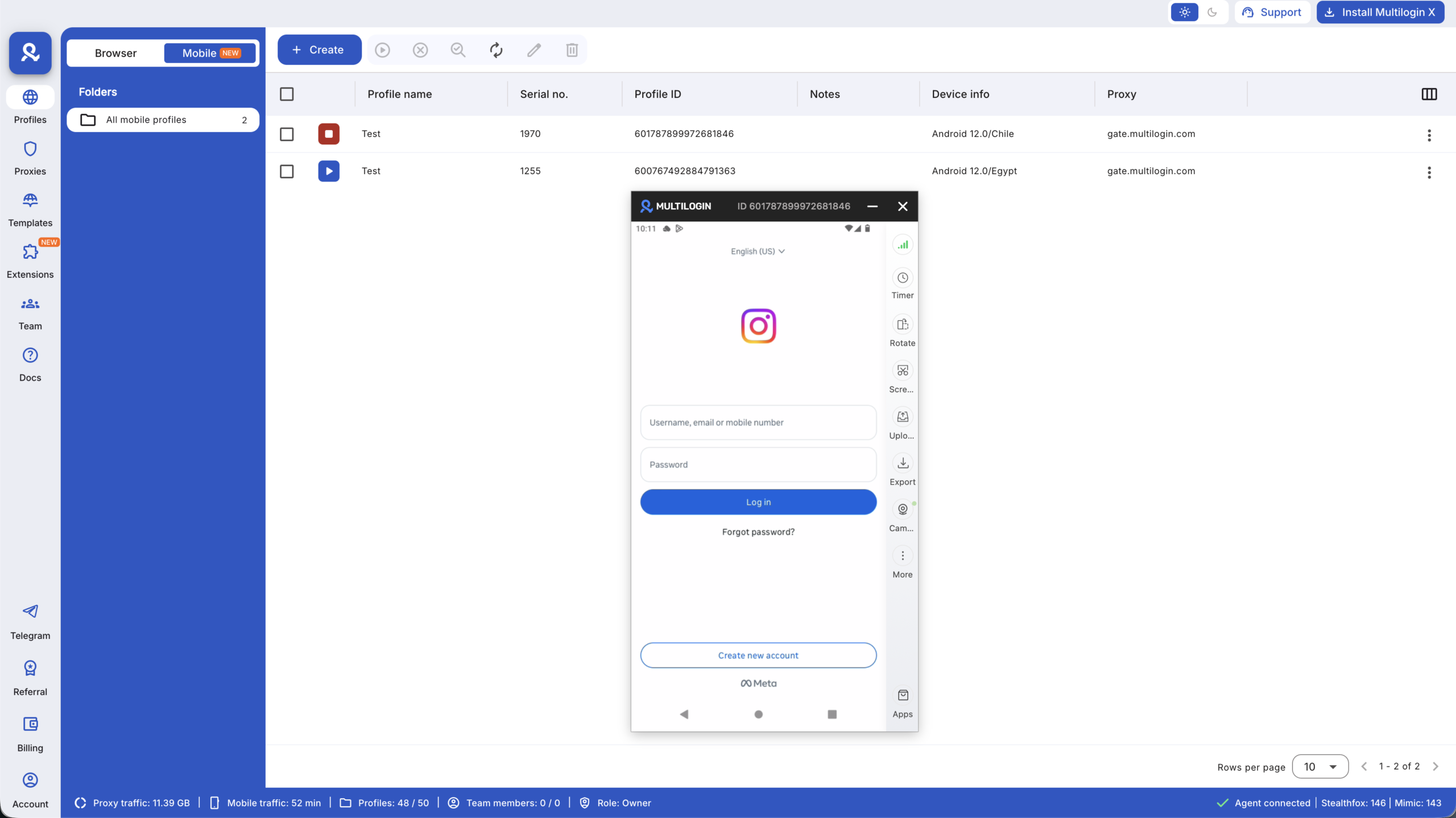
Running each Instagram account on its own real Android cloud phone

Every cloud phone is a full Android system hosted in the cloud. Each one comes with genuine hardware identifiers like IMEI, Android ID, and MAC address. These identifiers aren’t simulated or recycled.

When Instagram opens inside a cloud phone:

  • The app sees a real Android device
  • App storage stays inside that phone
  • The device behaves the same way every time

Each account lives in its own environment, just like having a separate physical phone — without the hardware.
Running each Instagram account on its own real Android cloud phone

Keeping sessions stable across logins

One of the fastest ways to trigger security checks is logging in from a fresh or inconsistent environment. Cloud phones avoid that by preserving app data, cache, and login state.

When you return to an account:

  • It opens as the same device
  • The app remembers its history
  • Behavior stays predictable

This stability allows accounts to warm up naturally instead of resetting their identity every day.

Preventing account linking through full isolation

Account linking usually happens when signals overlap. Multilogin avoids this by isolating everything at the device level.

Each cloud phone has:

  • Its own storage
  • Its own system settings
  • Its own background signals

If one Instagram account runs into trouble, it stays contained. The rest of your setup remains untouched.

This isolation is what allows an unlimited Instagram account creator workflow to stay controlled instead of fragile.

Managing all Instagram accounts from one desktop

Scaling accounts often becomes messy because tools are scattered. Phones here. Browsers there. Logins everywhere.

Multilogin brings cloud phones and browser profiles into one desktop app. From a single dashboard, you can:

  • Launch cloud phones
  • Switch between Instagram accounts
  • Organize devices clearly

This reduces errors, saves time, and makes daily work more predictable.

Matching mobile identity with built-in proxies

Instagram looks for consistency between device signals and location. Cloud phones use built-in mobile-grade proxies that align IP, region, and device behavior.

There’s no manual setup and no guessing. Each cloud phone keeps its identity aligned over time, which helps avoid conflicts that often lead to restrictions.

Scaling without physical phone farms

Physical phone farms introduce their own problems: charging, rotation, maintenance, and human error. Cloud phones remove all of that.

You scale by adding environments, not hardware. Each new Instagram account gets its own Android device instantly. This makes growth predictable and repeatable.

At this stage, Multilogin becomes less of a tool and more of an unlimited Instagram account creator framework — one where scale doesn’t increase risk.

 

Run Instagram accounts on real Android cloud phones.

Who this setup is built for

This approach fits anyone who can’t afford unstable accounts:

  • Creators running multiple niches
  • Agencies managing client profiles
  • E-commerce brands testing regions
  • Teams scaling outreach or content

In all cases, the goal is the same: long-term control.

The difference between creating accounts and maintaining them

Creating an Instagram account takes minutes. Keeping that account alive over weeks and months is where most setups fail. The moment multiple accounts start sharing the same mobile environment, problems appear quietly — logouts, extra verification, sudden limits, or full bans with no explanation. This isn’t about mistakes. It’s about how Instagram reads consistency at the device level.

An unlimited Instagram account creator isn’t built on speed or shortcuts. It’s built on repeatable conditions that don’t change every time you log in. When each account runs inside its own Android environment, with its own app data and device identity, Instagram sees stable behavior instead of recycled signals. At that point, scaling stops feeling risky. You’re no longer guessing which account will disappear next — you’re running a system designed to last.


Final thoughts 

Instagram doesn’t limit growth. Shared environments do. When multiple accounts rely on the same device, restrictions are only a matter of time.

Multilogin Cloud Phones solve this by giving every account its own real Android device, persistent app data, and isolated identity. That’s what turns account creation into a stable process instead of a cycle of bans.

If your goal is to build an unlimited Instagram account creator setup that lasts, controlling the device behind each account isn’t optional — it’s the foundation.

FAQs

“Unlimited” doesn’t mean creating accounts endlessly from one phone or in one session. It means removing the technical ceiling that usually stops people from scaling. That ceiling is the shared mobile environment. When multiple accounts depend on the same device, Instagram eventually connects them. When each account runs inside its own Android environment, that limit disappears. You’re no longer constrained by how many accounts one phone can safely handle.

Most bans have nothing to do with content. They happen because Instagram recognizes repeated device behavior. When new accounts are created on a phone that already has history, the app sees familiar Android identifiers, leftover app data, and consistent system patterns. That’s enough to trigger restrictions before the account has a chance to grow or even post.

Normal account creation focuses on surface details like emails, usernames, or phone numbers. An unlimited Instagram account creator focuses on the environment behind each account. By giving every account its own Android system, app storage, and device identity, accounts stay independent. They don’t inherit history or risk from earlier logins, which is what usually causes new accounts to fail.

Yes, when accounts share the same device or app environment, restrictions often spread. One flagged account can quietly raise the risk level for all others on that device. When accounts are isolated at the Android level, issues stay contained. A problem with one account doesn’t leak into the rest of the setup.

Repeated logouts and verification requests usually signal that Instagram doesn’t trust the environment. This often happens when the app sees resets, inconsistent device signals, or frequent changes in behavior. Persistent Android environments keep app data and system signals stable, which reduces the need for Instagram to constantly recheck identity.

Anyone who depends on account stability. Creators managing multiple niches, agencies handling client profiles, e-commerce brands testing regions, and teams scaling outreach all face the same risk when accounts share devices. Separate Android environments turn account management from a guessing game into a predictable workflow.

Run Multiple Accounts Without Bans or Blocks

Get a secure, undetectable browsing environment for just €1.99.

  • 3-day trial 
  • 5 cloud or local profiles
  • 200 MB proxy traffic

Table of Contents

Join our community!

Subscribe to our newsletter for the latest updates, exclusive content, and more. Don’t miss out—sign up today!

Recent Posts
Reviewer
22 Jan 2026
Share with
Hi, I’m Gayane G., a passionate content creator at Multilogin. With a degree in Marketing and over 9 years of experience, I focus on creating engaging digital content that resonates with audiences. When I’m not writing, you can find me traveling, trying new recipes, or curled up with a good book.
https://multilogin.com/academy/how-to-run-an-unlimited-instagram-account-creator-using-multilogin-cloud-phones/
Recent Posts
Join our community!

Subscribe to our newsletter for the latest updates, exclusive content, and more. Don’t miss out—sign up today!

Thank you! We’ve received your request.
Please check your email for the results.
We’re checking this platform.
Please fill your email to see the result.

Multilogin works with amazon.com