



Buying an established channel can look like a shortcut to an existing audience, content library, and revenue history. The difficult part is not finding listings. It is working out whether the seller controls what they claim, the audience fits your plan, the revenue can be verified, and ownership can change without a messy credential handover.
If you plan to buy YouTube channels, treat the process like acquiring a small media asset. Compare marketplaces, but inspect the channel inside YouTube Studio before agreeing to a price. Monetization status, subscriber count, and channel age tell only part of the story.
Key takeaways
YouTube channels are listed on general digital-asset marketplaces, YouTube-specific marketplaces, business marketplaces, and community forums.
A marketplace’s verified-listing label is not a substitute for checking revenue, traffic sources, audience geography, strikes, content rights, and ownership.
YouTube documents Brand Account ownership changes, but those instructions do not constitute an endorsement of channel sales.
A newly added Brand Account owner must wait at least seven days before becoming the primary owner.
Monetized channels remain subject to YouTube’s monetization, copyright, Community Guidelines, advertiser-friendly, and program policies.
Buyers should avoid taking over a seller’s Google Account password when access can be assigned through documented ownership roles.
What do “aged,” “dead,” “active,” and “monetized” channels mean?
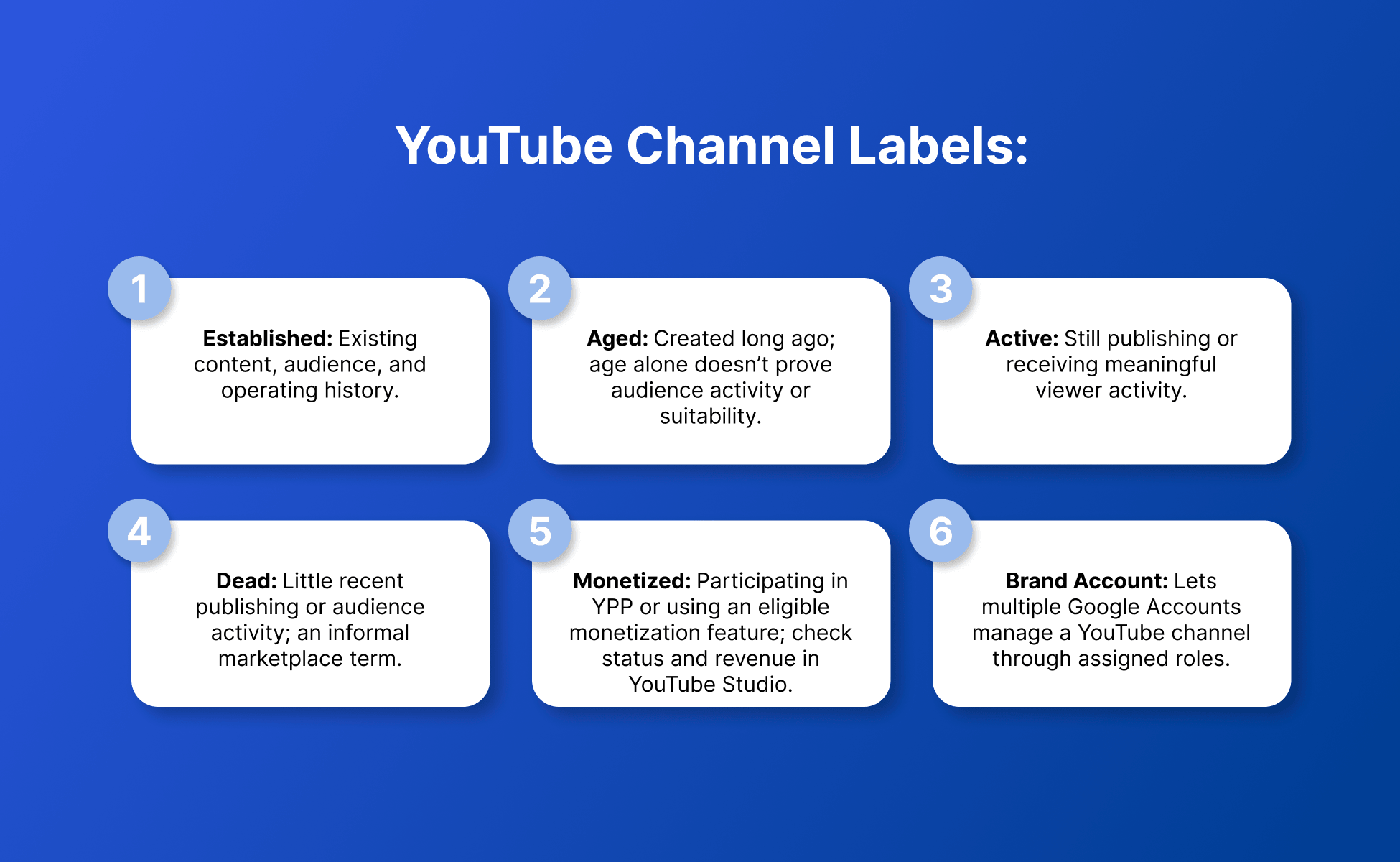
These labels describe different parts of a channel’s history, but none proves that the channel is a suitable acquisition.
Established YouTube channel: A channel with an existing content, audience, and operating history.
Aged YouTube channel: A channel created some time ago. Age alone does not show whether its audience remains active or its content history fits the buyer’s plans.
Active YouTube channel: A channel that continues publishing or receiving meaningful viewer activity.
Dead YouTube channel: An informal marketplace term for a channel with little recent publishing or audience activity.
Monetized YouTube channel: A channel currently participating in the YouTube Partner Program or using an eligible monetization feature. Buyers should inspect its exact status and revenue sources inside YouTube Studio.
Brand Account: A Google account structure that allows multiple Google Accounts to manage a linked YouTube channel through assigned roles.
Where can you buy YouTube channels?
You can find YouTube channels for sale through marketplaces such as Flippa, Fameswap, Hypertube, Investors Club, and Motion Invest, as well as community-based platforms such as EpicNPC and SWAPD.
These platforms do not all serve the same type of buyer. Some list YouTube channels alongside websites and online businesses. Others focus on social profiles or YouTube inventory. Forum-style platforms place more of the investigation and negotiation work on the buyer.
No marketplace should be selected from its brand name or marketing claims alone. The useful comparison is what it shows, what it says it checks, how payment is handled, and how much evidence the buyer can inspect before funds are released.
How were these YouTube channel marketplaces checked?
The marketplaces were checked using information visible on their current pages and the approved SERP sources.
The review looked for:
Channel types and listing format
Monetized or aged inventory
Listing-verification statements
Escrow or payment protection
Inspection periods
Ownership-transfer support
Publicly stated fees
Information available for buyer due diligence
Unavailable details are marked as “not publicly verified.” Marketplace testimonials and individual seller claims were not treated as factual proof.
Can you buy a YouTube channel?
You can find and negotiate purchases of YouTube channels through active marketplaces, but YouTube’s approved documentation does not endorse or certify channel sales.
YouTube documents how owners and managers can be added to a channel linked to a Brand Account. It also documents how primary ownership can change. Those instructions explain channel administration, not approval of a marketplace transaction.
Buyers should review YouTube’s current terms and policies alongside the marketplace conditions and purchase agreement before proceeding.
What does YouTube document about channel ownership transfer?
YouTube documents that a channel linked to a Brand Account can have multiple owners and managers, and that primary ownership can be reassigned after the required waiting period.
According to YouTube’s Brand Account ownership instructions, the process can include:
The current owner invites the buyer’s Google Account as an owner.
The buyer accepts the invitation.
The buyer remains an owner for at least seven days.
The current primary owner transfers primary ownership.
The parties review and update any remaining owner or manager access.
This process applies when the channel is linked to a Brand Account and the required ownership options are available.
YouTube recommends assigning appropriate access roles and avoiding password sharing. A buyer should therefore distinguish between receiving ownership of a channel and receiving the login credentials for somebody else’s Google Account.
Is changing the owner the same as moving the channel?
Changing the owner is not the same as moving a channel between Brand Accounts.
YouTube’s separate channel-move procedure allows a channel to be moved between Brand Accounts associated with the same Google Account. YouTube warns that an incorrect move can delete the wrong destination channel. Some account data can also be lost during that process.
For that reason, buyers should not use “Brand Account transfer” as a vague label for every technical step. The parties need to identify whether they are changing ownership roles or moving a channel between Brand Accounts.
What should you check before buying a YouTube channel?
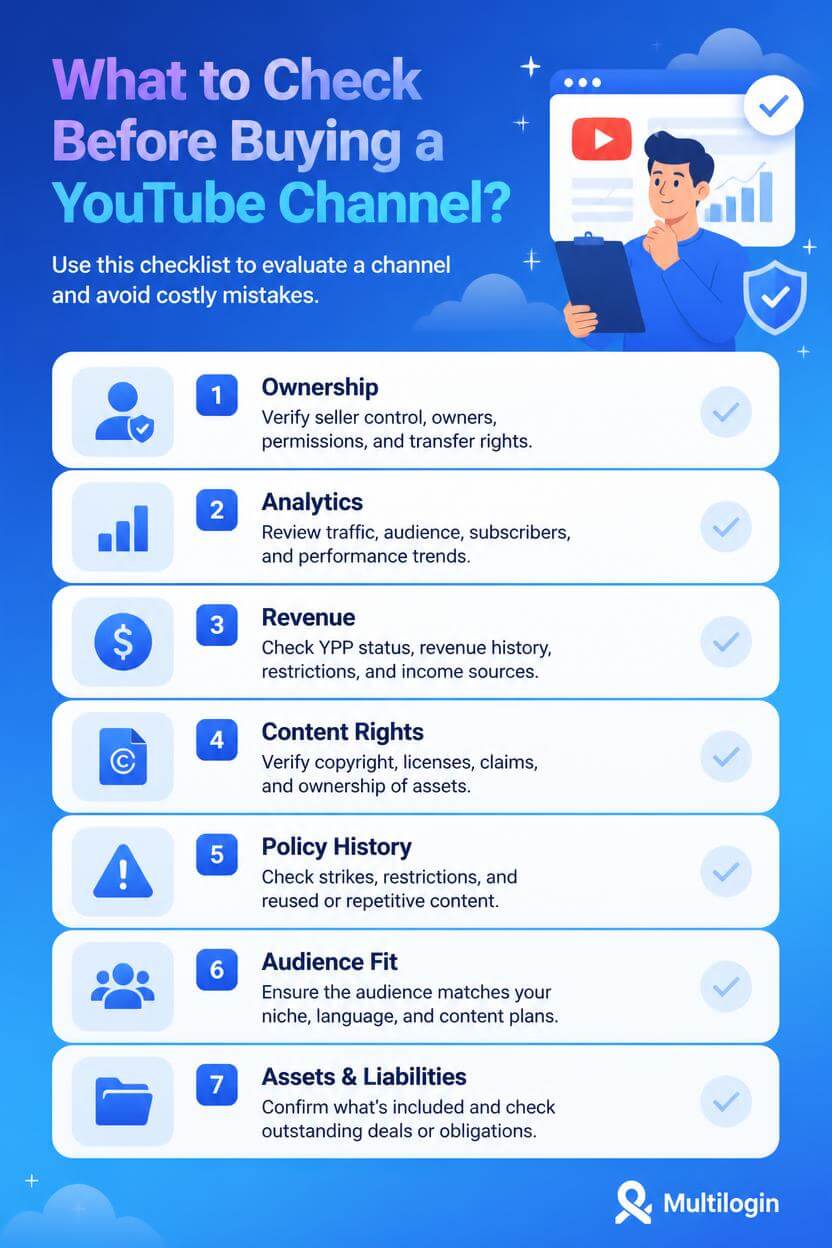
You should check ownership, analytics, revenue, audience quality, content rights, policy history, and the proposed ownership path before buying a YouTube channel.
1. Seller ownership and authority
Ask the seller to demonstrate current control through a live session inside YouTube Studio.
Confirm:
The channel URL and channel ID
Whether the channel is linked to a Brand Account
The current primary owner
Other owners, managers, or channel-permission users
Whether another person, company, creator, or agency has a claim to the channel
Whether the seller has authority to transfer the content library, brand assets, and related rights
A screenshot can be outdated or incomplete. A live, buyer-directed inspection provides more current evidence.
2. YouTube Studio analytics
Review analytics across several time ranges rather than focusing on one strong month.
Inspect:
Views and watch time
New and returning viewers
Traffic sources
Top videos
Audience geography
Viewer age and language where available
Subscriber gains and losses
Shorts, long-form, and live-stream performance
Recent performance compared with longer-term history
Look for concentration. A channel receiving most of its activity from one viral video, one search term, one country, or one traffic source may behave differently after the acquisition.
3. Monetization and revenue
Check monetization inside YouTube Studio and identify which revenue sources produced the seller’s figures.
Review:
Current YPP status
Estimated revenue by month
Revenue by video and content format
Ad revenue compared with other monetization features
Any visible monetization restrictions
Revenue from sponsorships, affiliates, licensing, products, or agreements outside YouTube
Which payment arrangements need to change after ownership transfer
A “monetized” label does not explain how much the channel earns or whether that performance can continue. The YouTube Partner Program and AdSense for YouTube are related but distinct parts of the operating setup.
4. Copyright and content rights
Confirm that the seller can transfer or license every material asset included in the transaction.
Review:
Active copyright strikes
Copyright claims affecting important videos
Music, footage, image, and voiceover licences
Agreements with hosts, editors, writers, or performers
Sponsor obligations
Source files and project files
Rights to the channel name, logo, thumbnails, and off-platform assets
Control of a channel does not automatically prove ownership of every element in its video library.
5. Community Guidelines and monetization history
Review the channel’s policy history rather than relying on a “no strikes” sentence in a listing.
YouTube states that monetized channels must continue following its monetization policies, Community Guidelines, copyright rules, advertiser-friendly guidelines, and program policies.
YouTube also reviews channels for original and authentic content. Reused content and generic, repetitive, or mass-produced material can affect monetization eligibility. Review the channel as a whole, especially its most viewed videos, newest uploads, main theme, metadata, and largest sources of watch time.
6. Audience and niche fit
Compare the existing audience with the content you plan to publish after the purchase.
A channel can have real subscribers and still be a poor fit. If viewers subscribed for gaming clips in one language, a move to financial explainers in another language would represent a different content proposition.
Assess:
Topic continuity
Audience geography
Language
Long-form versus Shorts behavior
Returning-viewer patterns
Host or personality dependence
Comment relevance
Whether viewers follow the topic, format, or individual creator
7. Included assets and liabilities
Record exactly what the transaction includes before agreeing to the price.
Possible assets include:
The YouTube channel
Video and thumbnail source files
Brand names and design files
Domains and websites
Related social profiles
Email lists
Sponsorship relationships
Affiliate arrangements
Production procedures
Contractor relationships
Also document outstanding content commitments, sponsor deliverables, disputes, and other obligations disclosed by the seller.
How can you value a YouTube channel?
You can value a YouTube channel by examining verifiable earnings, operating costs, audience quality, content rights, niche fit, performance stability, and transfer risk.
Subscriber count is easy to display but limited as a standalone valuation method. Two channels with the same subscriber count may differ in returning viewers, traffic quality, revenue, production cost, and dependence on the original creator.
Useful valuation inputs include:
| Factor | What to examine |
|---|---|
| Revenue | Monthly history, sources, concentration, seasonality, and supporting records |
| Profit | Revenue minus editing, writing, voiceover, footage, music, software, and contractor costs |
| Audience | Geography, language, returning viewers, engagement, and fit with planned content |
| Traffic | Search, browse, suggested, Shorts feed, external, paid, and one-video concentration |
| Content | Originality, rights, remaining useful life, and production requirements |
| Policy | Strikes, claims, monetization restrictions, and reused-content exposure |
| Operations | Time required, team dependencies, workflows, and access to source files |
| Transfer | Brand Account setup, ownership path, included assets, and seller cooperation |
| Concentration | Dependence on one video, one personality, one sponsor, or one revenue stream |
Example 1: Similar subscribers, different operating value
Channel A and Channel B each have 100,000 subscribers. Channel A receives most of its recent views from one Shorts spike and has few returning viewers. Channel B has a smaller but more consistent base of returning viewers across a library of original videos.
The subscriber count is equal, but the channels do not present the same evidence of repeatable audience demand. A buyer would still need to examine revenue, costs, content rights, and niche fit before deciding whether either price is reasonable.
Example 2: Revenue without transferable production assets
A channel shows consistent recent revenue, but its videos depend on the seller’s voice, personal image, and informal relationships with editors. The sale does not include a transition agreement, production files, or rights to reuse the seller’s likeness.
The historical revenue may be real, but the production model is not automatically transferable. The buyer should evaluate what can continue after the seller leaves, not only what happened before the sale.
How should YouTube channel ownership transfer work?
YouTube channel ownership transfer should use documented roles, written milestones, and controlled payment release rather than informal password sharing.
A practical checklist is:
Before payment
Confirm the channel URL, ID, ownership structure, and Brand Account status.
Complete the analytics, revenue, policy, rights, and audience review.
Agree on the purchase terms and included assets.
Define the payment-release conditions and inspection period.
Record what must happen before funds can be released.
Account for the seven-day primary-owner waiting requirement where applicable.
During the ownership waiting period
If the channel is linked to a Brand Account, the current owner invites the buyer’s Google Account as an owner.
The buyer accepts the invitation.
Both parties confirm the ownership role inside the Brand Account permissions.
The agreed access remains in place while the waiting period runs.
The buyer confirms that the channel and included assets still match the agreement.
Payment remains subject to the agreed release conditions.
When primary ownership changes
The eligible current owner initiates the primary-ownership change.
The buyer confirms primary-owner status.
The parties review the remaining owners, managers, and channel permissions.
Unneeded access is removed according to the agreement.
The buyer updates recovery, payment, team, and operating settings under their control.
Funds are released when the agreed closing conditions have been met.
This checklist must be adapted to the marketplace, purchase agreement, channel structure, and current YouTube interface.
What should you do immediately after buying a channel?
You should review access, preserve transaction evidence, confirm permissions, and avoid abrupt operational changes immediately after acquiring a channel.
Start by:
Saving the purchase agreement and closing records
Recording current analytics and policy status
Reviewing all owners, managers, and channel permissions
Updating recovery settings under the buyer’s control
Confirming payment setup
Preserving source files, licences, and production documentation
Reviewing scheduled uploads and sponsor obligations
Planning a measured content transition
Monitoring how returning viewers respond to the new publishing direction
Do not assume that a new owner can replace the topic, format, language, and creator identity without changing audience behavior.
Five best practices for buying YouTube channels
1. Verify the channel through a live inspection
Ask the seller to open YouTube Studio and navigate to the pages you select. Review analytics, revenue, permissions, copyright information, and policy status directly.
2. Match the audience to your publishing plan
Compare the channel’s existing topic, language, format, and geography with the content you intend to produce. An established audience is useful only when it has a reason to watch what comes next.
3. Document every transferred asset
List the channel, source files, brand assets, domains, licences, contracts, sponsor obligations, and production processes in the purchase agreement.
4. Use role-based ownership transfer
Use YouTube’s documented Brand Account ownership roles where applicable. Do not treat another person’s Google Account password as the asset being purchased.
5. Hold payment against clear closing conditions
Define what the buyer must receive and confirm before funds are released. Escrow can organize payment timing, but the agreement and inspection criteria still matter.
Organizing multiple brand, client, and acquired channel workflows
Creator teams need a clear operating structure after an acquisition, especially when different people handle publishing, analytics, mobile reviews, and client approvals.
Multilogin is a cloud phone platform for social media marketers. For YouTube, web channel management and the full desktop version of YouTube Studio primarily belong in isolated browser profiles, each with its own cookies, session, and IP address. Android cloud phones can support mobile-app workflows when the YouTube or YouTube Studio Android app is needed.
Teams can keep separate branded or client channel sessions in one dashboard and assign access without repeatedly switching logins. The channel owner should still use YouTube’s roles and permissions to control access inside YouTube.
The multi-channel management guide covers the wider account workflow, while the YouTube cloud phone guide explains where mobile and browser environments fit different tasks.
For creator teams managing multiple brand or client profiles, Multilogin can help keep daily account work organized without turning your analytics workflow into a login mess.
Multilogin is not a way around platform rules; the safest approach combines clean account separation with original content, real engagement, and platform-compliant activity.
Conclusion
Buying a YouTube channel is closer to acquiring a small media operation than purchasing a username and subscriber count.
A marketplace can help you find the opportunity. The decision itself depends on ownership, analytics, revenue, audience fit, content rights, policy history, and a transfer process that does not rely on shared credentials.
If those points cannot be confirmed, the listing is not ready for a confident acquisition.