
Instagram quietly updated its recommended post dimensions in 2026, and if you are still designing to 2022 or 2023 specs, your content is getting cropped, compressed, or displayed in ways you did not intend.
This is the complete reference. Every post format, every size, every ratio, in pixels, inches, and centimeters. Bookmark it, paste it into your design brief, and stop guessing.
There is also a section at the end that is genuinely useful for anyone managing multiple Instagram accounts across different brands or clients, because getting the sizing right is one thing, and running clean, isolated accounts that actually stay alive is another thing entirely.
The New IG Post Size in 2026
Instagram’s core recommended dimensions have been relatively stable, but in 2026 the platform shifted its default feed display to favor the 4:5 portrait ratio even more strongly than before. Posts outside this ratio are not blocked, but they are cropped in the feed preview in ways that can cut off faces, text, and key visual elements if you are not designing for it.
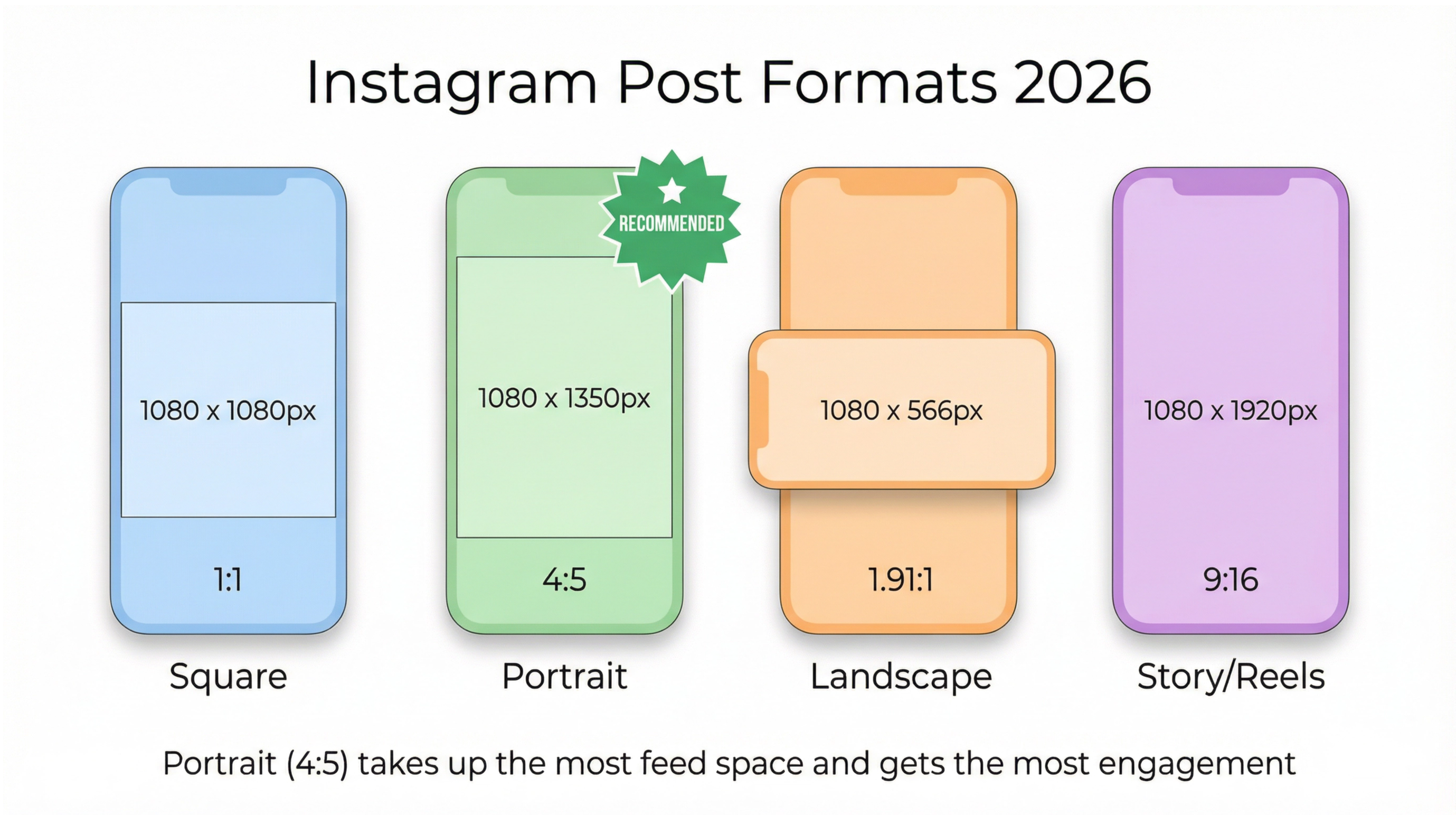
Here is the full 2026 overview at a glance:
Post Type | Recommended Size (px) | Aspect Ratio | Max File Size |
Square | 1080 x 1080 | 1:1 | 30 MB |
Portrait (recommended) | 1080 x 1350 | 4:5 | 30 MB |
Landscape | 1080 x 566 | 1.91:1 | 30 MB |
Carousel (per slide) | 1080 x 1080 or 1080 x 1350 | 1:1 or 4:5 | 30 MB per image |
Story | 1080 x 1920 | 9:16 | 30 MB |
Reels | 1080 x 1920 | 9:16 | 1 GB (video) |
Profile photo | 320 x 320 | 1:1 | — |
Grid thumbnail preview | 161 x 161 | 1:1 | — |
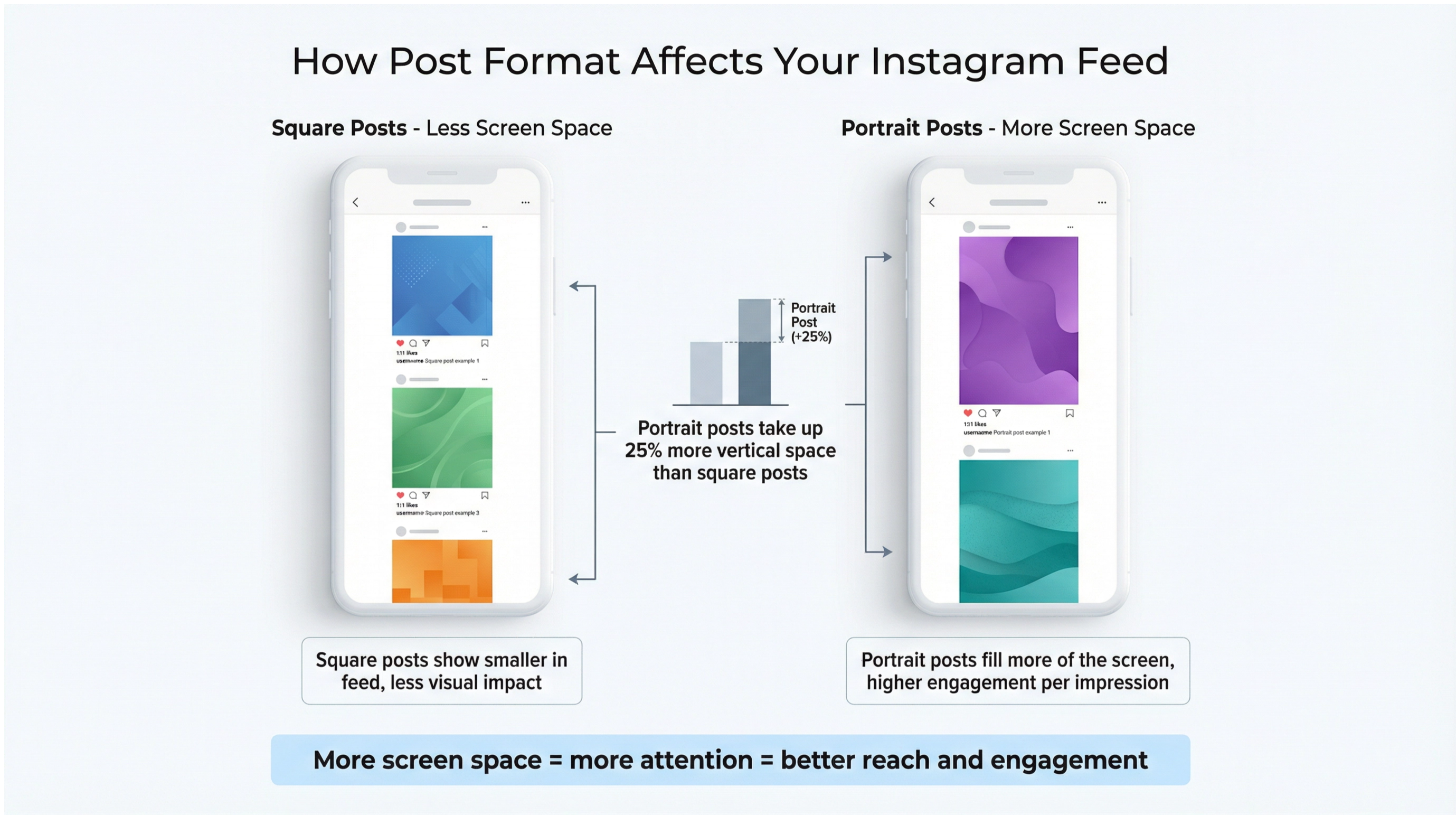
The key change in 2026 is that Instagram now defaults to showing portrait posts (4:5) at full width in the feed on most devices. Square posts display slightly smaller. This alone is reason enough to switch your default format to portrait if you have not already.
IG Square Post Size
The square post is the format Instagram launched with and it remains common, but it is no longer the default recommended format.
Square IG post size: 1080 x 1080 pixels
- Aspect ratio: 1:1
- Minimum size: 320 x 320 px
- Maximum size: 1080 x 1080 px (uploading larger gets compressed down)
- File format: JPG or PNG
- Max file size: 30 MB
Square posts display well in the grid and are still a solid choice for infographics, product shots with centered subjects, and text-based content. The trade-off is that they take up less vertical space in the feed than portrait posts, which means less screen real estate and typically lower engagement per impression.
In Photoshop: Create a new document at 1080 x 1080 px, 72 PPI (pixels per inch), RGB color mode. Export as JPG at quality 80 or higher to balance file size and visual quality.
IG Portrait Post Size (Vertical)
Portrait is the current best-practice format for Instagram feed posts in 2026.
Portrait IG post size: 1080 x 1350 pixels
- Aspect ratio: 4:5
- This is the maximum vertical ratio Instagram allows for feed posts
- File format: JPG or PNG
- Max file size: 30 MB
Portrait posts take up the most screen space in the feed of any feed format. More screen real estate means more attention, which is why the data consistently shows portrait format outperforming square for reach and engagement when content quality is equal.
The 4:5 ratio explained: For every 4 units wide, the post is 5 units tall. At 1080 pixels wide, that gives you 1350 pixels of height. If you try to go taller than 4:5 (for example, a 9:16 vertical image), Instagram crops it to 4:5 in the feed.
What the “new IG post size” actually means: When people on Reddit and in design forums talk about the new IG post size in 2026, they are almost always referring to this shift toward 4:5 portrait as the standard, not a change in pixel dimensions. The 1080 x 1350 px spec has been around for years, but Instagram’s feed rendering now favors it more prominently.
In Photoshop: New document at 1080 x 1350 px, 72 PPI, RGB. Keep critical content (faces, logos, text) within the center 1080 x 1080 region so it looks good both as a full portrait post and in any cropped grid preview.
IG Landscape Post Size (Horizontal)
Landscape or horizontal posts are the least-favored format for Instagram feeds in 2026 because they take up the least vertical screen space.
Landscape IG post size: 1080 x 566 pixels
- Aspect ratio: 1.91:1 (sometimes written as 16:9 approx)
- File format: JPG or PNG
- Max file size: 30 MB
Landscape works well for wide scenic shots, panoramic images, and content where the horizontal field of view matters (architecture, group shots, landscapes). For most other content types, portrait or square will serve better in terms of feed presence.
Instagram crops landscape images to this ratio if your original is wider. A 16:9 image (1920 x 1080) will be cropped to 1.91:1, cutting off the top and bottom if your subjects are not centered.
IG Carousel Post Size
Carousels are among the highest-performing post formats on Instagram in 2026, and the size rules have a few nuances worth knowing.
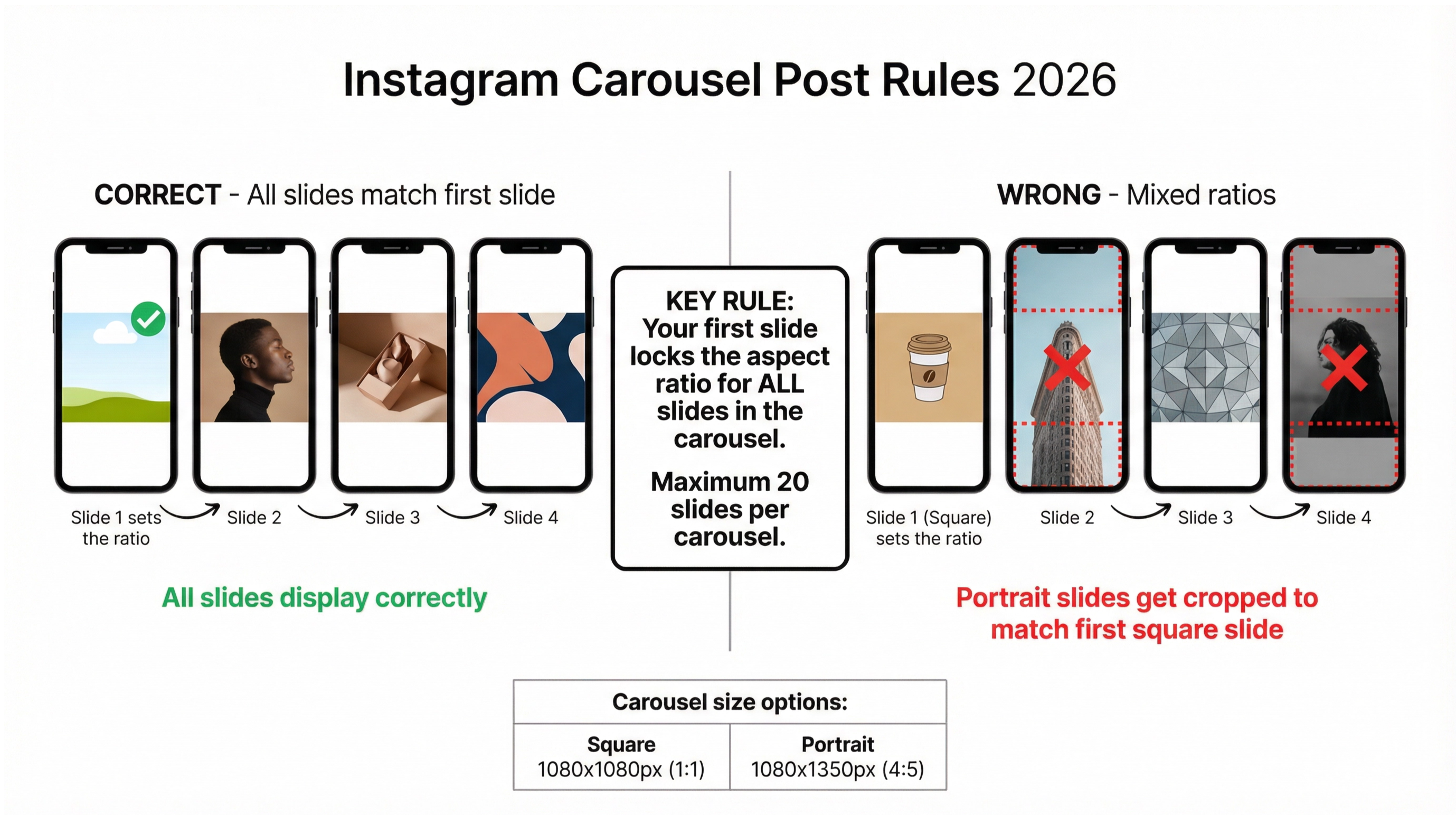
IG carousel post size: 1080 x 1080 px (square) or 1080 x 1350 px (portrait)
- All slides in a carousel must use the same aspect ratio
- Instagram locks the ratio after the first slide, so your first image sets the format for the whole carousel
- File format: JPG or PNG per slide
- Max file size: 30 MB per image
- Maximum slides: 20
The most important carousel sizing rule: Whatever ratio your first slide uses, all subsequent slides are cropped to match. If you upload a square first slide followed by portrait slides, the portrait slides get cropped to square. Plan your carousel format before you design any of the slides.
IG multiple photos in one post size: This refers to carousels. Each photo in a multi-image carousel post follows the same size rules above. All photos need to be at least 320 px on the shortest side and no more than 1080 px on the longest side for optimal display.
Carousel cover size: The first slide is your cover, which is what shows in the grid. Design the first slide with grid visibility in mind, keeping key visual elements in the center square region if you are using portrait format.
IG Story Post Size
Stories use a different format from feed posts entirely.
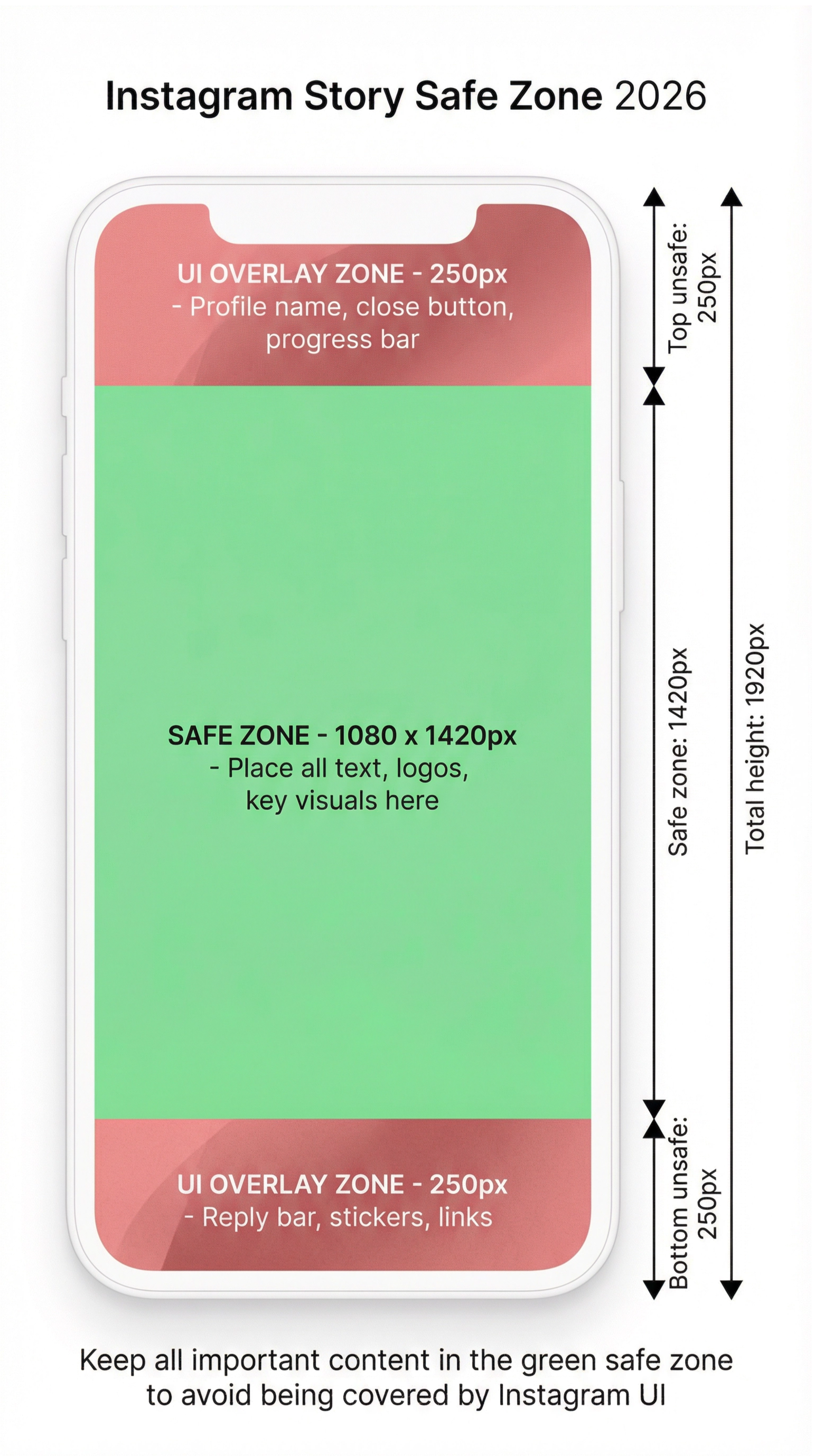
IG story post size: 1080 x 1920 pixels
- Aspect ratio: 9:16 (full vertical smartphone screen)
- Safe zone for text and interactive elements: 1080 x 1420 px (250 px from top and bottom are often covered by UI)
- File format: JPG or PNG for images, MP4 or MOV for video
- Max image file size: 30 MB
- Max video file size: 4 GB
- Max video length: 60 seconds
The safe zone matters a lot for stories. Instagram’s UI overlays (profile name at the top, reply bar at the bottom) cover roughly 250 pixels on each end. Any text, logos, or key visual elements placed too close to the edges will be hidden behind the interface.
IG story post size in inches: At 72 PPI (screen resolution), 1080 x 1920 px is approximately 15 x 26.67 inches. For practical design purposes, work in pixels rather than inches for digital content.
IG Video and Reels Post Size
Video formats on Instagram in 2026:
Reels (main video format):
- Size: 1080 x 1920 px
- Aspect ratio: 9:16
- Minimum: 500 x 888 px
- Max file size: 1 GB
- Max length: 90 seconds
- Format: MP4 or MOV
- Frame rate: 23-60 fps recommended
Feed video posts:
- Square: 1080 x 1080 px
- Portrait: 1080 x 1350 px
- Landscape: 1080 x 566 px
- Max file size: 1 GB
- Max length: 60 minutes (though shorter performs better)
Reels cover image size: The cover thumbnail for a Reel displays at 1080 x 1920 in full, but is cropped to 1:1 (square) in the grid. Design your Reel cover with the center 1080 x 1080 region as the primary visual area so the grid preview looks intentional.
IG post video size in 2026: The biggest change for video is that Reels is now Instagram’s dominant video format. Standard feed videos still work but Reels get preferential distribution. If you are creating video content for Instagram, 9:16 vertical at 1080 x 1920 is the format to prioritize.
IG Post Size in Inches and CM
Most Instagram content is designed in pixels, but if you need dimensions in physical units for presentations, client briefs, or cross-media work:
At 72 PPI (standard screen resolution):
Format | Pixels | Inches | Centimeters |
Square | 1080 x 1080 | 15 x 15 in | 38.1 x 38.1 cm |
Portrait | 1080 x 1350 | 15 x 18.75 in | 38.1 x 47.6 cm |
Landscape | 1080 x 566 | 15 x 7.86 in | 38.1 x 19.96 cm |
Story / Reels | 1080 x 1920 | 15 x 26.67 in | 38.1 x 67.7 cm |
At 96 PPI (Windows default screen resolution):
Format | Pixels | Inches | Centimeters |
Square | 1080 x 1080 | 11.25 x 11.25 in | 28.6 x 28.6 cm |
Portrait | 1080 x 1350 | 11.25 x 14.06 in | 28.6 x 35.7 cm |
Story / Reels | 1080 x 1920 | 11.25 x 20 in | 28.6 x 50.8 cm |
For digital content going straight to Instagram, work in pixels. Use inches or cm measurements only when you need to produce print-equivalent deliverables alongside the digital assets.
IG Post Size in Photoshop and Design Tools
If you are setting up templates in Photoshop, Canva, Figma, or similar tools, these are the document settings to use:
Photoshop IG post size settings:
For square posts:
- Width: 1080 px, Height: 1080 px
- Resolution: 72 PPI
- Color Mode: RGB Color, 8 bit
- Export: File > Export > Export As > JPG, Quality 80–90
For portrait posts:
- Width: 1080 px, Height: 1350 px
- Same resolution and color settings
For stories and Reels:
- Width: 1080 px, Height: 1920 px
- Same settings
IG post size in Canva: Canva has preset templates for all Instagram formats. Select “Instagram Post” for 1080 x 1080, “Instagram Portrait” for 1080 x 1350, or “Instagram Story” for 1080 x 1920. All presets are already configured correctly.
Convert to IG post size: If you have an image in a different size or ratio and need to convert it to an IG post size, the cleanest approach is to resize the canvas to the target dimensions and reposition your content rather than stretching the image. In Photoshop: Image > Canvas Size, set new dimensions, then use the Move tool to reposition. In Canva, upload your image and use the resize tool to set the target format.
Facebook and IG Post Size
If you are cross-posting content to both Facebook and Instagram, the sizing situation is slightly different between the two platforms.
Facebook feed post (shared with IG):
- Recommended: 1080 x 1080 px (square) or 1080 x 1350 px (portrait)
- Facebook displays square and portrait slightly differently than Instagram but both formats work well on both platforms
FB and IG post size for simultaneous posting: The safest single size that works well on both platforms is 1080 x 1080 px square. Both platforms display this format cleanly. If you are optimizing specifically for Instagram, go portrait (1080 x 1350). If you are optimizing for both equally, go square.
When using Meta Business Suite to schedule posts across both platforms, the preview will show you how the post will look on each platform before publishing. Always check the preview before posting if your content has text near the edges.
FB IG post size for ads: For Meta advertising (Facebook and Instagram ads), the recommended sizes are:
- Feed ad: 1080 x 1080 px (1:1) or 1080 x 1350 px (4:5)
- Story ad: 1080 x 1920 px (9:16)
- Aspect ratio range allowed: 1.91:1 to 4:5
IG Grid and Preview Size
Your Instagram grid is how your profile looks to anyone visiting it, and it is made up of square thumbnail previews regardless of what format your original posts were in.
- IG grid post size (thumbnail): 161 x 161 px display size, cropped from the center of your post.
- What this means for your content: Every post, regardless of format, is previewed in the grid as a square crop from the center. A portrait post (1080 x 1350) will be previewed as the center 1080 x 1080 region. A landscape post will be cropped similarly.
- IG post preview size: When someone sees your post in their feed before tapping to expand, the preview shows the full dimensions (portrait shows full portrait, square shows full square). The grid thumbnail is the only forced square crop.
Designing for both full post and grid preview: Keep the most important visual elements (faces, logos, key product shots, main text) within the center square region of every post. This ensures both the full-size feed post and the grid thumbnail look intentional.
Managing Multiple Instagram Accounts: Why Sizing Is the Easy Part
Getting your post dimensions right takes about five minutes once you know the specs. The harder problem, for anyone running multiple Instagram accounts for different brands, clients, or content niches, is keeping those accounts alive.
Instagram actively detects when multiple accounts are operated from the same device, the same IP address, or the same session environment. The signals it checks go far beyond just your login details: device fingerprint, GPS data, network connection, app behavior patterns, and hardware identifiers all feed into Instagram’s account linking algorithms.
When Instagram connects two or more of your accounts, the consequences range from reduced reach to permanent bans on all linked accounts simultaneously. And when that happens, no amount of correctly sized content matters.
This is the problem that Multilogin Cloud Phones solve directly.
A Real Device for Each Account
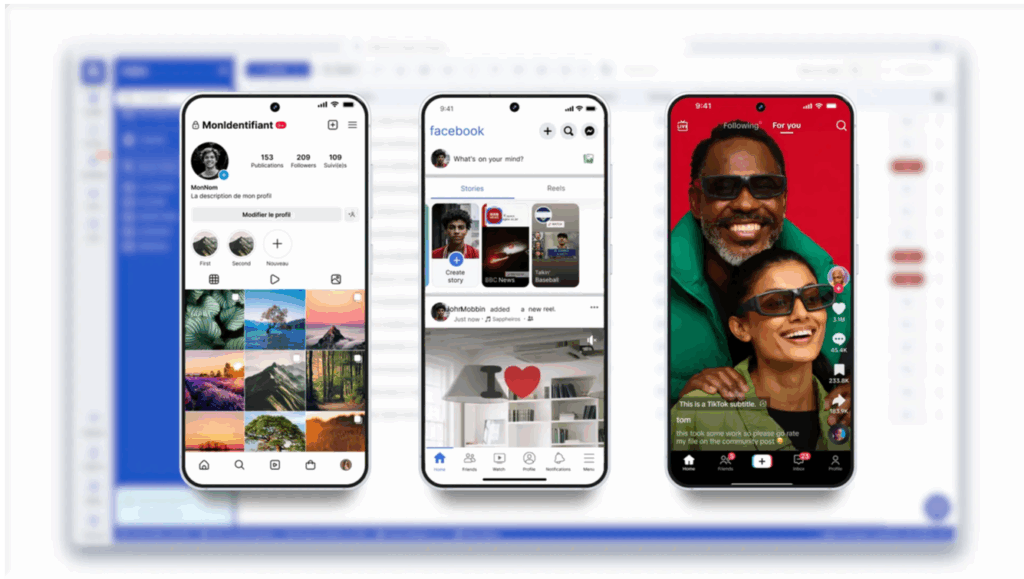
Each Multilogin Cloud Phone is a real Android device running in the cloud. Not an emulator. Not a spoofed browser profile. A genuine Android device with its own IMEI, Android ID, MAC address, and mobile data connection.
When you run an Instagram account on a cloud phone, Instagram sees a real, separate Android phone with its own device history. There is nothing connecting it to your other accounts at the device level because, at the device level, nothing is shared.
If you are a social media manager running ten Instagram accounts for ten different clients, that means ten separate cloud phones, each presenting to Instagram as a completely independent device used by a completely independent person. Each account builds its own device history, its own engagement patterns, and its own standing with Instagram’s algorithm, cleanly separated from every other account you manage.
Persistent Sessions Build Real Account History
Instagram’s algorithm favors accounts that look like they belong to real, active users. A new account that suddenly starts posting daily looks different from an account that has been active for six months with consistent behavior.
Multilogin Cloud Phones support persistent app sessions. The app data, cache, and login state for each Instagram account is saved between sessions, exactly like a real phone that someone picks up and uses every day. Your accounts on cloud phones accumulate genuine activity history over time, which makes them look like established accounts rather than fresh ones spun up for posting.
One Dashboard for Everything
The sizing and design work happens in Photoshop, Canva, or wherever you build your content. The posting and account management happens through the Instagram app on each cloud phone. And the oversight of all your cloud phones, which ones are active, which accounts have pending posts, which sessions need attention, happens from Multilogin’s single dashboard.
You do not switch devices. You do not juggle logins. You open a cloud phone from the dashboard, do the work in that isolated environment, close it, and move to the next one. Each account stays on its own phone, with its own history, completely invisible to the others.
For teams managing Instagram accounts across multiple people, Multilogin’s team features let you assign cloud phones to specific team members with granular permission controls. No shared credentials, no accidental cross-account activity, no one person’s mistake cascading across the whole operation.
Managing Multiple Instagram Accounts Guide | How to Run an Unlimited Instagram Account Creator
Need to manage multiple Instagram accounts? Try Multilogin Cloud Phones.
Frequently asked questions About IG Post Size 2026
The recommended IG post sizes in 2026 are: 1080 x 1080 px for square (1:1), 1080 x 1350 px for portrait (4:5, currently the best-performing format), and 1080 x 566 px for landscape (1.91:1). Stories and Reels are 1080 x 1920 px (9:16).
In 2026, Instagram’s recommended default is portrait at 1080 x 1350 px (4:5 ratio). This gives posts the most vertical screen space in the feed. The pixel dimensions are not new, but the shift in platform preference toward portrait over square is the practical change most creators are adapting to.
The drop system relies on communication between Twitch’s servers and each game developer’s servers. When either side has issues, drops fail to track or deliver. Ad blockers, browser extensions, and unlinked accounts are the most common causes of individual issues. Widespread issues are usually Twitch server-side problems.
For feed engagement, 1080 x 1350 px portrait (4:5) is currently the ideal size because it occupies the most vertical space in the feed. For grid aesthetics on a profile page, square (1080 x 1080) offers more control since every post previews as a centered square crop.
Check that your game account is connected at twitch.tv/settings/connections, that you are watching a stream tagged “Drops Enabled” for the specific campaign, and that your ad blocker is not interfering. If everything looks correct, the issue may be on Twitch’s or the game developer’s servers.
Connect your Steam account to Twitch at twitch.tv/settings/connections. Watch any Rust stream tagged “Drops Enabled” during an active campaign (announced by Facepunch on their official channels). Claim the drop in your Twitch inventory. Items appear in your Rust Steam inventory.

