


You want to manage multiple TikTok accounts. Maybe you’re a creator with different content niches, a business managing client accounts, or a marketer testing different strategies. But here’s the question that keeps you up at night: will TikTok shadowban me?
The short answer is yes, you can create multiple TikTok accounts. TikTok doesn’t officially limit the number of accounts you can own. However, there’s a significant catch.
Creating and managing multiple accounts from the same device is one of the fastest ways to trigger a shadowban, which can result in 3-14+ days of zero or near-zero views. If one account gets shadowbanned, all your linked accounts are at risk.
This guide explains the real limits you’ll face, the shadowban mechanics that most creators don’t understand, and how to manage multiple TikTok accounts without destroying your reach.
Can You Actually Create Multiple TikTok Accounts?
Yes, absolutely. TikTok’s terms of service don’t prohibit having multiple accounts. You can create as many as you want, as long as each account has a unique email address. The platform even has a built-in account switcher that allows you to quickly toggle between accounts.
However, the ability to create multiple accounts doesn’t mean you can manage them all from one device without consequences. TikTok’s algorithm is sophisticated enough to detect when multiple accounts are operating from the same device, and it treats this as suspicious behavior.
The Real Limits: Device, Email, and Phone Number
Understanding the practical limitations of multiple TikTok accounts requires looking at three key areas: device limits, email requirements, and phone number verification.
Device Limit: 3-6 Accounts Maximum
The TikTok app allows you to switch between a maximum of 3 to 6 accounts on a single device, depending on your device and TikTok’s current detection sensitivity. This is the most significant practical limit you’ll encounter. Beyond this number, you’ll need to use additional devices to manage more accounts.
However, this device limit is not just about convenience. It’s about TikTok’s detection system. The platform creates a detailed fingerprint of your device, including your device model, operating system, browser type, and hardware identifiers.
When you log into multiple accounts from the same fingerprinted device, TikTok links those accounts together. If one account violates TikTok’s community guidelines or exhibits suspicious behavior, all linked accounts are at risk.
Email Requirement: Unique Email Per Account
Each TikTok account must be associated with a unique email address. You can use Gmail, Outlook, ProtonMail, or any other email provider. Some email providers allow you to create aliases, which can technically be used as separate email addresses for TikTok. However, TikTok’s systems may recognize aliases as variations of the same email, potentially linking the accounts.
For the safest approach, use completely different email addresses from different providers for each account.
Phone Number: Flexible But Monitored
TikTok doesn’t enforce a strict phone number limit like some other platforms. You can create multiple accounts without phone verification, or you can verify multiple accounts with the same phone number. However, TikTok’s anti-fraud systems monitor phone number patterns. If you create dozens of accounts and verify them all with the same number in rapid succession, you’ll trigger detection.
The Shadowban Risk: Why Device Linking is Dangerous
This is the critical part that most creators don’t fully understand. A shadowban is an algorithmic penalty that TikTok applies when it detects suspicious behavior.
Unlike a full ban, a shadowban doesn’t delete your account or prevent you from posting. Instead, it dramatically reduces your video visibility. Your videos receive zero or near-zero views, even though they’re technically still visible to your followers.
The primary trigger for shadowbanning multiple accounts is device linking. When TikTok detects that multiple accounts are operating from the same device, it assumes you’re either a bot, a spammer, or someone trying to manipulate the platform. To protect its ecosystem, TikTok applies a shadowban to all linked accounts simultaneously.
Other behaviors that increase shadowban risk include liking or commenting on your own posts from another account, switching between accounts rapidly, and posting identical or near-identical content across accounts.
How to Create Multiple TikTok Accounts Safely
If you need to manage multiple TikTok accounts, there are steps you can take to minimize shadowban risk. However, none of these methods are foolproof when using standard devices and browsers.
Step 1: Use Unique Email Addresses
Create a new email address for each TikTok account. Don’t reuse emails, and don’t use email aliases. If possible, use different email providers for each account. This makes it harder for TikTok’s systems to link accounts based on email patterns.
Step 2: Verify with Different Phone Numbers (If Required)
If TikTok requires phone verification, use different phone numbers for each account. Virtual phone numbers work, but be aware that TikTok sometimes blocks numbers from known virtual phone number services. Real phone numbers are safer, but obviously less scalable.
Step 3: Isolate Each Account’s Environment
This is the most critical step. Each account should operate in a completely separate environment. Ideally, this means using different physical devices for each account. If that’s not practical, use different browsers, different browser profiles, or incognito windows. However, these methods provide only weak isolation. TikTok’s detection systems can still identify the underlying device.
Step 4: Maintain Different Behavior Patterns
Don’t like, comment on, or share your own posts from another account. Don’t cross-promote between accounts. Space out your posting and engagement activities. Use different content strategies and posting schedules for each account. The goal is to make each account appear as a completely independent user.
Common Mistakes That Trigger Shadowbans
Many creators unknowingly make mistakes that trigger TikTok shadowbans. Understanding these mistakes can help you avoid them.
Logging into multiple accounts from the same device in rapid succession is the fastest way to trigger detection. TikTok’s systems flag this as suspicious behavior. Liking or commenting on your own posts from another account is another major mistake.
TikTok’s algorithm recognizes this pattern and interprets it as artificial engagement manipulation. Creating too many accounts too quickly from the same location is also risky. If you create five accounts in one day from the same IP address, you’re likely to get flagged.
Using identical or near-identical recovery information across accounts makes it easy for TikTok to link them. Finally, violating TikTok’s community guidelines on any account puts all linked accounts at risk. If one account is flagged for spam, harassment, or other prohibited behavior, all connected accounts may be shadowbanned as well.
How Multilogin Cloud Phones Solve the Multi-Account Problem
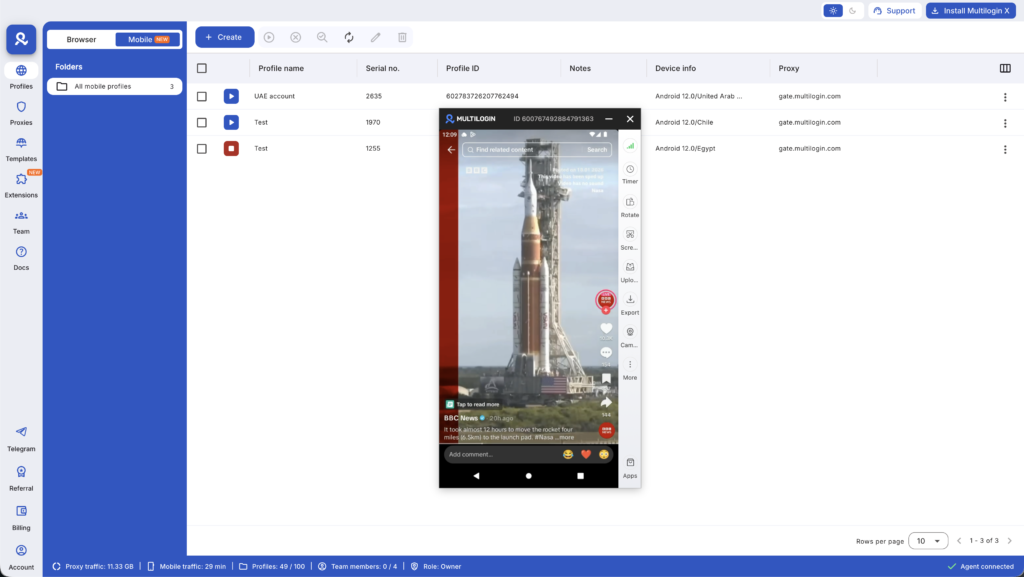
Managing multiple TikTok accounts manually is a constant battle against detection. You’re juggling different devices, browsers, and isolation strategies, and one small mistake can result in a shadowban that destroys your reach. This is where Multilogin’s cloud phones provide a complete solution.
Multilogin gives you real cloud-hosted Android devices with genuine hardware identifiers. Each cloud phone runs authentic Android OS on real hardware, providing an environment that is indistinguishable from a physical device. From TikTok’s perspective, each account is operating on a completely separate, real phone.
Here’s how Multilogin directly solves the challenges of managing multiple TikTok accounts. Each cloud phone has a unique, non-spoofed mobile identity with genuine hardware parameters like IMEI, Android ID, and MAC address.
TikTok cannot link these accounts because they genuinely aren’t connected. App data, cache, and login states persist between sessions, allowing for natural account warm-up that mimics a real user.
Each cloud phone comes with a built-in mobile-grade proxy that matches the device’s geolocation, ensuring a consistent and trustworthy identity signal. You can manage multiple social media accounts, each on its own isolated cloud phone, from a single desktop dashboard.
With Multilogin, you’re not just avoiding shadowbans. You’re building a professional, scalable foundation for managing multiple TikTok accounts with complete peace of mind.
No more juggling physical devices or risking account links. Try Multilogin's cloud phones now.
Frequently Asked Questions About Can I Create Multiple TikTok Accounts?
No official limit exists. However, practical limits include the device switcher limit (3-6 accounts per device) and TikTok’s detection systems, which flag suspicious account creation patterns.
TikTok won’t ban you simply for having multiple accounts. However, if the accounts are linked by device or IP address and one account violates community guidelines, all linked accounts are at risk. Learn more about TikTok account suspensions and how to prevent them.
Yes, you can verify multiple accounts with the same phone number. However, doing this rapidly or with many accounts increases shadowban risk.
You cannot use the same email for multiple TikTok accounts. Each account requires a unique email address.
Not directly. However, if TikTok detects that multiple accounts are linked by device or IP, it may shadowban them, which dramatically reduces views. Using TikTok proxies can help maintain account separation.
Yes, the TikTok app allows 3-6 accounts on one device. However, TikTok’s algorithm links these accounts, increasing shadowban risk if one account violates guidelines.
Open TikTok, tap your profile icon, select your username, and tap “Add account.” Continue with a unique email address. For safer account management, consider learning how to run multiple TikTok accounts without bans.
The Bottom Line: Multiple Accounts Are Possible, But Device Isolation is Critical
Creating multiple TikTok accounts is allowed and straightforward. The challenge is managing them without triggering a shadowban. The key to success is complete device isolation. Each account must operate in its own unique environment with its own device fingerprint and IP address.
While you can attempt to build this setup yourself using multiple physical devices and complex browser configurations, it’s inefficient, expensive, and prone to error. For creators and businesses serious about managing multiple TikTok accounts at scale, Multilogin’s cloud phones are the professional solution.
They provide the security of real Android hardware and the efficiency of unified management, allowing you to scale your TikTok operations with confidence.
Ready to manage multiple TikTok accounts without shadowban risk? Explore Multilogin’s cloud phone solutions and discover how to build a secure and scalable multi-account workflow.


