
Exporting your Instagram followers or following list is one of those tasks that sounds like it should be simple and turns out to be more complicated than expected. Instagram does not have a one-click export button, third-party tools vary wildly in reliability, and the wrong approach can trigger security flags on your account.
This guide covers every legitimate method for exporting Instagram followers and following lists in 2026, from Instagram’s own data download to the best third-party tools, with honest assessments of what each one actually delivers. There is also a section specifically for anyone managing multiple Instagram accounts, because the follower export question looks very different at scale.
Can You Export Instagram Followers?
Yes, but not natively in the way most people expect. Instagram does not have a built-in “Export followers to CSV” button. What it does have is a full data download feature that includes your follower and following lists as part of a broader account data export.
For more structured exports (direct CSV with usernames, follower counts, contact info where public), third-party tools are required. These tools connect to Instagram’s API or use browser-based scraping to pull list data and format it for export.
The two main use cases are:
- Exporting your own followers (people who follow you) — useful for audience analysis, CRM building, influencer research, or migrating your community to another platform.
- Exporting your following list (accounts you follow) — useful for auditing your following, identifying inactive accounts to unfollow, or recreating a following list on a new account.
Both are covered below.
Method 1: Instagram’s Native Data Download
Instagram allows you to download a copy of all your account data, which includes your follower and following lists. This is free, requires no third-party tools, and is the safest method because it uses Instagram’s own data export system.
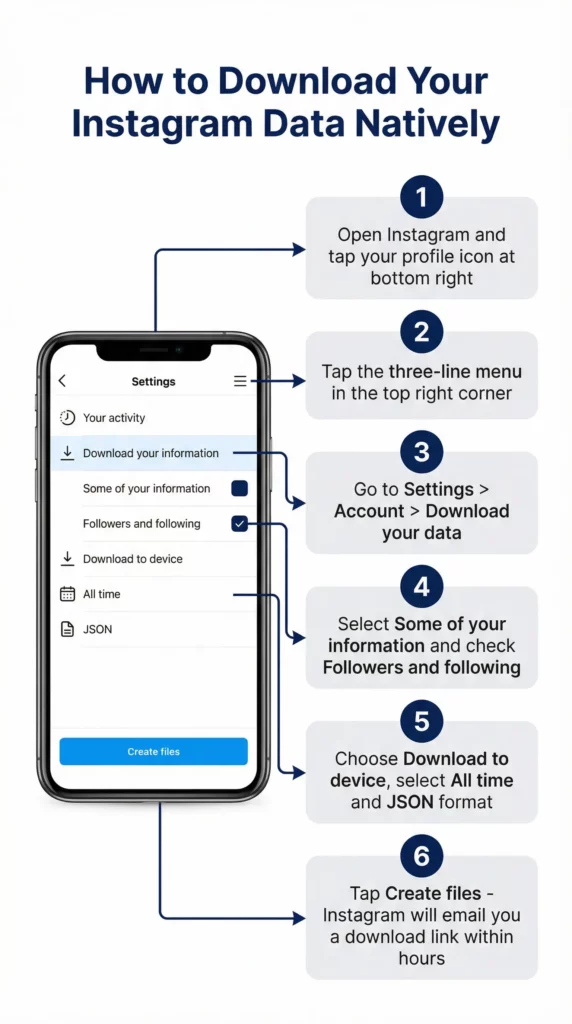
How to download your Instagram data:
- Open Instagram and go to your profile
- Tap the three-line menu (☰) in the top right
- Go to “Your activity” > “Download your information” (or Settings > Account > Download your data on some versions)
- Select “Download or transfer information”
- Choose “Some of your information”
- Select “Followers and following” from the list
- Choose “Download to device”
- Select a date range (or “All time”)
- Choose HTML or JSON format
- Tap “Create files”
Instagram will process the request and send a download link to your email within minutes to a few hours, depending on account size.
What the native export contains:
- followers_1.json (or .html): List of accounts that follow you, with usernames and profile links
- following.json (or .html): List of accounts you follow, with usernames and profile links
Limitations of the native export:
- No follower count, bio, or contact information for each follower
- No engagement data (who interacts with your content vs. ghost followers)
- JSON or HTML format, not a clean spreadsheet-ready CSV without conversion
- Data is static at the moment of export, not updated automatically
For basic follower and following list exports, the native download is sufficient. For richer data (follower counts, email where public, engagement rates), third-party tools are needed.
Method 2: Instagram Follower Export Tools (Third-Party)
Third-party Instagram follower export tools work in one of two ways:
API-based tools: Connect to Instagram’s official Graph API using your account credentials. These are the most reliable and safest options because they operate within Instagram’s permitted data access framework. The trade-off is that the official API has rate limits and data access restrictions that limit what information can be pulled.
Browser extension / scraping tools: Run in your browser and scrape the Instagram interface as you scroll through your followers or following list. These can access more data than the API allows (since they see everything your browser sees) but carry a higher risk of triggering Instagram’s anti-automation detection.
The right tool depends on what you need the data for and how many followers you are working with.
Best Instagram Follower Export Tools in 2026
1. Phantombuster — Instagram Follower Export
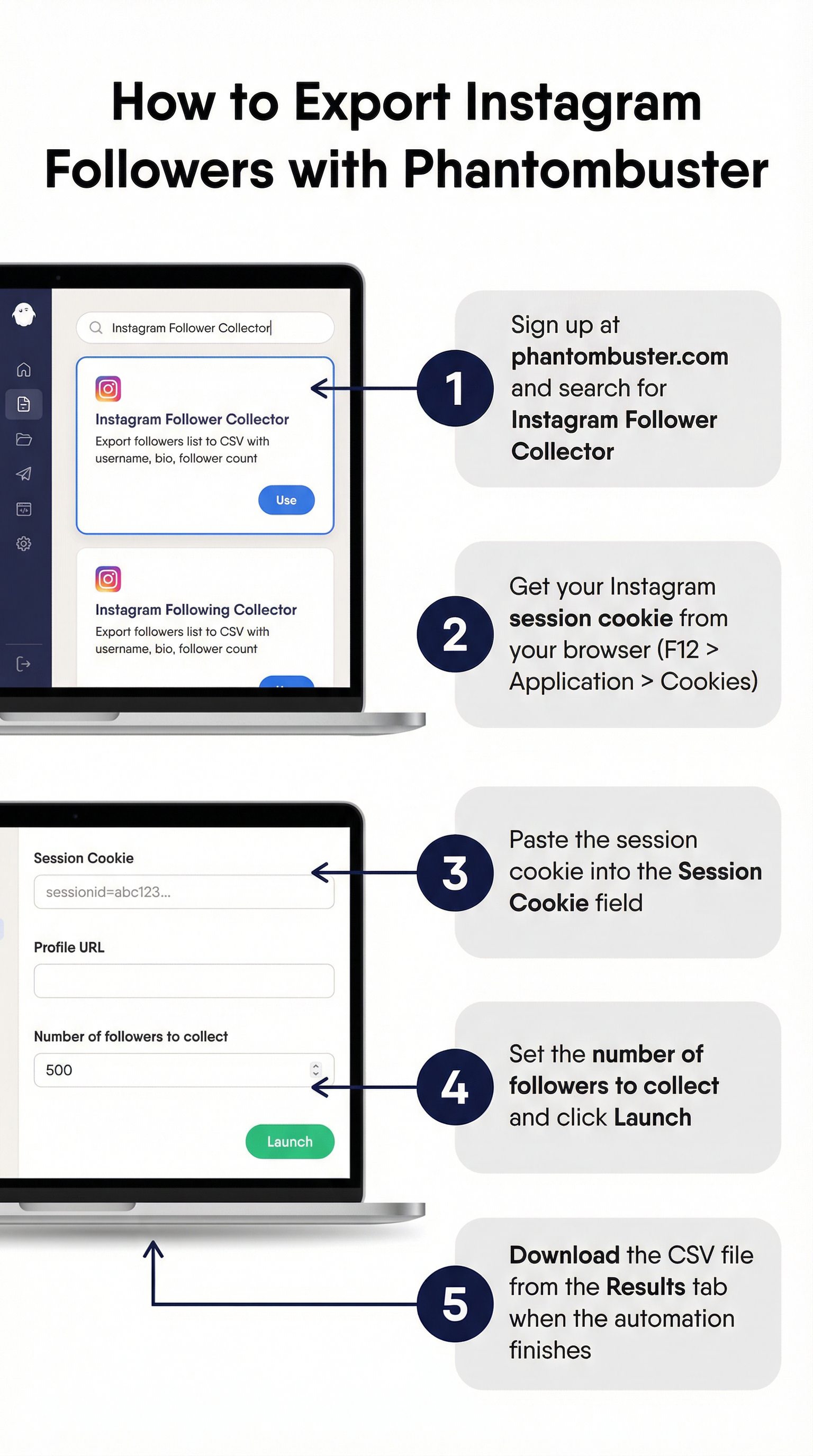
Phantombuster is the most widely used tool for Instagram data extraction in 2026. It offers a dedicated “Instagram Follower Collector” and “Instagram Following Collector” automation that exports follower/following lists to a spreadsheet-ready format.
What it exports: Username, full name, biography, follower count, following count, profile URL, verified status, and whether the account is private.
How it works: You provide your Instagram session cookie (obtained from your logged-in browser), and Phantombuster’s cloud infrastructure runs the collection automatically. You download the result as a CSV or JSON.
Free tier: Phantombuster offers limited free credits per month. The follower export for small accounts (under a few hundred followers) is often achievable on the free tier. Larger exports require a paid plan.
Safety: Phantombuster runs at controlled speeds and respects rate limits. It is one of the safer scraping-based options, though any third-party tool carries some inherent risk.
2. Instaloader — Free Open Source Tool
Instaloader is a free, open-source command-line tool for downloading Instagram data including follower and following lists. It is the most powerful free option available and requires no subscription.
What it exports: Usernames, profile data, and optionally profile pictures. Output is text-based and can be processed into CSV format with basic scripting.
How it works: Run from the command line with your Instagram credentials. Instaloader accesses Instagram through the mobile API and downloads the data you specify.
Best for: Developers, technical users, and anyone comfortable with the command line. Not the right tool for non-technical users.
Safety: Instaloader is well-maintained and used by a large community. Like all third-party tools, it can trigger Instagram rate limits if run too aggressively.
3. Exportagram
A browser-based tool specifically designed for exporting Instagram follower and following lists without requiring technical knowledge. You authenticate with your Instagram account and the tool exports your lists to CSV.
What it exports: Usernames, full names, follower counts (where accessible), and profile links.
Best for: Non-technical users who want a clean CSV without command-line setup.
Free tier: Limited exports available on the free plan. Paid tiers for larger accounts.
4. IGExport / Similar Browser Extensions
Several browser extensions exist specifically for exporting Instagram follower and following lists. These run within your browser session, which means they access the same data your browser sees when you are logged in.
How they work: Install the extension, navigate to your followers or following list on Instagram, and the extension captures the list as you scroll through it. Export to CSV when done.
Limitations: You need to manually scroll through the entire list for the extension to capture it. For accounts with tens of thousands of followers, this is impractical.
Safety consideration: Browser extensions have full access to your browser session. Only use extensions from established developers with transparent privacy policies and reviews. Avoid extensions with vague permissions or poor review history.
5. Apify Instagram Scrapers
Apify is a cloud-based web scraping platform with pre-built Instagram actors (scrapers) for follower and following exports. You run the scraper on Apify’s infrastructure, specify the target account (your own or a public account), and download the results.
What it exports: Username, full name, biography, follower count, following count, post count, external URL, verified status.
Best for: Developers and agencies that need programmatic access to Instagram data at scale.
Free tier: Apify offers free monthly compute credits sufficient for small export jobs.
Tool Comparison
Tool | Free Option | CSV Export | Follower Count Data | Technical Skill Needed | Risk Level |
Instagram Native Download | Yes (free) | No (JSON/HTML) | No | Low | None |
Phantombuster | Limited | Yes | Yes | Low-Medium | Low-Medium |
Instaloader | Yes (fully free) | Partial | Yes | High | Low |
Exportagram | Limited | Yes | Partial | Low | Medium |
Browser Extensions | Varies | Yes | Partial | Low | Medium-High |
Apify | Limited | Yes | Yes | Medium | Low-Medium |
Free Instagram Follower Export Tools
If cost is the primary constraint, these are the genuine free options:
Instagram’s own data download: Completely free, always available, no third-party involvement. Limited to usernames and profile links with no follower count or engagement data. Best starting point for anyone who just needs a basic list.
Instaloader: Fully free and open source. Powerful but requires command-line comfort. The most capable free option for technical users.
Phantombuster free tier: Limited monthly credits but sufficient for small account exports. The free tier is the most accessible no-code free option.
Apify free credits: Monthly free compute allows small export jobs. Requires creating an Apify account and configuring an actor, but the documentation is clear.
What “free” Instagram follower export tools on Reddit actually deliver: Reddit threads on this topic (searching “instagram follower export tool reddit”) typically surface the same tools listed above, plus occasional mentions of tools that have since been deprecated or had their Instagram access revoked. The Phantombuster and Instaloader recommendations appear consistently and have remained reliable. Be skeptical of any tool claiming completely unrestricted free exports with rich data, as Instagram’s API restrictions make this technically implausible through legitimate means.
Export Instagram Followers to CSV
Most people asking about Instagram follower export want a clean CSV they can open in Excel, Google Sheets, or import into a CRM or email marketing tool.
From Instagram’s native download: The native export gives you JSON or HTML. Converting to CSV requires a quick extra step:
- For JSON: Use a free online JSON to CSV converter (search “json to csv converter”), paste your followers_1.json content, and download as CSV.
- For HTML: Open the HTML file in your browser, copy the visible list, and paste into a spreadsheet. Manual but functional for small lists.
From Phantombuster: Direct CSV download is included. The output file is ready to open in any spreadsheet application.
From Instaloader: Output is text-based. A simple Python script converts the output to CSV format. Instaloader’s documentation includes examples.
From browser extensions and Exportagram: Most output directly to CSV with a download button.
What columns to expect in a typical Instagram follower CSV: Username, full name (display name), profile URL, follower count, following count, biography, verified (true/false), private account (true/false), external website URL (if set on profile).
Exporting Followers for Multiple Instagram Accounts
If you manage multiple Instagram accounts, whether for different brands, different clients, or different content niches, the follower export question scales in complexity.
The core challenge: running multiple Instagram accounts from the same device creates exactly the kind of shared-environment signal that triggers Instagram’s detection systems. When you run a follower export tool on account A and then immediately run the same tool on account B from the same device, Instagram can connect those requests to the same operator. For accounts that are already linked through shared device fingerprints, this compounds the risk of action blocks, verification requirements, and account restrictions.
The follower export itself is not the primary risk. The underlying shared environment is. An export that would be routine on a properly isolated account becomes a flag-generating event on an account already linked to a cluster of others.
This is the same problem that affects every other multi-account Instagram activity, and the solution is the same: each account needs its own isolated environment.
How Multilogin Cloud Phones Make Multi-Account Management Sustainable
Multilogin Cloud Phones give each Instagram account its own real Android device in the cloud, complete with its own IMEI, Android ID, MAC address, and dedicated mobile IP.
When you run a follower export on an account from its cloud phone, Instagram sees a single account performing a normal data access operation from its regular device. There is nothing connecting it to your other accounts because at the hardware level, nothing is shared.
Clean Accounts Mean Clean Data
The follower and analytics data for accounts running on cloud phones accurately reflects each account’s genuine audience. Because each cloud phone environment is completely isolated, there is no cross-contamination between accounts. The follower list you export from account A belongs entirely to account A. The engagement patterns reflect that account’s actual community.
For social media agencies and managers who report follower data to clients, this matters directly. The follower counts, demographics, and engagement metrics you pull from a cloud phone account are that client’s genuine numbers, not a blended result from a linked-account cluster.
Persistent Sessions Reduce Export Risk
One of the reasons follower export tools trigger Instagram flags is that they often operate from fresh or inconsistent sessions, which looks like automated account access to Instagram’s systems.
Cloud phones maintain persistent app sessions. The Instagram app stays logged in between uses, the device history stays consistent, and the session environment looks exactly like a phone someone uses every day. Export tools operating within this environment face far less scrutiny than the same tools running from a fresh browser session or a new device.
One Dashboard for Multi-Account Export Management
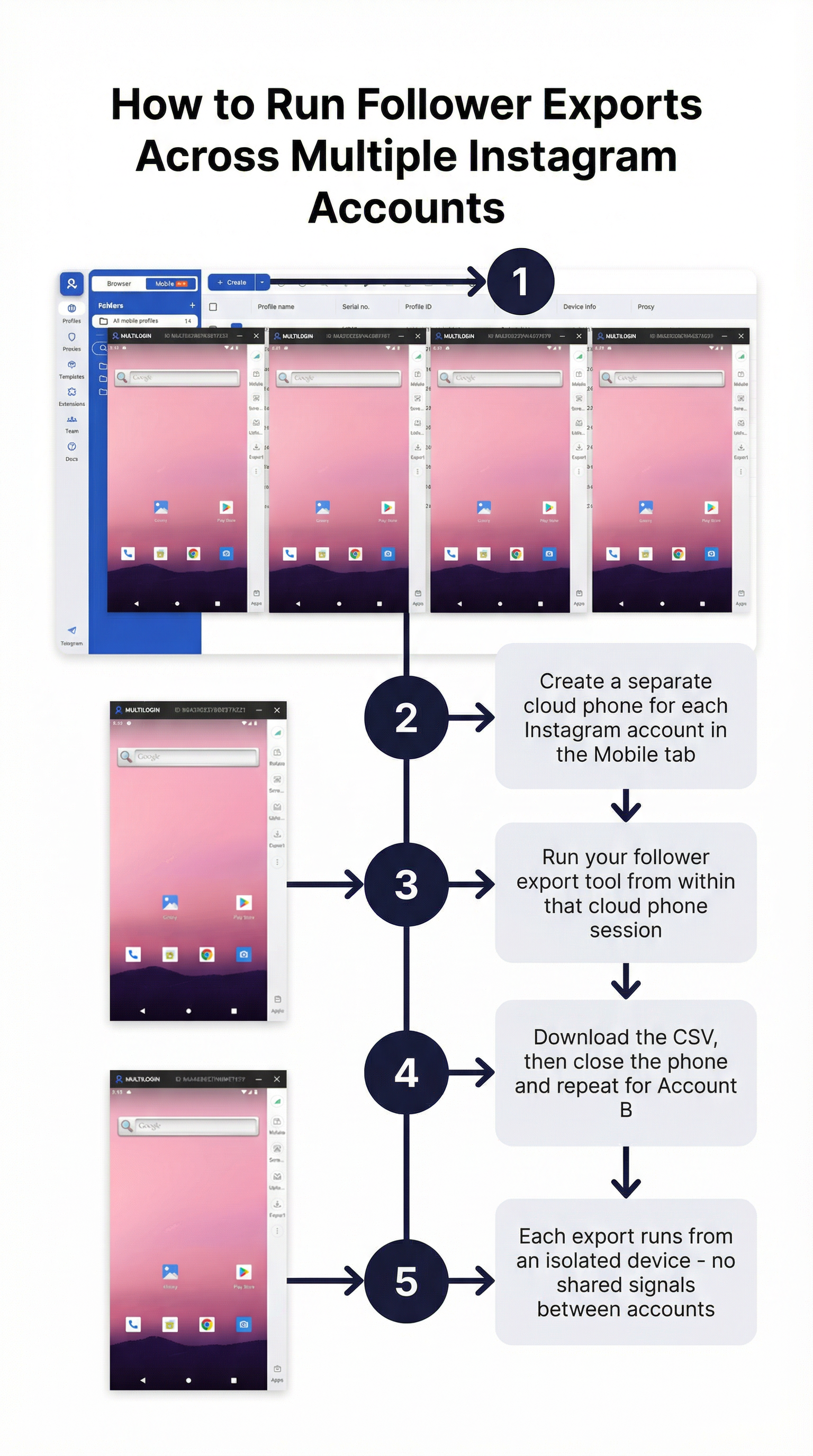
All cloud phones are managed from Multilogin’s single dashboard. You see all your accounts, all their sessions, and all their cloud phone environments in one place. When you need to run a follower export for a specific account, you open that account’s cloud phone, run the export from within that environment, download the file, and close the phone. The operation stays entirely within that account’s isolated environment.
How to Get Started With Multilogin Cloud Phones
Step 1: Sign up at multilogin.com Choose a plan based on the number of Instagram accounts you manage.
Step 2: Create a Cloud Phone for each account From the dashboard, click “Create Cloud Phone.” Set the location to match the account’s target audience, choose the Android version, and label it with the account name.
Step 3: Install Instagram and your export tool Launch the cloud phone. Install Instagram from the Play Store and log in to your account. If you use a browser-based export tool, you can also open the Chrome browser on the cloud phone, log into Instagram on the web, and run the export from there.
Step 4: Run your follower export Use Instagram’s native download, Phantombuster, or your preferred tool from within the cloud phone’s isolated environment. The export operates from a clean, consistent device identity.
Step 5: Scale to additional accounts Each account gets its own cloud phone, its own IP, and its own session history. Follower exports across multiple accounts are independent operations with no shared signals between them.
Bottomline
Exporting Instagram followers in 2026 is achievable through several paths. Instagram’s own data download is free, safe, and sufficient for basic username lists. Phantombuster is the best non-technical tool for richer CSV exports with follower count and bio data. Instaloader is the strongest free option for technical users who want full control. Browser extensions work for small lists if you choose a reputable one.
The free vs. paid question usually comes down to account size and data richness needed. For most creators and small businesses exporting their own follower list once or twice a year, the free native download or Instaloader handles the job. For agencies exporting data regularly across multiple accounts, a paid tool like Phantombuster delivers better reliability and richer output.
The bigger picture for multi-account operators is that the export itself is the easy part. The hard part is keeping the accounts healthy and isolated so that routine operations like follower exports do not become triggers for action blocks. Running each account on its own Multilogin Cloud Phone solves that at the infrastructure level, which means your data stays clean, your accounts stay live, and the reports you deliver to clients reflect reality rather than a blended multi-account mess.
Frequently Asked Questions About Instagram Follower Export Tool
What is the best tool for exporting Instagram followers?
Phantombuster is the most widely recommended non-technical option for exporting Instagram followers to CSV with rich data. For free and open-source, Instaloader is the strongest alternative for technical users. Instagram’s own data download is the safest option for basic username lists.
Is there a free Instagram follower export tool?
Yes. Instagram’s native data download is completely free. Instaloader is a free, open-source command-line tool. Phantombuster and Apify both offer free tiers with limited monthly exports.
How do I export Instagram followers to CSV?
Use Phantombuster or Exportagram for a direct CSV download. For Instagram’s native export, convert the JSON output using a free online JSON to CSV converter. Browser extensions also export directly to CSV.
Can I export followers from someone else's Instagram account?
Only for public accounts, and only certain tools support this. Instagram’s API has restrictions on accessing other accounts’ follower data. Large-scale competitor follower scraping increasingly triggers detection and is against Instagram’s Terms of Service.
Why do Instagram follower export tools stop working?
Instagram regularly updates its API and web interface, which breaks tools that rely on scraping. Well-maintained tools like Phantombuster and Instaloader update to stay compatible. Less actively maintained tools tend to break and stay broken.
Is it safe to use a third-party Instagram follower export tool?
Depends on the tool. Established tools with large user bases (Phantombuster, Instaloader, Apify) are generally lower risk. Avoid tools that require your Instagram password directly. Tools that use session cookies or official API access are safer than those that simulate login from scratch.

