





Most social media managers are sleeping on this tool
Ask a room of social media managers which AI they use for content, and roughly 80% will say ChatGPT. A handful will mention Gemini. Almost nobody mentions Claude.
That gap is not about quality. Claude consistently outperforms every other AI model on the thing social media managers care about most: writing that actually sounds human. If you are managing multiple social media accounts across clients or brands, the quality of your copy layer matters even more — because volume without voice just produces noise.
We have been testing Claude across real client workflows since mid-2025, including inside multi-account setups paired with cloud phones. This is our honest review of where Claude earns its place in your stack and where it will frustrate you.
What is Claude AI?
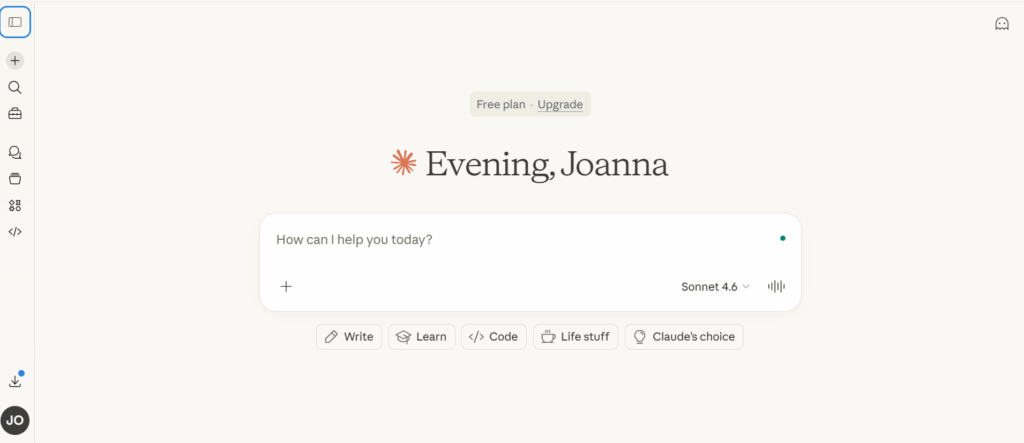
Claude is Anthropic’s AI assistant. Anthropic is a safety-focused AI research company founded in 2021 by former members of OpenAI. Unlike OpenAI, Anthropic builds Claude around a framework called Constitutional AI, which means the model is trained to follow a set of principles rather than just optimising for user approval.
In practice, this makes Claude less likely to produce generic hype, less likely to hallucinate confident nonsense, and more likely to push back when a prompt is underspecified. For social media managers who have spent months editing AI output to remove corporate filler, that shift in defaults matters.
By August 2025, Claude’s monthly web traffic had grown more than 10x in eight months, from around 16 million to over 164 million visits. The growth is being driven by marketing and content teams who tried Claude as a secondary tool and quietly made it their primary one.
Claude models available in 2026
- Claude Haiku 4.5 — fastest and cheapest; good for simple caption generation and bulk tasks
- Claude Sonnet 4.6 — the workhorse; best balance of quality and speed for day-to-day social media work
- Claude Opus 4.6 — most capable; best for complex strategy work, long-form briefs, and nuanced brand voice
Note Which model should social media managers use?
For day-to-day content creation, Sonnet 4.6 is the right call. Opus is worth the extra usage cost for high-stakes pieces like campaign briefs or content strategy documents. Haiku is useful for bulk operations through the API.
What Claude does for social media managers
Claude is a text tool. It does not schedule, publish, or pull analytics. It does not connect directly to Instagram, TikTok, or LinkedIn. What it does — better than almost any other AI right now — is write.
1. Platform-specific caption and copy generation
Give Claude your brief, your target audience, and the platform, and it produces content that fits the native tone of that channel. A LinkedIn post from Claude does not read like a recycled Instagram caption. A TikTok hook is punchy and front-loaded. The platform awareness is built in, but it sharpens dramatically when you specify the voice.
2. Bulk content creation in a single session
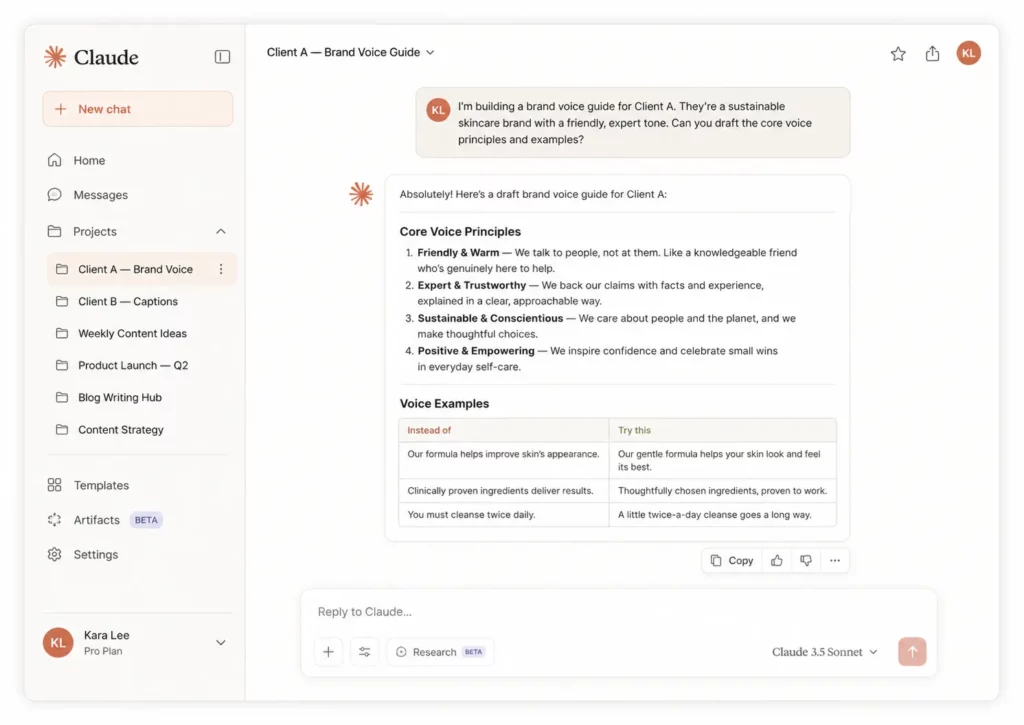
Content batching is where Claude saves agencies the most time. Rather than generating one post at a time, you build a master prompt with your content pillars, voice brief, and 30-day structure, then ask Claude to produce the full set in one go. Teams using this approach consistently report cutting first-draft time by 60 to 70 percent.
“Write 20 Instagram captions for a social media agency. Voice: direct, practical, no jargon. Mix: 8 educational, 6 engagement, 4 promotional. Format: hook line, 2-3 short paragraphs, CTA question. Avoid em dashes, buzzwords, and anything that reads like AI.”
The output needs editing. But going from blank page to 20 structured drafts in 90 seconds changes the economics of content production.
3. Content repurposing across platforms
Record a 10-minute podcast or YouTube video. Transcribe it. Paste the transcript into Claude with a brief covering your platforms, audience, and voice. Claude produces a LinkedIn newsletter draft, an X thread, three TikTok hook variations, and an Instagram caption set from the same source material in under five minutes.
This workflow is particularly powerful when combined with a cloud phone setup. If you are managing content for multiple brand accounts across different platforms — each operating from its own isolated cloud phone session — Claude handles the copy layer while the cloud phone handles the account isolation layer. The two tools do not overlap; they stack.
4. Brand voice consistency at scale
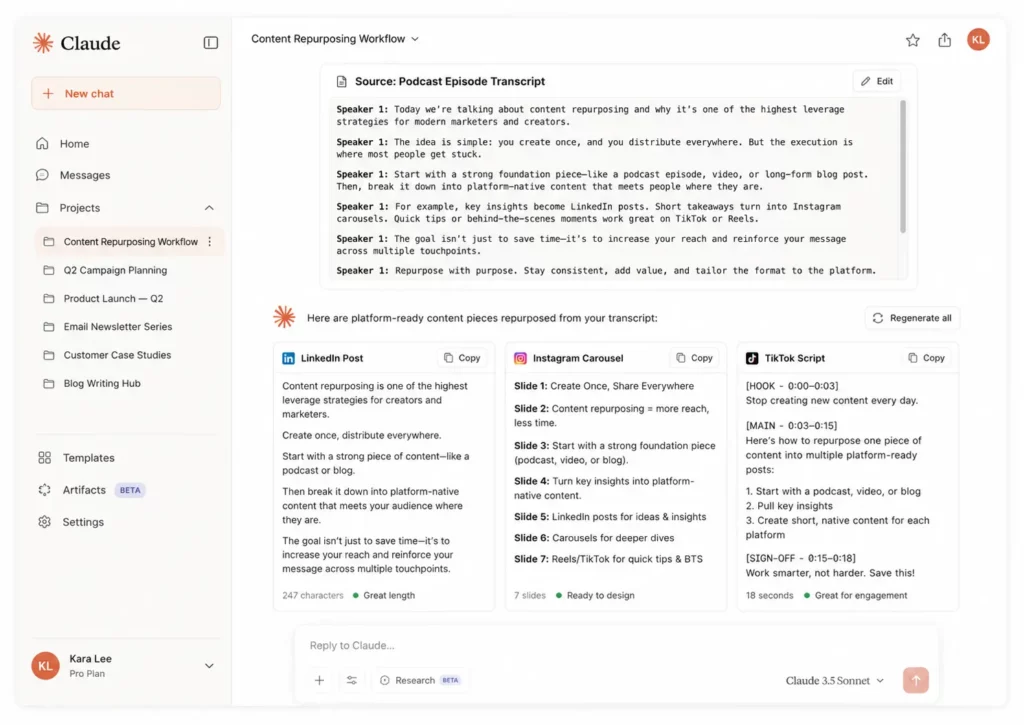
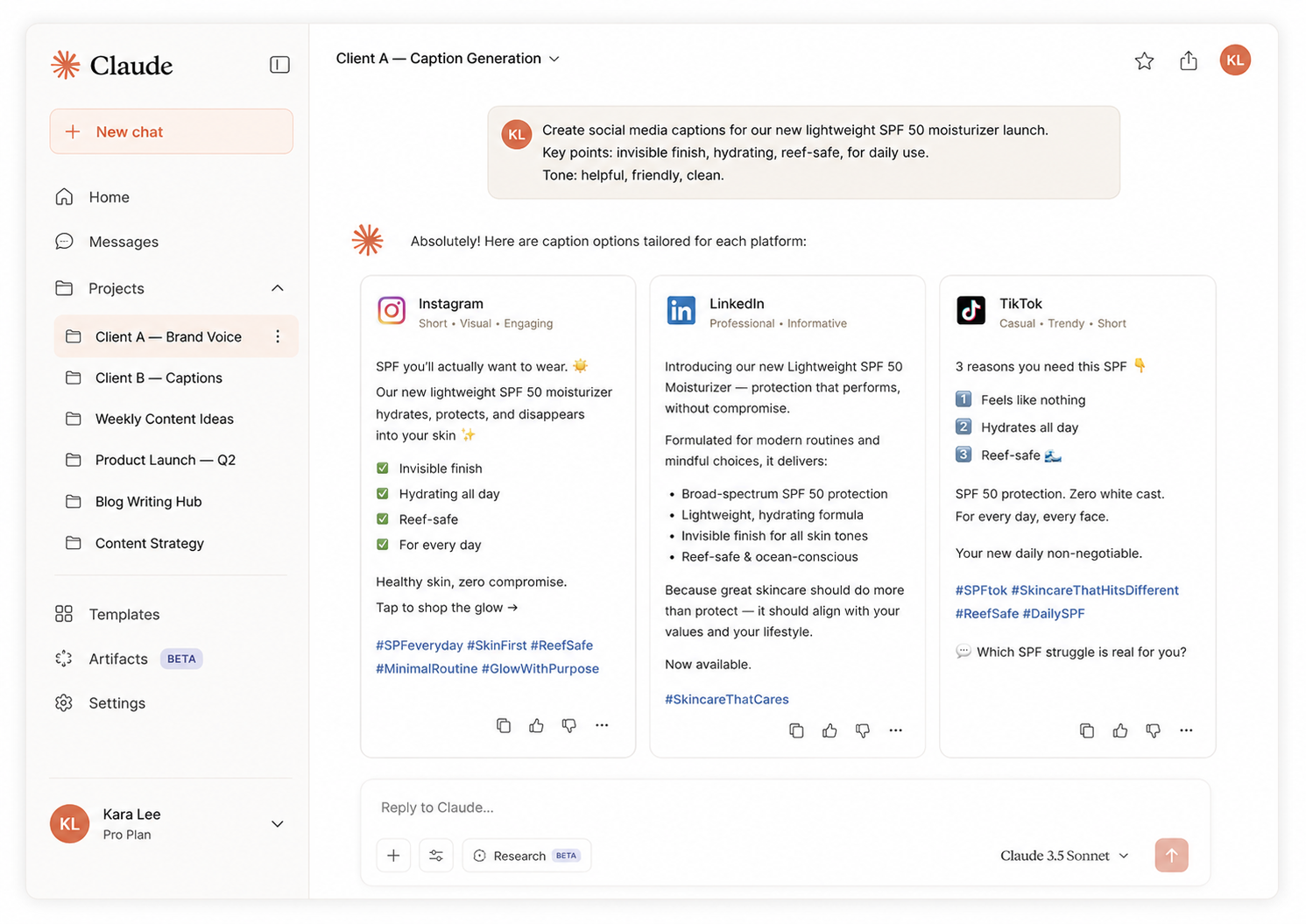
Claude Projects is the feature that separates professional use from casual use. A Project is a persistent workspace where you store your brand voice, tone guidelines, audience description, banned phrases, and content examples. Every conversation inside that Project inherits all of that context without you re-briefing.
For agencies managing multiple clients, the workflow is one Project per client. Client A’s brand voice never bleeds into Client B’s output. Combined with multi-account management through Multilogin cloud phones — where each client’s social accounts run inside isolated virtual devices — you end up with clean separation between clients at both the content layer and the account layer.
5. Competitor research and content gap analysis
Claude does not have live web access by default, but toggling on the web search tool on paid plans lets you ask it to identify what competitors are covering, surface gaps in your niche, or summarise what is trending in your category.
For strategy sessions, this is more useful than a blank brainstorm — you arrive with real data and Claude turns it into a structured content brief.
6. Social media ad copy
Claude writes clean ad copy. Give it your product, your audience segment, and the platform — Meta, TikTok Ads, LinkedIn — and it produces primary text, headline variants, and CTA options in a single pass. For agencies running multiple ad accounts across clients, the combination of Claude for copy generation and cloud phones for account separation creates a production pipeline that is both fast and clean.
Claude AI + cloud phone: the multi-account workflow
Most reviews of Claude AI stop at the content quality conversation. For social media managers running multiple accounts — whether for clients, affiliate operations, or brand portfolios — the real question is how Claude fits into a multi-account workflow.
Here is how the setup works in practice:
- Each client or brand account lives inside its own Multilogin cloud phone session. The cloud phone is a virtualised mobile device with its own identity, network profile, and browser environment.
- Content for each account is generated inside a corresponding Claude Project. The Project holds the client’s brand voice, audience brief, and content history.
- Claude generates the copy. The cloud phone is the device the account lives on. A scheduling tool bridges the two for publishing.
The result is an agency workflow where content quality is consistent, accounts are properly separated, and the human editor focuses on review and approval rather than first drafts.
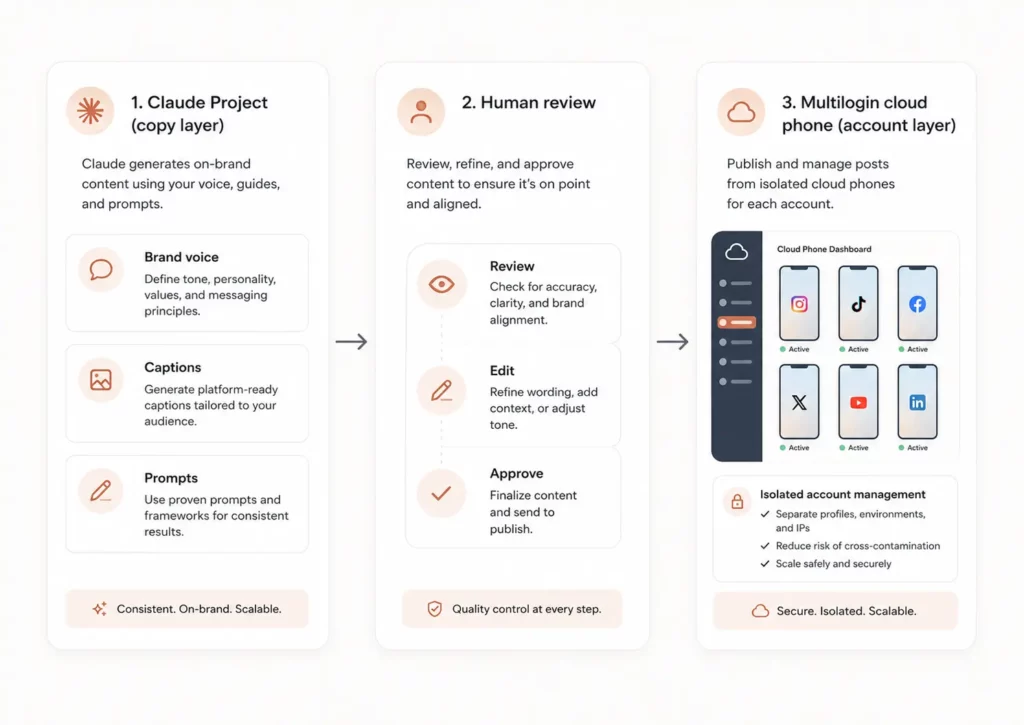
This approach is particularly effective for running multiple TikTok accounts, managing multiple LinkedIn accounts, and any workflow where one person or team is producing content across multiple brand identities. The cloud phone keeps the accounts isolated while Claude keeps the content consistent.
Multilogin Using Multilogin cloud phone with Claude
If you are managing 5+ social media accounts across different platforms, a Multilogin cloud phone session for each account removes the risk of cross-account contamination while Claude handles the content layer. See our guide to cloud phones for social media for the full setup.
The same workflow applies beyond social media. Teams running dropshipping and e-commerce operations use Claude to generate product descriptions and ad copy across multiple seller accounts, with each account running inside its own cloud phone session. Traffic arbitrage teams use it to produce campaign copy at scale. The pattern is the same: Claude for content, cloud phones for account separation.
Claude AI pricing in 2026
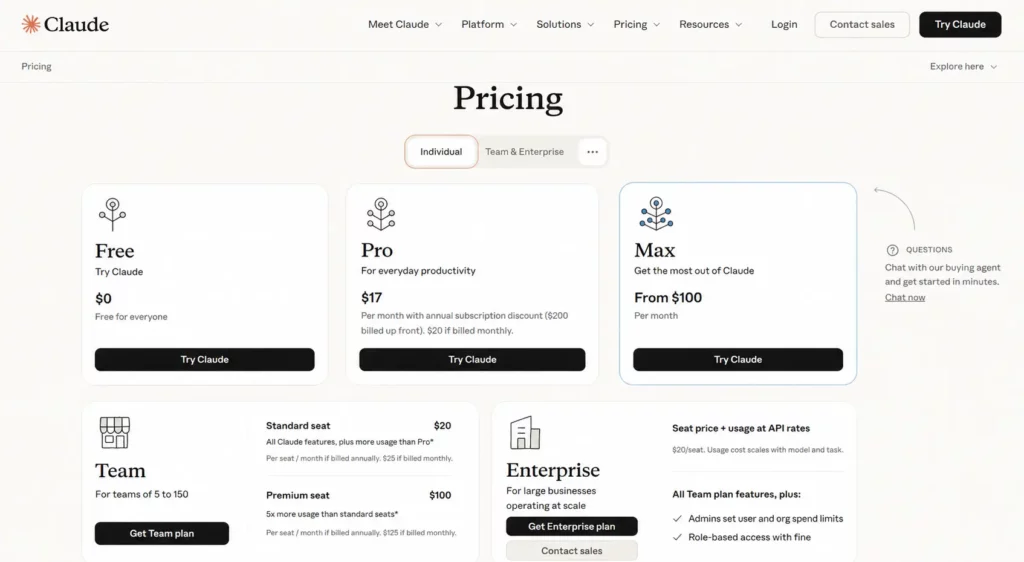
Claude has four main plans. Here is how they map to different social media management use cases:
Plan | Price | Best for | Key limits |
Free | $0/mo | Testing and light use | Rate-limited; no Claude Code |
Pro | $17/mo | Solo SMMs and freelancers | 5x free limits; includes Projects |
Max 5x | $100/mo | Power users and agency leads | 5x Pro capacity; same models |
Team | $25/seat/mo | Agencies (5+ members) | Shared Projects, central billing |
Our recommendation: The Pro plan at $17/month is the right entry point for working social media managers. The free tier hits rate limits quickly — one complex batch-creation session can burn through your 5-hour allowance. Pro gives you Projects (essential for multi-client work), higher limits, and access to the full Sonnet model. If you are running an agency with multiple team members generating content daily, the Team plan at $25/seat/month adds central billing and shared Projects.
Where Claude falls short
No tool review is complete without the honest part. Here is where Claude will frustrate you:
It does not post or publish
Claude generates text. It has no connection to Instagram, TikTok, LinkedIn, Facebook, or X. You still need a scheduler — Buffer, Later, Metricool, or whichever tool your agency runs — to get content live. Factor a scheduling tool into your stack from day one.
No memory between conversations by default
Each new Claude chat starts fresh. If you are not using Projects, you re-brief every session. The fix is straightforward: create a Project, store your brand brief inside it, and every future session in that Project inherits the full context. But you have to set it up deliberately.
Vague prompts get vague results
Claude rewards specificity more than any other model we have tested. A one-sentence prompt produces output you will not publish. A detailed prompt with a voice brief, audience description, platform context, format constraints, and banned phrases produces output that needs minimal editing. The quality ceiling is high, but you have to do the work to reach it.
Free tier rate limits are genuinely restrictive
The most common complaint about Claude is hitting usage limits mid-session. One complex batch-creation request can burn 50 to 70 percent of a free tier 5-hour window. For professional use, the free tier is a trial, not a workflow. Budget for Pro from day one.
No image generation
Claude processes images but does not generate them. For the visual layer of social media content, you need a separate tool: Canva, Adobe Express, or a dedicated AI image generator. Many teams route Claude’s copy output directly into Canva templates for a clean end-to-end workflow.
Account safety is a separate problem
Claude does not protect your accounts from platform flags, shadow bans, or detection. If you are operating across multiple social media accounts, account-level safety is handled at the infrastructure layer — cloud phones, session isolation, and clean network profiles — not at the content layer. Facebook shadow bans and LinkedIn shadow bans are driven by account behaviour, not by what AI tool wrote the copy. Claude and cloud phones solve different problems.
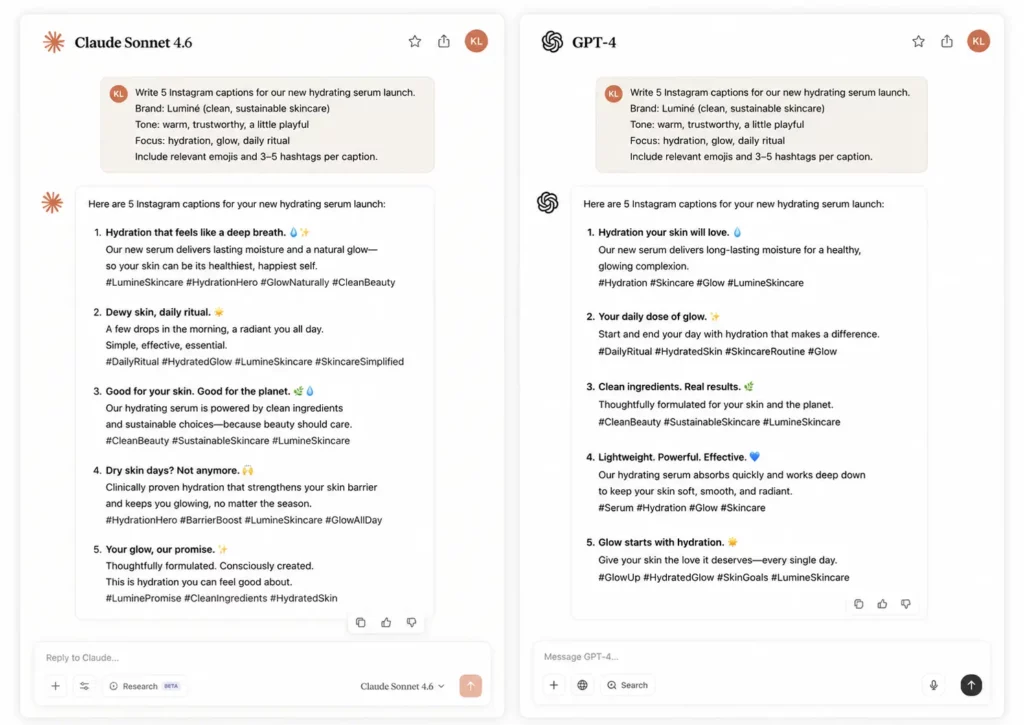
What actually makes Claude different from ChatGPT
The Claude versus ChatGPT conversation is the one most social media managers actually need an answer to. Here is the honest version:
- Claude produces cleaner long-form content. On anything over 400 words — LinkedIn articles, campaign briefs, content strategies — Claude’s output is consistently less repetitive and less likely to include the filler phrases that signal AI authorship.
- Claude’s Constitutional AI framework makes it less likely to produce confident misinformation. It is more likely to flag uncertainty rather than invent a plausible-sounding answer.
- Claude is more likely to push back on underspecified prompts. Some users find this annoying. Experienced prompt writers find it useful — it forces the specificity that improves output quality.
- ChatGPT has a larger plugin and integration ecosystem and native image generation with DALL-E. If your workflow depends heavily on visual output or third-party tool integrations, ChatGPT has more native options right now.
- For social media captions, ad copy, and content repurposing, most working SMMs who switch to Claude as their primary tool do not switch back.
How to set up Claude for social media management: quick-start guide
Step 1: Create a Claude Project for each client
Log in to Claude (Pro or higher). In the left sidebar, create a new Project for each client or brand you manage. Name it clearly: ‘Client Name — Social Content’ works well.
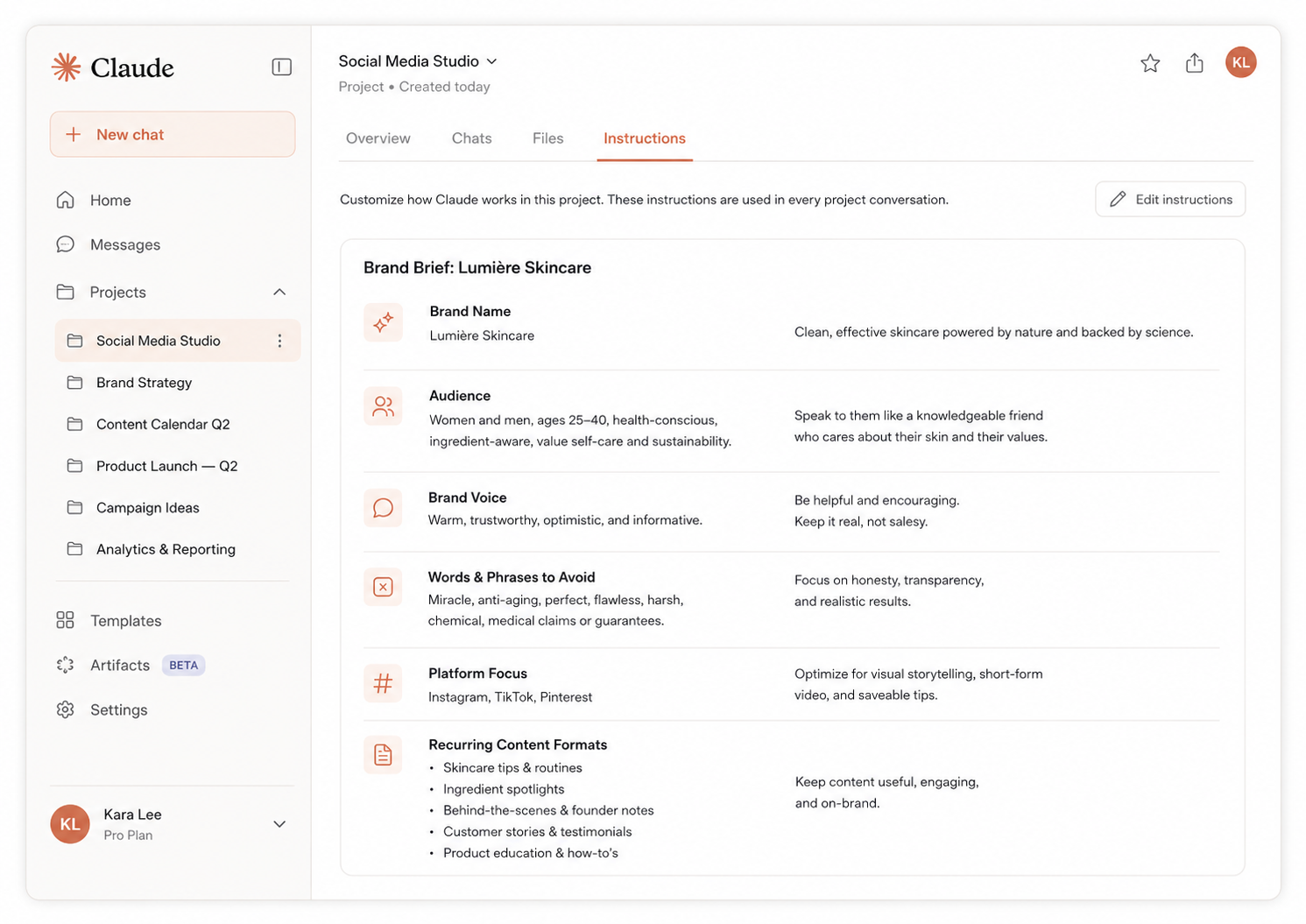
Step 2: Build your brand brief inside the Project
Inside the Project’s instructions section, paste in the following:
- Brand name and one-line description
- Target audience: who they are, what they care about, what platforms they use
- Brand voice: 3 to 5 adjectives, plus two example posts you like
- Banned words and phrases (em dashes, ‘delve’, ‘game-changer’, and so on)
- Platform focus: which platforms this client uses
- Recurring content formats: educational, promotional, engagement
Step 3: Pair with a cloud phone for account management
If you are managing accounts for multiple clients, pair your Claude workflow with Multilogin cloud phones. Each client’s accounts run inside a dedicated cloud phone session. Whether you are managing multiple Instagram accounts, multiple TikTok accounts, or multiple YouTube channels, the cloud phone keeps accounts isolated. Claude handles the content generation inside the corresponding Project. Your scheduler handles the publishing. You handle the review.
Step 4: Build reusable prompt templates
Create a library of 10 to 15 prompt templates covering your most common content types: weekly educational posts, product promotions, engagement questions, content repurposing from video, ad copy variants. Store them in a doc you reference each session. The templates become your content briefing system.Step 5: Always edit the output
Claude produces first drafts, not final copy. The editing pass is what makes the content publishable. Add the specific detail that only you or your client knows. Cut the phrases that still read as AI. Adjust the hook. The human layer is not optional — it is the layer that protects your reach and makes the content worth reading.Our verdict
| Category | Score | Notes |
| Content quality | 9/10 | Cleanest long-form output of any AI tool tested |
| Brand voice retention | 9/10 | Projects make this consistent across sessions |
| Platform adaptability | 8/10 | Nails LinkedIn and Instagram; TikTok hooks need prompting |
| Prompt depth required | 7/10 | Rewards specificity; vague prompts get vague results |
| Pricing value | 7/10 | Free tier too limited; Pro at $17/mo is the sweet spot |
| Multi-account workflow | 8/10 | Strong with Projects + cloud phone isolation |
| Overall | 8.3/10 | Best AI writer for social media managers in 2026 |
Need to manage multiple social media accounts? Try Multilogin Cloud Phones.
Frequently asked questions About Claude AI for social media managers
No. Claude generates text but has no connection to social platforms. You use a separate scheduling tool or post manually.
The brief is everything. Specify the platform, audience, brand voice, format, and goal. Paste in examples of approved content. The more context Claude has, the more specific the output.
A Claude Project is a persistent workspace where you can store instructions that apply to every conversation within it. For social media managers, this means you store brand voice, audience description, and content guidelines once — Claude uses them every session without you re-briefing.
Yes. Create one Claude Project per client. That keeps each client’s brand voice, audience, and content guidelines separate.
No, unless you’re using Projects with stored instructions. Each new conversation starts fresh by default. If you need Claude to have context from a previous session, paste it back in.
It depends on the use case. Claude tends to produce cleaner, more natural long-form writing. For caption writing, content briefs, and narrative content, many SMMs prefer it. Test both with your specific use case.
The one thing worth doing today
If you’re not already using Claude Projects to store client briefs and brand voices, start there. Create one project per client. Add the brand voice, audience description, content pillars, and a few examples of approved content. Every conversation you have within that project will be informed by that context from the start.
That single change — moving from one-off conversations to structured projects — is where Claude shifts from a novelty to a working part of your content process.
For the account isolation side of running multiple social media accounts, Multilogin’s cloud phones and browser profiles give each account its own independent environment. Both pieces — content production and account infrastructure — matter when you’re working at scale.
Try Multilogin now to see how the account isolation layer works alongside your content workflow.


