


A Facebook Ads campaign has three levels. You choose the objective at campaign level, configure the audience and budget at ad-set level, and add the creative at ad level. Everything else follows from getting those three decisions aligned to one measurable business result.
This guide walks through each level in Meta Ads Manager, then covers what to check after launch. When you figure it out and want to grow your ads campaign, Multilogin offers you cloud phones and isolated browser profiles to manage and run multiple Facebook ads accounts across mobile and web.
What You Need Before Creating a Facebook Ads campaign
Prepare the campaign inputs before opening the builder. Most expensive setup mistakes start with a missing permission, an untested event, or an undefined offer.
Here’s the checklist of everything you need:
- A Facebook Page or permission to advertise for one
- An ad account with a valid payment method
- Access to the relevant Meta Business Portfolio
- A destination, such as a website, app, Messenger conversation, WhatsApp account, Instagram profile, or instant form
- Approved ad copy and creative in the required formats
- A defined audience and offer
- A tracking method appropriate to the objective
- A named owner for campaign monitoring, lead handling, and comment moderation
If you advertise for a client, ask the client to add your agency as a partner and assign the required business assets. Don’t exchange personal Facebook passwords. Meta Business Portfolio permissions give each person access to the Pages, ad accounts, Instagram accounts, datasets, and other assets they need without transferring ownership.
For website campaigns, set up the Meta Pixel before launch and use the Test Events tool to confirm that the required events arrive in Events Manager. Businesses with the necessary technical resources can also connect the Conversions API to send marketing data from a server, website platform, CRM, app, or other supported source.
Tracking check: Loading a thank-you page yourself is not enough. Confirm that the correct event appears in Meta Events Manager, carries the expected parameters, and uses the dataset selected in the ad set.
How the Meta Ads Campaign Structure Works
Meta Ads Manager uses three levels. Each level answers a different question.
Level | Question it answers | What you configure | Example |
Campaign | What outcome are we buying? | Objective and campaign-level settings | Sales campaign for a summer collection |
Ad set | Who should receive the ad, where, when, and for how much? | Conversion location, performance goal, audience, budget, schedule, and placements | Adults in Germany who can receive the product |
Ad | What will people see and where will they go? | Identity, format, media, copy, destination, tracking, and call to action | Product video linking to the collection page |
One campaign can contain multiple ad sets, and each ad set can contain multiple ads. A first campaign does not need a complex structure. Every extra ad set divides the available learning data and adds another variable to interpret.
Set Up a Facebook Ads Campaign: Step by Step
1. Define the Result Before Choosing an Objective
Write down one primary result, one success metric, and one decision threshold. “Get more customers” does not tell Meta what to optimize or tell your team when to change the campaign.
Use a brief such as:
- Generate qualified consultation requests at or below a target cost per qualified lead.
- Sell a product while maintaining a minimum return on ad spend.
- Bring relevant visitors to a landing page at or below a target cost per landing-page view.
- Reach a defined local audience before an in-store event.
Work backwards from business economics before setting the budget. An ecommerce team can calculate its maximum acquisition cost from contribution margin. A lead-generation team can estimate it from customer value, lead-to-sale rate, and gross margin.
For example, if a new customer is worth $240 in gross profit and 10% of qualified leads become customers, the theoretical break-even value of a qualified lead is $24. Your actual target should leave room for operating costs and profit; the calculation gives the budget a business anchor.
2. Open Meta Ads Manager and Create the Campaign
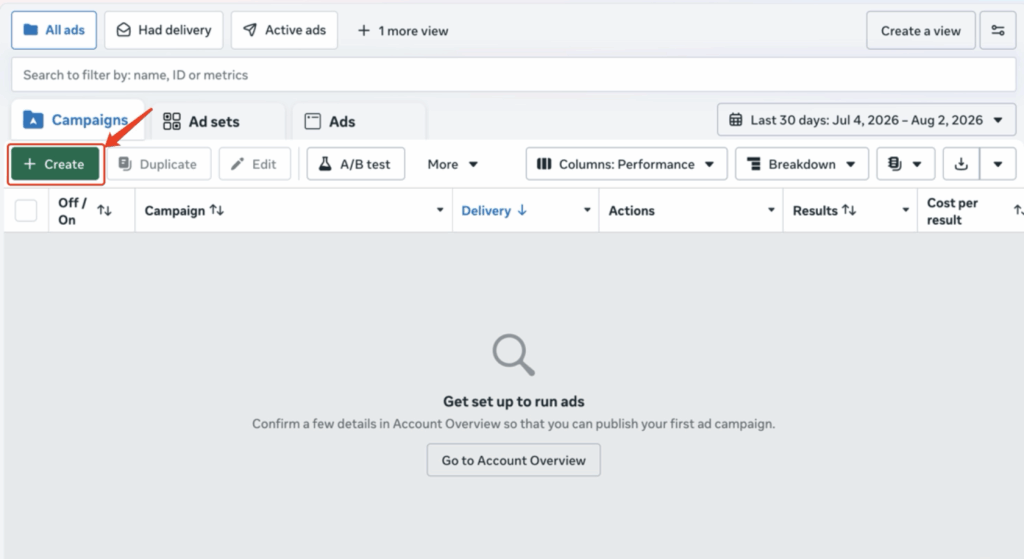
Open Meta Ads Manager, select the correct ad account, and click Create. Check the account name, currency, and time zone before proceeding. These details affect payment and reporting, and they should belong to the organization whose campaign you are building.
3. Choose the Facebook Ads Campaign Objective
Meta organizes campaigns around six objectives. Choose the objective closest to the final result that you can measure reliably. Meta’s objective guide explains how each objective connects to a business goal.
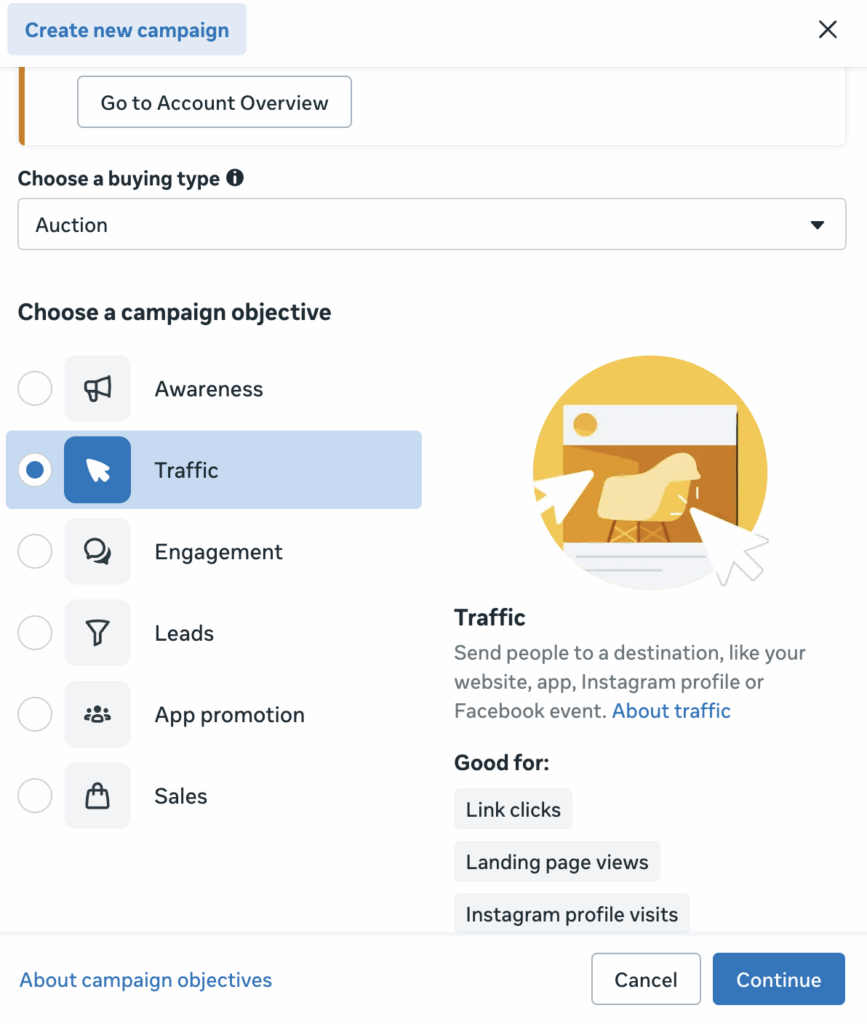
Objective | Use it when the main result is |
Awareness | Reach, brand awareness, or awareness-focused video views |
Traffic | Visits to a website, app, profile, event, or conversation destination |
Engagement | Messages, video views, post engagement, or event responses |
Leads | Instant-form submissions, calls, messages, registrations, or website leads |
App promotion | App installs or valuable actions inside an app |
Sales | Purchases or other revenue-focused conversions |
4. Select a Campaign-Level Setup
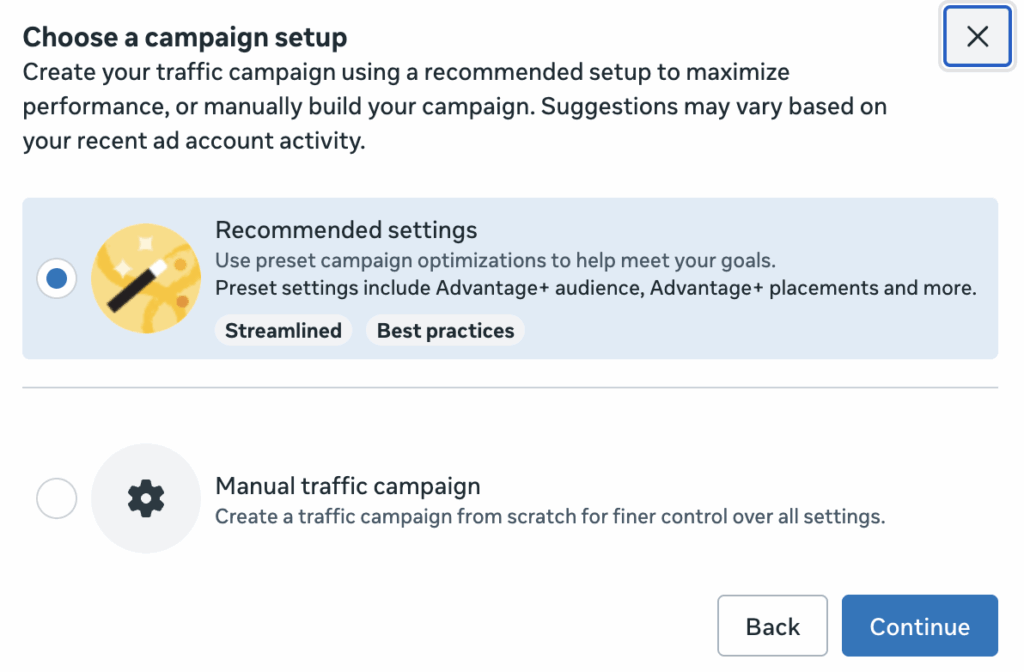
Meta now offers both recommended settings and a manual campaign. Or you can have an Advantage+ campaign experience, or other objective-specific options. Availability varies by account and objective.
Declare a Special Ad Category when the ad concerns financial products and services, employment, housing, or social issues, elections, and politics. Meta limits certain audience controls for these categories to reduce discriminatory targeting. If you are unsure, use Meta’s Special Ad Category guidance before building the audience.
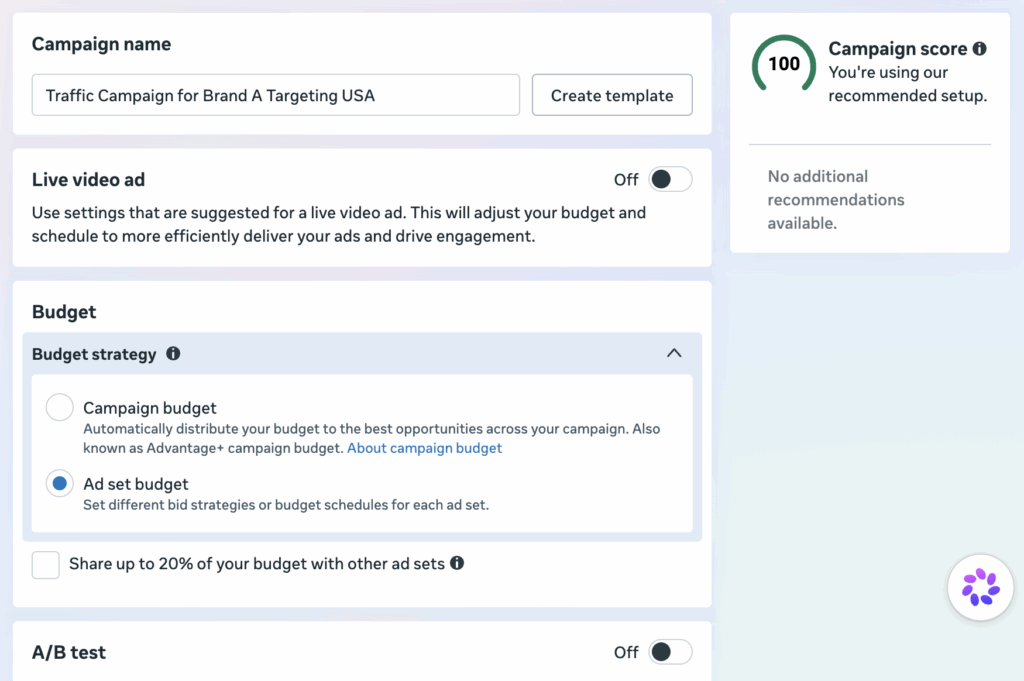
If the campaign contains multiple ad sets, decide whether the budget should sit at campaign level or ad-set level. Advantage+ campaign budget lets Meta distribute spend among ad sets. Ad-set budgets give the advertiser tighter control over how much each audience can receive. Choose based on the test question, not on habit.
5. Set the campaign name and decide whether you want an A/B test
Use a naming convention that still makes sense in a report six months later. For example:
USA | Sales | Brand A | Jul 2026
Include fields your team actually filters or reports by. A readable name is more useful than a string of unexplained abbreviations.
A/B tests can help improve your ad performance by comparing versions to see what works best.
6. Select the Conversion Location and Performance Goal
At ad-set level, select where the desired action should happen. Options vary by objective and may include:
- Website
- App
- Website and app
- Messaging apps
- Calls
- Facebook Page
- Instagram profile
- Instant forms
Then select the performance goal. The objective defines the broad outcome; the performance goal tells Meta which result to pursue within that objective. A Traffic campaign, for example, may optimize for landing-page views rather than link clicks. A Sales campaign may optimize for a specific website event.
For website events, select the correct dataset and conversion event. Confirm the domain, event, and destination before continuing. Optimizing for AddToCart when the campaign brief calls for purchases changes both delivery and reporting.
7. Build the Audience
Start with the constraints that determine whether someone can actually use the offer:
- Country, region, or city served
- Delivery or service area
- Minimum or maximum age, where relevant and permitted
- Language, if the offer or landing page requires it
- Existing-customer inclusion or exclusion rules
- Regulatory or licensing limits
Then decide whether the campaign needs a broad audience, detailed targeting, a Custom Audience, or a Lookalike Audience.
Broad audiences give Meta more room to find results. Detailed targeting may help when the offer serves a narrow field or the ad account has little useful conversion data. Custom Audiences can reconnect with people who have already interacted with the business, subject to Meta’s rules and applicable privacy law. Lookalike Audiences use a source audience to find people with similar characteristics.
Change one meaningful audience variable at a time when the goal is to learn. If one ad set changes the country, age range, interests, placement, and offer simultaneously, the result cannot tell you which change mattered.
8. Set the Budget and Schedule
Meta supports daily and lifetime budgets at campaign or ad-set level, depending on the setup.
- A daily budget is the average amount you are willing to spend per day. Daily delivery can vary as Meta responds to available opportunities.
- A lifetime budget is the total amount available over the scheduled run of the campaign or ad set.
Base the starting budget on the target cost per result and the amount of data needed to make a decision. If the expected qualified-lead cost is $40, a seven-day test with a $50 total budget is unlikely to produce enough evidence for a useful comparison.
Set a clear start date. Use an end date for a fixed promotion, event, or test. For an ongoing campaign, agree on an internal review date even if Ads Manager has no scheduled end date.
Avoid moving the budget up and down during the day. Meta describes the learning phase as the period in which the delivery system is still learning how an ad set may perform. Significant edits can make results less stable and harder to compare.
9. Choose Placements
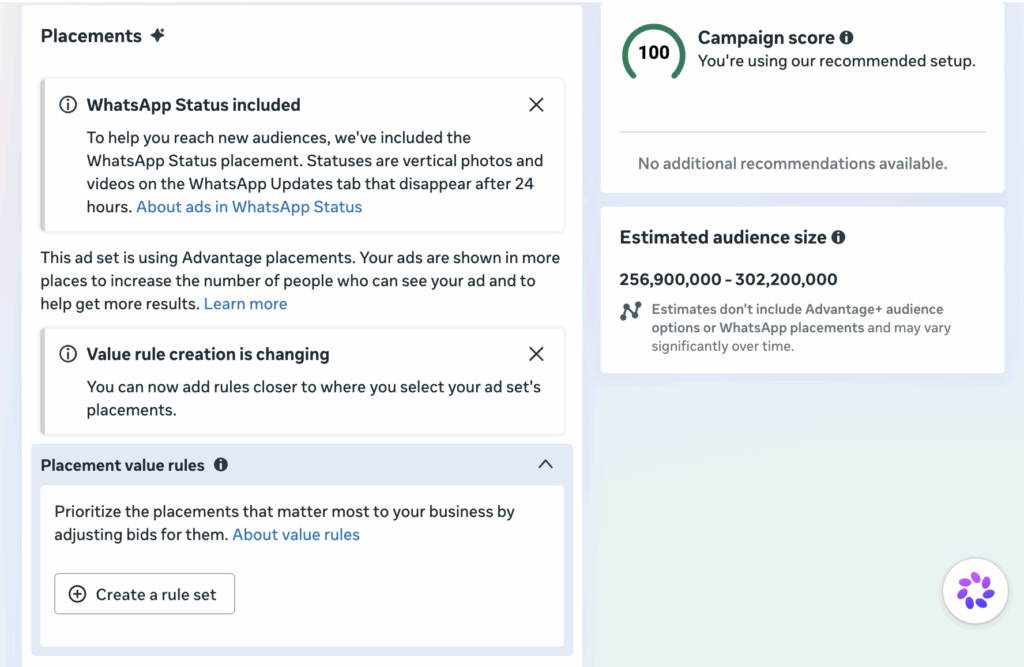
Placements control where an ad may appear across Facebook, Instagram, Messenger, Threads, and Meta Audience Network. Eligible inventory depends on the objective, creative, format, and account.
Meta recommends Advantage+ placements because its delivery system can look for cost-effective opportunities across eligible placements. Advantage+ placements are a practical starting point when the creative works in the available formats.
Use manual placements when there is a documented reason, such as:
- The team designed the creative for one placement.
- The offer is unavailable on a particular device.
- Historical data shows a material difference in lead or purchase quality.
- A controlled test requires fixed placement conditions.
Do not remove a placement solely because its click-through rate is lower. Judge it against the campaign’s primary business result.
10. Create your Ad
At ad level, select the Facebook Page and Instagram account that will represent the advertiser. Then choose the format and add the creative.
A standard ad usually includes:
- Primary text
- Headline
- Description, where supported
- Image, video, carousel, or another eligible format
- Destination URL or in-platform destination
- Call-to-action button
- URL parameters for analytics
Your ad should answer four questions:
- What is the offer?
- Who is it for?
- Why should the person care now?
- What happens after the click?
Keep the claim consistent from ad to destination. If the ad promises a free consultation, the landing page should make that consultation easy to request. If conditions apply, state them.
Preview every important placement. Text can truncate, product details can sit behind interface elements, and landscape video can become unreadable in a vertical placement. Add placement-specific crops when necessary.
11. Review Tracking, Permissions, and Policy Compliance
Before publishing, check the campaign from top to bottom:
- Correct ad account, Facebook Page, and Instagram account
- Correct objective and performance goal
- Correct destination, dataset, and conversion event
- Working URL and mobile-friendly landing page
- Audience and location settings
- Budget, schedule, currency, and time zone
- Creative previews and call to action
- URL parameters
- Payment method
- Required disclosures and Special Ad Category
- Named owner for delivery checks, comments, messages, and leads
Review the Meta Advertising Standards for the product and market involved. Meta restricts certain products, claims, targeting practices, and landing-page experiences even when the underlying product is legal.
Click Publish. The campaign, ad set, and ad then move through processing and review. Use the Delivery column to see whether each level is active, in review, scheduled, rejected, or affected by another issue.
What should you monitor after launch
Start with delivery and measurement. One cheap click or one expensive impression does not establish a trend.
Confirm that:
- Spend has started.
- The campaign is reaching the intended location.
- The destination works on a phone.
- The selected event is recording.
- Costs and results appear in the correct currency and time zone.
- Comments, messages, and leads have an owner and response target.
The main metric should match the objective.
Campaign goal | Primary metrics | Useful diagnostic metrics |
Awareness | Reach, frequency, CPM | Video engagement, brand-lift data where available |
Traffic | Landing-page views, cost per landing-page view | Outbound CTR, outbound clicks, landing-page conversion rate |
Engagement | Cost per result, meaningful interactions | Video retention, comment quality, message starts |
Leads | Cost per qualified lead, qualified-lead rate | Form completion rate, contact rate, lead-to-sale rate |
App promotion | Cost per install or in-app action | Retention and downstream app events |
Sales | Purchases, cost per purchase, ROAS | Add-to-cart rate, checkout rate, average order value |
Tip: Do not choose Traffic because the clicks look cheaper. A Traffic campaign looks for people likely to visit the destination, not people likely to buy. If the business needs purchases and can measure them, Sales gives Meta a more relevant optimization signal.
Common Facebook Ads Setup Mistakes
- Choosing the Wrong Objective
Optimizing for clicks when the business needs sales asks Meta to find people with a higher propensity to click, not necessarily to buy. Match the objective to the measurable business outcome.
- Launching Without Reliable Tracking
If the selected event fails to fire, Ads Manager receives poor feedback and the report cannot support a sound decision. Test the event before spending.
- Splitting a Small Budget Across Too Many Ad Sets
Five audiences and ten ads may look thorough, but each variation receives less spend and data. Begin with a structure the budget can support.
- Editing Before Enough Evidence Arrives
Early delivery is uneven. Repeated edits change the conditions of the test and can make comparisons unreliable. Set the review window before launch.
- Sharing Personal Logins
Password sharing weakens security and accountability. Use Meta Business Portfolio partner access and role-based permissions instead.
- Ignoring the Post-Click Experience
Slow pages, broken forms, unclear shipping terms, and an offer that changes after the click waste paid traffic. Test the entire route on a phone before launch.
- Treating Every Dashboard Number as Equally Important
Choose one business metric before launch. Diagnostic metrics explain performance; they should not replace the campaign’s intended result.
How Multilogin Supports Your Facebook Ads Campaign
Multilogin is a cloud phone platform for social media marketers. It helps agencies and marketing teams that need both mobile app access and desktop Ads Manager for the same Facebook work. Each mobile social profile runs on a persistent Android cloud phone. Web work runs in a browser profile. Both stay organized in one dashboard, with built-in proxies included in every plan.
It does not replace Meta’s ownership and permission system. A reliable agency setup uses two layers:
Layer | Tool | What it controls |
Business governance | Meta Business Portfolio | Asset ownership, partner access, Page access, ad accounts, datasets, billing, and Meta-side roles |
Working environment | Multilogin | Persistent mobile and browser sessions, profile organization, network location, and workspace access |
This distinction prevents a common setup error: creating extra personal Facebook accounts when your need is access to more business assets. Use Meta partner permissions for client assets. Use Multilogin to keep social profile workflows organized across mobile and web.
Map environments to login identities, not campaign rows. If one Facebook profile can access five client ad accounts, do not automatically copy that same login into five cloud phones. Start with one cloud phone for that legitimate social profile, then use Meta’s asset permissions and Multilogin folders to organize the work. Add another environment when there is another operator profile or a genuinely separate workflow.
Step 1. Confirm Meta Access Before Creating a Multilogin Profile
In Meta Business Suite, confirm that the operator has the required access to the Business Portfolio, Facebook Page, ad account, Instagram account, and dataset. Use partner access for an external agency and person-level access for the people doing the work.
Record the owner of the asset, the approved operator, and the ad account ID in the campaign brief.
Step 2. Create a Facebook Mobile Social Profile in Multilogin
Open Multilogin and go to Profiles → Mobile → Create. Enter a name that identifies the profile and working region, such as:
FB | Agency Operator 03 | Germany
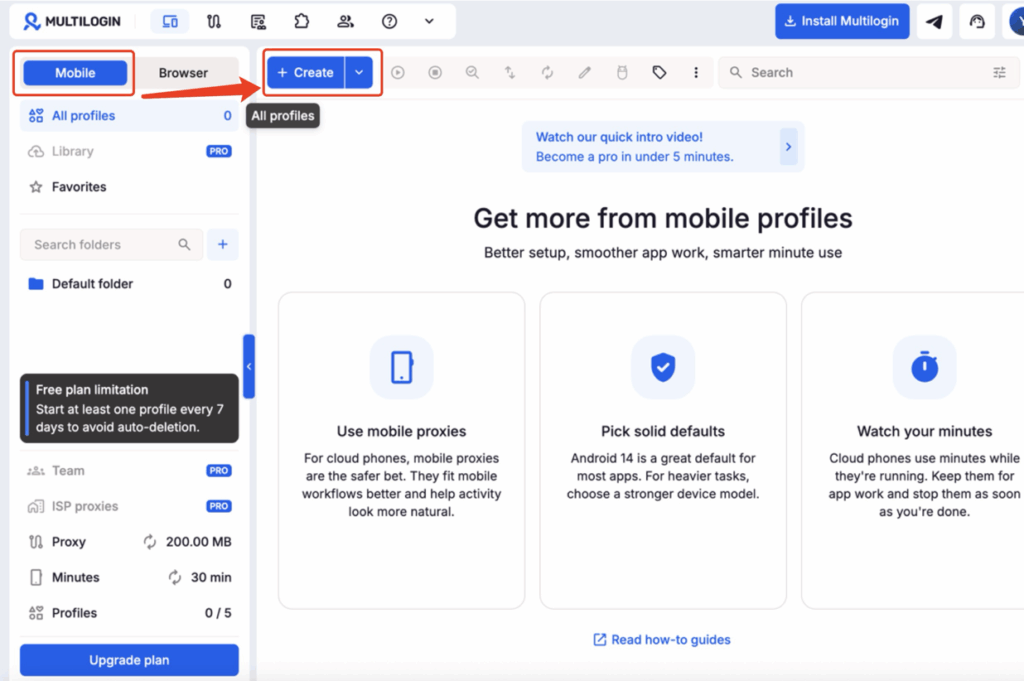
Check the pre-filled settings, select the appropriate folder, and create the cloud phone. Multilogin’s cloud phone setup guide documents the current menu path.
Tip: We now offer free plan that includes 5 browser profiles and 1 cloud phone, with 30 one-time mobile minutes and 200 MB of one-time proxy traffic. No credit card, no time limit. Enough to test the full workflow on one ad account before committing.
Step 3. Choose a Stable Network Location
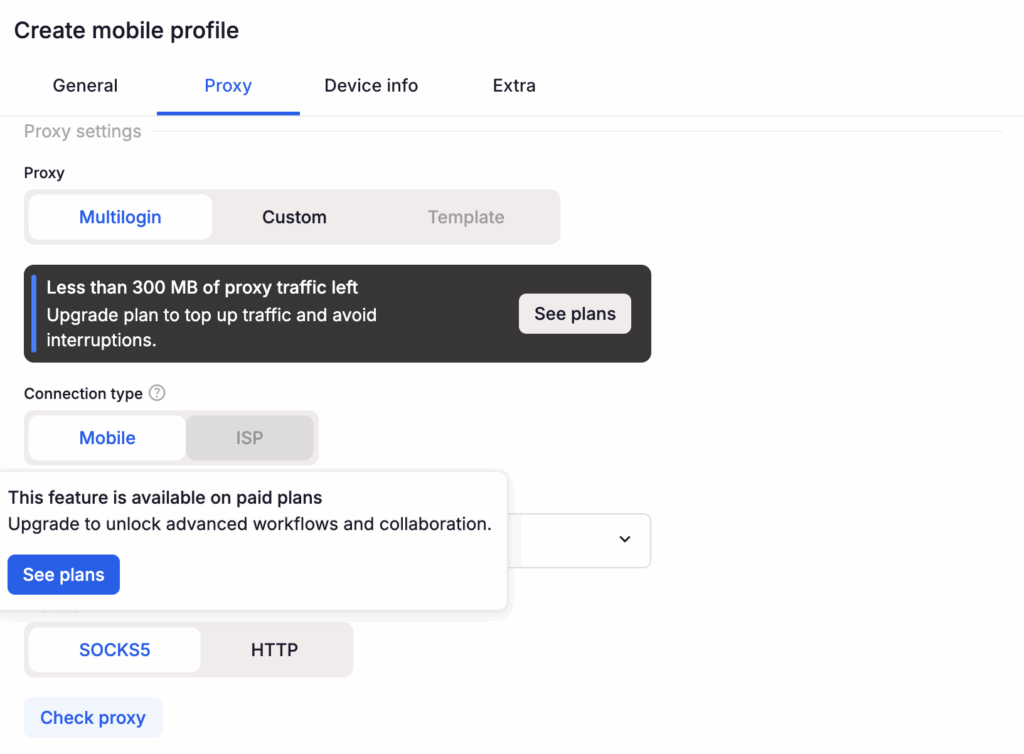
In the profile’s proxy settings, select Multilogin proxy, choose the connection type, and set the country or region that matches the normal working context of you and your team. Once the proxy connection is done, your cloud phones are ready to go.
Avoid changing countries between routine sessions unless the business workflow genuinely requires it. Record the intended region in the profile note so another team member does not change it casually.
Step 4. Start the Cloud Phone and Install Meta Apps
Start the cloud phone. Tap Apps in the lower-right corner, search for Meta Ads and Meta Business Suite, and install the apps needed for the workflow. Multilogin’s phone library installs an app directly on the running cloud phone; Google Play is also available when an app is not in the library.
Use Meta Ads for mobile campaign monitoring and Meta Business Suite for Page content, inbox, notifications, and other supported business tasks. For a broader Meta workflow, see Multilogin’s guide to using Meta Business Suite.
Step 5. Log In With the Facebook Profile
Open the Meta app, enter the credentials for the Facebook profile, and complete two-factor authentication. Confirm the profile name, Business Portfolio, Page, and ad account before making a change.
Do not ask a client to send a password in chat or email. The client should grant the required Meta access to the operator’s own profile.
Step 6. Create a Browser Profile for Detailed Ads Manager Work
Desktop Ads Manager is better suited to campaign construction, bulk edits, reporting, and spreadsheet-based analysis. In Multilogin, go to Profiles → Browser → Create, choose the settings, and click Create. Add https://adsmanager.facebook.com/ as a start URL if the profile should open Ads Manager on launch.
Use a clear paired name such as:
FB Web Ad 1 | Client A | USA
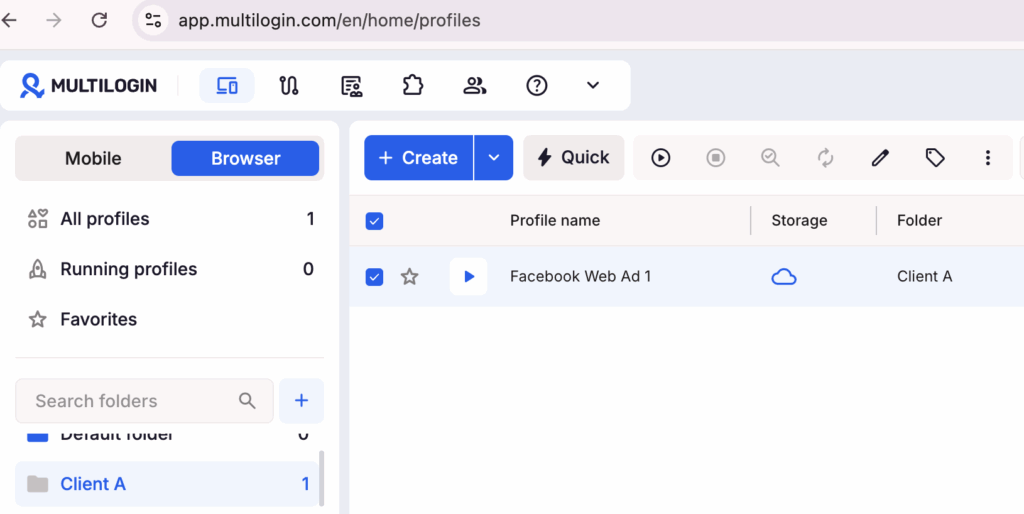
Keep the browser profile in the same folder as the mobile social profile and use the same normal working region. The browser-profile guide shows the current creation path.
Step 7. Assign Team Access and Keep an Audit Note
Create a folder for the client, operator, or project. In Team, select Manage access, choose a role, assign the relevant folder, and save the changes. Limit operators and starters to assigned folders; managers have broader workspace access.
Add a note with the Meta asset owner, approved operator, normal working region, campaign owner, and last access review. Do not store passwords in the note. Multilogin’s team-access guide explains the available role and folder controls.
Use the cloud phone for mobile notifications, app checks, Page activity, and moderation. Use the browser profile for detailed campaign creation and reporting. Reopen the same persistent profile for future sessions instead of creating a new environment each time.
When a Cloud Phone Is and Is Not Useful for Facebook Ads
A cloud phone is useful when:
- An agency handles Facebook workflows for multiple operators, clients, or regions.
- The team needs Meta Ads or Meta Business Suite mobile-app access from desktop workstations.
- Remote team members need controlled access to persistent work environments.
- Mobile notifications, Page activity, moderation, or app-only checks are part of the operating routine.
A cloud phone may be unnecessary when one person runs only one ad account, works entirely in desktop Ads Manager, and does not need mobile-app or team sharing. Multilogin improves the operating environment. It does not choose a profitable objective, fix weak creative, or override Meta’s permissions and policies.
Multilogin offers a Free plan with no time limit and no credit card required. Paid plans start at $7.08 per month and add monthly allowances and features according to the selected plan.
How Many Cloud Phones Does a Facebook Ads Team Actually Need?
Count logins, not clients. One cloud phone per Facebook login that needs mobile app access, plus one browser profile for the same login. An agency with twelve clients and three operators usually needs three environments, not twelve.
This is the most common provisioning mistake we see in agency setups. A team looks at its client list, counts twelve, and creates twelve cloud phones. But Meta does not separate work by device. It separates work by asset permission. Twelve clients granting partner access to the same agency login is still one login, and one login needs one persistent session.
| What you have | What teams usually create | What you actually need | Why |
|---|---|---|---|
| One operator, one Facebook login, five client ad accounts | Five cloud phones | One cloud phone, one browser profile, five folders | Meta permissions already separate the clients. The operator is one person with one session history. |
| Three operators sharing one agency login | One shared environment | Three separate logins, one environment each | Shared logins break two-factor authentication, audit trails, and accountability. Fix the login structure first. |
| One operator with a personal profile and an agency profile | One environment | Two environments | Two logins, two session histories. These should never share a device. |
| One operator working two regions with genuine local context | One environment, proxy switched per session | Two environments, one matched proxy each | Flipping location between sessions on one profile is worse than running two stable ones. |
| A client who requires your team to use their own Facebook login | One shared environment | One environment per client login | This is the case where the count genuinely grows with clients. |
The counting rule: add one environment when there is another login or another stable working region. Do not add one when there is another client, another ad account, another campaign, or another creative test. Those live inside Meta’s permission model and inside folders.
A worked example
An agency runs Facebook ads for twelve clients. Three operators handle the work. Each client has added the agency as a partner in Meta Business Portfolio and assigned access to their Page, ad account, and dataset.
The wrong setup is twelve cloud phones, one per client. It costs four times more in mobile minutes, produces twelve thin session histories instead of three solid ones, and creates twelve places where a proxy or a login can drift out of sync.
The right setup is three cloud phones and three browser profiles, one pair per operator, with twelve folders organizing the client work. Each operator has one persistent session that builds naturally. Client separation is handled where it belongs, in Meta’s asset permissions.
The count only changes when the inputs change. Hire a fourth operator, add a fourth pair. Take on a client who insists on their own login, add one environment for that login.
Check your setup in two questions
Before creating a new cloud phone, ask:
- Is there a new Facebook login involved? If no, you probably need a folder, not an environment.
- Is there a stable working region that differs from the existing one? If no, use the profile you already have.
If both answers are no and you still want a separate environment, write down why in the profile note. If you cannot finish that sentence, you do not need the environment.


Manage multiple accounts with Android cloud phones
Build account trust, reach new locations, and grow faster from one dashboard
Facebook Ads Campaign Launch Checklist
Before clicking Publish, confirm:
✅ The campaign has one measurable goal and the objective matches that goal
✅ The correct business assets and permissions are in place
✅ Tracking works on the final destination
✅ The audience can buy or use the offer
✅ The budget can produce enough data to evaluate
✅ The creative fits the selected placements
✅ The landing page matches the ad
✅ The team knows who will monitor delivery, comments, leads, and spend
The mechanics of setting up Facebook ads are straightforward once each decision has a clear owner. The harder work is keeping the objective, measurement, audience, and offer aligned after the campaign starts.
If your team manages several Facebook workflows across mobile and desktop, start with Multilogin to organize cloud phones, browser profiles, matching IPs, and team access all from one dashboard.
FAQ
What is a cloud phone?
A cloud phone is an Android device hosted in the cloud. You access it from your desktop, but it runs like a physical smartphone with its own operating system, hardware identifiers, and storage.
How much should I spend on my first Facebook ads campaign?
Start from the maximum acceptable cost per result and the number of results needed to evaluate the campaign. There is no universal starting budget. A local lead campaign and an international e-commerce campaign have different economics, audience sizes, and conversion rates.
Which Facebook Ads objective should I choose?
Choose the objective closest to the result you want Meta to optimize for: awareness, traffic, engagement, leads, app promotion, or sales. If purchases can be tracked reliably, use Sales rather than Traffic simply to obtain cheaper clicks.
Do I need a Meta Business Portfolio to run ads?
An individual advertiser may be able to create an ad account without a complex business setup, but a Business Portfolio is the appropriate structure for organizations managing Pages, ad accounts, datasets, people, and partners. It gives the business clearer control over assets and permissions.
Should I use daily or lifetime budget?
Use a daily budget for ongoing campaigns or when you want a consistent average daily spend. Use a lifetime budget for campaigns with fixed dates and a defined total amount. The better choice depends on how tightly the schedule and total spend must be controlled.
Can I manage Facebook Ads from a cloud phone?
Yes. An Android cloud phone can run Facebook, Meta Ads Manager, and Meta Business Suite for mobile campaign checks, notifications, moderation, and other app-based work. Detailed campaign building and reporting are often easier in desktop Ads Manager, which is why Multilogin provides cloud phones and isolated browser profiles in the same platform.
Does a cloud phone prevent Facebook ad account restrictions?
No tool can guarantee an account will avoid review or restriction. A cloud phone provides a persistent mobile workspace and clearer separation between authorized client or brand operations. Advertisers still need valid permissions, accurate business information, compliant ads, secure payment methods, and adherence to Meta’s policies.
How much do cloud phones cost in Multilogin?
Mobile minutes start at $0.0073 per minute on larger packages and $0.009 per minute on smaller ones. You pay only for time used, and unused minutes roll over while your subscription is active. Every plan includes monthly minutes.