


LinkedIn cold message is a short, direct message sent to someone you have no existing relationship with, usually to start a conversation around sales, recruitment, partnerships, job opportunities, or professional networking. In this guide, you’ll learn how to structure messages that feel relevant, avoid common mistakes that hurt reply rates, and build a more consistent outreach process as your activity scales.
The strongest cold messages are simple: they focus on the recipient, reference something specific, avoid pitching too early, and make the next step easy. That matters even more when teams are managing multiple LinkedIn workflows, because messaging quality and account organization need to work together.
For larger outreach operations, Multilogin cloud phones can support this workflow by providing separate Android cloud environments for managing LinkedIn activity more consistently, without relying on multiple physical devices.
👉 Learn how to write better LinkedIn cold messages and build a scalable outreach setup that stays practical as your team grows.
What Makes a Good LinkedIn Cold Message?
A good LinkedIn cold message answers two questions immediately:
Why are you contacting me?
And:
Why should I care?
You do not need clever copywriting to answer them.
You need relevance.
Mention something specific about the recipient, explain why you are reaching out, and make the next step easy.
A strong first message generally follows three principles:
- Keep it short.
- Personalize the reason for contacting them.
- Avoid turning the first interaction into a full sales pitch.
Templates can help you work faster, but they should be treated as frameworks rather than messages you send unchanged to hundreds of people.
Good cold outreach works because it respects the recipient’s attention, not because it sounds complicated.
What Makes a LinkedIn Cold Message Different From Cold Email?
LinkedIn gives recipients much more context about you than a typical cold email.
Before replying, someone can quickly see your:
- Profile photo
- Job title
- Company
- Work history
- Mutual connections
- Recent posts
- Professional activity
That means your profile and your message work together.
A great message will struggle if your profile looks incomplete, outdated, or unrelated to what you are discussing.
Before spending hours testing different opening lines, make sure your profile clearly communicates who you are and why someone in your target audience might reasonably want to speak with you.
Your profile does not need to look overly polished. It simply needs to create enough credibility that the message makes sense.
How Do You Write a LinkedIn Cold Message That Gets Replies?
Start with the recipient.
Instead of opening with:
“Hi, I work for XYZ Company and we provide…”
Start with a reason you selected that specific person.
You could reference:
- A recent LinkedIn post
- Their role
- A company announcement
- A shared professional interest
- A project
- A hiring update
- A recent market expansion
Then give them a small amount of context and finish with a low-friction question.
A simple structure looks like this:
Line 1: Why you are reaching out to this specific person.
Line 2: Why the conversation might be relevant to them.
Line 3: A simple question or next step.
That is usually enough.
Your first LinkedIn message is not supposed to close a deal. Its job is to start a conversation.
How Long Should a LinkedIn Cold Message Be?
Short messages are generally easier to process than long introductions.
You do not need to explain your company history, list every product benefit, attach your entire résumé, or describe every reason the recipient should speak with you.
Aim for roughly three or four short lines where possible.
If the recipient has to scroll through a large paragraph before understanding why you contacted them, the message is probably doing too much.
Think of the first message as an invitation to continue the conversation.
You can provide more detail after they respond.
LinkedIn Cold Message Examples
Different goals require different approaches. A recruiter contacting a candidate should not sound like a salesperson, while a job seeker should not approach a hiring manager like an outbound sales prospect.
Here are a few practical frameworks.
LinkedIn Cold Message for Recruiters
Hi [Name], I came across your profile while looking at people with experience in [skill/industry]. We’re currently hiring for a [role], and your background in [specific area] stood out. Would you be open to hearing a little more about it?
Why it works: the recipient immediately understands why they were contacted and what the opportunity involves.
LinkedIn Cold Message for Sales
Hi [Name], noticed that [Company] recently [specific event]. We work with teams dealing with [relevant challenge] during that stage of growth. Curious if this is something you’re currently looking at?
The goal is not to force a meeting immediately. It is to see whether there is genuine relevance.
LinkedIn Cold Message for Networking
Hi [Name], enjoyed your recent post about [topic]. I’m currently learning more about [field] and your point about [specific detail] caught my attention. Would love to connect and follow your work.
This works because the message has a genuine reason behind it.
LinkedIn Cold Message for Job Seekers
Hi [Name], I saw the [role] opening at [Company] and wanted to reach out directly. My background in [relevant experience] seems closely related to what the team is looking for. Happy to share more context if useful.
The recipient can understand the purpose without immediately being asked for a long meeting or referral.
Common LinkedIn Cold Message Mistakes
The most common mistake is talking about yourself too early.
Your company, experience, product, awards, and achievements may eventually matter. But before the recipient understands why the conversation is relevant to them, those details usually create unnecessary friction.
Other common mistakes include generic openings such as “Hope you are doing well,” sending the same pitch to everyone, asking for a 30-minute meeting immediately, writing large blocks of text, and following up too aggressively.
Personalization does not mean writing an entirely new essay for every prospect.
Sometimes one specific sentence explaining why you contacted that person is enough to make a template feel relevant.
When Should You Follow Up?
A practical first follow-up window is around three to five business days.
Your follow-up should not repeat your entire original message.
Keep it simple.
For example:
Hi [Name], just following up in case my previous message got buried. Happy to share more if this is relevant to what you’re working on.
If there is still no response after one or two follow-ups, it is usually better to move on rather than continuing to push.
Good outreach should create opportunities without damaging your professional reputation.
How LinkedIn Outreach Changes When You Manage Multiple Accounts
For an individual sending a small number of thoughtful messages, outreach management is fairly straightforward.
The situation becomes more complicated for recruitment teams, sales organizations, agencies, and businesses working across multiple LinkedIn accounts.
At that point, the challenge is no longer just writing messages.
You also need to organize account access, keep workflows separate, reduce accidental account switching, coordinate team members, and maintain consistent working environments.
This is where Multilogin Cloud Phones fits into the broader LinkedIn outreach workflow.
Multilogin’s positioning changed significantly during mid-2026. Rather than being positioned primarily around browser profile management, the platform now focuses more broadly on Android Cloud Phones for social media account operations, while combining mobile environments, browser profiles, proxies, automation support, and team workflows inside one platform.
For teams working with LinkedIn and other social platforms, this means mobile and browser-based account workflows can be managed from the same workspace instead of relying on separate phones, browsers, and disconnected tools.
Where Multilogin Cloud Phones Fit Into LinkedIn Outreach
A Multilogin Cloud Phone provides an Android environment hosted in the cloud.
Instead of maintaining a collection of physical devices, teams can access mobile environments from their desktop and organize them alongside their other account workflows.
Multilogin currently supports Android cloud phones together with browser profiles and centralized account management.
For LinkedIn outreach teams, the practical value is organization.
A recruiter might maintain different workflows for different markets. An agency might manage LinkedIn activity for several clients. A sales team may have multiple representatives responsible for different accounts.
Keeping these workflows clearly separated makes daily operations easier to manage and reduces mistakes caused by constantly moving between devices and logins.
The important point is that infrastructure does not replace good outreach.
Cloud phones cannot make an irrelevant sales pitch interesting, and they should not be treated as a way to ignore LinkedIn’s rules.
Your messaging strategy still needs to focus on real people, relevant conversations, reasonable outreach volume, and professional behavior.
Multilogin’s New 2026 Direction: Mobile-First Multi-Account Management
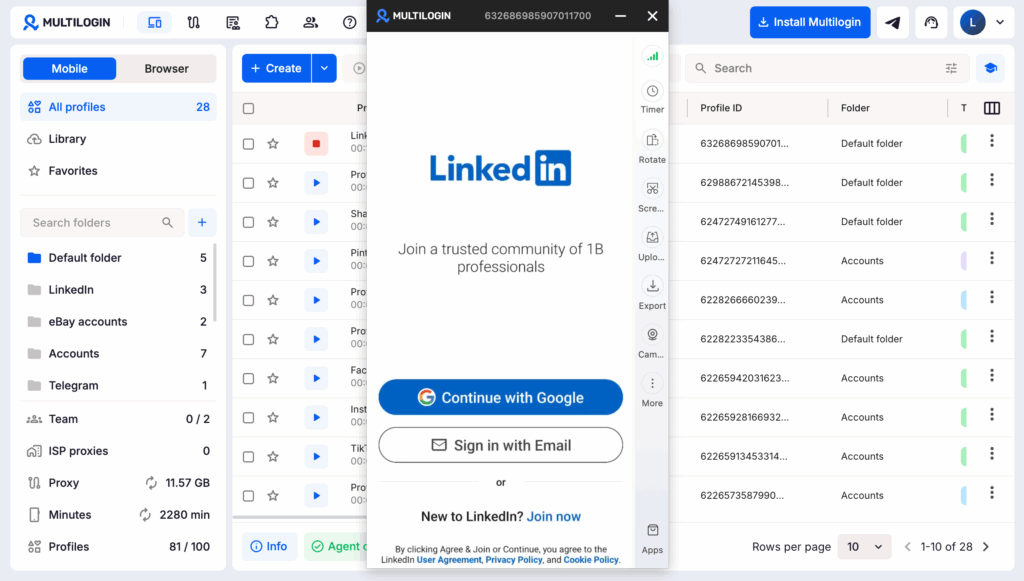
Multilogin had increasingly shifted toward positioning Cloud Phones as a central part of the product rather than treating mobile account management as a secondary feature.
Its current platform combines Android Cloud Phones with browser profiles and other workflow tools, allowing teams to manage mobile apps and web accounts from one dashboard.
That positioning is particularly relevant for social media teams because modern account workflows rarely happen entirely inside a browser.
LinkedIn, Instagram, TikTok, Facebook, messaging apps, and other platforms often involve both mobile and desktop interactions.
Instead of maintaining a physical phone farm alongside separate browser-profile tools, teams can centralize more of the workflow in one environment.
The objective is not simply “more accounts.”
It is easier account organization as operations become more complex.
Can You Try Multilogin for Free?
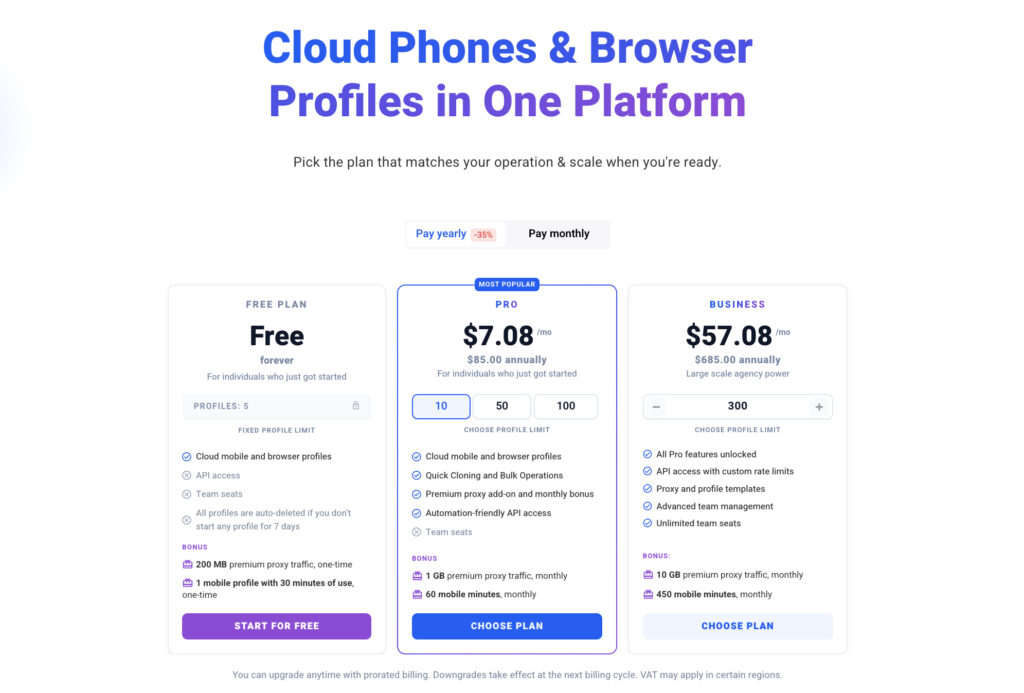
Yes! Multilogin introduced a permanent free plan rather than a short-term free trial. The free plan does not require a credit card and currently includes up to five profiles, with browser and cloud phone functionality available for testing.
That makes it useful if you want to understand how cloud phones fit into your LinkedIn workflow before committing to a paid setup.
You can start with one workflow, test how account organization feels, and decide whether it makes sense for your team.
Try Multilogin for free and see how cloud phones can simplify your LinkedIn account workflow.