


VEED is a browser-based video editor with AI tools for subtitles, presenters and short-form clips. You can edit your own footage or start from a script and let an AI character present it, then add captions and music for each platform, all in one tab. For a social media manager handling several clients and a full posting calendar, that matters more than any single feature.
We tested VEED as a team running social accounts on Multilogin, a cloud Android phone platform for multi-account management. Our question was simple: can one person go from a written script to a captioned vertical video, ready to post, without opening a second tool? Below is what happened, what VEED costs, how it compares with CapCut, and where agencies should be careful.
TL;DR
- Subtitles are the main reason social teams pay for VEED. Creator includes unlimited auto subtitles, and the subtitle style gallery we saw in testing is built for TikTok and Reels.
- The editor runs in the browser, so freelancers and agency staff can pick up a project from any computer.
- Setting up an AI avatar video is quick, but generating one costs credits. Our 30-second test video needed 320.
- Free exports carry a VEED watermark, and AI videos over 15 seconds need a paid plan.
- Paid plans start with Creator at $147 per user a year, which removes the watermark and includes unlimited auto subtitles.
- CapCut is the better pick for trend templates and phone editing. VEED is the better pick for subtitles, brand consistency and client work.
What is VEED?
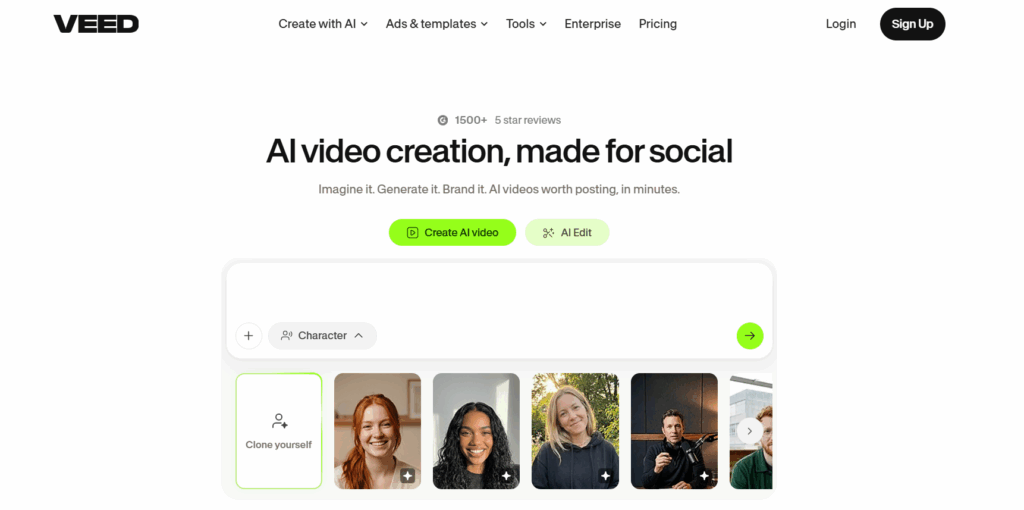
VEED (also written VEED.IO) is an online video editor with built-in AI tools for subtitles, audio cleanup, translation, avatars and short-form clips. Everything happens in a web browser, and projects are saved in the cloud. Most people sign up for one of three jobs: captioning videos, trimming long recordings into social clips, or making quick branded videos without desktop software.
Job | What VEED offers | Who gets the most out of it |
Editing | Timeline editor, trimming, splitting, text, transitions, templates | Creators, freelancers |
Subtitles | Auto subtitles, caption styles, translation | Social media managers, educators |
Audio | Background noise removal, text-to-speech, AI voices | Podcasters, course creators |
AI tools | AI presenters, AI clips, dubbing and 15+ other AI tools | Marketing teams |
Team work | Brand kits, review mode on Enterprise, team management | Agencies, in-house teams |
Plan access differs for several of these. We cover what each plan unlocks in the pricing section.
How did we test VEED?
We tested VEED’s AI avatar workflow on the free plan by setting up a 30-second TikTok tips video presented by an AI character, from a written script to the generate button. Every setup step worked on the free plan. Generating the video didn’t: VEED asked us to upgrade first. Everything after that point is based on VEED’s official pricing and help pages. We didn’t test the main editor, transcription accuracy or the AI editing tools, so the sections on those features describe what VEED offers rather than how well it performs.
Our test brief
- Input: a 90-word script, “3 tips to go viral on TikTok”
- Goal: a vertical video of about 30 seconds, with an AI presenter, subtitles and music
- Plan: VEED Free
- Date: October 1, 2026
Step 1: Adding the script
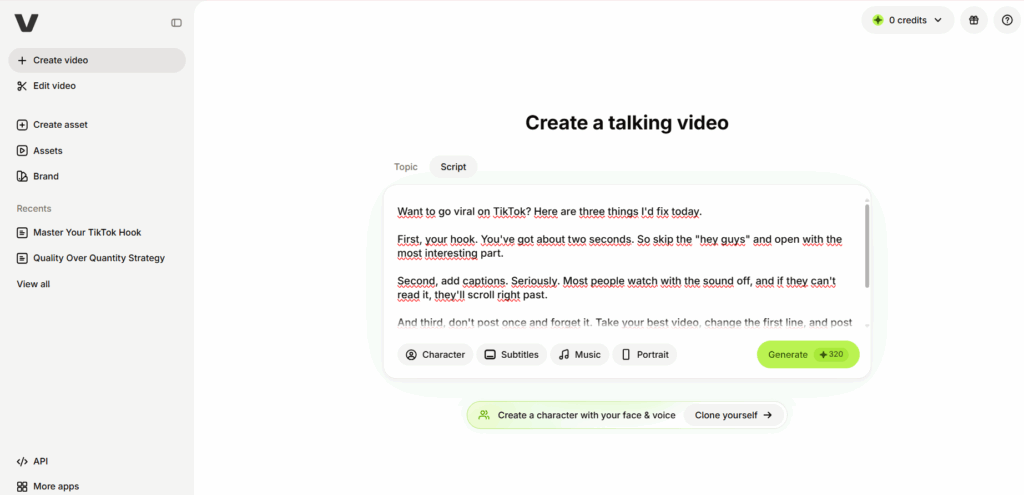
We opened Create video and chose “Create a talking video.” VEED offers two ways in: give it a topic and let it write the script, or paste your own. We picked Script and pasted our 90 words. Setup took less than a minute.
Step 2: Choosing an AI character
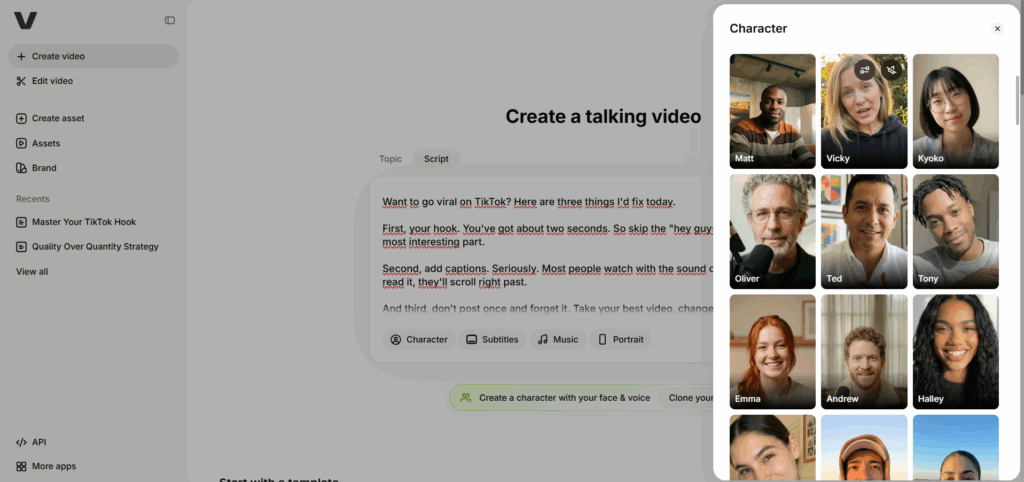
The Character menu shows a grid of stock presenters, including Matt, Vicky, Kyoko, Oliver and Emma. You can preview each one before choosing. There is also a “Clone yourself” option that creates a character from your own face and voice. We picked Vicky.
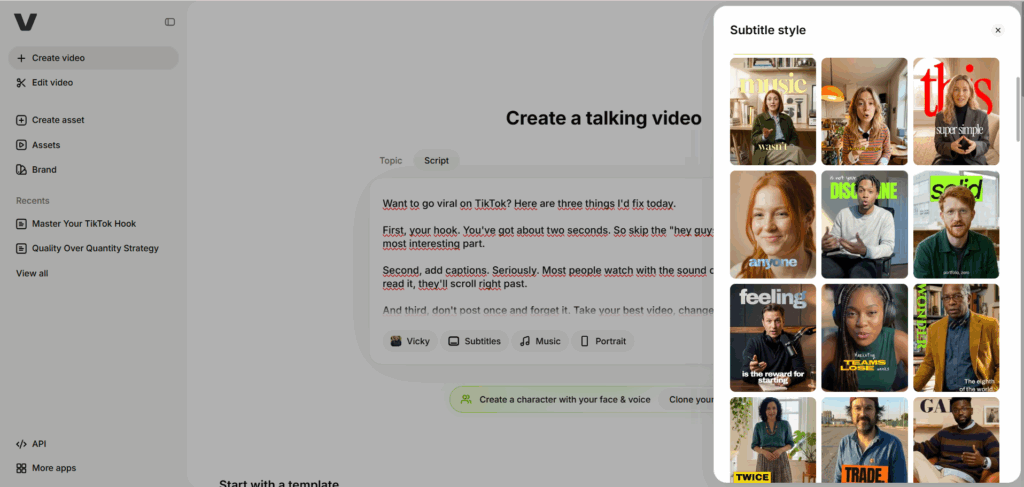
Step 3: Picking a subtitle style
The Subtitles menu opens a gallery of caption styles, from clean lower-third text to large animated words that fill the frame. Most of them look made for TikTok and Reels. Choosing one was quick, and the previews make it easy to compare styles before generating.
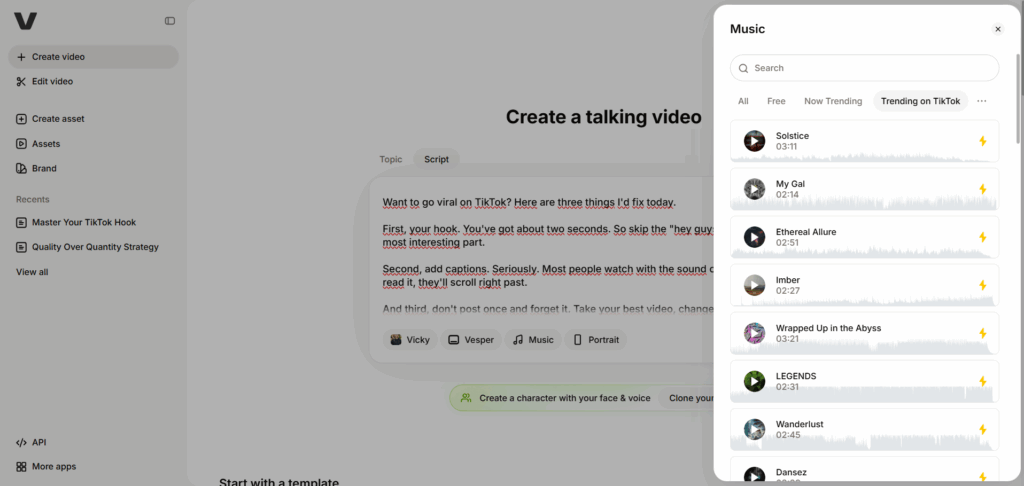
Step 4: Adding music
The Music panel has filters for All, Free, Now Trending and Trending on TikTok. That last filter is handy for social teams that want background audio that already fits the platform. However, the tracks under these filters carry a lightning icon, which marks them as premium.
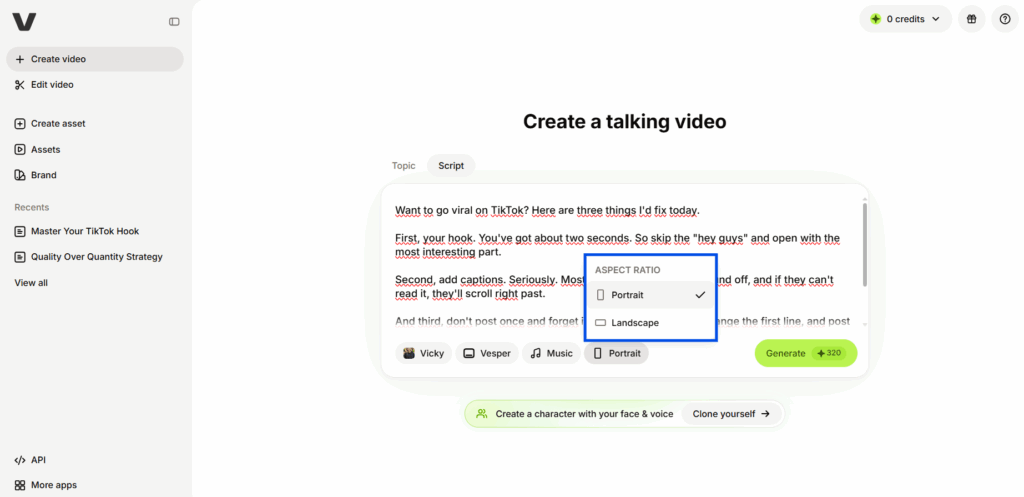
Step 5: Choosing the aspect ratio
VEED offers two formats for talking videos: Portrait and Landscape. We kept Portrait, the vertical format for TikTok, Reels and Shorts.
Step 6: Clicking Generate
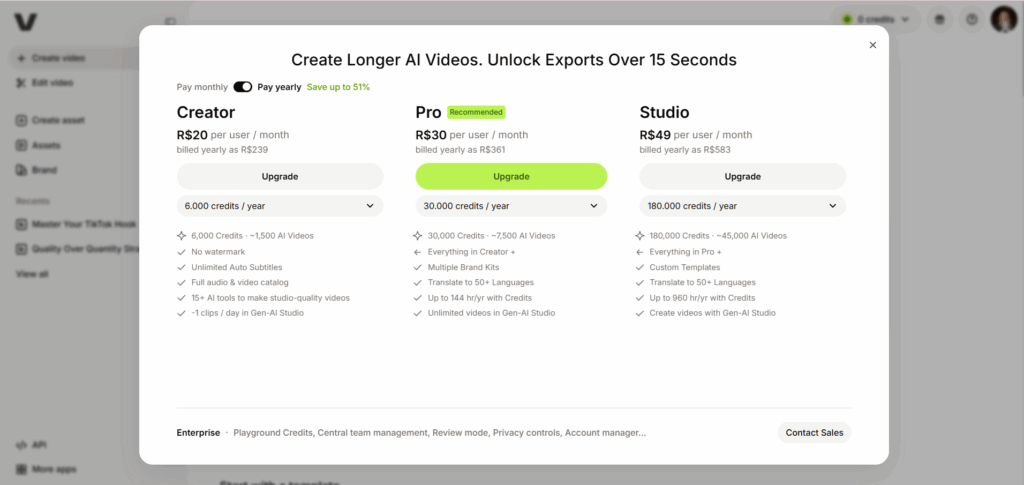
The Generate button showed a cost of 320 credits for our video, and the free account had 0 credits. When we clicked it, VEED opened an upgrade window titled “Create Longer AI Videos. Unlock Exports Over 15 Seconds,” with Creator, Pro and Studio plans. That was as far as the free plan let us go.
Test results
Result | What we found |
Time to reach the upgrade prompt | 10 to 15 minutes |
What worked on the free plan | Script, subtitle style, music, character and aspect ratio |
What was blocked | Generating the video |
Credits needed | 320 (the free account had 0) |
Free plan limit stated by VEED | AI video exports over 15 seconds need a paid plan |
What 320 credits means in practice
The upgrade window lists Creator at 6,000 credits a year, Pro at 30,000 and Studio at 180,000. At 320 credits per video like ours, Creator covers about 18 talking videos a year, Pro about 93 and Studio about 560. That’s far fewer than the “~1,500 AI videos” VEED advertises for Creator, which likely refers to shorter or simpler generations. Teams planning daily avatar videos should do this math before choosing a plan.
Is VEED good for social media?
Yes. VEED is a good fit for social media managers whose content is built on people talking to camera: tips, explainers, interviews, product walkthroughs and webinar cuts. Many viewers scroll with the sound off, so captions often decide whether a clip gets watched at all. VEED treats captions as a core feature, not an add-on.
It is a weaker fit for content that lives on trends. If your feed runs on trending sounds, fast effects and meme formats, a phone-first editor will usually get you there faster.
Subtitles are the main reason to pay
Creator, VEED’s entry plan, includes unlimited auto subtitles, and translation into 50+ languages starts on Pro. In our test, the subtitle style gallery was one of the strongest parts of the workflow, with styles clearly designed for TikTok and Reels. Brand names and industry terms tend to trip up any auto transcription, so build in a few minutes of proofreading per clip.
One video, several platform sizes
In VEED’s AI talking video tool, you choose the format before generating, and there are only two options: Portrait and Landscape. Portrait covers TikTok, Reels and Shorts, and Landscape covers YouTube and most LinkedIn video. Square and 4:5 feed formats aren’t offered at this stage, so they need resizing afterwards in VEED’s main editor.
Because generating needed a paid plan, we couldn’t check how subtitles and framing hold up after a resize. If you post the same video in both formats, plan for two generations from the start rather than resizing one later. With AI avatar videos, each generation costs credits, so a portrait and a landscape version of the same script costs twice as much.
Where VEED falls short for social teams
- Trend content: VEED has a “Trending on TikTok” music filter, but it offers far fewer trend effects and templates than mobile-first editors like CapCut. Meme formats and effect-heavy edits are still easier elsewhere.
- AI video costs: credits run out fast for AI avatar videos (see our test results).
- Format options: the AI talking video tool only offers Portrait and Landscape. Square or 4:5 feed versions need extra work in the main editor.
- Phone editing: VEED is built for a computer browser, so creators who edit on their phone will find mobile-first apps more comfortable.
Does VEED have AI tools for marketers?
Yes. VEED includes AI tools for subtitles, editing, audio, translation, avatars and clipping long videos into short ones. For marketers, the most useful ones are the tools that remove repetitive work from talking-head content. The flashier tools, like avatars and full text-to-video, matter less for most social calendars.
AI tool | What to check before posting |
Auto subtitles | Proofread brand names, product terms and accents |
Translation | Starts on Pro; have a native speaker check hooks and slang |
Magic Cut | Watch the cuts between sentences for abrupt jumps |
Clean Audio | Listen for voices that sound over-processed |
Eye Contact | Review side glances for an unnatural look |
AI clips | Confirm each clip makes sense without the full video |
Text-to-speech and AI avatars | Uses credits; label AI-generated people where platforms require it |
AI dubbing | Confirm which plan includes it before promising it to a client |
If you plan to build a full AI character instead of editing real people, the workflow is different. Our guide on how to create an AI influencer covers identity, consistency and the account side.
Can agencies use VEED for client videos?
Yes, agencies can use VEED for client videos, especially for captioned talking-head and AI presenter content. The plan you pick matters more for agencies than for solo creators. Branding, translation and approval tools are spread across different tiers, and pricing is per user.
Agency need | What VEED offers | Plan it starts on |
Separate branding per client | Multiple brand kits | Pro |
Videos for clients in other markets | Translation into 50+ languages | Pro |
Reusable formats for recurring series | Custom templates | Studio |
Formal client approval | Review mode for videos | Enterprise |
Managing a larger team in one place | Central team and data management | Enterprise |
For most agencies, Pro is the realistic starting point. Creator covers captions and watermark-free exports, but it doesn’t list multiple brand kits. Review mode is only listed on Enterprise. On lower plans, approvals have to happen outside VEED, through exported files or your usual project tool.
What to agree with clients before using AI presenters
VEED’s “Clone yourself” option creates an AI character from a real person’s face and voice. That’s useful for a founder or spokesperson who doesn’t have time to film every week, but it needs the person’s written consent before you create it. For stock characters, agree with the client upfront whether AI presenters fit their brand. Also label AI-generated people wherever the platform requires it.
VEED pricing: how much does VEED cost?
VEED pricing page showing Creator, Pro, Studio and Enterprise plans on yearly billing
VEED has a free plan and four paid tiers: Creator, Pro, Studio and Enterprise. On yearly billing, Creator costs $147 per user a year, Pro $265 and Studio $465. Enterprise is quoted per team. Every paid plan comes with AI credits, which cover AI work such as voiceovers, avatars and Gen-AI Studio videos. According to VEED’s pricing page, paying yearly saves up to 51% compared with monthly billing.
Plan | Price per user, billed yearly | AI credits | What it adds |
Free | $0 | 0 credits | The editor, subtitle styles and AI presenter setup to try. Watermark on every export, and AI videos over 15 seconds need a paid plan |
Creator | $147/year (about $12.25/month) | 6,000 (about 1,500 AI videos) | No watermark, unlimited auto subtitles, full audio and video catalog, 15+ AI tools, Gen-AI Studio (about one clip a day) |
Pro | $265/year (about $22/month) | 30,000 (about 7,500 AI videos) | Everything in Creator, plus multiple brand kits, translation into 50+ languages, up to 144 hours a year of AI voice drawn from credits, and unlimited Gen-AI Studio videos |
Studio | $465/year (about $38.75/month) | 180,000 (about 45,000 AI videos) | Everything in Pro, plus custom templates and up to 960 hours a year of AI voice drawn from credits |
Enterprise | Custom | Custom | Central team and data management, review mode for videos, privacy controls, customer success |
Last verified: October 1, 2026, on the official VEED pricing page.
What changes between plans for social work
- Watermark: every paid plan removes it, starting with Creator.
- Subtitles: Creator already includes unlimited auto subtitles. A team that mainly captions talking-head clips may never need more than that.
- Brand kits and translation: multiple brand kits and translation into 50+ languages start on Pro. For agencies and multilingual teams, that is usually the deciding line.
- AI voice and credits: heavy use of AI voiceovers, avatars and Gen-AI Studio is what pushes teams up to Pro or Studio.
- Review and admin: review mode for videos and central team management are listed under Enterprise.
Which VEED plan fits which team?
Team | Plan to start with | Why |
Solo creator or freelancer posting captioned clips | Creator | No watermark and unlimited subtitles cover most of the work |
Agency with several clients | Pro | Multiple brand kits keep each client’s fonts, colors and logos separate |
Multilingual brand | Pro | Translation into 50+ languages starts here |
Team producing AI voiceovers at volume | Studio | Much larger credit allowance for AI voice, plus custom templates |
Company that needs formal approvals and admin controls | Enterprise | Review mode, central management and privacy controls |
How to estimate VEED’s cost per client
Agencies should price VEED per client, not per plan. Multiply the seat price by the number of editors, then divide by the number of active clients.
For example, two editors on Pro billed yearly cost $530 a year, or about $44 a month. Spread across four clients, that is about $11 per client per month. Because VEED discounts yearly billing by up to 51%, the same setup on monthly billing can cost up to about twice as much.
Is VEED free?
Yes, VEED has a free plan, but it’s a trial rather than a way to publish. According to VEED’s help center, every export from a free account carries a VEED.IO watermark.
VEED vs CapCut: which is better for social content?
CapCut is usually the better choice for trend-led content edited on a phone, while VEED is the better choice for captioned, branded videos made on a computer and shared with a team or client. Both handle short-form vertical video. They differ in where they work best and who they are built for.
VEED | CapCut | |
Where it runs | Web browser | Mobile app, desktop app and web |
Built around | Subtitles, talking-head editing, AI presenters, brand tools | Effects, templates, trending sounds and fast mobile edits |
Subtitles | Core feature, unlimited from Creator, translation on Pro | Auto captions available, with styling options |
Team and client work | Multiple brand kits on Pro, review mode on Enterprise | Team features available, but the app is creator-first |
Learning curve | Quick setup in the AI talking video flow we tested | Easy on mobile, deeper effects menu |
Free plan | Watermark on every export; AI videos over 15 seconds need a paid plan | Basic editing at up to 1080p; premium templates, effects and some AI features can add a watermark or need a paid plan |
Paid plans | Creator $147, Pro $265, Studio $465 per user a year | Standard about $9.99 a month; Pro about $19.99 a month or $179.99 a year |
Best for | Agencies, educators, B2B and explainer content | Creators and trend-heavy TikTok and Reels feeds |
Which free plan is more useful for social media?
CapCut’s free plan is the easier place to start posting. Basic edits export at up to 1080p, and CapCut reserves its watermark mainly for premium templates, effects and some AI features, so check the export screen before you publish. Limits show up quickly if you rely on Pro templates, 4K export or heavy AI use.
VEED’s free plan is a trial, not a publishing plan. Every export carries a VEED.IO watermark, so a brand account will need Creator ($147 per user a year) before posting anything. On price, the comparison depends on which CapCut tier you’d need. CapCut Standard, at about $9.99 a month, is the cheapest way to remove CapCut’s watermark. CapCut Pro, reported at $179.99 a year, is where the full AI toolkit sits. VEED Creator costs less than CapCut Pro and includes unlimited auto subtitles, which matters if every video in your feed is captioned.
Pick VEED if most of your videos are someone talking to camera, captions are non-negotiable, and other people need to review or reuse your projects. It is also the safer pick when brand consistency across clients matters more than effects, and it costs less than CapCut Pro for teams that caption everything.
Pick CapCut if you edit on your phone, your content depends on trending sounds and templates, and you work mostly alone. It is also the cheaper place to start, with a free plan for basic edits and a Standard tier at about $9.99 a month. Many creators use both: CapCut for trend clips, VEED for captioned and branded videos.
What are the best VEED alternatives?
The best VEED alternatives depend on which part of the job you want done better. No single tool beats VEED at everything, but several beat it at one thing.
- CapCut: best for trend content, effects and editing on a phone.
- Descript: best when you want to edit video by editing the transcript, especially for podcasts.
- Kapwing: another browser editor with a strong focus on team collaboration.
- Canva: best for teams that already design their social graphics in Canva and need simple video in the same place.
- OpusClip: best for turning long videos into many short clips automatically. Our OpusClip review tested how that workflow holds up.
- Captions: best for creators who record talking-head videos on their phone and want AI editing on the spot.
VEED pros, cons and limits
VEED’s biggest strengths are subtitles and simplicity. Its biggest weaknesses for social teams are credit costs for AI video, per-seat pricing and features that only unlock on higher plans.
Pros
- Unlimited auto subtitles from Creator, with a style gallery built for TikTok and Reels.
- Runs in the browser, so there is nothing to install for freelancers or new team members.
- A fast, simple setup for AI talking videos, with a Trending on TikTok music filter.
- Multiple brand kits on Pro, which suit agencies with several clients.
Cons
- The free plan watermarks every export, and AI videos over 15 seconds need a paid plan.
- Credits run out fast for AI avatar videos. Our test video needed 320 credits, about 18 videos a year on Creator.
- Per-user pricing gets expensive for teams on monthly billing.
- Fewer trend effects and templates than mobile-first editors.
- AI results still need a manual review before posting.
Who should skip VEED
- Solo creators who edit on their phone and mostly post trend content.
- Teams that need advanced color grading, motion graphics or multi-camera editing. A desktop editor will serve them better.
- Anyone expecting AI tools to deliver a post-ready video with no review.
How do social teams use VEED across multiple accounts?
Social teams use VEED to edit and caption videos, then move each approved export into the right account’s workflow for scheduling and publishing. VEED handles the video. Getting it onto the right account, for the right client, is a separate process.
A practical flow looks like this:
Script or recording → VEED edit and subtitles → client or team review → approved export per platform → content calendar → correct account environment → publish
Review comes before anything else. Check that captions spell names correctly, that the brand kit matches the client, and that the video isn’t too close to something already posted on another account. A social media content calendar keeps track of which version goes where.
For mobile-app accounts like TikTok and Instagram, use one Multilogin cloud phone per account. Each cloud phone is an Android device in the cloud with its own app data, location and IP, and it keeps its login history between sessions. That makes handovers easier when a teammate covers a client for the week. Web-based work, such as YouTube Studio or Facebook Business Manager, runs in browser profiles, which Multilogin includes on the same dashboard. Built-in residential proxies and mobile minutes are included in every plan, and team seats and permissions let you decide who can open which client’s accounts.
Two limits are worth stating plainly. Separate cloud phones don’t solve content problems: if several accounts post near-identical VEED exports, platforms can still flag them, however the accounts are set up. Change hooks, captions and edits per account. And cloud phones can’t receive SMS or calls. When an app asks for a verification code, use your own phone or an external SMS provider, then enter the code in the app on the cloud phone. Teams handling several brands can find the full process in our guide to managing multiple social media accounts.
VEED review verdict: who should use it?
VEED is worth it for social media managers, agencies and small businesses that publish captioned, talking-head and explainer videos every week and want editing, subtitles and AI help in one browser tab. Setting up an AI avatar video took minutes, but you can’t see the result without paying, so budget for at least one paid month before you judge it.
Start on the free plan to explore the editor and subtitle styles, then move to Creator if you mainly need clean, captioned exports, or Pro if you need brand kits for several clients and translation. If your content runs on trends and phone editing, CapCut will probably serve you better. For the scheduling and reporting side, our roundup of the best social media management tools covers what comes after the export.