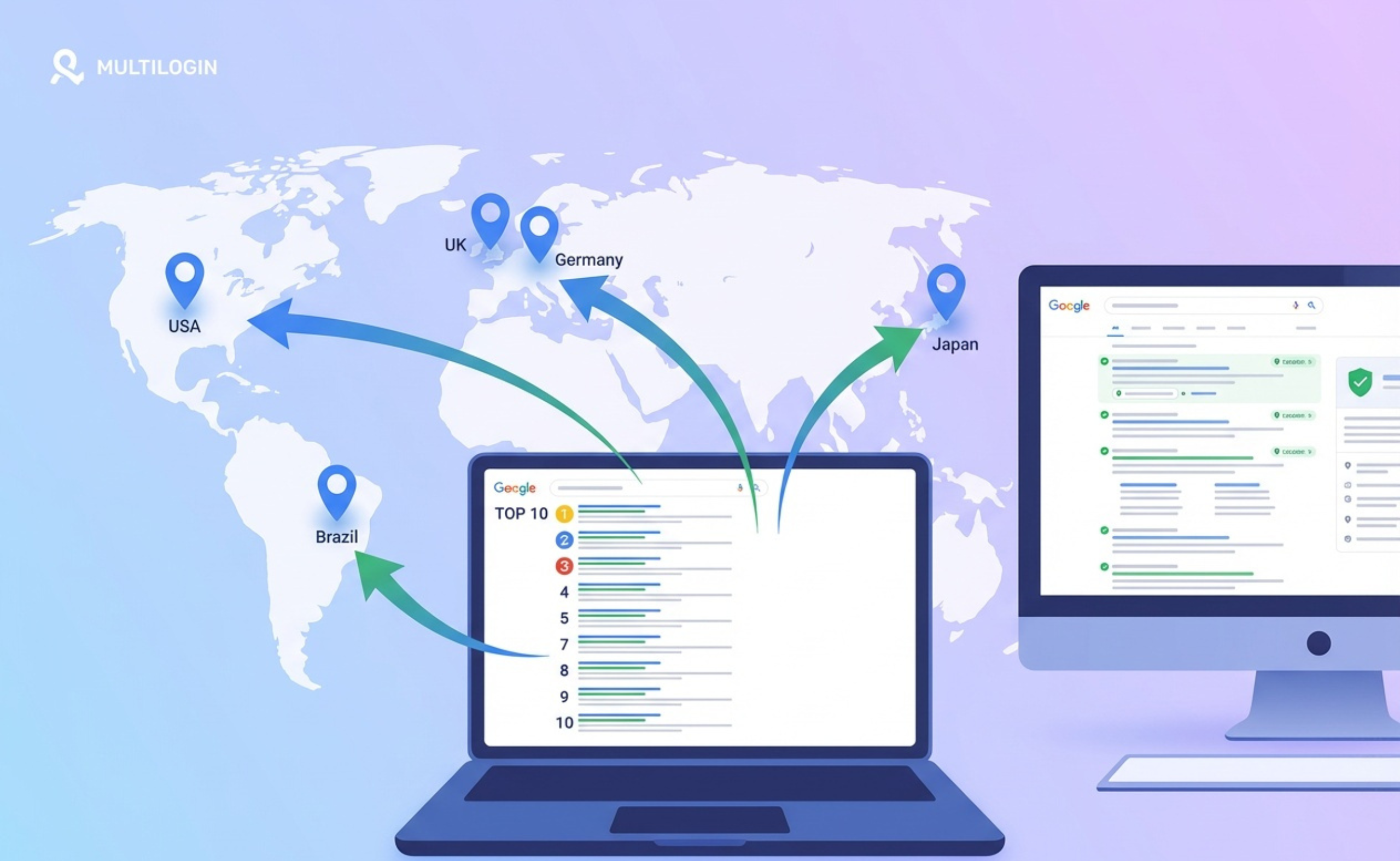



Understanding how Google displays different search results based on location is crucial for SEO professionals, local businesses, and marketers. Whether you’re managing a multi-location business, running international SEO campaigns, or simply want to verify your local rankings, knowing how to check Google search results from different geographic locations is an essential skill.
TL;DR – Want to check Google rankings right now?
Not ready to dive into the full technical guide? We get it. Click here to jump straight to the “how to check google results right now” section you’ll learn the fastest free method to see Google’s top 10 from any city or country in under 2 minutes, no proxies or special tools required. Works in any language.
This comprehensive guide will walk you through everything you need to know about location-based search result verification, from basic concepts to advanced techniques using the Google UULE parameter and proxies.
How Google Determines Your Location: The Complete Picture
Google uses a sophisticated multi-signal approach to determine where a searcher is located. Understanding these signals is critical before attempting to check results from different locations.
Primary Location Signals
1. IP Address & ASN (Autonomous System Number)
Your IP address is the most fundamental location signal. Google doesn’t just look at your IP—it analyzes:
- Geographic IP mapping: Which city/region the IP is registered to
- ISP and ASN: Whether it’s residential (Comcast, Verizon), mobile (T-Mobile, Vodafone), or datacenter (AWS, DigitalOcean)
- Trust score: Datacenter IPs are treated with higher suspicion and may trigger CAPTCHAs
Example: An IP from AS7922 (Comcast, Chicago) will be treated as a residential Chicago user, while an IP from AS16509 (Amazon AWS) may be flagged as a proxy/bot.
2. Device GPS & HTML5 Geolocation API
On mobile devices and when browser permissions are granted, Google can access precise latitude/longitude coordinates through:
- GPS: Accuracy within 5-10 meters
- Wi-Fi positioning: Using nearby Wi-Fi network databases
- Cell tower triangulation: Accuracy within 100-1000 meters.
3. Browser & System Settings
- Language settings (Accept-Language header): Browser language preferences
- Time zone: System time zone settings (detected via JavaScript)
- System fonts: Installed fonts can indicate region (e.g., Chinese/Japanese fonts)
- Canvas & WebGL fingerprints: Hardware/graphics card signatures tied to device type and location
4. WebRTC IP Leak
WebRTC (Web Real-Time Communication) can expose your real local IP address even when using a VPN or proxy. Google can detect this mismatch:
Proxy IP shows Paris → WebRTC leaks Berlin IP → Google may show mixed/suspicious results
5. Google Account History & Personalization
If you’re logged into a Google account:
- Home/work addresses from Google Maps
- Location history and frequently visited places
- Previous search behavior and patterns
6. Explicit URL Parameters
Parameters you can manually add to Google URLs:
- gl= Country code (e.g., gl=US, gl=FR)
- hl= Interface language (e.g., hl=en, hl=fr)
- uule= Encoded location parameter (discussed in detail below)
- near= City name (less reliable, deprecated in favor of UULE)
What UULE Is & How to Use It
UULE (stands for Encoded Location) is a Google search parameter that allows you to simulate searches from specific geographic locations. It’s the most reliable method for checking location-based search results.
What is UULE?
UULE is an encoded string that tells Google where to pretend the search is coming from. When you append &uule=<encoded_value> to a Google search URL, Google renders results as if the searcher is physically located in that specific place.
1. Canonical Name UULE (Place-Based)
Uses Google Ads geo-targeting canonical place names. Typically starts with w+CAIQICI…
- Format: City, State/Province, Country
- Example: “Austin,Texas,United States”
- Use case: City-level testing, broader geographic areas
2. Coordinate-Based UULE (Lat/Long)
Uses precise latitude/longitude coordinates. Often starts with a+cm9…
- Contains: Latitude, longitude, timestamp, radius (in meters)
- Example coordinates: 2672° N, 97.7431° W (Austin downtown)
- Use case: Hyperlocal testing, specific neighborhoods, precise proximity simulation
Both forms exist in URL params, cookies (UULE), and the x-geo header (used by Google apps)..
Basic usage tips
Build a Google URL with your query and add
&uule=<encoded_value>. Pair it withhl(interface language) and, if needed,gl(country).If you use SERP APIs, note that some providers convert human-readable locations to UULE under the hood; in SerpAPI,
locationanduulearen’t used together in a single call
How UULE Encoding Works (Technical Details)
The UULE parameter uses Base64 encoding with a specific Google protocol buffer format. Here’s what happens under the hood:
1. Canonical Name Encoding Process:
- Take a canonical place name: “New York,New York,United States”
- Encode to protobuf format
- Apply Base64 encoding
- Add the prefix w+
- Result: w+CAIQICINTmV3IFlvcmssVVNB
2. Coordinate Encoding Process:
- Input: latitude, longitude, radius, timestamp
- Encode these values into Google’s protobuf structure
- Base64 encode the result
- Add prefix a+
- Result: a+cm9sZTogMSwgcHJvZHVjZXI6IDEyLCB0aW1lc3RhbXA6…
Essential Google Search URL Parameters
Understanding all location-related parameters helps you construct accurate test queries:
| Parameter | Values | Description & Use |
| q= | search+query | Your search keywords (URL encoded) |
| uule= | encoded string | Simulates search from specific location (city or coordinates) |
| gl= | US, FR, JP, etc. | Country code (ISO 3166-1 alpha-2). Affects result set and local businesses shown. |
| hl= | en, fr, es, etc. | Interface language. Changes UI elements, buttons, and some result descriptions. |
| near= | city+name | Deprecated. Less reliable than UULE. May still affect results but not recommended. |
| pws= | 0 | Personalized Web Search. Set to 0 to reduce personalization (though not fully eliminated). |
Example URL Construction
Basic search from Austin, Texas:
https://www.google.com/search?q=pizza+delivery&uule=w+CAIQICIdQXVzdGluLFRleGFzLFVuaXRlZCBTdGF0ZXM&gl=US&hl=en&pws=0
Breaking it down:
- q=pizza+delivery — search query
- uule=w+CAI… — encoded Austin location
- gl=US — United States country code
- hl=en — English interface
- pws=0 — reduced personalization
How to Check Google Results by Location: 4 Methods
Method 1: Manual UULE Parameter (Quick & Free)
Best for: Quick spot checks, one-off location tests
- Generate UULE code using a UULE encoder tool
- Construct Google URL with parameters
- Use incognito mode
- Search and analyze results
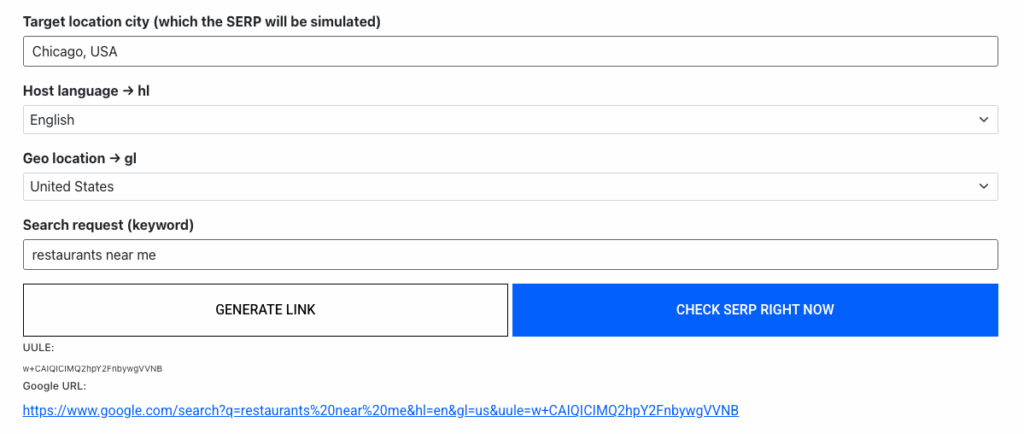
Instead of manually encoding UULE parameters, you can use a free tool that does all the work for you: Free Google Local SEO Checker by Multilogin, just select any city, enter your keyword, and get instant top 10 results.
The tool automatically generates UULE codes and constructs the proper Google URL.
Limitations: Only simulates location via URL parameter. Your actual IP and browser fingerprint remain unchanged, so results may not be 100% accurate for highly localized queries.
This free method delivers excellent accuracy for strategic SEO decisions, competitive intelligence, and understanding geographic ranking patterns.
For mission-critical local pack monitoring or when you need 99% precision, combine with Method 3 (proxies + antidetect browser).
Method 2: VPN or Proxy (Better Accuracy)
Best for: More realistic simulation, avoiding IP mismatch detection
- VPN: Consumer-friendly, changes your apparent location
- Residential Proxy: Real residential IPs, higher trust, less likely to trigger CAPTCHAs
- Mobile Proxy: Mobile carrier IPs, ideal for mobile SERP testing
- Datacenter Proxy: Cheaper but flagged by Google — avoid for accurate testing
Important: Clear cookies, use incognito mode, and disable WebRTC to prevent IP leaks.
Method 3: Antidetect Browser + Residential Proxy (Professional)
Best for: SEO agencies, multi-location businesses, professional rank tracking
Why this is the gold standard:
- Residential/mobile proxy: Real IP from target city
- Synchronized browser fingerprint: Time zone, language, fonts, Canvas/WebGL all match the target location
- WebRTC protection: No IP leaks
- Geolocation API: Set precise lat/long coordinates
- Isolated profiles: No personalization cross-contamination
Recommended tool: Multilogin — industry-leading antidetect browser with the most accurate fingerprint simulation and scalability for checking multiple locations simultaneously.
Method 4: SEO Tools & Rank Trackers
Best for: Automated tracking, historical data, competitor analysis
Popular tools:
- Semrush Position Tracking: 130+ countries, city-level targeting, mobile/desktop
- Ahrefs Rank Tracker: Country/city selection, SERP feature tracking
- SE Ranking: Affordable, supports Google + Yandex, granular location settings
- BrightLocal: Specialized in local SEO, Google Maps tracking, review monitoring
Note: Most tools use UULE emulation behind the scenes. They’re directionally accurate but may not reflect every micro-location nuance. These tools typically range from $99-$500/month, their functionality may be overkill if you primarily need location-based rank checking.
Real-World Use Cases & Examples
Case Study 1: Multi-Location Restaurant Chain
Scenario: A pizza restaurant chain with 5 locations across Chicago wants to verify each location appears in local pack results for “pizza near me.”
Challenge: Each neighborhood shows different local pack results based on proximity.
Solution:
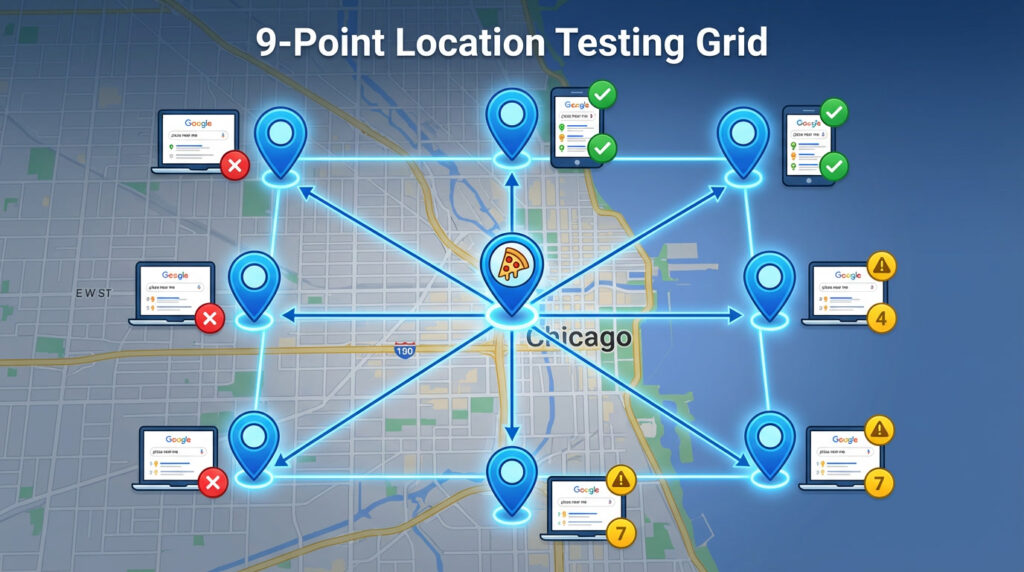
- Created 9-point test grid across Chicago (center + N/S/E/W + NE/NW/SE/SW)
- Used coordinate-based UULE for each grid point with exact lat/long
- Set up Multilogin profiles with Chicago residential proxies + proper time zone (America/Chicago)
- Tested query: “pizza near me” from each point
What is 9-point test grid? A method for checking Google’s local search results from 9 different locations across a city, arranged in a compass pattern.
Results:
- Discovered one location wasn’t appearing in local pack from any test point → Found missing Google Business Profile category
- Identified 2 locations with inconsistent NAP (Name, Address, Phone) citations
- Optimized each location’s service area radius based on actual visibility patterns
Outcome: After fixes, all 5 locations appeared in local pack within their target neighborhoods. Local organic traffic increased 34% over 3 months.
Case Study 2: International E-commerce SEO
Scenario: European e-commerce site selling to UK, France, Germany, and Spain. Each country has a dedicated subdirectory (/uk/, /fr/, /de/, /es/).
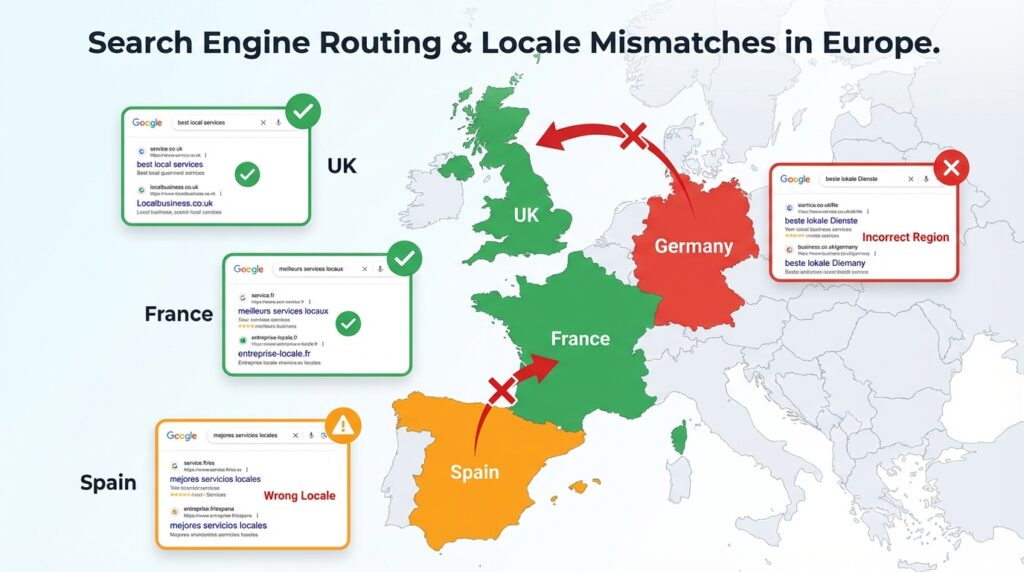
Challenge: Verify that Google shows the correct country version to users in each market.
Solution:
- Set up 4 Multilogin profiles (London, Paris, Berlin, Madrid)
- Each profile configured with:
- Residential proxy from target city
- Matching time zone (Europe/London, Europe/Paris, etc.)
- Local language (en-GB, fr-FR, de-DE, es-ES)
- UULE for capital city + gl parameter (UK, FR, DE, ES)
- Searched for branded + product keywords
Results:
- UK searches correctly showed /uk/ pages — ✓ Working
- French searches showed /fr/ pages — ✓ Working
- German searches showed /uk/ pages instead of /de/ — ✗ Issue found!
- Spanish searches showed mix of /es/ and /fr/ pages — ✗ Issue found!
Root cause: Hreflang tags were missing for German and incorrectly configured for Spanish.
Outcome: Fixed hreflang implementation. Re-tested from all 4 locations to confirm. German organic traffic increased 67%, Spanish traffic increased 43% within 6 weeks.
Case Study 3: Local Service Business (Plumber)
Scenario: Plumbing company in Austin, Texas serving a 25-mile radius.
Challenge: Client complained that when they searched “emergency plumber” from their office location, they didn’t appear in the top 3 local pack, but competitors did.
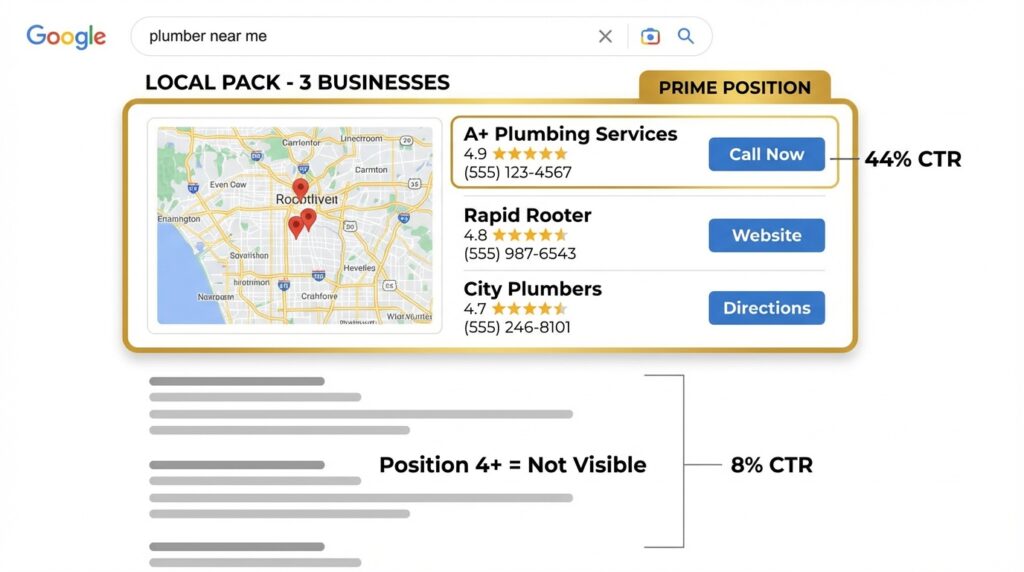
What is Local Pack (Map Pack / 3-Pack)? Local Pack (also called Map Pack or 3-Pack) is a special block featuring 3 local businesses that Google displays at the top of search results for location-based queries like “plumber near me” or “pizza delivery.”
Investigation:
- Created 5-point test grid across Austin service area
- Used coordinate-based UULE for each point
- Set up Austin residential proxy + proper time zone
- Tested “emergency plumber” + “plumber near me” from each grid point
Findings:
- From downtown Austin → Client appeared in position 2 of local pack
- From north Austin → Client appeared in position 4 (outside top 3)
- From south Austin → Client didn’t appear at all in local pack
- From east/west Austin → Mixed results (position 1-5)
Analysis: Client’s Google Business Profile location was in central Austin. Competitors who appeared in south Austin searches had physical locations or service area settings optimized for that area.
Recommendations:
- Optimize GBP service area to include all neighborhoods equally
- Create location-specific landing pages (South Austin Plumber, North Austin Emergency Plumbing)
- Build citations and backlinks from south Austin directories
- Add south Austin zip codes to website content and schema markup
Outcome: After 2 months, client appeared in top 3 local pack from 80% of test points across service area. Emergency call volume from south Austin increased 120%.
Advanced Tips & Best Practices
Understanding Query Intent Types
Google treats different query types with varying degrees of location sensitivity:
- Implicit local queries (“pizza”, “dentist”, “car repair”): Google assumes the user wants nearby results even without “near me.” Proximity is heavily weighted.
- Explicit local queries (“pizza in austin”, “dentist chicago”): User specifies location in query. Google respects this but still applies some proximity weighting.
- Non-local informational queries (“how to fix a leaky faucet”, “python tutorial”): Location matters less. Google may still show regionally relevant content but proximity isn’t a primary factor.
Key insight: For implicit local queries, test from multiple micro-locations within a city. For explicit queries, city-level UULE is usually sufficient.
Mobile vs Desktop: Different SERPs
Mobile search results can differ significantly from desktop:
- Local pack prominence: Mobile shows local pack more frequently and higher on page
- Different rankings: Mobile-first indexing means mobile UX affects rankings
- SERP features: Mobile may show different featured snippets, People Also Ask, etc.
Recommendation: Always test both mobile and desktop. For accurate mobile SERP simulation, use Multilogin Cloud Phones (real Android devices in the cloud) with mobile proxies instead of desktop browser user-agent emulation, which Google easily detects and may show inaccurate results.
Common Mistakes to Avoid
Using datacenter proxies for local SERP checks
Datacenter IPs are flagged by Google and trigger CAPTCHAs. Use residential or mobile proxies.
Not matching time zone to location
If your system time zone is UTC+1 but you’re testing New York (UTC-5), Google may detect the mismatch.
Testing while logged into Google account
Personalization will skew results. Always test logged out or in incognito mode with separate profiles.
Relying on a single test point per city
For local pack queries, test from 5-9 grid points across the city to see micro-location variance.
Ignoring WebRTC leaks
WebRTC can expose your real local IP even when using a proxy. Disable it in browser settings or use an antidetect browser.
Using country domain instead of gl parameter
Searching on google.fr doesn’t force French results if your IP is in the US. Use gl=FR parameter instead.
Not clearing cookies between tests
Cookies can carry personalization signals. Use fresh profiles or clear all cookies before each test.