





You’re searching for “Surfinite browser” and trying to figure out if it’s legit or just another sketchy tool that’ll get your accounts banned. Smart move doing research first—because with antidetect browsers, the wrong choice doesn’t just waste money. It costs you accounts, reputation, and revenue.
After testing Surfinite extensively (and comparing it to established alternatives), here’s everything you need to know before downloading anything.
What Is Surfinite Browser? (The Real Story)
Surfinite is a relatively new antidetect browser that positions itself as a solution for managing multiple accounts without detection. The tool claims to offer browser fingerprinting protection, proxy management, and profile isolation—basically the standard antidetect browser promise.
But here’s what’s interesting: Surfinite is nowhere near as established as the major players in this space. While tools like Multilogin have been around since 2015 with proven track records, Surfinite is still building credibility in a market where trust literally determines whether your accounts survive.
The browser targets users who need to manage multiple social media accounts, run e-commerce operations, or handle affiliate marketing campaigns. Sounds good on paper, but the execution? That’s where things get complicated.
Surfinite Download and Login: What to Expect
Since “Surfinite download” and “Surfinite login” are common searches, let’s address the basics first.
The Download Process
The Surfinite download process is relatively straightforward:
- Visit their official website
- Create an account
- Download the client for Windows, macOS, or Linux
- Install the application
- Log in with your credentials
Important security note: Only download Surfinite from their official website. There are fake antidetect browser installers floating around that contain malware. This isn’t unique to Surfinite—it’s a problem across the entire antidetect browser market.
Surfinite App and APK Availability
Here’s where things get murky. If you’re searching for “Surfinite app” or “Surfinite apk,” you need to know: Surfinite doesn’t officially offer a mobile application.
Any “Surfinite apk” you find online is either:
- A completely different app from another developer
- A potentially malicious fake
- An outdated or unofficial port
For legitimate mobile antidetect browser functionality, you’ll need a platform that actually supports mobile fingerprints—something most newer antidetect browsers (including Surfinite) don’t properly handle yet.
Surfinite Antidetect Features: What’s Actually Included?
Let’s break down what Surfinite actually offers in terms of antidetect capabilities:
Basic Fingerprinting
Surfinite provides some level of fingerprint masking, including:
- Browser fingerprint modification
- Canvas fingerprinting protection
- WebGL fingerprint spoofing
- Basic user agent spoofing
But here’s the critical question: how sophisticated is this fingerprinting? The difference between basic fingerprint modification and professional-grade digital fingerprinting is whether your accounts survive on platforms like Facebook, Instagram, or Amazon.
Proxy Integration
Surfinite supports proxy integration, allowing you to route different profiles through different IPs. You can use:
- HTTP/HTTPS proxies
- SOCKS5 proxies
- Residential proxies
- Datacenter proxies
However, proxies aren’t included—you’ll need to purchase them separately. This adds significant cost compared to solutions like Multilogin that include built-in residential proxies covering 150+ countries.
Profile Management
The browser lets you create multiple isolated browser profiles, each with unique fingerprints. You can:
- Save and reuse profiles
- Export/import configurations
- Organize profiles by project or client
Pretty standard stuff for any antidetect browser.
Is Surfinite Browser Safe? (The Critical Question)
This is what you’re really wondering, right? “Is Surfinite browser safe?” or more specifically: “Will using Surfinite protect my accounts or put them at risk?”
Let’s be brutally honest about antidetect browser safety.
Security Concerns with New Antidetect Browsers
Newer antidetect browsers face several inherent risks:
- Limited Testing: Platforms like Facebook, Instagram, Amazon, and Google constantly update their bot detection systems. Established browsers test their fingerprints daily against these platforms. Newer browsers? They’re often reactive rather than proactive—you discover problems when accounts get banned.
- Unknown Track Record: Surfinite doesn’t have years of proven operation. You can’t verify how many users successfully run operations long-term without bans. Compare this to Multilogin’s 9-year track record with zero security breaches and thousands of verified businesses operating safely.
- Data Privacy Questions: Where is your profile data stored? How is it encrypted? What happens if Surfinite’s servers are compromised? These aren’t hypothetical questions—antidetect browser companies have failed before, taking user data with them.
The Real Safety Test: Platform Detection
The actual safety question isn’t “will Surfinite steal my data?” (probably not) but “will Surfinite’s fingerprinting protect me from platform detection?”
This is where the rubber meets the road. Professional operations can’t afford to lose accounts on:
- Facebook and Instagram (strict detection)
- Amazon and eBay (automated fraud systems)
- LinkedIn (professional account monitoring)
- TikTok (aggressive bot detection)
Surfinite’s fingerprinting hasn’t been independently verified or extensively tested over years of operation. You’re essentially betting your accounts on unproven technology.
Surfinite vs. Established Antidetect Browsers
Let’s compare Surfinite to proven alternatives, because this context matters.
Surfinite vs. Multilogin: The Features Gap
Fingerprinting Sophistication:
- Surfinite: Basic fingerprint modification, limited parameters
- Multilogin: 55+ customizable parameters, tested daily on 50+ platforms
Proxy Solutions:
- Surfinite: BYO proxies (additional cost)
- Multilogin: Built-in residential proxies (30M+ IPs, 150+ countries)
Browser Technology:
- Surfinite: Modified Chromium
- Multilogin: Two proprietary browsers (Mimic and Stealthfox) built specifically for undetectability
Mobile Support:
- Surfinite: None
- Multilogin: Full mobile device emulation (iOS and Android)
Track Record:
- Surfinite: New, unproven
- Multilogin: 9 years, zero breaches, thousands of verified businesses
Automation:
- Surfinite: Basic
- Multilogin: Professional automation with Selenium/Puppeteer/Playwright support
Support:
- Surfinite: Email support
- Multilogin: 24/7 expert support in 5 languages
Surfinite vs. Other Alternatives
Compared to other established options like AdsPower, GoLogin, or Dolphin Anty, Surfinite sits in an awkward middle ground—not as cheap as the budget options, not as proven as the premium ones, and not as feature-rich as either.
Real-World Use Cases: When Surfinite Works (and When It Doesn’t)
Let’s talk about actual use cases, because this determines whether Surfinite is right for you.
Where Surfinite Might Be Adequate
- Low-Stakes Personal Use: If you’re just managing a few personal accounts for non-commercial purposes, Surfinite’s basic protection might suffice. Think managing multiple Reddit accounts for different hobbies or separating personal and side-project social media.
- Testing and Learning: If you’re new to antidetect browsers and want to understand the basics before investing in professional tools, Surfinite could serve as an entry point—though you’d learn the same lessons faster with a proven platform’s trial period.
Where Surfinite Falls Short
- Social Media Marketing: Managing client Instagram, Facebook, or Twitter accounts? You can’t afford account bans. One banned client account damages your reputation permanently. Surfinite’s unproven fingerprinting is too risky.
- E-Commerce Operations: Running multiple Amazon seller accounts or eBay stores? Account suspensions mean direct revenue loss. These platforms use sophisticated detection—you need battle-tested fingerprinting.
- Affiliate Marketing: Managing multiple affiliate marketing accounts across networks that actively hunt for multi-accounting? Surfinite’s basic detection evasion won’t cut it against platforms specifically designed to catch this.
- Cryptocurrency Operations: Farming airdrops or managing multiple exchange accounts? The financial stakes are too high for unproven tools. You need verified security and reliability.
- Web Scraping: Professional web scraping operations require sophisticated rotating proxies and advanced fingerprinting. Surfinite’s basic setup won’t survive against modern anti-scraping measures.
The Cost Reality: Is Surfinite Actually Cheaper?
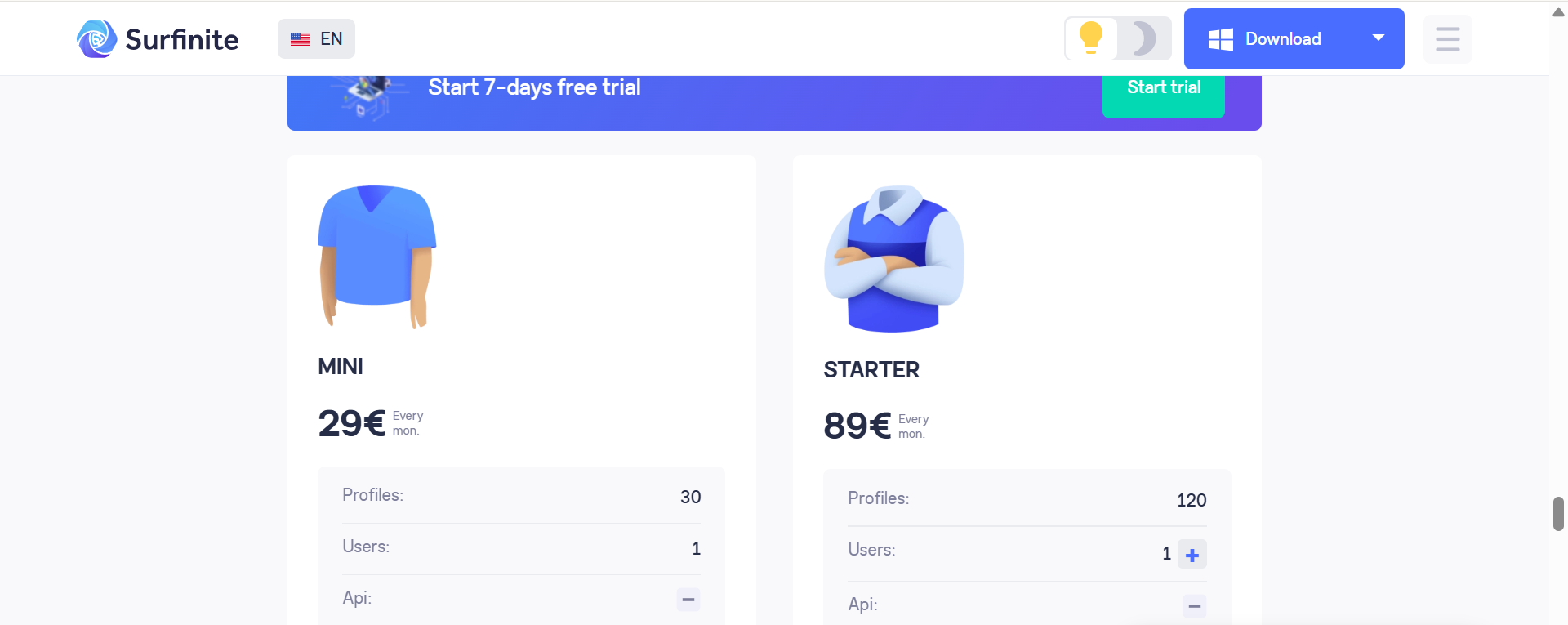
One reason people consider Surfinite is the assumption it’s cheaper than established alternatives. Let’s do the real math.
Surfinite’s Hidden Costs:
- Browser subscription: ~$29-49/month (estimated, varies by plan)
- Residential proxies: $50-100+/month (you need quality proxies)
- Time spent troubleshooting: Immeasurable but significant
- Risk of account loss: Potentially thousands in lost revenue
- Total: $79-149+/month plus operational risks
Multilogin’s Actual Cost:
- Solo plan: €9/month (includes 10 profiles)
- Includes 1GB residential proxy traffic
- No setup complexity
- Proven protection saves accounts
- 24/7 expert support
- Total: €9/month all-inclusive for most users
Wait, what? The “budget” option costs more once you factor in essential proxies? And carries significantly higher risk? That’s the trap with cheap antidetect browsers.
Professional Operations Require Professional Tools
Here’s the uncomfortable truth about antidetect browsers: if you’re running actual business operations, the browser you choose isn’t really a “choice”—it’s infrastructure.
Think about it like this: would you run a real business on free web hosting that goes down randomly? Would you store customer data in an unencrypted database from a company nobody’s heard of? Would you process payments through a sketchy payment gateway that might work?
Of course not. Because when business operations are involved, reliability isn’t optional.
The same logic applies to antidetect browsers. If you’re:
- Managing client accounts where bans damage your reputation
- Running e-commerce operations where accounts equal revenue
- Operating affiliate campaigns where detection means lost earnings
- Handling cryptocurrency worth real money
- Building any business dependent on multi-account access
Then Surfinite’s unproven technology represents an unacceptable risk.
Why Multilogin Is the Professional Standard
Multilogin has been the industry standard since 2015 for reasons that become obvious once you need reliability:
- Daily Platform Testing: The team tests fingerprints daily on 50+ major platforms including Facebook, Instagram, Amazon, LinkedIn, TikTok. When platforms update detection (which happens constantly), Multilogin updates before you notice problems.
- Pre-Farmed Cookies: New accounts look suspicious. Multilogin’s pre-made cookies make profiles appear established immediately, dramatically reducing verification requests and bans.
- Proprietary Browser Technology: Rather than modifying Chromium and hoping for the best, Multilogin built two browsers from scratch specifically for undetectability. Mimic (Chromium-based) and Stealthfox (Firefox-based) are engineered for one purpose: staying undetected.
- True Mobile Emulation: Most platforms are mobile-first now. Multilogin’s mobile antidetect browser capabilities authentically emulate iOS and Android devices—not just desktop browsers pretending to be mobile.
- Proven Security: Nine years of operation without a single security breach. GDPR compliant. End-to-end encryption. 2FA. SOC 2 Type II certified. These aren’t just buzzwords—they’re verifiable security standards.
- Actual Business Support: When something goes wrong at 2 AM before a campaign launch, 24/7 expert support in 5 languages isn’t a luxury—it’s what saves your operation. Email-only support from newer browsers doesn’t cut it.
- Team Collaboration: Unlimited team members on business plans, session management across teams, permission controls. This isn’t just a browser—it’s business infrastructure.
The Smart Approach: Test Before Committing
If you’re seriously considering Surfinite, here’s what you should actually do:
- Test with throwaway accounts first. Never test unproven tools with accounts that matter.
- Compare side-by-side. Run the same operations in Surfinite and Multilogin’s trial simultaneously. Track which accounts face issues.
- Monitor for 30+ days. Account bans often don’t happen immediately. Some detection systems flag accounts for review that hit later.
- Calculate real costs. Factor in proxy costs, time spent troubleshooting, and risk of account loss—not just subscription prices.
- Consider your risk tolerance. If account loss would be annoying? Maybe experiment. If it would be catastrophic? Don’t gamble with unproven tools.
Better Alternatives to Surfinite
If you’re looking at Surfinite, you’re probably evaluating options. Here are proven alternatives worth considering:
For Professional Operations: Multilogin
Best for: Anyone running business operations where account bans mean lost revenue.
Why: 9-year track record, daily platform testing, built-in residential proxies, professional automation, 24/7 support. Start with Solo plan at €9/month.
Perfect for:
- Social media marketers
- E-commerce sellers
- Affiliate marketers
- Crypto airdrop farmers
- Web scraping operations
For Budget-Conscious Users: GoLogin
Best for: Users with lighter requirements and smaller budgets.
GoLogin offers decent features at lower price points, though fingerprinting isn’t as sophisticated. Good middle ground between free tools and professional platforms.
For Crypto-Focused Operations: Dolphin Anty
Dolphin Anty specializes in cryptocurrency operations. If that’s your specific use case and you don’t need broader multi-account capabilities, worth evaluating.
What About Other “New” Browsers?
Tools like Incogniton, VMLogin, or BitBrowser face the same fundamental issue as Surfinite: unproven fingerprinting against platforms that update detection daily.
You’re essentially beta testing their technology with your accounts. That might be acceptable for hobbyists. For businesses? Unacceptable risk.
Technical Red Flags to Watch For
If you do decide to test Surfinite (or any newer antidetect browser), watch for these warning signs:
- Verification Request Increases: If you start seeing more “verify your phone number” or “suspicious activity detected” prompts, your fingerprinting isn’t working.
- Account Review Notifications: Platforms don’t tell you they’ve detected multi-accounting. They just put accounts under review or restrict features. Increased reviews = detection.
- Shadowbans: Decreased reach, engagement drops, content not appearing in feeds. These are shadowban indicators showing platforms have flagged your accounts.
- Login Challenges: Increased captchas, two-factor prompts, or “we don’t recognize this device” messages indicate fingerprint inconsistencies platforms are catching.
- Connection Pattern Flags: If accounts created through the same browser fingerprint start getting linked, that’s the worst-case scenario—your entire operation is compromised.


