



Most people start searching for a remote Android phone when managing more than one mobile account stops being reliable. Switching accounts on a single phone works at first, but over time sessions break, logins repeat, and accounts begin to affect each other. Adding physical phones quickly becomes expensive and hard to manage, while emulators and app cloners often introduce unstable device behavior that doesn’t hold long term.
The real problem isn’t scale. It’s reuse. When multiple accounts share the same device environment or session history, instability becomes inevitable. Managing multiple accounts consistently requires remote Android phones built for isolation and persistence, not convenience. This is exactly what Multilogin Remote Android Phones are designed to provide.
The core problem with managing multiple accounts on mobile
Managing multiple accounts on mobile usually fails quietly, not all at once. At first, everything seems fine: accounts log in, apps open, sessions hold. Over time, though, the same device starts carrying history from every login, and that history doesn’t reset just because you switch accounts or reinstall an app. What breaks setups long term isn’t volume, but the way mobile devices store and reuse identity signals underneath the surface.
One phone was never designed for multiple identities
Mobile apps are built around the idea that one device equals one person. From the first login, the app starts collecting long-term signals and storing them locally. App data, cache files, and session history don’t disappear when you log out, and they don’t reset just because you switch accounts. Over time, the phone becomes a memory of everything that has happened on it. When you try to run several identities from the same device, all of those traces stay in place, quietly tying accounts together even when you believe you’re starting fresh.
This is why switching accounts feels fine at the beginning and slowly becomes unreliable. Nothing obvious breaks on day one, but the environment never truly changes, and the device keeps behaving like it belongs to one user, not many.
Why does reusing devices cause silent account linking
When multiple accounts are used on the same phone, they don’t just share screen time, they share system-level signals. The operating system, stored identifiers, background data, and usage patterns are all reused, and apps can see that continuity even when users can’t. Sessions don’t collide immediately. Instead, they bleed into each other slowly, which makes the damage harder to spot and harder to fix once it shows up.
This is why people often say, “Everything worked fine, and then it didn’t.” If you get banned or restricted at this stage, the problem isn’t a single action. It’s the accumulated overlap that has been building quietly in the background.
Why emulators and app cloning don’t hold long term
Emulators and app cloners promise separation, but in practice they don’t change the foundation. Emulators rely on repeated, detectable device patterns that platforms learn to recognize over time. App cloners may duplicate the app interface, but they still sit on the same operating system and hardware layer, which means the deeper signals are shared whether you notice it or not.
Resetting these environments again and again doesn’t reduce risk. It increases it. Constant resets look unnatural, create inconsistent behavior patterns, and often make accounts more fragile instead of more stable. If you reach this point and start seeing bans or limits, adding more resets or clones won’t help. The structure itself is the issue, not how carefully you switch accounts.
What a remote Android phone needs to actually work long-term
A remote Android phone only works long term when it behaves like a real, single-use device instead of a temporary workspace. Most setups fail because they look fine on day one, then slowly fall apart as sessions reset, signals change, or accounts start overlapping. When that happens, accounts don’t break loudly. Reach drops, logins get harder, and restrictions show up without clear warnings. Long-term stability comes from consistency at the device level, not from speed, cloning, or frequent resets.
For a remote phone to actually hold up over time, it needs to deliver a few non-negotiable basics:
- A dedicated Android environment per account: Each account must live in its own device space, not as a profile inside a shared system.
- Persistent app data and sessions: App cache, login state, and usage history must stay intact between sessions instead of resetting.
- Stable device identity over time: The same Android ID, device parameters, and system signals need to remain consistent every time the account is used.
- Consistent location and network signals: IP, region, timezone, and network behavior should align and stay steady instead of shifting between logins.
- No shared system data between accounts: Nothing at the OS level should be reused across accounts, even indirectly.
- Centralized control as account volume grows: Managing more accounts should mean adding environments, not rebuilding or reconfiguring existing ones.
How Multilogin remote Android phones solve the problem
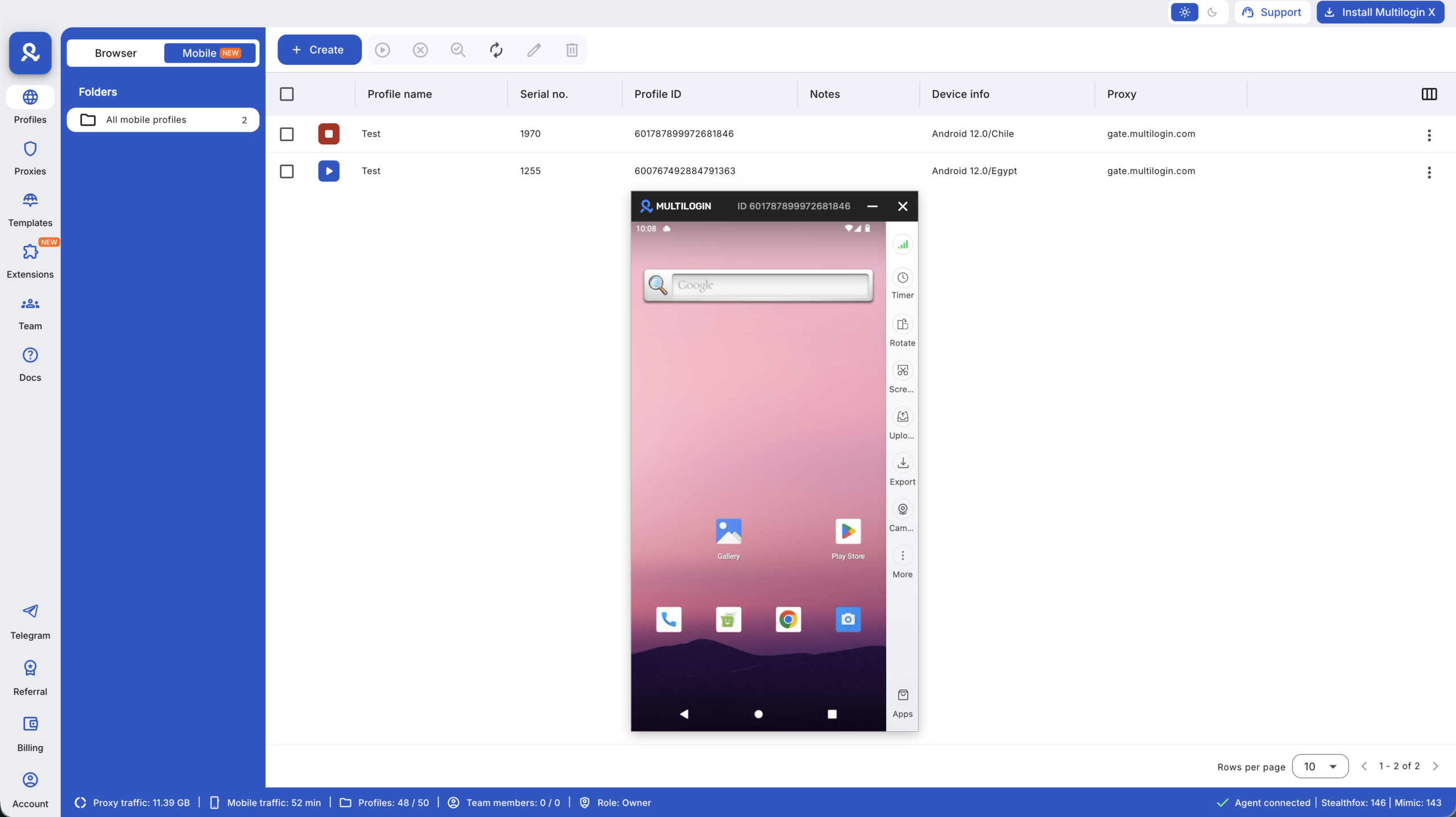
Most tools that call themselves a “remote Android phone” are designed for quick access, not for long-term account stability. They focus on letting you open an app, test something, or log in once, but they fall apart when the same account needs to be reused day after day without triggering issues. Multilogin takes a different approach by treating remote Android phones as permanent environments, not disposable devices. Each phone is cloud-hosted, persistent, and isolated, which removes the root causes behind account instability instead of trying to mask them.
Multilogin replaces device switching and constant rebuilding with stable Android environments designed specifically for long-term account use.
Manage multiple accounts with a persistent Android remote phone setup with Multilogin!
Dedicated Android environment per account
Every Multilogin cloud phone runs as its own Android device in the cloud. This is not a profile, container, or app layer inside a shared system. The separation happens at the environment level, which is exactly where most problems originate when managing multiple accounts.
- Each cloud phone has its own Android OS environment
- No shared system storage, app data, or device history
- Activity in one account cannot influence another account in any way
Persistent App data and session continuity
Accounts fail quietly when sessions don’t hold. Repeated logins, forced re-verification, and “fresh device” signals are all signs of an unstable environment. Multilogin remote Android phones avoid this by keeping app data and session history intact between uses.
- App data, cache, and login state are saved automatically
- Accounts reopen exactly where they were left
- No repeated logins that reset trust signals over time
Real Android cloud phones (not emulators)
A major reason remote Android setups break down is because they rely on emulation or simulated device layers. These setups reuse detectable patterns that platforms learn to recognize quickly. Multilogin cloud phones run real Android operating systems with genuine device parameters, which is why they behave like physical phones instead of temporary test devices.
Genuine Android OS and device parameters
Each cloud phone runs a real Android OS version with stable, consistent identifiers that remain the same across sessions. This consistency is what allows accounts to behave normally over time.
- Real Android versions from v10 to v15
- Genuine Android ID, IMEI, and MAC address
- No simulated, rotating, or spoofed fingerprints
Full app compatibility
Because these are real Android environments, app behavior is not restricted or modified. You use the same apps, flows, and updates you would on a physical phone, without workarounds.
- Install apps directly from the built-in app store
- Upload APKs when needed
- Full compatibility with native Android apps
Location-based remote android phones
Location issues are one of the fastest ways to destabilize mobile accounts. Problems usually appear when IPs, device settings, and session history don’t align over time. With Multilogin, location is built into the remote Android phone itself, so signals remain consistent instead of being patched together.
Country and region selection per cloud phone
Each cloud phone is launched from a specific country or region, and that choice stays tied to the environment rather than changing between sessions.
- Select the country and region before launching the phone
- Support location-specific account behavior
Matched location signals
Once the environment is created, all location signals move together instead of drifting apart. This alignment removes contradictions that platforms often react to.
- IP, SIM, network, and GPS signals match automatically
- No conflicting signals across sessions
- Location remains stable every time the account is used
Managing all remote Android phones from one dashboard
Managing multiple devices usually becomes messy because control is spread across tools, windows, and accounts. Multilogin centralizes everything into one dashboard so remote Android phones stay organized as volume increases.
Centralized control
All cloud phones are managed from a single interface, which removes the need to juggle devices or parallel tools.
- Launch, pause, and manage cloud phones from one place
- No manual device switching or separate control layers
Organization at scale
As the number of accounts grows, visibility becomes more important than speed. Multilogin focuses on keeping environments understandable and traceable.
- Visual list of all remote Android phones
- Notes and tags for context
- Clear ownership per account
Scaling multiple accounts without changing structure
Most setups break when scaling forces reuse. Multilogin avoids this by keeping the structure identical no matter how many accounts are added. Scaling means adding environments, not modifying existing ones.
- New accounts are created as new remote Android phones
- Existing environments are never reused
- No resets, rebuilds, or cleanup cycles
Key idea: growth adds environments, not complexity.
Automation on remote Android phones
Automation only works when the underlying environments are stable. On temporary or reset devices, automation becomes fragile and unpredictable. Multilogin allows automation because sessions and device identity persist over time.
Automation built on stable environments
Automation interacts with environments that already behave consistently, which keeps actions contained and repeatable.
- Sessions persist between runs
- No automation on disposable or reset devices
Supported tools
Automation operates at the workflow and environment level, not by faking devices.
- Selenium
- Playwright
- Puppeteer
- Postman
- Multilogin CLI for environment-level automation
Team access without sharing devices or logins
Sharing credentials is where collaboration usually becomes risky. Multilogin avoids this by letting teams work inside environments instead of passing logins around.
Environment-based collaboration
Access is assigned per remote Android phone, not per account password.
- Share cloud phones without sharing credentials
- Assign permissions per environment
- Safe handoff without session loss
What managing accounts looks like with proper remote Android phones
When remote Android phones are built correctly, account management stops feeling fragile. Sessions hold, behavior stays consistent, and scaling no longer introduces hidden risks because the structure never changes underneath.
- One account per Android environment
- Sessions that persist naturally
- Stable device and location signals
- Centralized control as volume grows
- Predictable scaling without rebuilds

