


Ads slow down page loads, follow you across the web, and chip away at your privacy with every click. An ads detector extension is the first line of defense — but it’s rarely the last one you’ll need.
This guide covers what ads detector extensions actually do, which ones are worth using, the risks you should know about, and why multi-account operators and social media managers need to think beyond the browser extension itself.
See Multilogin’s pricing and plan options →
What is an ads detector extension?
An ads detector extension is a browser tool that identifies and blocks advertisements before they load on a webpage. It scans incoming content, flags elements that match known ad patterns, and removes or hides them from your view.
Beyond blocking visual ads, most modern extensions also block tracking scripts — the code advertisers use to follow your behavior across sites. Blocking those scripts speeds up page loads and reduces how much data third parties collect about you.
What ads detector extensions can’t do: change your browser fingerprint or prevent platforms from detecting that you’re using one. That’s a different problem — and one that matters a lot if you’re managing multiple accounts.
>>> See how to install a browser extension in Multilogin here.
How does an ads detector extension work?
1. Scanning website content
As a page loads, the extension scans the incoming content for patterns, scripts, and URLs associated with known ad networks. It compares these against regularly updated filter lists.
2. Blocking or hiding ads
When the extension identifies an ad element — whether it’s a banner, video preroll, interstitial, or popup ad — it blocks it from loading or removes it from the rendered page entirely.
3. Blocking tracking scripts
Many extensions also act as an ad network detector, identifying and blocking third-party tracking scripts from ad networks, analytics platforms, and data brokers. This prevents advertisers from building a behavioral profile on you.
4. Customizable rules
Most tools let you whitelist trusted sites, enable or disable specific filter lists, and adjust what gets blocked. This matters when a site’s core functionality breaks because a legitimate script got flagged.
The best ads detector extensions right now
uBlock Origin
The gold standard for ad and tracker blocking. Lightweight, highly customizable, and completely free. Runs on Chrome, Firefox, and Edge. Supports custom filter lists, so power users can get granular. The learning curve is real for beginners, but the performance is unmatched.
AdGuard
Available as both a browser extension and a standalone desktop/mobile application — which gives it an edge for ad detector app use cases beyond the browser. The free version covers basic blocking; premium adds DNS-level filtering and more advanced privacy controls.
AdBlock
One of the most widely used options. Easy to install, works across Chrome, Firefox, Safari, and Edge, and requires minimal configuration. The tradeoff: it participates in an “Acceptable Ads” program that allows some non-intrusive ads by default. Disable it in settings if you want full blocking.
Ghostery
Strong on transparency — it shows you a detailed breakdown of every tracker detected on a page. Customizable blocking options and desktop/mobile support make it a solid choice for privacy-conscious users who want to see what’s actually running on each site.
Privacy Badger
Built by the Electronic Frontier Foundation. Privacy Badger learns which trackers follow you across multiple sites and blocks them automatically. Worth noting: it intentionally allows ads that don’t track users across sites, so it’s more of an anti-tracking tool than a pure ad blocker.
Poper Blocker
Focused specifically on popup ads detector use cases — interstitials, overlays, and countdown-timer popups that other extensions sometimes miss. Useful as a complement to a broader ad blocker rather than a standalone solution.
Ad detector on Android: what’s different
Mobile ad detection is a separate problem from desktop browser blocking.
On Android, ad network detector SDKs are embedded directly inside apps — not in the browser. These SDKs check whether ad placements are rendering and whether tracking events are firing correctly. A browser extension can’t touch them.
Tools like AppBrain ad detector let users scan installed apps to see which advertising SDKs are present. The AppBrain ad detector APK is a popular option for users who want visibility into what’s running inside their apps. But identifying ad SDKs and blocking them at the OS level are two different things.
For users managing multiple social media or e-commerce accounts on Android, the real exposure isn’t the ads themselves — it’s that mobile ad detection systems feed into broader device fingerprinting. When an ad network detector Android SDK flags unusual behavior, it can contribute to an account review or suspension.
Why ad blocking detection is a bigger problem for multi-account operators
For the average user, getting flagged by an ad blocker detector is a minor inconvenience — a warning banner, a paywalled article, a restricted video. For anyone running multiple accounts professionally, the consequences are more serious.
When a platform’s ad blocking detector logs that ad scripts aren’t firing from your browser, it doesn’t just affect your current session. It can trigger a broader review of your account activity. If multiple accounts share the same device fingerprint or IP address, that review can cascade across all of them.
A common pattern: a performance marketing team manages campaigns for multiple clients across Meta, Google, and TikTok. They run an ad blocker to cut distractions. The platform’s ad network detector flags that their ad scripts aren’t executing. Multiple client accounts get reviewed simultaneously. Campaigns go dark while access is restored.
This isn’t about the ad blocker specifically — it’s about what the ad blocker reveals about your setup. If your browser fingerprint ties multiple accounts together, one detection event exposes all of them.
How Multilogin keeps accounts isolated and fingerprints unique →
Risks of using ads detector extensions
False positives. Extensions sometimes block legitimate content — embedded videos, comment sections, checkout scripts — because they match an ad pattern. Whitelist the site or adjust your filter rules when this happens.
Privacy concerns with free tools. Some free ad blockers monetize by collecting browsing data. Always check the privacy policy before installing. If a tool is free and doesn’t explain how it sustains itself, that’s a red flag.
Detection by websites. Publisher-side ad blocker detector scripts are increasingly sophisticated. Many sites now use behavioral fingerprinting rather than simple bait-element checks, which means your extension can be identified even if it successfully blocks the ads.
Platform policy risk. Some platforms have terms of service that restrict the use of ad-blocking tools. In professional or multi-account contexts, violating those terms — even accidentally — can result in account action.
When an ads detector extension isn’t enough
Browser extensions patch the visible problem. They don’t fix the underlying fingerprint.
If you’re managing multiple accounts — social media profiles, ad accounts, e-commerce storefronts — and those accounts share a digital fingerprint, an ad blocker is one of the least important variables in the equation. The fingerprint is what connects them.
This is where an antidetect browser becomes the more useful tool.
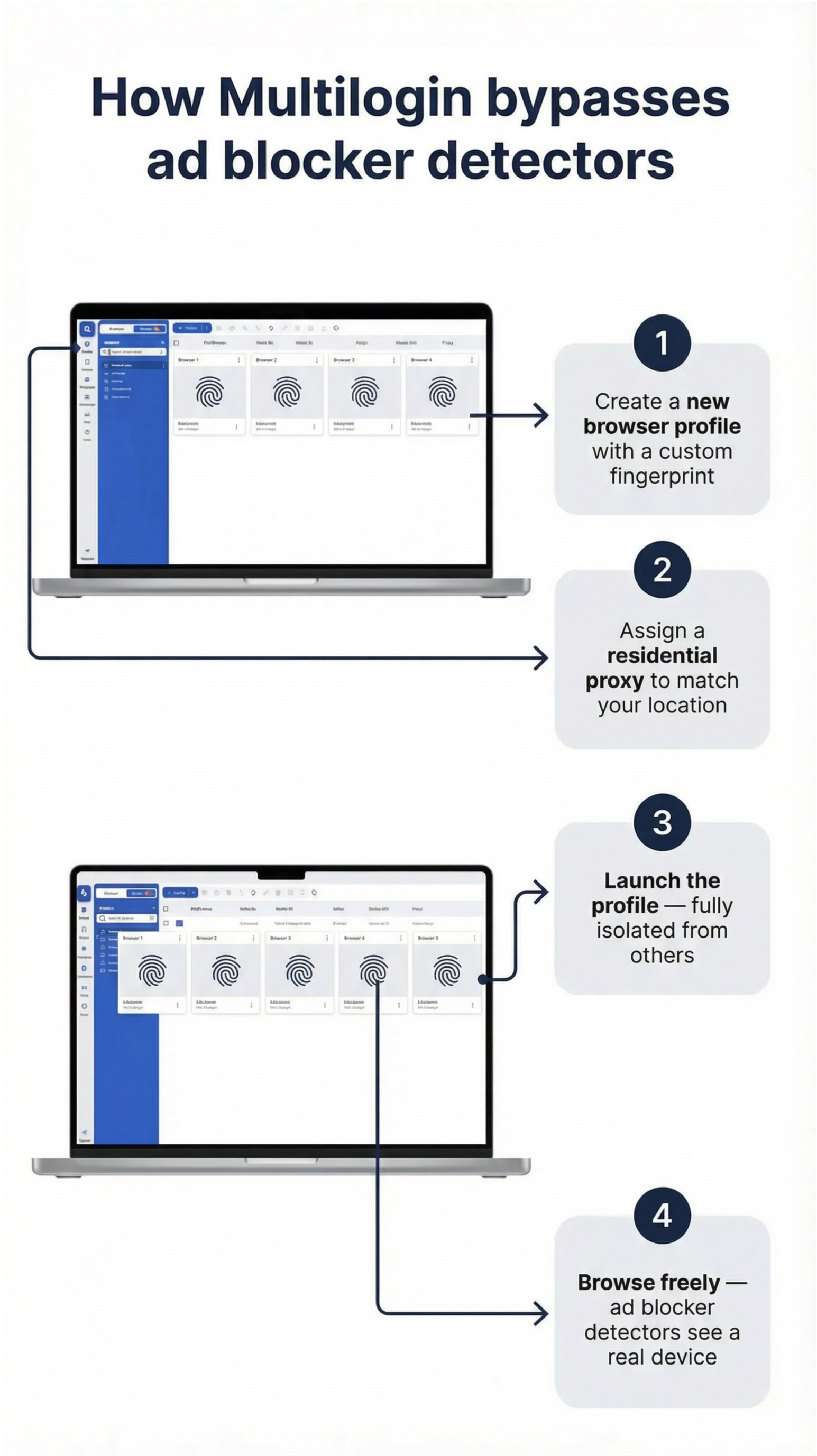
How Multilogin goes further than an ads detector extension
Multilogin is an antidetect browser built for multi-account work. It doesn’t just block ads — it eliminates the signals that get accounts flagged in the first place.
Isolated browser profiles
Each Multilogin profile runs in a completely separate environment. Cookies, cache, and browsing history never carry over between profiles. You can run an ad blocker inside any profile without that blocker’s presence creating a link to your other accounts.
Multilogin generates real browser fingerprints based on genuine device characteristics, so each profile looks like an independent real user — not a copy of your main browser with a different extension installed.
Built-in residential proxies
Most ad blocking detector systems combine fingerprint checks with IP analysis. A mismatched IP and fingerprint is an immediate flag. Multilogin’s built-in residential proxies let you assign a location-matched IP to each profile — 30M+ IPs across 195+ countries, with city-level targeting in 1,400+ cities. Every profile presents a consistent identity that passes detection checks.
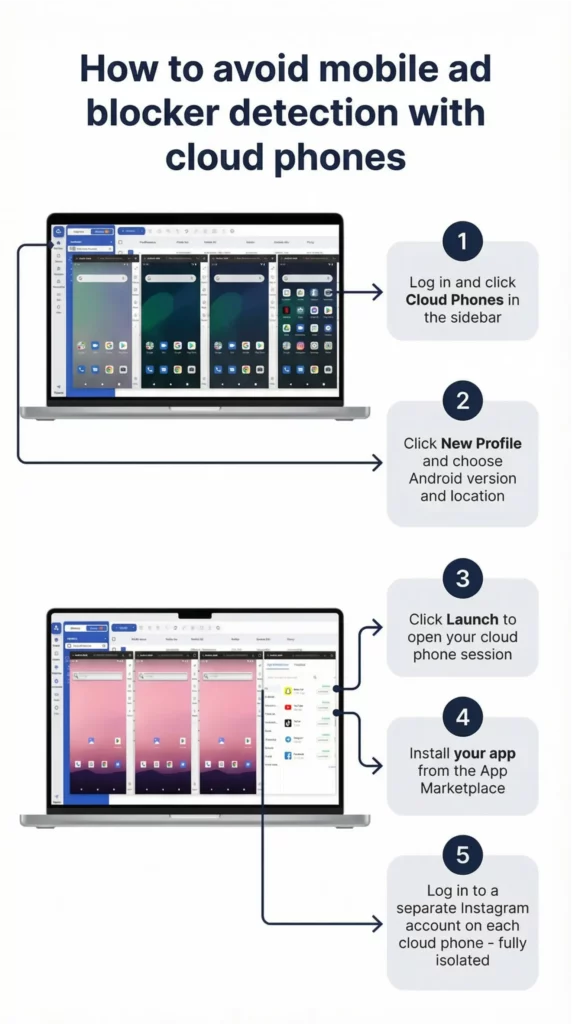
Cloud phones for native Android apps
If your workflows run on native Android apps — TikTok, Instagram, Facebook — browser-level blocking is irrelevant. Ad network detector Android SDKs check device-level signals that no extension can touch.
Multilogin Cloud Phones solve this directly. Each cloud phone is a real cloud-hosted Android device running Android OS v10–15 with genuine hardware identifiers (IMEI, Android ID, MAC address). App data, login states, and cache persist between sessions, so accounts behave like established, real devices — not freshly reset emulators.
You control everything from your desktop dashboard. Roughly 30 device types across Samsung, OPPO, vivo, Google, Redmi, and OnePlus. Priced at €0.009/minute, with bonus minutes included.
Getting started
- Sign up for Multilogin — plans start from €5.85/month and include built-in residential proxies.
- Create browser profiles for each account or client. Assign unique fingerprints and location-matched proxies.
- Install your preferred ads detector extension inside each profile. Because each profile has a distinct fingerprint, the extension’s presence doesn’t link accounts together.
- Add cloud phones for any accounts that run primarily on native Android apps. Launch and manage them from the same dashboard as your browser profiles.
- Use bulk actions to create, configure, and launch multiple profiles simultaneously for agency-scale workflows.
Frequently Asked Questions About Ads Detector Extension
What is an ad detector?
An ad detector is tool or a software that identifies the ads and blocks them. It can enhance the browsing speed and carries lots of benefits.
Are ad detector extensions free?
Yes, most of the ad detector extensions are free to use. Some of them may offer premium versions as well with more advanced features.
Why should I use an ad detector extension?
Using an ad detector extension can be beneficial for various reasons including improved browsing experience, privacy protection, enhanced security, etc.
Are ad detector extensions safe?
In general, using ad detector extensions is safe. However, you must be cautious while choosing which one to install. Paying attention to their reputation, privacy policy and key features are essential for avoiding any threats.
Conclusion
In conclusion, ad detector extensions can be highly beneficial for users who are looking to improve their online experience. Blocking intrusive ads can enhance your browsing process, privacy and page load speed.
Following the best practices and being aware of the risks can help you to effectively use ad detector extensions.