
You’re probably here because you searched “can you see who views your facebook profile”. To be honest, you’re one of millions asking this question. The short answer: No, Facebook does not provide a feature to see who viewed your profile.
But that’s not the full story. While Facebook doesn’t show profile viewers, they DO track extensive data about your browsing behavior. And if you’re the one trying to view OTHER profiles anonymously for research, competitive analysis, or privacy reasons, there are proper methods — despite what third-party “profile viewer” apps claim.
This guide covers everything: why Facebook doesn’t show profile viewers, what they actually track, why those “profile viewer apps” are scams, what Facebook CAN tell you about viewers (stories, reels), and how to actually browse websites anonymously including Facebook profiles without leaving traces.
Need to browse Facebook profiles anonymously for research or business purposes? Multilogin antidetect browser provides proper identity isolation — view profiles without Facebook linking your activity to your main account or detecting your browsing patterns.
Can you see who views your facebook profile? The definitive answer
No. Facebook does not offer any feature, setting, or method to see who viewed your profile.
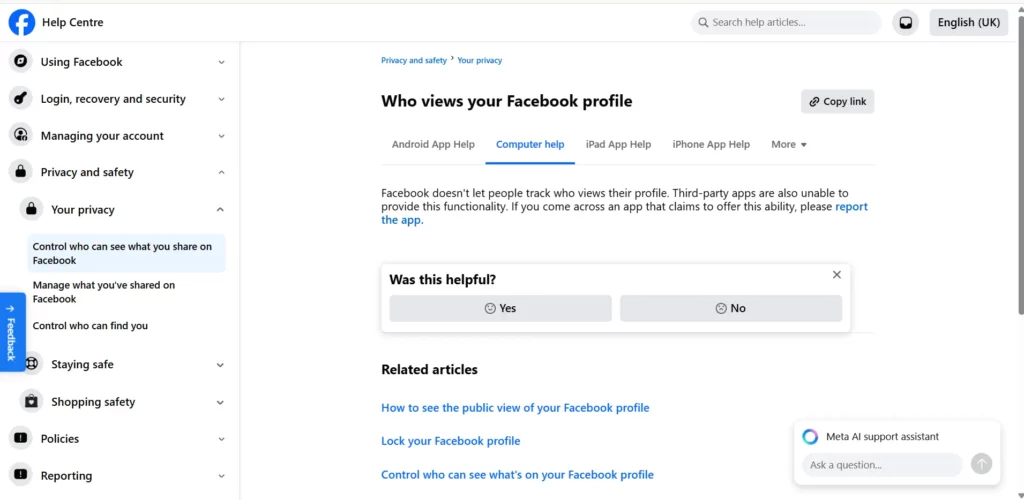
Facebook’s official statement:
“Facebook doesn’t let people track who views their profile. Third-party apps also can’t provide this functionality. If you come across an app that claims to offer this ability, please report it.”
Why this feature doesn’t exist:
Privacy concerns
If Facebook showed profile viewers, it would fundamentally change user behavior:
- People would stop casually browsing profiles
- “Stalking” accusations would increase
- Users would feel monitored constantly
- Social anxiety would prevent natural exploration
Business model conflicts
Facebook wants users to browse freely. If you knew your ex could see you viewed their profile, you’d browse less. Less browsing = less engagement = less ad revenue.
Technical complexity
Tracking every profile view across billions of users generates enormous data. While Facebook could technically do this, the storage and processing costs don’t justify a feature that might harm user engagement.
Legal liability
Showing profile viewers could enable harassment, stalking documentation, or workplace disputes. Facebook avoids this liability.
The bottom line: Facebook will never add a “profile viewer” feature. It contradicts their core business model of encouraging casual, frequent browsing.
What facebook DOES show you about viewers
While Facebook doesn’t show profile viewers, they DO reveal some viewing information:
Story views (fully visible):
When you post a Facebook story:
- See exactly who viewed it
- See view count and names
- Available for 24 hours
- Includes non-friends who can see your stories
Access: Tap your story → Swipe up → See viewer list
Reels views (partial):
For Facebook Reels:
- See total view count
- See like and comment counts
- Don’t see individual viewer identities
Video views (limited):
For video posts:
- See total view count (3+ seconds = 1 view)
- Don’t see who watched
- Can see engagement (likes, comments, shares)
Profile picture and cover photo views:
You can see:
- Total views on profile picture
- Total views on cover photo
- Who reacted (but not who just viewed)
Access: Click profile picture → View “X views” → See reactions only
Professional mode / Creator profiles:
If you enable professional/creator features:
- See profile visit analytics
- See follower demographics
- See content reach metrics
- Still don’t see individual viewer identities
Access: Professional Dashboard → Insights
What this means:
Facebook selectively shows aggregate data (view counts) and certain specific viewers (stories) but maintains profile browsing privacy. The inconsistency frustrates users who want profile viewer visibility.
Facebook profile viewer apps: why they’re all scams
Searching “facebook profile viewer” returns hundreds of apps and websites claiming to show who viewed your profile. Every single one is a scam.
Common scam types:
Type 1: Browser extensions
How they claim to work:
“Install our Chrome extension and see who viewed your Facebook profile!”
The reality:
- Extension requests access to all your Facebook data
- Harvests your login credentials, friend lists, messages
- Shows fake “profile viewers” to seem legitimate
- Sells your data or uses your account for spam
Type 2: Mobile apps
How they claim to work:
“Download our app, log into Facebook, see your profile viewers!”
The reality:
- App collects your Facebook login
- Compromises your account security
- Shows fabricated viewer lists
- Posts spam to your timeline
- May charge subscription fees for fake features
Type 3: Website scams
How they claim to work:
“Enter your Facebook URL, we’ll show who viewed your profile!”
The reality:
- Phishing for Facebook credentials
- Malware installation attempts
- Fake results to seem credible
- Redirects to affiliate scams
- Data harvesting operations
Type 4: Facebook app scams
How they claim to work:
“Authorize our Facebook app to see profile viewers!”
The reality:
- Requests excessive permissions
- Posts spam on your behalf
- Accesses your private information
- Impossible to actually show viewers (Facebook API doesn’t provide this data)
Red flags to recognize scams:
❌ Promises to show profile viewers
❌ Requires Facebook login credentials
❌ Asks for extensive permissions
❌ Shows “results” with random names
❌ Requests payment for “premium” features
❌ Has poor reviews warning of scams
❌ Uses urgency tactics (“See now before Facebook blocks this!”)
Why these scams can’t work technically:
Facebook’s API (the interface apps use to access data) does not provide profile view information. It’s technically impossible for any third-party app to access data Facebook doesn’t share through their API.
Any app claiming to show profile viewers is lying and attempting to steal your data.
If you’ve used a “profile viewer” app:
- Change your Facebook password immediately
- Remove the app from your Facebook settings (Settings → Apps and Websites)
- Enable two-factor authentication
- Check your timeline for unauthorized posts
- Review what information was accessed (Facebook shows this)
- Monitor for unusual account activity
How to view facebook profiles anonymously (the right way)
While you can’t see who viewed YOUR profile, you CAN view OTHER profiles anonymously for legitimate purposes:
Legitimate use cases:
✅ Market research (analyzing competitor brands)
✅ Recruitment screening (reviewing candidates professionally)
✅ Journalistic research (gathering public information)
✅ Competitive analysis (monitoring industry players)
✅ Safety vetting (checking new contacts before meetings)
What “anonymous” means:
Not anonymous:
- Logging out doesn’t hide your identity from Facebook’s servers
- Incognito mode only prevents local browsing history
- Facebook still tracks your device fingerprint, IP address, and behavioral patterns
Properly anonymous:
- No connection between your main identity and viewing activity
- Different device fingerprint
- Different IP address
- Different browser characteristics
- No cross-session tracking
Method 1: View public profiles without logging in
How:
- Log out of Facebook
- Clear cookies and cache
- Use incognito/private browsing
- Search Facebook profiles via Google (profile names often indexed)
- View public posts and information only
Limitations:
- Only see completely public information
- Can’t see posts restricted to friends
- Can’t see stories or private content
- Facebook still tracks your device fingerprint
Method 2: Use a separate browser profile
How:
- Create a dedicated browser profile for research
- Don’t log into your main Facebook account there
- Use only for viewing (not interacting)
- Clear data after each session
Limitations:
- Facebook can still link profiles through device fingerprinting
- IP address connects browsing sessions
- Not truly anonymous if Facebook correlates data
Method 3: Proper anonymous browsing with antidetect technology
How it works:
- Uses unique browser fingerprints per session
- Routes through residential proxies
- Prevents cross-session tracking
- Isolates viewing activity from your main identity
Learn more about browsing Facebook anonymously with proper isolation.
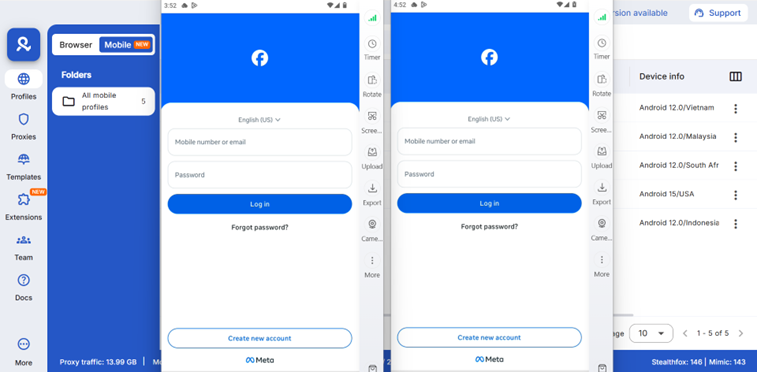
When you need professional-grade anonymity:
If you’re conducting competitive research, managing multiple accounts, or need reliable anonymous browsing:
- Basic methods (incognito, VPNs) leave detectable fingerprints
- Facebook can still track and correlate activity
- Professional tools provide genuine isolation
What facebook actually tracks when you view profiles
Even though Facebook doesn’t show profile owners who viewed them, Facebook themselves tracks EXTENSIVE data about your browsing:
Device fingerprinting:
Facebook analyzes your device characteristics:
- Browser version and plugins
- Screen resolution
- Operating system
- Installed fonts
- Timezone and language
- GPU and rendering capabilities
- Touch support and sensor data
Learn about browser fingerprinting mechanisms in detail.
Behavioral tracking:
Facebook monitors how you browse:
- Which profiles you visit
- How long you stay on each profile
- What content you click
- Your scrolling patterns
- When you’re most active
- Which device you use
Network analysis:
Facebook tracks your connections:
- Who you view frequently
- Common profile viewing patterns
- Network proximity (friends of friends)
- Geographic location correlation
- IP address history
Cross-platform tracking:
Facebook tracks you across:
- Facebook mobile app
- Facebook website
- Instagram (owned by Meta)
- WhatsApp (owned by Meta)
- Third-party websites with Facebook pixels
Why this tracking matters:
Ad targeting
Facebook uses your browsing to show relevant ads. View a competitor’s business page repeatedly? You’ll see ads for similar businesses.
Content ranking
Your browsing affects your news feed. Frequently view someone’s profile? You’ll see more of their posts.
Friend suggestions
“People you may know” is partially based on mutual profile viewing patterns.
The privacy paradox:
Facebook doesn’t show you who viewed your profile (protecting user privacy in one direction) but extensively tracks your profile viewing (mining data for their business). You’re not told who views you, but Facebook knows who you view.
Can people see if you view their facebook profile?
The definitive answer: No, people cannot see that you specifically viewed their profile.
What they CAN’T see:
❌ That you visited their profile
❌ How many times you viewed it
❌ When you viewed it
❌ What parts you looked at
❌ Whether you viewed from mobile or desktop
What creates confusion:
“Friend suggestions” phenomenon
You view someone’s profile, then they show up in their “People you may know” suggestions. This seems like they can tell you viewed them.
Reality: Friend suggestions use multiple signals (mutual friends, work/school networks, contact syncing, group memberships, tagging history). Profile viewing might contribute to algorithms but doesn’t directly notify the person.
Story views
If someone posts a story and you view it, they see you viewed it. This makes people think profile views are also visible.
Reality: Stories and profile views are separate features with different privacy settings.
“Suggested friends” appearing
You view someone’s profile, then you appear in their suggestions.
Reality: Same algorithm that suggested you view them likely suggests them to connect with you (mutual networks, common interests).
Timing coincidences
You view someone’s profile, then they message you or friend request you.
Reality: Coincidence. Or you both appeared in each other’s suggestions due to network overlap.
The bottom line:
Any perception that people can “sense” when you view their profile is either:
- Coincidental timing
- Algorithm-driven suggestions
- Misunderstanding of what features show (stories ≠ profiles)
Facebook does not provide profile view notifications to users.
Does facebook notify when you view a profile?
No. Facebook does not send any notifications when someone views your profile.
What Facebook DOES notify about:
✅ Story views (shows who viewed)
✅ Friend requests
✅ Messages
✅ Comments on your posts
✅ Tags in photos/posts
✅ Reactions to your content
✅ Shares of your posts
✅ Event responses
✅ Group post interactions
What Facebook DOESN’T notify about:
❌ Profile views
❌ Post views (without interaction)
❌ Photo views (without reaction)
❌ Video views (just aggregated count)
❌ Profile picture views (just count, no identity)
Testing this yourself:
Want proof Facebook doesn’t notify?
- Log out of your main account
- Create a test account or use a friend’s (with permission)
- View your own profile from the other account
- Check if you received any notification
Result: No notification appears.
Why people think notifications exist:
Confirmation bias
You view someone’s profile, coincidentally they contact you, you assume it’s connected.
Facebook’s friend suggestion algorithm
Makes it seem like Facebook is “telling” people about viewers.
Scam apps claiming to show viewers
Create false beliefs about Facebook’s actual features.
Privacy anxiety
Fear that you’re being watched makes coincidences seem meaningful.
How to view facebook profile as public (checking your own privacy)
While you can’t see who views your profile, you CAN see what strangers see when they view you.
How to view your profile as public:
Method 1: View As feature
- Go to your Facebook profile
- Click the three dots (More) near your cover photo
- Select “View As”
- See what public visitors see
This shows your profile exactly as non-friends see it.
Method 2: Check specific audience
- Click “View As” as above
- Click “View as Specific Person”
- Enter a friend’s name
- See what that specific person sees
Useful for checking audience-restricted posts work correctly.
What to check:
Profile information visibility:
- Which posts appear publicly
- Whether your friend list is visible
- If your photos are public
- What “About” information shows
Privacy tightening steps:
Lock down your profile:
- Settings & Privacy → Settings
- Privacy → Profile and Tagging
- Set “Who can see your future posts?” to Friends
- Limit past posts (option to bulk change old posts)
- Review who can see your friend list
- Check photo album privacy
Hidden content from public:
- Birth year (keep birthday, hide year)
- Phone number and email
- Relationship status
- Family members
- Check-ins and location history
Professional anonymous browsing for agencies and marketers
If you’re an agency or marketer needing to research competitor Facebook profiles, analyze brands, or conduct market research at scale:
The challenge:
Using your personal account:
- Leaves traces in Facebook’s tracking
- May trigger friend suggestions to competitors
- Professional research mixed with personal browsing
- Risk of accidentally interacting from wrong account
Using separate accounts:
- Facebook detects accounts from same device
- Can link accounts through fingerprinting
- Risks account bans for managing multiple accounts
- VPNs alone don’t prevent detection
The professional solution:
Proper account isolation:
- Unique browser fingerprints per account
- Residential proxies matched to account locations
- Separated storage and cookies
- Team collaboration features
Use cases:
✅ Competitive analysis (view competitor brand pages)
✅ Market research (analyze audience behavior)
✅ Client account management (agencies managing multiple clients)
✅ Recruitment (professional candidate screening)
✅ Crisis monitoring (reputation management research)
Learn about managing multiple Facebook accounts safely without detection.
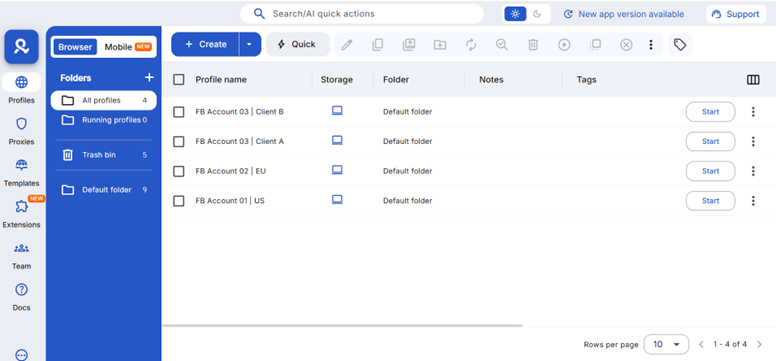
Professional tools:
Multilogin antidetect browser provides:
- Unique fingerprints for each browsing session
- Built-in residential proxies
- Team access controls
- Session persistence
- Account isolation preventing linking
Why this matters for agencies:
When managing 10+ client Facebook accounts or conducting regular competitor research:
- Basic anonymity methods fail (Facebook detects patterns)
- Account bans disrupt client operations
- Need reliable isolation that scales
See best browsers for anonymous browsing comparison.
View facebook profile without account (limitations)
Some people want to view Facebook profiles without creating an account.
What’s possible:
Public profiles (limited)
You can view:
- Profile pictures (if public)
- Cover photos (if public)
- Some basic information
- Public posts (if any)
Access method:
- Search “[person name] Facebook” on Google
- Click result to view public page
- Or visit facebook.com/[username] directly
Severe limitations:
❌ Most profiles restrict content to logged-in users
❌ Can’t see friend lists
❌ Can’t see photos beyond profile/cover
❌ Can’t see posts shared with “Friends” or custom audiences
❌ Can’t view stories or reels
❌ Can’t see comments or interactions
Facebook’s “login wall”:
Since 2020, Facebook increasingly forces login to view content:
- “Log in to see more” appears after viewing a few profiles
- Even public profiles become inaccessible
- Search results link to login page
- Mobile experience especially restrictive
What to do instead of looking for profile viewers
Since you can’t see profile viewers, focus on what you CAN control:
Increase engagement legitimately:
- Post quality content: People who enjoy your content will interact visibly (likes, comments, shares) instead of silently viewing.
- Use stories actively: Story views are visible. Regular stories show you who’s interested.
- Create engaging posts: Ask questions, run polls, share experiences that encourage comments.
- Build genuine connections: People who connect with you will interact visibly, reducing your need to know about silent viewers.
Improve your privacy:
- Audit your profile: Use “View As” to see what strangers see. Tighten privacy settings.
- Control your information: Limit what’s public, who can contact you, who can see your friends.
- Review old posts: Use Facebook’s bulk privacy tools to limit old post visibility.
For business and research:
- Use Facebook analytics: If you run a page, Facebook provides extensive analytics about your audience without identifying individual viewers.
- Conduct proper research: Use professional anonymous browsing tools for competitive analysis.
- Focus on metrics that matter: Engagement rate, reach, conversions — not who silently viewed your profile.
No more juggling physical devices or risking account links. Try Multilogin's cloud phones now.
Frequently Asked Questions About Can you see who views your facebook profile
No. Facebook does not provide any feature to see who viewed your profile. This is intentional and permanent — Facebook will not add this feature because it contradicts their business model of encouraging casual profile browsing. Any app or website claiming to show profile viewers is a scam attempting to steal your data.
No. Facebook does not send any notification when you view someone’s profile. People cannot see that you specifically viewed their profile, how many times, or when. This is different from Story views (which are visible) or other interactions like comments and likes (which notify). Profile viewing is private in both directions.
For viewing public profiles without your main account: log out, use incognito mode, and search profiles via Google. However, Facebook still tracks device fingerprints. For professional anonymous browsing (agencies, researchers), use antidetect browser technology with unique fingerprints and residential proxies to prevent Facebook correlating your research activity with your main identity.
No. People cannot tell you specifically viewed their profile. However, Facebook’s algorithms may show you both in each other’s “People you may know” suggestions if you have mutual connections or network overlap. This coincidental timing makes some users think profile views are visible, but they’re not. Profile viewing never triggers notifications.
Extremely limited. You can see profile pictures and cover photos if public, and sometimes basic public information. However, Facebook’s “login wall” blocks most content from non-logged-in viewers. You can’t see friend lists, photos, posts (even public ones), stories, or meaningful profile information without an account. Creating a separate research account with proper isolation is more practical.
Browse Facebook anonymously with proper protection
While Facebook doesn’t show profile viewers, they extensively track YOUR browsing activity. If you need to research competitor profiles, conduct market analysis, or view profiles without linking activity to your main identity, basic methods like incognito mode or VPNs aren’t enough.
Facebook tracks device fingerprints, behavioral patterns, and network characteristics that connect browsing sessions even when you think you’re anonymous.
Multilogin provides professional-grade anonymous browsing:
🔹 Unique browser fingerprints per session — Facebook can’t correlate viewing activity
🔹 Built-in residential proxies — 30M+ IPs, 195+ countries, matched to your needs
🔹 Complete session isolation — no cross-account tracking or linking
🔹 Team collaboration — share research access with team members securely
🔹 Desktop management — control all browsing sessions from one interface
Whether you’re conducting competitive research, managing client accounts, or need genuine anonymity for professional purposes, proper isolation protects against Facebook’s sophisticated tracking.
Get started with Multilogin — plans start at €5.85/month with everything needed for anonymous Facebook browsing and multi-account management.
