





Ever wanted to check out a Facebook profile without leaving a trace? Maybe you’re a recruiter researching candidates, a job seeker scoping out potential employers, a marketer monitoring competitors, or someone who needs to create and manage multiple Facebook accounts while keeping each setup separate.You’re not alone. Every month, thousands of people search for ways to browse Facebook anonymously, but most end up confused by outdated tips, risky viewer tools, or solutions that only hide their browsing history.Facebook’s real-name policies, tracking systems, and privacy concerns have made anonymous browsing feel nearly impossible. But here’s the truth: anonymous Facebook browsing is possible to a degree, as long as you understand what can be hidden, what Facebook can still track, and which tools actually provide stronger separation.So, can you browse Facebook anonymously in 2026? Let’s break down what works, what doesn’t, and when advanced setups like cloud phones make sense.
Can you actually browse Facebook anonymously?
Let’s be honest upfront: sort of, but with real limitations.Unlike LinkedIn (which tells people when you view their profile), Facebook doesn’t notify users who’s been looking at their page. That’s the good news. The bad news? Facebook itself tracks everything.
What Facebook tracks by default
- Your identity signals – IP address, browser fingerprint, device info, login location, and browsing patterns—even when you’re not logged in
- Every action you take – Likes, comments, friend requests, group joins, and page follows are all visible to account owners and to Facebook
- Cross-site tracking – Facebook’s pixel and tracking scripts follow you across the web, building profiles even when you’re not on Facebook
Profile views themselves aren’t visible to other users. But Facebook’s systems see everything you do, and any action you take is immediately tied to your identity.
The same identity signals often end up with data brokers, too. You can remove data from data brokers as a complement to anonymous browsing.
What you can and can’t do anonymously
- You CAN browse public pages and posts without logging in—no record visible to the page owner
- You CANNOT access private profiles or groups without logging in—Facebook locks these behind authentication
- You CANNOT interact (like, comment, message, join groups) without revealing your identity
- Facebook ALWAYS tracks visits for analytics and security, even if users can’t see who visited
The question isn’t really “can I be invisible to Facebook?”—it’s “can I be invisible to other users and minimize what Facebook learns about me?”
Does Facebook tell people when you view their profile?
This is one of the most searched questions around Facebook privacy, and the answer is straightforward: no, Facebook does not notify users when someone views their profile.Unlike LinkedIn, which has a “Who viewed your profile” feature, Facebook has never offered this. You can view someone’s public profile, scroll through their posts, and check their photos without them receiving any notification. They have no way of knowing you were there—at least not through Facebook’s official systems.What does get recorded:
- Facebook’s own servers log your visit for analytics and ad targeting purposes
- If you’re logged in, your browsing is tied to your account internally
- If you interact (like, comment, react), that action is immediately visible to the profile owner
So browsing itself is anonymous to other users—but not to Facebook’s systems. This distinction matters a lot depending on what kind of anonymity you’re after.
Why people want to browse Facebook anonymously
There are more legitimate reasons for anonymous Facebook browsing than you might think:
Professional research
- Recruiters and HR teams – Researching candidates without tipping them off before interviews
- Job seekers – Checking out companies, hiring managers, or industry leaders without leaving a digital footprint
- Competitive intelligence – Marketers and business owners reviewing competitor pages, groups, and events without revealing interest
- Journalists and investigators – Reviewing profiles and groups for stories without exposing their identity
Personal privacy
- Reconnecting cautiously – Checking on old friends, family members, or former colleagues before reaching out
- Avoiding awkward encounters – Sometimes you want to look without the other person knowing
- Verifying people – Confirming someone’s public presence before connecting professionally or personally
Safety concerns
- Parents monitoring children – Keeping tabs on kids’ online activity without constant notifications
- Security researchers – Investigating scam pages or suspicious accounts without revealing their real identity
- People in sensitive situations – Those who need to research others without being tracked themselves
None of these use cases are shady—they’re practical reasons why people need privacy controls that Facebook doesn’t offer by default.
Does Facebook have a guest mode?
Short answer: not officially.Facebook doesn’t offer a built-in guest mode or anonymous browsing mode the way some apps do. There’s no “browse as guest” button that lets you explore Facebook content without leaving any trace or creating an account.What Facebook does allow is limited public browsing while logged out. You can visit facebook.com without signing in and see:
- Public business pages
- Public events
- Public posts on personal profiles
- Limited profile information (photo, bio, cover image)
But Facebook will prompt you to log in very quickly, and most content—friend lists, Stories, private posts, groups—is completely inaccessible without an account.Facebook Marketplace has a similar situation. You can browse Facebook Marketplace without an account to a limited degree (viewing listings in some regions), but to message sellers, make purchases, or access full listing details, you need to be logged in.The closest thing to a guest mode is using an incognito browser window while logged out—but even then, Facebook still tracks your IP and device fingerprint. For anything resembling real guest browsing, you need a dedicated isolated environment rather than just a private tab.
How to browse Facebook anonymously: what actually works
If you’re searching for how to browse Facebook anonymously, you’ll find a lot of methods online. Most of them don’t work as advertised. Here’s what actually helps—and what doesn’t.
Method 1: Browse while logged out
The simplest approach: visit Facebook without logging in.How to do it:
- Open an incognito/private browser window
- Navigate directly to public Facebook pages (facebook.com/pagename)
- View whatever public content is available
What you can see:
- Public business pages and posts
- Public event listings
- Limited personal profile info (profile photo, cover photo, bio, and any posts marked “Public”)
The catch: Most profiles and groups are private by default. You’ll quickly hit the “log in to continue” wall. And you can’t interact with anything—no likes, comments, or messages.
Method 2: Incognito mode and Facebook
Using your browser’s private or incognito mode on Facebook prevents Facebook from saving cookies and history on your device.What it does:
- Prevents local browsing history from being saved
- Starts with a fresh session (no existing cookies)
What it doesn’t do:
- Hide your IP address from Facebook
- Block browser fingerprinting
- Prevent Facebook from tracking your session
- Make you anonymous if you log in
Does Facebook have an incognito mode of its own? No—the app has no built-in private browsing feature. The incognito option is browser-side only, not something Facebook offers from within its platform.Incognito mode is useful for keeping your local browser clean, but it’s not real anonymity. Facebook still sees your IP, your device fingerprint, and everything you do during that session. Logging into Facebook in incognito mode does not make you anonymous—your account activity is fully visible to Facebook and any users you interact with.
Method 3: VPNs
VPNs hide your IP address by routing traffic through another server.What VPNs do:
- Mask your real IP address
- Make you appear to be in a different location
- Encrypt your connection
What VPNs don’t do:
- Block browser fingerprinting (Facebook still identifies your device)
- Prevent tracking if you’re logged in
- Stop cookies from linking your sessions
VPNs are better than nothing, but Facebook’s tracking goes far beyond IP addresses. They use canvas fingerprinting, WebGL fingerprinting, and dozens of other signals to identify users even without cookies.
Method 4: “Anonymous Facebook viewer” tools—the truth
Search for anonymous Facebook viewer or Facebook profile viewer anonymous and you’ll find dozens of websites claiming to let you view profiles, see private content, or browse without being detected. Tools like Peekviewer and similar sites have built up search traffic around these promises.The reality:
- Most are scams, phishing attempts, or malware delivery systems
- None can bypass Facebook’s privacy settings to show you private content
- Any site asking for your Facebook credentials is trying to steal your account
- Even the legitimate-looking ones are simply loading public content you could access yourself for free
There is no working anonymous Facebook account viewer that can show you private profiles, hidden friend lists, or locked content. Facebook’s privacy architecture does not have a backdoor—and any site claiming otherwise is lying.Rule of thumb: Never enter your Facebook login into any third-party tool. If a site promises to show you “private profiles” or “hidden content,” close the tab.
Method 5: Cloud phones (the most realistic anonymous setup)
If you need deeper anonymity on Facebook, simply hiding your activity from other users is not enough. You also need to reduce how much Facebook can associate your behavior across different sessions. In this case, browser-based solutions often have limitations.Cloud phones provide access to real Android devices hosted in secure environments. Instead of simulating a device in your browser, you interact with Facebook through a fully isolated mobile environment.Solutions like Multilogin combine browser profile management with cloud-based mobile devices, allowing users to operate separate Facebook environments with higher isolation.What cloud phones provide:
- Isolated mobile environments that behave like real Android devices
- Separate app sessions, storage, and device-level data
- IP flexibility through proxy integration
- Reduced cross-session linking compared to standard browsers
Who uses this: Teams running market research, social media testing, or managing multiple environments where separation and consistency are important.
Anonymous Facebook browsing methods comparison
| Method | Anonymous to other users | Anonymous to Facebook | Can view private content |
|---|---|---|---|
| Logged-out browsing | Yes | No | No |
| Incognito mode | Yes | No | No |
| VPN | Yes | No | No |
| Anonymous Facebook viewer tools | Sometimes | No | Limited / Unreliable |
| Cloud phones | Yes | Partial | No |
| Separate Facebook account | Limited | No | Only if accepted/followed |
How to view a Facebook profile anonymously
If your goal is to view someone’s Facebook profile anonymously—without them knowing and without triggering notifications—here’s what’s realistic in 2026.
For public profiles
Public profiles can be viewed while logged out. Open an incognito window, go directly to the profile URL, and browse whatever they’ve made public. The profile owner gets no notification. Facebook logs your visit server-side, but the user sees nothing.
For private profiles
There is no legitimate way to view a private Facebook profile anonymously without sending a friend request—which immediately reveals your identity. Anyone claiming otherwise is selling a scam.What some professionals do instead: use a dedicated research account (set up with a cloud phone or isolated browser profile) to send friend requests for research purposes. This keeps the activity separate from their real identity without relying on fake viewer tools.
For locked profiles
Facebook’s “locked profile” feature lets users restrict what non-friends can see—sometimes down to just the profile photo and name. If a profile is locked, you cannot view their posts, friends list, or photos even while logged in as a non-friend.There is no way to view a locked Facebook profile without being accepted as a friend. Tools claiming to unlock or bypass locked profiles are scams. The lock is enforced server-side by Facebook—no browser trick or third-party app can override it.
What you can realistically do
- View public profiles while logged out (no notification to user)
- Use a dedicated research account for accessing private content (requires friend request)
- Use browser profiles or cloud phones to keep research accounts isolated from your real identity
How to search Facebook without an account
You can search Facebook without logging in, but the results are heavily restricted. Facebook’s public search shows a limited view of people, pages, and groups—enough to confirm someone exists, but not enough to browse their content.What you can search without an account:
- Public pages by name (go to facebook.com/search/pages/?q=name)
- Public events and groups (limited results)
- Basic profile name searches (very limited public info)
What requires an account:
- Searching friends lists or mutual connections
- Advanced filtering (location, workplace, education)
- Searching within private groups
- Full name search results with profile details
For more thorough Facebook searches without linking to your real identity, a dedicated browser profile or cloud phone with a separate account is the practical route. You get full search functionality while keeping the activity isolated from your personal Facebook presence.
How to view Facebook Stories anonymously
Facebook Stories are not visible to logged-out users at all. Unlike public posts or pages, Stories require you to be logged in and in most cases to be friends with (or following) the person who posted them.If you view someone’s Story while logged in, Facebook does show them a list of who viewed it—similar to Instagram Stories. So viewing Facebook Stories is not anonymous when you’re logged into your real account.Options if you need to view Stories anonymously:
- Use a dedicated research account that isn’t connected to your real identity—the Story owner will see that account’s name, not yours
- A cloud phone with a separate account keeps this activity fully isolated from your personal profile
- There are no third-party tools that can show you Facebook Stories without being detected—these claims are false
How to create an anonymous Facebook account
Some people don’t want to browse anonymously—they want an anonymous Facebook account they can use for research, competitive monitoring, or keeping personal and professional activity separate.Facebook requires a real name and phone number for registration, which creates a barrier. But people create anonymous or pseudonymous accounts regularly. Here’s how to do it with a reasonable level of separation:
Step 1: Use a separate device environment
Never create an anonymous Facebook account from your main browser or personal device. Facebook links new accounts to existing ones through browser fingerprints, cookies, and IP addresses. A fresh browser profile in Multilogin or a dedicated cloud phone gives you a clean, isolated starting point.
Step 2: Use a residential IP
Creating an account from a datacenter IP or a known VPN range will trigger verification immediately. Use a residential proxy that looks like a normal home internet connection.
Step 3: Use a separate phone number
Facebook requires phone verification. Use a number that isn’t linked to your real identity—SMS verification services can help here. Avoid reusing numbers across multiple anonymous accounts, as Facebook links them.
Step 4: Build natural activity
A brand-new account with zero friends, no posts, and no history gets flagged quickly. Post occasionally, join a few public groups, like some pages—act like a normal user over days or weeks before using the account for research purposes.
Can an anonymous Facebook account be traced?
Potentially, yes—depending on how it’s set up. Facebook collects device identifiers, IP history, behavioral patterns, and metadata that can be used to link accounts even when names are different. Law enforcement can also request account data with a valid legal order.A properly isolated anonymous account—created from a cloud phone with a residential IP, separate phone number, and no behavioral overlap with your real account—is significantly harder to link back to you. But “anonymous” should always be understood as “harder to trace,” not “impossible to trace.”
Cloud phones: anonymous mobile Facebook browsing
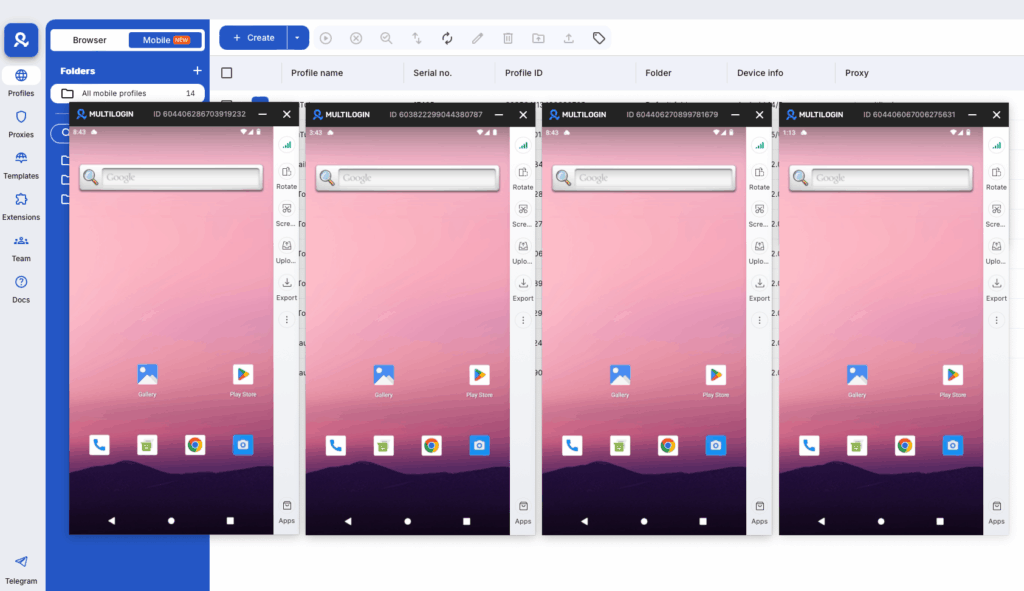 Here’s something most anonymous browsing guides miss: Facebook is increasingly a mobile platform. The mobile app collects even more data than the web version—including precise location, device identifiers, and app usage patterns.If you want true anonymous Facebook browsing that includes mobile app access, cloud phones offer something no other method can match.
Cloud phones: the missing piece in anonymous Facebook browsing
Most guides stop at browsers and VPNs. That already puts you one step behind.Facebook is mobile-first. A huge share of profile views, page checks, and group activity happens inside the Facebook mobile app, not the desktop browser. And the app collects more signals than the web version ever could.If your goal is serious anonymity—not just “no notifications,” but real separation—cloud phones matter.
What cloud phones actually are
Cloud phones are real Android devices hosted in secure data centers. Not emulators. Not simulations. Real phones with real hardware identifiers.You access them remotely from your desktop, just like a virtual machine—but under the hood, Facebook sees:
- A real Android device
- A real mobile OS version
- Real device identifiers
- Real mobile-style network behavior
From Facebook’s perspective, it’s just another person using the app on their phone.
Why cloud phones work for Facebook anonymity
Facebook aggressively fingerprints mobile users. The app tracks things browsers simply don’t expose. Cloud phones work because they don’t fake those signals. They provide:
- Real device identifiers – Genuine Android ID, hardware profiles, and system characteristics—nothing spoofed, nothing synthetic
- Native Facebook app access – You use the official Facebook app, with full functionality: profiles, pages, groups, stories, ads, and events
- Persistent sessions – App data, cache, and login history stay intact between sessions, so behavior looks natural over time
- Mobile IP consistency – Traffic routes through mobile or residential IPs that match the device’s apparent location
- Full isolation – Each cloud phone is completely separate from your personal phone, browser, and network
Why emulators fall short
Traditional Android emulators (like BlueStacks or Nox):
- Use spoofed device fingerprints
- Reuse detectable emulator patterns
- Break under Facebook’s mobile integrity checks
- Often trigger extra verification or account risk
Cloud phones avoid this entirely by using real hardware, not software tricks.
When cloud phones make sense
Cloud phones are especially useful if you need to:
- Research profiles or pages while logged in, without linking to your real identity
- Maintain separate Facebook accounts for research, moderation, or brand monitoring
- Access mobile-only features (stories, app-only UI, ad previews)
- Keep professional Facebook activity isolated from personal accounts
- Avoid cross-device and cross-account linking
If browsers are step one, cloud phones are step two—the mobile layer Facebook actually trusts.
Cloud phones vs other anonymity options
| Method | Mobile app access | Real device signals | Fingerprint isolation |
|---|---|---|---|
| Incognito mode | ❌ | ❌ | ❌ |
| VPN only | ❌ | ❌ | ❌ |
| Android emulator | ✅ | ❌ Spoofed | Partial |
| Cloud phones | ✅ | ✅ | ✅ |
For Facebook in 2026, mobile realism matters. Cloud phones are the only option that checks all three boxes.
How Multilogin fits in
Multilogin combines browser profiles and cloud phones in one platform. That means you can:
- Use browser profiles for web-based Facebook research
- Use cloud phones for native mobile app access
- Keep every account and session fully isolated
- Manage everything from a single dashboard
For professionals who need anonymity that actually holds up under Facebook’s tracking systems, this browser + mobile combination is what makes the difference.
How Multilogin helps with anonymous Facebook browsing
Multilogin offers two complementary approaches for anonymous Facebook activity:
Browser profiles for web-based anonymity
- Unique fingerprint masking for each profile
- Separate cookie and session storage
- Built-in residential proxies for IP masking
- Protection against canvas and WebGL fingerprinting
Cloud phones for mobile anonymity
For mobile Facebook browsing and app access, cloud phones provide:
- Real Android devices with genuine hardware IDs
- Native Facebook app installation and use
- Persistent app data and sessions
- Built-in mobile proxies with geolocation matching
- Desktop control through Multilogin’s dashboard
The 2-in-1 advantage
With Multilogin, you get both browser profiles and cloud phones in one platform. Use browser profiles for web research, cloud phones for mobile app access—all managed from a single dashboard.This is particularly useful for multi-account management scenarios where you need to maintain several Facebook accounts that should never be linked together. Start with Multilogin from $7.08/month (billed annually) for professional anonymous browsing, browser fingerprint management, and scalable multi-account operations.
What you can view anonymously on Facebook
Before diving into anonymous browsing, it helps to know what’s actually visible without logging in or leaving traces.
Publicly visible content
- Business pages – Most company pages are fully public
- Public events – Event listings set to public are viewable without login
- Public posts – Any content shared with “Public” privacy setting
- Limited profile info – Profile photo, cover photo, bio, and any posts marked public
- Some public groups – Groups set to public may show posts before you join
Content you cannot view anonymously
- Private profiles – Most personal Facebook profiles are locked to friends only
- Private groups – Members-only content requires joining
- Stories – Facebook Stories are never visible to non-logged-in users
- Friends lists – Usually hidden from non-friends
- Tagged photos – Visible only to logged-in users with permission
- Locked profiles – Restricted by the profile owner so that only friends see full content
The privacy trade-off to understand
Unlike LinkedIn or Instagram, Facebook doesn’t tell users who viewed their profile. This means even when logged in, your browsing is more private than on other platforms—people can’t see that you looked at their page.But Facebook itself sees everything. Whether logged in or not, they collect data for analytics, advertising, and security. The question is whether you care about Facebook tracking you, or about other users knowing you were there.
Pro tips for anonymous Facebook browsing
1. Mask your location and fingerprint
Facebook tracks your IP address and device fingerprint even when you’re not logged in. Your session can still be tied to you or your network.Use cloud phones with proxy integration to route traffic through dedicated IPs and keep each Facebook session in a separate mobile environment. This helps reduce cross-session linking and makes each browsing setup more consistent.
2. Don’t interact
The moment you like, comment, share, or send a friend request, you’ve revealed your identity. If your goal is anonymity, stick to observation only.
3. Avoid “anonymous viewer” scam sites
Websites promising to let you “view private profiles” or “browse Facebook anonymously” are almost always scams. They’re either phishing for your credentials, delivering malware, or just loading pages with ads.If it sounds too good to be true, it is. No tool can bypass Facebook’s privacy settings to show you private content.
4. Use dedicated research accounts
If you need to access content that requires login, use dedicated accounts for research purposes and keep them separate from your personal accounts. Cloud phones can help by providing isolated mobile environments with separate app sessions, storage, and device-level data.This is how professional researchers, journalists, and competitive intelligence teams operate—with isolated accounts that can’t be traced back to their real identities.
5. Understand incognito mode’s limits
Incognito mode keeps your browsing off your local device. It does not make you anonymous to Facebook or any website you visit. Your IP address, browser fingerprint, and all activity during that session are still visible to the sites you access.
Managing multiple Facebook accounts anonymously
For many professionals, anonymous browsing is just one piece of the puzzle. Marketers, agencies, and businesses often need to manage multiple Facebook accounts that should never be linked together.
Why account separation matters
Facebook’s detection systems actively look for connections between accounts. If they determine you’re running multiple accounts from the same device or network, you risk:
- Account suspensions or bans
- Reduced reach and engagement
- Ad account restrictions
- All linked accounts being flagged together
How proper isolation works
Each Facebook account needs:
- Unique device fingerprint – Different canvas, WebGL, and hardware signatures
- Separate IP address – Ideally from residential sources
- Isolated cookies and storage – No data leakage between accounts
- Different behavioral patterns – Distinct login times, activity patterns, and usage habits
This is where cloud phones become especially useful. They provide isolated mobile environments that help keep separate Facebook sessions, app data, and device-level signals apart.Learn more about avoiding Facebook bans when managing multiple accounts.
Cross-platform anonymous browsing
The same principles that apply to Facebook work across other platforms:
- Instagram – Browse Instagram anonymously using similar techniques
- LinkedIn – Anonymous LinkedIn browsing is especially important since LinkedIn shows who viewed profiles
- TikTok – Anonymous TikTok viewing for content research
- General web browsing – How to browse anonymously across any website
Multilogin works across all these platforms from one dashboard, letting you maintain consistent anonymity wherever you need it.

