
Cloud phone and VPS get mentioned in similar conversations — both are remote computing environments, both run in the cloud, both let you do things from your desktop that would otherwise require physical hardware. But they’re designed for completely different purposes, and using the wrong one for a job creates frustrating problems.
A VPS is a Linux or Windows server you access remotely. A cloud phone is a real Android device running in the cloud. The gap between those two things is larger than it sounds.
This guide breaks down exactly what each one is, where each one excels, and which use cases belong to which tool. For context on Multilogin cloud phones specifically — the cloud phone platform referenced throughout this article — that overview covers the feature set.
What is a VPS?
A VPS (Virtual Private Server) is a virtualized portion of a physical server, running its own operating system — usually Linux, sometimes Windows — with dedicated resources: CPU, RAM, storage, and a static IP. You access it via SSH (for Linux) or Remote Desktop Protocol (for Windows).
What a VPS is designed for:
- Hosting web applications and websites
- Running scheduled scripts and bots (Python, Node, bash)
- Running Selenium, Playwright, or Puppeteer for web scraping
- Acting as a proxy or relay server
- Running headless browser workflows
- Providing a persistent remote computing environment
A VPS is fundamentally a server. It’s built for server workloads: running code, serving requests, processing data. The interface is typically a terminal or a remote desktop. It knows nothing about Android, mobile apps, or device identity.
What is a cloud phone?
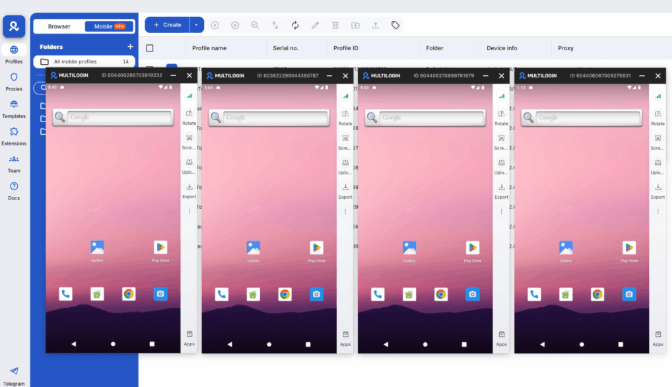
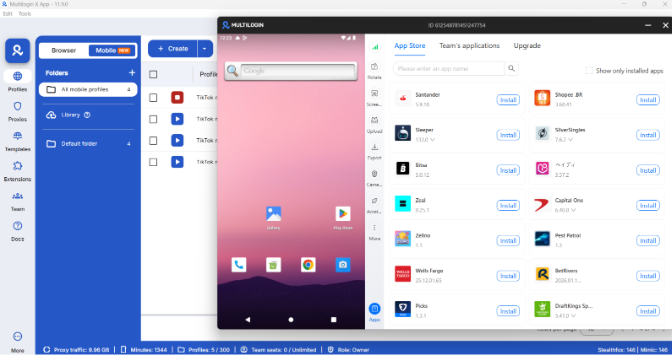
A cloud phone is a real Android device hosted in the cloud. Not a simulated Android environment, not an emulator running on a server — a cloud-hosted Android OS running on actual hardware, accessible from your desktop.
What a cloud phone is designed for:
- Running native Android apps (TikTok, Instagram, Facebook, any app available via the Play Store or APK)
- Managing multiple Android device identities in isolation
- Phone farming and mobile multi-account operations
- Social media automation through native apps
- Account warmup that produces real Android behavioral signals
A cloud phone has genuine hardware identifiers — IMEI, Android ID, MAC address, device model. Each profile is a distinct device from the platform’s perspective. What a cloud device is, Android virtual device and mobile device virtualization provide the technical background on how this works.
This is the critical distinction: a cloud phone is not a server with Android installed on top. It’s an Android device in the cloud — which is why it behaves like a real phone to the apps running on it.
The difference between a cloud phone and an emulator is also worth clarifying. An emulator simulates Android hardware on a desktop or server. It produces detectable signals that platforms like TikTok and Instagram have become good at identifying. A cloud phone runs real Android on real hardware — there’s nothing to detect because there’s nothing being faked. Cloud phones vs mobile emulators and cloud Android emulator vs real device cover this in more detail.
How they differ technically
Dimension | VPS | Cloud phone |
Operating system | Linux or Windows | Android (10–15) |
Hardware identity | Server / datacenter IP and specs | Real IMEI, Android ID, MAC address |
Primary interface | Terminal (SSH) or Remote Desktop | Android UI, accessible from desktop |
App support | Web apps and scripts | Native Android apps |
Device fingerprint | None (server-class environment) | Genuine Android hardware parameters |
IP type | Static datacenter IP | Residential proxy (or your own) |
Automation method | Selenium, Playwright, Puppeteer | App-native tools, or Selenium/Appium via Android |
Persistent state | Files and processes persist | App storage, login state, and cache persist |
Primary use case | Server workloads, web scraping, headless browsing | Mobile app automation, multi-account social media, phone farming |
The defining difference: if the task requires a real Android app running on a real Android device, a VPS cannot do that job. If the task requires running server-side scripts, web scraping, or hosting an application, a cloud phone is the wrong tool.
Use cases: when to use a VPS
Web scraping and data collection. Running Playwright, Puppeteer, or Selenium against websites — whether headless or with a full browser — is server territory. A VPS with a headless browser is faster, cheaper, and easier to manage for large-scale scraping than any mobile environment. Web automation and scraping tools integrate with VPS environments directly.
Running bots and scripts. Python scripts, Node.js jobs, cron-scheduled tasks — these belong on a server. A VPS provides the always-on environment and the processing power for persistent workloads.
Proxy relay and routing. VPS instances are commonly used as relay servers to route traffic through specific geolocations. Pairs well with residential proxies for scraping use cases where IP control matters.
Hosting applications. Anything where you’re serving web traffic, running a database, or providing an API endpoint — that’s a server job.
Browser profile management for web platforms. Some operators run Multilogin browser profiles on a VPS — using the remote desktop to manage multiple browser sessions from a persistent cloud environment. This is a valid workflow for web-based platforms (LinkedIn, Facebook web, YouTube) but doesn’t work for native Android apps.
Use cases: when to use a cloud phone
- Mobile app-based social media management. TikTok, Instagram (app), Facebook app, and similar platforms apply their tightest detection logic to native app behavior. A cloud phone running TikTok looks like a real Android user. A VPS cannot run the TikTok app natively — it’s not an Android environment.
- Phone farming. Running multiple Android devices simultaneously to earn from reward apps, engagement programs, or mobile-first affiliate work. A cloud phone farm vs physical phone farm comparison shows why cloud phones replace physical devices for this use case. Phone farming with cloud phones, automating a phone farm, and a stable alternative to physical phone farms cover the setup in depth.
- Multi-account social media operations. Managing 10, 50, or 100 mobile social media accounts that need to look like distinct real users — each with a unique device identity and residential IP. Each cloud phone profile is a separate Android device with its own IMEI, hardware fingerprint, and proxy assignment.
- Account warmup on native apps. Accounts that need to establish behavioral history in native apps before scaling. App storage and login states persist between sessions on cloud phones, so accounts don’t look new every time you open them.
Mobile QA and testing. Testing how apps behave across different Android versions and device types without managing a physical device lab.
The common confusion: can a VPS run Android apps?
Technically, with significant setup complexity, yes — you can install an Android emulator on a Linux VPS and run Android apps that way. Tools like Anbox or Waydroid allow this on compatible Linux kernels.
In practice, this approach has serious limitations for anyone using it for social media or multi-account work:
- The device identity produced is emulated, not real. Platforms that check for emulation signals will detect it.
- Performance on most VPS tiers is mediocre for graphical Android sessions.
- Setup and maintenance overhead is high.
- You’re still not getting real Android hardware identifiers.
This is why dedicated cloud phone platforms exist as a separate category from VPS providers. A cloud phone is purpose-built for Android. A VPS-with-emulator is a workaround that trades setup complexity for weaker output.
Quick decision guide
Use a VPS if:
- You’re running Python/Node scripts, web scrapers, or server-side bots
- You need headless browser automation (Playwright, Puppeteer, Selenium) on websites
- You’re hosting applications or APIs
- You want a persistent cloud desktop for browser profile work
Use a cloud phone if:
- You need to run native Android apps — TikTok, Instagram, any mobile-first platform
- You’re managing multiple accounts that need distinct Android device identities
- You’re doing phone farming or mobile reward app operations
- You need real IMEI, Android ID, and hardware fingerprints per profile
- You want persistent app state and login sessions across mobile accounts
You might need both if:
- You’re running a mixed operation: web scraping handled by VPS scripts, and mobile app management handled by cloud phones
- Your agency manages both web-based platforms (handled in browser profiles on desktop/VPS) and mobile-first platforms (handled through cloud phones)
Need to manage multiple social media accounts? Try Multilogin Cloud Phones.
Frequently asked questions About Cloud Phone vs VPS
A VPS is a Linux or Windows server running in the cloud — designed for server workloads like scripts, web scraping, and application hosting. A cloud phone is a real Android device running in the cloud — designed for native Android app usage, mobile multi-account management, and phone farming. They serve fundamentally different purposes.
Not natively. A VPS runs Linux or Windows, not Android. You can install an Android emulator on a Linux VPS (using Anbox or Waydroid), but this produces emulated device signals that platforms are increasingly able to detect. For native Android app usage, a purpose-built cloud phone environment is the right tool.
No. An emulator simulates Android hardware on a non-Android environment. A cloud phone runs actual Android OS on real hardware, hosted in the cloud. The distinction matters for platform detection: emulators produce signals that sophisticated platforms can identify; cloud phones running real hardware don’t.
For mobile-first platforms like TikTok and Instagram, a cloud phone. Each cloud phone profile has a unique real Android device identity — IMEI, Android ID, device model — which is what multi-account operations on native apps require. A VPS doesn’t provide Android device identities.
No. Phone farming involves running native Android apps — reward apps, engagement programs, mobile-first affiliate programs — that require a real Android environment. A VPS doesn’t run these apps. Cloud phones are the right infrastructure for phone farming at scale.

