
YouTube is one of the few platforms where you can realistically build income from zero — but the path there is more specific than most guides admit. The requirements have changed, the revenue rates vary wildly by niche, and some monetization methods work long before you hit the subscriber thresholds everyone talks about.
This guide covers the actual numbers, every monetization method worth knowing, how long it realistically takes, and what operators running multiple channels do differently to scale.
Try Multilogin now if you’re already at the multi-channel management stage.
The YouTube Partner Program requirements in 2026
AdSense revenue — the ads that play before, during, and after videos — requires joining the YouTube Partner Program (YPP). There are now two tiers.
YPP Basic (early monetization)
- 500 subscribers
- 3 public uploads in the last 90 days
- 3,000 watch hours in the last 12 months, OR 3 million YouTube Shorts views in the last 90 days
This tier unlocks channel memberships, Super Thanks, Super Chats, and the ability to promote products via shopping — but not AdSense ad revenue.
YPP Standard (full monetization)
- 1,000 subscribers
- 4,000 watch hours in the last 12 months, OR 10 million YouTube Shorts views in the last 90 days
This tier adds AdSense ad revenue on long-form videos and Shorts.
YouTube added the Basic tier in 2023 specifically to let smaller creators start earning before hitting 1,000 subscribers. If you’re starting fresh, the Basic threshold is achievable within a few months of consistent posting in most niches.
Scroll through any popular YouTube video’s comment section and you’ll spot them almost immediately. “Amazing video, check my channel!” Copy-pasted across thousands of videos. Crypto scam links disguised as giveaways.
Fake celebrity impersonators pushing sketchy URLs. Bot comments on YouTube have become so common that viewers now assume half of what they read in comment sections isn’t real.
But here’s what most people miss about bot comments on YouTube: understanding how they work matters whether you’re a creator trying to protect your channel, an agency managing multiple YouTube accounts, or someone researching a YouTube comments generator for legitimate engagement purposes.
The technology behind automated commenting reveals exactly why most approaches fail, and what actually works for managing YouTube engagement across multiple channels safely.
How Bot Comments on YouTube Actually Work
The mechanics behind bot comments on YouTube range from embarrassingly simple to genuinely sophisticated. At the basic level, someone downloads a script, feeds it a list of generic messages, and points it at YouTube videos. At the advanced end, AI YouTube comments powered by language models analyze video content and generate responses that sound convincingly human.
Script-Based Auto Comment Tools
The most common approach to auto comment on YouTube video content uses browser automation frameworks like Selenium or Puppeteer. These scripts open a browser, log into a Google account, navigate to target videos, locate the comment box, type a message, and submit it. The whole cycle repeats across hundreds or thousands of videos.
People searching for how to make a comment bot usually find open-source scripts on GitHub that handle this basic flow. They run on Node.js, require Chrome installed locally, and store credentials in configuration files.
Many users looking into bot comments on YouTube how they work and managing engagement safely download these scripts expecting plug-and-play automation. The scripts work, technically. They post comments. But “working” and “working without getting caught” are two completely different things.
AI YouTube Comments and Content Generation
The newer generation of bot comments on YouTube uses AI to generate contextually relevant responses. Instead of posting “Great video!” everywhere, these systems analyze video titles, descriptions, and sometimes transcripts to produce comments that reference specific content.
A YouTube comments generator powered by AI might produce something like “That comparison at the 4:23 mark really changed how I think about this topic” for a video it never actually watched.
These AI YouTube comments fool casual observers more effectively than template-based spam. But YouTube’s detection systems look at patterns beyond just comment text, and even sophisticated language generation can’t fix the behavioral signals that give automated systems away.
The YouTube Comment Responder Problem
Some tools market themselves as a YouTube comment responder, automatically replying to comments on your own videos. The idea sounds reasonable: your audience comments, the tool responds with relevant replies, engagement metrics go up.
In practice, YouTube tracks interaction patterns closely. A channel that responds to every comment within 30 seconds of posting, using varied but still algorithmically generated text, triggers the same detection flags as outbound spam bots.
The response timing alone creates problems. Human creators respond in bursts (checking comments during breaks, replying to several at once, then disappearing for hours). Automated YouTube comment responder tools produce unnaturally consistent response patterns that detection systems recognize instantly.
How many views do you need to make money on YouTube?
The more useful question is how much money per view — and the answer depends heavily on niche.
YouTube pays creators based on RPM (revenue per mille), which is the amount earned per 1,000 views after YouTube takes its 45% cut. RPM varies from roughly $1–$2 in broad entertainment or gaming to $15–$30+ in finance, B2B software, legal, and insurance niches.
Rough benchmarks:
Niche | Typical RPM |
Finance / investing | $12–$30 |
Business / SaaS | $10–$25 |
Health / fitness | $4–$10 |
Gaming | $2–$5 |
Entertainment / vlogs | $1–$4 |
YouTube Shorts | $0.03–$0.08 per 1,000 views |
So “how many views to make money” depends entirely on your niche. A finance channel making $20 RPM needs around 50,000 monthly views to generate $1,000/month from ads alone. A gaming channel at $3 RPM needs over 300,000 views for the same result.
This is why many creators — especially beginners — combine ad revenue with other income sources from day one rather than waiting to scale views.
How to make money on YouTube: every method
1. AdSense (YouTube ad revenue)
The baseline monetization method. Once you’re in YPP Standard, YouTube serves ads on your videos and pays you based on RPM. You don’t control which ads run; YouTube’s algorithm matches ads to your content and audience.
Key factors that affect earnings: niche (see RPM table above), audience geography (US/UK/AU viewers generate significantly more ad revenue than most other regions), video length (longer videos can include mid-roll ads, which pay more), and audience age (18–35 typically generates higher CPMs for advertisers).
2. YouTube Shorts monetization
Shorts are monetized differently from long-form videos. YouTube pools ad revenue from Shorts, takes its cut, and distributes the remainder to creators based on their share of total Shorts views. In practice, Shorts RPM is much lower than long-form — $0.03–$0.08 per 1,000 views is typical.
The strategic value of Shorts isn’t primarily the direct revenue. It’s subscriber acquisition and funnel traffic to longer videos. Creators who use Shorts as a top-of-funnel for long-form content often see faster channel growth than those posting exclusively in one format.
3. Channel memberships
Available at YPP Basic tier (500 subscribers). Viewers pay a monthly fee for exclusive badges, emojis, and member-only content. Revenue is predictable and recurring, which makes it valuable even at modest subscriber counts if your audience is engaged.
4. Super Chats and Super Thanks
Super Chats let viewers pay to highlight their messages during live streams. Super Thanks is a one-off tipping mechanism on regular videos. Both are available at YPP Basic. For creators who live-stream regularly or have a highly engaged community, these can outperform ad revenue at the same view count.
5. Affiliate marketing
Available to any channel regardless of YPP status. You promote a product or service using a trackable link and earn a commission on sales. This is one of the fastest ways to make real money on YouTube before hitting 1,000 subscribers, because a single well-placed affiliate recommendation in a niche video can generate significant commissions even with modest view counts.
Finance, software, and e-commerce niches are particularly strong for affiliate revenue. The key is recommending products your audience actually needs, not whatever pays the highest commission.
6. Sponsored content
Brand deals and sponsorships are negotiated directly with brands and don’t require YPP status. Rates vary enormously — a niche channel with 10,000 highly engaged subscribers in B2B software might command more per integration than a general channel with 100,000 subscribers.
Typical starting rates for smaller channels: $20–$50 per 1,000 views for dedicated integrations. Mid-roll integrations in longer videos generally pay less but are less intrusive.
7. Selling your own products or services
The highest-margin option for most creators. A YouTube channel that drives traffic to a course, coaching offer, digital product, or e-commerce store keeps 100% of the revenue. Many creators with under 10,000 subscribers make more from a single digital product than they’d make in a year of AdSense at the same view count.
8. Making money on YouTube without making videos
A few approaches exist:
Compilation channels — curating and editing third-party content with proper licensing or fair use framing. These carry legal risk if done incorrectly and YouTube has tightened enforcement, but licensed compilation models do exist.
AI-narrated or faceless channels — using AI voiceover and stock footage or screen recording to produce content without appearing on camera. This is a legitimate model; some of the highest-earning YouTube channels are fully faceless. The content still needs to provide real value to rank and retain viewers.
Licensing your footage — if you produce original B-roll, time-lapses, or other visual content, licensing it to other creators or platforms generates passive income independent of your channel’s subscriber count.
Watching videos for pay — platforms exist that pay small amounts to watch and review content, but this isn’t a YouTube income stream. It’s a separate category of micro-task work. Making money by watching ads has its own set of platforms and expectations.
How long does it take to make money on YouTube?
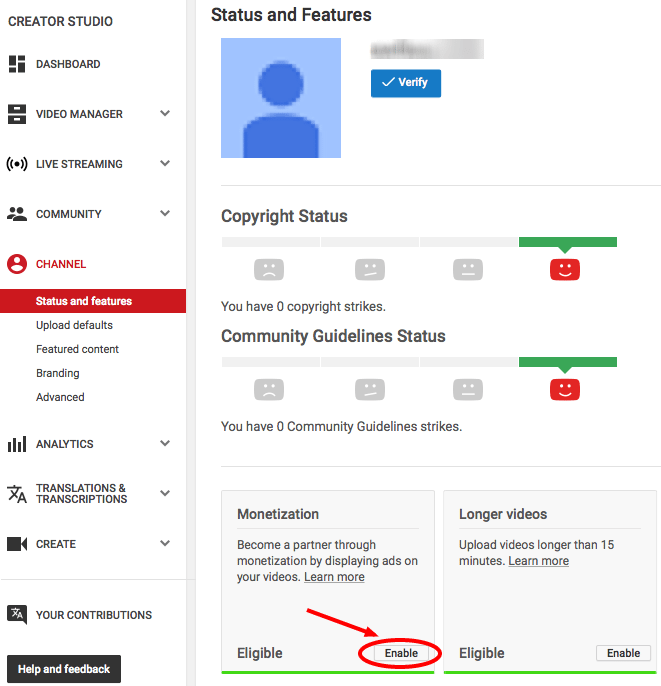
Most creators reach the YPP Basic threshold (500 subscribers, 3,000 watch hours) within 3–6 months of consistent posting, assuming they’re publishing at least once per week on a focused topic.
YPP Standard (1,000 subscribers, 4,000 watch hours) typically takes 6–18 months for a new channel, though channels that nail a high-demand niche early can reach it in weeks.
The most common mistakes that slow this down:
- Posting inconsistently (once a month instead of once or twice a week)
- Choosing topics with low search volume or high competition without a differentiated angle
- Ignoring click-through rate — a thumbnail and title that don’t generate clicks get suppressed regardless of video quality
- Optimizing for views instead of watch time (YouTube’s algorithm weights completion rate heavily)
How to make more money on YouTube: scaling strategies
Once you’re earning, the ceiling is usually set by channel volume, niche selection, and audience depth — not by working harder on a single channel.
- Expand to multiple channels. Many creators operate 2–5 YouTube channels targeting different niches or audience segments. Each channel builds its own YPP status, its own affiliate relationships, and its own audience. The combined revenue from four modest channels often exceeds what a single larger channel generates.
- Optimize for high-RPM content. A channel covering personal finance earns more per view than one covering entertainment. If you can naturally migrate your content toward higher-value topics without losing your audience, the revenue per video increases without increasing view counts.
- Build an email list from your audience. YouTube’s algorithm owns your distribution. Building an off-platform list — through a lead magnet, newsletter, or free resource linked in descriptions — creates an asset you control that can monetize independently of YouTube’s policy changes.
- Use your channel as a funnel, not a destination. The highest-earning YouTube creators tend to treat the channel as the top of a funnel that leads to higher-margin offers: courses, memberships, masterminds, software, or physical products. Ad revenue then becomes one income stream rather than the primary one.
Need a better YouTube Engagement Plan? Try Multilogin Cloud Phones.
Managing multiple YouTube channels without linking them
Operating several YouTube channels from the same Google account creates obvious links between them. But even separate Google accounts used from the same device, browser, or IP address share fingerprint signals that Google’s systems detect.
This matters because YouTube and Google can flag multiple channels operated from the same identity cluster for coordinated behavior — particularly if any account in the cluster gets warned, restricted, or shadowbanned. Restrictions can spread across linked accounts.
The practical fix is the same approach used across multi-account operations on other platforms: separate device identities and network signals per channel.
Multilogin’s browser profiles give each channel its own isolated environment — unique browser fingerprint, independent cookie storage, and a dedicated proxy. You can manage 10+ channels simultaneously from one interface without any shared signals between them. The guide to managing multiple YouTube accounts with Multilogin covers the full setup.
For creators also running YouTube Shorts alongside native mobile app management, Multilogin’s cloud phones provide isolated real Android environments — each with its own hardware identifiers and persistent session state — so mobile activity doesn’t create cross-account links either.
Content creators who want a broader look at tooling can read about the best antidetect browsers for content creators, and the create multiple YouTube accounts guide covers the structural setup in detail.
Start your Multilogin plan to see how many profiles fit your channel count.
Frequently asked questions About How to make money on YouTube
For AdSense ad revenue (YPP Standard), you need 1,000 subscribers and either 4,000 watch hours or 10 million Shorts views in the last 90 days. For early monetization features like channel memberships and Super Thanks, the threshold dropped to 500 subscribers in 2023.
There’s no view threshold for joining YPP — the requirement is watch hours (4,000 in the last 12 months) or Shorts views (10 million in 90 days). Once you’re monetized, earnings depend on RPM, which ranges from around $1 in low-value niches to $30+ in finance or B2B. At $5 RPM, 10,000 monthly views generates roughly $50/month.
Most channels reach YPP Basic (500 subscribers) within 3–6 months of weekly posting. YPP Standard typically takes 6–18 months. Channels with strong niche focus, consistent upload schedules, and good thumbnail/title optimization reach monetization significantly faster than those without.
Yes. Faceless channels using AI narration, stock footage, and screen recording are a legitimate model. Compilation channels with properly licensed content also exist, though YouTube has tightened enforcement on low-effort compilations. The most sustainable “no face” approach is creating genuinely useful content — tutorials, analysis, narrated explainers — without appearing on camera.
Not per view — per 1,000 views (RPM). Typical RPM ranges from $1–$4 for entertainment and gaming to $12–$30 for finance, legal, and business niches. Geography also matters: US, UK, and Australian viewers generate higher CPMs than most other regions.
You don’t earn money from YouTube by watching other people’s content. Some third-party platforms pay small amounts for watching and rating videos, but these are separate services unrelated to YouTube’s own monetization. See the breakdown of ways to make money watching ads if that’s the angle you’re exploring.

