


How to optimize LinkedIn profile pages effectively starts with the elements people notice first: your profile photo, banner, and headline.
👉 In this guide, you’ll learn how to improve each key section of your profile to increase visibility, make a stronger first impression, and give recruiters, hiring managers, or potential clients a clear reason to keep reading.
A weak LinkedIn profile does not always lead to rejection. More often, it leads to being skipped entirely. Someone sees your name, scans your profile for a few seconds, and moves on without contacting you. That is why clarity matters more than clever wording. Your headline should quickly explain what you do, while your About section should sound natural and human – not like it was copied from a resume template.
For teams managing multiple LinkedIn accounts for recruitment, sales, outreach, or personal branding, Multilogin cloud phones can also support a more organized workflow by providing separate mobile environments for different accounts.
👉 Start improving your LinkedIn profile today, and explore Multilogin to manage multiple accounts more efficiently.
Why Your LinkedIn Profile Matters More Than You Think
👉 Short answer: because it’s usually the first search result for your own name. Longer answer below.
Employers Google candidates before interviews. Recruiters scroll LinkedIn before they message anyone. Even clients, in some industries, check a professional’s profile before signing a contract. Your profile isn’t a formality anymore. It’s a first impression that happens without you in the room.
Here’s the thing nobody tells you: LinkedIn’s algorithm rewards completeness and activity, not perfection. A profile with a real photo, a clear headline, and occasional posts will outrank a beautifully written but static one. Consistency wins over polish, more often than people expect.
A profile that looks unfinished signals one thing to a recruiter: this person isn’t serious right now. Fair or not, that’s the read.
How to Optimize Your LinkedIn Profile: The Basics
👉 The direct answer: nail the photo, banner, headline, and About section first, because those four elements appear before a viewer scrolls at all.
Let’s go through them one at a time.
- Profile photo. Use a real, recent, well-lit photo where your face takes up a good chunk of the frame. Group photos, sunglasses, and blurry vacation shots don’t help. LinkedIn’s own data has repeatedly shown profiles with photos get dramatically more views than those without, and honestly, that tracks. People trust faces.
- Banner image. Most people leave this blank, or worse, leave the default blue pattern. That’s wasted real estate. Use it to reinforce what you do: a subtle graphic with your title, your company, or your area of focus works well.
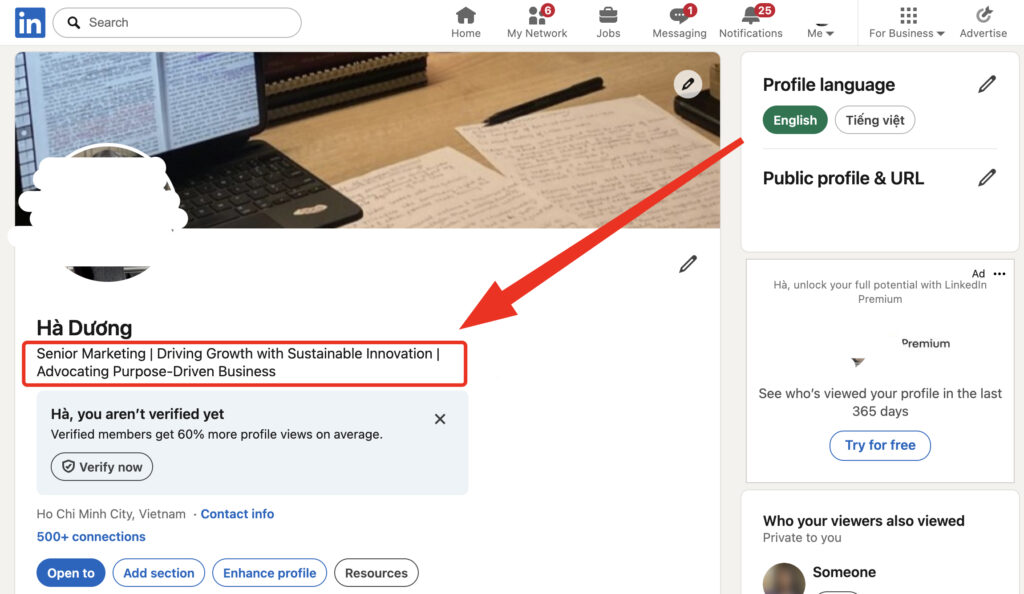
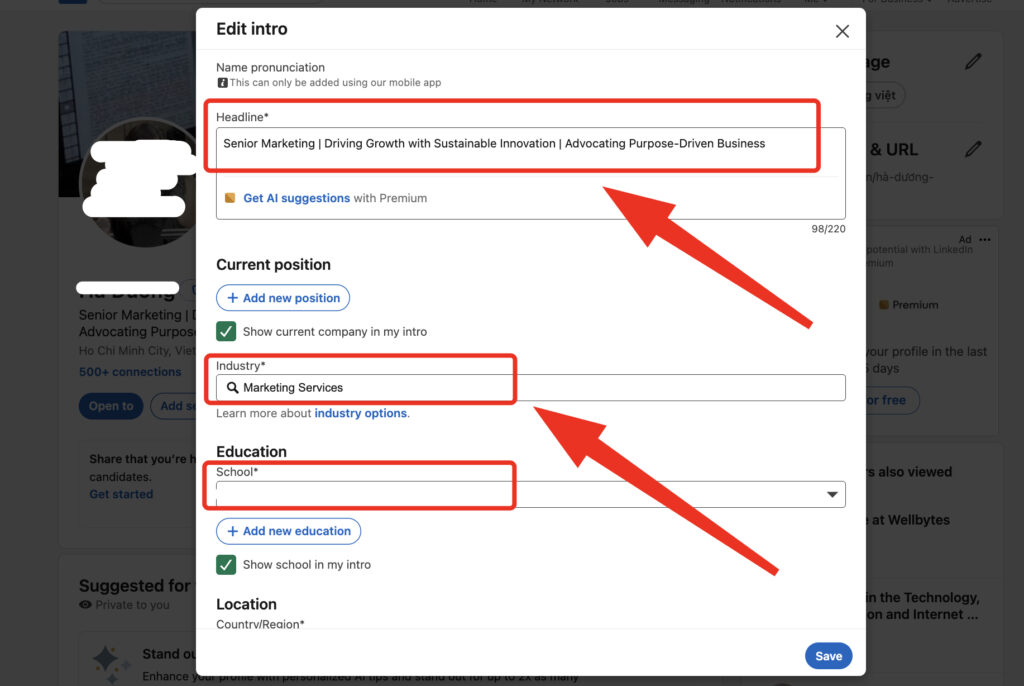
- Headline. This is not just your job title. LinkedIn gives you 220 characters here, so use them. Instead of “Marketing Manager,” try something like “Marketing Manager | B2B SaaS Growth | Helping Startups Scale Through Content.” Specific beats generic, every single time.
- About section. Write it like you’re explaining your career to a smart friend at a coffee shop, not filing a report. Open with what you do and who you help. Middle section: how you got here, what makes your approach different. Close with what you’re looking for or open to. Keep paragraphs short.
Read your About section out loud. If it sounds like something you’d actually say to a person, keep it. If it sounds like a press release, rewrite it.
A few more basics that matter more than people assume:
- Custom URL (drop the random numbers LinkedIn assigns by default)
- Featured section (pin a project, article, or presentation)
- Skills section, ranked by relevance, not alphabetically
- Location set accurately, since this affects local search visibility
How to Optimize LinkedIn Profile for Recruiters
Think like a search engine, because that’s largely what LinkedIn Recruiter is for the person on the other end.
Recruiters don’t read profiles top to bottom the way a friend would. They search keywords, then skim. Which means your profile needs to contain the actual terms a recruiter would type. If you’re a project manager, the words “project management,” “Agile,” “Scrum,” and whatever certifications you hold need to appear somewhere in your headline, About, or experience sections, not just implied.
Here’s a quick breakdown of what separates a profile recruiters skip from one they open:
| Element | ⛔️ Skipped Profile | ✅ Opened Profile |
|---|---|---|
| Headline | Generic job title only | Title plus specialty and value |
| Skills | Left default or unranked | Top 3 skills endorsed, relevant |
| Experience | Duties listed | Outcomes and numbers listed |
| Activity | No posts, no comments | Occasional posts or reshares |
| Open to Work | Not enabled | Enabled with target roles listed |
Recruiters also rely heavily on the “Open to Work” feature, and there’s a quiet trick here: you can set it visible to recruiters only, so your current employer doesn’t see the green banner. Worth using if you’re job hunting discreetly.
Another thing worth saying plainly: quantify your experience wherever you can. “Managed a team” says less than “Managed a team of 9 across three time zones, cut onboarding time by 40 percent.” Numbers catch the eye during a fast scroll in a way adjectives never do.
👉👉 Pro tip: request recommendations from former managers, not just peers. Recruiters weight a recommendation from someone who supervised you far higher than one from a colleague at the same level.
LinkedIn Profile Optimization for Lawyers, Attorneys, and Legal Professionals
Lead with practice area and bar admission, then build credibility through thought leadership, since clients and referral partners search LinkedIn very differently than recruiters do.
Legal professionals face a slightly odd version of this problem. Attorneys aren’t usually job hunting through LinkedIn the way a marketer might be. Instead, referral sources, opposing counsel, journalists, and potential clients look them up to gauge credibility before ever picking up the phone.
A few things that matter specifically for legal profiles:
- State bar admissions and jurisdictions, listed clearly, not buried
- Practice areas named explicitly (litigation, family law, IP law, whatever applies), since generic terms like “attorney” get lost in search
- Published articles, case commentary, or speaking engagements featured prominently
- Firm affiliation kept current, since an outdated firm listing raises questions fast
There’s also an ethics angle worth mentioning here, because it doesn’t apply to most other professions. Many state bars have rules around attorney advertising and client testimonials on social platforms. Before posting recommendations or discussing case outcomes, it’s worth checking your jurisdiction’s specific guidance. Rules vary, and what’s fine in one state can be a violation in another.
A LinkedIn profile for a legal professional should read like a credibility document, not a sales pitch. That distinction matters more here than in almost any other field.
Pro tip: lawyers who post short explainers of recent rulings or legal changes in their practice area tend to build recognition faster than those who only post firm announcements. Original commentary, even brief, signals expertise in a way reposts don’t.
Optimize LinkedIn Profile: A Quick Checklist
Since we’ve covered a lot of ground, here’s the short version to optimize LinkedIn profile pages without rereading the whole guide:
- Real photo, recent, face visible. 👉 You can use AI to create professional avatar.
- Custom banner reinforcing your role or field
- Headline with specifics, not just a title
- About section written in your own voice
- Skills ranked and endorsed
- Recommendations from supervisors, not just peers
- Custom URL
- Location and industry accurate
- Featured section with one strong example of your work
- Occasional posts, comments, or reshares to stay visible in feeds
Do these ten things and you’ll be ahead of most profiles on the platform. Genuinely, most people skip at least half this list.
Common Mistakes That Undo Your Optimization
A few habits quietly sabotage otherwise decent profiles:
Overstuffing the headline with buzzwords until it reads like keyword soup. “Synergistic Growth Ninja | Thought Leader | Visionary” tells a recruiter nothing real.
Letting the profile go stale. An About section written three jobs ago, still describing a role you left in 2022, undercuts everything else you’ve done since.
Ignoring the Experience section’s bullet points, leaving them as vague duty lists instead of outcomes. “Responsible for marketing” versus “Grew organic traffic 65 percent in eight months.” One of these gets remembered.
Skipping recommendations entirely, assuming the rest of the profile speaks for itself. It doesn’t, not on its own.