
For many users, a Facebook suspension begins without warning. A sudden logout is followed by a message saying the account has been permanently suspended, often with no clear option to appeal.
The situation becomes more confusing when Facebook’s messages conflict. Emails may claim there are 30 or 180 days to appeal. In some cases, users are asked to verify their identity by uploading an ID or recording a selfie video, only to see no result.
This raises an obvious question: why does Facebook suspend accounts this way, and why do recovery options so often fail?
To understand this, we need to look at how Facebook’s automated enforcement systems work.
What Facebook users experience after a suspension
Based on user reports, Facebook account suspensions often follow the same pattern, even for long-standing accounts used for personal or business purposes. Many users describe being locked out suddenly, without any prior warning or clear explanation.
Many users also report unclear or changing instructions during the recovery process. Users may receive emails mentioning appeal timelines, while the account interface shows no recovery option at all. This creates confusion and false expectations.
Another frequent problem is failed recovery loops. Users are asked to:
- Upload identity documents
- Complete selfie or video verification
- Confirm email ownership
But after completing these steps, access is not restored and no explanation is provided. Repeating the same steps usually leads to the same result.
For business users, the impact can be broader. A suspended personal profile may also block access to pages, groups, or business tools, even if no advertising activity was involved. Overall, once an account enters Facebook’s automated enforcement process, users have very limited visibility into what went wrong or how to recover.
Why Facebook suspends accounts without warning
Many Facebook account suspensions feel sudden and arbitrary. In most cases, however, they result from automated risk assessment rather than a human decision. Facebook’s own documentation makes it clear that enforcement actions are often taken automatically when the system detects behavior it considers high risk.
Automated enforcement, not human review
Facebook enforces its Terms of Service largely through automated systems, not manual moderation. These systems continuously assess account activity, login behavior, and trust signals.
When an account crosses a certain risk threshold, restrictions or suspensions can be applied immediately, often without warning. In many cases, a human review only happens after an appeal is submitted — and some suspension categories are never reviewed manually at all. This explains why users often receive vague messages and limited explanations.
Account compromise triggers extreme responses
Suspected account compromise is one of the most common reasons for permanent suspension. If Facebook detects unauthorized access, it may disable the account to prevent further misuse, especially if the account is used to spread prohibited content or interact with other users.
These decisions prioritize risk containment. As a result, the system does not always distinguish clearly between the account owner and an attacker. Even after access is recovered, the suspension may remain final.
Device, IP, and behavior inconsistencies
Facebook also evaluates how consistently an account is accessed over time. Frequent changes in devices, locations, or IP addresses can increase risk signals, particularly when combined with shared access or unstable network environments.
No single factor guarantees a suspension, but repeated inconsistencies can reduce an account’s trust score and increase the likelihood of automated enforcement.
Why appeals and ID verification often don’t work
After a Facebook account is suspended, users are usually directed to appeal the decision or verify their identity. In many cases, these steps do not restore access, especially when the suspension is marked as permanent.
Appeals are often handled automatically, not by human reviewers. If the same risk signals that triggered the suspension are still present, the appeal is likely to be rejected without explanation.
Identity verification works similarly. It confirms who is requesting access, but it doesn’t reverse an enforcement decision on its own. For some suspension types, Facebook also limits or removes the appeal option entirely, even if emails suggest otherwise.
Because of this, users may complete every required step correctly and still receive no response or outcome.
What to do right now if your Facebook account is suspended
If your Facebook account has just been suspended, it’s important to act carefully. Repeated or incorrect recovery attempts can sometimes make the situation worse. The steps below focus on damage control and preserving your chances of recovery.
1. Secure your email account first
Your email is the key to Facebook recovery. Review recent login activity, and enable two-factor authentication. If your email is compromised or broken, Facebook recovery attempts may fail or be intercepted.
2. Save all suspension details
Take screenshots of:
- The suspension message,
- Any appeal or “no appeal” screens,
- Emails from Facebook related to the suspension.
Keep timestamps and reference numbers. This information may be useful later.
3. Submit an official appeal once, if available
If Facebook provides an appeal option, submit it carefully and accurately. Avoid submitting multiple appeals or changing information repeatedly, as this can reinforce automated risk signals.
4. Use the hacked-account flow only if compromise is likely
If you received alerts about logins from unfamiliar locations or devices, use Facebook’s hacked-account recovery process. This path is intended for unauthorized access, not general suspensions, and using it incorrectly can lead to dead ends.
5. Avoid repeated logins and environment changes
Do not attempt to log in from multiple devices, locations, or networks. Sudden changes after a suspension can increase risk signals and reduce the chance of recovery.
These steps won’t guarantee account restoration, but they help prevent further damage and keep recovery options open. If Facebook access is critical for your work or business, the next question becomes how to reduce the risk of this happening again.
Why prevention matters more than appeals
In practice, preventing account risk is usually far more effective than trying to reverse a suspension after it happens.
Facebook’s enforcement systems are designed to act quickly when they detect potential abuse or compromise. They prioritize reducing risk over investigating intent. As a result, even legitimate users can be affected if their accounts appear unstable from a technical standpoint.
This is especially important for:
- Business owners who rely on Facebook for communication or advertising,
- Agencies managing multiple pages or groups,
- Professionals accessing accounts from multiple locations or devices.
In these cases, account safety is less about individual actions and more about long-term consistency. Stable devices, predictable login environments, and reduced exposure to automated risk signals all play a role in how Facebook evaluates trust over time.
How a stable mobile environment can reduce account risk
Facebook’s mobile apps operate in a more controlled environment than desktop browsers and provide clearer device-level signals, such as OS behavior and hardware characteristics. This helps automated systems assess account legitimacy more reliably.
Desktop access, especially when combined with extensions, VPNs, or frequently changing setups, can introduce inconsistent signals. Mobile environments tend to be more uniform and predictable, reducing the chance of triggering security responses.
For users managing important accounts long-term, a stable mobile setup helps avoid unnecessary technical red flags rather than bypassing Facebook’s rules.
Tools professionals use to maintain account stability
Teams that rely on Facebook for ongoing work often separate account access from personal devices altogether. Instead of logging in from laptops or phones that change over time, they use dedicated mobile environments designed to stay the same for months or years.
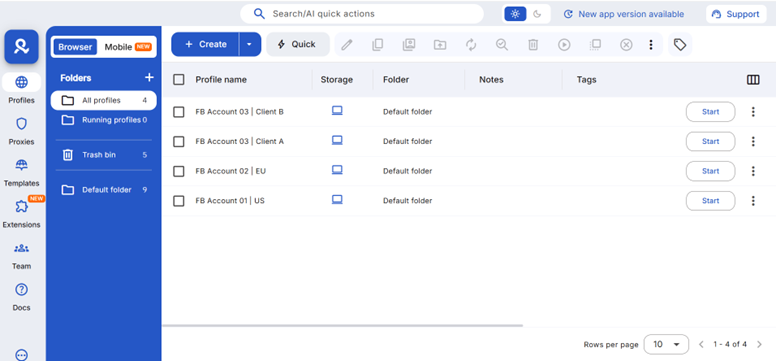
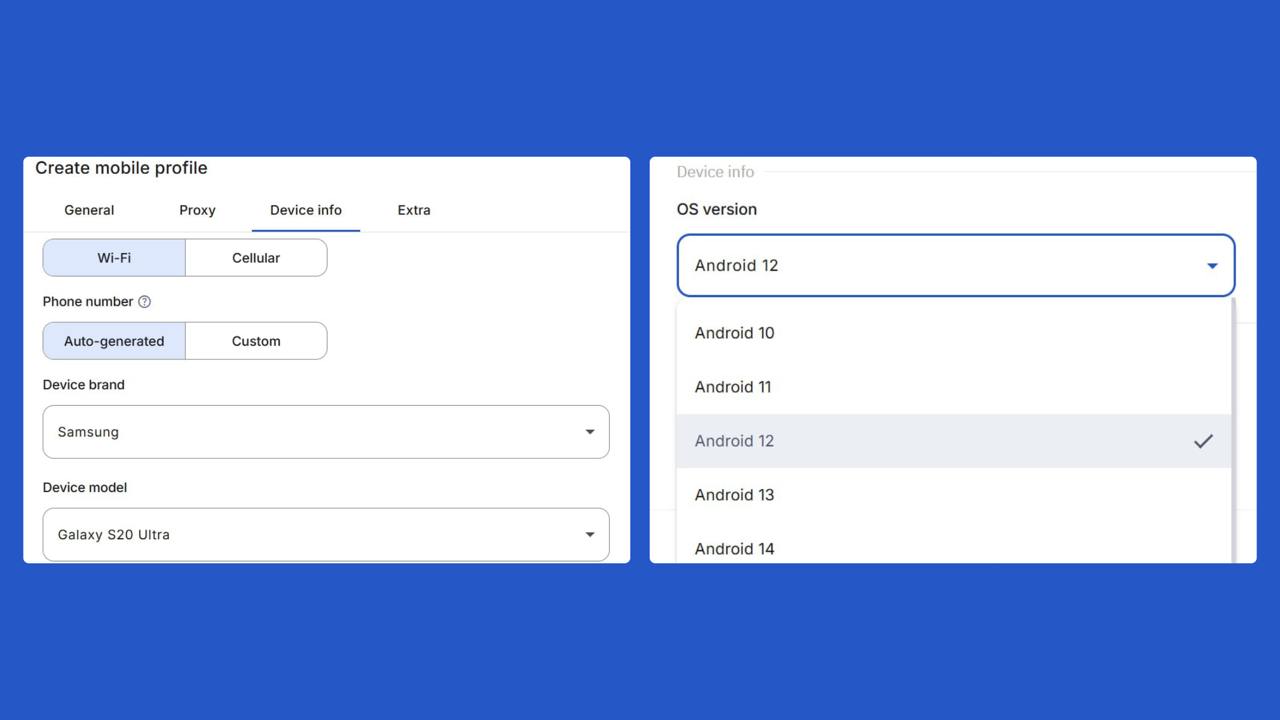
Multilogin Cloud Phones are built for this use case. Each cloud phone is a real Android device in the cloud, not an emulator, with a fixed hardware profile and Android versions from 10 to 15. Because the device does not change, Facebook sees the same mobile environment over time.
Cloud Phones also include built-in residential and mobile proxies, helping keep account access tied to a specific country or city. This reduces accidental location changes that can occur when teams work remotely or travel.
For teams, access can be shared without sharing passwords, and each Facebook account can be isolated on its own device.
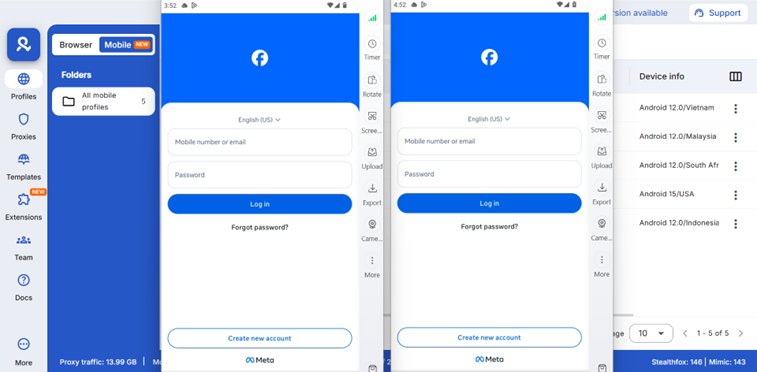
This approach doesn’t bypass Facebook’s rules, but it helps professionals avoid common technical issues that come from unstable devices, shared access, or frequently changing login setups.
Who this approach is most useful for
Maintaining a stable access environment is especially important for users who depend on Facebook as a long-term tool rather than personal use. This approach is most relevant for:
- Business owners who rely on Facebook for communication, sales, or client support
- Agencies managing multiple pages or client accounts over long periods
- Media buyers and advertisers working with business-critical assets
- Social media managers handling accounts across teams or locations