
Look, Pinterest monetization isn’t rocket science, but most guides make it sound way easier than it actually is. They’ll tell you to post pretty pins and watch the money roll in. Then reality hits and you’re three months in with $47 to show for it.
Here’s what nobody tells you upfront. Making money on Pinterest works, but you need the right setup from day one. That means managing multiple accounts without Pinterest linking them together, maintaining consistent posting across different niches, and actually scaling your operations when things start working.
I’m going to walk you through seven real ways to make money on Pinterest in 2025. No fake income screenshots, no “I made $10k my first week” nonsense. Just practical methods that work when you have the right infrastructure behind them.
The secret that changes everything? Cloud phones that let you manage multiple Pinterest accounts like a professional operation instead of hoping Pinterest doesn’t notice you’re running five profiles from the same laptop.
Can you actually make money on Pinterest in 2025?
Short answer: absolutely. But let me be real with you about the timeline.
Pinterest has over 5 billion searches happening every month. People are actively looking for products to buy, ideas to try, and solutions to their problems. That’s where you come in. Whether you’re promoting affiliate products, selling your own stuff, or managing accounts for clients, Pinterest is still printing money for people who do it right.
The part nobody wants to hear? Your first month will probably make you less than $100. Maybe nothing at all. Pinterest needs time to figure out who wants to see your content. Your audience needs to actually find you. And you need to learn what the hell you’re doing.
Most accounts that make real money spent at least three months just building the foundation. Creating content, understanding Pinterest SEO, figuring out what actually gets clicks versus what just looks pretty.
But here’s the good part. Once your pins start ranking, they keep working for you. A pin you create today can still be sending traffic (and making money) six months from now. That’s the compounding effect that makes Pinterest worth the effort.
The people making serious money on Pinterest (we’re talking $5k+ per month) almost always run multiple accounts. Different niches, different content strategies, sometimes different clients. And they’re using tools that let them manage all those accounts without Pinterest connecting the dots and banning everything.
7 ways to make money on Pinterest (what actually works)
Let’s get into the actual methods. I’m giving you real income timelines based on what people actually make, not some fantasy numbers pulled out of thin air.
1. Affiliate marketing (the fastest way to start)
This is where most people begin because you don’t need to create your own products. You find products you like, get an affiliate link, create pins that link to those products, and earn a commission when someone buys.
Popular programs: Amazon Associates, ShareASale, CJ Affiliate, Awin. Some people also use ClickBank for digital products or RewardStyle for fashion stuff.
Real income timeline:
- Month 1-2: Maybe $20-50 if you’re lucky. You’re still learning.
- Month 3-4: $100-500 range. Some pins are starting to rank.
- Month 5-6: $500-2,000 if you’re consistent and know what converts.
What actually gets people to click and buy:
- Multiple pin designs for the same product (test everything)
- Keywords that show buying intent like “best wireless headphones under $100”
- Pinterest product pins that let people buy directly
- Evergreen products that solve real problems people are searching for
Here’s something most people learn the hard way. Your first 50 pins will probably bomb. Pinterest users scroll past hundreds of pins daily. They need to see your content a few times, recognize your style, and trust you before they click through to buy something.
Budget three months minimum before expecting consistent commissions. The algorithm literally tests your stuff on small groups before showing it to bigger audiences.
Quick wins for affiliate marketing:
- Always tell people it’s an affiliate link (transparency works)
- Create boards comparing 10+ products in the same category
- Link to actual helpful blog content, not just straight to checkout
- Test different text overlays on your pins (CTA variations matter)
Pro tip: If you want to scale this, you need multiple accounts targeting different niches. Home decor on one account, tech gadgets on another, fashion on a third. That’s where managing multiple Pinterest accounts with cloud phones becomes the real game changer.
2. Selling your own digital products
This is basically selling downloads. Templates, planners, worksheets, guides, whatever you can create once and sell forever.
Pinterest people go crazy for printables. They’re constantly searching for budget planners, wedding checklists, business templates, wall art, you name it.
Real money timeline:
- Month 1-2: Building products, probably zero sales
- Month 3-4: $200-800 as your pins start getting traction
- Month 5-6: $1,000-3,000 if you have a decent catalog
What sells like crazy on Pinterest:
- Budget planning stuff (people love financial organization)
- Wedding anything (massive niche)
- Business templates (invoices, social media planners, content calendars)
- Educational workbooks
- Printable art for homes
You’ll need somewhere to sell this stuff. Etsy is easiest. Gumroad works. Some people use Shopify. Doesn’t really matter as long as checkout works smoothly.
The strategy: create free samples that lead to paid full versions. Someone downloads your free weekly planner, loves it, buys your complete annual planner for $29.
Want to really scale digital products? Run multiple niche-specific Pinterest accounts. One for wedding planning, one for business templates, one for fitness planners. Each account with its own cloud phone identity so Pinterest doesn’t link them together. Check out how to build this with social media marketing tools that actually work.
3. Pinterest Creator Rewards (if you can get in)
Pinterest actually pays creators now for making video content. It’s invite-only, but they’re expanding it throughout 2025.
You need a business or creator account, at least 5 idea pins in the last month, 1,000+ monthly viewers who actually engage with your stuff, and you have to follow community guidelines (no spam, no stolen content).
Money range: $100-2,000 monthly depending on how many views and engagement you get. People in popular niches like home decor, fashion, and recipe content report higher payments.
Even if you’re not in the program yet, make idea pins anyway. Pinterest’s algorithm loves them and pushes them harder than regular pins. You’re building authority in your niche whether you get paid for it immediately or not.
4. Sending traffic to your blog or website
This is the long game. Use Pinterest to drive people to your website where you make money through ads, sponsored posts, or building an email list for product launches.
Real timeline:
- Month 1-3: Building both your pin library and blog content
- Month 4-6: Getting 10,000 to 50,000 monthly visits from Pinterest
- Month 7-12: $500-5,000 monthly depending on how you monetize
How to actually get traffic:
- Make multiple pins for every single blog post (different designs, different angles)
- Stuff your pin descriptions with keywords people search on Pinterest
- Build boards around topics, not random collections
- Actually look at Pinterest Analytics to see what’s working
- Join group boards to get more eyes on your content
Ways to make money from that traffic:
- Display ads once you hit 10k monthly visitors (Mediavine, AdThrive)
- Build an email list and launch products to them
- Get brands to pay you for sponsored blog posts
- Offer consulting or services
Learn more Pinterest marketing strategies to maximize what you’re getting from the platform.
5. Brand partnerships and getting paid for sponsored pins
Brands will literally pay you to create pins featuring their products. Same concept as Instagram sponsorships, just on Pinterest.
What brands pay in 2026:
- 10k-50k followers: $200-500 per sponsored pin
- 50k-100k followers: $500-1,500 per pin
- 100k+ followers: $1,500-5,000+ per campaign
How to actually land these deals:
- Make a media kit showing your Pinterest stats
- Pick one profitable niche and dominate it (beauty, home, fashion, parenting)
- Email brands directly through their PR or marketing teams
- Sign up for influencer platforms (AspireIQ, GRIN, CreatorIQ)
- Keep posting quality content in your niche consistently
What brands actually care about:
- Does it look authentic or obviously like an ad?
- Does your audience match who they’re trying to reach?
- Engagement rates (saves and clicks matter way more than followers)
- Professional looking pins that fit their brand aesthetic
6. Managing Pinterest accounts for other people (fastest money)
This is honestly the quickest path to consistent income if you know what you’re doing on Pinterest. Businesses and personal brands need Pinterest management but don’t have time to do it themselves.
What you can charge:
- Basic management: $500-1,500/month (creating pins, scheduling, basic analytics)
- Full service: $1,500-3,000/month (strategy, content, advertising, detailed reporting)
- Setup packages: $300-800 one-time (optimizing accounts, setting up boards)
Where to find clients:
- Start on Upwork or Fiverr to get testimonials
- Reach out directly to small businesses with zero Pinterest presence
- Use your own Pinterest account as your portfolio
- Get referrals from happy clients (this becomes your main source)
Here’s the problem nobody talks about. When you’re managing five different client accounts, Pinterest can detect they’re all connected to you. Same device, same IP address, similar posting patterns. One client gets an issue, suddenly all five accounts are flagged.
I’ve seen agencies lose every single client account in 48 hours because they didn’t understand how Pinterest tracks connections between accounts. It’s not just your IP address. Pinterest reads your device fingerprint, your browser data, login patterns, everything.
This is where managing multiple Pinterest accounts with cloud phones becomes absolutely critical. Each client account needs its own isolated mobile environment that Pinterest sees as a completely separate device. Not just a different browser tab. An actual different device identity.
Traditional solutions don’t work. VPNs just change your IP but Pinterest still sees the same device fingerprint. Regular browsers in “incognito mode” don’t provide real isolation. Pinterest’s detection systems are way more sophisticated than that.
Professional Pinterest managers use cloud phones because each account runs in its own genuine Android environment with unique device parameters. IMEI, Android ID, MAC address, system settings, everything Pinterest checks to identify devices. Plus you manage everything from your desktop without juggling actual physical phones.
7. Selling physical products through Pinterest Shopping
Connect your online store to Pinterest and your products show up as shoppable pins. Pinterest becomes a visual search engine for your stuff.
Best products for Pinterest:
- Home decor and furniture
- Fashion and accessories
- Handmade crafts
- Specialty food products
- Beauty and wellness items
Money timeline:
- Month 1-2: Getting your product catalog set up, making initial pins
- Month 3-4: First real sales coming from Pinterest
- Month 5-6: $1,000-10,000+ depending on your margins and catalog size
How to set it up:
- Claim your website on Pinterest
- Upload your product catalog (this usually syncs automatically from Shopify or WooCommerce)
- Create “shop the look” pins showing products in real settings
- Run Pinterest ads to boost your best performing product pins
- Optimize your product descriptions with Pinterest search keywords
Physical products work best when you’re running multiple storefronts or niche-specific shops. Each shop with its own Pinterest presence, managed through separate cloud phone environments so Pinterest doesn’t connect everything back to one person.
What you actually need to make money on Pinterest
Time commitment (be realistic)
You need at least 5-10 hours weekly for the first three months. That’s creating content, designing pins, doing keyword research, scheduling posts, checking what’s working.
Once you have systems in place, you can drop to 3-5 hours weekly with scheduling tools handling the repetitive stuff.
Common mistake: posting 20 pins a day right from the start. Pinterest’s algorithm flags sudden activity spikes as suspicious. New accounts should ease into it. Start with 5 pins daily. Bump to 10 after two weeks. Hit 15-20 once your account has some history.
Pinterest business account (do this first)
Converting to a business account is free and gives you access to actual useful stuff. Analytics to see what’s working. Ability to run Pinterest ads. Product pin features. Audience demographics. Conversion tracking for your website.
Go to Settings, Account management, Convert account. Takes like 60 seconds.
Basic content creation skills
You don’t need to be a designer, but you need basic Canva skills (or whatever tool you prefer). Understanding Pinterest-specific image sizes (1000x1500px works best). Making text overlays readable on mobile. Keeping a consistent visual style across your pins.
Pinterest prioritizes pins that are vertical format, high resolution (nothing blurry), have enough text to convey value while scrolling, and look different enough from your other content to avoid duplicate detection.
The infrastructure that actually matters
Here’s what separates people making $500/month from people making $5,000+ monthly. Infrastructure.
If you’re running one Pinterest account, you can get away with basic setup. But the moment you want to scale (multiple niches, client accounts, testing different strategies), you need proper account isolation or Pinterest will link everything together and shut you down.
Pinterest tracks way more than you think:
- Device fingerprints from your browser
- IP address and location patterns
- Login timing and behavior
- Content similarities across accounts
- Email and phone associations
Regular solutions don’t work. VPNs just mask your IP but Pinterest still sees your device fingerprint. Browser incognito mode provides zero real isolation. Switching browsers manually is tedious and still leaves connection points.
This is why serious Pinterest operations run on cloud phones for managing multiple social media accounts. Each Pinterest account gets its own genuine Android environment with unique device identity. Not spoofed parameters that detection systems can catch. Real device signatures from real Android hardware.
You manage everything from your desktop. No physical phones to juggle. No complicated setup. Just isolated mobile environments that Pinterest sees as completely separate devices. Each with its own app data, cache, login history, and device fingerprint.
Why cloud phones change everything for Pinterest income
Let me paint you a picture. You’re managing Pinterest accounts for five clients. Wedding planner in Austin, home decor shop in Portland, fitness coach in Miami, real estate agent in Denver, and a fashion boutique in Chicago.
Without proper setup, Pinterest sees all five accounts logging in from the same device, same browser fingerprint, similar posting patterns. Their algorithm connects the dots in about 48 hours. One account has an issue? All five get flagged. All five clients lose their Pinterest marketing overnight.
This happens constantly to people who don’t understand Pinterest’s detection systems.
What Pinterest actually tracks
Pinterest isn’t just looking at your IP address. They’re tracking dozens of data points:
- Browser fingerprinting: Your screen resolution, timezone, language settings, installed fonts, canvas fingerprint, WebGL data, about 50+ parameters that create a unique signature for your device.
- Behavioral patterns: When you log in, how long you stay active, posting frequency, navigation patterns within the app.
- Device consistency: Operating system version, device model, hardware identifiers.
- Location signals: IP address patterns, GPS data from mobile, timezone consistency.
- Connection graphs: If account A and account B share any overlap in these signals, Pinterest links them together.
When multiple accounts make sense
Running multiple Pinterest accounts is completely legitimate when you’re:
- Managing different clients as an agency or freelancer
- Operating separate business lines that need distinct presences
- Testing different content strategies in the same niche
- Geographic targeting (different accounts for different regions)
- Building niche-specific boards that don’t fit under one brand
What’s NOT okay: avoiding Pinterest restrictions by making new accounts after bans, spamming identical content across profiles, manipulating engagement metrics, or circumventing advertising account limits.
The traditional multi-account methods that fail
- VPNs: Changes your IP but Pinterest still reads your device fingerprint. They know it’s the same device.
- Browser incognito mode: Provides basically zero isolation. Pinterest can still fingerprint your browser and device.
- Multiple browsers: Still leaves device-level signals identical. Plus it’s annoying to manage.
- Physical separate phones: Works but creates hardware management nightmare. Expensive, space-consuming, requires constant charging and updates.
How cloud phones actually solve this
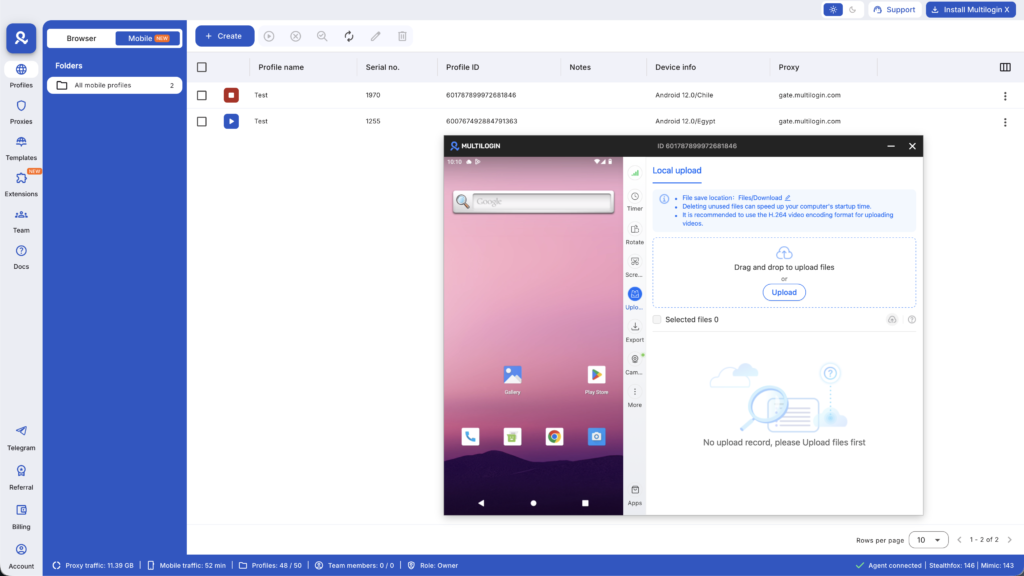
Multilogin cloud phones give you real Android devices hosted in the cloud. Each Pinterest account runs in its own genuine mobile environment with unique device identity.
- Real device fingerprints: Each cloud phone has authentic hardware parameters. IMEI, Android ID, MAC address, system settings. Pinterest sees every account as a legitimately different device because it IS a different device.
- Persistent app data: Your Pinterest app maintains its login state, cache, and storage between sessions. Accounts look natural and aged, not like fresh setups constantly starting from scratch.
- Desktop management: Control all your cloud phones from your desktop computer. No physical devices to manage. Launch Pinterest on any cloud phone with a click.
- Built-in mobile proxies: Geographic consistency automatically handled. Your Miami fitness client’s Pinterest account has a Miami IP. Your Portland home decor client has a Portland IP. Location signals match perfectly.
- Full app compatibility: Run the actual native Pinterest mobile app, not some web wrapper. Install via Google Play Store or upload the APK directly.
This isn’t just about avoiding bans. It’s about operating professionally at scale. When you’re charging clients $1,500/month to manage their Pinterest, you can’t risk their accounts getting linked to your other clients. The infrastructure cost of cloud phones starting at €0.009 per minute is nothing compared to losing a $1,500/month client because Pinterest banned their account.
What about automation?
Cloud phones integrate with standard automation tools. Selenium, Puppeteer, Playwright. You can build automated workflows for pin creation, scheduling, engagement tracking, whatever you need.
But here’s the reality. Automation won’t save bad content. If your pins don’t match what people search for, no amount of automated posting will generate traffic. Focus on quality first, then scale with automation.
Setting up vs scaling up
If you’re starting with one Pinterest account, you might not need cloud phones yet. Get your monetization working first. Prove the concept. Make your first $1,000.
Once you’re ready to scale (add accounts, take on clients, test multiple niches), that’s when cloud phone infrastructure becomes essential. You’re not just protecting against bans. You’re building a sustainable business that can grow without constant platform risk.
The professionals making $10,000+ monthly from Pinterest? They’re all running multiple accounts with proper isolation. It’s not optional at that level. It’s foundational infrastructure, same as web hosting for bloggers or email software for consultants.
Pinterest automation: what works without getting banned
Let’s be clear about something. Automation tools can help you schedule and post content efficiently. What they can’t do is make bad content perform well. If your pins don’t match what people are searching for, automating your posting schedule won’t magically generate traffic.
Safe automation tools
These are Pinterest-approved and won’t get your account flagged:
- Tailwind (official Pinterest partner)
- Later
- Buffer
- Hootsuite
- Native Pinterest scheduler (built right into the platform)
How to use them safely:
- Schedule pins at different times (don’t blast everything at 9am daily)
- Vary your pin descriptions (copy-pasting identical text looks spammy)
- Mix fresh pins with repins from other accounts in your niche
- Respect Pinterest’s limits (max around 200 pins per day)
- Do some manual Pinterest activity (don’t be 100% automated)
What triggers Pinterest to restrict your account
Aggressive automation that looks like bot behavior:
- Mass following and unfollowing accounts through third-party tools
- Automated comments on other people’s pins
- Creating multiple accounts rapidly without warming them up
- Posting identical content across multiple accounts
- Browser signatures that scream “automation tool”
Pinterest has gotten really good at detecting mechanical behavior. If your account acts too robotic, you get shadow banned. Your pins still post but Pinterest stops showing them in search results or feeds.
Signs you’re shadow banned:
- Sudden drop in impressions and clicks
- New pins get basically zero engagement
- Your pins don’t show up when you search for your own keywords
- Analytics shows your reach is falling off a cliff
Recovery takes 2-4 weeks of manual, natural activity to convince Pinterest you’re human again.
Real timeline: how long until you’re actually making money
Forget the Instagram screenshots showing “$10k in my first month.” Here’s what actually happens when you start making money on Pinterest from scratch.
Month 1: $0-20 You’re basically learning how Pinterest works. Setting up your account and boards. Creating your first 30-50 pins. Figuring out what content performs in your niche. Most people make nothing. If you make $20 from a random affiliate click, consider it a win.
Month 2: $50-150 You’ve got 100+ pins out there now. Some of them are starting to show up in search results. You’re getting initial affiliate clicks but conversion rates are low. You’re refining your pin designs based on what actually gets clicks.
Month 3: $200-500 This is where things start clicking. Some of your pins are getting consistent organic reach. Affiliate conversions are happening regularly. You understand your audience preferences clearly. Maybe getting your first brand partnership inquiries.
Month 4: $500-1,200 Multiple pins are generating daily traffic now. You’ve established some topical authority in your niche. Affiliate commissions are predictable. You understand seasonal trends. If you’re running multiple accounts with cloud phones, you’re seeing compounding returns across different niches.
Month 5: $1,000-2,500 Your back catalog of pins is working for you. Traffic compounds from everything you created in months 1-4. You’ve diversified into 2-3 income streams. You might have access to Pinterest Creator Rewards now.
Month 6: $2,000-5,000+ Established presence with real algorithmic trust. Multiple high-performing boards. Possibly taking on Pinterest management clients. Your systems are dialed in enough that time investment drops while income increases.
What affects your timeline:
- Niche competition (home decor moves faster than finance)
- Consistency of posting quality content
- How well you understand Pinterest SEO
- Price points of what you’re promoting
- Whether you’re starting with an existing audience
Important reality: these numbers assume you’re actually putting in the work. Publishing quality stuff consistently. Learning from your analytics. Adapting your strategy based on what’s working. Most Pinterest accounts never make money because people quit at month 2 when results feel minimal.
If you’re serious about hitting those month 5-6 numbers, you need infrastructure that lets you scale. That means managing multiple accounts (different niches or client work) without Pinterest linking them. Cloud phones become essential at that stage.
Mistakes that kill Pinterest income (avoid these)
Copying successful pins exactly
Pinterest’s algorithm buries duplicate content. Don’t just recreate top pins word for word. Study why they work instead. What problem do they solve? What keywords are they targeting? How is the information structured? What emotional angle gets people to click?
Create unique versions that serve the same search intent differently.
Ignoring Pinterest SEO
Pinterest is a search engine, not social media. Optimization isn’t optional. Your board titles need target keywords. Pin descriptions need natural keyword integration. Alt text helps Pinterest understand your images. Board descriptions establish topical relevance.
Research keywords using Pinterest’s search bar autocomplete and the Pinterest Trends tool.
Inconsistent posting
Pinterest rewards accounts that show up regularly. Sporadic activity makes the algorithm think you’re a low-quality account. Establish a sustainable rhythm and stick to it.
Beginners: 5-10 pins daily. Established accounts: 15-20 pins daily. Use scheduling tools to maintain consistency even when you’re busy.
Only posting your own content
Successful Pinterest accounts curate stuff, not just self-promote. Repin quality content from other accounts in your niche. Pinterest sees this as adding value to the platform.
Ratio guideline: 70% your own content, 30% curated from others.
Forgetting mobile exists
Over 80% of Pinterest users are on mobile. Your pins need to be readable on small screens. Text overlays should be minimum 20pt font. High contrast between text and background. Important information in the center (edges get cropped). Test everything on mobile before publishing.
Scaling too fast without infrastructure
Going from 1 Pinterest account to 5 accounts overnight is asking for trouble. Pinterest’s detection systems will link them through device fingerprints, IP patterns, and behavioral similarities.
One account has an issue? Suddenly all five accounts are flagged because Pinterest knows they’re connected.
If you’re managing multiple accounts (clients, different niches, different business lines), proper isolation isn’t paranoia. It’s basic operational security. One mistake cascading across all your accounts can destroy months of work.
This is exactly why professional Pinterest managers use cloud phones. Complete account isolation. Each Pinterest profile runs in its own mobile environment that Pinterest sees as a totally separate device.
Want to earn more on Pinterest? Try Multilogin Cloud Phones.
The real way to make serious Pinterest income
Making money on Pinterest in 2026 isn’t complicated, but it requires realistic expectations and proper infrastructure from the start.
You need patience (3-4 months before consistent income). You need strategic thinking about which monetization methods fit your skills. And you need to understand that the people making $5,000+ monthly are almost always running multiple accounts with proper isolation.
Your income timeline depends on niche competition, content quality, and consistency. Most successful Pinterest monetizers spent months building their foundation before earning consistently. They created quality content that matched search intent. They learned from their analytics. They adapted their strategy based on what actually worked.
But here’s what separates the $500/month accounts from the $5,000+ monthly operations. Infrastructure.
When you’re managing multiple Pinterest accounts (whether for different niches, client work, or testing strategies), account isolation becomes critical. Pinterest’s detection systems are sophisticated. They track device fingerprints, behavioral patterns, location signals, everything. One mistake can link all your accounts together and trigger restrictions across your entire operation.
Traditional solutions don’t work. VPNs just mask your IP. Browser incognito mode provides zero real isolation. Physical phones create management nightmares.
Cloud phones solve this completely. Each Pinterest account runs in its own genuine Android environment with unique device identity. Real hardware parameters (IMEI, Android ID, MAC address) that Pinterest sees as legitimately different devices. Persistent app data so accounts look aged and natural. All managed from your desktop without juggling physical devices.
The cost? €0.009 per minute of usage. Compare that to losing a client account because Pinterest linked it to your other profiles. Or losing months of work building an affiliate account because you didn’t have proper isolation.
Professional Pinterest operations run on cloud phones because the alternative is constant platform risk. You’re not just protecting against bans. You’re building sustainable business infrastructure that can scale without breaking.
Ready to manage Pinterest accounts like a professional? Start with Multilogin cloud phones and never worry about Pinterest linking your accounts again.
Frequently asked questions About making money on Pinterest
Yes, absolutely. Pinterest is still profitable in 2026 for affiliates, service providers, and content creators. Realistic income for established accounts ranges from $1,000 to $10,000+ monthly depending on your monetization method, niche competition, and how much traffic you’re generating.
Expect 3-4 months before seeing consistent earnings though. Pinterest’s algorithm takes time to learn your content and your audience needs time to find you. The people making serious money are usually running multiple accounts across different niches or managing client accounts, which requires proper isolation setup with cloud phones.
Followers matter way less on Pinterest than platforms like Instagram. Accounts with 500 followers regularly make $1,000+ monthly if their pins rank well in search. Pinterest income correlates more with monthly impressions and click-through rates than follower count.
Focus on creating pins that solve specific problems and show up in searches. Followers are a vanity metric on Pinterest.
Yes. Direct affiliate links, selling digital products through Etsy or Gumroad, and Pinterest Creator Rewards all work without a blog. That said, having a website gives you more monetization options (display ads, email list building, multiple touchpoints).
Most profitable accounts use a hybrid approach. Some pins go to owned content, others link directly to products.
Realistically 3-4 months for first consistent income in the $200-500 monthly range. Month 1-2 is learning platform mechanics and building your pin catalog. Month 3-4 brings initial traction as pins rank in search. By month 6, many accounts hit $2,000-5,000+ monthly with an established content library.
These timelines assume consistent effort (5-10 hours weekly) and quality content. Most people quit at month 2 when results feel small.
Yes, but you need proper technical setup to prevent account linking. Professional Pinterest managers use cloud phones for each account. Each account runs in its own genuine Android environment with unique device identity. Without proper isolation, Pinterest links your accounts through device fingerprints and behavioral patterns, then restricts all of them simultaneously.
Traditional VPNs and browser incognito mode don’t provide sufficient isolation. Pinterest’s detection systems are way more sophisticated than that.

