

Pinterest is not a social media platform. It is a visual search engine. And that single distinction changes everything about how you should be using it.
Most people treat Pinterest like Instagram: post pretty images, hope for shares, move on. That approach gets you nowhere. Pinterest works like Google. Users search for specific things, the algorithm surfaces content based on keywords and relevance, and the pins at the top got there through SEO, not luck.
Here is the good news: Pinterest SEO is genuinely less competitive than Google SEO in most niches. Content lasts for years instead of hours. And once you understand how the algorithm works, ranking becomes a repeatable process rather than a mystery.
This guide covers Pinterest SEO from the ground up: what it means, how the algorithm works, how to do keyword research, best practices for pins and boards, the best tools to use, and how to scale safely across multiple accounts using Multilogin cloud phones.
Already managing Pinterest for multiple clients or brands? Multilogin pricing starts from €5.85/month — cloud phones and antidetect browser in one dashboard.
What is Pinterest SEO?
Pinterest SEO is the practice of optimizing your pins, boards, and profile so they rank higher in Pinterest’s internal search results.
When someone types “minimalist bedroom ideas” or “healthy meal prep for beginners” into Pinterest’s search bar, the algorithm decides which pins to show first. It reads your pin titles, descriptions, board names, alt text, and domain history to make that call.
The SEO meaning on Pinterest is the same as anywhere else: you are telling a search engine what your content is about, so it can show that content to the right people at the right time.
What makes Pinterest SEO different from Google SEO is the intent. Pinterest users are not trying to solve an immediate problem. They are planning, collecting ideas, and saving things for later. That changes the language you optimize for and the kind of content that performs.
It also changes the timeframe. A pin you optimize today can still rank and drive traffic 18 months from now. That is the core of Pinterest’s SEO value, and it is why bloggers and e-commerce brands who get this right describe Pinterest as one of their highest-ROI channels.
How does Pinterest SEO work?
Pinterest’s algorithm evaluates several signals when deciding which pins to surface.
- Keyword relevance is the biggest one. Pinterest reads the text in your pin title, description, board name, board description, and profile bio. A pin titled “15 Easy Vegan Meal Prep Ideas for Beginners” will beat “Healthy Eating inspo” every single time if the descriptions follow the same pattern.
- Engagement quality comes next. Saves (repins) are the strongest signal because saving requires active intent. Someone wants to come back to this content. Outbound clicks confirm the pin delivered on its promise. Close-ups register as passive interest. Pinterest weighs these signals to decide whether a pin is genuinely useful or just visually appealing.
- Domain authority on Pinterest is separate from your Google authority. Pinterest builds its own trust score for your domain based on how well your content performs when pinned. Strong engagement across your pins builds domain-level authority that benefits every future pin from that domain.
- Freshness gives new pins a temporary boost in distribution. This is why consistent publishing matters even when your older pins are performing well.
- Pin quality covers the basics: image resolution, aspect ratio, load speed on the destination page, and whether the landing page delivers something genuinely useful.
Understanding these signals is the foundation of any Pinterest SEO strategy. Once you know what the algorithm looks for, optimization stops being guesswork.
Pinterest SEO keywords: how to find what people actually search
Pinterest keyword research is one area where many creators skip the work entirely. That is a mistake. The right keywords are the difference between a pin that ranks for months and one that gets zero organic reach.
The intent behind Pinterest searches is different from Google. People are not asking “how do I fix this right now.” They are browsing ideas for projects, purchases, and plans that may not happen for weeks or months. That shapes the language. Searches tend to be visual, specific, and idea-oriented.
Where to find real Pinterest keywords:
- Pinterest search bar autocomplete — Type a broad keyword and Pinterest auto-suggests related queries. These come from real search behavior on the platform. More reliable for Pinterest-specific research than any third-party tool.
- Guided search bubbles — After running a search, Pinterest displays related keyword tiles at the top of results. These reveal high-volume adjacent queries you might not have considered.
- Pinterest Trends (trends.pinterest.com) — Free tool that shows search volume over time for any keyword. Essential for seasonal planning. Pinterest users search for Christmas and holiday content in October and November, not December.
- Pinterest Analytics — Shows which search terms are already driving traffic to your pins. For established accounts, this is the most targeted data you can get.
- Google keyword tools — Google Keyword Planner, Ubersuggest, and Ahrefs all help. Many high-volume Google searches have strong Pinterest equivalents. If “budget meal prep” is popular on Google, the same intent exists on Pinterest.
Where to place your keywords once you have them:
Placement | What to do |
Pin title | Primary keyword at the start, specific and descriptive |
Pin description | Primary keyword in first 50 characters, 2–3 related terms woven in naturally |
Board name | Primary keyword phrase only |
Board description | Primary keyword + variations, 150–300 characters |
Alt text | Natural description including your keyword |
Profile bio | Your main topic keywords, written for humans |
One more thing: do not ignore long-tail keywords. “Vegan breakfast recipes” is competitive. “Quick vegan breakfasts you can meal prep on Sunday” is more specific, less competitive, and often converts better because it matches exactly how someone is thinking about the problem.
Pinterest SEO best practices for 2026
The fundamentals of Pinterest SEO have been stable for years. What has changed is how precisely Pinterest weighs certain signals, and how much the competition has increased in popular niches.
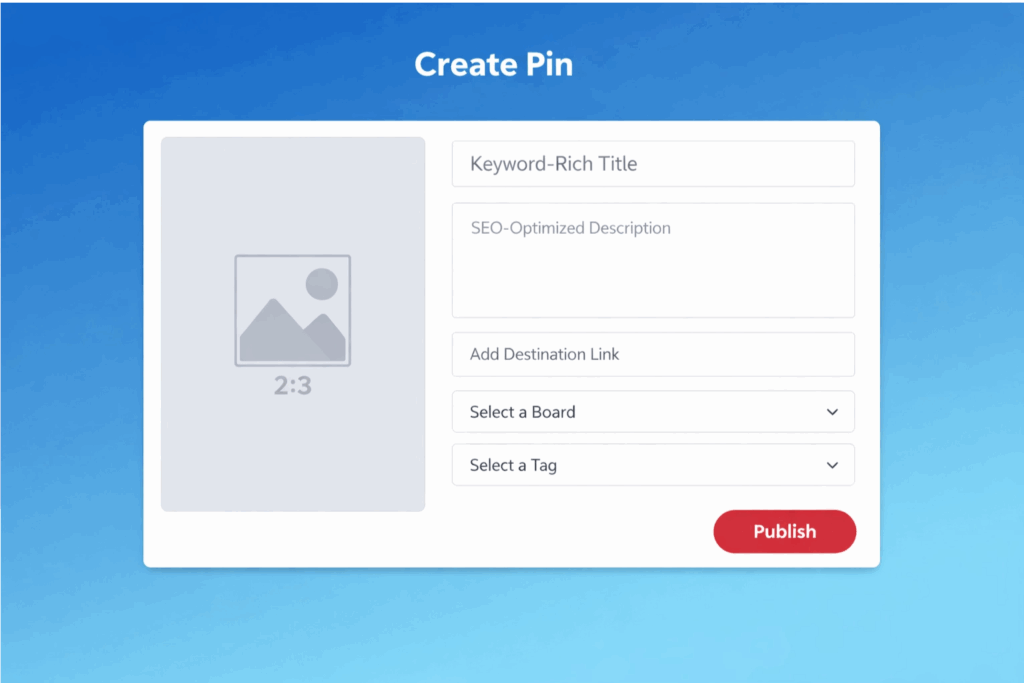
- Use vertical images, every time. The ideal aspect ratio is 2:3, specifically 1000 x 1500 pixels. Vertical pins take up significantly more screen space in the feed and in search results. More space means more visibility. Horizontal pins underperform regardless of content quality. This is not negotiable.
- Write pin titles that lead with the keyword. “15 Easy Vegan Breakfast Ideas” is better than “Breakfast Ideas That Are Easy and Vegan.” The algorithm reads the beginning of your title with more weight. So does the human scrolling past.
- Write pin descriptions for humans first, algorithms second. Your description should be 100 to 500 characters. Include your primary keyword in the first 50 characters. Add two or three related keywords naturally. Avoid keyword stuffing. The test: would a real person find this description helpful?
- Name your boards with real search terms. “Healthy Breakfast Recipes” is a keyword someone searches. “Morning Inspo” is not. Every pin you place inside a board inherits context from that board’s name. Get the board name right and every pin in it benefits.
- Write board descriptions every time. 150 to 300 characters with your target keyword and natural variations. Most creators skip this. It is a small effort with a real ranking impact.
- Fill in alt text on every pin. Pinterest uses alt text as an additional keyword signal. Describe the image naturally and include your target keyword where it fits genuinely.
- Link to content that delivers. Pinterest tracks what happens after the click. Pages with thin content, aggressive ads, or mismatched promises accumulate negative signals against your domain authority over time. Link to pages that earn the click.
- Publish consistently. Five to ten new pins per day is the benchmark for aggressive growth. At minimum, publish several times per week. Consistency builds stronger algorithmic trust than high-volume bursts followed by inactivity.
- Create multiple pins per piece of content. This is one of the highest-leverage habits in Pinterest SEO. A single blog post can generate five to ten pin variations with different images, different headline angles, and different keyword focuses. Each variation ranks independently. More pins means more keyword coverage and more chances to surface in search.
Pinterest SEO tools worth using
You do not need to spend money to do Pinterest SEO well. Most of the highest-impact tools are free.
- Pinterest Analytics (free) — Built into every Pinterest Business account. Shows top-performing pins, referral traffic, search terms driving visitors to your content, and audience demographics. If you only use one tool, use this one.
- Pinterest Trends (free) — Solves one specific problem better than anything else: when to publish seasonal content. Use it to identify when searches for your topics peak, then work backwards to time your publishing schedule.
- Tailwind (paid) — Scheduling tool with analytics, optimal posting time suggestions, hashtag recommendations, and performance tracking over time. Worth it for anyone managing Pinterest consistently or at scale.
- Canva (free and paid) — Pre-sized Pinterest templates at the correct 1000 x 1500 pixel dimensions. Makes creating multiple pin variations per post fast without needing a designer.
- Keywords Everywhere (paid browser extension) — Displays Pinterest search volume data directly in the autocomplete results. Makes keyword research significantly faster.
- Google Analytics (free) — Pinterest Analytics shows what happens inside the platform. GA4 shows what happens after the click: time on page, bounce rate, conversions. Both are necessary to understand the real value Pinterest is driving.
For teams managing Pinterest accounts across multiple brands or clients, tools that handle social media automation alongside Pinterest scheduling can bring workflows together. The best antidetect browser for marketing and antidetect browsers for SEO guides are worth reading for multi-account operators who need to manage Pinterest alongside other platforms.
A note on Yoast SEO and Pinterest: If you run WordPress, Yoast SEO handles your Pinterest meta tags automatically through Open Graph settings. Make sure your featured images are set at the correct dimensions and that your meta descriptions are filled in. This controls how your content appears when pinned from your site.
Does Pinterest help SEO? (And do Pinterest backlinks count?)
This question comes up constantly and it deserves a precise answer, because the common answer — “Pinterest links are nofollow so they don’t help” — is technically true but misses the bigger picture.
Do Pinterest backlinks help Google SEO directly? No. Pinterest links are nofollow, meaning they do not pass PageRank. Hundreds of pins pointing to your blog post do not count as backlinks in Google’s ranking algorithm.
Does Pinterest help your SEO performance indirectly? Yes, in several real ways:
- Pinterest drives traffic to your pages. Google observes how many users find and visit your content as a demand signal. Higher traffic from any source can correlate with improved rankings, particularly for newer pages trying to gain traction.
- Pinterest increases brand search volume over time. When more people see your pins and look up your brand on Google, that brand search activity is a positive signal.
- Pinterest referral traffic often has good engagement metrics: reasonable time on page and low bounce rates. These are signals Google factors into content quality evaluation.
Is Pinterest good for SEO overall? If you mean Pinterest’s own internal search: yes, absolutely. If you mean Google SEO: it is better thought of as a complementary traffic channel than a link-building tool.
The practical advice: do not choose between Pinterest SEO and Google SEO. Optimize your content for Google, then create five to ten Pinterest pins per post to open a second traffic channel that operates on a completely different timeline. Google SEO takes months to build. A well-optimized Pinterest pin can drive traffic within days.
Pinterest SEO strategy for e-commerce
Pinterest consistently outperforms other social platforms for e-commerce in visual categories: home decor, fashion, beauty, DIY, food, crafts, weddings, and gift ideas. The reason is purchase intent. Pinterest users come actively looking for products to buy and ideas to implement.
- Keyword-optimized product pins. “Minimalist solid oak desk for small home office” will outrank “Cool desk” in both search rankings and click-through rate. Lead with how shoppers actually search, not marketing copy.
- Lifestyle pins that show products in context. A kitchen gadget staged in a real kitchen gets more saves and wider distribution than the same product on a white background. Context sells.
- Multiple pins per product. Five to ten variations per product with different images, different keyword angles, and different value propositions. Each ranks independently. More coverage means more queries you can surface for.
- Seasonal boards. Create boards like “Holiday Gift Ideas for Her” or “Summer Home Refresh Ideas” with full keyword optimization. Publish to these boards eight to twelve weeks before the season peaks, based on Pinterest Trends data.
- Rich Pins. Product Rich Pins pull real-time pricing, availability, and product information directly from your site into the pin. They get significantly more engagement than standard pins because they reduce purchase uncertainty. Worth setting up if you have an e-commerce site.
- User-generated content. Repinning real customer photos (with permission) consistently outperforms studio shots because it shows genuine use. Pinterest users trust real-life results.
Pinterest SEO for bloggers
Bloggers get more leverage from Pinterest SEO than almost any other creator category. Here is why.
Pinterest treats each pin as an independent piece of content that can rank for its own keywords. A blog post with ten pin variations has ten separate chances to surface in search. Each one targets a slightly different keyword angle. Most other platforms simply do not work this way.
The other structural advantage is content lifespan. A post that ranks well on Pinterest can drive consistent traffic for two to three years without any updates. Publishing effort compounds rather than depreciating.
How bloggers should approach Pinterest SEO:
- Use Pinterest Trends to identify what your audience is searching before writing the post, not after
- Create five to ten vertical pin images per post with different headline angles and visual styles
- Write a unique, keyword-optimized description for every pin variation — do not copy-paste
- Schedule pin variations over several months to extend your distribution window
- Check Pinterest Analytics weekly to see which formats, keywords, and styles perform best, then replicate them
And a point worth emphasizing: long-tail keywords that are nearly impossible to rank for on Google are often very achievable on Pinterest. The platform is less competitive, domain authority matters less than keyword relevance, and even relatively new accounts can get meaningful search visibility quickly. That makes Pinterest especially valuable for blogs that have not yet built Google SEO authority.
How to scale Pinterest with multiple accounts (and stay safe doing it)
Agencies, content businesses, and marketing teams often run Pinterest at a scale that requires multiple accounts: different clients, different niche sites, different regional markets.
The challenge is that Pinterest actively links accounts that share device fingerprints, IP addresses, or behavioral patterns. When it detects connected accounts, it can restrict all of them at once. One detection event can cost an agency access to every client account it manages.
This is where device isolation becomes essential. And it is where Multilogin cloud phones make a real operational difference.
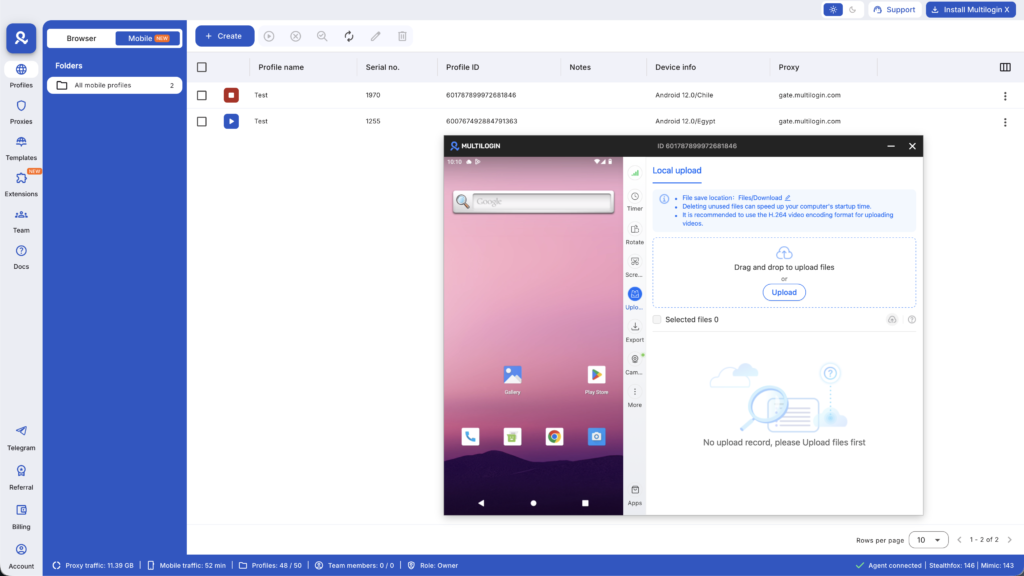
Each Multilogin cloud phone is a real Android device hosted in the cloud with genuine hardware identifiers: its own IMEI, Android ID, and MAC address. Pinterest’s detection system sees each cloud phone as a completely separate device because it is one. There is no shared fingerprint to catch.
Each cloud phone also runs a fully isolated app environment. The Pinterest app on one cloud phone shares nothing with another: no cookies, no login state, no browsing history, no app cache.
How to set up Multilogin cloud phones for multiple Pinterest accounts:
- Create one cloud phone profile per Pinterest account in the Multilogin desktop app
- Assign a unique device model to each profile — approximately 30 real device types are available including Samsung, Google Pixel, OPPO, and OnePlus
- Assign a mobile-grade residential proxy to each profile matched to the geographic location for that account
- Install the Pinterest app fresh from the built-in app store on each cloud phone
- Never transfer session data or APKs between profiles
- Manage each account exclusively from its assigned cloud phone
For browser-based Pinterest management alongside mobile, the Pinterest proxy and antidetect bundle covers desktop profile isolation. Both cloud phones and browser profiles are managed from the same Multilogin dashboard.
One practical risk to understand: a Pinterest IP ban applies to every account on that IP, not just one. Mobile-grade residential proxies with stable carrier-assigned IPs prevent this by giving each profile its own clean connection.
Common Pinterest SEO mistakes (and how to fix them)
- Using horizontal images. This is the single most damaging mistake. Horizontal pins get less feed real estate, lower click rates, and weaker algorithmic reach. Vertical 2:3 is the format. Every time.
- Generic pin descriptions. “Love this!” is not indexed for anything useful. “15 quick vegan breakfast recipes you can prep the night before” gives Pinterest keywords to work with and gives a human a reason to click. Every description should do both.
- Inconsistent publishing. Posting 50 pins in one weekend then going quiet for three weeks signals to Pinterest that you are not a reliable publisher. Steady, consistent pinning builds far stronger account authority over time.
- Linking to thin or low-quality pages. Pinterest tracks post-click behavior. Pages with minimal content, heavy ad loads, or mismatched promises accumulate negative signals against your domain. Every pin should link somewhere genuinely useful.
- One pin per piece of content. One pin is one shot at search visibility. Ten variations across different keyword angles are ten shots. Creating multiple pins per post is the single highest-leverage habit in Pinterest SEO.
- Copy-pasting descriptions across pin variations. Duplicate descriptions reduce your keyword surface area. Each variation should target a slightly different angle with a unique description.
Ignoring Analytics. The data is free and shows exactly which keywords, boards, and formats drive results. Not using it means guessing instead of iterating on what actually works.
Pinterest SEO checklist
Account setup
- Pinterest Business account active and website verified
- Profile bio includes your main topic keywords
- Board names are keyword-specific phrases, not vague labels
- All boards have descriptions of 150–300 characters with target keywords
Per pin
- Vertical 2:3 image (1000 x 1500 pixels)
- Title leads with primary keyword and is specific
- Description: 100–500 characters, primary keyword in first 50, 2–3 related terms included
- Alt text filled in naturally with keyword
- Links to a high-quality, content-rich page
- Unique description (never copy-pasted from another pin variation)
Ongoing
- Publishing daily or near-daily (minimum several times per week)
- Five to ten pin variations created per blog post or product
- Pinterest Analytics reviewed weekly
- Pinterest Trends checked before creating seasonal content
Want to earn more on Pinterest? Try Multilogin Cloud Phones.
Summary: Pinterest Growth in 2026
Pinterest SEO rewards the people who treat it seriously, not as an afterthought.
Most creators still approach Pinterest like a social platform: post something, check for likes, repeat. That is exactly why there is still so much opportunity here. When your competitors are guessing, optimization gives you a systematic edge.
The core idea is simple. Pinterest is a search engine with a visual interface. The content that wins is the content that matches what people are searching for and proves its value through engagement. Keywords, image format, board structure, and consistent publishing are not optional extras — they are the product.
Start with your keyword research. Build boards with real search terms. Create multiple pin variations per post. Publish consistently. Check your analytics and iterate on what works.
If you are running Pinterest accounts at any serious scale, device isolation through Multilogin cloud phones is what keeps your accounts clean and independent. Each account gets a real Android identity, its own proxy, and its own app environment. One dashboard manages everything.
Pinterest traffic compounds. The work you put in today is still paying off a year from now. That is rare. Use it.
Frequently asked questions About Pinterest SEO
Pinterest SEO is optimizing your pins, boards, and profile to rank in Pinterest’s internal search results. It uses keyword research, image optimization, and consistent publishing to drive traffic that compounds over time.
Pinterest ranks content based on keyword relevance in titles, descriptions, and board names; engagement signals like saves and clicks; domain authority; image quality; and freshness. It works like a visual search engine.
Create valuable, save-worthy pins consistently. Engage with other accounts. Join and contribute to group boards. Follow accounts in your niche. Run Pinterest ads if budget allows. Followers grow naturally as your content gets distribution.
Research keywords using Pinterest autocomplete and Pinterest Trends. Create vertical 2:3 pins with keyword-optimized titles and descriptions. Organize content into keyword-named boards. Publish consistently and track results in Pinterest Analytics.
Yes, but you need proper technical setup to prevent account linking. Professional Pinterest managers use cloud phones for each account. Each account runs in its own genuine Android environment with unique device identity. Without proper isolation, Pinterest links your accounts through device fingerprints and behavioral patterns, then restricts all of them simultaneously.
Traditional VPNs and browser incognito mode don’t provide sufficient isolation. Pinterest’s detection systems are way more sophisticated than that.

