





You posted. You waited. And the view counter is just sitting there. Zero. Or it moved up to 200 and then stopped dead.
Before you spiral into thinking you’re permanently shadowbanned or that the algorithm has personally decided to ruin your account, take a breath. There are specific, fixable reasons why TikTok views get stuck at certain numbers, and most of them are not what people assume.
This guide breaks down exactly what’s happening at each stuck point, what it actually means for your account, how to diagnose the real cause, and what to do about it. Whether you’re a creator managing your own account or a social media manager running TikTok for clients, this is the information you actually need.
First, Understand How TikTok Actually Distributes Content
Before you can fix the problem, you need to understand how TikTok decides who sees your video in the first place.
TikTok doesn’t show a new video to everyone at once. It uses a staged distribution system that starts small and expands based on how each stage performs.
When you upload a video, TikTok first shows it to a small test group of around 200 to 500 people. These are not necessarily your followers. They’re users whose browsing behavior and content preferences suggest they might be interested in what you’ve posted. TikTok then watches what that test group does. It measures watch time and completion rate, whether people watch all the way through or rewatch the video. It measures engagement, whether people like, comment, share, or save. It looks for negative signals too, whether people scroll past quickly or mark the content as not interested.
If the test group responds well, the video gets pushed to a larger audience of somewhere between 1,000 and 50,000 people. If that group also engages well, it gets pushed further. Videos that go viral are just videos that kept passing each of these expansion gates with strong engagement at every stage.
If the test group doesn’t engage, the video stops there. The platform deprioritises it and moves on. That’s the 200-view ceiling that so many people hit and don’t understand.
This system is important to understand because it means that being stuck at 200 views is almost never about a shadowban or a technical glitch. It’s about your video not clearing the first test gate. That’s a content and strategy problem, and it’s fixable.
You posted. You waited. And the view counter is just sitting there. Zero. Or it moved up to 200 and then stopped dead.
Before you spiral into thinking you’re permanently shadowbanned or that the algorithm has personally decided to ruin your account, take a breath. There are specific, fixable reasons why TikTok views get stuck at certain numbers, and most of them are not what people assume.
This guide breaks down exactly what’s happening at each stuck point, what it actually means for your account, how to diagnose the real cause, and what to do about it. Whether you’re a creator managing your own account or a social media manager running TikTok for clients, this is the information you actually need.
First, Understand How TikTok Actually Distributes Content
Before you can fix the problem, you need to understand how TikTok decides who sees your video in the first place.
TikTok doesn’t show a new video to everyone at once. It uses a staged distribution system that starts small and expands based on how each stage performs.
When you upload a video, TikTok first shows it to a small test group of around 200 to 500 people. These are not necessarily your followers. They’re users whose browsing behavior and content preferences suggest they might be interested in what you’ve posted. TikTok then watches what that test group does. It measures watch time and completion rate, whether people watch all the way through or rewatch the video. It measures engagement, whether people like, comment, share, or save. It looks for negative signals too, whether people scroll past quickly or mark the content as not interested.
If the test group responds well, the video gets pushed to a larger audience of somewhere between 1,000 and 50,000 people. If that group also engages well, it gets pushed further. Videos that go viral are just videos that kept passing each of these expansion gates with strong engagement at every stage.
If the test group doesn’t engage, the video stops there. The platform deprioritises it and moves on. That’s the 200-view ceiling that so many people hit and don’t understand.
This system is important to understand because it means that being stuck at 200 views is almost never about a shadowban or a technical glitch. It’s about your video not clearing the first test gate. That’s a content and strategy problem, and it’s fixable.
TikTok Views Stuck at 200 or 300: The Test Gate Problem
This is the most common stuck point, and it’s the one that frustrates people the most because the video clearly got some distribution but then hit a wall.
When your views plateau at around 200 to 300, it means your video passed initial processing and made it to TikTok’s first test group, but didn’t generate enough engagement from that test group to push to the next level. The algorithm looked at the data from those initial viewers and decided the video wasn’t worth expanding.
The three metrics TikTok weights most heavily at this stage are completion rate (did people watch to the end), engagement rate (did people like, comment, share, or save), and negative signals (did people scroll past quickly or mark it as not interested).
A video with a weak hook loses most of the test audience in the first three seconds. A video that’s too long relative to its content has viewers dropping off early. A video that doesn’t prompt any engagement reaction doesn’t generate the likes and comments that tell the algorithm the content is worth pushing.
This is what people mean when they talk about being stuck at 200 views. It’s not a bug. It’s the algorithm working as designed. The video didn’t earn the next push.
What “200-View Jail” Actually Means
The term “200-view jail” has become common in creator communities, but it’s worth being precise about what it actually describes.
It’s not an official TikTok policy or a formal restriction. It’s a pattern that creators observe when their content consistently fails to clear the first test gate. If multiple videos in a row cap out at 200 to 300 views, it often signals one of three things.
The content quality or hook isn’t strong enough to generate high completion rates with an unfamiliar test audience. TikTok can’t clearly categorise what your content is about, which means it’s showing it to the wrong test audience and getting poor engagement as a result. Or the account itself has built up a track record of low-performing content, which causes TikTok to weight the initial distribution lower over time.
None of these are permanent. All of them are fixable with the right content adjustments.
TikTok Views Stuck at Other Numbers: 500, 1000, 1500
The same staged distribution logic applies at every threshold. If your videos consistently cap at 500 or 1,000 views, you’re clearing the first test gate but not the second one. The video is resonating with an initial audience but not broadly enough to earn the next expansion.
At these higher thresholds, the issues are usually about content breadth (the video appeals to a specific niche audience but not broadly enough), engagement depth (people are watching but not actively engaging with likes, comments, and shares), or posting timing (the initial test group are catching the video at a low-engagement time of day for your specific audience).
How to Tell If You’re Actually Shadowbanned
The word shadowban gets used for everything from a low-performing video to an actual account restriction, and they’re very different things. Here’s how to tell the difference.
A genuine shadowban means your content is being suppressed platform-wide: it doesn’t appear in hashtag searches, it doesn’t reach the For You page for non-followers, and your analytics show “For You” traffic at near-zero across multiple recent videos, not just one.
A low-performing video that caps at 200 views is not a shadowban. It’s a video that didn’t pass the test gate. The content performed poorly with the test group. That’s a content problem, not an account restriction.
To check whether you’re dealing with an actual account restriction, go to Settings → Account → Account Status. TikTok introduced this feature specifically to show creators whether their account or specific videos are restricted, which videos have been flagged or removed, whether you’re eligible for the For You page, and options to appeal any restrictions. If Account Status shows no issues, you are not shadowbanned. You have a content performance problem.
You can also test by posting a video with a completely unique hashtag that no one else is using, then checking from a secondary account or asking a friend to search for that hashtag. If your video appears in the search results, your content is being distributed normally. If it doesn’t appear, that’s a stronger signal of actual suppression.
Check your analytics traffic sources. If your For You page traffic is at zero across multiple recent videos, that points toward an account-level restriction. If For You traffic is normal but low, the videos are being distributed but not resonating.
The Real Reasons Your TikTok Views Are Stuck
Here’s an honest look at the most common reasons, with none of the vague “just post better content” advice that doesn’t actually help.
Weak Opening Hook
The first one to three seconds of your video determines whether your test group watches or scrolls. If there’s no immediately compelling visual, question, statement, or action in the first two seconds, most of the test audience will scroll before the video has a chance to prove itself. A weak hook is the single most common reason for the 200-view ceiling.
Fix: Rewrite your hook entirely. Start mid-action, mid-sentence, or with a provocative statement or question. Cut any intro that’s longer than two seconds. Test different versions.
Completion Rate Is Low
Even with a good hook, if the middle of your video loses people, the completion rate drops and the algorithm notices. TikTok tracks exactly where in your video viewers are dropping off. A steep drop at the 30% or 50% mark signals low quality to the system.
Fix: Watch your retention analytics. Find where the drop-off is happening and cut or rework that section. Tighten the pacing. Remove filler content. Get to the point faster.
No Clear Content Category
TikTok’s algorithm works best when it can clearly classify what your content is about, so it can show it to the right test audience. If your content doesn’t fit a clear niche or switches topics between videos, the algorithm struggles to find the right people. When it shows your video to people who aren’t really the target audience, engagement drops and so does distribution.
Fix: Post consistently within a clear niche for a period of weeks. Use topic-relevant hashtags that accurately describe your content. Let the algorithm learn what your account is about.
Posting at the Wrong Time
Your test group is drawn from users who are active when your video is uploaded. If you post when your core audience isn’t active, you get a worse test group and lower initial engagement, which limits expansion.
Fix: Check your TikTok analytics for when your followers are most active. Post within that window. For accounts managed across multiple time zones, this becomes more complex, but the principle is the same.
Using the Wrong or Banned Hashtags
Hashtags help TikTok categorise your content and find the right test audience. Using overly broad hashtags like #fyp or #foryoupage doesn’t actually help distribution and hasn’t for some time. Using banned hashtags can actively suppress your video.
Fix: Use three to five hashtags that are specific and relevant to your content topic. Avoid hashtags with “this video is not available” when you search them, that’s a sign they’re banned or restricted.
Low Account Trust Score
New accounts get lower initial distribution because TikTok hasn’t established a track record for the account. Accounts that have had previous violations, spam behavior, or engagement pod activity also get lower initial distribution because the algorithm has negative signals in the account history.
Fix: For new accounts, warm up the account with genuine engagement activity before posting content you care about. Spend time watching, liking, and commenting authentically in your niche. For accounts with a history of violations, the recovery takes time and consistent compliant behavior.
Multiple Accounts Linked on the Same Device
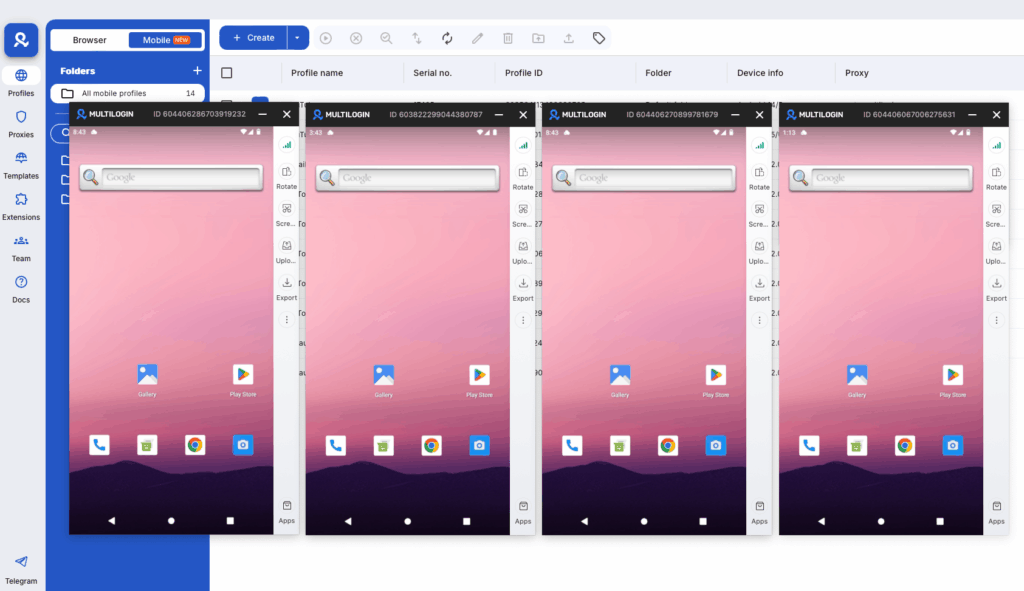
If you’re managing multiple TikTok accounts from the same device, TikTok can and does link those accounts together. When one account gets a restriction, it can affect others on the same device. This is particularly relevant for social media managers and agencies running TikTok for multiple clients.
This is one of the reasons account isolation matters. Running each TikTok account from its own isolated environment, whether that’s a dedicated device or a Multilogin Cloud Phone with its own unique device identity and residential proxy, prevents account linking from causing restrictions to bleed across accounts. You can read more about how TikTok’s shadowban works at the device and account level in Multilogin’s TikTok shadowban guide, which goes deep on the fingerprinting and detection mechanisms involved.
How to Fix TikTok Views Stuck at 0
Work through this in order.
Wait two hours before doing anything. Processing takes time and many apparent zero-view situations resolve themselves.
Check your video’s privacy settings and confirm it’s set to “Everyone.”
Check Account Status in Settings. If there are any flags or restrictions showing, that’s the actual problem and you need to address the specific violation, not guess at content changes.
Check your notifications for any content-specific flags on the video in question.
If none of those show problems, look at your hook critically. Watch the first three seconds of your video as if you’ve never seen it before and have no context for it. Does it immediately give a reason to keep watching? If not, that’s your answer.
How to Fix TikTok Views Stuck at 200 or 300
The test gate didn’t open. Here’s how to give it a better chance next time.
Focus entirely on the hook first. Rewatch your video and identify what the first two seconds actually show. If it’s an intro, a logo, a slow pan, or anything that isn’t immediately compelling, cut it.
Shorten the video if it’s over 30 to 40 seconds unless the content genuinely justifies the length. Optimal video length for most niches in 2025-2026 is 21 to 34 seconds for high completion rates. Longer videos can work but need very tight pacing throughout.
Post at peak active times for your audience. Check your analytics before you post.
Use more specific hashtags. Three to five niche-relevant hashtags outperform ten generic ones.
After posting, engage actively in your niche for the first 30 to 60 minutes. Watch other creators’ videos, leave genuine comments, respond to comments on your own content. This signals genuine account activity to the algorithm around the time your video is being tested.
If your videos consistently cap at 200 views across many posts, the issue may be account categorization. Take two to three weeks of consistent posting within a very specific niche, using consistent hashtags, to help the algorithm understand what your content is about and who to show it to.
How to Recover From an Actual Shadowban
If Account Status shows restrictions, or if your For You page traffic has dropped to zero across multiple recent videos, here’s the recovery approach.
Stop posting for 24 to 48 hours. Continuing to post during an active restriction doesn’t help and can extend the timeline.
Audit your last 30 videos for anything that might have triggered the restriction. Look for guideline violations, banned hashtags, copyrighted audio with licensing issues, competitor watermarks on reposts, or engagement bait language in captions.
Remove or appeal any flagged content. TikTok’s Account Status tool lets you appeal restrictions on specific videos.
After the pause, return with fresh, clearly original content. No reposts, no recycled videos from other platforms with watermarks, no aggressive hashtag stacking.
Most shadowbans resolve within two to four weeks with consistent compliant behavior. Continuing to engage authentically in your niche during the recovery period helps rebuild account trust faster.
The one thing that consistently makes recovery longer is continuing the behavior that triggered the restriction in the first place. If the restriction came from spam-like activity or device-level flagging, the behavior or the device environment needs to change, not just the content.
Need to manage multiple social media accounts? Try Multilogin Cloud Phones.
Frequently asked questions About TikTok Views Stuck
The most common reasons are that the video is still processing (wait two hours), the privacy setting is wrong, the video has been flagged for a content violation, or the hook isn’t strong enough to retain the initial test group. Check Account Status first to rule out restrictions, then verify privacy settings, then look critically at your first three seconds.
Your video reached TikTok’s first test group of 200 to 300 people but didn’t generate enough watch time, completion rate, or engagement to earn the next distribution push. This is a content performance issue, not a technical glitch or shadowban. The fix is improving the hook, pacing, and engagement triggers in your content.
No. A video that plateaus at 200 views is not shadowbanned. It failed to clear TikTok’s initial test gate due to low engagement from the test group. An actual shadowban shows up as zero For You page traffic across multiple videos and content not appearing in hashtag searches. Check Account Status to confirm.
Processing delays typically resolve within two hours. If your video still shows zero views after two hours and Account Status shows no restrictions, the problem is content-level rather than a glitch. There is no indefinite “0 views glitch.” The video either clears review and gets distributed, or it doesn’t distribute because of a restriction or low engagement.
Go to Settings → Account → Account Status to check for official restrictions. Then go to your Analytics → Reach and check whether For You traffic has dropped to zero across multiple recent videos. You can also post a video with a unique hashtag and check from a different account whether the video appears in that hashtag’s search results. If it doesn’t, your content may be suppressed.
Focus on these four things: a stronger hook in the first two seconds, a tighter video with high completion rate, posting at peak active times for your audience, and using specific niche-relevant hashtags rather than broad ones. Consistent posting within a clear niche over several weeks also helps the algorithm categorize your account and show your content to the right audience.
Managing Multiple TikTok Accounts Without Getting Them Linked
For social media managers running TikTok for multiple clients, the account linking problem is real and worth taking seriously.
TikTok’s detection systems use device fingerprinting, IP addresses, behavioral patterns, and account activity timing to identify when multiple accounts are connected. When one account gets restricted, those signals can affect accounts that are technically connected to the same device or IP, even if those accounts have done nothing wrong themselves.
This is the specific problem that Multilogin Cloud Phones are built for. Each Cloud Phone is a real Android device hosted in the cloud, with its own unique IMEI, Android ID, hardware fingerprint, and residential proxy IP matched to a specific region. To TikTok, each Cloud Phone looks like a completely separate physical phone used by a separate person in a different location.
This matters for agencies because a restriction on one client’s account can’t bleed into another client’s account if they’re running from completely isolated device environments. It also means that if you’re building a new account from scratch, you’re doing it from a clean device identity with no history of violations attached to it.


