Social media automation

Social media automation lets teams automate social media actions through real browser sessions instead of manual work. It supports Puppeteer, Playwright, Postman, Selenium, and CLI workflows, allowing accounts to run separately and stay stable while operations scale.

Automate multiple social media accounts from one browser

Automate multiple social media accounts from one browser

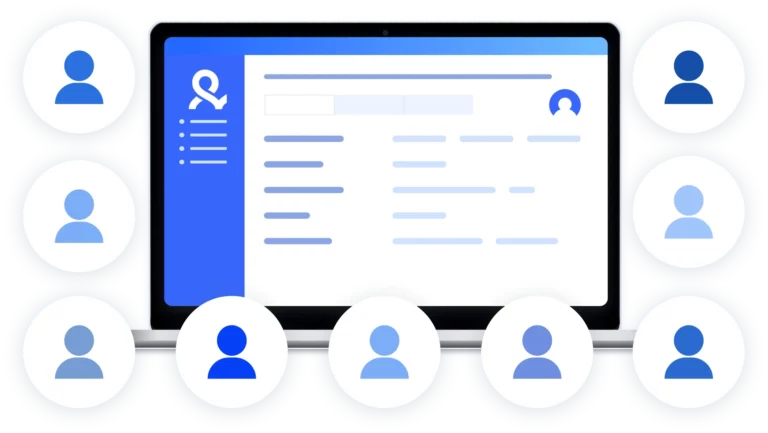
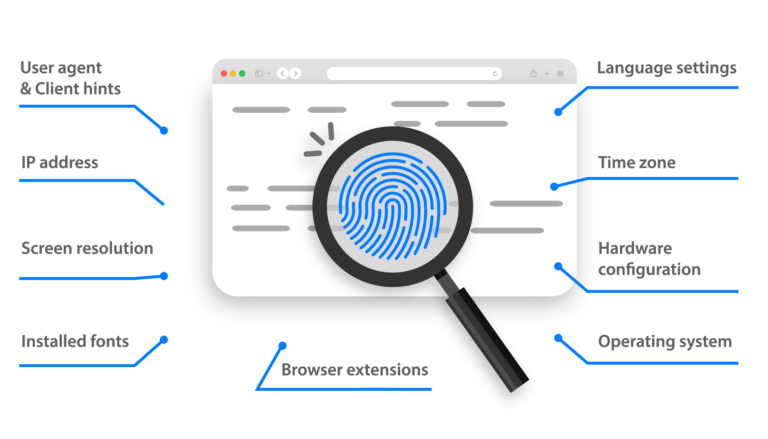
Automate multiple social media accounts from one browser by running each account in its own isolated profile with 55 fingerprint parameters. This setup keeps accounts separate and reduces repeated verification and CAPTCHA interruptions during automation.

Keep Automation Running Without Session Resets

Keep automation running without session resets

Automation breaks when sessions reset and platforms see every run as a new device. Persistent browser profiles keep cookies, local storage, and login history intact, so automated actions continue from the same trusted session instead of starting over. This allows long-running workflows to pause, resume, and scale without triggering extra checks or account reviews.

Connect automation to your existing tooling

Connect automation to your existing tooling

Social media automation works best when it connects to the tools already running your workflows. Existing scripts for logins, outreach, or engagement can be reused without rebuilding setups, allowing automation to scale across multiple social media accounts while keeping full control over timing and actions.

Run automation with built-in residential IPs

Run automation with built-in residential IPs

Automation runs more reliably when each account uses a real residential connection. Built-in residential IPs provide access to over 30 million IPs across around 150 countries, allowing automation sessions to stay consistent with their browser profiles. This removes the need for external proxy tools and reduces location-based checks during automation.

Try Multilogin Risk-Free — Just €1.99!

Run multiple accounts with zero bans or blocks. Start your 3-day trial and test everything for less than a coffee.
  • 3-day access to Multilogin

  • 5 cloud or local profiles

  • 200 MB proxy traffic included

  • 3-day access to Multilogin

  • 5 cloud or local profiles

  • 200 MB proxy traffic included

What is antidetect browser?

An antidetect browser is a browser environment designed to run multiple accounts without linking them together. It creates separate browser profiles, each with its own fingerprint, cookies, storage, and device signals, so every session looks like a different real user. In social media automation, antidetect browsers are used to keep accounts isolated while actions are automated, reducing flags, repeated verifications, and account bans.

Антидетект браузер

Why you need an antidetect browser for social media automation

You need an antidetect browser for social media automation because platforms track more than actions—they track the environment behind them. When multiple automated accounts share the same browser, device signals, or session data, they get linked and flagged quickly. An antidetect browser isolates each account into its own environment, allowing social media automation to run at scale while keeping sessions consistent and reducing bans.

Multilogin features for social media automation

Bypass Bot Protection

Our fingerprint masking technology is capable of modifying numerous browser fingerprints to avoid detection.

An icon representing High Load Supported feature of Multilogin.

Integration with Selenium, Postman, Playwright, and Puppeteer

Automate data extraction with popular browser automation drivers all while keeping them invisible to anti-automation bots.

Residential Rotating Proxies

Gain access to premium residential proxy nodes in 1400+ cities across 150+ countries with your Multilogin subscription.

Fingerprint Adjustment to Proxies

Fingerprint adjustment ensures that all browser fingerprints match the proxy’s location, enhancing anonymity.

Supports for All Proxy Types

Use our proxies or bring your own, Multilogin supports all proxy types.

Data Sync Over VPS

Use our cloud profiles to synchronize browser data across multiple VPS instances effortlessly.

Fully Featured Browsers

Unlike headless browsers that websites can easily detect, our browsers mimic real user activity, preventing restrictions by websites.

Easy Dockerization

You can collaborate on browser profiles and easily share passwords, cookies, and session progress with team members.

How to start social media automation with Multilogin

Enjoy the freedom to automate social media accounts from anywhere, at any scale.

Step 1 of how to use Multilogin

Sign up

Register using a verified email address

Step 2 of how to use Multilogin

Choose your plan

Select from various subscription plans tailored to your business needs

Step 3 of how to use Multilogin

Download Multilogin agent

Available for Windows, Mac, and Linux. It automatically installs two antidetect browsers on your machine, optimized and pre-configured for scraping tasks

Step 4 of how to use Multilogin

Access the Multilogin dashboard

Start creating and managing antidetect browser profiles

Step 5 of how to use Multilogin

Create a social media script

Write a script with your developers or get in touch with us for personalized support

Most awarded antidetect browser

Kinza awards for Multilogin.
Conversion club badge for Multilogin.
Mask group badge for Multilogin
Startup 2019 awards badge for Multilogin
badge for Multilogin
Best Value Software 2022 badge for Multilogin
High performer 2024 badge for Multilogin
Leader 2024 badge for Multilogin
Best support 2024 badge for Multilogin
Easiest to do business with 2024 badge
SourceForge top performer 2023 badge
GetApp user reviews badge

Watch the Multilogin Demo

Watch our 10-minute demo to see how Multilogin can simplify creating and managing multiple accounts without the risk of getting banned. Just enter your first name, last name, and email below, and we’ll send the demo video straight to your inbox.
Name
Last Name
Email *
Image of locked video for Multilogin demo preview

What is social media automation and why do teams rely on it?

Social media automation is the practice of running social media actions through software instead of doing everything by hand. That includes logging into accounts, switching profiles, sending messages, visiting pages, or collecting public data.

For small setups, automation is about saving time. For agencies and lead generation teams, it’s about survival. Once you manage more than a few accounts, manual work stops being realistic. Mistakes happen. Accounts get mixed. Logins overlap. Platforms notice.

Social media automation exists because platforms watch patterns, not intent. If the same device, browser, or IP keeps showing up behind different accounts, it doesn’t matter how careful you are. Accounts get flagged anyway. 

That’s where social media automation tools come in. Not to cheat systems, but to run operations in a controlled, repeatable way. 

Why does social media automation break so often

Most people don’t fail because their scripts are bad. They fail because the environment looks wrong. 

Here’s what platforms track behind the scenes: 

  • Device consistency 
  • IP location stability 
  • Session history 
  • Behavior timing 

When automation runs without isolation, all accounts start to look related. One warning turns into a ban. Then the rest follow. 

If you’ve ever logged into multiple accounts from the same browser and watched them disappear one by one, you’ve already seen this pattern. 

Automation without isolation doesn’t scale. It collapses. 

What do social media automation tools actually do

At their core, social media automation tools separate what you do from how you appear while doing it. 

A reliable setup allows you to: 

  • Run each account in its own browser identity 
  • Keep cookies and session history intact 
  • Assign a stable IP per account 
  • Automate actions without resetting environments 
  • Reuse accounts safely over time 

This is why advanced teams don’t rely on scheduling tools alone. Scheduling handles content. Automation handles accounts. 

How do teams automate social media without getting banned

The difference is not speed. It’s structure. 

A working automation stack usually looks like this: 

  1. Each account runs inside its own isolated browser profile 
  2. That profile keeps its fingerprint and storage between sessions 
  3. A clean residential IP stays consistent with the profile 
  4. Automation scripts interact with real browsers, not fake ones 
  5. Actions follow human-like pacing, not machine bursts 

This is where tools like Multilogin are used. Not as an automation tool by themselves, but as the execution layer that makes automation sustainable. 

Instead of running scripts directly in headless environments, teams run them inside persistent browser profiles that behave like real users. When something pauses, resumes, or changes, the account doesn’t reset. It continues. 

That difference keeps accounts alive. 

How can you automate lead generation for social media marketing agencies

Lead generation automation is one of the fastest ways agencies hit platform limits. 

Outreach looks simple on paper: visit profiles, follow, send messages, track replies. In practice, it’s repetitive and sensitive. Small mistakes compound fast. 

A typical automated lead generation flow includes: 

  • Logging into multiple client accounts 
  • Visiting target profiles 
  • Sending connection requests or DMs 
  • Tracking engagement or replies 
  • Switching between brands or regions 

Without isolation, agencies burn accounts weekly. 

With proper automation, agencies run each client inside a separate environment. Profiles don’t leak. Sessions don’t overlap. Teams can pause campaigns without losing progress. 

This is where Multilogin fits naturally into agency workflows. It allows agencies to separate client identities, assign automation safely, and scale without rebuilding setups every month. 

What activities are best suited for social media automation

Automation works best for operational actions, not creative ones. 

High-value automated activities include: 

  • Account logins and session management 
  • Switching between multiple brands or clients 
  • Profile visits and engagement routines 
  • Outreach and follow-up flows 
  • Data collection from public profiles 
  • Account warm-up actions 

Content strategy still needs humans. Infrastructure does not. 

Who is social media automation actually for

This page is not written for casual users. 

Social media automation is built for: 

  • Lead generation teams 
  • Growth and operations managers 
  • Businesses managing multiple brands or regions 

These readers already tried manual workflows. They already lost accounts. They’re looking for control, not shortcuts. 

Who should not use social media automation tools

Automation is not a fix for bad strategy. 

It’s not ideal for: 

  • Solo creators managing one account 
  • Influencers looking for scheduling tools 
  • Users chasing engagement shortcuts 
  • People expecting automation to replace thinking 

Automation multiplies systems. If the system is broken, automation just makes it fail faster. 

What makes social media automation sustainable long term

ustainability comes from consistency, not volume. 

Tools that last share a few traits: 

  • Real browser environments, not stripped-down ones 
  • Persistent sessions instead of resets 
  • Fingerprints aligned with IP location 
  • Support for automation frameworks like Playwright or Selenium 
  • The ability to pause, resume, and scale without rebuilding 

Multilogin is often chosen because it focuses on account stability, not just automation speed. Teams don’t have to keep starting over. They maintain environments instead. 

Final thought

Social media automation is not about doing more. It’s about doing the same things without breaking accounts. 

If you automate and accounts disappear, the problem isn’t the script. It’s the setup. 

Build systems that look real, behave consistently, and survive over time. That’s how automation stops being risky and starts being useful. 
FAQ

Social media automation is the process of running actions on social platforms using software instead of manual work. This includes logging into accounts, switching profiles, sending messages, visiting pages, or collecting public data. 

It’s not just about saving time. Automation is used when managing multiple accounts becomes risky or impossible to do by hand. Platforms track patterns, and manual workflows break once scale increases. 

Yes, it can; if it’s done without proper setup. Most bans don’t happen because of automation itself. They happen because multiple accounts appear to come from the same device, browser, or IP. 

When automation runs in shared or reset environments, platforms link accounts together. Once one account is flagged, others usually follow. Automation becomes safe only when each account is properly isolated and stays consistent over time. 

Platforms don’t just look for bots. They look for inconsistencies. They track browser fingerprints, device signals, IP location, session history, and behavior timing. If these signals don’t match or repeat across accounts, automation stands out. 

That’s why running scripts alone is not enough. The environment behind the script matters more than the script itself. 

Social media automation tools are used to manage operational tasks at scale, not creative work. 

Common use cases include: 

  • Managing multiple accounts safely 
  • Running outreach or engagement workflows 
  • Switching between client or brand accounts 
  • Collecting public data 
  • Keeping sessions stable across campaigns 

They are built for teams that need structure, not shortcuts. 

Agencies automate lead generation by separating each client account into its own environment and running outreach workflows from there. 

A typical setup includes isolated browser profiles, stable IPs, and automation scripts that handle profile visits, messages, and follow-ups. This prevents client accounts from being linked and allows campaigns to pause or resume without losing progress. 

Tools like Multilogin are often used as the execution layer, ensuring automation runs inside real, persistent browser profiles instead of fragile setups. 

Yes, proxies are required for automation at scale. Without them, all automated sessions appear to come from the same location, which quickly triggers restrictions. 

Residential proxies are commonly used because they look like real user connections. What matters most is consistency—each account should keep the same IP profile over time, not rotate randomly. 

Yes, proxies are required for automation at scale. Without them, all automated sessions appear to come from the same location, which quickly triggers restrictions. 

Residential proxies are commonly used because they look like real user connections. What matters most is consistency—each account should keep the same IP profile over time, not rotate randomly. 

For multi-account automation, yes. An antidetect browser allows each account to run in its own browser identity with unique fingerprints, cookies, and storage. 

This prevents accounts from being linked even when automation runs in parallel. Instead of resetting environments every time, teams maintain stable sessions that age naturally. This is where Multilogin is commonly used—teams automate through it, not around it. 

Thank you! We’ve received your request.
Please check your email for the results.
We’re checking this platform.
Please fill your email to see the result.

Multilogin works with amazon.com