






Deleting an Instagram account is permanent. Once the 30-day window closes, the username, posts, followers, and messages are gone for good — there’s no undo. So before you start, it’s worth being sure you want deletion rather than a temporary deactivation.
This guide covers every method: on the app, on a computer, without a password, and for business accounts. It also covers what happens to your data and how long the process actually takes.
If you manage multiple Instagram accounts and want to remove just one of them without losing access to the others, the managing multiple Instagram accounts guide covers that workflow separately.
Delete vs deactivate — which one do you actually want?
These are two very different actions, and Instagram doesn’t make the distinction obvious.
- Deactivating hides your account temporarily. Your profile, posts, and followers are preserved. You can reactivate any time by logging back in. It’s the right choice if you want a break without losing everything.
- Deleting is permanent. Instagram gives you a 30-day grace period during which you can log back in to cancel. After 30 days, the account and all its content are deleted from Meta’s systems — though it can take up to 90 days for all data to be fully cleared from backups.
A few situations where people think they want deletion but might want something else:
- You’re getting an Instagram shadow ban and want to start fresh — deactivating briefly or switching to a new account often makes more sense than deleting.
- You want to remove an account you added to your phone — that’s “removing an account from the app” not deleting it from Instagram entirely.
- You’re locked out and frustrated — the process for regaining access is different from deletion.
If deletion is what you need, here’s how to do it.
How to delete your Instagram account (the standard way)
Instagram moved account deletion into Meta’s Account Center in 2023. The old direct deletion link no longer works reliably — you need to go through Account Center.
On the Instagram app (iPhone or Android)
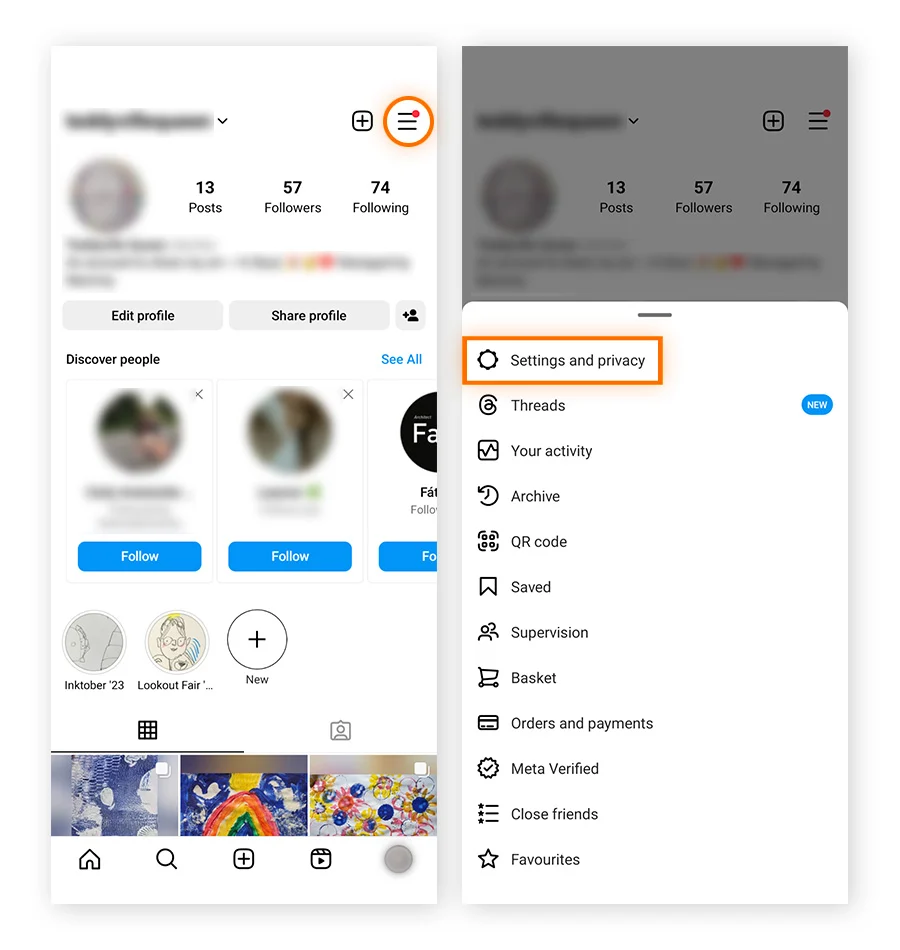
- Open the Instagram app and make sure you’re logged into the account you want to delete.
- Tap your profile icon at the bottom right.
- Tap the three lines (hamburger menu) in the top right corner.
- Tap Settings and privacy.
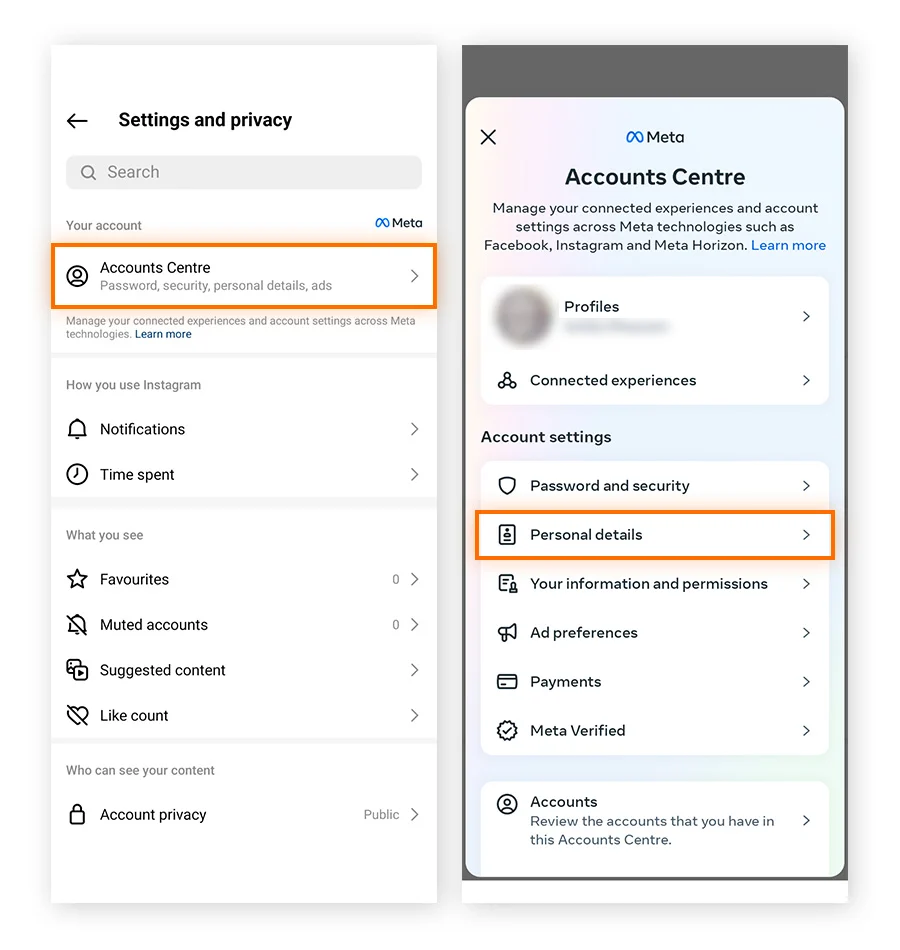
- Scroll down and tap Account Center (this takes you to Meta’s central account management).
- Tap Personal details.
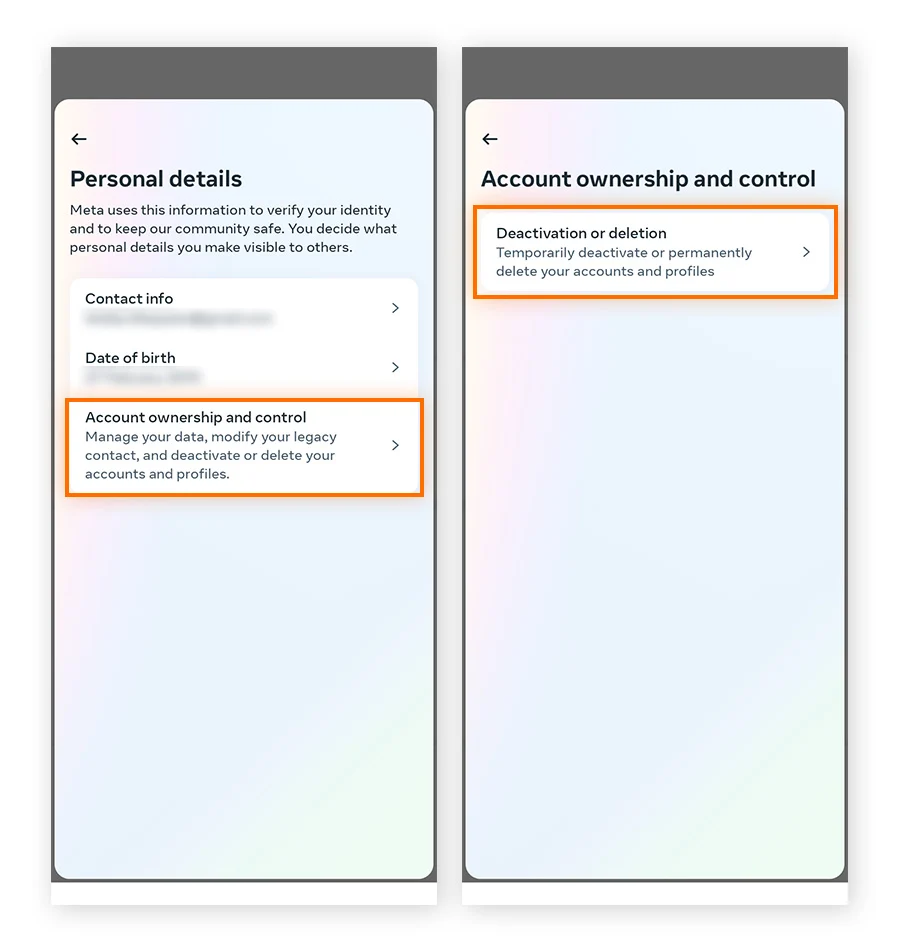
- Tap Account ownership and control.
- Tap Deactivation or deletion.
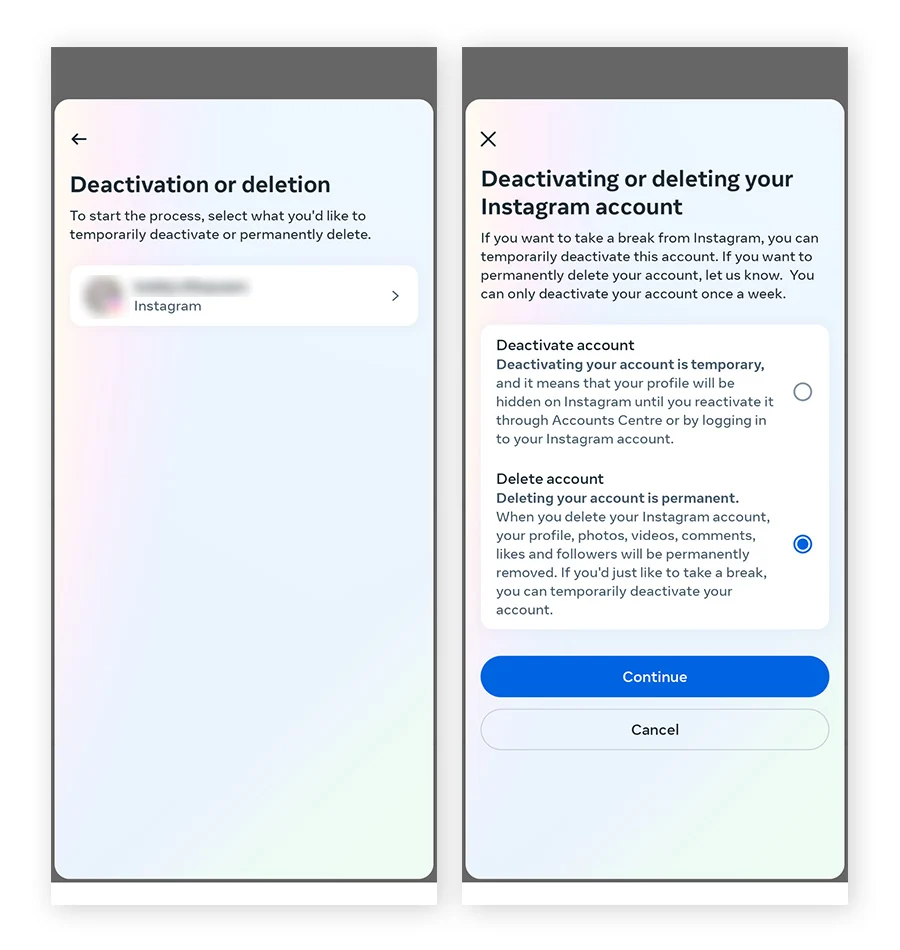
- Select the Instagram account you want to delete (if you have multiple linked accounts).
- Tap Delete account, then follow the prompts to confirm.
Instagram will ask you to enter your password and select a reason for leaving. After confirming, your account enters the 30-day pending deletion window.
On a computer or browser
- Go to accountscenter.instagram.com or navigate to instagram.com → Settings → Account Center.
- Log in if prompted.
- Click Personal details.
- Click Account ownership and control.
- Click Deactivation or deletion.
- Select the account to delete.
- Choose Delete account and follow the confirmation steps.
The same 30-day rule applies. If you log back in within 30 days, the deletion is cancelled automatically.
Quick reality check: Some third-party tutorials still point to instagram.com/accounts/remove or other direct URLs. These redirect to Account Center now. If a guide is telling you to use a direct link and it’s not working, the Account Center path above is the correct route in 2026.
How to delete an Instagram account without your password
If you’ve lost access to your password, you can’t complete the standard deletion flow — it requires password confirmation.
Your options:
- Reset your password first. On the login screen, tap “Forgot password?” and follow the recovery flow. Instagram can send a reset link to your email or phone number. Once you’re back in, complete the deletion steps above.
- If you’ve lost access to your email and phone too, Meta’s support process for account recovery is the only route. Go to instagram.com/hacked or use the “Get more help” option on the login screen. This process can take several days and isn’t guaranteed if you can’t verify identity.
- If the account belongs to a deceased person, Instagram allows immediate family members to request deletion by submitting a special request via Meta’s Help Center. You’ll need to provide proof of death and your relationship to the account holder.
One thing worth noting: if you’re trying to delete an account because it was hacked and is now associated with a different email, understanding Instagram IP bans and how to avoid them can help you understand what happened to the account’s access credentials.
How to delete an Instagram business account
Deleting an Instagram business account works the same way as a personal account — through Account Center. The account type (personal, creator, business) doesn’t change the deletion process.
However, a few things to check first:
- If your Instagram business account is connected to a Facebook Page, the Facebook Page itself won’t be deleted. Only the Instagram account is removed.
- If the account has an active Instagram Shopping setup or ads running, pause those first. Active campaigns connected to a deleted account can cause billing issues on your Meta ad account.
- If the account is managed through a Meta Business Manager, make sure any team members who have admin access are aware before you proceed.
The deletion path is the same: Account Center → Personal details → Account ownership and control → Deactivation or deletion.
How long does it take for Instagram to delete your account?
The timeline works like this:
- Day 0: You confirm deletion. The account goes into a 30-day pending state.
- Days 1–30: Your profile is hidden from other users. You can cancel deletion any time by logging in.
- Day 30: If you haven’t logged back in, permanent deletion begins.
- Up to 90 days after day 30: Instagram’s systems remove your data from active servers and begin clearing it from backups. Some data may persist in backup systems for up to 90 additional days after the 30-day window.
So the full data removal process can take up to 120 days in total. This is normal and is covered in Instagram’s data policy — it’s not a sign anything went wrong.
Your username becomes available again after the permanent deletion is complete, though there’s no exact timeframe for when that happens.
Managing multiple Instagram accounts — what to do instead of deleting
If you’re considering deleting an account because it’s one of several you manage and it’s become a liability — getting flagged, restricted, or linked to your main account — deletion might not fix the underlying problem.
The reason accounts get linked, restricted, or flagged isn’t usually the account itself. It’s the setup behind it: shared device fingerprints, the same IP address, overlapping session data. Remove the account and rebuild on the same setup, and the new one runs into the same issues.
A common mistake teams make: running multiple Instagram accounts from the same phone or the same browser, switching between profiles. Instagram’s detection doesn’t just look at the login — it reads device signals, network patterns, and behavioral data across sessions. That’s what links accounts even when the usernames and emails are completely different.
The right approach is proper multi-account management — each account gets its own isolated identity. That means a unique device fingerprint, a separate IP, and no shared session history.
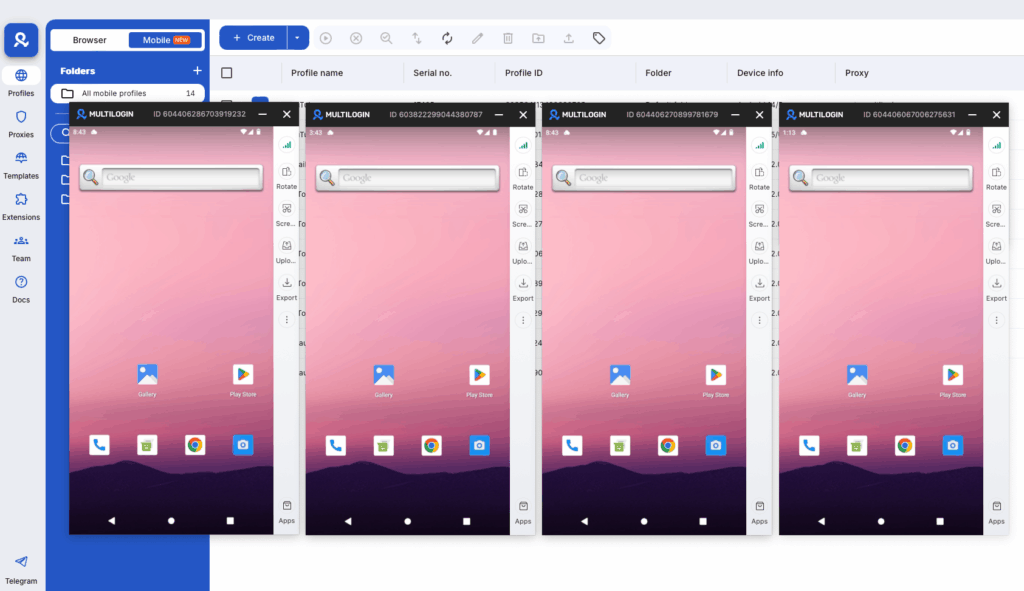
Multilogin handles this at the infrastructure level. Cloud phones run real Android environments with genuine hardware identifiers — IMEI, Android ID, MAC address — unique per device. Each account behaves like a separate physical phone. There’s no fingerprint bleed between sessions.
For anyone running operations at scale, the antidetect browser for Instagram covers the browser-side approach for web-based account management. And if you’re setting up mobile accounts specifically, how to set up multiple Instagram accounts with cloud phones walks through the full Multilogin workflow.
New accounts also need a warmup period before they’re ready for active engagement. Warming up a new Instagram account covers the right sequence — skipping this step is one of the fastest ways to get a fresh account flagged.
If you want to create multiple Instagram accounts safely, the setup guide covers what you need before you start. And for teams managing accounts across multiple platforms, managing multiple social media accounts covers the broader workflow.
For long-term Instagram ban prevention, the infrastructure matters more than any individual account action.
Try Multilogin now — manage multiple Instagram accounts from one dashboard, each with its own isolated device identity and proxy. No account linking, no shared fingerprints. Plans start from €5.85/month.
Need to manage multiple Instagram accounts? Try Multilogin Cloud Phones.
Frequently asked questions About How to Delete an Instagram Account
After you confirm deletion, Instagram gives you a 30-day window to cancel by logging back in. After 30 days, permanent deletion begins. Full data removal from Instagram’s systems and backups can take up to 90 additional days — so up to 120 days total from the moment you confirmed.
Not directly — the deletion flow requires password confirmation. You’ll need to reset your password first using Instagram’s recovery flow (via email or phone number), then proceed with the standard deletion steps. If you’ve lost access to both your email and phone number, Meta’s account support process is the only option.
Your profile, posts, stories, reels, comments, messages, and followers are all removed. The process starts after the 30-day pending window and can take up to 90 days to complete across Instagram’s servers and backups. Your username may become available to others once deletion is complete.
You can recover it within the 30-day window by logging back in — this cancels the deletion automatically. After 30 days, recovery is not possible. The account and all its data are permanently gone.
Go to Settings and privacy → Account Center → Personal details → Account ownership and control → Deactivation or deletion. Select the account, choose “Delete account,” and confirm. This works the same on both iPhone and Android.
Instagram doesn’t delete accounts based on a specific number of reports. Reports trigger a review by Instagram’s moderation team, who decide whether the account violates policies. There’s no public threshold. Reporting is not a reliable method for getting an account removed — it depends entirely on whether the content actually violates community guidelines.
Yes, but each account needs its own isolated device environment. Accounts managed from the same device and IP get linked by Instagram’s systems, which creates cascade risk across all of them. Multilogin Cloud Phones give each account its own real Android device with its own IP, enabling independent growth for each account.


