






Sprout Social is one of the most powerful social media management platforms available in 2026. It is also one of the most expensive, and for many teams, the price is the entire conversation.
The honest answer to whether Sprout Social is worth it: yes, for mid-market and enterprise teams managing 10+ social accounts with complex workflows and reporting needs. No, for solo creators, freelancers, and early-stage startups where the cost per user becomes unjustifiable fast.
This review covers exactly what you get, what it costs, where it falls short, what real users say, and which alternatives make sense depending on your situation. If you are comparing Sprout Social to other tools for managing multiple accounts, also see how to manage multiple social media accounts and Claude AI for social media managers for the full operational picture.
What Is Sprout Social?
Sprout Social is a cloud-based social media management platform founded in 2010 and publicly traded on Nasdaq under the ticker SPT. It consolidates publishing, scheduling, engagement, analytics, social listening, and customer care across 10 or more social networks including Instagram, Facebook, X, LinkedIn, TikTok, Pinterest, YouTube, Threads, and Bluesky.
The platform serves approximately 30,000 brands, primarily mid-market and enterprise organizations. At its core, Sprout Social is built for marketing teams that need a shared content calendar, a unified inbox for customer messages, exportable reports for leadership, and team-based workflows with approvals and role assignments.
It is not designed for solo creators or very small teams. The per-user pricing model makes that clear from the start.
Is Sprout Social Trustworthy?
Yes, Sprout Social is a legitimate, well-established platform. It has held G2’s Best Software Award for 10 consecutive years, has over 5,700 verified reviews on G2 where it ranks number one in 40 of G2’s 2026 Winter Reports including Social Media Listening Tools and Social Media Analytics, and has a 4.4 out of 5 rating on both G2 and Capterra.
The trustworthiness concern that does appear consistently in reviews is around sales and contract practices. Sprout Social holds a 2.0 score on Trustpilot from 79 reviews. The dominant complaints there are about contract lock-in, auto-renewal traps, and difficult cancellation processes.
One reviewer described being signed up for a 24-month contract by a sales representative who indicated cancellation would be possible at any time. Another described receiving a renewal notification during a trip with only a 14-day opt-out window.
The platform itself is legitimate and well-regarded. The sales and contract practices warrant caution. Read any contract carefully before signing, understand the renewal terms completely, and get cancellation policies in writing.
How Much Does Sprout Social Cost in 2026?
Sprout Social’s pricing is per user per month, and it scales quickly.
The Standard plan starts at $199 per user per month and is limited to 5 social profiles. For a typical social presence covering Facebook, Instagram, X, LinkedIn, and YouTube, that is the entire allotment with zero room for expansion.
The Professional plan costs $299 per user per month and unlocks more profiles and features. The Advanced plan costs $399 per user per month and adds API access, customer care automation, and sophisticated analytics. Enterprise pricing is custom and requires contacting the sales team directly.
For a 10-person team on the Advanced plan, the annual cost is $47,880. For a 20-person team it is $95,760. Premium features like Social Listening, Premium Analytics, and Employee Advocacy require additional purchases on top of those plan costs.
A 30-day free trial is available with no credit card required, which gives full access to test all features before committing to any plan.
Can you use Sprout Social for free permanently? No. The free trial ends after 30 days and there is no ongoing free tier.
What Makes Sprout Social Expensive?
The pricing criticism is the single most consistent thread across every review platform. Users on G2 praise the features. Users on Trustpilot criticize the pricing. Capterra users note that “the platform can be expensive for small teams.”
Even positive reviewers frequently include statements like “it’s a great product, the price is just an undeniable flaw” and “I would say it’s the best social media management app but only if you have a big pocket.”
The reason Sprout Social is expensive comes down to its positioning. It is built as an enterprise-grade platform and priced accordingly. The features — particularly the Smart Inbox, social listening, customizable analytics, and workflow automation — genuinely justify the cost for large teams that use them fully. For smaller teams that only use 20 or 30 percent of the platform’s capabilities, the cost-to-value ratio feels poor.
The per-seat pricing model also compounds rapidly. Adding a single team member adds $199 to $399 per month to the bill. For agencies scaling their teams, this creates a real operational ceiling.
Core Features: What Sprout Social Actually Does
- Smart Inbox. Every comment, DM, mention, and message from every connected platform lands in one unified stream. No tab switching, no missed messages. You can filter, tag, assign, and respond without leaving the dashboard. For customer care teams managing high volume across multiple platforms, this feature alone saves hours per week.
- Publishing and scheduling. A collaborative content calendar shows everything scheduled across all profiles. The Sprout Queue distributes content automatically at optimal times even when you are offline. One-click pause stops all scheduled content instantly during a crisis without requiring you to delete individual posts across multiple apps.
- Analytics and reporting. Sprout’s reporting is consistently described by users as best-in-class. Customizable dashboards, presentation-ready exports, and deep analytics on engagement, audience demographics, and campaign performance. Monthly, quarterly, and annual reports are easy to generate and easy to share with clients or leadership.
- Social listening. Monitoring brand mentions and industry conversations beyond direct notifications. Competitive analysis tools track what competitors are posting and how their content performs. Sentiment analysis is included on higher tiers.
- Team collaboration. Role-based access controls, internal notes, task assignment, and content approval workflows. Teams can work on the same accounts without overlap, and approval processes ensure content goes through proper review before publishing.
- AI features. Sprout introduced Trellis, an AI agent for social listening, in 2026. The platform also uses AI to suggest optimal posting times, help write captions, and surface trending topics. These features are integrated throughout the workflow rather than bolted on as a separate add-on.
Sprout Social for Agencies
For social media agencies managing multiple clients, Sprout Social has specific strengths and specific pain points.
The strengths are real. The Smart Inbox handles multiple client accounts cleanly from one view. Reports are client-ready and easy to export with client branding. Team collaboration features work well for agencies with multiple team members on the same accounts. The approval workflow is specifically useful for getting client sign-off before publishing.
The pain points are also real. The per-seat, per-profile pricing model scales against agencies as they grow. Adding clients means adding profiles, which means moving to higher pricing tiers. Adding team members means adding seats, which compounds the cost. Many agencies find Sprout Social sustainable when they are mid-size but restrictive when they scale to larger client rosters.
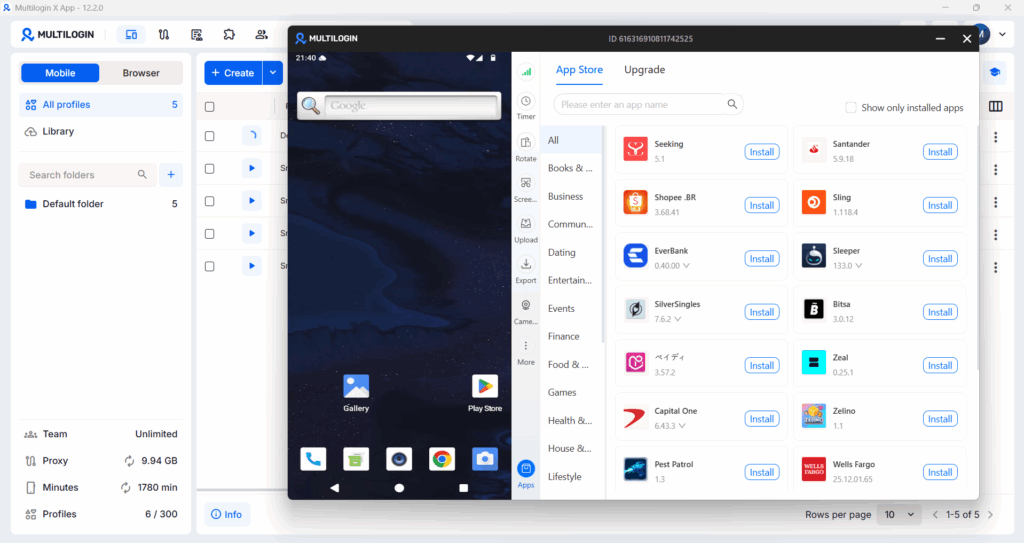
For the account isolation side of multi-client social media management — ensuring that a ban or flag on one client’s account does not affect other clients — Sprout Social is a publishing and analytics tool, not an infrastructure tool. The device-level isolation that protects multiple accounts from being linked through shared signals requires a separate layer. Multilogin’s Cloud Phone provides exactly that: each client account runs on its own isolated Android device with its own residential IP and its own hardware fingerprint.
Sprout Social handles the content and reporting workflow. Multilogin handles the account environment. For agencies managing clients at scale across TikTok, Instagram, LinkedIn, and Facebook, both layers matter equally.
Is Sprout Social Easy to Use?
Yes. New users consistently describe the interface as clean and intuitive. G2 and Capterra reviewers give it high marks for ease of use alongside its feature depth, which is uncommon at the enterprise tier where platforms often trade usability for functionality.
The learning curve exists but is manageable. Users note that new team members can typically navigate the core features within 15 minutes of setup. More advanced features like custom report building, social listening configuration, and automation workflows take more time to master, but the basics are immediately accessible.
What Are the Alternatives to Sprout Social?
- Hootsuite is the closest competitor in terms of scale and features. Generally slightly cheaper than Sprout, with stronger scheduling capabilities. Sprout Social’s analytics depth and Smart Inbox are widely considered superior.
- Agorapulse is the most direct functional alternative to Sprout at a lower price point. Strong social inbox, good reporting, more agency-friendly pricing structure.
- Buffer has a free plan for up to 3 channels and paid plans starting around $6 per month per channel. Best for small teams or solo creators who primarily need scheduling without the enterprise features.
- Later is visual-first and best when Instagram is the primary platform. Significantly cheaper than Sprout with strong visual planning tools.
- Zoho Social starts at $10 per month. Best budget alternative for small businesses managing fewer social accounts.
- Metricool is a strong mid-tier option with solid analytics at significantly lower pricing than Sprout.
The right choice depends on team size, budget, and how many of Sprout’s advanced features you will actually use. If you will use the Smart Inbox, social listening, custom analytics, and team workflows fully, Sprout Social is worth the cost. If you primarily need scheduling and basic analytics, more affordable tools deliver 80 percent of the value at 20 percent of the price.
Need to manage multiple social media accounts? Try Multilogin Cloud Phones.
Frequently asked questions About Sprout Social Review
Yes as a platform — it is well-established, publicly traded, and consistently rated highly by enterprise users. Exercise caution around contract terms and auto-renewal clauses, which have generated significant negative feedback from users who felt locked into terms they did not expect.
Yes. There is a 30-day free trial but no permanent free tier. Paid plans start at $199 per user per month.
Standard plan: $199 per user per month. Professional plan: $299 per user per month. Advanced plan: $399 per user per month. Enterprise: custom pricing. All plans are priced per user, so team costs multiply quickly.
You can use it free for 30 days with no credit card required. After the trial, a paid plan is required.
Scheduling and publishing social media content across multiple platforms, managing customer messages and comments from a unified inbox, generating analytics reports for clients or leadership, monitoring brand mentions and industry conversations through social listening, and coordinating team workflows with approvals and task assignment.


