






If you watch someone’s TikTok Story inside the app, your username appears in their viewer list. There is no in-app “ghost mode” for Stories.
Third-party “anonymous TikTok story viewer” sites do exist and some genuinely pull public Story media, but they range from ad-heavy to outright malicious, and none of them work on private accounts.
The only reliable, safe method is a separate research identity: a secondary account running in an isolated mobile profile or cloud phone
If you do TikTok research daily, run it in a separate mobile profile or cloud phone so your main account stays clean.
How TikTok story views work (what TikTok actually shows)
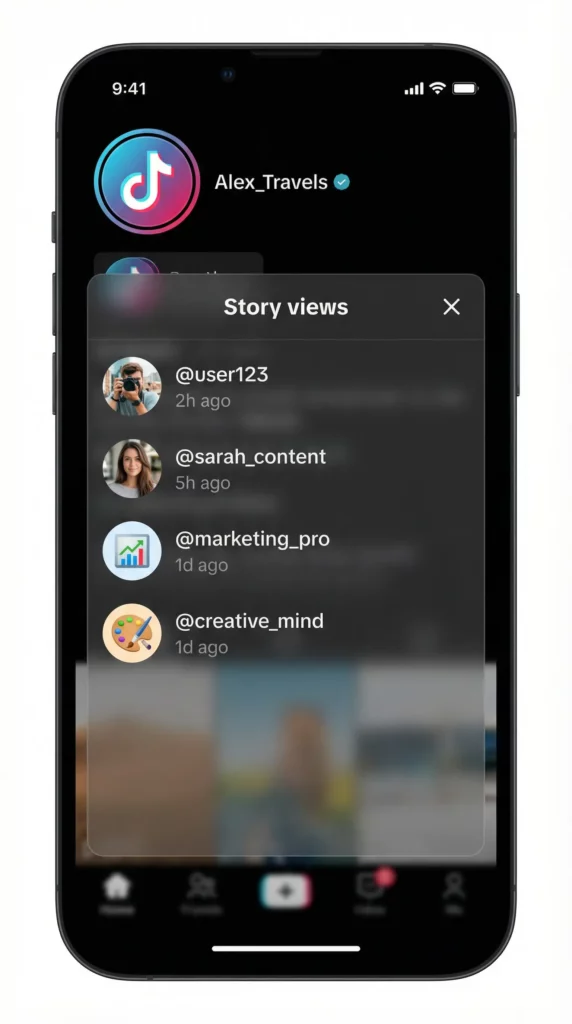
When you post a story on TikTok, it is available for 24 hours. During that time, you can see who has viewed it. A “view” is counted when someone watches your story. TikTok provides a list of viewers for each story, which only you can see. This list is not public.
While the Story is live, you can open it and swipe up to see the list of accounts that watched it. That list is private to you. Your followers cannot see it, and TikTok does not publish it anywhere.
Two things people get wrong here:
The viewer list is temporary. Once the 24 hours are up, the Story moves to your archive and the per-viewer list is no longer reliably accessible.
View counts lag. TikTok’s counters update in batches, not in real time. A gap of a few minutes to a few hours between a view happening and appearing in your list is normal, and it gets worse on a weak connection or during traffic spikes.
The three “view history” settings everyone confuses
This is where almost every article on this topic gets it wrong, and where most of the confusion in search comes from. TikTok has three separate view-tracking systems. They are not connected, and turning one off does nothing to the others.
| Setting | What it tracks | Is it mutual? | Who has access |
|---|---|---|---|
| Story view history | Who watched your 24-hour Stories | Story-specific; viewers appear in the creator’s list | Standard Story feature |
| Post view history | Who watched your regular feed videos | Yes — mutual. If you turn it on, people you follow who also have it on can see that you viewed their posts | Only accounts 16+ with fewer than 5,000 followers |
| Profile view history | Who visited your profile page | Yes — mutual, opt-in on both sides | Available in Settings → Privacy → Profile views |
The critical detail, straight from TikTok’s own documentation: your Story view history is separate from post view history and is not affected by it.
What this means in practice:
- Turning off Profile View History does not hide you from Story viewer lists. This is the single most common mistake.
- Turning off Post View History does not hide you from Story viewer lists either.
- There is no in-app toggle that lets you watch someone’s Story invisibly.
Also worth knowing about post view history specifically: even with the setting off, your likes and comments still register as views to the other person. And if you don’t follow someone but you like or comment on their post, you show up in their view history regardless of your settings.
Can you see who viewed your TikTok story?
Short answer: yes, if you watch it in the app.
Longer answer depends on what you did. Here is the breakdown:
| Action | Do they know it was you? |
|---|---|
| Watching a public Story in the app | Yes — your username joins the viewer list |
| Watching a Story from a private account you follow | Yes — same list |
| Liking a Story | Yes — plus it’s a visible interaction |
| Replying or reacting to a Story | Yes — arrives as a direct message |
| Tapping through to their profile from the Story | Yes, if both of you have profile view history on |
| Following them after watching | Yes — obvious signal |
| Viewing their regular feed videos | Only if post view history conditions are met |
| Viewing their profile without opening a Story | Only if profile view history is on for both |
| Screenshotting a Story | No — TikTok does not notify for Story screenshots |
Can someone see if you viewed their TikTok story?
Yes, if you view someone’s TikTok story, they will be able to see that you have viewed it. Your username will appear in their story viewer list. This is a key difference from simply viewing someone’s profile, which does not notify the user.
However, there are certain actions that will definitely expose your activity, such as:
- Liking a story
- Commenting on a story
- Replying to a story
- Following the user
- Tapping on their profile from the story
If you want to remain anonymous, you should avoid these interactions. Simply viewing a public story will add you to the viewer list, but it will not send a separate notification to the user.
Anonymous TikTok story viewer — what’s real vs what’s bait
Many websites and apps claim to be an “anonymous TikTok story viewer.” They promise that you can watch stories without the other person knowing. However, most of these are scams. They often lead to phishing attempts, where they try to steal your login information, or they may contain malware that can harm your device.
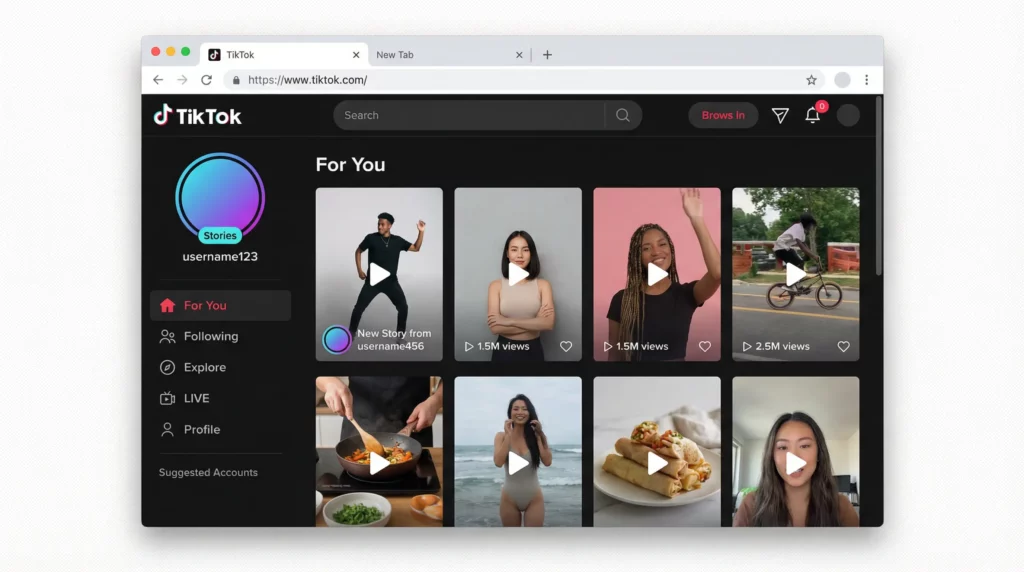
These fake viewer websites often fail because they cannot bypass TikTok’s security. They might ask you to complete surveys or download suspicious software, which are red flags. A safe approach to viewing stories more privately is to avoid these tools altogether. There is no legitimate way to view a private TikTok story anonymously.
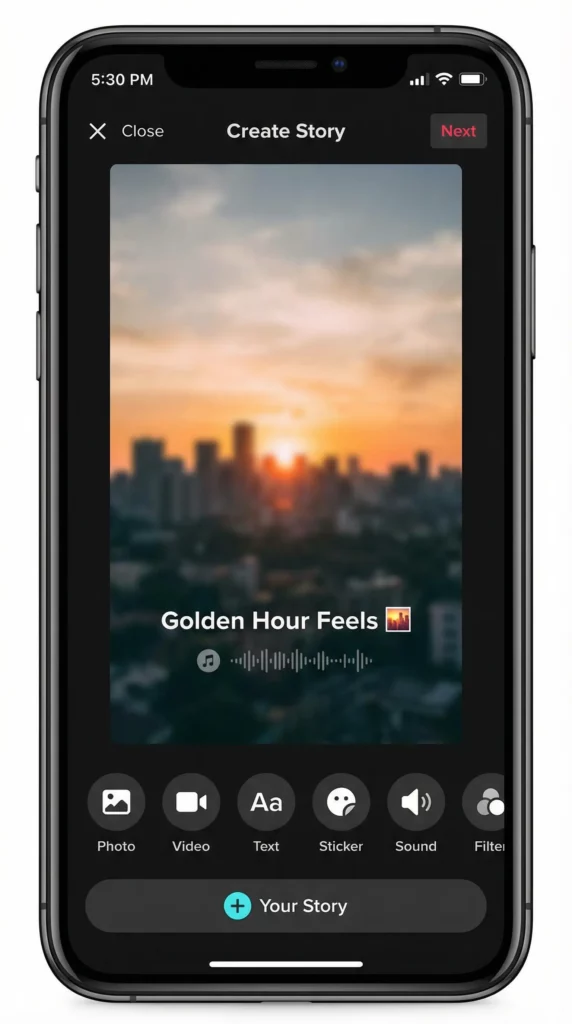
How to view TikTok stories more privately (safe methods)
If you want to view TikTok stories more privately, there are a few safe methods you can use that do not break any rules:
- Use a separate research account: Create a new TikTok account that is not linked to your personal information. You can use this account to view stories without revealing your main identity. Learn more about managing multiple TikTok accounts.
- Reduce accidental interactions: Be careful not to accidentally like, comment, or follow accounts when you are trying to be discreet.
- Keep your sessions clean: Avoid mixing your personal and research accounts in the same browsing session. This can help prevent TikTok from linking your accounts through browser fingerprinting.
Run a dedicated mobile profile for research so TikTok doesn’t mix your personals, clients, and competitors in one identity.
Why you can’t view TikTok stories on PC (and what to do instead)
Historically, TikTok stories were a mobile-only feature. This meant that you could not view them on the TikTok website on your computer. While TikTok has started to roll out story viewing on desktop, the experience is still not as seamless as on the mobile app.
Show Image
If you need to do TikTok research from your desktop, you can use a cloud phone. A cloud phone is a virtual mobile device that you can access from your computer. This allows you to use the TikTok mobile app in its native environment, giving you full access to all features, including stories. Discover more about browsing TikTok anonymously.
Use Multilogin cloud phones for app-first TikTok research without touching your personal device.
Best workflow for marketers and teams (research without getting flagged)
For marketers and teams that manage multiple TikTok accounts, it is crucial to have a workflow that keeps your accounts separate and avoids getting flagged for suspicious behavior. Here are some best practices:
- Separate mobile environments for each task: Use a dedicated Cloud Phone or mobile profile for each TikTok account you manage. This helps keep research, posting, and client workflows separated instead of mixing sessions, app data, and account activity in one device environment.
- Keep your device and session consistent: Use the same browser profile for each account every time you log in. This helps to build a consistent and trustworthy history with TikTok through proper device emulation.
- Avoid suspicious behavior patterns: Do not switch between accounts too quickly or perform actions that could be seen as spammy. Understanding TikTok shadow bans can help you avoid common mistakes.
If you manage multiple TikTok accounts, mobile profiles + cloud phones keep each one isolated and stable.


Run Unlimited Accounts Without Bans
Run your social media accounts on cloud phones & web browsers
Frequently Asked Questions About TikTok Story Viewer
Yes, you can see a list of users who have viewed your TikTok story by swiping up on the story. This feature is available to all TikTok users and is one of the main ways to track engagement on your stories.
When you swipe up, you will see a list that includes the username and profile picture of each viewer, along with a timestamp showing when they viewed your story. This list updates in real time as more people view your content. Keep in mind that this viewer list is only visible to you, the creator. Your followers cannot see who else has viewed your story.
Yes, TikTok shows the creator of the story a list of viewers. This is different from regular TikTok videos, where you can only see view counts and not individual viewer names. The story viewer list is a privacy feature that gives you insights into your audience without making that information public.
If you are managing multiple TikTok accounts for different clients or brands, you can use separate mobile profiles to keep each account isolated and prevent TikTok from linking them together based on device fingerprints.
Yes, the creator of the story will see your username in their viewer list if you watch their story. This is automatic and happens as soon as you view the story. There is no way to hide your view from the creator if you are logged into your account.
If you are doing competitor research or market analysis and want to avoid leaving a trace, consider using a separate research account that is not connected to your main profile. For professional researchers and agencies, using isolated mobile profiles ensures that your research activities do not get mixed with your client accounts or personal brand.
The only truly safe way to view a TikTok story anonymously is to use a separate, anonymous account that is not tied to your personal information. Avoid using fake viewer apps or websites that claim to let you view stories without being detected, as these are often scams designed to steal your login credentials or install malware on your device.
If you need to conduct research across multiple accounts without cross-contamination, tools like Multilogin allow you to run each account in its own isolated mobile profile with unique device fingerprints. This keeps your research clean and prevents TikTok from linking your accounts together.
Need to research competitors without exposing your main account? Try Multilogin’s mobile profiles for isolated TikTok sessions.
Yes, TikTok has started to roll out the ability to view stories on the desktop web version, but it may still have limitations compared to the mobile app. The web version of TikTok is primarily designed for browsing videos, and some mobile-first features like stories may not work as smoothly.
If you are managing TikTok accounts from your desktop and need full access to all features, you can use cloud phones to run the TikTok mobile app in a virtual environment. This gives you the complete mobile experience without needing a physical device.
If you are having trouble viewing stories on your PC, it may be because the feature is not fully rolled out to all users yet, or there may be a temporary issue with the website. TikTok is primarily a mobile app, and desktop features are often added later. Another reason could be browser compatibility issues or outdated cache data.
Try clearing your browser cache, updating your browser, or switching to a different browser. If you need reliable access to TikTok stories from your desktop, using a cloud phone gives you a consistent mobile environment that works every time.
This can be due to a delay in TikTok’s servers, a poor internet connection, or a temporary glitch in the app. Sometimes, views take a few minutes to update, especially if you just posted your story. If the issue persists, try closing and reopening the app, checking your internet connection, or restarting your device.
In rare cases, TikTok may be experiencing server issues that affect view counts across the platform. If you are managing multiple accounts and notice inconsistent view tracking, make sure each account is running in a separate session to avoid conflicts.
Conclusion
While the idea of an anonymous TikTok story viewer is appealing, the truth is that most of these tools are fake and can put your data at risk. The best way to view stories privately and conduct research is to use safe and legitimate methods.
For marketers, researchers, and anyone who needs to manage multiple accounts, a tool like Multilogin is the ideal solution. By using separate mobile profiles and cloud phones, you can keep your accounts isolated, maintain a consistent browsing environment, and avoid getting flagged by TikTok.
This allows you to conduct your research safely and efficiently, without putting your personal accounts at risk. Explore our solutions for creating multiple TikTok accounts and learn about multi-account management best practices.
Ready to take your TikTok research to the next level? Try Multilogin’s mobile profiles and cloud phones for clean, cloud-synced research sessions.


